

Toplantılarda, seyahatlerde, derslerde ve telefon görüşmelerinde İspanyolcadan İngilizceye çeviri yapın. 7 aracı karşılaştırın ve canlı sesli çeviri doğruluğunu nasıl artıracağınızı öğrenin.
İle İspanyolcayı İngilizceye çevir Öncelikle, hızlı bir metne, yazılı bir belgeye, canlı bir sesli görüşmeye veya eksiksiz bir toplantı iş akışına ihtiyacınız olup olmadığına karar verin. Ücretsiz bir çevirmen menü veya kısa bir mesajı halledebilir, ancak çok dilli bir iş görüşmesi aynı zamanda iki dilli altyazılar, çevrilmiş ses kaydı, terminoloji bağlamı ve toplantı sonrası notlar gerektirebilir.
İspanyolca ve İngilizce birçok ülke, sektör ve bölgesel toplulukta kullanılmaktadır. Aksanlar, kelime dağarcığı, konuşma hızı ve kültürel bağlam önemli ölçüde farklılık gösterebilir. Bu nedenle doğru araç hem dil çiftine hem de duruma uygun olmalıdır.
Bu pratik kılavuz, dokuz yaygın senaryoyu ele alıyor, yedi çeviri ürününü karşılaştırıyor ve canlı İspanyolca-İngilizce iletişimini nasıl geliştirebileceğinizi açıklıyor.
İspanyolcadan İngilizceye Çevirmenin En İyi Yolu Nedir?
İçeriğe en uygun basit iş akışını kullanın:
- Bir kelime veya kısa bir cümle: Genel bir metin çevirmeni kullanın.
- Menü, tabela veya resim: Kamera hareketlerini takip edebilen bir araç kullanın.
- Bir belge: Biçimlendirmeyi koruyan bir belge çeviri platformu kullanın.
- Yüz yüze bir görüşme: İki yönlü ses çeviri cihazı kullanın.
- Çevrimiçi bir toplantı: Toplantı öncesinde ses yönlendirme ve çift dilli altyazı özelliklerine sahip bir çevirmen kullanın.
- Bir konferans: Katılımcı odaklı bir etkinlik platformu kullanın.
- Bir video veya podcast: Medya yerelleştirme ve seslendirme aracı kullanın.
- Özel bir uygulama: Çeviri veya konuşma API'si kullanın.
Göreve göre seçim yapmak, yalnızca desteklenen dil sayısına göre seçim yapmaktan daha güvenilirdir.
İspanyolcadan İngilizceye Çevirmenin 9 Yolu
1. Canlı bir iş toplantısını tercüme edin.
İspanyolca-İngilizce iş görüşmelerinde ürün adları, rakamlar, son teslim tarihleri ve birden fazla konuşmacıdan gelen sorular yer alabilir. Uygulamalar arasında metin kopyalamak, görüşmeyi kesintiye uğratır ve konuşmanın tonunu bozar.
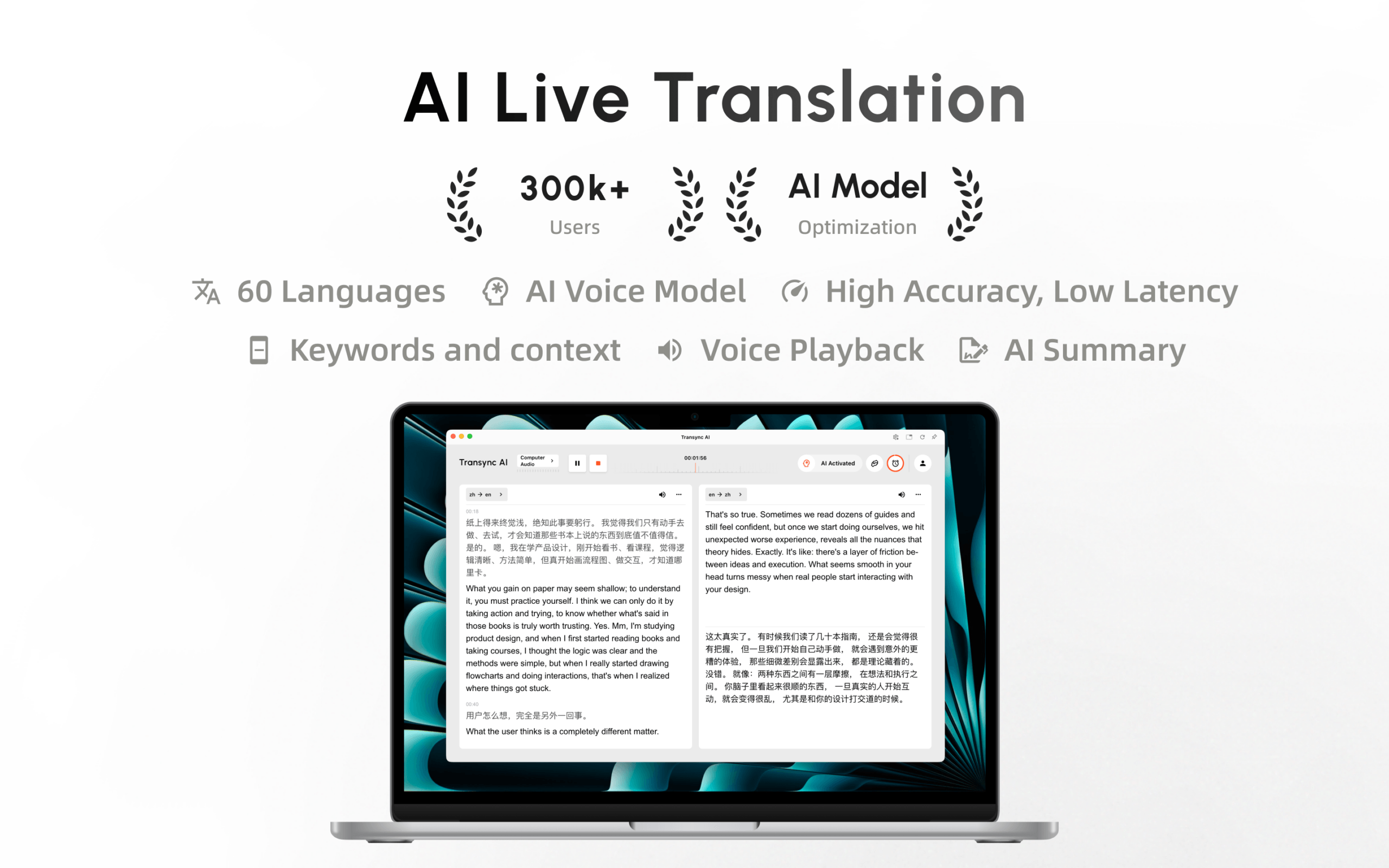
Transync AI Bu senaryo için tasarlanmıştır. gerçek zamanlı çeviri aracı İspanyolca konuşmayı ve İngilizce çevirisini düşük gecikmeyle yan yana görüntüleyebilir. Yapay zeka ses çevirmeni Çevrilmiş içeriği sesli olarak okuyarak katılımcıların hem dinlemesini hem de okumasını sağlar.
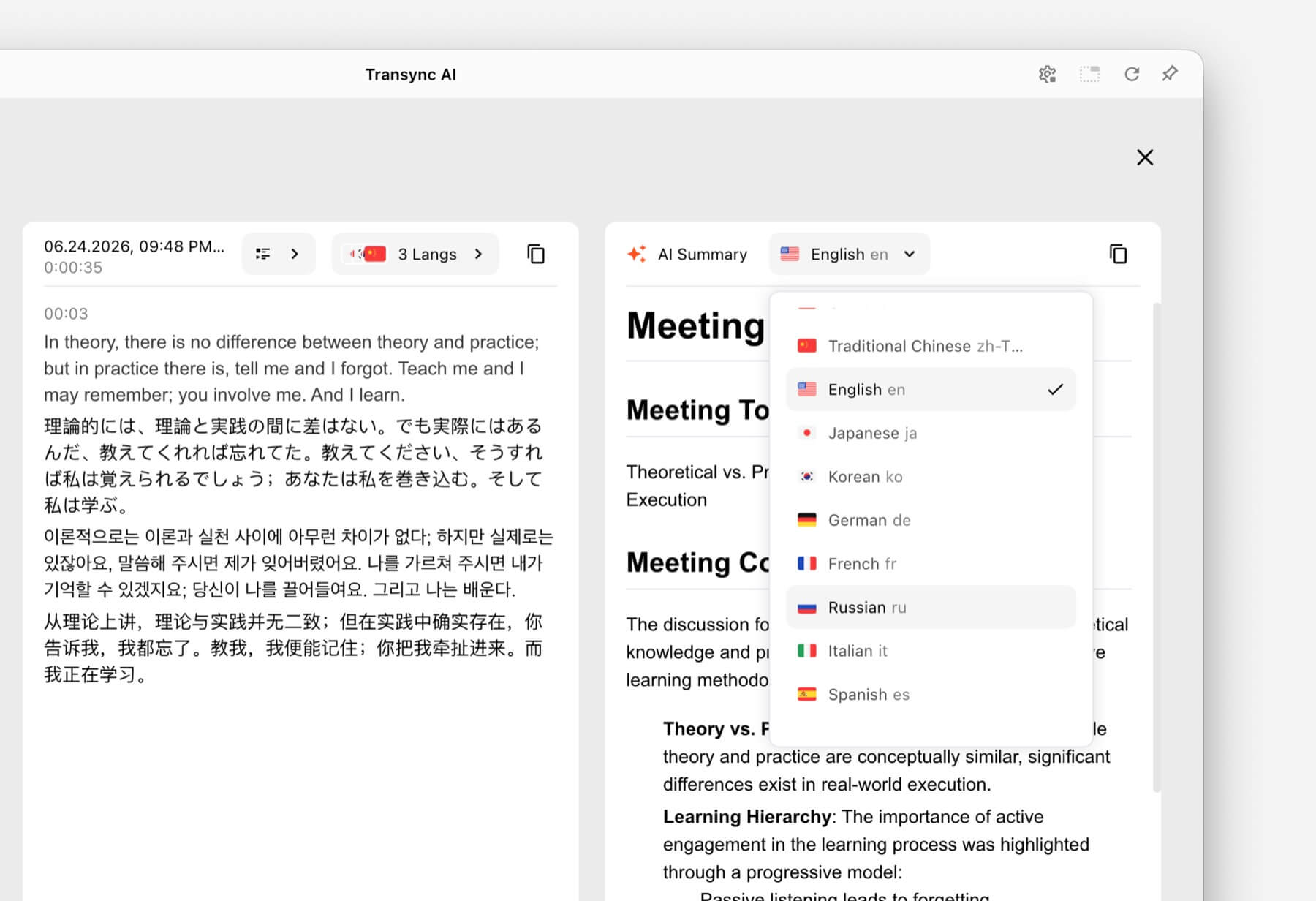
Telefon görüşmesinin ardından, Yapay zeka destekli toplantı notları özelliği İnceleme ve takip için bir transkript ve yapılandırılmış kayıt sağlar.
 2. İngilizce yanıtı tekrar İspanyolcaya çevirin.
 2. İngilizce yanıtı tekrar İspanyolcaya çevirin.
İyi iletişim iki yönlüdür. İspanyolca konuşan biri İspanyolca konuşabilmeli, İngilizce konuşan biri de ayarları tekrar tekrar değiştirmeden İngilizce cevap verebilmelidir.
Seçilen İngilizce-İspanyolca dil çifti içerisinde, Transync AI Hangi dilin konuşulduğunu ayırt edebilir. Bu, manuel geçişi azaltır ve daha doğal bir karşılıklı konuşmayı destekler.
Kullanıcılar yine de net bir şekilde konuşmalı ve birbirlerinin sözünü kesmekten kaçınmalıdır. Otomatik dil tanıma, üst üste binen seslerin yarattığı zorluğu ortadan kaldırmaz.
3. Video görüşmesi sırasında İspanyolca'yı çevirin.
Çevrimiçi toplantılar, çeviri aracının uzaktaki katılımcıların seslerini işlemesini ve çevrilmiş konuşmayı aramaya geri göndermesini gerektirir.
The canlı toplantı çeviri özelliği yanında çalışır Zoom, Microsoft Teams, Ve Google Meet. Transync AI Platforma özgü bir eklenti yerine bağımsız bir yazılım olarak çalışır.
The bilgisayar ses paylaşım özelliği Diğer görüşme katılımcılarından gelen İspanyolca konuşmaları kaydeder. sanal mikrofon özelliği Toplantıya İngilizceye çevrilmiş ses gönderilmesine yardımcı olur.

Sorunsuz gerçek zamanlı çeviri için başlıca çevrimiçi toplantı platformlarıyla uyumludur.
4. İspanyolca bir sunumu veya dersi takip edin.
Öğrenciler ve konferans katılımcıları genellikle çevrilmiş konuşmayı takip ederken slaytları da görüntülemek zorundadır. Sunumun arkasında kaybolan bir çeviri penceresinin kullanımı zordur.
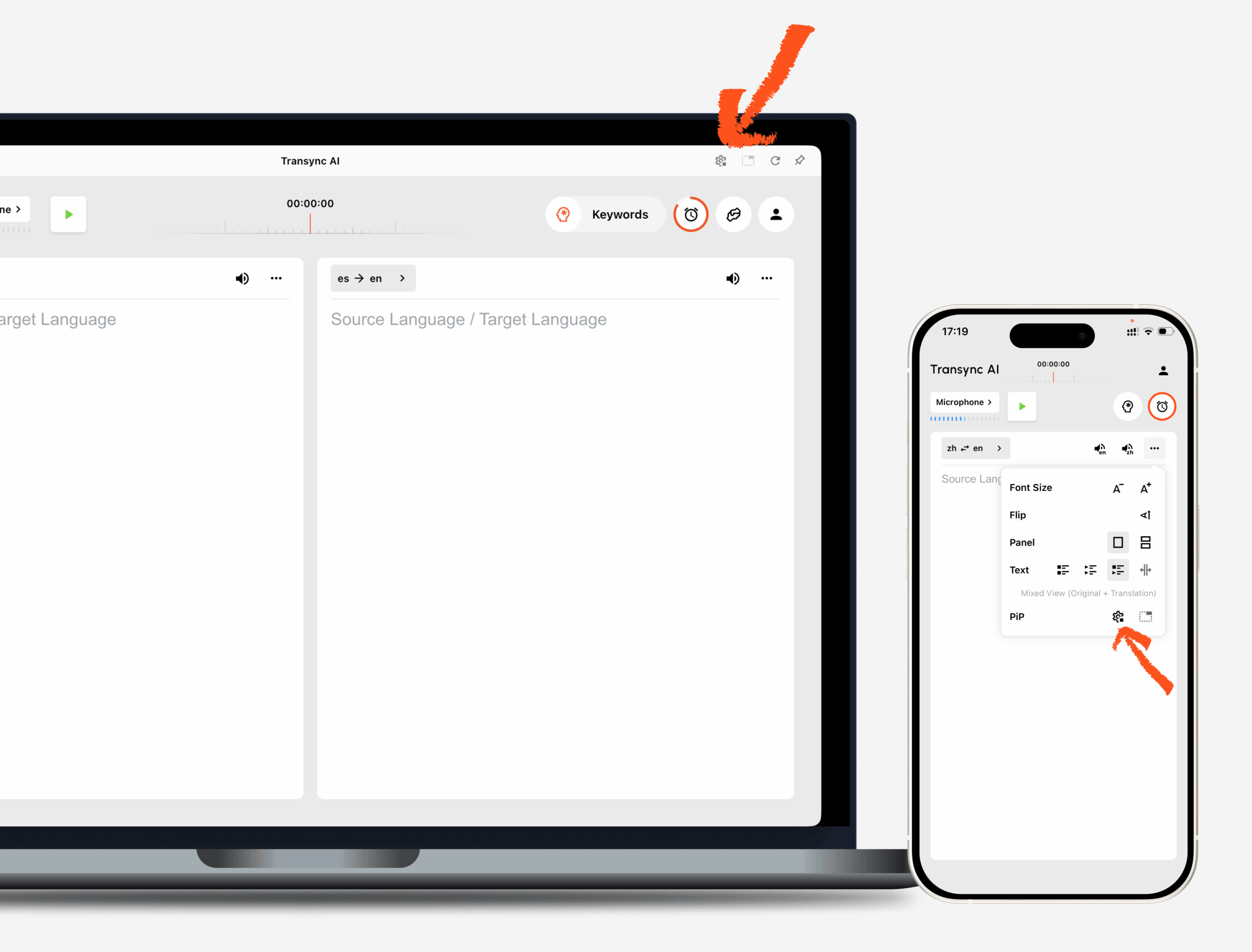
The Resim içinde resim çift dilli altyazı özelliği Desteklenen cihazlarda İspanyolca ve İngilizce altyazıların diğer uygulamaların üzerinde görünür kalmasını sağlar. Kullanıcılar, pencereler arasında tekrar tekrar geçiş yapmadan slaytları, ders materyallerini veya notları görüntülemeye devam edebilirler.

Masaüstü ve mobil cihazlarda gerçek zamanlı kayan altyazılar.
Daha sonra gözden geçirmek üzere, Yapay zeka destekli toplantı notları özelliği Ders notlarını ve yapılandırılmış kayıtları transkripte dönüştürebilirsiniz. Önemli akademik tanımlar ve değerlendirme yönergeleri yine de resmi ders materyalleriyle karşılaştırılmalıdır.
 5. Müşteri destek görüşmelerini tercüme edin
 5. Müşteri destek görüşmelerini tercüme edin
Müşteri hizmetleri, isimler, model numaraları, hesap koşulları ve teknik terminolojiyi içerir. Genel bir çevirmen kelimeleri tanıyabilir ancak belirli bir ürün bağlamında ne anlama geldiklerini yanlış anlayabilir.
The Yapay Zeka Asistanı Anahtar Kelimeler ve Bağlam özelliği Kullanıcıların görüşme başlamadan önce ürün adlarını, sık karşılaşılan sorunları, uzmanlık terimlerini ve görüşmenin kısa bir açıklamasını girmelerine olanak tanır.
Örneğin, bir destek temsilcisi İspanyolca bir ürün adını ve tercih edilen İngilizce karşılığını tanımlayabilir. Bu, çeviri sistemine ek bağlam sağlar ve terminoloji hatalarını azaltabilir.
 6. Seyahat ederken çeviri yapın
 6. Seyahat ederken çeviri yapın
Otel giriş işlemleri, restoran siparişleri, taksi çağırma ve yol tarifi gibi işlemler için kullanıcılar genellikle toplantı notlarından ziyade hızlı mobil çeviriye ihtiyaç duyarlar.
Talkao Mobil çeviri, seyahat, kamera ve artırılmış gerçeklik özellikleri ve dil öğrenimi alanlarında tüketici odaklı olarak konumlandırılmıştır. Google Çeviri Metin, resim, web sitesi, doküman ve günlük konuşma çevirisi için yaygın olarak kullanılabilir.
 Bu araçlar menüler, tabelalar ve kısa seyahat ifadeleri için daha uygun olabilir. Transync AI Daha uzun konuşmaları destekleyebilir ancak çevrimdışı mod, görüntü tanıma veya yalnızca metin içeren belge çevirisi özellikleri sunmaz.
7. İspanyolca bir konferansı tercüme edin.
Büyük bir etkinlikte, yüzlerce kişinin kendi telefonlarında İngilizce altyazıya veya çevrilmiş sese ihtiyacı olabilir. Kişisel bir toplantı tercümanı, katılımcılara dağıtım iş akışını en kolay hale getirmeyebilir.
Dünyevi Konferanslar, web seminerleri, hibrit etkinlikler ve büyük toplantılar için tasarlanmıştır. Katılımcılar çeviriye bir bağlantı veya QR kodu aracılığıyla erişebilirler.
Seçmek Dünyevi Hedef kitle büyüklüğü ve katılımcı erişimi öncelikli olduğunda. Seçin Transync AI Sesli anlatım, bağlamsal terminoloji ve notlara ihtiyaç duyulan kişisel ve ekip tabanlı İspanyolca-İngilizce toplantılar için.
 8. İspanyolca video ve ses içeriklerini çevirin.
 8. İspanyolca video ve ses içeriklerini çevirin.
Video yerelleştirme, yalnızca canlı konuşmayı anlamaktan daha fazlasını gerektirir. İçerik ekiplerinin altyazılara, zamanlamaya, düzenlemeye, seslendirmeye, transkriptlere ve dışa aktarma seçeneklerine ihtiyacı olabilir.
Maestra Medya çevirisi, altyazı, dublaj, web seminerleri ve canlı içerik için konumlandırılmıştır. İngilizce olarak yayınlanması gereken İspanyolca videolar, podcast'ler ve kayıtlı medya için daha uygun olabilir.
 İki yönlü satış görüşmesi, mülakat veya şirket içi toplantı için, Transync AI Daha odaklı bir canlı iletişim iş akışı sunar.
9. İspanyolca-İngilizce çeviri özelliğini bir uygulamaya entegre edin.
Sesli asistanlar, destek sistemleri veya çok dilli ürünler geliştiren yazılımcıların yalnızca hazır bir toplantı arayüzüne değil, API'lara da ihtiyaçları vardır.
Soniox Teknik ürün ekipleri için konuşmadan metne, çeviri ve metinden konuşmaya dönüştürme yetenekleri sağlar.
 DerinL API'ler ve daha geniş kapsamlı metin, belge, yazma, kurumsal ve seçili ses iş akışları sunar.
 Seçmek Transync AI İnsanların kullanıma hazır bir ürüne ihtiyaç duyduğu durumlarda API platformu tercih edin. Mühendisler İspanyolca-İngilizce çeviri deneyimini tasarlayacak, entegre edecek ve sürdürecekse API platformu daha uygundur.
İspanyolca-İngilizce Çevirmen Karşılaştırması
Aşağıdaki tablo, tipik ürün kullanım senaryolarını karşılaştırmaktadır. Özellikler ve planlar değişebilir, bu nedenle güncel yetenekleri her bir ürünün resmi web sitesinden doğrulayın.
| Alet | En iyi İspanyolca-İngilizce kullanım örneği | Canlı altyazılar | Çevrilmiş ses | Ek iş akışı | En iyisi için |
|---|---|---|---|---|---|
| Transync AI | Toplantılar, telefon görüşmeleri, dersler ve yüz yüze görüşmeler | İki dilli | Evet | Bağlam, tutanaklar ve yapay zeka toplantı notları | Canlı çift yönlü iletişime ihtiyaç duyan ekipler ve bireyler |
| Talkao | Seyahat ve mobil çeviri | Uygulamaya bağlı | Evet | Kamera, artırılmış gerçeklik ve öğrenme özellikleri | Tüketiciler ve gezginler |
| Dünyevi | İspanyolca dilinde konferanslar ve web seminerleri | Evet | Evet | Katılımcı bağlantıları, transkriptler ve özetler | Etkinlik organizatörleri |
| Soniox | İspanyolca-İngilizce konuşma ürünleri | API/uygulama yeteneği | TTS/API yeteneği | Geliştirici uygulaması | Ürün ve mühendislik ekipleri |
| Maestra | İspanyolca video, ses, altyazı ve dublaj | Evet | Evet | Medya yerelleştirme | İçerik ve prodüksiyon ekipleri |
| DerinL | İspanyolca metinler, belgeler, kurumsal dil çalışmaları ve seçilmiş ses kullanımları. | Ürüne bağlı | Ses ürününe bağlı | Belgeler, yazma ve API'ler | Metin ağırlıklı iş akışları |
| Google Çeviri | Günlük hızlı İspanyolca-İngilizce çeviri | Önce görüşmemek | Çeviri oynatma | Metinler, resimler, web siteleri ve belgeler | Serbest ve günlük kullanım |
İspanyolcadan İngilizceye Konuşma Çevirisi Neden Zor Olabilir?
Bölgesel kelime dağarcığı
İspanyolca kelime dağarcığı İspanya, Meksika, Karayipler, Orta Amerika, Güney Amerika ve diğer İspanyolca konuşulan topluluklarda farklılık gösterir. Aynı nesne veya eylem için farklı günlük terimler kullanılabilir.
Faydalı bir çeviri, bir bölgesel kelimenin evrensel olduğunu varsaymak yerine, cümleyi bağlam içinde yorumlamalıdır.
Resmi ve gayri resmi hitap
İspanyolcada "tú" ve "usted" gibi ifadeler arasında ayrım yapılırken, İngilizcede her ikisi için de genellikle "you" kullanılır. İngilizceye çeviri, resmiyetle ilgili bilgiyi ortadan kaldırabilir ve tekrar İspanyolcaya çeviri, bir ton seçimi gerektirir.
Profesyonel görüşmelerde, iş bağlamını belirtin ve müşteriyle iletişimde kullanılması gereken önemli ifadeleri gözden geçirin.
Cinsiyet ve anlaşma
İspanyolca isimler ve sıfatlar, İngilizcede aynı şekilde ifade edilmeyen dilbilgisel cinsiyet ve uyum taşırlar. Belirsiz referanslar daha geniş bir cümle bağlamı gerektirebilir.
Hızlı konuşma ve bağlantılı sesler
Doğal konuşmada kelimeler birbirine karışır ve sesler azalabilir. Konuşma hızı, aksan, ortam gürültüsü ve mikrofon mesafesi, çeviri başlamadan önce bile konuşma tanımayı etkiler.
İsimler, markalar ve teknik terimler
İsimler ve uzmanlık terimleri günlük kelimelere benzeyebilir. Bunları aşağıdaki yöntemle ekleyin: Yapay Zeka Asistanı Anahtar Kelimeler ve Bağlam özelliği Bir iş toplantısı, ders veya destek görüşmesi öncesinde.
İspanyolcadan İngilizceye Çeviri Doğruluğunu Nasıl Artırabilirsiniz?
- Doğru dil çiftini seçin. İspanyolca ve İngilizce ayarlarının doğru yönlerde yapıldığından emin olun.
- Lütfen net ses veren bir mikrofon kullanın. Yankıyı azaltmak için hoparlöre yakın yerleştirin.
- Konuşmacılardan sırayla söz almalarını isteyin. Üst üste binen sesleri ayırt etmek daha zordur.
- Bölgesel bağlam sağlayın. Uygun olduğunda ülkeyi, sektörü ve konuşma konusunu belirtin.
- Terminoloji ekleyin. İsimleri, ürün terimlerini, kısaltmaları ve tercih edilen çevirileri girin.
- Tam cümleler kullanın. Parçalı konuşma, her iki dilde de belirsiz olabilir.
- Rakamları ve tarihleri kontrol edin. Fiyatları, teslim tarihlerini, ölçüleri ve adresleri doğrulayın.
- Toplantıdan önce test edin. Lütfen gerçek platformu, cihazı, ağı ve aksanları kullanın.
The desteklenen diller sayfası Mevcut dil kapsamını listeler Transync AI. Kritik bir oturumdan önce mutlaka gerekli eşleşmeyi teyit edin.
İspanyolcadan İngilizceye Nasıl Çeviri Yapılır? Transync AI
- Açık Transync AI Web üzerinden, Windows, macOS, iOS veya Android işletim sistemlerinde.
- Konuşma dilleri olarak İspanyolca ve İngilizce'yi seçin.
- Doğru mikrofonu veya bilgisayar ses kaynağını seçin.
- İsimleri ve terminolojiyi aşağıdaki yöntemle ekleyin. Yapay Zeka Asistanı Anahtar Kelimeler ve Bağlam özelliği.
- Başla gerçek zamanlı çeviri aracı.
- İki dilli altyazı görünümünde İspanyolca konuşmanın ve İngilizce çevirisinin göründüğünü doğrulayın.
- Etkinleştir Yapay zeka ses çevirmeni İngilizce sonucun sesli olarak okunması gerekiyorsa.
- Kullanın Resim içinde resim çift dilli altyazı özelliği başka bir uygulama üzerinde çalışırken.
- Çevrimiçi görüşme için aşağıdaki ayarları yapılandırın. bilgisayar ses paylaşım özelliği Ve sanal mikrofon özelliği.
- Oturumu aşağıdaki yöntemle gözden geçirin. Yapay zeka destekli toplantı notları özelliği.
Müşterileri veya meslektaşları davet etmeden önce kısa bir test yapın. Çeviri yönlerinin, ses kaynaklarının, ses çıkışının ve özel terimlerin beklendiği gibi çalıştığını doğrulayın.
Sıkça Sorulan Sorular (SSS) İspanyolcadan İngilizceye Çeviri
Toplantı sırasında İspanyolcadan İngilizceye en iyi çeviri yöntemi nedir?
Öncelikle, çift yönlü dil tanıma, çift dilli altyazı, ses çevirisi ve görüşme sonrası notlar sağlayan bir görüşme tercümanı kullanın. Transync AI birleştirir gerçek zamanlı iki dilli çeviri, ses oynatma, yüzen altyazılar, terminoloji bağlamı ve Yapay zeka toplantı notları.
İspanyolca konuşma İngilizce ses kaydına çevrilebilir mi?
Evet. Transync AI'dan yapay zeka ses çevirmeni Kullanıcılar, doğal ses seçeneklerini kullanarak çevrilmiş içeriği sesli olarak oynatabilirler. Ayrıca, şunları da keşfedebilirler: ses klonlama özelliği Kendi seslerine göre modellenmiş bir şekilde çevrilmiş çıktı için.
Video görüşmesi sırasında İspanyolca'yı çevirebilir miyim?
Evet. Transync AI'nin canlı toplantı çeviri özelliği yanında çalışır Zoom, Microsoft Teams, Ve Google Meet.
Çeviri her iki yönde de çalışabilir mi?
The Transync AI'dan gerçek zamanlı çeviri aracı Seçilen dil çifti içinde İspanyolca ve İngilizceyi ayırt edebilir, sürekli düğme değiştirme gerektirmeden iki yönlü konuşmayı destekler.
İspanyolca tabelaları veya belgeleri tercüme edebilir miyim?
Google Çeviri Görüntüler ve belgeler gibi geniş kapsamlı tüketici girdilerini desteklerken DerinL Metin ve belge iş akışları için güçlü bir konumda yer almaktadır. Transync AI Canlı konuşmaya odaklanır ve görüntü tanıma veya yalnızca metin içeren belge çevirisi hizmeti sunmaz.
İspanyolcadan İngilizceye çeviri çevrimdışı çalışıyor mu?
Çevrimdışı destek, ürüne ve dile göre değişiklik gösterir. Transync AI İnternet bağlantısı gerektirir ve çevrimdışı mod sunmaz. Kullanmadan önce, seyahat odaklı bir sağlayıcıdan doğrudan çevrimdışı dil seçeneğinin kullanılabilirliğini kontrol edin.
Yapay zeka, İspanyolca-İngilizce tercümanının yerini alabilir mi?
Yapay zekâ birçok seyahat, eğitim ve iş görüşmesini destekleyebilir, ancak mükemmel doğruluk, muhakeme veya kültürel incelik garantisi veremez. Tıbbi, hukuki, güvenlik açısından kritik ve sözleşmeye dayalı görüşmeler nitelikli bir insan tercüman gerektirebilir.
Son Tavsiye
En iyi yol İspanyolcayı İngilizceye çevir İçeriğe bağlı:
- Seçmek Talkao veya Google Çeviri Seyahat, görseller, kısa metinler ve günlük ifadeler için.
- Seçmek Dünyevi İspanyolca dilinde düzenlenen konferanslar ve katılımcılara yönelik etkinlikler için.
- Seçmek Soniox İspanyolca-İngilizce konuşma API'leri ve özel uygulamalar için.
- Seçmek Maestra İspanyolca video yerelleştirme, altyazı ve dublaj hizmetleri için.
- Seçmek DerinL İspanyolca belgeler, yazım, API'ler ve kurumsal dil iş akışları için.
- Seçmek Transync AI Canlı İspanyolca-İngilizce toplantılar için, iki dilli altyazı, ses çevirisi, terminoloji bağlamı, ses yönlendirmesi ve sonrasında notlar gerektiren durumlarda kullanılır.
Tekrarlanan uluslararası aramalar için, seçim yapmadan önce gerçek aksanları, terminolojiyi, ekipmanı ve toplantı platformunu test edin. Başarılı bir İspanyolca-İngilizce iş akışı, insanların anlamasına, yanıt vermesine, önemli ayrıntıları onaylamasına ve alınan kararları aklında tutmasına yardımcı olmalıdır.
Yeni nesil bir deneyim istiyorsanız, Transync AI Konuşmaların doğal bir şekilde akmasını sağlayan gerçek zamanlı, yapay zeka destekli çeviriyle öncülük ediyor. ücretsiz deneyin Şimdi.
Transync AI artık Mac App Store'da mevcut. Kolayca indirin, otomatik güncellemeleri alın ve Mac'inizde gerçek zamanlı çeviriye başlayın.
