
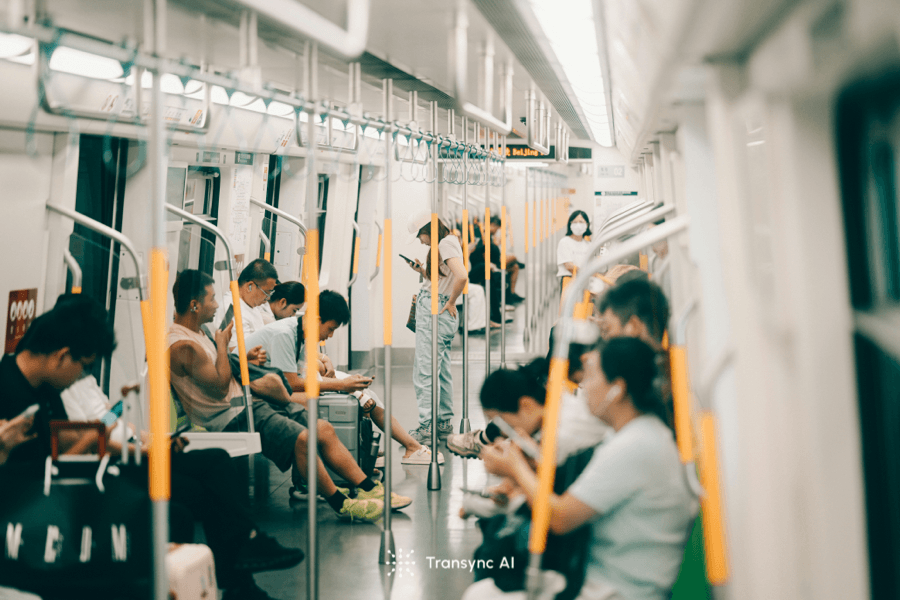
เรียนรู้วิธีใช้การแปลสดใน 7 ขั้นตอน สำหรับการสนทนา การประชุม และการนำเสนอ ด้วยเสียงที่คมชัดขึ้น คำบรรยาย การเล่นเสียง และการบันทึกเสียง.
การรู้ วิธีใช้งาน Live Translate สิ่งสำคัญไม่ได้อยู่ที่การหาปุ่มกด แต่เป็นการสร้างเส้นทางที่ราบรื่นจากผู้พูดไปยังผู้ฟัง การตั้งค่าที่เหมาะสมจะเปลี่ยนแปลงไปตามสภาพแวดล้อม: คนสองคนใช้โทรศัพท์ร่วมกัน เพื่อนร่วมงานในการประชุมออนไลน์ และผู้ชมที่ติดตามการนำเสนอ ล้วนต้องการอินพุตและเอาต์พุตที่แตกต่างกัน.
นี่คือเวอร์ชันที่สั้นที่สุดและใช้งานได้จริง เลือกประเภทการสนทนา เลือกภาษา เชื่อมต่อไฟล์เสียงที่มีคำพูดจริง ตัดสินใจว่าผู้คนจะอ่านหรือฟังผลลัพธ์ และทำการฝึกซ้อม 90 วินาที หากการฝึกซ้อมนั้นครอบคลุมชื่อ ตัวเลข และการแก้ไข การใช้งานจริงก็จะมีโอกาสประสบความสำเร็จมากขึ้น.
ก่อนเริ่มต้น: ลองนึกภาพช่วงเวลาแห่งการฟัง
ลองนึกภาพคนที่ต้องการการแปลดูสิ พวกเขาอยู่ที่ไหน และพวกเขาจะทำอะไรในขณะที่คนอื่นกำลังพูดอยู่?
- ที่เคาน์เตอร์ร้านกาแฟ พวกเขาอาจมองดูโทรศัพท์ที่วางอยู่ระหว่างคนสองคน.
- ในการประชุมออนไลน์ พวกเขาอาจอ่านคำบรรยายสองภาษาขณะดูหน้าจอที่แชร์ร่วมกัน.
- ในระหว่างการสนทนาเพื่อขายสินค้า ผู้เข้าร่วมอีกฝ่ายอาจต้องการให้มีการแปลคำพูดเข้ามาในสายสนทนา.
- ในการบรรยาย ผู้ฟังแต่ละคนอาจต้องการใช้ภาษาที่แตกต่างกันบนอุปกรณ์ของตนเอง.
นี่คือคำถามที่บทเรียนหลายๆ บทมองข้ามไป การเรียนรู้ วิธีใช้งาน Live Translate เริ่มต้นจากประสบการณ์ของผู้ฟัง เพราะนั่นเป็นตัวกำหนดอุปกรณ์ แหล่งที่มาของเสียง โหมดการแปล และวิธีการนำเสนอ.
วิธีใช้งาน Live Translate ใน 7 ขั้นตอน
1. วิธีใช้ Live Translate โดยการตั้งชื่อห้อง
เริ่มต้นด้วยการกำหนดสถานที่สนทนาไว้ในห้องใดห้องหนึ่งจากสี่ห้องนี้.
ห้องโทรศัพท์ส่วนกลาง: คนสองคนยืนอยู่ด้วยกันและสามารถผลัดกันพูดได้ โดยปกติแล้วแอปแปลบทสนทนาบนมือถือก็เพียงพอแล้ว.
ห้องฟังเพลง: ผู้พูดคนหนึ่งพูดเป็นเวลาหลายนาที ในขณะที่อีกคนหนึ่งพูดตาม ควรใช้การแปลแบบทางเดียว หูฟัง หรือคำบรรยายที่แปลแล้ว ซึ่งไม่จำเป็นต้องมีการสลับบทบาทอยู่ตลอดเวลา.
ห้องประชุม: มีผู้คนหลายคนพูดคุยกันผ่านซอฟต์แวร์การประชุมทางไกล ผู้แปลต้องรับทั้งเสียงจากไมโครโฟนและเสียงที่มาจากคอมพิวเตอร์.
ห้องนำเสนอ: ผู้ดำเนินรายการหนึ่งคนพูดคุยกับผู้คนจำนวนมาก ผู้ฟังจำเป็นต้องมีลิงก์ รหัส QR หรือวิธีการอื่นที่คล้ายกันเพื่อให้สามารถเลือกภาษาได้เองอย่างอิสระ.
ก่อนที่จะตั้งค่าอะไรก็ตาม ให้เขียนประโยคเดียวลงไปก่อน: “ลำโพงจะพูดผ่าน” และผู้ฟังจะได้รับคำแปลผ่านทาง _.ประโยคนั้นช่วยป้องกันข้อผิดพลาดในการตั้งค่าที่พบบ่อยที่สุด นั่นคือ การเลือกคุณสมบัติที่ดึงดูดใจแต่ไม่สามารถรับฟังแหล่งที่มาหรือเข้าถึงกลุ่มเป้าหมายได้.
2. วิธีใช้ Live Translate ในห้องที่เหมาะสม
ไม่มีขั้นตอนการทำงาน "การแปลสด" ที่ใช้ได้กับทุกสถานการณ์ วิธีการทั้งสี่นี้แก้ปัญหาที่แตกต่างกันอย่างมีนัยสำคัญ.
สำหรับการสนทนาสั้นๆ แบบพบหน้ากัน, Google แปล แอปนี้มีโหมดการใช้งานให้เลือก 3 โหมด ได้แก่ การฟัง การสนทนา ข้อความอย่างเดียว การตั้งค่าแบบกำหนดเอง และการสนทนาแบบเห็นหน้ากัน บนโทรศัพท์และแท็บเล็ตที่รองรับ ในโหมดการสนทนา ผู้ใช้จะผลัดกันพูด และสามารถเล่นคำแปลผ่านลำโพงโทรศัพท์หรือหูฟังได้ ส่วนโหมดการสนทนาแบบเห็นหน้ากันจะแบ่งหน้าจอเพื่อให้ทั้งสองคนสามารถอ่านได้.
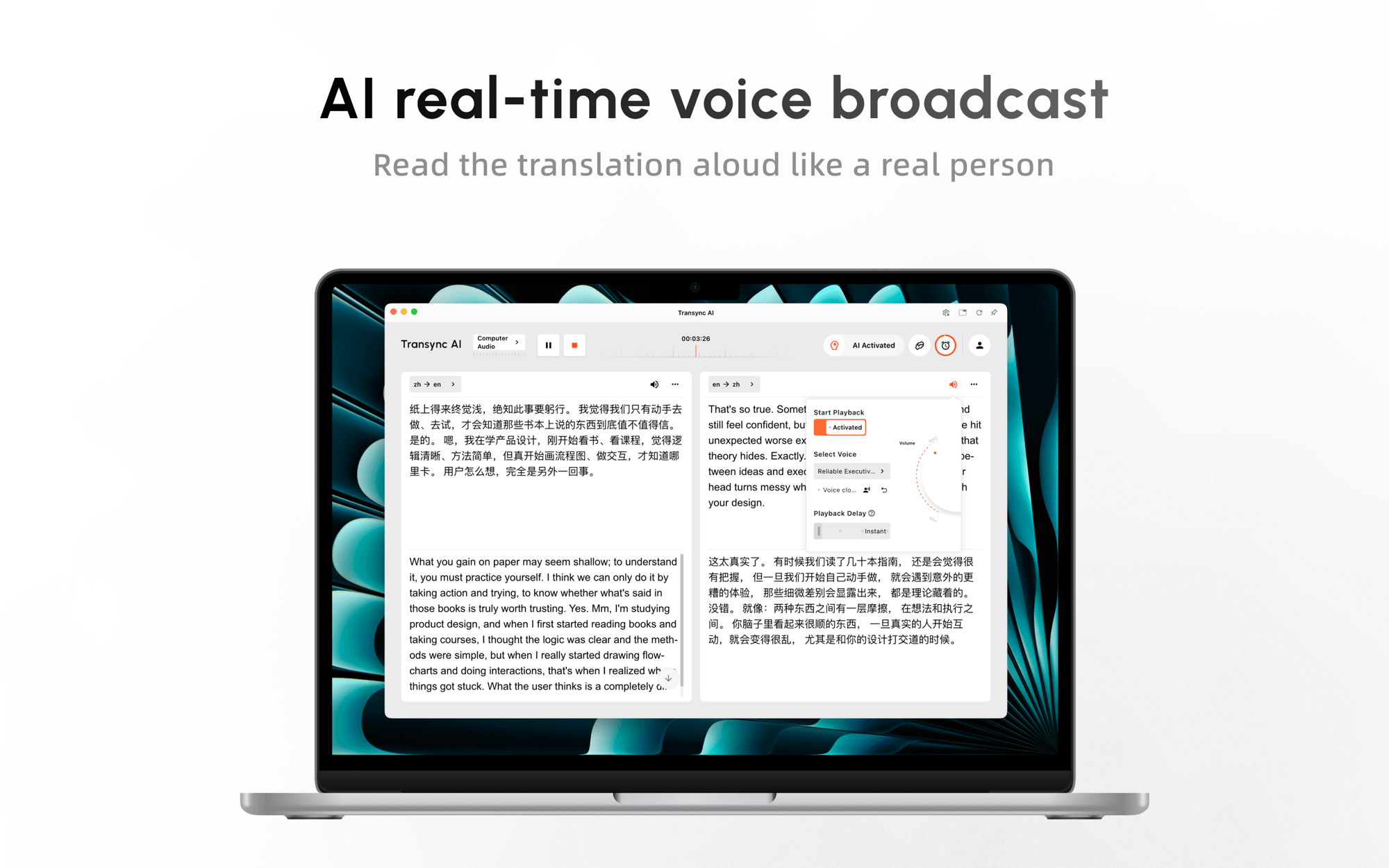
สำหรับการโทรและการประชุมที่เกิดขึ้นซ้ำๆ ผ่านแพลตฟอร์มต่างๆ, Transync เอไอ จัดเตรียมให้ การแปลแบบเรียลไทม์ มีคำบรรยายสองภาษาและเสียงพากย์ให้เลือกใช้ สามารถใช้งานร่วมกับแอปพลิเคชันอื่นได้ Zoom, Microsoft Teams, Google Meet, รวมถึงเนื้อหาในเบราว์เซอร์และการสนทนาแบบตัวต่อตัว แทนที่จะกำหนดให้ทุกการสนทนาต้องอยู่ภายในผลิตภัณฑ์การประชุมเพียงผลิตภัณฑ์เดียว.
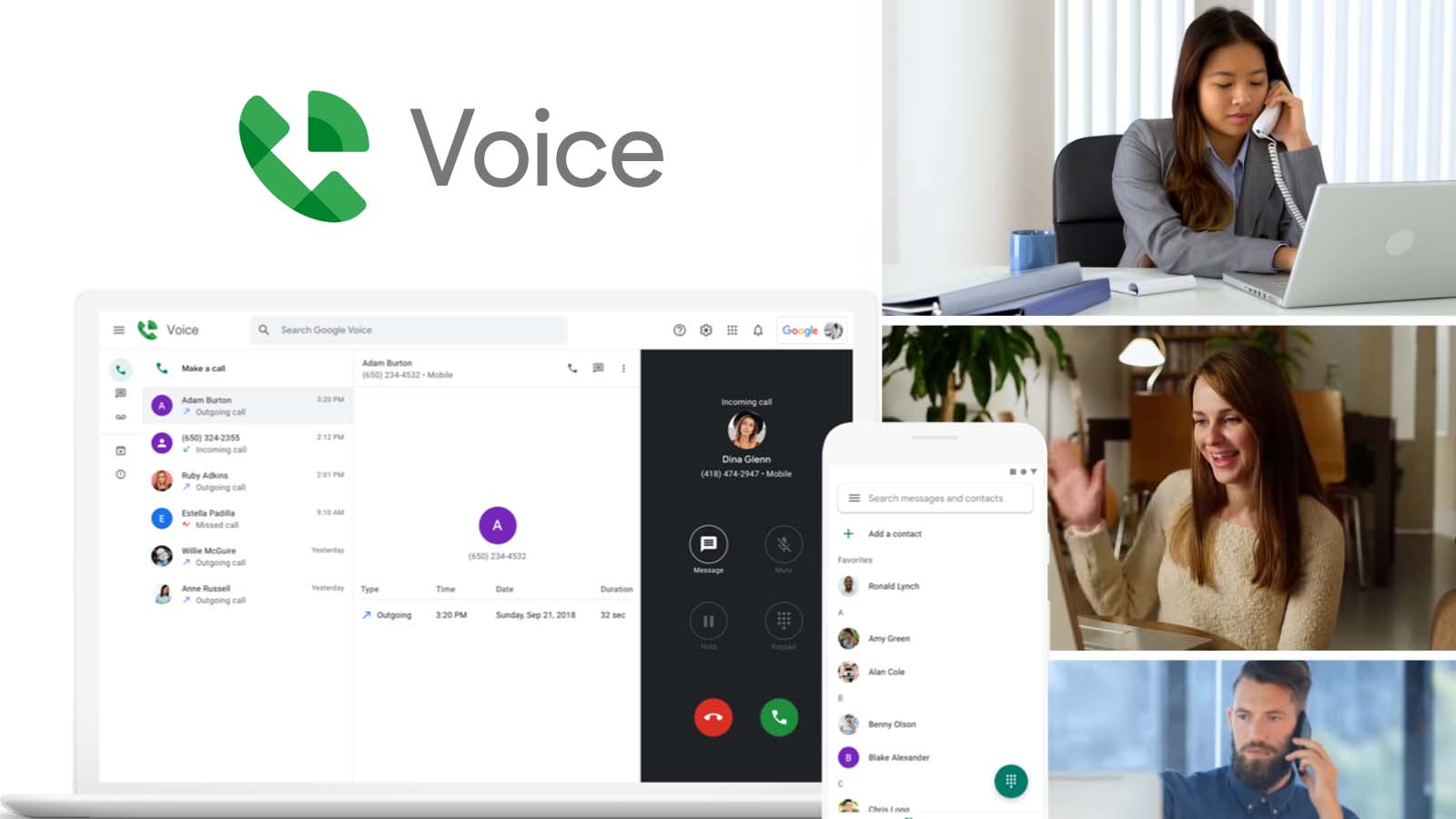
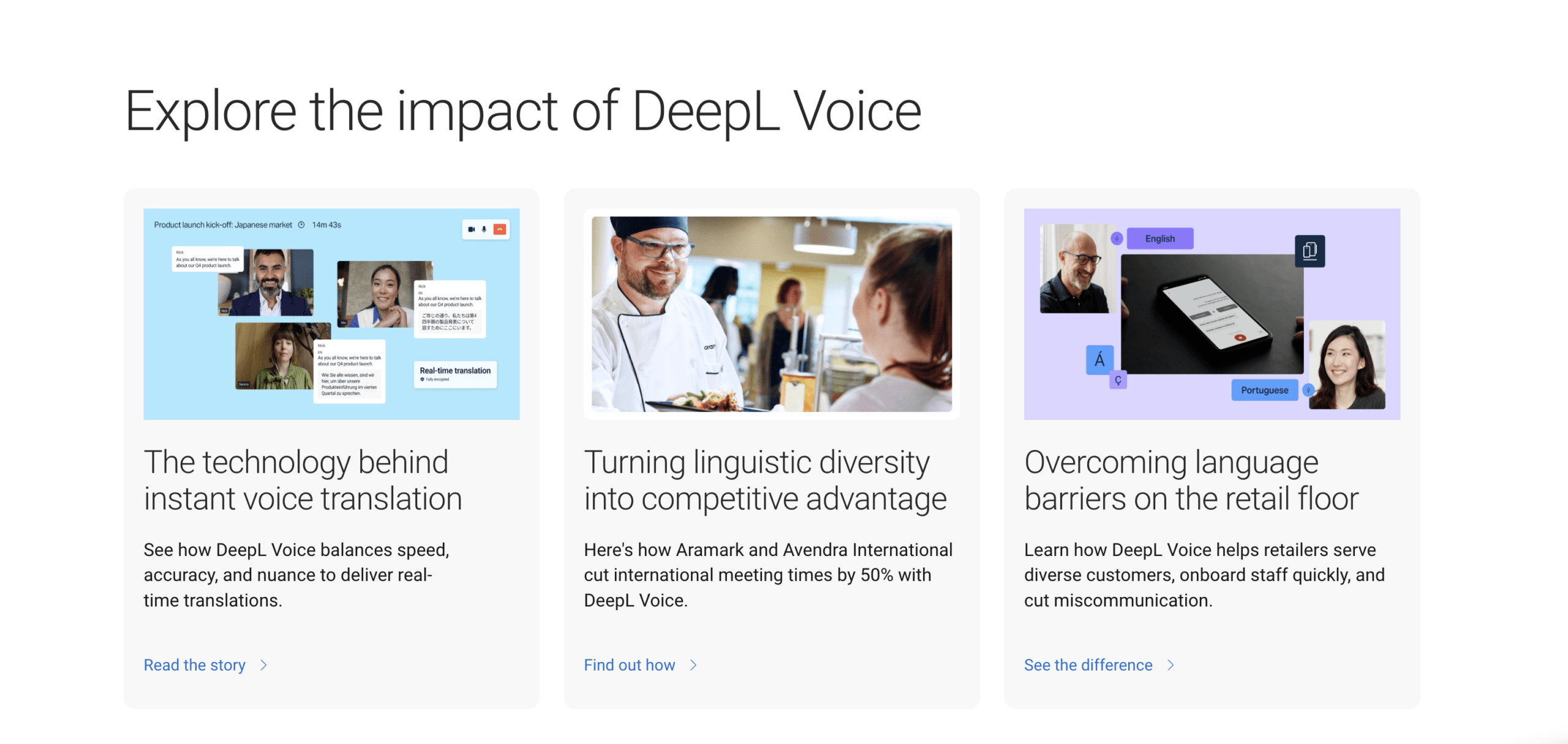
สำหรับองค์กรที่ต้องการใช้เลเยอร์การประชุมระดับองค์กร, เสียงดีปแอล รองรับคำบรรยายแปลสดในเวิร์กโฟลว์การประชุมที่เข้ากันได้ และมีฟังก์ชันการแปลด้วยเสียงในประสบการณ์การใช้งานบนเดสก์ท็อปในปัจจุบัน คุณสมบัติที่มีให้ใช้งานจะขึ้นอยู่กับแผนเสียงและเวิร์กโฟลว์ การแปลการประชุมผ่านเบราว์เซอร์อาจใช้บอทการประชุมและลิงก์ผู้เข้าร่วม ในขณะที่แอปเดสก์ท็อปมีการตั้งค่าที่แตกต่างออกไป.
สำหรับงานประชุมและกิจกรรมต่างๆ ที่ได้รับการจัดการ, โลกแห่งโลก ระบบนี้ช่วยให้ผู้จัดงานสามารถสร้างเซสชันและแจกจ่ายสิทธิ์การเข้าถึงผ่าน URL หรือรหัส QR ผู้เข้าร่วมสามารถเข้าร่วมจากอุปกรณ์ของตนเอง เลือกภาษาที่ใช้งานได้ และอ่านคำบรรยายหรือฟังเสียงที่แปลแล้วโดยไม่ต้องสร้างบัญชีผู้เข้าร่วม.
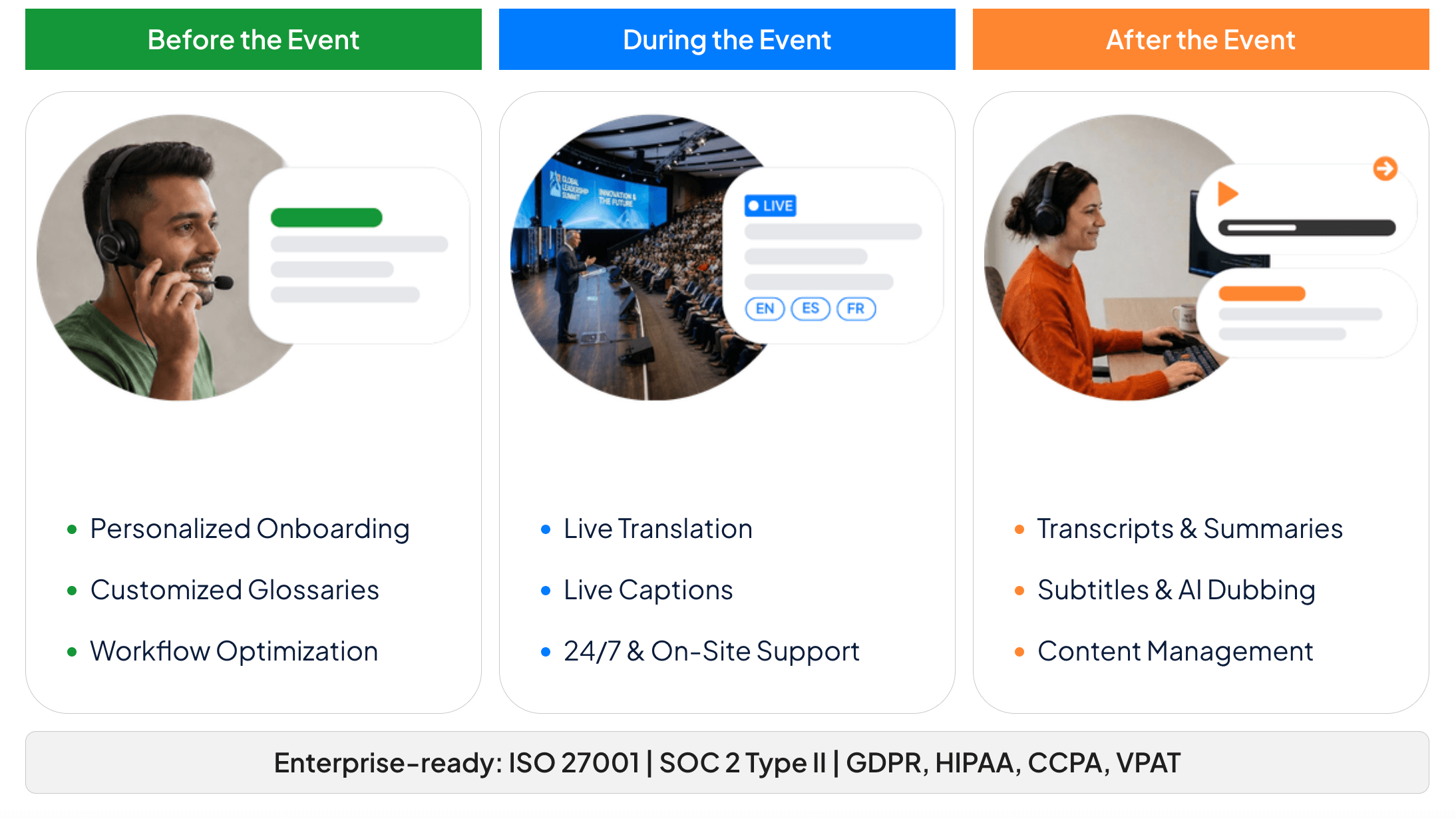
เส้นทางการแปลสดแบบใดที่เหมาะกับงานของคุณ?
| ผลิตภัณฑ์ | จุดเริ่มต้นที่ดีที่สุด | การพูดเข้ามาได้อย่างไร | สิ่งที่ผู้ฟังได้รับ | ขอบเขตการตั้งค่าหลัก |
|---|---|---|---|---|
| Google แปล | การสนทนาแบบเห็นหน้ากันสั้นๆ หรือการฟังส่วนตัว | ไมโครโฟนโทรศัพท์หรือแท็บเล็ต | ข้อความที่แปลแล้วและไฟล์เสียง (เลือกได้) | อุปกรณ์ โหมด และภาษาที่รองรับอาจแตกต่างกันไป |
| Transync เอไอ | การประชุม การโทร การเรียน และการนำเสนอที่จัดขึ้นเป็นประจำ | ไมโครโฟน, ระบบประมวลผลเสียงคอมพิวเตอร์ หรือระบบเสียงในห้อง | คำบรรยายสองภาษา เสียงแปล บันทึก หรือมุมมองของผู้ชม | ต้องใช้การเชื่อมต่ออินเทอร์เน็ตและการกำหนดเส้นทางเสียงที่ถูกต้อง |
| เสียงดีปแอล | เวิร์กโฟลว์การประชุมระดับองค์กรที่ได้รับอนุญาต | การตรวจจับการประชุมบนเดสก์ท็อปหรือเวิร์กโฟลว์บอทการประชุม | คำบรรยายที่แปลแล้วและฟีเจอร์เสียงที่ขึ้นอยู่กับแผนการใช้งาน | ข้อกำหนดด้านใบอนุญาต แพลตฟอร์ม บอท และผู้ดูแลระบบนั้นแตกต่างกันไป |
| โลกแห่งโลก | การประชุม สัมมนาออนไลน์ และการอบรมแบบพบปะผู้เข้าร่วมโดยตรง | เสียงจากผู้บรรยายหรือผู้จัดงาน | คำบรรยายส่วนตัวหรือไฟล์เสียงแปลผ่านลิงก์/คิวอาร์ | การจัดเตรียมระบบเสียงและการเชื่อมต่อเครือข่ายเสียงที่เชื่อถือได้สำหรับสถานที่จัดงาน |
ตารางนี้ไม่ใช่ตารางจัดอันดับ หากคุณกำลังเรียนรู้ วิธีใช้งาน Live Translate สำหรับแผนกต้อนรับของโรงแรม การใช้โทรศัพท์ร่วมกันอาจเป็นทางเลือกที่เหมาะสมที่สุด หากคุณต้องการการประชุมทางธุรกิจที่เกิดขึ้นเป็นประจำ คำศัพท์เฉพาะ การแปลเสียง และการจดบันทึก การทำงานแบบเน้นการประชุมเป็นหลักจะเหมาะสมกว่า หากมีผู้เข้าร่วมหลายร้อยคนต้องเข้าร่วมโดยไม่มีบัญชีผู้ใช้ การเข้าถึงกิจกรรมอาจเป็นตัวตัดสินทางเลือกก่อนที่จะทดสอบคุณภาพการแปล.
3. เลือกภาษาและรูปแบบการสนทนา
อย่าเลือกภาษาโดยดูแค่ชื่อประเทศเท่านั้น ตรวจสอบให้แน่ใจว่าผู้พูดของคุณจะใช้ภาษาโปรตุเกสในรูปแบบใด เช่น ภาษาโปรตุเกสแบบบราซิลหรือแบบยุโรป และทดสอบว่าผลิตภัณฑ์นั้นสามารถแยกแยะความแตกต่างในสำเนียงที่สำคัญต่อการสนทนาของคุณได้หรือไม่.
ส่วนต่อไปของ วิธีใช้งาน Live Translate คือการตัดสินใจว่าการพูดจะเคลื่อนที่ไปในทิศทางเดียว สองทิศทาง หรือจากผู้พูดคนเดียวไปยังกลุ่มภาษาหลายกลุ่ม.
ถัดไป ให้เลือกโหมด.
- การแปลทางเดียว: จะได้ผลดีที่สุดเมื่อมีคนหนึ่งพูดและอีกคนหนึ่งฟังเป็นหลัก.
- การแปลสองทาง: เหมาะที่สุดสำหรับการสนทนาที่ทั้งสองฝ่ายตอบโต้กันด้วยภาษาของตนเอง.
- การแปลหลายภาษา: เหมาะที่สุดเมื่อต้องเผยแพร่แหล่งข้อมูลเดียวกันไปยังหลายภาษาเป้าหมาย.
- การนำเสนอผลงาน: จะดีที่สุดเมื่อพิธีกรคนเดียวกระจายการแปลสดไปยังอุปกรณ์ของผู้ชม.
ใน Transync เอไอ, ควรเลือกโหมดก่อนเริ่มการประชุม การแปลแบบสองทางเหมาะสำหรับการประชุมแบบโต้ตอบ การแปลแบบทางเดียวช่วยให้การบรรยายและการฟังง่ายขึ้น และการแปลหลายภาษาสามารถสร้างภาษาเป้าหมายหลายภาษาได้ในงานเดียว การเปิดใช้งานภาษาเพิ่มเติมอาจทำให้มีการใช้งานมากขึ้น ดังนั้นควรเปิดใช้งานเฉพาะภาษาที่ผู้คนต้องการใช้งานจริงเท่านั้น.
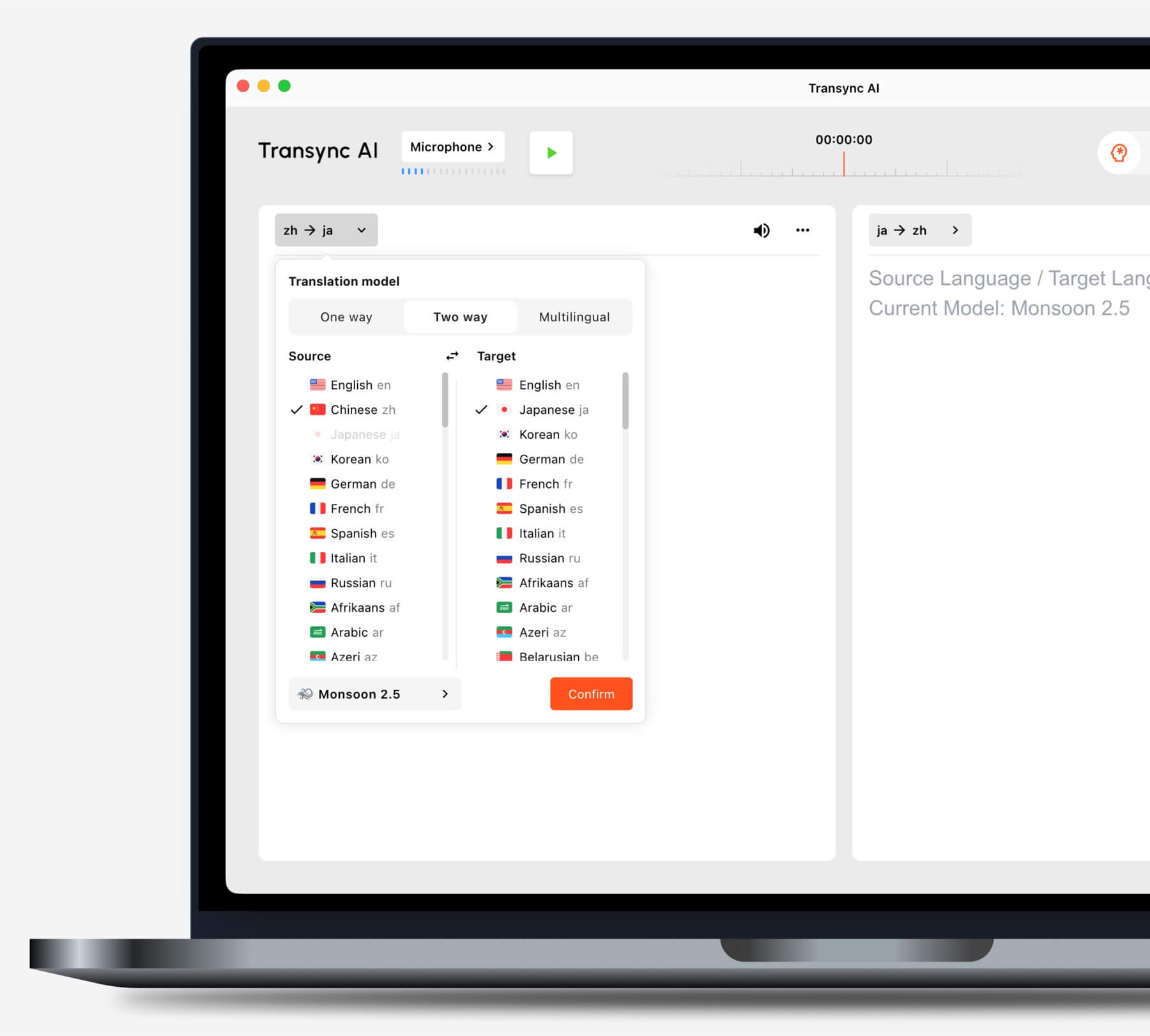
เลือกโหมดการแปลที่เหมาะสมกับสถานการณ์ของคุณก่อนเริ่มงาน.
ใน Google แปล, หลังจากเปิดแอปแล้ว ให้เลือกโหมด Live Translate และคู่ภาษา โหมด Listening ออกแบบมาเพื่อการฟังคำแปล โหมด Conversation จะเล่นคำแปลขณะที่ทั้งสองฝ่ายผลัดกันพูด โหมด Text only จะไม่มีเสียง และโหมด Face-to-face จะเปลี่ยนวิธีการอ่านหน้าจอของทั้งสองฝ่าย.
ผู้คนกำลังค้นหา วิธีใช้งาน Live Translate บ่อยครั้งที่ระบบจะเปิดใช้งานการตรวจจับอัตโนมัติโดยไม่ได้ทดสอบก่อน การตรวจจับอัตโนมัติสะดวกก็จริง แต่การกำหนดภาษาต้นทางที่แน่นอนอาจปลอดภัยกว่า เมื่อผู้พูดจะใช้ภาษาเดียวตลอดเวลา และชื่อหรือวลีทางเทคนิคสั้นๆ อาจถูกเข้าใจผิดว่าเป็นภาษาอื่น.
4. วิธีใช้ Live Translate กับเสียงที่ถูกต้อง
การแปลแบบเรียลไทม์ไม่สามารถแปลภาษาที่มันไม่ได้รับได้ ก่อนที่จะคิดถึงคุณภาพของโมเดล ให้ดูที่มาตรวัดระดับเสียงหรือข้อความต้นฉบับ และยืนยันว่าเสียงที่ถูกต้องปรากฏขึ้น.
สำหรับการสนทนาแบบเผชิญหน้า ให้ขยับไมโครโฟนให้ใกล้กับผู้พูดทั้งสองคนโดยไม่วางไว้ข้างลำโพงเสียงดัง ลดเสียงรบกวนจากโทรทัศน์ เสียงเพลง การสนทนาที่ซ้อนทับกัน และเสียงสะท้อน ส่งเสริมการผลัดกันพูดอย่างเป็นธรรมชาติ แทนที่จะถือโทรศัพท์แนบปากของคนใดคนหนึ่งโดยตรง.
สำหรับการประชุมออนไลน์ ให้แยกเส้นทางเสียงทั้งสองออกจากกัน:
- เสียงไมโครโฟน นำเสนอสุนทรพจน์ของคุณเอง.
- เสียงคอมพิวเตอร์ ส่งสัญญาณผู้เข้าร่วมจากระยะไกล วิดีโอ และเสียงอื่นๆ ผ่านทางคอมพิวเตอร์.
การ ขั้นตอนการแปลการประชุมสด ใน Transync เอไอ สามารถใช้แหล่งข้อมูลเหล่านี้ได้ในการตั้งค่าที่รองรับ กำหนดค่าทั้งสองอย่างก่อนเข้าร่วมการโทรที่สำคัญ จากนั้นขอให้ผู้เข้าร่วมทางไกลพูดในขณะที่คุณตรวจสอบว่าคำพูดของพวกเขา—ไม่ใช่แค่ไมโครโฟนของคุณ—ปรากฏในไฟล์ถอดเสียงต้นฉบับ.

ใช้งานร่วมกับแพลตฟอร์มการประชุมออนไลน์หลักๆ เพื่อการแปลแบบเรียลไทม์ที่ราบรื่น
หากผู้เข้าร่วมประชุมคนอื่นๆ จำเป็นต้องได้ยินคำแปล การเปิดใช้งานการเล่นเสียงบนคอมพิวเตอร์ของคุณเพียงอย่างเดียวอาจไม่ส่งเสียงไปยังการประชุมได้ ขึ้นอยู่กับการตั้งค่า ให้ใช้การควบคุมการแชร์เสียงระหว่างคอมพิวเตอร์ของแพลตฟอร์มการประชุม หรือขั้นตอนการทำงานของไมโครโฟนเสมือน หูฟังช่วยลดเสียงสะท้อน แต่ก็อาจเปลี่ยนวิธีการกำหนดเส้นทางการเล่นเสียงได้เช่นกัน.
การตรวจสอบเสียงนี้เป็นหัวใจสำคัญของการใช้งานจริง วิธีใช้งาน Live Translate. หากข้อความต้นฉบับไม่ถูกต้อง การเปลี่ยนเสียงแปลหรือภาษาเป้าหมายจะไม่สามารถแก้ไขข้อมูลได้.
5. ให้คำศัพท์ที่ไม่สามารถเดาได้แก่ผู้แปล
ชื่อ รหัสสินค้า คำย่อ ชื่อสถานที่ และศัพท์เฉพาะทาง มักมีค่าใช้จ่ายสูงกว่าปกติหากแปลผิด ดังนั้นควรเตรียมข้อมูลเหล่านี้ให้พร้อมก่อนการสนทนา.
แนวทางที่เชื่อถือได้ในการ วิธีใช้งาน Live Translate ถือว่าการเตรียมการนี้เป็นส่วนหนึ่งของการตั้งค่า ไม่ใช่การแก้ไขข้อผิดพลาดที่พยายามทำในระหว่างการสนทนา.
ใน Transync เอไอ, คำสำคัญและบริบท ให้ผู้ใช้ป้อนคำสั้นๆ และคำอธิบายเกี่ยวกับภูมิหลังของการประชุม นอกจากนี้ยังสามารถจับคู่คำหลักกับคำแปลที่ต้องการโดยใช้เครื่องหมายเท่ากับได้ ควรใช้คำหลักที่สั้น ส่วนคำอธิบายที่ยาวกว่านั้นให้ใส่ในช่องบริบท.
ตัวอย่างเช่น:
คำสำคัญ: Oriona X4, Jun Chen, SLA, อินเวอร์เตอร์โซลาร์เซลล์ คำศัพท์ที่นิยมใช้: กำไรขั้นต้น = margen bruto บริบท: การตรวจสอบซัพพลายเออร์รายไตรมาสสำหรับบริษัทอุปกรณ์พลังงานแสงอาทิตย์.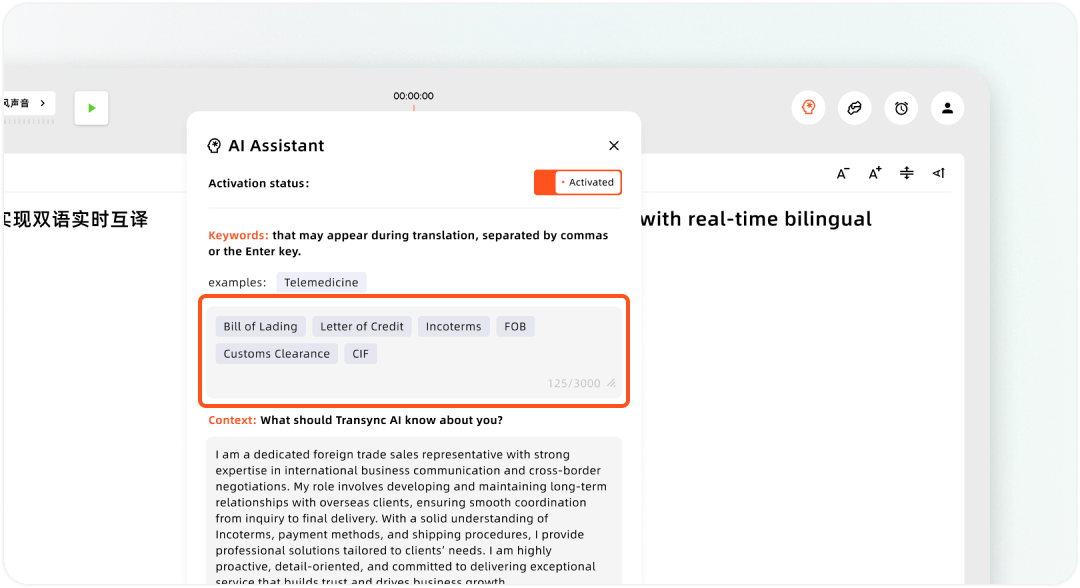
การตั้งค่าคำหลักที่กำหนดเองและบริบทผู้ใช้ใน Transync AI Assistant
ผลิตภัณฑ์อื่นๆ อาจเรียกคุณสมบัตินี้ว่า อภิธานศัพท์ คำศัพท์ที่ใช้พูด คำศัพท์เฉพาะ หรือการจัดการคำศัพท์. เสียงดีปแอล ผลิตภัณฑ์สำหรับการประชุมนี้มีคำศัพท์เฉพาะและคำศัพท์ที่ใช้พูดเฉพาะในแต่ละแผนงาน ไม่ว่าจะใช้ชื่ออะไรก็ตาม ควรใช้รายการทดสอบเดียวกันในทุกผลิตภัณฑ์เพื่อให้การเปรียบเทียบมีความยุติธรรม.
หากผู้แปลสดไม่สามารถควบคุมคำศัพท์ได้ ให้แนะนำชื่อที่ไม่คุ้นเคยอย่างช้าๆ ใส่ชื่อเหล่านั้นในช่องแชทของการประชุม หรือยืนยันด้วยวาจา การรู้จักชื่อเหล่านั้น วิธีใช้งาน Live Translate รวมถึงการรู้ว่าเมื่อใดที่ระบบต้องการความช่วยเหลือ แทนที่จะคาดหวังให้ระบบอนุมานชื่อเฉพาะทุกคำจากพยางค์เดียว.
6. วิธีการใช้งาน Live Translate ในรูปแบบข้อความ เสียง หรือมุมมองผู้ชม
ประโยคที่แปลแล้วสามารถแสดงผลได้ในสี่รูปแบบที่เป็นประโยชน์ ได้แก่ ข้อความบนหน้าจอหลัก คำบรรยายลอยตัว เสียงอ่าน หรือการแสดงผลเฉพาะบุคคล เลือกรูปแบบการแสดงผลหลักหนึ่งรูปแบบและรูปแบบสำรองอีกหนึ่งรูปแบบ.
วางข้อความไว้ข้างๆ งาน
คำบรรยายภาพซ้อนภาพ ใน Transync เอไอ สามารถแสดงข้อความที่แปลแล้วไว้เหนือแอปพลิเคชันบนเดสก์ท็อปที่รองรับ หรือในหน้าต่างลอยตัวบนมือถือได้ ซึ่งมีประโยชน์เมื่อผู้ฟังต้องติดตามสไลด์ สเปรดชีต หรือหน้าต่างการประชุมอื่น ๆ โดยไม่ต้องสลับกลับไปที่โปรแกรมแปลอยู่ตลอดเวลา.

คำบรรยายแบบลอยตัวแบบเรียลไทม์บนเดสก์ท็อปและอุปกรณ์มือถือ
ใช้มุมมองเฉพาะต้นฉบับเมื่อตรวจสอบการจดจำภาพ มุมมองเฉพาะคำแปลเพื่อประสบการณ์การอ่านที่ชัดเจนยิ่งขึ้น หรือมุมมองแบบผสมเมื่อต้องการเปรียบเทียบทั้งสองแบบ เพิ่มขนาดตัวอักษรก่อนแชร์หน้าจอ อย่ารอจนกว่าการประชุมจะเริ่มขึ้น.
ให้ผู้คนได้ฟังผลลัพธ์
หนึ่ง เครื่องแปลเสียง AI สามารถอ่านผลลัพธ์ที่แปลแล้วออกเสียงดัง ๆ ได้ Transync เอไอ. เริ่มต้นด้วยการหน่วงเวลาเล่น 1 วินาที เพื่อให้ได้ความสมดุลระหว่างความเร็วและความสมบูรณ์ของประโยค ใช้โหมดทันทีเมื่อความเร็วในการตอบสนองมีความสำคัญมากกว่า หรือใช้การหน่วงเวลาที่นานขึ้นเมื่อผู้พูดหยุดพูดบ่อยๆ ในระหว่างประโยค.
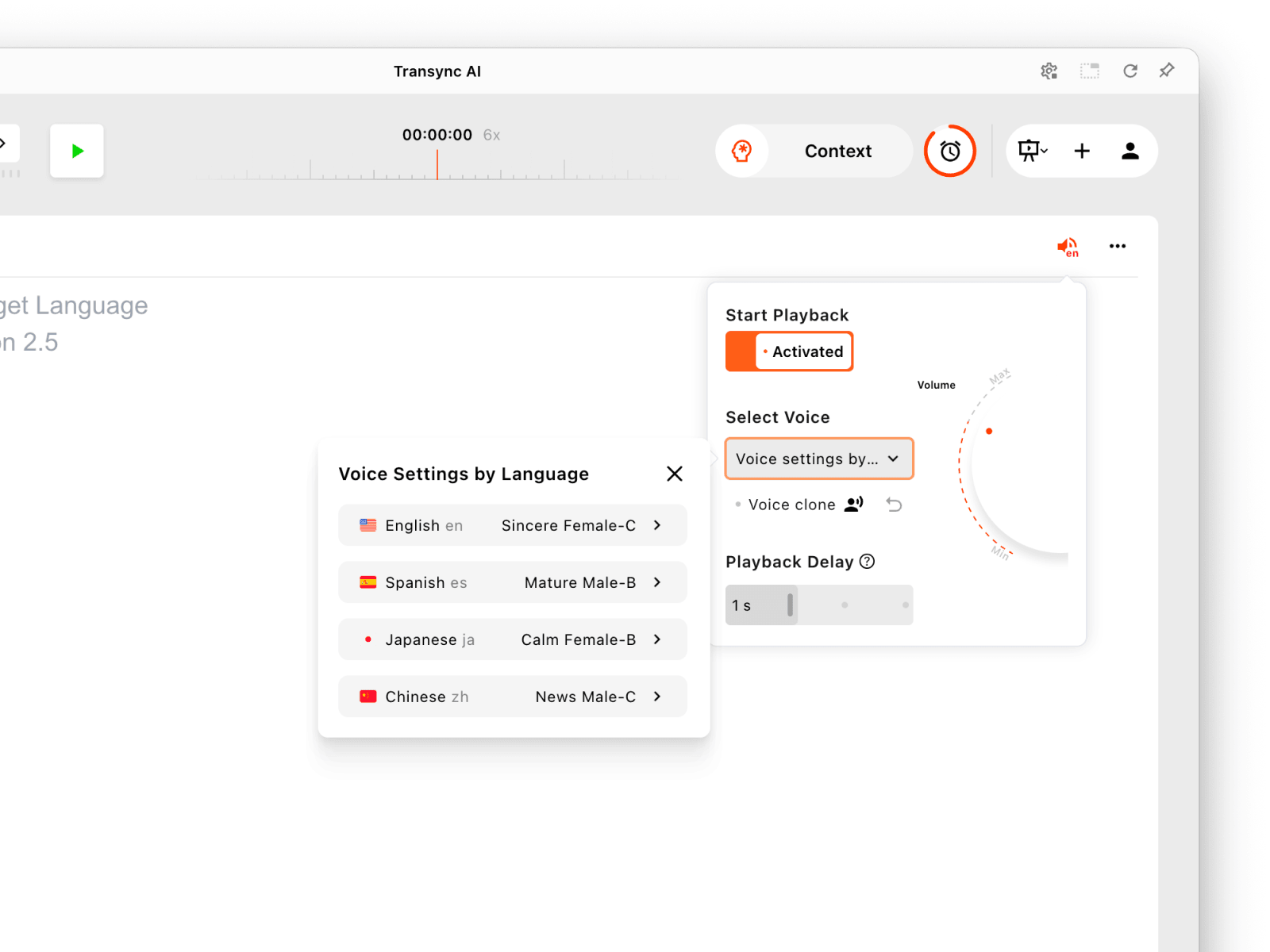
ตั้งค่าการเล่นเสียงแยกกันสำหรับแต่ละภาษาในการนำเสนอ.
หากทั้งสองฝ่ายออกอากาศเสียงแปลพร้อมกัน อาจเกิดเสียงซ้ำหรือเสียงสะท้อนได้ ให้ลองเปิดการเล่นเสียงจากด้านใดด้านหนึ่งก่อน โดยใช้หูฟังหากเหมาะสม และค่อยเพิ่มทิศทางการเล่นเสียงอีกด้านหนึ่งหลังจากทดสอบเสร็จแล้ว.
มอบมุมมองภาษาของตนเองให้กับผู้ชม
อยู่ในช่วงเบต้า โหมดการนำเสนอ, a Transync เอไอ ผู้จัดสามารถเปิดใช้งานภาษาเป้าหมายได้สูงสุด 10 ภาษา สมาชิกผู้ชมเข้าร่วมผ่านลิงก์ รหัส QR หรือรหัสห้อง และเลือกภาษาที่เปิดใช้งานบนอุปกรณ์ของตนเอง พวกเขาสามารถอ่านข้อความสดและใช้การเล่นเสียงได้เมื่อมีให้ใช้งาน แต่ไม่สามารถส่งข้อมูลเสียงไปยังงานของผู้จัดได้ ขั้นตอนการลงชื่อเข้าใช้อาจปรากฏขึ้นในขั้นตอนการเข้าร่วมปัจจุบัน.
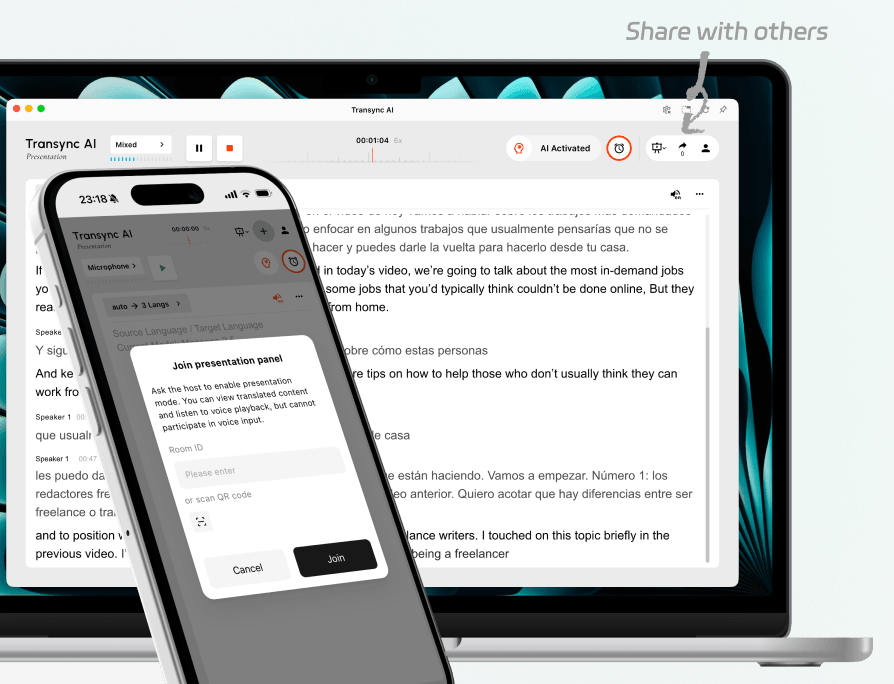
เชิญผู้ชมทั้งที่อยู่ในห้องและที่อยู่ทางไกลเข้าร่วมการนำเสนอสดเดียวกัน.
โลกแห่งโลก นอกจากนี้ยังใช้ลิงก์สำหรับผู้เข้าร่วมงานหรือคิวอาร์โค้ดในการจัดงาน ข้อมูลสาธารณะในปัจจุบันระบุว่าผู้เข้าร่วมงานสามารถเข้าร่วมได้ผ่านเบราว์เซอร์สมัยใหม่โดยไม่ต้องดาวน์โหลดแอปหรือสร้างบัญชี ซึ่งความแตกต่างนี้อาจมีความสำคัญเมื่อต้องให้ผู้ชมจำนวนมากเข้าร่วมงานอย่างรวดเร็ว.
คำตอบที่ดีที่สุดสำหรับ วิธีใช้งาน Live Translate บางครั้ง การแปลแบบนี้ก็ไม่ใช่รูปแบบการแปลที่ดีกว่าเสมอไป แต่เป็นวิธีการส่งมอบผลลัพธ์ที่ทำให้ผู้ฟังสามารถนำไปใช้ได้จริง.
7. ซ้อมเป็นเวลา 90 วินาที แล้วบันทึกเฉพาะส่วนที่สำคัญ
อย่าทดสอบด้วยข้อความ "สวัสดี สบายดีไหม?" ให้ใช้สคริปต์ที่แสดงจุดล้มเหลวที่แท้จริงแทน:
การซ้อมครั้งนี้กลายเป็น วิธีใช้งาน Live Translate จากรายการการตั้งค่าไปสู่การทดสอบการสื่อสารที่สามารถสังเกตได้.
อรุณสวัสดิ์ครับ ผมจุน เฉิน จาก Oriona Systems ครับ คำสั่งซื้อที่แก้ไขแล้วคือ 1,450 หน่วย ไม่ใช่ 1,540 หน่วย และกำหนดส่งมอบจะเลื่อนจากวันอังคารเป็นวันพฤหัสบดีที่ 24 กันยายน โปรดรักษาอัตรากำไรขั้นต้นให้อยู่เหนือ 18.51% (ขออภัย แก้ไข: การประชุมเริ่มเวลา 9:30 น. ไม่ใช่ 9:13 น.).
อ่านด้วยความเร็วปกติ จากนั้นให้คะแนนห้าข้อ:
| ตรวจสอบ | เงื่อนไขการผ่าน |
|---|---|
| การจับกุม | ไฟล์ถอดเสียงต้นฉบับได้ยินเสียงผู้พูดที่ตั้งใจไว้ และไม่ได้เล่นซ้ำ |
| ข้อเท็จจริง | ชื่อ วันที่ ตัวเลข ข้อมูลเชิงลบ และการแก้ไขยังคงถูกต้องแม่นยำ |
| ความหมาย | การแปลนี้ยังคงรักษาไว้ซึ่งว่าใครต้องทำอะไร และต้องเสร็จเมื่อใด |
| จังหวะเวลา | ผู้ฟังจะได้รับผลลัพธ์ในเวลาที่เหมาะสมพอที่จะตอบสนองได้อย่างเป็นธรรมชาติ |
| จัดส่ง | ผู้ที่เหมาะสมสามารถอ่านหรือฟังคำแปลได้โดยไม่ต้องขอความช่วยเหลือ |
หากการถอดเสียงต้นฉบับมีปัญหา ให้แก้ไขไมโครโฟน แหล่งเสียงจากคอมพิวเตอร์ ระยะห่าง เสียงรบกวน หรือการพูดซ้อนทับกัน หากการจดจำเสียงดีแต่ไม่สามารถระบุชื่อได้ ให้เพิ่มคำศัพท์เฉพาะหรือลดความเร็วในการแนะนำตัว หากวลีขาดตอนมากเกินไป ให้ปรับการหน่วงเวลาการเล่นและขอให้ผู้พูดพูดให้จบก่อนที่จะขัดจังหวะ.
เมื่อสิ้นสุด Transync เอไอ เมื่อเสร็จสิ้นภารกิจ ให้หยุดการประชุมและตรวจสอบบันทึกการถอดเสียง. บันทึกการประชุม AI สามารถจัดระเบียบการสนทนาให้เป็นบันทึกที่มีประโยชน์มากขึ้นสำหรับการติดตามผล ในโหมดการนำเสนอ ผู้จัดรายการสามารถควบคุมได้ว่าจะแชร์บันทึกการสนทนากับผู้ฟังหรือไม่.
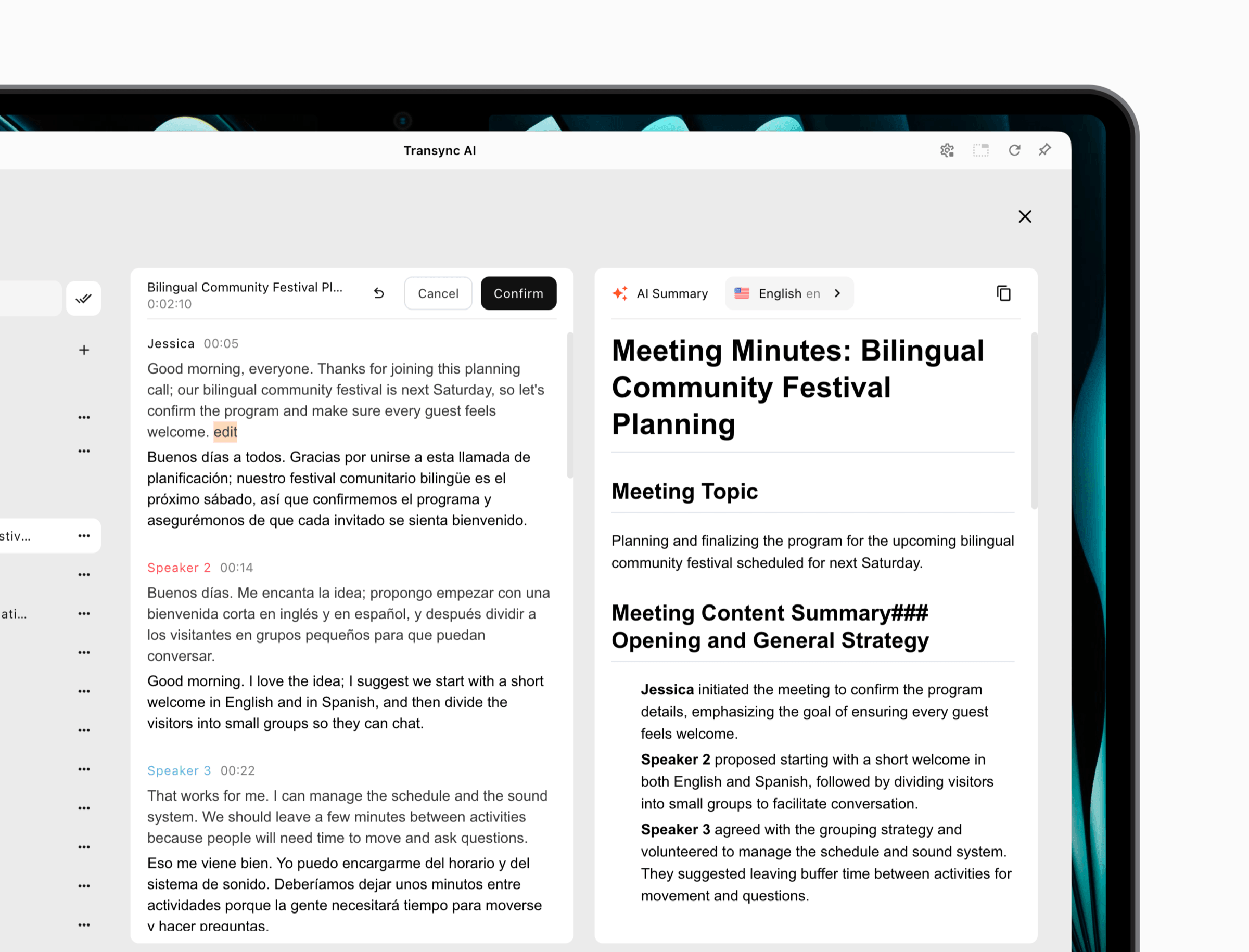 ผลิตภัณฑ์อื่นๆ มีวิธีการจัดการข้อมูลที่แตกต่างกันออกไป. ดีพแอล ทำให้การดาวน์โหลดเอกสารถอดเสียงขึ้นอยู่กับแผนการดาวน์โหลด ในขณะที่ส่วนบุคคล Google แปล การสนทนานี้ไม่ได้ออกแบบมาให้เป็นกระบวนการบันทึกการประชุมที่สมบูรณ์แบบ ควรตัดสินใจก่อนเริ่มการประชุมว่าผู้เข้าร่วมประชุมต้องการสำเนาถอดเสียงฉบับถาวร สรุป หรือไม่ต้องการเก็บเอกสารใดๆ เลย.
ขั้นตอนสุดท้ายนี้เสร็จสมบูรณ์แล้ว วิธีใช้งาน Live Translateคำแปลนั้นควรจะหายไปอย่างเหมาะสม หรือกลายเป็นบันทึกที่ควบคุมได้ซึ่งสนับสนุนการดำเนินการต่อไป.
แผนที่การแก้ไขปัญหาภายในห้านาที
แอปได้ยินเสียงคุณ แต่ไม่ได้ยินเสียงผู้เข้าร่วมทางไกล
โปรแกรมแปลอาจใช้เพียงไมโครโฟนเท่านั้น โปรดเปิดใช้งานการบันทึกเสียงจากคอมพิวเตอร์หรือแท็บ จากนั้นขอให้คู่สนทนาพูดในขณะที่คุณดูข้อความต้นฉบับ.
คำบรรยายถูกต้อง แต่เสียงพากย์หายไป
ตรวจสอบให้แน่ใจว่าได้เปิดใช้งานการเล่นเสียงสำหรับทิศทางเป้าหมายแล้ว เลือกเสียงที่ถูกต้องแล้ว ได้ยินเสียงจากอุปกรณ์ และการประชุมได้รับเสียงจากคอมพิวเตอร์ที่แชร์หรือเอาต์พุตไมโครโฟนเสมือนเมื่อจำเป็น.
การแปลซ้ำซ้อน
ไมโครโฟนอาจกำลังรับฟังเสียงแปลที่เล่นซ้ำและส่งสัญญาณนั้นกลับไปยังโปรแกรมแปล ควรใช้หูฟัง ลดระดับเสียงลำโพง ขยับตำแหน่งไมโครโฟน หรือออกอากาศเพียงทิศทางเดียว.
ชื่อและหมายเลขมีการเปลี่ยนแปลงอยู่เรื่อยๆ
ควรระบุชื่อและศัพท์เฉพาะก่อนเริ่ม ลดเสียงรบกวนรอบข้าง พูดตัวเลขเป็นกลุ่มๆ ให้ครบถ้วน และย้ำรายละเอียดที่สำคัญเสมอ ตรวจสอบราคา วันที่ ชื่อยา ข้อกำหนดทางกฎหมาย และคำแนะนำด้านความปลอดภัยผ่านกระบวนการทางวิชาชีพที่เหมาะสมเสมอ.
ผู้ชมเข้าร่วมแต่เห็นภาษาที่ไม่ถูกต้อง
ตรวจสอบให้แน่ใจว่าโฮสต์ได้เปิดใช้งานภาษาเป้าหมายที่ต้องการแล้ว ขอให้ผู้เข้าร่วมเปิดตัวเลือกภาษา หากไม่พบภาษาที่ต้องการ โฮสต์อาจต้องรีสตาร์ทหรือกำหนดค่าการทำงานใหม่ ขึ้นอยู่กับผลิตภัณฑ์และพฤติกรรมของแอปในปัจจุบัน.
ใช้แผนที่นี้ทุกครั้งที่มีคนรู้ วิธีใช้งาน Live Translate ในทางทฤษฎีแล้วทำได้ แต่ในทางปฏิบัติกลับล้มเหลว ปัญหาส่วนใหญ่เกิดจากข้อมูลนำเข้า การกำหนดค่า การส่ง หรือการสะท้อนกลับ ไม่ใช่แค่การแปลเพียงอย่างเดียว.
ความเป็นส่วนตัวเป็นส่วนหนึ่งของการตั้งค่า
ก่อนเริ่มต้น โปรดแจ้งผู้เข้าร่วมว่าระบบแปลอัตโนมัติทำงานอยู่ และอธิบายว่าจะมีการเก็บรักษาไฟล์เสียง บันทึกการถอดเสียง หรือบทสรุปไว้หรือไม่ ตรวจสอบเอกสารเกี่ยวกับความเป็นส่วนตัวของผลิตภัณฑ์และกฎระเบียบขององค์กรของคุณด้วย.
ความเป็นส่วนตัวควรเป็นส่วนหนึ่งของคำอธิบายที่รับผิดชอบทุกประการ วิธีใช้งาน Live Translate, เนื่องจากเนื้อหาที่พูดเหมือนกันอาจถูกประมวลผลและเก็บรักษาแตกต่างกันไปในแต่ละผลิตภัณฑ์และรูปแบบ.
Transync เอไอ ระบุว่าโดยค่าเริ่มต้น ข้อมูลลูกค้าจะไม่ถูกนำมาใช้ในการฝึกอบรม AI บันทึกการแปลอาจมีข้อมูลทางธุรกิจที่ละเอียดอ่อน ดังนั้นควรใช้การควบคุมบัญชีและลบบันทึกเมื่อไม่จำเป็นอีกต่อไป ตรวจสอบ ศูนย์ความไว้วางใจ สำหรับข้อมูลด้านความปลอดภัยในปัจจุบัน.
เสียงดีปแอล เอกสารระบุว่า ข้อมูลการประชุมลูกค้าไม่ได้ถูกนำมาใช้ในการฝึกอบรม ดีพแอล แบบจำลองภาษาและอธิบายพฤติกรรมการประมวลผลชั่วคราวและการเก็บรักษาข้อมูลในพื้นที่สำหรับขั้นตอนการทำงานของการประชุม. โลกแห่งโลก และ Google แปล แต่ละระบบมีรูปแบบการประมวลผลและบัญชีเป็นของตนเอง และไม่สามารถถ่ายทอดข้อสรุปด้านความเป็นส่วนตัวจากระบบหนึ่งไปยังอีกระบบหนึ่งได้.
สำหรับการสนทนาที่เกี่ยวข้องกับกฎหมาย การแพทย์ การเงิน การเข้าเมือง ข้อบังคับ หรือความปลอดภัย ควรใช้ล่ามหรือผู้ตรวจสอบที่เป็นมนุษย์ที่มีคุณสมบัติเหมาะสมเมื่อจำเป็นต้องรับผิดชอบในระดับมืออาชีพ การแปลด้วย AI แบบเรียลไทม์สามารถช่วยให้เข้าถึงข้อมูลได้ง่ายขึ้น แต่ไม่สามารถรับผิดชอบในส่วนนั้นได้.
คำถามที่พบบ่อย
วิธีใช้ฟังก์ชันแปลภาษาแบบเรียลไทม์บนโทรศัพท์?
สำหรับการสนทนาแบบเห็นหน้ากันในระยะเวลาสั้นๆ ให้เปิดแอปแปลภาษาที่รองรับ เลือกสองภาษา เลือกโหมดสนทนาหรือโหมดเห็นหน้ากัน อนุญาตการเข้าถึงไมโครโฟน และพูดสลับกันไปมา วางโทรศัพท์ไว้ระหว่างผู้พูดและทดสอบการเล่นเสียงก่อนที่จะพูดคุยรายละเอียดที่สำคัญ.
วิธีใช้การแปลแบบเรียลไทม์ในการประชุมออนไลน์?
เลือกโปรแกรมแปลภาษาที่รองรับการประชุม เลือกคู่ภาษาและโหมด เปิดใช้งานไมโครโฟนของคุณและเสียงจากคอมพิวเตอร์ของการประชุม และตรวจสอบความถูกต้องของทั้งสองฝ่ายในเอกสารต้นฉบับ จากนั้นตั้งค่าคำบรรยายหรือเสียงแปล และทดลองใช้งานสั้นๆ ก่อนที่ผู้เข้าร่วมจะเข้าร่วม.
การแปลแบบเรียลไทม์สามารถทำงานกับหลายภาษาพร้อมกันได้หรือไม่?
ใช่ ผลิตภัณฑ์บางอย่างรองรับการแสดงผลหลายภาษา. Transync เอไอ มีฟังก์ชันการแปลหลายภาษาและเวิร์กโฟลว์โหมดการนำเสนอให้เลือกใช้ โลกแห่งโลก ช่วยให้ผู้เข้าร่วมงานสามารถเลือกภาษาจากภาษาที่ผู้จัดงานรองรับได้ การใช้งาน แผน และความพร้อมใช้งานของภาษาอาจแตกต่างกัน ดังนั้นโปรดเปิดใช้งานเฉพาะภาษาที่จำเป็นเท่านั้น.
ฉันควรใช้คำบรรยายหรือเสียงแปลดี?
ใช้คำบรรยายเมื่อผู้เข้าร่วมต้องการตรวจสอบคำพูด ดูการประชุมอย่างเงียบ ๆ หรือเปรียบเทียบข้อความต้นฉบับและข้อความเป้าหมาย ใช้เสียงแปลเมื่อการอ่านจะทำให้เสียสมาธิจากการสนทนาหรือการนำเสนอ สำหรับการประชุมที่สำคัญ ควรเตรียมคำบรรยายไว้เป็นตัวสำรอง แม้ว่าเสียงจะเป็นรูปแบบหลักก็ตาม.
การแปลแบบเรียลไทม์ใช้งานได้แบบออฟไลน์หรือไม่?
ขึ้นอยู่กับผลิตภัณฑ์และรูปแบบการใช้งาน. Transync เอไอ จำเป็นต้องเชื่อมต่ออินเทอร์เน็ต ฟังก์ชันการแปลสำหรับผู้บริโภคบางอย่างอาจรองรับภาษาที่ดาวน์โหลดมา แต่ไม่ได้หมายความว่าฟังก์ชันที่ระบุว่าใช้งานแบบออฟไลน์ได้นั้นจะรองรับการใช้งานเสียงสด การประชุม หรือการสนทนาแบบเดียวกันเสมอไป ควรทดสอบอุปกรณ์และโหมดการใช้งานให้ถูกต้องก่อนเดินทาง.
การทดสอบการแปลสดที่สำคัญที่สุดคืออะไร?
ตรวจสอบให้แน่ใจว่าระบบได้ยินเสียงจากแหล่งเสียงที่ถูกต้อง จากนั้นทดสอบด้วยชื่อจริง ตัวเลข ประโยคปฏิเสธ และคำแก้ไข เสียงพูดที่ไพเราะไม่สามารถชดเชยเสียงพูดจากแหล่งเสียงที่ขาดหายไปหรือบันทึกไม่ถูกต้องได้.
วิธีคิดที่ดีกว่าเกี่ยวกับการแปลสด
การเรียนรู้ วิธีใช้งาน Live Translate นี่เป็นแบบฝึกหัดเล็กๆ ในการออกแบบการสื่อสาร รูปแบบมีความสำคัญ แต่ไมโครโฟน โหมดภาษา หน้าจอ หูฟัง นโยบายการประชุม การเข้าถึงของผู้ชม และการบันทึกหลังการสนทนาก็สำคัญเช่นกัน.
สำหรับการใช้โทรศัพท์ร่วมกันสองคน ควรตั้งค่าให้เรียบง่ายที่สุด สำหรับการประชุมที่เกิดขึ้นเป็นประจำ ควรสร้างขั้นตอนการทำงานด้านเสียงและคำศัพท์ที่ใช้ซ้ำได้ สำหรับการนำเสนอ ควรให้ผู้ฟังแต่ละคนมีเส้นทางภาษาเฉพาะของตนเอง ในทุกกรณี ควรทดสอบชื่อและหมายเลขจริงก่อนที่จะนำไปใช้จริง.
นี่คือวิธีการใช้การแปลสดอย่างน่าเชื่อถือ: บันทึกเสียงที่ถูกต้อง รักษาความหมาย ส่งมอบให้ทันเวลา และทิ้งไว้เพียงไฟล์บันทึกที่ผู้คนต้องการจริงๆ เท่านั้น.
หากคุณต้องการประสบการณ์รุ่นถัดไป Transync เอไอ นำทางด้วยการแปลแบบเรียลไทม์ที่ขับเคลื่อนด้วย AI ซึ่งช่วยให้การสนทนาไหลลื่นอย่างเป็นธรรมชาติ คุณสามารถ ทดลองใช้ฟรี ตอนนี้.
