

เปรียบเทียบเครื่องมือแปลภาษา AI 7 แบบ สำหรับการประชุม การเดินทาง งานอีเวนต์ สื่อ และ API ใช้คู่มือนี้เพื่อเลือกเวิร์กโฟลว์ที่เหมาะสม.
หนึ่ง โปรแกรมแปลภาษา AI ใช้ปัญญาประดิษฐ์ในการตีความเนื้อหาในภาษาหนึ่งและสร้างความหมายที่เทียบเท่ากันในอีกภาษาหนึ่ง ขึ้นอยู่กับผลิตภัณฑ์ อาจแปลข้อความ เอกสาร รูปภาพ คำพูดสด สื่อที่บันทึกไว้ หรือการประชุมหลายภาษาทั้งหมดได้.
ความหลากหลายนั้นทำให้การเลือกใช้เครื่องมือยากกว่าที่คิดไว้ในตอนแรก เครื่องมือแปลภาษาสำหรับการเดินทางฟรี, ผู้ช่วยในการประชุม, แพลตฟอร์มการใส่คำบรรยายในงานอีเวนต์, ชุดเครื่องมือการแปลสื่อ และ API สำหรับนักพัฒนา ล้วนแก้ปัญหาที่แตกต่างกันออกไป แม้ว่าแต่ละอย่างจะถูกอธิบายว่าเป็นเครื่องมือแปลภาษาด้วย AI เหมือนกันก็ตาม.
คู่มือนี้เริ่มต้นจากผู้ใช้งานมากกว่ารายการคุณสมบัติ ติดตามเส้นทางการตัดสินใจ เปรียบเทียบตัวเลือกชั้นนำเจ็ดตัวเลือก และทดสอบขั้นตอนการทำงานที่ตรงกับความต้องการด้านการสื่อสารที่แท้จริงของคุณมากที่สุด.
คำตอบโดยสรุป: คุณต้องการโปรแกรมแปลภาษา AI ประเภทใด?
เริ่มต้นด้วยผลลัพธ์:
- ต้องการวลี รูปภาพ หรือข้อความสั้นๆ สำหรับการเดินทางใช่ไหม? พิจารณา ทอล์คาโอ หรือ Google แปล.
- ต้องการคำบรรยายสองภาษา คำแปล และบันทึกการประชุมหรือไม่? พิจารณา Transync เอไอ.
- ต้องการคำบรรยายและเสียงสำหรับผู้เข้าร่วมงานจำนวนมากใช่ไหม? พิจารณา โลกแห่งโลก.
- ต้องการเพิ่มฟังก์ชันการแปลภาษาลงในผลิตภัณฑ์ของคุณเองหรือไม่? พิจารณา โซนิอ็อกซ์.
- ต้องการคำบรรยาย, พากย์เสียง และการแปลสื่อตามท้องถิ่นหรือไม่? พิจารณา อาจารย์.
- ต้องการข้อความ เอกสาร เครื่องมือเขียน หรือเวิร์กโฟลว์ภาษาสำหรับองค์กรใช่ไหม? พิจารณา ดีพแอล.
ไม่มีโปรแกรมแปลภาษา AI ตัวใดตัวหนึ่งที่ดีที่สุดสำหรับงานทั้งหกประเภท การเลือกใช้ตามกรณีการใช้งานจะช่วยป้องกันการจ่ายเงินสำหรับขั้นตอนการทำงานที่ไม่ตรงจุด.
ระบบแปลภาษาด้วย AI ทำงานอย่างไร?
กระบวนการนี้ขึ้นอยู่กับข้อมูลที่ป้อนเข้าไป.
สำหรับเนื้อหาที่เป็นลายลักษณ์อักษร ระบบจะระบุรูปแบบภาษา บริบท และความหมายก่อนที่จะสร้างข้อความที่แปลแล้ว สำหรับการสื่อสารด้วยเสียงพูด ระบบจะต้องดำเนินการเพิ่มเติมอีกหลายขั้นตอน:
บันทึกเสียง → จดจำเสียงพูด → ตีความบริบท → แปลความหมาย → แสดงคำบรรยายหรือสร้างเสียงพูด
การวิเคราะห์เสียงพูดสดมีความท้าทายอย่างยิ่ง เนื่องจากเครื่องมือต้องจัดการกับสำเนียง การหยุดชั่วคราว ประโยคที่ไม่สมบูรณ์ เสียงรบกวนจากภายนอก และผู้พูดหลายคน โดยไม่ทำให้เกิดความล่าช้าที่รบกวนการรับชม.
ผลิตภัณฑ์สมัยใหม่อาจเพิ่มฟังก์ชันการควบคุมคำศัพท์ การสังเคราะห์เสียง การโคลนเสียง การกำหนดเส้นทางเสียงสำหรับแพลตฟอร์มการประชุม การถอดเสียง สรุป และ API ฟังก์ชันเพิ่มเติมเหล่านี้จะเป็นตัวกำหนดว่าเครื่องมือดังกล่าวเหมาะสมกับวลีทั่วไปหรือขั้นตอนการทำงานทางธุรกิจที่สมบูรณ์แบบหรือไม่.
เปรียบเทียบโปรแกรมแปลภาษา AI: 7 ตัวเลือก
ตารางนี้เปรียบเทียบการวางตำแหน่งผลิตภัณฑ์โดยทั่วไป คุณสมบัติ ภาษาที่รองรับ และแผนการใช้งานอาจมีการเปลี่ยนแปลง ดังนั้นโปรดตรวจสอบข้อกำหนดที่สำคัญบนเว็บไซต์อย่างเป็นทางการของผลิตภัณฑ์อีกครั้ง.
| เครื่องมือ | ดีที่สุดสำหรับ | อินพุตหลัก | เอาต์พุตเสียงสด | ขั้นตอนการประชุม | มูลค่าหลังการประชุม |
|---|---|---|---|---|---|
| Transync เอไอ | การประชุม การโทร และการสนทนาแบบตัวต่อตัวที่ใช้หลายภาษา | เสียงพูดสดและเสียงการประชุม | ใช่ | คำบรรยายสองภาษา การกำหนดเส้นทางเสียง และเครื่องมือบริบท | บันทึกการประชุมและรายงานการประชุมที่สร้างโดย AI |
| ทอล์คาโอ | การท่องเที่ยว การแปลผ่านมือถือ และการเรียนรู้ภาษา | การป้อนข้อมูลด้วยเสียง ข้อความ กล้อง และมือถือ | ใช่ | ไม่ใช่เป้าหมายหลัก | เครื่องมือแปลภาษาสำหรับผู้บริโภค |
| โลกแห่งโลก | การประชุม สัมมนาออนไลน์ และการประชุมขนาดใหญ่ | สุนทรพจน์ในงานอีเวนต์สด | ใช่ | มุ่งเน้นที่กิจกรรมและผู้เข้าร่วมงาน | บทถอดเสียงและบทสรุป |
| โซนิอ็อกซ์ | ผลิตภัณฑ์เสียงสำหรับนักพัฒนา | API และเสียงแอป | ความสามารถ TTS/API | ขึ้นอยู่กับการนำไปใช้งาน | การผลิตผลิตภัณฑ์ตามสั่ง |
| อาจารย์ | วิดีโอ เสียง คำบรรยาย การพากย์เสียง และเนื้อหาสด | ไฟล์สื่อและคำพูดสด | ใช่ | พร้อมสำหรับเนื้อหาสด | การแปลและการนำสื่อกลับมาใช้ใหม่ |
| ดีพแอล | ข้อความ เอกสาร งานด้านภาษาขององค์กร และกรณีการใช้งานด้านเสียงที่เลือกไว้ | ผลิตภัณฑ์ด้านข้อความ เอกสาร API และเสียง | ขึ้นอยู่กับผลิตภัณฑ์ | ขึ้นอยู่กับผลิตภัณฑ์เสียง | เวิร์กโฟลว์แบบเขียนและแบบองค์กร |
| Google แปล | บริการแปลภาษาฟรีทุกวัน | ข้อความ รูปภาพ เว็บไซต์ เอกสาร และคำพูด | การเล่นคำแปล | ไม่ได้นัดพบกันก่อน | บริการแปลด่วนส่วนตัว |
เส้นทางการตัดสินใจที่ 1: คุณกำลังแปลการประชุมสดอยู่หรือไม่?
ถ้าคำตอบคือใช่ ให้เน้นที่ความลื่นไหลของการสนทนามากกว่าคุณภาพของข้อความเพียงอย่างเดียว คุณสมบัติที่มีประโยชน์ที่สุด ได้แก่ ความหน่วงต่ำ การจดจำภาษาแบบสองทาง คำบรรยายสองภาษา เสียงแปล การกำหนดเส้นทางเสียงสำหรับการประชุม การรองรับคำศัพท์เฉพาะ และการบันทึกหลังการโทร.
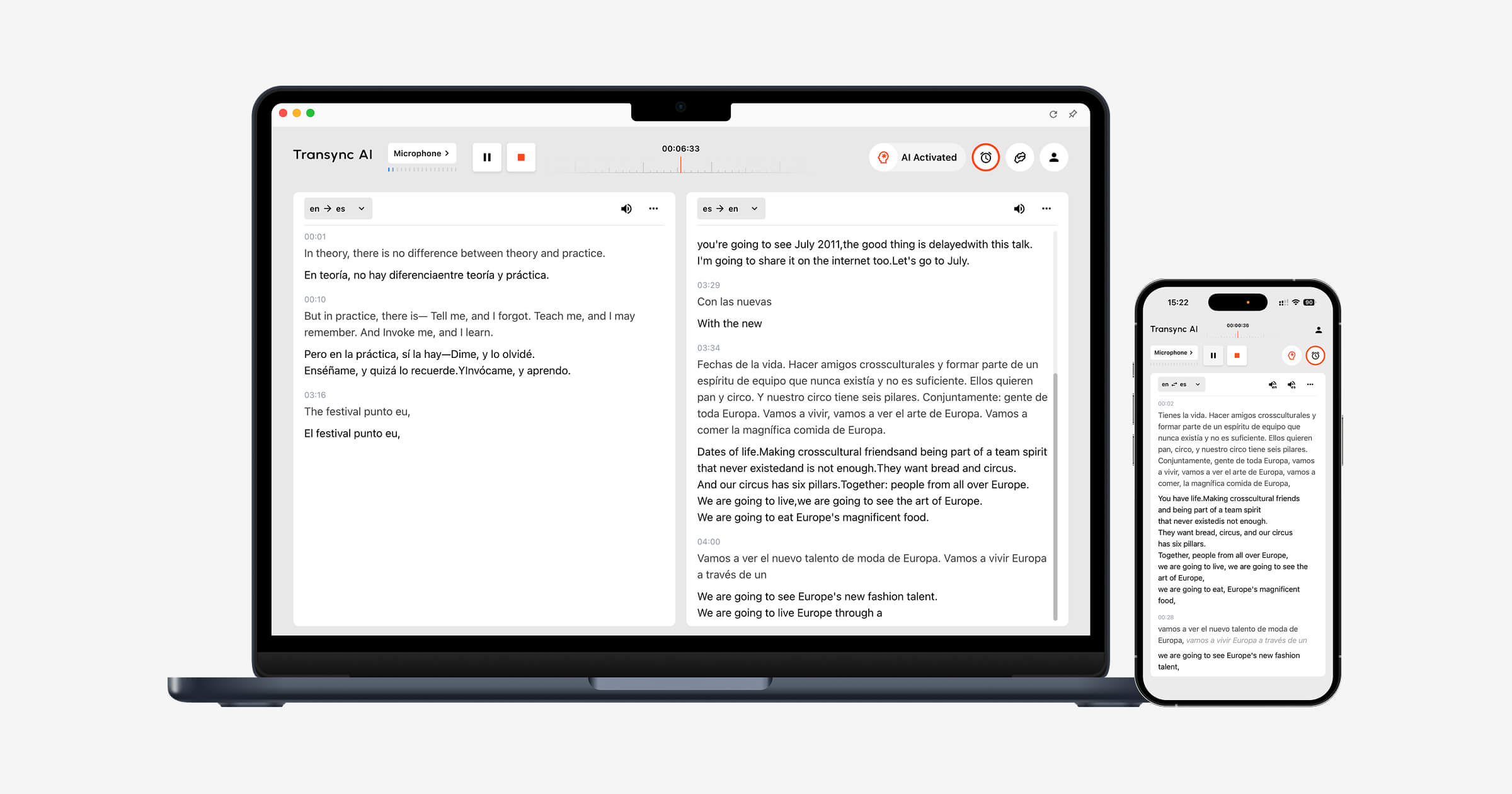
Transync เอไอ ได้รับการออกแบบโดยคำนึงถึงข้อกำหนดเหล่านี้เป็นหลัก เครื่องมือแปลแบบเรียลไทม์ แสดงข้อความต้นฉบับและคำแปลควบคู่กันไปขณะที่การสนทนากำลังดำเนินอยู่.
การ เครื่องแปลเสียง AI อ่านผลการแปลออกเสียงดัง ๆ ทำให้ผู้เข้าร่วมสามารถฟังได้เช่นเดียวกับการอ่าน ฟีเจอร์บันทึกการประชุมด้วย AI จากนั้นจึงสร้างบันทึกการสนทนาและบันทึกย่อที่เป็นระบบหลังจากการสนทนาเสร็จสิ้น.
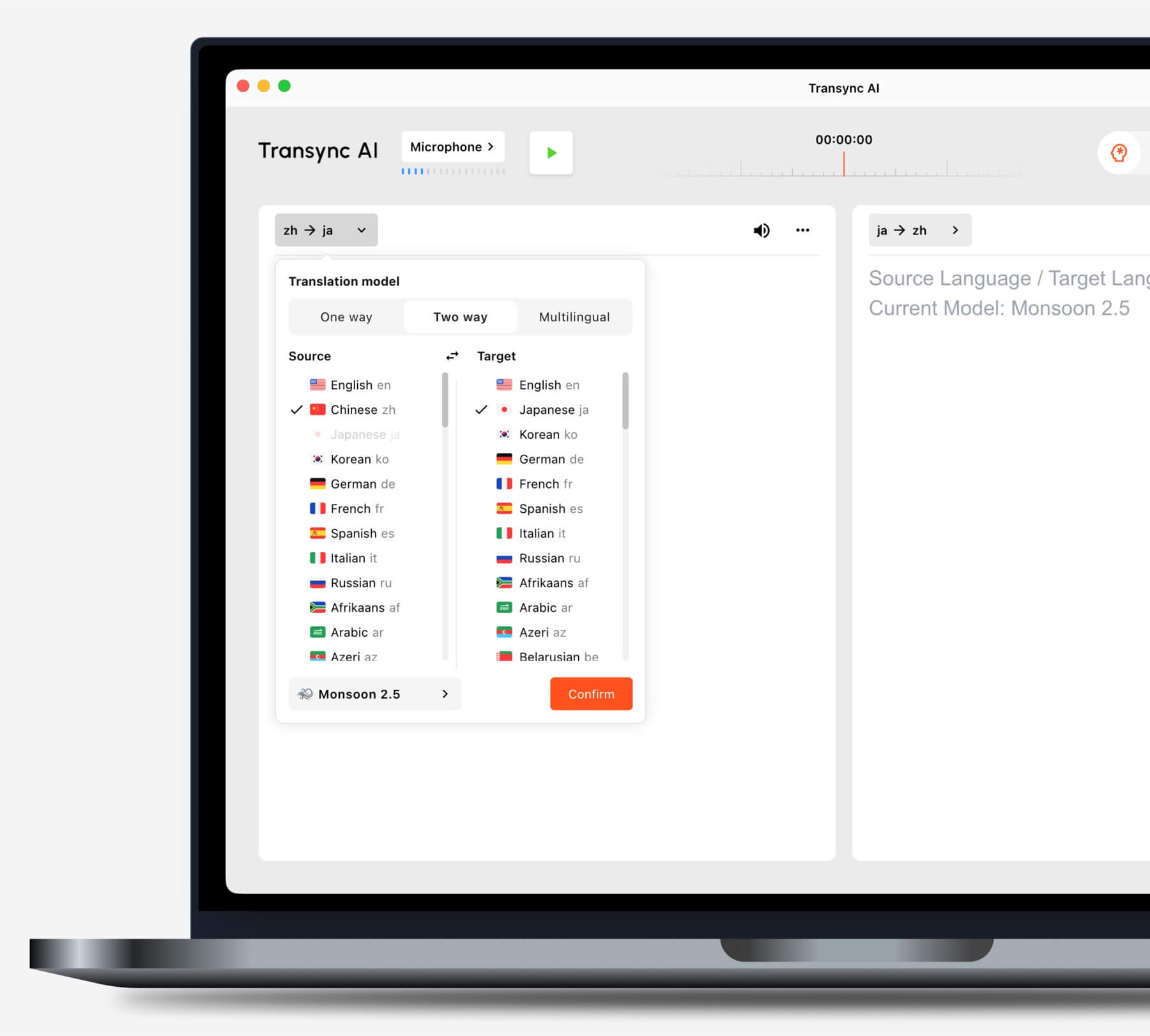
เลือกโหมดการแปลที่เหมาะสมกับสถานการณ์ของคุณก่อนเริ่มงาน.
คุณใช้แพลตฟอร์มการประชุมทางวิดีโอทั่วไปหรือไม่?
การ ฟีเจอร์การแปลการประชุมสด ทำงานควบคู่กันไป Zoom, Microsoft Teams, และ Google Meet. Transync เอไอ เป็นซอฟต์แวร์แบบสแตนด์อโลน ไม่ใช่ปลั๊กอินเฉพาะแพลตฟอร์ม.
การ คุณสมบัติการแชร์เสียงคอมพิวเตอร์ บันทึกเสียงพูดจากผู้เข้าร่วมที่อยู่ห่างไกล คุณสมบัติไมโครโฟนเสมือนจริง ช่วยส่งเสียงแปลเข้าสู่การประชุม.

ใช้งานร่วมกับแพลตฟอร์มการประชุมออนไลน์หลักๆ เพื่อการแปลแบบเรียลไทม์ที่ราบรื่น
คุณนำเสนอด้วยสไลด์หรือทำงานในแอปพลิเคชันอื่น?
การ คุณสมบัติคำบรรยายสองภาษาแบบภาพซ้อนภาพ แอปพลิเคชันนี้จะแสดงทั้งคำบรรยายต้นฉบับและคำบรรยายที่แปลแล้วไว้เหนือแอปพลิเคชันอื่นๆ บนอุปกรณ์ที่รองรับ ช่วยให้ผู้ใช้สามารถติดตามคำแปลขณะนำเสนอ สาธิตซอฟต์แวร์ หรือจดบันทึกได้.
เส้นทางการตัดสินใจที่ 2: คุณกำลังแปลงานอีเวนต์ขนาดใหญ่ใช่หรือไม่?
เมื่อผู้เข้าร่วมประชุมหลายร้อยคนต้องการเข้าถึงข้อมูลด้านภาษา การกระจายข้อมูลจึงกลายเป็นความท้าทายหลัก ผู้เข้าร่วมอาจต้องเปิดคำบรรยายหรือไฟล์เสียงที่แปลแล้วบนอุปกรณ์ของตนเองโดยไม่ต้องสร้างบัญชีส่วนตัวหรือติดตั้งเครื่องมือสำหรับการประชุม.
โลกแห่งโลก เหมาะสำหรับงานประชุม สัมมนาออนไลน์ งานอีเวนต์แบบผสมผสาน และการประชุมขนาดใหญ่ ผู้เข้าร่วมสามารถเข้าถึงคำแปลผ่านลิงก์หรือคิวอาร์โค้ด ทำให้เหมาะสมกับการนำเสนอต่อผู้ฟังจำนวนมาก.
 เลือก Transync เอไอ สำหรับบริการแปลการประชุมส่วนบุคคลและการประชุมเป็นทีม เลือก โลกแห่งโลก เมื่อผู้จัดงานต้องส่งมอบงานแปลให้กับกลุ่มคนจำนวนมาก.
เส้นทางการตัดสินใจที่ 3: คุณกำลังแปลเนื้อหาเกี่ยวกับการท่องเที่ยวหรือเนื้อหาทั่วไป?
สำหรับการเดินทาง คุณสมบัติที่สำคัญที่สุดอาจเป็นความสะดวกในการพกพา การแปลภาพจากกล้อง การป้อนข้อความ และการเล่นเสียงอย่างรวดเร็ว ส่วนบันทึกการประชุมและไมโครโฟนเสมือนจริงมักไม่จำเป็น.
ทอล์คาโอ นำเสนอเครื่องมือแปลภาษาและการเรียนรู้ภาษาที่เน้นผู้บริโภคเป็นหลัก รวมถึงฟีเจอร์เสียง กล้อง และมือถือ. Google แปล สามารถใช้งานได้อย่างแพร่หลายสำหรับการแปลข้อความ รูปภาพ เว็บไซต์ เอกสาร และการสนทนาทั่วไป.
 Transync เอไอ สามารถช่วยในการสนทนาแบบตัวต่อตัวที่ยาวนานได้ แต่ไม่รองรับโหมดออฟไลน์ การจดจำภาพ หรือการแปลเอกสารเฉพาะข้อความ.
เส้นทางการตัดสินใจที่ 4: คุณกำลังทำการแปลสื่อให้เข้ากับท้องถิ่นอยู่หรือไม่?
การผลิตวิดีโอและเสียงนั้นต้องการมากกว่าแค่การเข้าใจคำพูดในขณะนั้น ทีมงานอาจต้องการคำบรรยายที่แก้ไขได้ การพากย์เสียง การกำหนดเวลา การถอดเสียง การแปล และตัวเลือกการส่งออก.
อาจารย์ บริการนี้ครอบคลุมงานแปลสื่อหลากหลายประเภท ตั้งแต่การถอดเสียง การใส่คำบรรยาย การพากย์เสียง การสัมมนาออนไลน์ และเนื้อหาถ่ายทอดสด ยิ่งเหมาะสมมากขึ้นเมื่อการแปลเป็นส่วนหนึ่งของกระบวนการผลิตและการเผยแพร่.
 เลือก Transync เอไอ เมื่อเป้าหมายหลักคือการสนทนาแบบสองทางสดๆ ให้เลือก อาจารย์ เมื่อต้องแก้ไขและนำเนื้อหาที่แปลแล้วกลับมาใช้ใหม่ในรูปแบบสื่อ.
เส้นทางการตัดสินใจที่ 5: คุณกำลังสร้างผลิตภัณฑ์แปลภาษาอยู่หรือไม่?
ทีมพัฒนาผลิตภัณฑ์ต้องการโครงสร้างพื้นฐานที่ตั้งโปรแกรมได้ เอกสารประกอบ การควบคุมความหน่วง และความยืดหยุ่นในการบูรณาการ โดยทั่วไปแล้วไม่จำเป็นต้องมีอินเทอร์เฟซสำหรับการประชุมกับผู้ใช้ปลายทาง.
โซนิอ็อกซ์ มีฟังก์ชันแปลงเสียงเป็นข้อความ แปลภาษา และแปลงข้อความเป็นเสียง สำหรับนักพัฒนาที่สร้างผลิตภัณฑ์ด้านเสียง.
 ดีพแอล ให้บริการ API และบริการด้านภาษาสำหรับองค์กร ครอบคลุมทั้งข้อความ เอกสาร การเขียน และเวิร์กโฟลว์เสียงบางประเภท.
 เลือก Transync เอไอ เมื่อพนักงานหรือลูกค้าต้องการโปรแกรมแปลการประชุมที่เสร็จสมบูรณ์แล้ว ควรเลือกใช้แพลตฟอร์ม API เมื่อวิศวกรจะเป็นผู้รับผิดชอบในการออกแบบและดูแลรักษาประสบการณ์การใช้งานทั้งหมด.
เส้นทางการตัดสินใจที่ 6: ข้อความและเอกสารมีความสำคัญเป็นอันดับแรกหรือไม่?
การแปลเอกสารเป็นลายลักษณ์อักษรให้ความสำคัญกับการรักษาโครงสร้างรูปแบบ ความสอดคล้องของคำศัพท์ การแก้ไข การสนับสนุนเอกสาร และการบูรณาการกับเครื่องมือการทำงานที่มีอยู่ ส่วนฟีเจอร์คำบรรยายสดและเสียงพากย์อาจเป็นส่วนเสริม.
ดีพแอล มีศักยภาพที่ครอบคลุมในด้านการแปลข้อความและเอกสาร การสนับสนุนการเขียน API และเวิร์กโฟลว์ภาษาสำหรับองค์กร. Google แปล มีประโยชน์สำหรับงานประมวลผลข้อความ เว็บไซต์ รูปภาพ และเอกสารสำหรับผู้บริโภคอย่างรวดเร็ว.
Transync เอไอ ไม่ใช่แค่โปรแกรมแปลเอกสารที่เป็นข้อความเท่านั้น จุดเด่นที่สุดของมันคือการใช้งานในการสื่อสารหลายภาษาแบบเรียลไทม์.
ทำไม Transync เอไอ เหมาะสำหรับการสนทนาหลายภาษา
Transync เอไอ เชื่อมโยงขั้นตอนต่างๆ ของการสนทนาสด ได้แก่ การฟังอีกฝ่าย การอ่านคำแปล การพูดตอบ และการจดบันทึก.
การจดจำสองทางอัตโนมัติ
ภายในคู่ภาษาที่รองรับที่เลือกไว้ เครื่องมือแปลแบบเรียลไทม์ สามารถแยกแยะภาษาที่กำลังพูดได้ ผู้ใช้ไม่จำเป็นต้องกดปุ่มเปลี่ยนภาษาทุกครั้งหลังจบการสนทนา.
 การเล่นเสียงธรรมชาติและการโคลนเสียง
 การเล่นเสียงธรรมชาติและการโคลนเสียง
การ เครื่องแปลเสียง AI มีรูปแบบเสียงและความเร็วในการเล่นที่หลากหลายให้เลือก คุณสมบัติการโคลนเสียง สามารถสร้างเสียงพูดที่แปลแล้วโดยใช้เสียงที่จำลองมาจากเสียงของผู้ใช้ ช่วยให้บทเรียน การนำเสนอ และการสนทนากับลูกค้ามีความเป็นส่วนตัวมากขึ้น.
 คำสำคัญและบริบทเบื้องหลัง
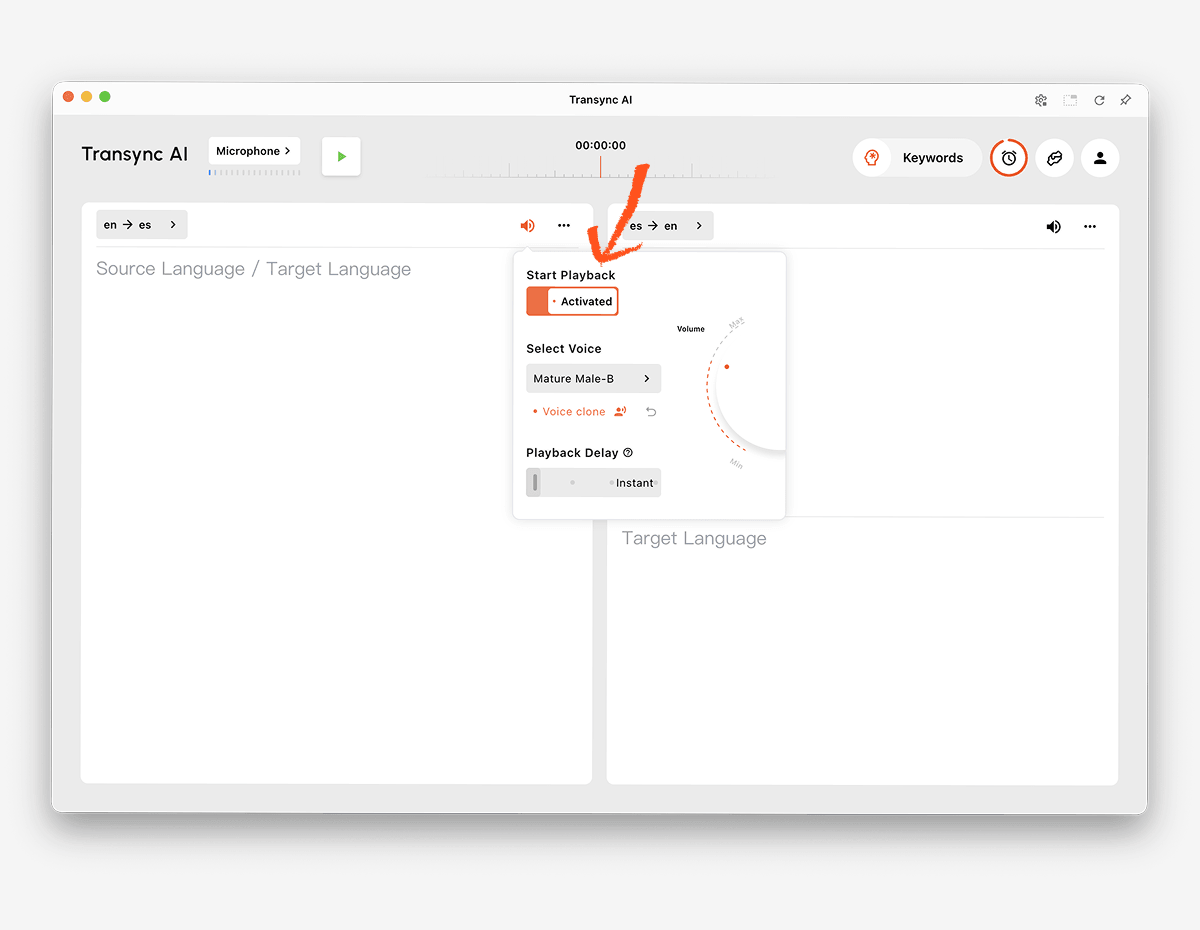 คำสำคัญและบริบทเบื้องหลัง
ชื่อ แบรนด์ คำย่อ และศัพท์เฉพาะทาง เป็นแหล่งที่มาของข้อผิดพลาดในการแปลได้บ่อย ฟีเจอร์คำหลักและบริบทของ AI Assistant ช่วยให้ผู้ใช้กำหนดคำศัพท์สำคัญและอธิบายหัวข้อก่อนเริ่มการเรียนการสอน.
 การเข้าถึงข้ามอุปกรณ์
 การเข้าถึงข้ามอุปกรณ์
Transync เอไอ รองรับการทำงานบนเว็บ, Windows, macOS, iOS และ Android ช่วยให้ผู้ใช้สามารถเลือกอุปกรณ์ที่เหมาะสมที่สุดสำหรับการสนทนาออนไลน์หรือแบบตัวต่อตัวได้.
มากกว่า 60 ภาษา
แพลตฟอร์มนี้รองรับมากกว่า 60 ภาษา และคู่ภาษามากกว่า 1,000 คู่ ความพร้อมใช้งานของภาษาอาจเปลี่ยนแปลงได้ ดังนั้นโปรดตรวจสอบ หน้าภาษาที่รองรับ สำหรับคู่ที่ต้องการอย่างแม่นยำ.
บันทึกหลังจากการสนทนา
การ ฟีเจอร์บันทึกการประชุมด้วย AI สร้างเอกสารถอดเสียงและบันทึกย่อที่มีโครงสร้าง คู่มือการจัดการบันทึกการแปล อธิบายวิธีการที่ผู้ใช้สามารถเข้าถึงและจัดการเซสชันก่อนหน้าได้.
 วิธีทดสอบโปรแกรมแปลภาษา AI
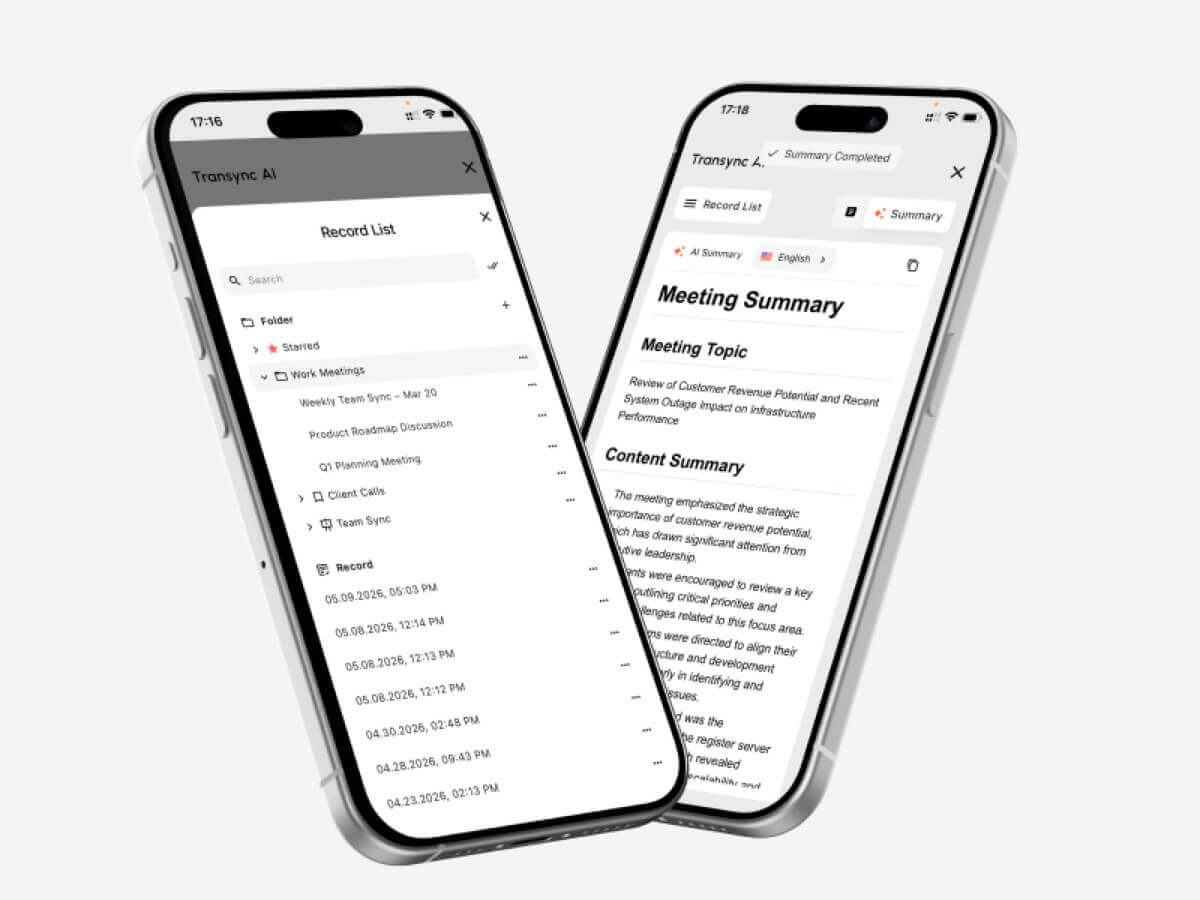 วิธีทดสอบโปรแกรมแปลภาษา AI
ทำการทดสอบในสภาพแวดล้อมเดียวกับที่จะใช้งานผลิตภัณฑ์จริง.
ทดสอบคู่ภาษาจริง
อย่าพึ่งพาแค่จำนวนภาษาโดยรวมเพียงอย่างเดียว ทดสอบทั้งสองทิศทางของคู่ภาษาที่ต้องการ โดยใช้สำเนียงท้องถิ่นและความเร็วในการพูดที่สมจริง.
ทดสอบคำศัพท์สำคัญ
สร้างรายการชื่อ ผลิตภัณฑ์ คำย่อ และคำศัพท์เฉพาะทาง เปรียบเทียบผลลัพธ์ก่อนและหลังการเพิ่มบริบท ตรวจสอบว่าการแปลยังคงรักษาความหมายไว้หรือไม่ หรือเพียงแค่จดจำคำศัพท์เท่านั้น.
ทดสอบความล่าช้าในการสนทนา
ขอให้คนสองคนสนทนากันอย่างเป็นธรรมชาติ สังเกตดูว่าความล่าช้าในการแปลทำให้เกิดการขัดจังหวะ ความสับสน หรือการหยุดชะงักที่ไม่เป็นธรรมชาติหรือไม่.
ทดสอบคำบรรยายและเสียงพร้อมกัน
ผู้เข้าร่วมบางคนชอบฟังเสียง ในขณะที่บางคนชอบอ่านข้อความ ตรวจสอบความชัดเจนของคำบรรยาย ความชัดเจนของเสียง จังหวะการพูด และดูว่าชื่อและหมายเลขต่างๆ สามารถยืนยันได้ง่ายหรือไม่.
ทดสอบการตั้งค่าการประชุม
ใช้แพลตฟอร์มการประชุมจริง ไมโครโฟน ลำโพง ระบบปฏิบัติการ และเครือข่าย ตรวจสอบให้แน่ใจว่าเสียงจากระยะไกลเข้าสู่โปรแกรมแปลภาษา และคำพูดที่แปลแล้วไปถึงผู้ฟังเป้าหมาย.
ทดสอบผลลัพธ์หลังจากเรียกใช้ฟังก์ชัน
ตรวจสอบบันทึกการถอดเสียงและบันทึกย่อเพื่อหาการตัดสินใจที่ขาดหายไป ชื่อที่ไม่ถูกต้อง และรายการดำเนินการที่ไม่ชัดเจน ประสบการณ์สดที่ราบรื่นไม่ได้หมายความว่าบันทึกจะถูกต้องเสมอไป.
ตรวจสอบนโยบายความเป็นส่วนตัวและการจัดการข้อมูล
ตรวจสอบวิธีการประมวลผลไฟล์เสียง ข้อมูลถอดเสียง โมเดลเสียง และข้อมูลบัญชีผู้ใช้. Transync เอไอ ระบุว่าโดยปกติแล้วข้อมูลลูกค้าจะไม่ถูกนำมาใช้ในการฝึกอบรม AI และไฟล์เสียงจะถูกลบหลังจากประมวลผลเสร็จแล้ว องค์กรควรตรวจสอบเรื่องนี้ ศูนย์ความไว้วางใจ และเงื่อนไขปัจจุบันที่สอดคล้องกับข้อกำหนดของพวกเขา.
วิธีเริ่มต้นเซสชั่นการแปลสด
- เปิด Transync เอไอ บนอุปกรณ์ที่รองรับ.
- เลือกภาษาทั้งสองที่ใช้ในการสนทนา.
- เลือกไมโครโฟนหรือแหล่งเสียงจากคอมพิวเตอร์ที่ถูกต้อง.
- เพิ่มคำศัพท์ผ่านทาง ฟีเจอร์คำหลักและบริบทของ AI Assistant.
- เริ่ม เครื่องมือแปลแบบเรียลไทม์.
- ตรวจสอบว่าคำบรรยายสองภาษาอัปเดตอย่างถูกต้องหรือไม่.
- เปิดใช้งาน เครื่องแปลเสียง AI เมื่อผู้เข้าร่วมต้องการการแปลด้วยเสียง.
- ใช้ คุณสมบัติคำบรรยายสองภาษาแบบภาพซ้อนภาพ ขณะกำลังทำงานในแอปพลิเคชันอื่น.
- สำหรับการโทรออนไลน์ ให้ตั้งค่า คุณสมบัติการแชร์เสียงคอมพิวเตอร์ และ คุณสมบัติไมโครโฟนเสมือนจริง.
- ตรวจสอบผลลัพธ์กับ ฟีเจอร์บันทึกการประชุมด้วย AI.
ควรซ้อมสั้นๆ ก่อนการประชุมสำคัญเพื่อตรวจสอบทิศทางภาษา การกำหนดเส้นทางเสียง คุณภาพเครือข่าย และคำศัพท์เฉพาะทาง.
คำถามที่พบบ่อยเกี่ยวกับการแปลภาษาด้วย AI
AI แปลภาษาคืออะไร?
โปรแกรมแปลภาษา AI ใช้โมเดลการเรียนรู้ของเครื่องในการตีความข้อความ เสียง รูปภาพ เอกสาร หรือสื่อต่างๆ ในภาษาหนึ่ง และสร้างความหมายที่เทียบเท่ากันในอีกภาษาหนึ่ง ความสามารถของผลิตภัณฑ์จะแตกต่างกันไปตามข้อมูลป้อนเข้าและกรณีการใช้งาน.
โปรแกรมแปลภาษา AI ที่ดีที่สุดสำหรับการประชุมคืออะไร?
Transync เอไอ เป็นตัวเลือกที่ดีสำหรับการจัดประชุมก่อน เพราะเป็นการผสมผสานระหว่าง การแปลสองภาษาแบบเรียลไทม์, การเล่นเสียงที่แปลแล้ว, คำบรรยายลอยตัว, บริบทของคำศัพท์ และ บันทึกการประชุม AI.
การเลือกที่ดีที่สุดยังคงขึ้นอยู่กับภาษาที่ต้องการใช้งาน แพลตฟอร์ม กฎความเป็นส่วนตัว และระยะเวลาการใช้งานที่คาดหวัง.
AI สามารถแปลคำพูดระหว่างการประชุมทางวิดีโอได้หรือไม่?
ใช่. ฟีเจอร์การแปลการประชุมสดจาก Transync AI ทำงานควบคู่กันไป Zoom, Microsoft Teams, และ Google Meet. สามารถแสดงคำบรรยายสองภาษาและเสียงพากย์ระหว่างการสนทนาสดได้.
ระบบสามารถจดจำทั้งสองภาษาได้โดยอัตโนมัติหรือไม่?
การ เครื่องมือแปลภาษาแบบเรียลไทม์จาก Transync AI สามารถแยกแยะภาษาของผู้พูดภายในคู่ภาษาที่เลือกไว้ ช่วยลดการสลับภาษาด้วยตนเองในการสนทนาแบบสองทาง.
การแปลด้วย AI สามารถใช้งานแบบออฟไลน์ได้หรือไม่?
การรองรับการใช้งานแบบออฟไลน์ขึ้นอยู่กับผู้ให้บริการและภาษา. Transync เอไอ จำเป็นต้องเชื่อมต่ออินเทอร์เน็ต และปัจจุบันยังไม่มีโหมดออฟไลน์.
AI สามารถแปลภาพและเอกสารได้หรือไม่?
ผลิตภัณฑ์บางชนิดสามารถทำได้. Google แปล รองรับข้อมูลจากผู้บริโภคในวงกว้าง รวมถึงรูปภาพและเอกสารต่างๆ ในขณะที่ ดีพแอล มีความเหมาะสมอย่างยิ่งสำหรับกระบวนการทำงานที่เกี่ยวข้องกับข้อความและเอกสาร. Transync เอไอ เน้นการประมวลผลคำพูดแบบเรียลไทม์ และไม่รองรับการจดจำภาพหรือการแปลเอกสารเฉพาะข้อความ.
โปรแกรมแปลภาษา AI สามารถทดแทนล่ามที่เป็นมนุษย์ได้หรือไม่?
ปัญญาประดิษฐ์ (AI) สามารถสนับสนุนการสนทนาในชีวิตประจำวัน การศึกษา การเดินทาง และธุรกิจได้มากมาย แต่ไม่สามารถรับประกันความถูกต้อง ความแม่นยำ หรือความละเอียดอ่อนทางวัฒนธรรมได้อย่างสมบูรณ์แบบ การสนทนาทางการแพทย์ กฎหมาย ความปลอดภัยที่สำคัญ และข้อผูกพันตามสัญญา อาจต้องใช้ล่ามที่เป็นมนุษย์ที่มีคุณสมบัติเหมาะสม.
การตัดสินใจขั้นสุดท้าย
เลือกตามขั้นตอนการทำงานหลัก:
- เลือก ทอล์คาโอ หรือ Google แปล เหมาะสำหรับการเดินทางแบบสบายๆ และการแปลในชีวิตประจำวัน.
- เลือก โลกแห่งโลก สำหรับการประชุมหลายภาษาและกิจกรรมที่ผู้เข้าร่วมจัดขึ้น.
- เลือก โซนิอ็อกซ์ สำหรับ API และผลิตภัณฑ์เสียงพูดแบบกำหนดเอง.
- เลือก อาจารย์ สำหรับงานคำบรรยาย การพากย์เสียง และการแปลสื่อตามท้องถิ่น.
- เลือก ดีพแอล สำหรับงานข้อความ เอกสาร งานด้านภาษาสำหรับองค์กร และเวิร์กโฟลว์เสียงที่เลือกไว้.
- เลือก Transync เอไอ สำหรับการประชุมสดที่ต้องการคำบรรยายสองภาษา การแปลด้วยเสียงที่เป็นธรรมชาติ บริบทของคำศัพท์ การกำหนดเส้นทางเสียง และบันทึกย่อที่เป็นประโยชน์หลังการประชุม.
ด้านขวา โปรแกรมแปลภาษา AI ไม่ใช่ว่าผลิตภัณฑ์ที่ดีที่สุดจะต้องเป็นผลิตภัณฑ์ที่มีปัจจัยนำเข้ามากที่สุดหรือมีฟีเจอร์ยาวที่สุดเสมอไป แต่เป็นผลิตภัณฑ์ที่เหมาะสมกับผู้คน เนื้อหา อุปกรณ์ และงานติดตามผลที่เกี่ยวข้องกับงานสื่อสารจริง ๆ.
หากคุณต้องการประสบการณ์รุ่นถัดไป Transync เอไอ นำทางด้วยการแปลแบบเรียลไทม์ที่ขับเคลื่อนด้วย AI ซึ่งช่วยให้การสนทนาไหลลื่นอย่างเป็นธรรมชาติ คุณสามารถ ทดลองใช้ฟรี ตอนนี้.
 🤖
🤖