

Porównaj rozwiązania Transync AI i Maestra pod kątem tłumaczeń na żywo, nagrań głosowych, napisów, obsługi wydarzeń, przepływów pracy związanych z multimediami oraz cen, aby znaleźć lepsze rozwiązanie.
Dwa zespoły mogą poprosić o “tłumaczenie na żywo” i potrzebować zupełnie różnych produktów. Jeden może prowadzić cykliczne rozmowy sprzedażowe, podczas których dwie osoby muszą się natychmiast porozumieć. Inny może zorganizować wielojęzyczny webinar, który później będzie musiał zostać opatrzony napisami, dubbingiem i treścią nadającą się do ponownego wykorzystania.
To rozróżnienie wyjaśnia wybór pomiędzy Transync AI I Mistrzyni. Oba rozwiązania mogą wspierać konwersacje i udostępniać tłumaczenie na żywo odbiorcom. Transync AI łączy w sobie tłumaczenie kontrolowane przez uczestników spotkań z trybem prezentacji umożliwiającym samoobsługową transmisję komunikatów od jednego do wielu osób. Mistrzyni obejmuje także prezentację wydarzenia, produkcję napisów, dubbing, edycję multimediów i publikację przetłumaczonych treści po sesji na żywo.
Krótka odpowiedź na Transync AI I Mistrzyni
Wybierać Transync AI Gdy głównym zadaniem jest cykliczna rozmowa dwujęzyczna lub wielojęzyczna. Łączy ona w sobie dwujęzyczne napisy na żywo, tłumaczenie głosu, kontekst terminologiczny, napisy ruchome i notatki ze spotkań w wieloplatformowym przepływie pracy. Niższa cena początkowa jest szczególnie atrakcyjna dla osób i zespołów regularnie tłumaczących spotkania.
Wybierać Mistrzyni Gdy sesja na żywo jest tylko jednym z etapów szerszego procesu tworzenia treści lub wydarzenia. Jest ona lepiej przygotowana pod kątem dostępu dla uczestników, kanałów językowych opartych na kodach QR, transmisji na żywo, napisów, dubbingu, klonowania głosu oraz publikacji przetłumaczonych materiałów multimedialnych po sesji.
Żadna z odpowiedzi nie jest uniwersalna. Podczas oceny Transync AI i Maestra, lepszy produkt zależy od tego, czy spotkanie jest przede wszystkim rozmową, wydarzeniem czy przyszłym zasobem medialnym.
Transync AI I Mistrzyni w skrócie
| Obszar decyzyjny | Transync AI | Mistrzyni | ||
|---|---|---|---|---|
| Orientacja rdzeniowa |
|
Tłumaczenie na żywo oraz lokalizacja wydarzeń i mediów | ||
| Najlepiej pasuje |
|
|
||
| Dostarczanie spotkań |
|
Sesje przeglądarki, rozszerzenia, integracje, linki i dostęp uczestników za pomocą kodów QR | ||
| Tekst na żywo | Napisy dwujęzyczne obok siebie | Napisy na żywo i kanały dla uczestników z tłumaczeniem | ||
| Przetłumaczony głos | Odtwarzanie głosu AI i przepływ pracy z wirtualnym mikrofonem | Tłumaczenie głosu na żywo, wybrane głosy sztucznej inteligencji i przepływy pracy klonowania głosu | ||
| Wsparcie terminologiczne | Słowa kluczowe i kontekst przygotowane do rozmowy | Opcje słownika niestandardowego, monitów i glosariusza wyższego poziomu | ||
| Po spotkaniu | Transkrypcja i notatki ze spotkania AI | Transkrypcje, streszczenia, napisy, tłumaczenie dźwięku, dubbing i ponowne wykorzystanie multimediów | ||
| Opublikowana indywidualna cena wejścia | $8,99/miesiąc za Personal Premium | $79/miesiąc za tłumaczenie w czasie rzeczywistym w ramach Premium z wybranym rozliczeniem rocznym | ||
| Najsilniejsza przewaga |
|
Szerszy ekosystem produkcji wydarzeń i mediów | ||
| Główny kompromis | Nie jest to zarządzany duży event ani pełny pakiet do lokalizacji mediów | Szerszy zestaw funkcji i wyższa porównywalna cena wejścia w tłumaczenie |
Ceny sprawdzone w sierpniu 2026 r. Ceny, podatki, okresy rozliczeniowe, wliczone środki i funkcje planu mogą ulec zmianie. Przed zakupem sprawdź aktualne warunki płatności.
1. Czy tłumaczysz rozmowę czy organizujesz wydarzenie?
To jest najważniejsza różnica pomiędzy Transync AI i Maestra.
Transync AI Traktuje tłumaczenie jako część rozmowy. Uczestnik otwiera produkt, wybiera wymagany tryb językowy, kieruje ścieżkę audio ze spotkania i śledzi tekst oryginalny i przetłumaczony, słuchając jednocześnie przetłumaczonej mowy. Ten model sprawdza się podczas rozmów z klientami, spotkań wewnętrznych, wywiadów, lekcji, pokazów i rozmów twarzą w twarz.
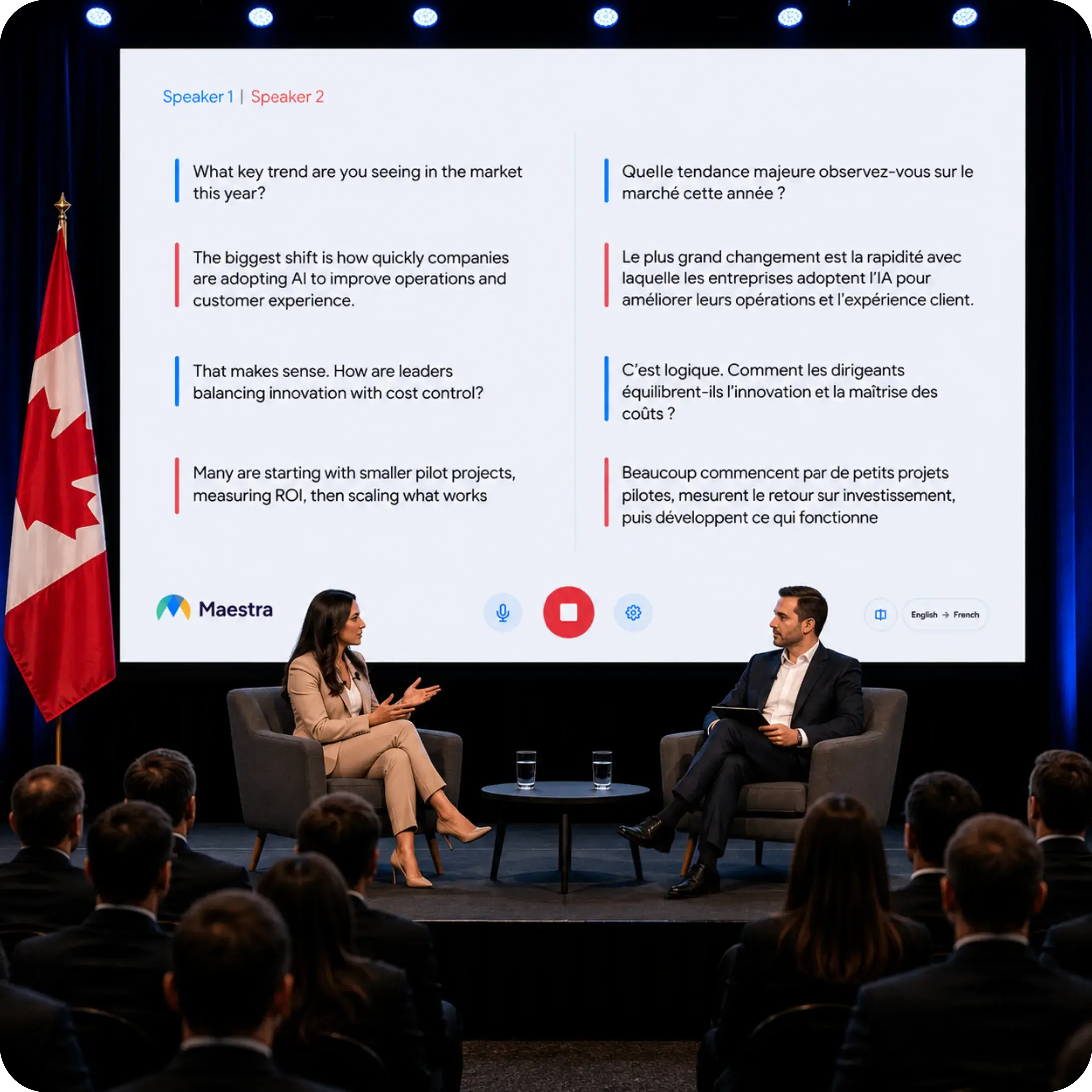
Mistrzyni Traktuje tłumaczenie na żywo jako część szerszego systemu komunikacji. Organizatorzy mogą zapewnić dostęp do języka dla publiczności i kontynuować pracę nad sesją jako medium. Jest to szczególnie przydatne, gdy webinarium wymaga przetłumaczonych napisów, konferencja wymaga wielu kanałów dla uczestników lub gdy nagranie musi zostać później zdubbingowane i opublikowane.
Praktyczne pytanie jest proste: czy ludzie próbują teraz ze sobą rozmawiać, czy też organizacja przekazuje treść publiczności przed sesją, w jej trakcie i po niej?
2. W jaki sposób poszczególne produkty trafiają na spotkanie?
Model konfiguracji wpływa na zasady prywatności, doświadczenia uczestników i wymagany stopień koordynacji. Praktyczne porównanie Transync AI i Maestra Dlatego wszystko zaczyna się od tego, w jaki sposób dźwięk trafia do procesu tłumaczenia.
Ten Transync AI Przepływ pracy
Ten funkcja tłumaczenia spotkań na żywo Działa równolegle z powszechnie używanym oprogramowaniem do spotkań. Użytkownicy mogą przechwytywać mowę zdalną poprzez udostępnianie dźwięku z komputera, wyświetlać oryginalne i przetłumaczone napisy oraz korzystać z wirtualnego mikrofonu lub współdzielonego dźwięku systemowego, gdy przetłumaczona mowa ma zostać wprowadzona do rozmowy.
To podejście towarzyszące jest przydatne, gdy zespoły przemieszczają się między Zoom, Microsoft Teams, Google Meet, i innych narzędzi do połączeń. Nie wymaga od każdego uczestnika spotkania instalowania tej samej aplikacji i nie jest powiązany z jednym ekosystemem konferencyjnym.

Zgodność z głównymi platformami do spotkań online, umożliwiająca bezproblemowe tłumaczenie w czasie rzeczywistym
Ten Mistrzyni Przepływ pracy
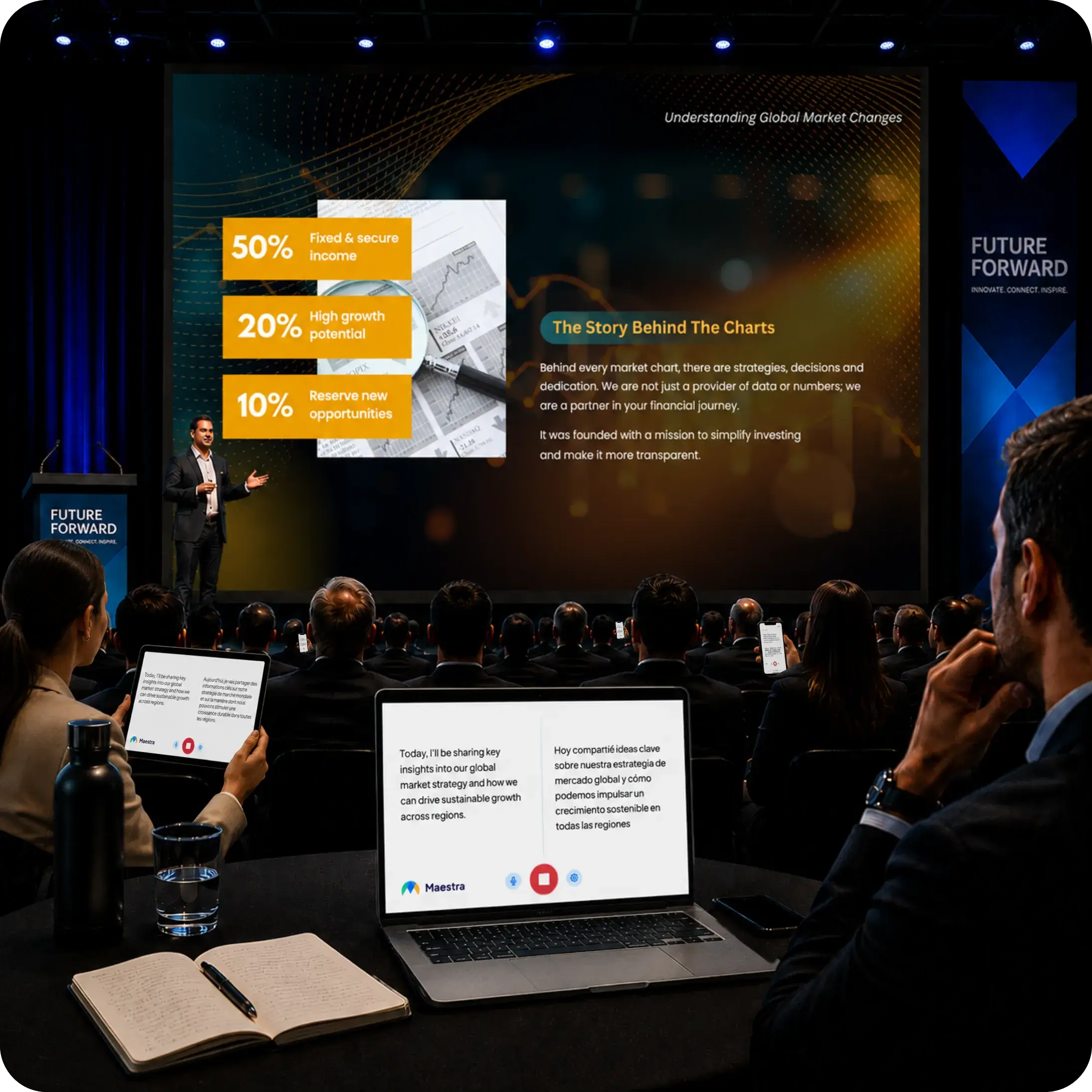
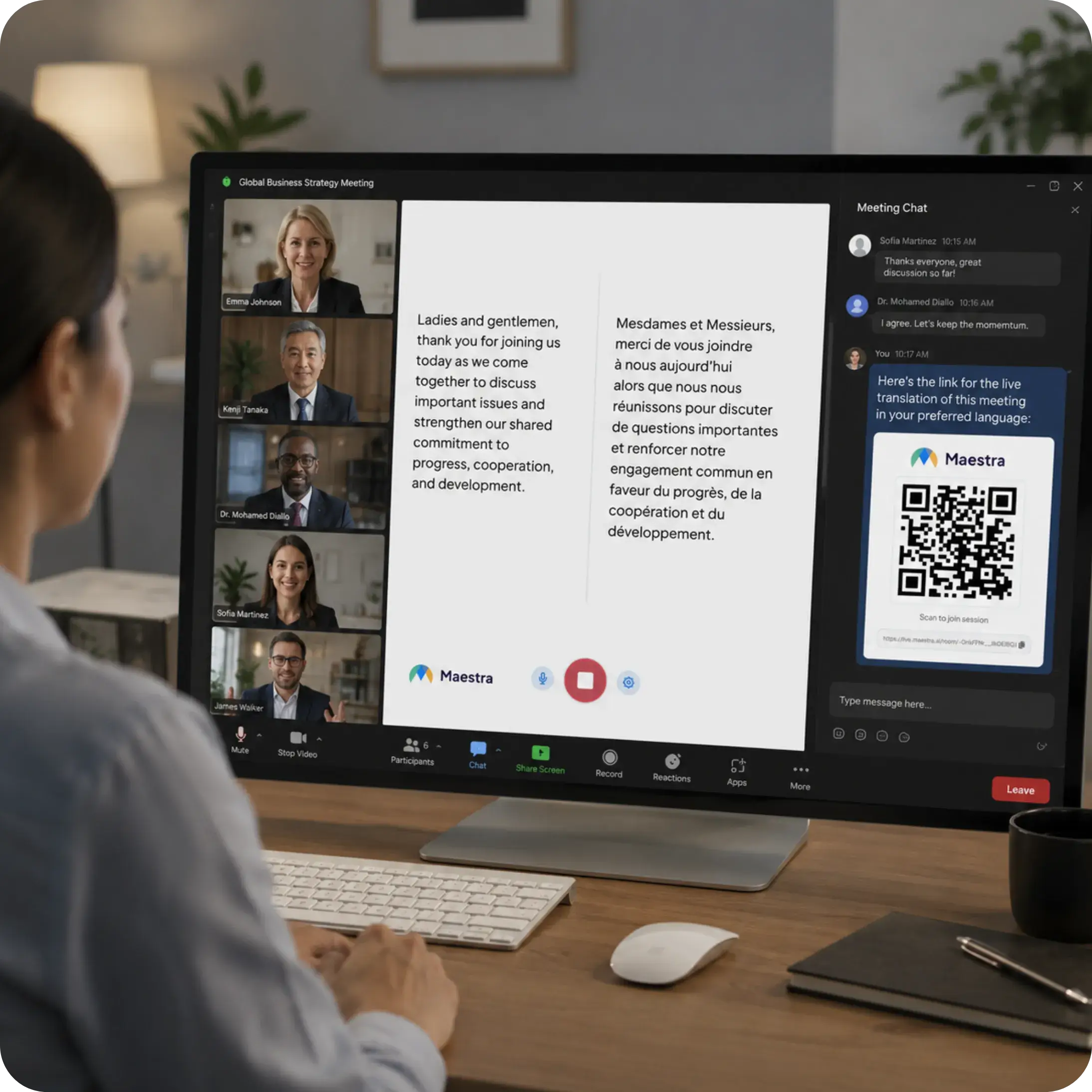
Mistrzyni Obsługuje sesje na żywo w przeglądarce oraz integrację ze spotkaniami i transmisjami. Podczas wydarzeń uczestnicy mogą skorzystać z linku lub zeskanować kod QR, wybrać język i śledzić przetłumaczone napisy lub dźwięk na swoich urządzeniach. Zmniejsza to potrzebę rozdawania odbiorników lub instalowania aplikacji w miejscu wydarzenia.
Model dostępu dla uczestników stanowi istotną zaletę w przypadku konferencji, wydarzeń hybrydowych, spotkań rządowych, szkoleń i webinariów. W przypadku prywatnych, cyklicznych połączeń może on jednak wprowadzać funkcje, których uczestnik nie potrzebuje.
3. Co uczestnicy widzą i słyszą na żywo?
Doświadczenie na żywo z Transync AI i Maestra mogą zapewnić więcej niż tylko przetłumaczony zapis, ale ich interfejsy służą różnym odbiorcom.
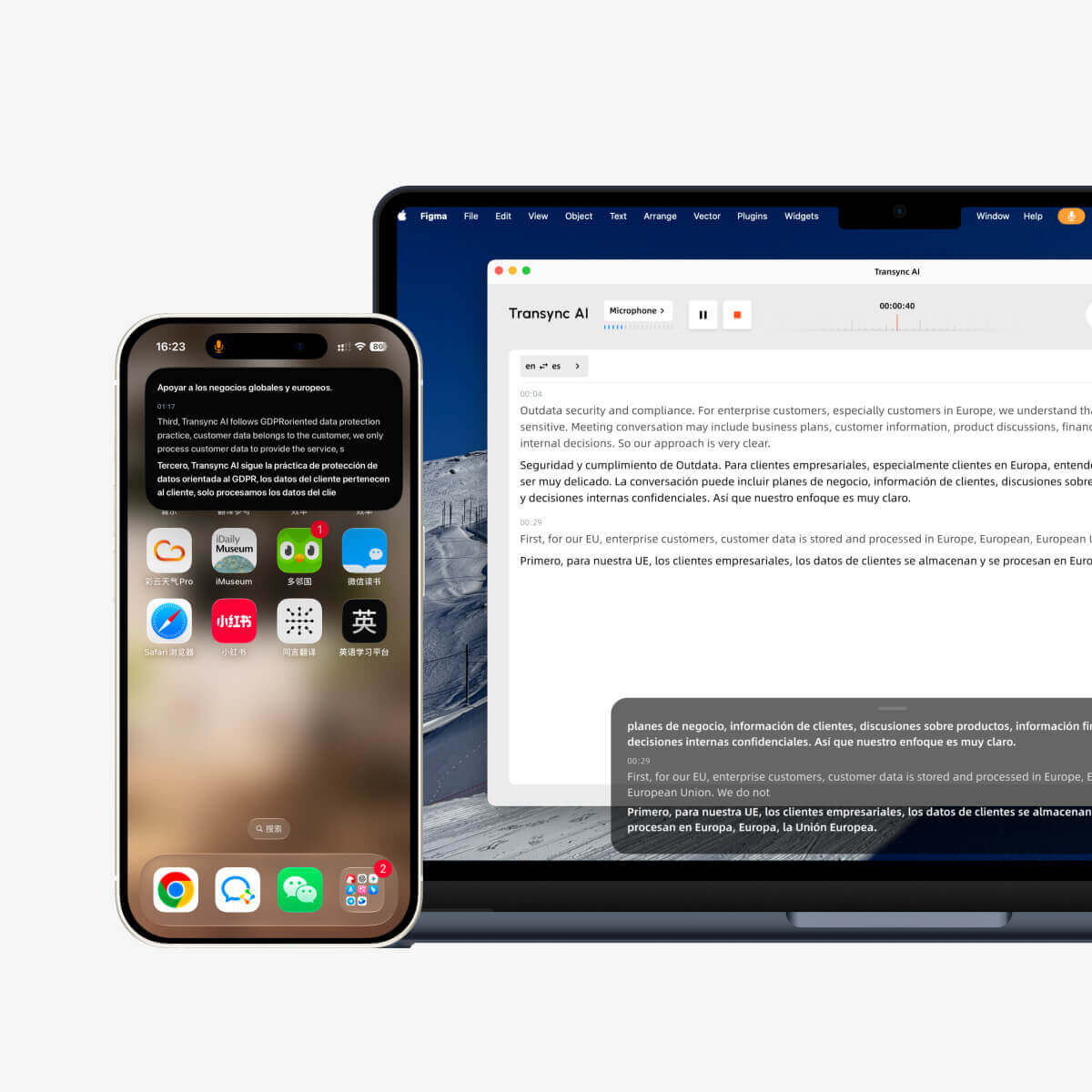
Transync AI prezentuje mowę źródłową i tłumaczenie razem. Jego narzędzie do tłumaczenia w czasie rzeczywistym Funkcja ta została zaprojektowana z myślą o osobach, które muszą sprawdzić, co zostało usłyszane, odczytać przetłumaczone znaczenie i odpowiedzieć bez utraty wątku konwersacji. Odtwarzanie głosu ze sztuczną inteligencją dodaje tłumaczenie głosowe, a automatyczne rozróżnianie języków ogranicza ręczne przełączanie w obsługiwanych trybach.
Ten Funkcja dwujęzycznych napisów „obraz w obrazie” Utrzymuje napisy widoczne nad innymi aplikacjami na obsługiwanych urządzeniach. Jest to szczególnie przydatne, gdy użytkownik musi jednocześnie czytać prezentację, rekord CRM, udostępniony dokument lub czat ze spotkania.
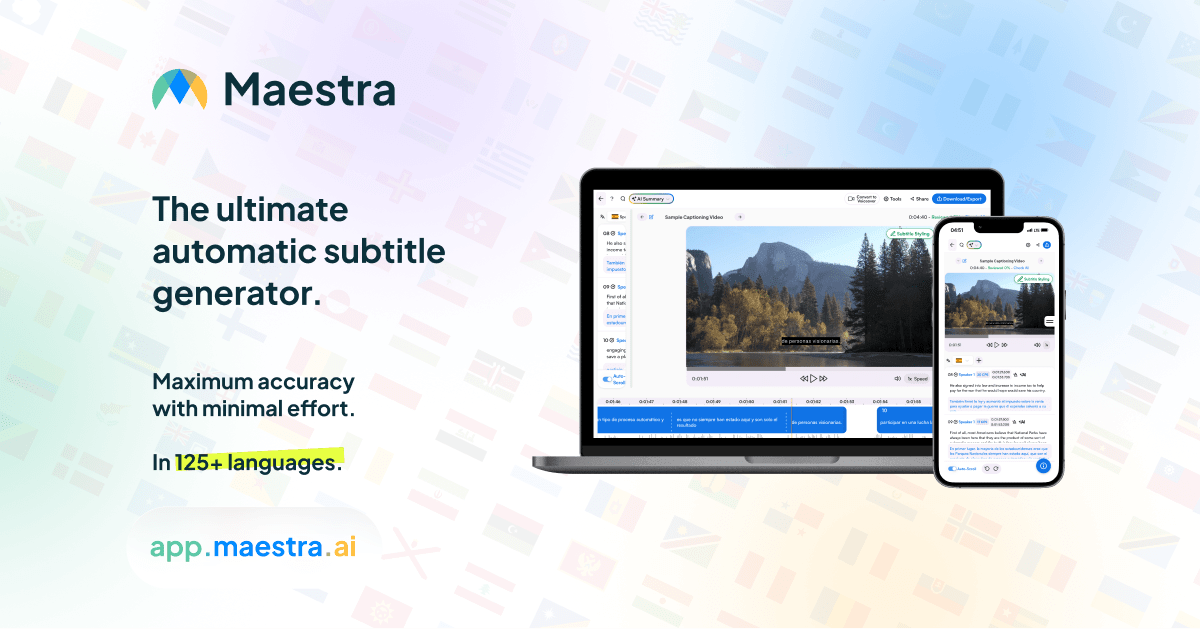
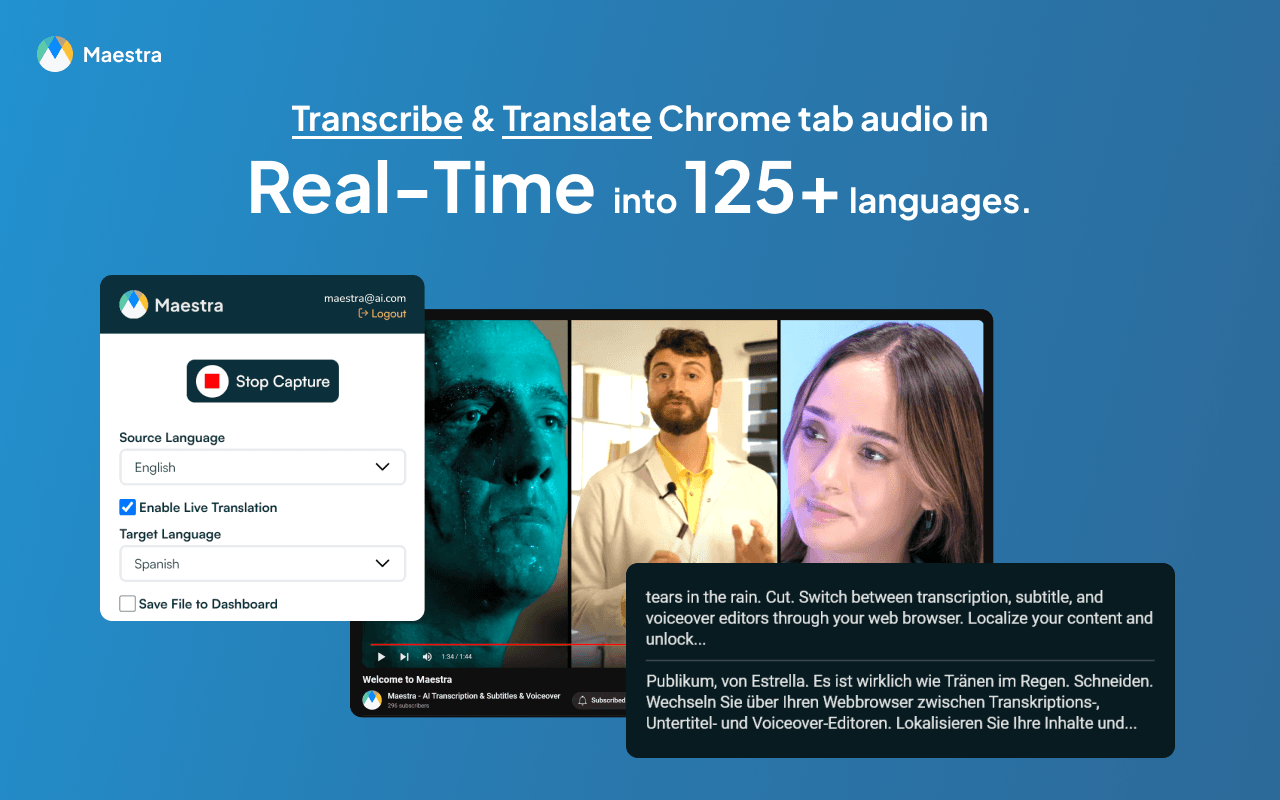
Mistrzyni może dostarczać uczestnikom napisy na żywo i przetłumaczone kanały głosowe. Materiały na wydarzenia kładą nacisk na dostęp przez przeglądarkę, opcje języków symultanicznych, przepływy pracy z uwzględnieniem mówcy oraz głos oparty na sztucznej inteligencji lub głos klonowany. Dla organizatorów istotną korzyścią jest nie tylko to, co widzi jeden użytkownik, ale także to, ilu widzów może wejść na właściwy kanał językowy z minimalnym oporem.
W przypadku rozmowy dwuosobowej, dwujęzyczny punkt widzenia uczestnika może mieć największe znaczenie. W przypadku konferencji, możliwość dystrybucji różnych języków do wielu urządzeń może okazać się decydującą cechą.
4. Jak radzą sobie z nazwami i językiem specjalistycznym?
Ogólne wskaźniki językowe nie ujawniają, jak dobrze produkt radzi sobie z nazwą firmy, akronimem, lekiem, kodem produktu lub frazą branżową. Terminologia jest często punktem odniesienia w praktycznym teście. Transync AI i Maestra staje się cenniejsza niż lista funkcji.
Transync AI zapewnia Funkcja słów kluczowych i kontekstu asystenta AI. Przed spotkaniem użytkownicy mogą dodawać ważne terminy i opisywać kontekst rozmowy. Ma to na celu usprawnienie przekazu na żywo bez konieczności przeprowadzania złożonego projektu lokalizacyjnego.

Mistrzyni Oferuje niestandardowe funkcje słownika oraz, w zależności od planu i przepływu pracy, podpowiedzi dotyczące tłumaczeń lub elementy sterujące związane z glosariuszem. Funkcje te są przydatne dla zespołów zarządzających powtarzającą się terminologią w napisach, tłumaczeniach i publikowanych materiałach.
W przypadku obu produktów rzetelny test powinien uwzględniać prawdziwe imiona i nazwiska klientów, skróty, terminologię produktu, liczby, daty i zdania o niejednoznacznym znaczeniu. Deklaracje dotyczące dokładności języka marketingowego są mniej przydatne niż kontrolowana próba z rzeczywistych spotkań z kupującym.
5. Co się dzieje po zakończeniu spotkania?
To tutaj odległość między Transync AI i Maestra staje się bardziej widoczny.
Ten Funkcja notatek ze spotkań AI Zamienia rozmowę w transkrypt i ustrukturyzowany zapis działań następczych. Jest to przydatne, gdy celem jest przypomnienie sobie decyzji, przejrzenie wielojęzycznej wymiany zdań lub kontynuowanie pracy po rozmowie z klientem lub zespołem.
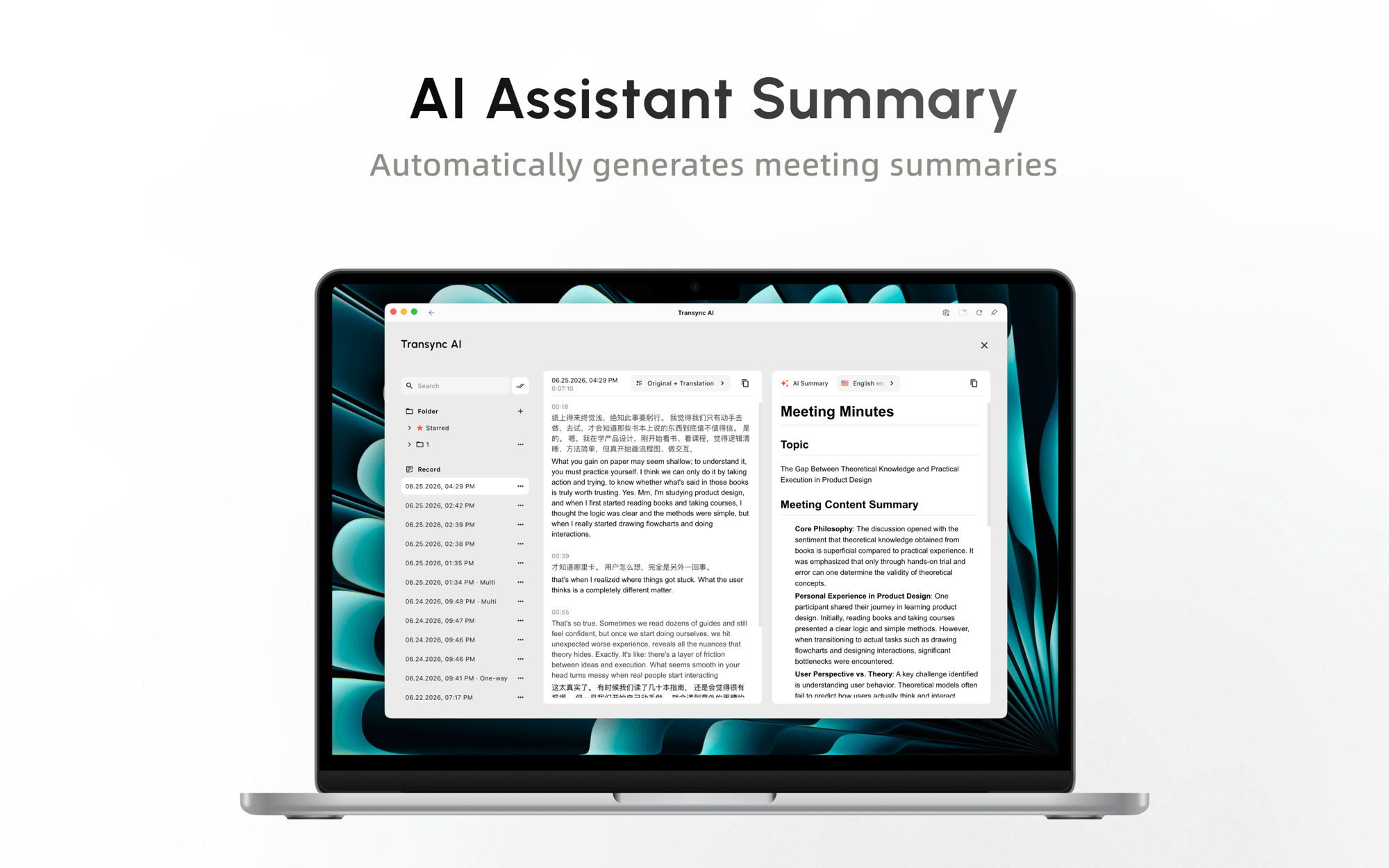
Mistrzyni Rozszerza się na produkcję treści. Sesja na żywo może być źródłem informacji dla procesów związanych z napisami, tłumaczeniem dźwięku, dubbingiem, klonowaniem głosu, edycją, eksportem i publikacją multimedialną. Zespół ds. marketingu, szkoleń, edukacji lub mediów może cenić tę ciągłość bardziej niż interfejs spotkania skoncentrowany na uczestnikach.
 Dokonaj wyboru w oparciu o wymagany produkt. Jeśli rezultatem są “decyzje i kolejne kroki”, efektywny jest przepływ pracy oparty na notatkach ze spotkania. Jeśli rezultatem jest “zlokalizowany film w kilku językach”, pakiet multimedialny ma wyraźną przewagę.
6. Który produkt jest odpowiedni dla szerszej publiczności?
W przypadku zwykłego spotkania skala widowni może oznaczać pięć lub dziesięć osób. W przypadku wydarzenia może to oznaczać publiczność na sali i zdalną, kilka języków docelowych, osobiste urządzenia do odsłuchu, operatorów technicznych oraz treści, które należy później ponownie wykorzystać.
Ten Funkcja trybu prezentacji pozwala Transync AI Prowadzący może włączyć do 10 języków docelowych i zaprosić publiczność za pomocą linku, kodu QR lub identyfikatora sali. Każda osoba będzie śledzić prezentację na swoim urządzeniu, wybierze włączony język i otrzyma napisy na żywo lub opcjonalnie nagranie głosowe. Widzowie nie muszą instalować oprogramowania, ale muszą się zarejestrować lub zalogować na konto. Mogą czytać i słuchać, ale nie mogą odpowiadać na pytania prowadzącego.
Oznacza to, że dostęp odbiorców nie jest już zarezerwowany wyłącznie dla Mistrzyni w tym porównaniu. Pozostała różnica to głębokość przepływu pracy. Transync AI oferuje tańszą, samodzielną trasę prezentacji, szkoleń, wykładów, konferencji, wycieczek i wydarzeń społecznościowych. Mistrzyni jest silniejsza, gdy wydarzenie na żywo musi być kontynuowane w ramach napisów firmowych, edycji napisów, dubbingu, tłumaczeń multimedialnych, integracji transmisji i przepływów pracy wydawniczej.
W przypadku wydarzeń o wysokiej stawce lub wydarzeń publicznych należy przetestować mikrofon, sieć, logowanie publiczności, włączone języki, odtwarzanie głosu, urządzenia uczestników oraz obliczenia dotyczące wykorzystania. Tryb prezentacji jest obecnie w fazie beta. Transync AI konsumpcja zmienia się w zależności od wielkości szczytowej grupy odbiorców i liczby języków docelowych.
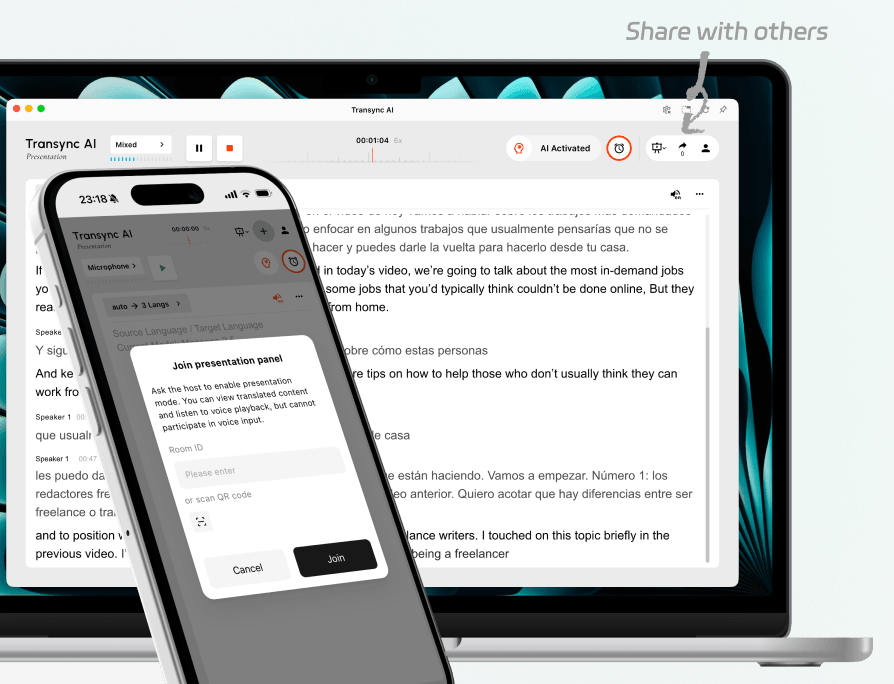
Zaproś publiczność obecną na sali oraz tę zdalną na tę samą prezentację na żywo.
7. Jak to działa Transync AI I Mistrzyni Porównanie cen?
Cennik jest jedną z najwyraźniejszych różnic pomiędzy Transync AI i Maestra, ale porównanie musi być wykonane poprawnie Mistrzyni Kategoria. Plan 39 Basic w czasie rzeczywistym jest wymieniony dla napisów w czasie rzeczywistym; oficjalna strona cennika wymienia tłumaczenie w czasie rzeczywistym w ramach planu 79 Premium w przypadku wybrania rozliczenia rocznego.
Opublikowane porównanie cen
| Plan | Cena opublikowana | Uwzględniono użycie najbardziej istotne dla spotkań | Ważna uwaga |
|---|---|---|---|
| Transync AI Bezpłatny | $0 | 40 minut po rejestracji | Przydatne do testowania rzeczywistego przepływu pracy podczas spotkań |
| Transync AI Premia osobista | $8,99/miesiąc | 10 godzin tłumaczeń w czasie rzeczywistym w okresie członkostwa | Obejmuje ukierunkowane na spotkania funkcje głosowe, kontekstowe, notatki i dostęp między urządzeniami |
| Transync AI Przedsiębiorstwo | $24,99/miesiąc za miejsce | Do 40 godzin miesięcznie na stanowisko | Dodaje funkcje zarządzania organizacją i ujednoliconej wiedzy |
| Mistrzyni Podstawowy w czasie rzeczywistym | $39/miesiąc przy wybranym rozliczeniu rocznym | 360 minut napisów w czasie rzeczywistym | Napisy są wymienione, ale tłumaczenie w czasie rzeczywistym nie jest uwzględnione na opublikowanej liście funkcji tego poziomu |
| Mistrzyni Premium w czasie rzeczywistym | $79/miesiąc przy wybranym rozliczeniu rocznym | 900 minut napisów lub 180 minut tłumaczenia w czasie rzeczywistym na każdy język | Dodaje funkcje zespołowe, monity i priorytetowe wsparcie |
| Mistrzyni Biznes w czasie rzeczywistym | $159/miesiąc przy wybranym rozliczeniu rocznym | 360 minut tłumaczenia na każdy język lub 180 minut dubbingu | Dodaje funkcje udostępniania sesji i szerszą terminologię |
| Mistrzyni Biznes w czasie rzeczywistym Plus | $359/miesiąc przy wybranym rozliczeniu rocznym | 900 minut tłumaczenia na każdy język lub 450 minut dubbingu | Zbudowany do pracy o dużej objętości i w zespołach |
Źródła: Transync AI oficjalna strona cenowa I Mistrzyni oficjalna strona cenowa. Sprawdzono w sierpniu 2026 r.
Co w praktyce oznacza różnica w cenie?
Korzystając z opublikowanych stawek indywidualnych, Transync AI Składka indywidualna jest o $70,01 niższa miesięcznie niż Mistrzyni Wyświetlana roczna stawka rozliczeniowa Real-Time Premium. To sprawia, że podstawowa cena miesięczna jest niższa o około 88,61 TP3T.
Jeżeli użytkownik wykorzysta cały podany czas tłumaczenia, Transync AI Wynosi około 0,015 za minutę wliczoną w cenę, podczas gdy **Maestra** Premium wynosi około 0,439 za minutę tłumaczenia w czasie rzeczywistym w danym języku. W tym zawężonym wyliczeniu, Transync AI zapewnia około 29 razy więcej minut tłumaczenia za jednego dolara.
To porównanie cen Transync AI i Maestra nie jest twierdzeniem, że plany są identyczne. Mistrzyni łączy w sobie szersze środowisko lokalizacji, zespołu, wydarzenia i produkcji treści, a jego możliwości tłumaczenia są opisane dla każdego języka. Transync AI oferuje mniej narzędzi produkcyjnych, ale zapewnia większą wartość, gdy nabywca potrzebuje głównie tłumaczeń podczas spotkań na żywo.
Dla osoby prywatnej, konsultanta, nauczyciela, sprzedawcy lub małego zespołu transgranicznego płacenie za niewykorzystane możliwości związane z wydarzeniami i mediami rzadko ma sens. Dla zespołu ds. treści, który w przeciwnym razie kupowałby osobne narzędzia do napisów, tłumaczeń, dubbingu i dostępu dla uczestników, szersze Mistrzyni subskrypcja może konsolidować kilka przepływów pracy.
Który produkt powinieneś wybrać?
Wybór pomiędzy Transync AI i Maestra najłatwiej jest, gdy najpierw spisze się wymagane doświadczenie na żywo i wyniki spotkania.
Wybierać Transync AI Kiedy potrzebujesz:
- Częste dwustronne spotkania wielojęzyczne.
- Napisy dwujęzyczne widoczne podczas rozmowy.
- Odtwarzanie przetłumaczonego głosu uczestników.
- Autonomiczne narzędzie działające na wielu platformach i urządzeniach konferencyjnych.
- Słowa kluczowe i kontekst dla nazw lub języka specjalistycznego.
- Notatki ze spotkania AI po rozmowie.
- Niższy koszt wejścia dla jednostki lub zespołu.
Wybierać Mistrzyni Kiedy potrzebujesz:
- Wielojęzyczne webinaria, konferencje lub wydarzenia hybrydowe.
- Dostęp dla uczestników za pośrednictwem linków lub kodów QR.
- Transmisje na żywo, które później stają się materiałami medialnymi tłumaczonymi na język polski.
- Napisy, dubbing, klonowanie głosu i lokalizacja w jednym środowisku.
- Dostosowywanie stylu, integracja z transmisjami lub dostarczanie zorientowane na zdarzenia.
- Szerszy, zespołowy obieg pracy, który uzasadnia wyższą cenę.
Pięciominutowy test dla Transync AI I Mistrzyni
Przed subskrypcją przeprowadź to samo krótkie spotkanie w obu produktach. Kontrolowane Transync AI i Maestra test zapobiega zniekształceniu wyniku przez różne warunki audio.
- Korzystaj z prawdziwej platformy konferencyjnej, zestawu słuchawkowego, głośników i sieci.
- Uwzględnij dwóch mówców, naturalne przerwy, akcent, trzy terminy dotyczące produktu, cenę i termin.
- Zmierz opóźnienie zanim przetłumaczony tekst i głos będą gotowe do użycia.
- Sprawdź, czy nazwy, liczby i terminologia przetrwały tłumaczenie.
- Poproś drugiego uczestnika o ocenę czytelności napisów i klarowności głosu.
- Porównaj czas konfiguracji i sprawdź, czy inny użytkownik potrzebuje konta, łącza lub specjalnej ścieżki audio.
- Po zakończeniu rozmowy przejrzyj opcje transkryptu, podsumowania, nagrania i eksportu.
Jeśli chodzi o wydarzenie, powtórz test z wieloma urządzeniami uczestników i kanałami językowymi. Test na prywatnym laptopie nie jest w stanie udowodnić, że przepływ pracy wydarzenia sprawdzi się w danym miejscu.
Transync AI I Mistrzyni Często zadawane pytania
Jest Transync AI Tańsze niż Mistrzyni do tłumaczenia na żywo?
Tak, na podstawie cen publicznych sprawdzonych w sierpniu 2026 r. Transync AI Cena pakietu Personal Premium wynosi 8,99 USD miesięcznie przy 10 godzinach użytkowania, natomiast Mistrzyni Usługa tłumaczenia w czasie rzeczywistym jest dostępna w ramach pakietu Premium 79 z 180 minutami na język przy wyborze rozliczenia rocznego. Plany oferują różne możliwości, dlatego kupujący powinni porównać wymagane funkcje oraz cenę.
Który z nich jest lepszy do codziennych spotkań?
Transync AI Rozwiązanie to jest bardziej odpowiednie dla cyklicznych połączeń, w których uczestnicy potrzebują dwujęzycznych napisów, tłumaczeń mowy, przygotowania terminologii i notatek. Wieloplatformowy przepływ pracy uczestników i niższa cena początkowa zmniejszają tarcia w codziennym użytkowaniu.
Który z nich jest lepszy na konferencje i webinaria?
Transync AI To solidne rozwiązanie samoobsługowe, gdy jeden z gospodarzy musi udostępnić do 10 tłumaczeń na inne języki za pośrednictwem linków, kodów QR lub identyfikatora sali. Widzowie mogą odbierać napisy na żywo i opcjonalnie odtwarzać głos lektora na swoich urządzeniach bez konieczności instalowania oprogramowania, choć wymagane jest założenie konta.
Mistrzyni staje się lepszym wyborem, gdy wydarzenie jest również projektem medialnym wymagającym niestandardowej prezentacji, integracji transmisji, montażu napisów, dubbingu, lokalizacji i publikacji po sesji. Decyzja nie opiera się już wyłącznie na dostępie publiczności.
Czy oba produkty zapewniają tłumaczenie mowy?
Tak, w obsługiwanych przez nich przepływach pracy. Transync AI zapewnia odtwarzanie głosu przez sztuczną inteligencję i metody kierowania przetłumaczonej mowy podczas połączeń. Mistrzyni Zapewnia tłumaczenie audio na żywo i oferuje wybrane lub sklonowane głosy AI do pracy na żywo i w mediach. Przetestuj dokładny język, platformę, plan i ścieżkę audio przed ważnym spotkaniem.
Który produkt zapewnia lepsze wyniki po spotkaniu?
Zależy to od zamierzonego wyniku. Transync AI jest lepiej zharmonizowany z transkryptami spotkań i praktycznymi notatkami. Mistrzyni zapewnia szerszą ścieżkę od sesji na żywo do napisów, dubbingu, przetłumaczonego dźwięku i opublikowanych materiałów multimedialnych.
Robi Maestra's $39 Czy plan w czasie rzeczywistym obejmuje tłumaczenie?
Aktualny cennik zawiera plan 39 Basic z napisami w czasie rzeczywistym. Tłumaczenie w czasie rzeczywistym jest dostępne w ramach planu 79 Premium. Kupujący powinni sprawdzić stronę z aktualnym cennikiem, ponieważ limity i opcje rozliczeń mogą ulec zmianie.
Ostateczna decyzja
Wybierać Transync AI Gdy tłumaczenie musi obsługiwać codzienne wielojęzyczne konwersacje lub samodzielnie zarządzaną prezentację jeden do wielu, rozwiązanie to łączy dwujęzyczne narzędzia do spotkań z dostępem dla publiczności za pośrednictwem linków, kodów QR lub identyfikatora sali, zachowując jednocześnie znacznie niższą cenę wejścia.
Wybierać Mistrzyni gdy wydarzenie na żywo musi zostać włączone do szerszego obiegu medialnego. Wyższa cena obejmuje produkcję napisów, dubbing, klonowanie głosu, prezentację marki, lokalizację i publikowane treści nadające się do ponownego wykorzystania.
Najbardziej sprawiedliwy wniosek jest taki, że Transync AI zapewnia większą wartość spotkań i prezentacji samoobsługowych, Mistrzyni oferuje szersze środowisko produkcji wydarzeń i materiałów medialnych.
Jeśli chcesz przeżyć doświadczenie nowej generacji, Transync AI wyznacza trendy dzięki tłumaczeniom w czasie rzeczywistym, opartym na sztucznej inteligencji, które zapewniają naturalny przepływ rozmów. Możesz wypróbuj za darmo Teraz.
