

เปรียบเทียบ Transync AI และ Maestra สำหรับการแปลการประชุมสด เสียง คำบรรยาย งานอีเวนต์ เวิร์กโฟลว์สื่อ และราคา เพื่อค้นหาตัวเลือกที่เหมาะสมที่สุด.
สองทีมอาจขอใช้บริการ "การแปลการประชุมสด" แต่ต้องการผลิตภัณฑ์ที่แตกต่างกันอย่างสิ้นเชิง ทีมหนึ่งอาจทำการประชุมขายทางโทรศัพท์เป็นประจำซึ่งผู้เข้าร่วมสองคนจำเป็นต้องเข้าใจกันได้ทันที ในขณะที่อีกทีมหนึ่งอาจจัดสัมมนาออนไลน์หลายภาษาซึ่งจะต้องนำมาแปลเป็นคำบรรยาย เสียงพากย์ และเนื้อหาที่สามารถนำกลับมาใช้ใหม่ได้ในภายหลัง.
ความแตกต่างนั้นอธิบายถึงทางเลือกระหว่าง Transync เอไอ และ อาจารย์. ทั้งสองอย่างสามารถรองรับการสนทนาและเผยแพร่การแปลสดไปยังผู้ชมได้. Transync เอไอ ผสานการแปลการประชุมที่ผู้เข้าร่วมควบคุมได้เข้ากับโหมดการนำเสนอสำหรับการส่งมอบแบบบริการตนเองแบบหนึ่งต่อหลายคน. อาจารย์ นอกจากนี้ยังครอบคลุมถึงการนำเสนออีเวนต์ การผลิตคำบรรยาย การพากย์เสียง การตัดต่อสื่อ และการเผยแพร่เนื้อหาที่แปลแล้วหลังจากการถ่ายทอดสดเสร็จสิ้น.
คำตอบสั้นๆ เกี่ยวกับ Transync เอไอ และ อาจารย์
เลือก Transync เอไอ เมื่อภารกิจหลักคือการสนทนาแบบสองภาษาหรือหลายภาษาที่เกิดขึ้นซ้ำๆ โปรแกรมนี้ผสานรวมคำบรรยายสองภาษาแบบเรียลไทม์ การเล่นเสียงที่แปลแล้ว บริบทของคำศัพท์ คำบรรยายแบบลอยตัว และบันทึกการประชุมไว้ในเวิร์กโฟลว์แบบข้ามแพลตฟอร์ม ราคาเริ่มต้นที่ต่ำกว่านั้นดึงดูดใจเป็นพิเศษสำหรับบุคคลและทีมที่แปลการประชุมเป็นประจำ.
เลือก อาจารย์ เมื่อการถ่ายทอดสดเป็นเพียงขั้นตอนหนึ่งของกระบวนการทำงานด้านเนื้อหาหรือกิจกรรมที่ใหญ่กว่า การถ่ายทอดสดจึงเหมาะสมกว่าสำหรับการเข้าถึงของผู้เข้าร่วม การใช้ช่องทางภาษาผ่าน QR Code การส่งมอบกิจกรรมสด คำบรรยาย การพากย์เสียง การคัดลอกเสียง และการเผยแพร่สื่อที่แปลแล้วหลังจากการถ่ายทอดสดเสร็จสิ้น.
ไม่มีคำตอบใดที่ใช้ได้ทั่วไป เมื่อประเมิน Transync AI และ Maestra, ผลิตภัณฑ์ที่ดีกว่านั้นขึ้นอยู่กับว่าการประชุมนั้นเป็นการสนทนา การจัดกิจกรรม หรือเป็นสินทรัพย์สื่อในอนาคตเป็นหลัก.
Transync เอไอ และ อาจารย์ ภาพรวมโดยสังเขป
| พื้นที่การตัดสินใจ | Transync เอไอ | อาจารย์ | ||
|---|---|---|---|---|
| การปฐมนิเทศหลัก |
|
การแปลสด รวมถึงการปรับเนื้อหาให้เข้ากับท้องถิ่นสำหรับงานอีเวนต์และสื่อต่างๆ | ||
| เหมาะสมที่สุด |
|
|
||
| การส่งมอบการประชุม |
|
การเข้าถึงผ่านเบราว์เซอร์ ส่วนขยาย การผสานรวม ลิงก์ และคิวอาร์โค้ดสำหรับผู้เข้าร่วมงาน | ||
| ข้อความสด | คำบรรยายสองภาษาแบบแสดงคู่กัน | คำบรรยายสดและช่องสำหรับผู้เข้าร่วมงานที่แปลแล้ว | ||
| เสียงแปล | การเล่นเสียงด้วย AI และเวิร์กโฟลว์ไมโครโฟนเสมือน | การแปลเสียงแบบเรียลไทม์ เสียง AI ที่เลือกสรร และเวิร์กโฟลว์การโคลนเสียง | ||
| การสนับสนุนด้านคำศัพท์ | คำหลักและบริบทที่เตรียมไว้สำหรับการสนทนา | ตัวเลือกพจนานุกรมแบบกำหนดเอง คำถามกระตุ้นความคิด และคำศัพท์เพิ่มเติมสำหรับแผนขั้นสูง | ||
| หลังจากการประชุม | บันทึกการประชุมและรายงานการประชุมที่สร้างโดย AI | การถอดเสียง สรุป คำบรรยาย เสียงแปล การพากย์เสียง และการนำสื่อกลับมาใช้ใหม่ | ||
| ราคาค่าเข้าชมรายบุคคล (ประกาศแล้ว) | $8.99/เดือน สำหรับเบี้ยประกันภัยส่วนบุคคล | $79/เดือน สำหรับการแปลแบบเรียลไทม์บนแพ็กเกจพรีเมียม เมื่อเลือกชำระเงินรายปี | ||
| ข้อได้เปรียบที่แข็งแกร่งที่สุด |
|
ระบบนิเวศการผลิตงานอีเวนต์และสื่อที่กว้างขวางยิ่งขึ้น | ||
| ข้อแลกเปลี่ยนหลัก | ไม่ใช่ชุดจัดการงานอีเวนต์ขนาดใหญ่หรือชุดแปลสื่อแบบครบวงจร | ชุดฟังก์ชันการทำงานที่หลากหลายกว่าและราคาค่าแปลเริ่มต้นที่สูงกว่าเมื่อเทียบกับรุ่นอื่น |
ราคา ณ เดือนสิงหาคม 2569 ราคา ภาษี ระยะเวลาการเรียกเก็บเงิน เครดิตที่รวมอยู่ และคุณสมบัติของแพ็กเกจอาจมีการเปลี่ยนแปลง โปรดยืนยันเงื่อนไขการชำระเงินปัจจุบันก่อนทำการซื้อ.
1. คุณกำลังแปลบทสนทนาหรือกำลังจัดงานอีเวนต์อยู่?
นี่คือความแตกต่างที่สำคัญที่สุดระหว่าง Transync AI และ Maestra.
Transync เอไอ โปรแกรมนี้มองว่าการแปลเป็นส่วนหนึ่งของการสนทนา ผู้เข้าร่วมเปิดโปรแกรม เลือกโหมดภาษาที่ต้องการ กำหนดเส้นทางเสียงสำหรับการประชุม และติดตามข้อความต้นฉบับและข้อความที่แปลแล้วไปพร้อมกับการฟังเสียงที่แปลแล้ว รูปแบบนี้เหมาะสำหรับการโทรติดต่อลูกค้า การประชุมภายใน การสัมภาษณ์ การสอน การสาธิต และการสนทนาแบบเผชิญหน้า.
อาจารย์ การแปลสดถือเป็นส่วนหนึ่งของระบบการสื่อสารที่ครอบคลุมมากขึ้น ผู้จัดงานสามารถอำนวยความสะดวกด้านภาษาให้กับผู้ชมและยังคงใช้งานสื่อในงานสัมมนาต่อไปได้ ซึ่งจะมีประโยชน์อย่างมากเมื่อต้องการคำบรรยายที่แปลแล้วสำหรับงานสัมมนาออนไลน์ หรือเมื่อต้องการช่องทางการสื่อสารหลายช่องทางสำหรับผู้เข้าร่วมงาน หรือเมื่อต้องพากย์เสียงและเผยแพร่การบันทึกในภายหลัง.
คำถามเชิงปฏิบัติง่ายๆ ก็คือ ตอนนี้ผู้คนกำลังพยายามพูดคุยกันเอง หรือว่าองค์กรกำลังนำเสนอเนื้อหาให้กับกลุ่มเป้าหมายก่อน ระหว่าง และหลังการประชุม?
2. ผลิตภัณฑ์แต่ละชิ้นเข้ามามีส่วนร่วมในการประชุมอย่างไร?
รูปแบบการตั้งค่าส่งผลต่อกฎความเป็นส่วนตัว ประสบการณ์ของผู้เข้าร่วม และปริมาณการประสานงานที่จำเป็น การเปรียบเทียบในทางปฏิบัติของ Transync AI และ Maestra ดังนั้นจึงเริ่มต้นด้วยวิธีการที่เสียงเข้ามามีส่วนร่วมในกระบวนการแปล.
การ Transync เอไอ ขั้นตอนการทำงาน
การ ฟีเจอร์การแปลการประชุมสด ทำงานควบคู่ไปกับซอฟต์แวร์การประชุมที่ใช้กันทั่วไป ผู้ใช้สามารถบันทึกเสียงจากระยะไกลผ่านการแชร์เสียงคอมพิวเตอร์ แสดงคำบรรยายต้นฉบับและคำบรรยายที่แปลแล้ว และใช้ไมโครโฟนเสมือนหรือเสียงระบบที่แชร์เมื่อจำเป็นต้องแทรกเสียงที่แปลแล้วเข้าไปในการสนทนา.
แนวทางการทำงานร่วมกันนี้มีประโยชน์เมื่อทีมมีการเคลื่อนย้ายระหว่างสถานที่ต่างๆ Zoom, Microsoft Teams, Google Meet, และเครื่องมือการโทรอื่นๆ ไม่จำเป็นต้องให้ผู้เข้าร่วมประชุมทุกคนติดตั้งแอปพลิเคชันเดียวกัน และไม่ผูกติดกับระบบนิเวศการประชุมใดระบบหนึ่ง.

ใช้งานร่วมกับแพลตฟอร์มการประชุมออนไลน์หลักๆ เพื่อการแปลแบบเรียลไทม์ที่ราบรื่น
การ อาจารย์ ขั้นตอนการทำงาน
อาจารย์ รองรับการใช้งานผ่านเบราว์เซอร์แบบเรียลไทม์ และการผสานรวมการประชุมหรือการถ่ายทอดสด สำหรับกิจกรรมต่างๆ ผู้เข้าร่วมสามารถใช้ลิงก์หรือสแกนคิวอาร์โค้ด เลือกภาษา และติดตามคำบรรยายหรือเสียงที่แปลแล้วบนอุปกรณ์ของตนเอง ซึ่งช่วยลดความจำเป็นในการแจกจ่ายอุปกรณ์รับสัญญาณหรือติดตั้งแอปพลิเคชันในสถานที่จัดงาน.
รูปแบบการเข้าถึงของผู้เข้าร่วมดังกล่าวเป็นข้อได้เปรียบที่สำคัญสำหรับงานประชุม งานอีเวนต์แบบผสมผสาน การประชุมของภาครัฐ การฝึกอบรม และสัมมนาออนไลน์ อย่างไรก็ตาม สำหรับการโทรแบบส่วนตัวที่เกิดขึ้นซ้ำๆ อาจมีฟังก์ชันการทำงานที่ผู้เข้าร่วมไม่ต้องการ.
3. ผู้เข้าร่วมเห็นและได้ยินอะไรบ้างแบบสดๆ?
ประสบการณ์สดจาก Transync AI และ Maestra สามารถให้ข้อมูลมากกว่าแค่การถอดเสียงที่แปลแล้ว แต่รูปแบบการใช้งานของแต่ละระบบนั้นเหมาะสำหรับกลุ่มเป้าหมายที่แตกต่างกัน.
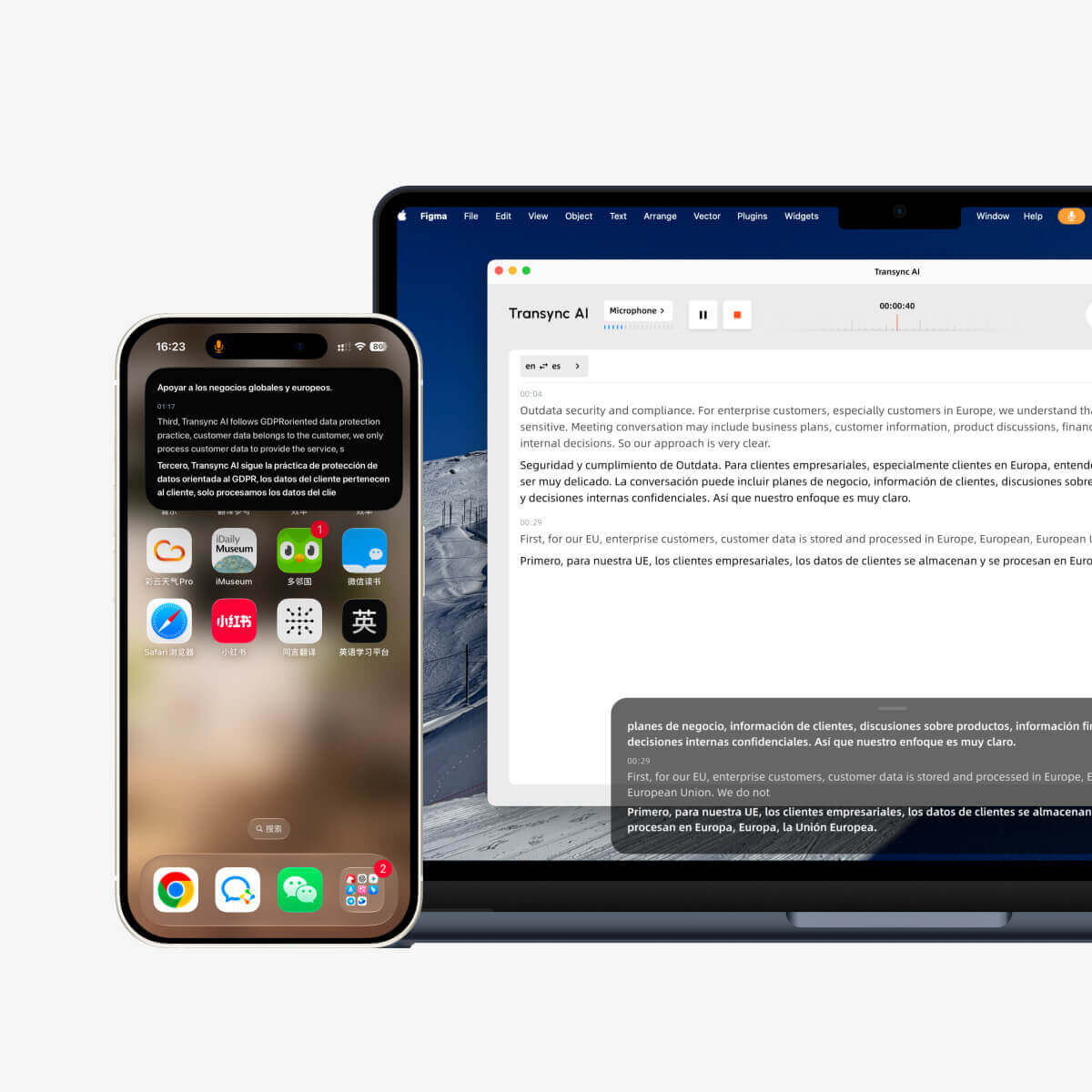
Transync เอไอ นำเสนอทั้งคำพูดต้นฉบับและคำแปลควบคู่กันไป เครื่องมือแปลแบบเรียลไทม์ ออกแบบมาสำหรับผู้ที่ต้องการตรวจสอบสิ่งที่ได้ยิน อ่านความหมายที่แปลแล้ว และตอบกลับโดยไม่ทำให้บทสนทนาสะดุด ระบบเล่นเสียงด้วย AI จะเพิ่มคำแปลที่ได้ยินได้ ในขณะที่การแยกแยะภาษาอัตโนมัติจะช่วยลดการสลับภาษาด้วยตนเองในโหมดที่รองรับ.
การ คุณสมบัติคำบรรยายสองภาษาแบบภาพซ้อนภาพ ฟีเจอร์นี้จะช่วยให้คำบรรยายภาพปรากฏอยู่เหนือแอปพลิเคชันอื่นๆ บนอุปกรณ์ที่รองรับ ซึ่งมีประโยชน์อย่างยิ่งเมื่อผู้ใช้ต้องอ่านงานนำเสนอ บันทึก CRM เอกสารที่แชร์ หรือแชทการประชุมไปพร้อมๆ กัน.
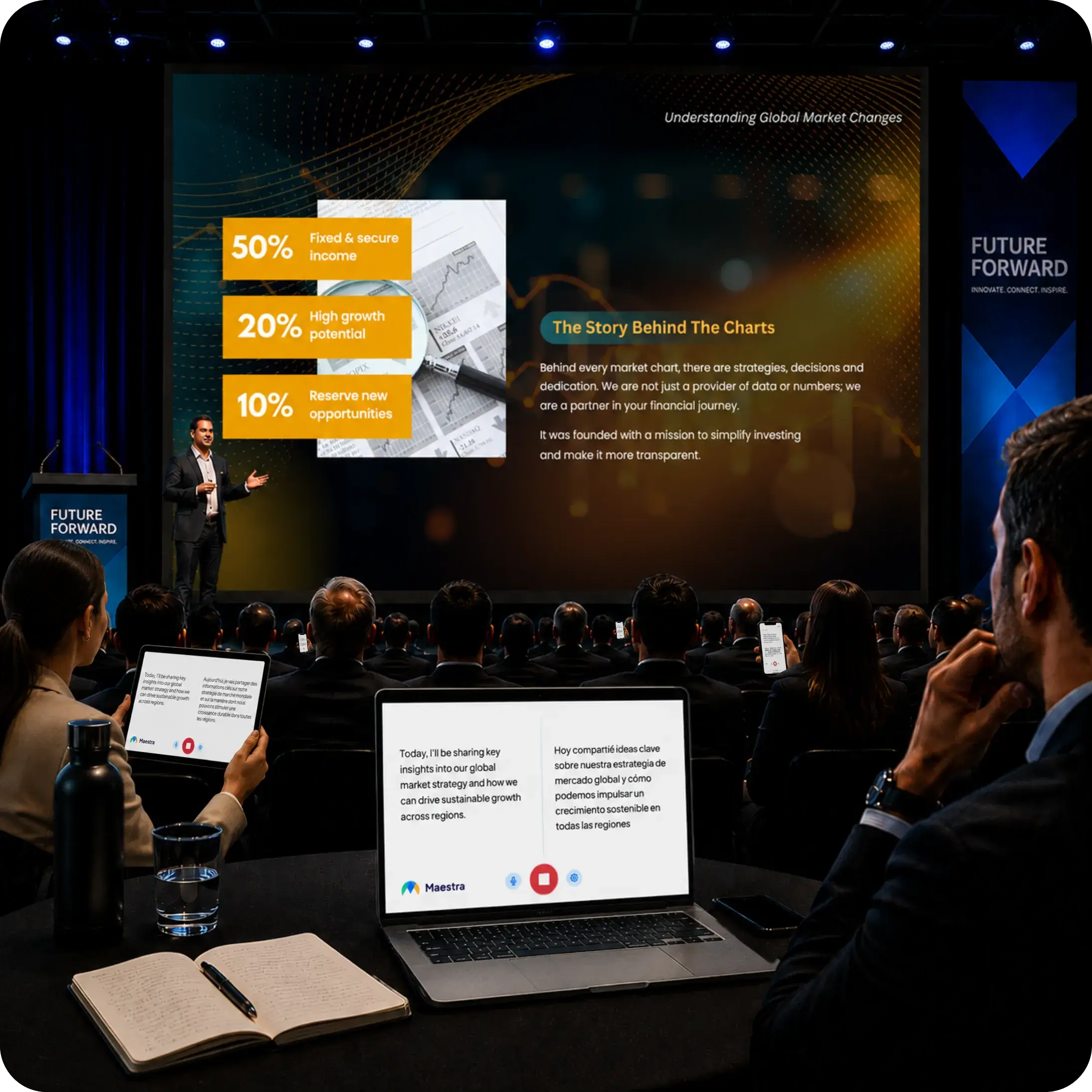
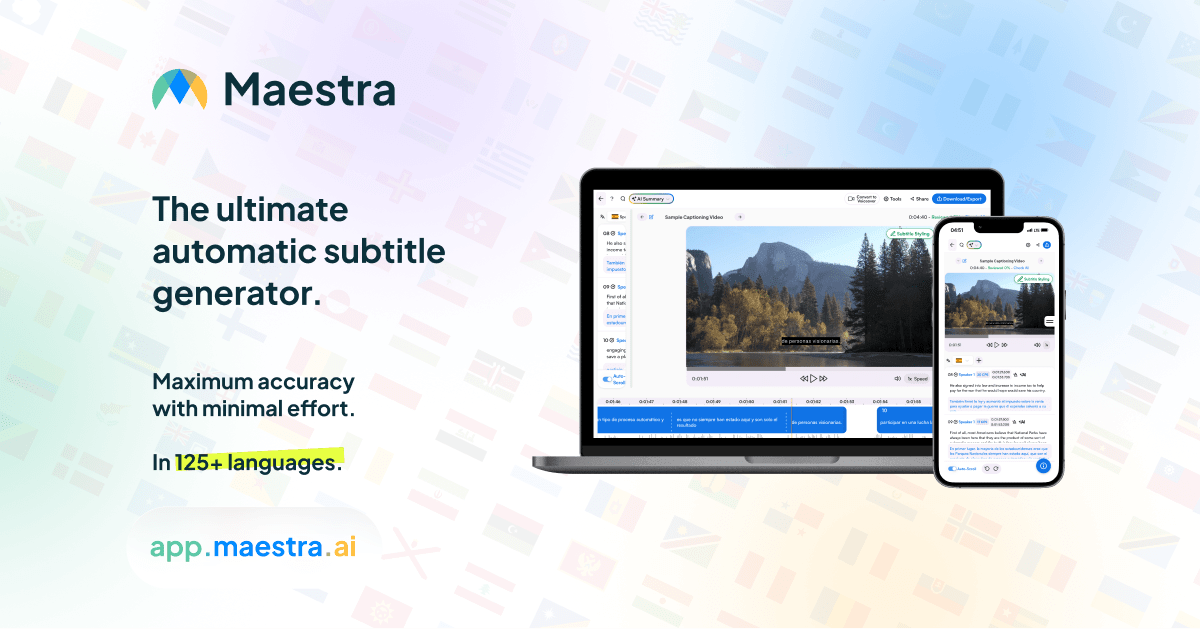
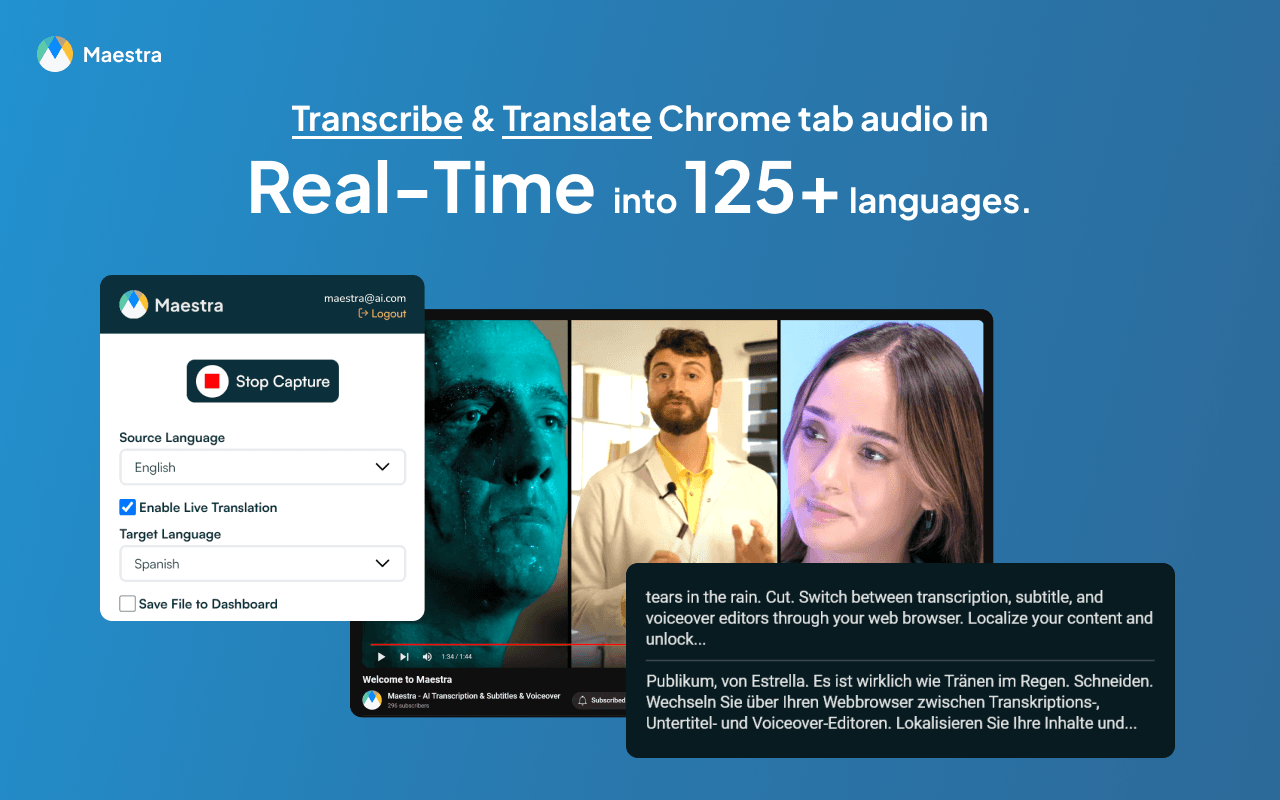
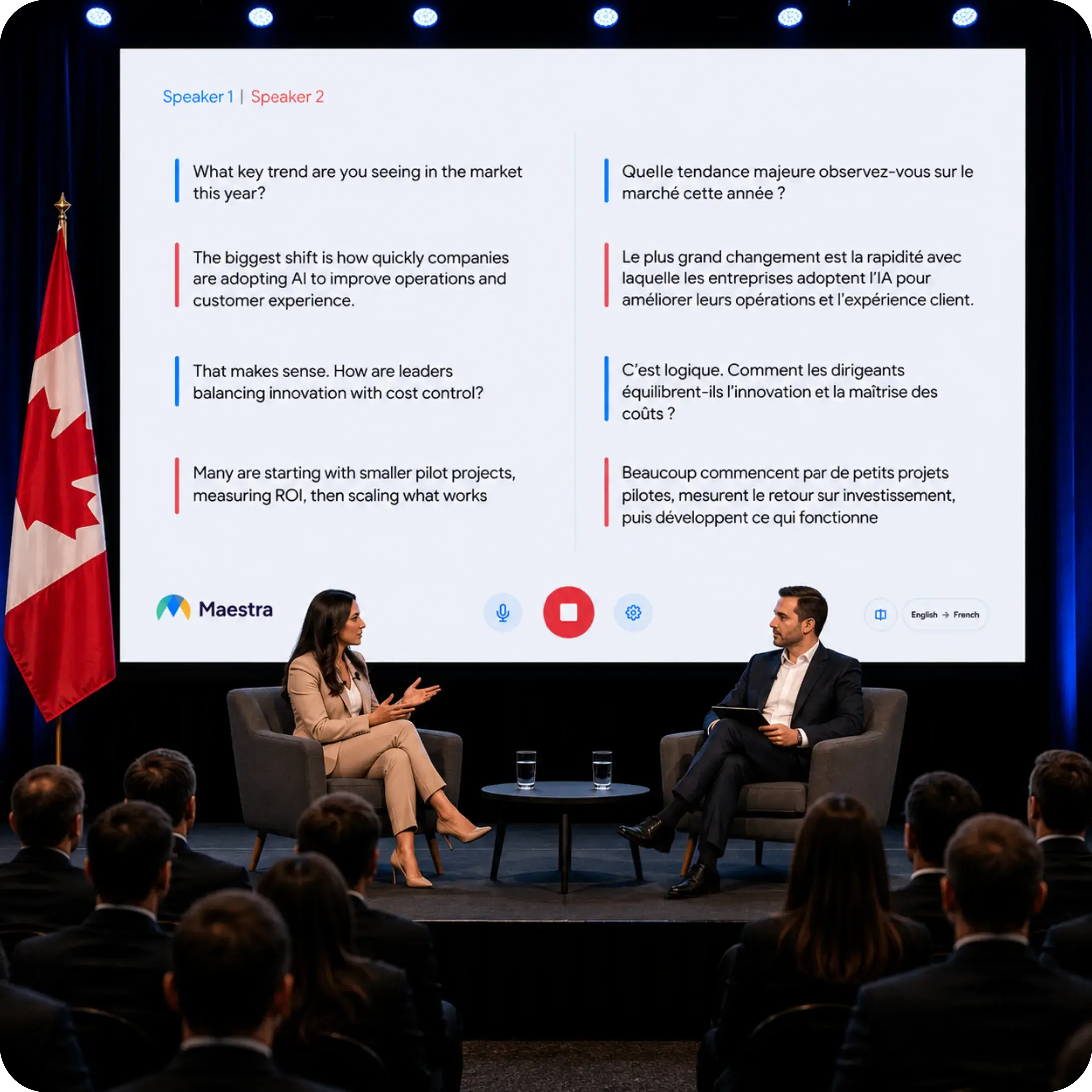
อาจารย์ สามารถส่งคำบรรยายสดและช่องเสียงที่แปลแล้วไปยังผู้เข้าร่วมงานได้ เอกสารประกอบงานอีเวนต์เน้นการเข้าถึงผ่านเบราว์เซอร์ ตัวเลือกภาษาพร้อมกัน กระบวนการทำงานที่คำนึงถึงผู้พูด และเอาต์พุตเสียง AI หรือเสียงจำลอง สำหรับผู้จัดงาน ประโยชน์ที่สำคัญไม่ได้อยู่ที่สิ่งที่ผู้ใช้คนหนึ่งเห็นเท่านั้น แต่ยังอยู่ที่จำนวนผู้เข้าร่วมงานที่สามารถเข้าสู่ช่องภาษาที่ถูกต้องได้อย่างราบรื่นที่สุดด้วย.
สำหรับการสนทนาระหว่างสองคน มุมมองของผู้เข้าร่วมที่ใช้สองภาษาอาจมีความสำคัญที่สุด สำหรับการประชุม การกระจายภาษาต่างๆ ไปยังอุปกรณ์หลายเครื่องอาจเป็นความสามารถที่ชี้ขาดได้.
4. พวกเขาจัดการกับชื่อและศัพท์เฉพาะทางอย่างไร?
การนับจำนวนคำในภาษาทั่วไปไม่ได้แสดงให้เห็นว่าผลิตภัณฑ์นั้นจัดการกับชื่อบริษัท คำย่อ ชื่อยา รหัสผลิตภัณฑ์ หรือคำศัพท์เฉพาะทางในอุตสาหกรรมได้ดีเพียงใด คำศัพท์เฉพาะทางมักเป็นจุดที่การทดสอบเชิงปฏิบัติมีความสำคัญที่สุด Transync AI และ Maestra กลายเป็นสิ่งที่มีค่ามากกว่าแค่รายการคุณสมบัติ.
Transync เอไอ ให้บริการ ฟีเจอร์คำหลักและบริบทของ AI Assistant. ก่อนการประชุม ผู้ใช้สามารถเพิ่มคำศัพท์สำคัญและอธิบายบริบทของการสนทนาได้ ฟังก์ชันนี้ออกแบบมาเพื่อปรับปรุงผลลัพธ์แบบเรียลไทม์โดยไม่ต้องใช้โครงการแปลภาษาที่ซับซ้อน.

อาจารย์ มีคุณสมบัติพจนานุกรมแบบกำหนดเอง และขึ้นอยู่กับแผนและขั้นตอนการทำงาน อาจมีคำแนะนำในการแปลหรือการควบคุมที่เกี่ยวข้องกับคำศัพท์เฉพาะ ความสามารถเหล่านี้เหมาะสำหรับทีมที่จัดการคำศัพท์ซ้ำๆ ในคำบรรยาย การแปล และสื่อสิ่งพิมพ์ต่างๆ.
สำหรับผลิตภัณฑ์ทั้งสอง การทดสอบที่เป็นธรรมควรประกอบด้วยชื่อลูกค้าจริง คำย่อ คำศัพท์เฉพาะของผลิตภัณฑ์ ตัวเลข วันที่ และประโยคที่มีความหมายคลุมเครือ การกล่าวอ้างความถูกต้องของภาษาทางการตลาดนั้นมีประโยชน์น้อยกว่าตัวอย่างที่ควบคุมได้จากการประชุมจริงของผู้ซื้อ.
5. จะเกิดอะไรขึ้นหลังจากประชุมเสร็จ?
นี่คือจุดที่ระยะห่างระหว่าง Transync AI และ Maestra เห็นได้ชัดเจนยิ่งขึ้น.
การ ฟีเจอร์บันทึกการประชุมด้วย AI แปลงบทสนทนาให้เป็นบันทึกถอดเสียงและบันทึกติดตามผลที่มีโครงสร้าง ซึ่งมีประโยชน์เมื่อเป้าหมายคือการทบทวนการตัดสินใจ ตรวจสอบการสนทนาหลายภาษา หรือทำงานต่อหลังจากการสนทนากับลูกค้าหรือทีมงาน.
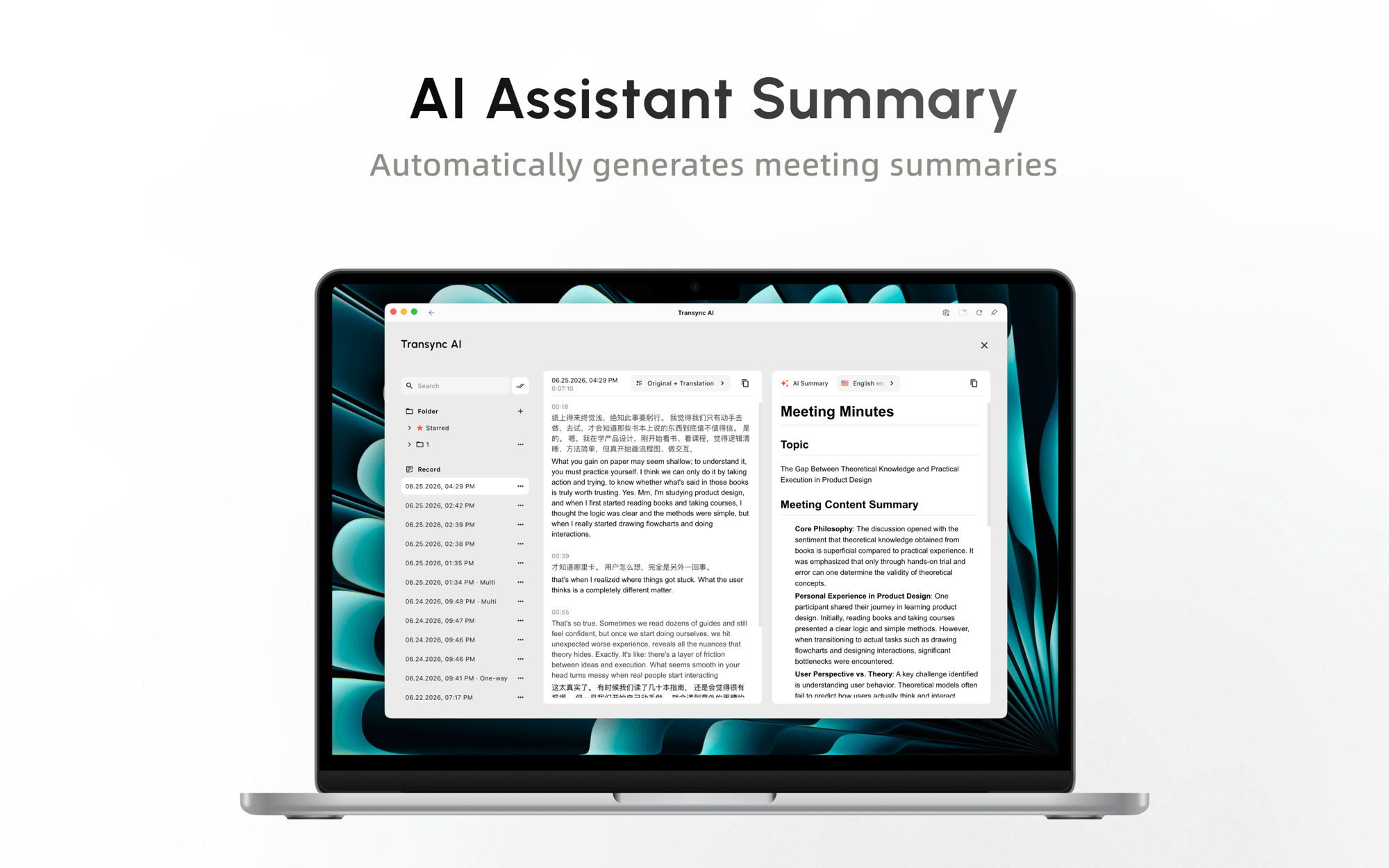
อาจารย์ นอกจากนี้ยังขยายไปสู่การผลิตเนื้อหาได้อีกด้วย การประชุมสดสามารถป้อนข้อมูลเข้าสู่เวิร์กโฟลว์สำหรับคำบรรยาย เสียงแปล การพากย์เสียง การโคลนเสียง การตัดต่อ การส่งออก และการเผยแพร่สื่อ ทีมการตลาด การฝึกอบรม การศึกษา หรือทีมสื่ออาจให้ความสำคัญกับความต่อเนื่องนี้มากกว่าอินเทอร์เฟซการประชุมที่เน้นผู้เข้าร่วมเป็นหลัก.
 เลือกใช้ตามผลลัพธ์ที่ต้องการ หากผลลัพธ์คือ “การตัดสินใจและขั้นตอนต่อไป” กระบวนการทำงานแบบจดบันทึกการประชุมจะมีประสิทธิภาพ แต่หากผลลัพธ์คือ “วิดีโอที่แปลเป็นภาษาต่างๆ” ชุดโปรแกรมสร้างสื่อจะมีข้อได้เปรียบที่ชัดเจนกว่า.
6. ผลิตภัณฑ์ใดเหมาะกับกลุ่มเป้าหมายขนาดใหญ่กว่า?
สำหรับการประชุมทั่วไป ขนาดของผู้ชมอาจหมายถึงห้าหรือสิบคน แต่สำหรับงานอีเวนต์ อาจหมายถึงผู้ชมทั้งในห้องและทางไกล ภาษาเป้าหมายหลายภาษา อุปกรณ์ฟังส่วนบุคคล ผู้ควบคุมด้านเทคนิค และเนื้อหาที่ต้องนำกลับมาใช้ใหม่ในภายหลัง.
การ คุณสมบัติโหมดการนำเสนอ ปล่อยให้ Transync เอไอ ผู้จัดสามารถเปิดใช้งานภาษาเป้าหมายได้สูงสุด 10 ภาษา และเชิญผู้เข้าร่วมผ่านลิงก์ รหัส QR หรือรหัสห้อง ผู้เข้าร่วมแต่ละคนสามารถติดตามได้บนอุปกรณ์ของตนเอง เลือกภาษาที่เปิดใช้งาน และรับคำบรรยายสดหรือการเล่นเสียง (ถ้าต้องการ) ผู้เข้าร่วมไม่จำเป็นต้องติดตั้งซอฟต์แวร์ แต่ต้องลงทะเบียนหรือเข้าสู่ระบบบัญชี พวกเขาสามารถอ่านและฟังได้ แต่ไม่สามารถพูดแทรกในระหว่างการนำเสนอของผู้จัดได้.
นี่หมายความว่าการเข้าถึงของผู้ชมจะไม่จำกัดเฉพาะกลุ่มอีกต่อไป อาจารย์ ในการเปรียบเทียบนี้ ความแตกต่างที่เหลืออยู่คือความลึกของขั้นตอนการทำงาน. Transync เอไอ นำเสนอทางเลือกที่มีต้นทุนต่ำและสามารถดำเนินการเองได้ สำหรับการนำเสนอ การฝึกอบรม การบรรยาย การประชุม การท่องเที่ยว และกิจกรรมชุมชน. อาจารย์ จะมีประสิทธิภาพมากขึ้นเมื่อกิจกรรมสดต้องต่อเนื่องไปยังขั้นตอนการสร้างคำบรรยายที่มีตราสินค้า การแก้ไขคำบรรยาย การพากย์เสียง สื่อที่แปลแล้ว การบูรณาการการออกอากาศ และขั้นตอนการเผยแพร่.
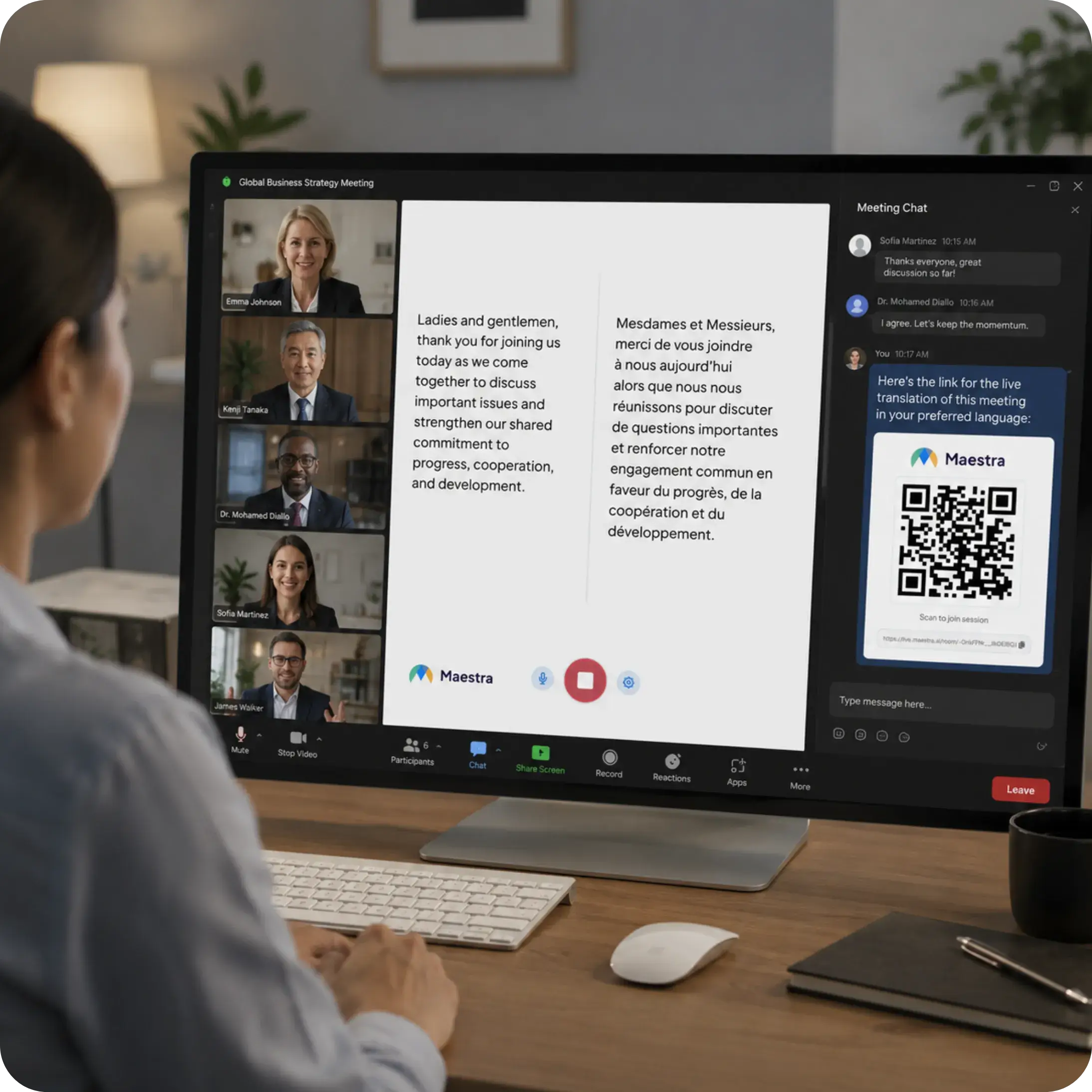
สำหรับงานสำคัญหรือกิจกรรมสาธารณะ ควรทดสอบไมโครโฟนของสถานที่จัดงาน เครือข่าย การลงทะเบียนผู้ชม ภาษาที่เปิดใช้งาน การเล่นเสียง อุปกรณ์ของผู้เข้าร่วม และการคำนวณการใช้งาน โหมดการนำเสนออยู่ในช่วงเบต้าในขณะนี้ และ Transync เอไอ รูปแบบการบริโภคจะเปลี่ยนแปลงไปตามขนาดของกลุ่มเป้าหมายสูงสุดและจำนวนภาษาเป้าหมาย.
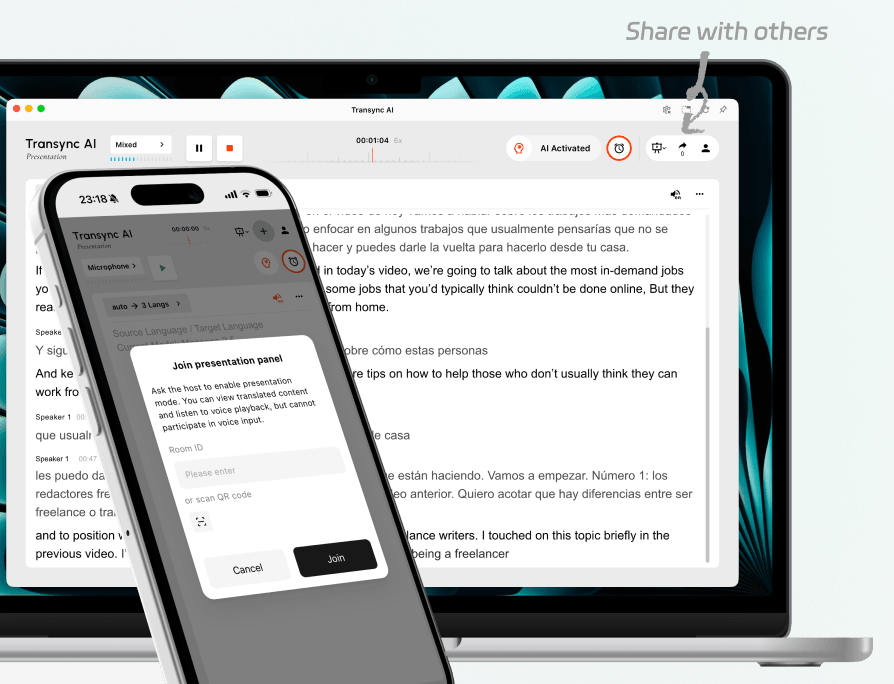
เชิญผู้ชมทั้งที่อยู่ในห้องและที่อยู่ทางไกลเข้าร่วมการนำเสนอสดเดียวกัน.
7. อย่างไร Transync เอไอ และ อาจารย์ เปรียบเทียบราคา?
ราคาเป็นหนึ่งในความแตกต่างที่ชัดเจนที่สุดระหว่าง Transync AI และ Maestra, แต่การเปรียบเทียบต้องใช้วิธีที่ถูกต้อง อาจารย์ หมวดหมู่ แพ็กเกจ 39 Basic แบบเรียลไทม์ของบริษัทนี้มีไว้สำหรับคำบรรยายแบบเรียลไทม์ ส่วนหน้าแสดงราคาอย่างเป็นทางการระบุว่าการแปลแบบเรียลไทม์จะอยู่ในแพ็กเกจ 79 Premium เมื่อเลือกชำระเงินรายปี.
เผยแพร่การเปรียบเทียบราคา
| วางแผน | ราคาที่ประกาศ | รวมการใช้งานที่เกี่ยวข้องกับการประชุมมากที่สุด | หมายเหตุสำคัญ |
|---|---|---|---|
| Transync เอไอ ฟรี | $0 | 40 นาทีหลังจากลงทะเบียน | มีประโยชน์สำหรับการทดสอบขั้นตอนการทำงานของการประชุมจริง |
| Transync เอไอ Personal Premium | $8.99/เดือน | บริการแปลแบบเรียลไทม์ 10 ชั่วโมงตลอดระยะเวลาการเป็นสมาชิก | ประกอบด้วยฟังก์ชันที่เน้นการประชุม เช่น เสียง บริบท บันทึกย่อ และการเข้าถึงข้ามอุปกรณ์ |
| Transync เอไอ องค์กร | $24.99/เดือน ต่อที่นั่ง | สูงสุด 40 ชั่วโมงต่อเดือนต่อที่นั่ง | เพิ่มฟีเจอร์การจัดการองค์กรและองค์ความรู้แบบครบวง |
| อาจารย์ เรียลไทม์เบสกี้ | $39/เดือน เมื่อเลือกชำระเงินรายปี | คำบรรยายแบบเรียลไทม์ 360 นาที | มีคำบรรยายแสดงอยู่ แต่การแปลแบบเรียลไทม์ไม่ได้รวมอยู่ในรายการคุณสมบัติที่เผยแพร่ของแพ็กเกจนี้ |
| อาจารย์ เรียลไทม์พรีเมียม | $79/เดือน เมื่อเลือกชำระเงินรายปี | คำบรรยาย 900 นาที หรือการแปลแบบเรียลไทม์ 180 นาทีต่อภาษา | เพิ่มฟีเจอร์สำหรับทีม การแจ้งเตือน และการสนับสนุนแบบพิเศษ |
| อาจารย์ ธุรกิจแบบเรียลไทม์ | $159/เดือน เมื่อเลือกชำระเงินรายปี | ใช้เวลาแปล 360 นาทีต่อภาษา หรือ 180 นาทีสำหรับการพากย์เสียงต่อภาษา | เพิ่มฟีเจอร์การแชร์เซสชันและคำศัพท์ที่ครอบคลุมมากขึ้น |
| อาจารย์ ธุรกิจแบบเรียลไทม์พลัส | $359/เดือน เมื่อเลือกชำระเงินรายปี | ใช้เวลาแปล 900 นาทีต่อภาษา หรือ 450 นาทีสำหรับการพากย์เสียง | ออกแบบมาเพื่อรองรับปริมาณงานที่สูงและการทำงานเป็นทีม |
แหล่งที่มา: Transync เอไอ หน้าแสดงราคาอย่างเป็นทางการ และ อาจารย์ หน้าแสดงราคาอย่างเป็นทางการ. ตรวจสอบเมื่อเดือนสิงหาคม 2569.
ความแตกต่างของราคานั้นหมายความว่าอย่างไรในทางปฏิบัติ?
โดยใช้อัตราต่อบุคคลที่เผยแพร่ไว้, Transync เอไอ เบี้ยประกันภัยส่วนบุคคลถูกกว่า $70.01 ต่อเดือน อาจารย์ อัตราค่าบริการรายปีที่แสดงของ Real-Time Premium ทำให้ราคาค่าบริการรายเดือนโดยประมาณต่ำกว่าที่คาดไว้ประมาณ 88.6%.
หากผู้ใช้ใช้เวลาแปลทั้งหมดที่ระบุไว้, Transync เอไอ คิดเป็นเงินประมาณ 0.015 ต่อนาทีที่รวมอยู่ในแพ็กเกจ ในขณะที่ **Maestra** Premium คิดเป็นเงินประมาณ 0.439 ต่อนาทีสำหรับการแปลแบบเรียลไทม์ต่อภาษา จากการคำนวณอย่างแคบๆ นี้, Transync เอไอ ให้จำนวนนาทีการแปลที่รวมอยู่ในแพ็กเกจมากกว่าถึงประมาณ 29 เท่าต่อเงินที่จ่ายไป.
การเปรียบเทียบราคานี้ของ Transync AI และ Maestra ไม่ได้หมายความว่าแผนทั้งสองเหมือนกันทุกประการ. อาจารย์ แพ็กเกจนี้รวบรวมสภาพแวดล้อมด้านการแปลภาษา ทีมงาน กิจกรรม และการผลิตเนื้อหาที่ครอบคลุมมากขึ้น โดยมีการระบุวงเงินสนับสนุนการแปลสำหรับแต่ละภาษา. Transync เอไอ มีเครื่องมือในการผลิตน้อยกว่า แต่ให้คุณค่าที่มากกว่าเมื่อผู้ซื้อต้องการการแปลการประชุมสดเป็นหลัก.
สำหรับบุคคลทั่วไป ที่ปรึกษา ครู พนักงานขาย หรือทีมงานข้ามชาติขนาดเล็ก การจ่ายเงินสำหรับฟังก์ชันการทำงานด้านกิจกรรมและสื่อที่ไม่ได้ใช้งานนั้นแทบจะไม่คุ้มค่าเลย สำหรับทีมงานด้านเนื้อหาที่ต้องซื้อเครื่องมือแยกต่างหากสำหรับคำบรรยาย การแปล การพากย์เสียง และการเข้าถึงของผู้เข้าร่วมงาน การใช้งานฟังก์ชันที่ครอบคลุมกว่านั้นจะคุ้มค่ากว่า อาจารย์ การสมัครสมาชิกอาจรวมเวิร์กโฟลว์หลายอย่างเข้าด้วยกัน.
คุณควรเลือกผลิตภัณฑ์ใด?
การเลือกระหว่าง Transync AI และ Maestra วิธีนี้จะทำได้ง่ายที่สุดหากได้เขียนรายละเอียดประสบการณ์จริงที่ต้องการและผลลัพธ์ที่คาดหวังหลังการประชุมลงไปก่อน.
เลือก Transync เอไอ เมื่อคุณต้องการ:
- มีการประชุมแบบสองทางหลายภาษาบ่อยครั้ง.
- มีคำบรรยายสองภาษาปรากฏระหว่างการสนทนา.
- ระบบจะอ่านเสียงที่แปลแล้วให้ผู้เข้าร่วมฟัง.
- เครื่องมือแบบสแตนด์อโลนที่ใช้งานได้กับแพลตฟอร์มการประชุมและอุปกรณ์ต่างๆ.
- คำสำคัญและบริบทสำหรับชื่อหรือภาษาเฉพาะทาง.
- บันทึกการประชุม AI หลังการโทร.
- จุดเริ่มต้นที่มีต้นทุนต่ำกว่าสำหรับบุคคลหรือทีม.
เลือก อาจารย์ เมื่อคุณต้องการ:
- การสัมมนาออนไลน์ การประชุม หรือกิจกรรมแบบผสมผสานหลายภาษา.
- ผู้เข้าร่วมงานสามารถเข้าถึงได้ผ่านลิงก์หรือรหัส QR.
- การถ่ายทอดสดที่ต่อมาได้ถูกแปลเป็นสื่อต่างๆ.
- คำบรรยาย, การพากย์เสียง, การคัดลอกเสียง และการแปลภาษา รวมอยู่ในสภาพแวดล้อมเดียว.
- การจัดรูปแบบเฉพาะตัว การผสานรวมการออกอากาศ หรือการส่งมอบที่เน้นกิจกรรม.
- กระบวนการทำงานของทีมที่ครอบคลุมมากขึ้น ทำให้ราคาสูงขึ้นอย่างสมเหตุสมผล.
แบบทดสอบห้านาทีสำหรับ Transync เอไอ และ อาจารย์
ทดลองใช้งานการประชุมสั้นๆ แบบเดียวกันบนทั้งสองผลิตภัณฑ์ก่อนสมัครใช้งาน เป็นการทดลองแบบควบคุม Transync AI และ Maestra การทดสอบนี้ช่วยป้องกันไม่ให้สภาวะเสียงที่แตกต่างกันส่งผลต่อผลลัพธ์.
- ใช้แพลตฟอร์มการประชุมจริง ชุดหูฟัง ลำโพง และเครือข่าย.
- ควรมีข้อมูลผู้พูดสองคน การแทรกแซงที่เป็นธรรมชาติ สำเนียงการพูด คำศัพท์เฉพาะของผลิตภัณฑ์สามคำ ราคา และกำหนดเวลาส่งงาน.
- วัดระยะเวลาหน่วงก่อนที่ข้อความและเสียงที่แปลแล้วจะใช้งานได้.
- ตรวจสอบว่าชื่อ ตัวเลข และคำศัพท์เฉพาะต่างๆ ยังคงเหมือนเดิมหลังการแปลหรือไม่.
- ขอให้ผู้เข้าร่วมคนที่สองประเมินความชัดเจนของคำบรรยายและคุณภาพเสียงพูด.
- เปรียบเทียบเวลาในการตั้งค่า และดูว่าผู้ใช้รายอื่นจำเป็นต้องมีบัญชี ลิงก์ หรือเส้นทางเสียงพิเศษหรือไม่.
- ตรวจสอบบันทึกการสนทนา สรุป การบันทึก และตัวเลือกการส่งออกหลังจากจบการสนทนา.
หากกรณีการใช้งานคือการจัดงาน ให้ทำการทดสอบซ้ำโดยใช้อุปกรณ์ของผู้เข้าร่วมงานหลายเครื่องและช่องภาษาหลายช่อง การทดสอบด้วยแล็ปท็อปส่วนตัวไม่สามารถพิสูจน์ได้ว่าขั้นตอนการทำงานของงานอีเวนต์จะประสบความสำเร็จในสถานที่จัดงาน.
Transync เอไอ และ อาจารย์ คำถามที่พบบ่อย
เป็น Transync เอไอ ถูกกว่า อาจารย์ สำหรับการแปลสด?
ใช่ครับ อ้างอิงจากราคาที่เปิดเผยต่อสาธารณะซึ่งตรวจสอบเมื่อเดือนสิงหาคม 2569. Transync เอไอ แพ็กเกจ Personal Premium มีราคา 8.99 ดอลลาร์ต่อเดือน โดยใช้งานได้ 10 ชั่วโมง อาจารย์ แพ็กเกจ 79 Premium มีบริการแปลแบบเรียลไทม์ โดยให้เวลาใช้งาน 180 นาทีต่อภาษา เมื่อเลือกชำระเงินรายปี แพ็กเกจต่างๆ มีคุณสมบัติแตกต่างกัน ดังนั้นผู้ซื้อควรเปรียบเทียบคุณสมบัติที่ต้องการรวมถึงราคาด้วย.
แบบไหนเหมาะกว่าสำหรับการประชุมในชีวิตประจำวัน?
Transync เอไอ เหมาะอย่างยิ่งสำหรับการประชุมทางไกลที่จัดขึ้นเป็นประจำ ซึ่งผู้เข้าร่วมต้องการคำบรรยายสองภาษา การแปลคำพูด การเตรียมคำศัพท์ และบันทึกย่อ เวิร์กโฟลว์ของผู้เข้าร่วมที่ใช้งานได้บนหลายแพลตฟอร์มและราคาเริ่มต้นที่ต่ำกว่า ช่วยลดอุปสรรคในการใช้งานในชีวิตประจำวัน.
อันไหนเหมาะกว่าสำหรับงานประชุมและสัมมนาออนไลน์?
Transync เอไอ เป็นตัวเลือกที่ยอดเยี่ยมสำหรับการบริการตนเอง เมื่อผู้จัดงานเพียงคนเดียวต้องการแจกจ่ายคำแปลได้มากถึง 10 ภาษาผ่านลิงก์ รหัส QR หรือรหัสห้อง ผู้ชมสามารถรับคำบรรยายสดและเล่นเสียงได้บนอุปกรณ์ของตนเองโดยไม่ต้องติดตั้งซอฟต์แวร์ แม้ว่าจะต้องมีบัญชีผู้ใช้ก็ตาม.
อาจารย์ การเลือกวิธีนี้จะยิ่งมีประสิทธิภาพมากขึ้นเมื่อกิจกรรมนั้นเป็นโครงการผลิตสื่อที่ต้องการการนำเสนอแบบกำหนดเอง การบูรณาการการออกอากาศ การตัดต่อคำบรรยาย การพากย์เสียง การแปล และการเผยแพร่หลังจบงาน การตัดสินใจจะไม่ขึ้นอยู่กับการเข้าถึงของผู้ชมเพียงอย่างเดียวอีกต่อไป.
ผลิตภัณฑ์ทั้งสองสามารถแปลคำพูดได้หรือไม่?
ใช่ ในขั้นตอนการทำงานที่พวกเขารองรับ. Transync เอไอ มีระบบเล่นเสียงด้วย AI และวิธีการกำหนดเส้นทางเสียงที่แปลแล้วระหว่างการโทร. อาจารย์ ให้บริการเสียงแปลแบบเรียลไทม์ และมีเสียง AI ที่เลือกหรือจำลองมาใช้สำหรับงานถ่ายทอดสดและสื่อต่างๆ ทดสอบภาษา แพลตฟอร์ม แผน และเส้นทางเสียงอย่างแม่นยำก่อนการประชุมสำคัญ.
ผลิตภัณฑ์ใดให้ผลลัพธ์หลังการประชุมที่ดีกว่า?
ขึ้นอยู่กับผลลัพธ์ที่ต้องการ. Transync เอไอ สอดคล้องกับบันทึกการประชุมและบันทึกย่อที่นำไปปฏิบัติได้จริงมากกว่า. อาจารย์ เป็นการนำเสนอเส้นทางที่ครอบคลุมมากขึ้น ตั้งแต่การถ่ายทอดสดไปจนถึงคำบรรยาย การพากย์เสียง การแปลเสียง และสื่อสิ่งพิมพ์.
ทำ ของมาเอสตรา แผนแบบเรียลไทม์ $39 รวมการแปลด้วยหรือไม่?
หน้าแสดงราคาปัจจุบันระบุแพ็กเกจ Basic ราคา 39 บาท พร้อมคำบรรยายแบบเรียลไทม์ ส่วนการแปลแบบเรียลไทม์นั้นมีอยู่ในแพ็กเกจ Premium ราคา 79 บาท ผู้ซื้อควรตรวจสอบหน้าแสดงราคาล่าสุด เนื่องจากเงื่อนไขและตัวเลือกการเรียกเก็บเงินอาจมีการเปลี่ยนแปลงได้.
การตัดสินใจขั้นสุดท้าย
เลือก Transync เอไอ เมื่อการแปลต้องรองรับการสนทนาหลายภาษาในชีวิตประจำวัน หรือการนำเสนอแบบจัดการตนเองแบบหนึ่งต่อหลายคน ระบบนี้ผสานรวมเครื่องมือการประชุมสองภาษาเข้ากับการเข้าถึงของผู้ชมผ่านลิงก์ รหัส QR หรือรหัสห้อง ในขณะที่ยังคงรักษาราคาค่าเข้าชมที่ประกาศไว้ต่ำกว่าอย่างมาก.
เลือก อาจารย์ เมื่อกิจกรรมสดต้องดำเนินต่อไปในกระบวนการทำงานด้านสื่อที่กว้างขึ้น ราคาที่สูงขึ้นจะรองรับการผลิตคำบรรยาย การพากย์เสียง การโคลนเสียง การนำเสนอที่มีตราสินค้า การแปล และเนื้อหาที่เผยแพร่แล้วที่สามารถนำกลับมาใช้ใหม่ได้.
ข้อสรุปที่ยุติธรรมที่สุดคือ Transync เอไอ นำเสนอการประชุมและการนำเสนอแบบบริการตนเองที่มีคุณค่ามากยิ่งขึ้น อาจารย์ นำเสนอสภาพแวดล้อมการผลิตสื่อที่ครอบคลุมมากขึ้น ตั้งแต่การจัดงานอีเว้นท์ไปจนถึงสื่อต่างๆ.
หากคุณต้องการประสบการณ์รุ่นถัดไป Transync เอไอ นำทางด้วยการแปลแบบเรียลไทม์ที่ขับเคลื่อนด้วย AI ซึ่งช่วยให้การสนทนาไหลลื่นอย่างเป็นธรรมชาติ คุณสามารถ ทดลองใช้ฟรี ตอนนี้.
