

Comparez 7 outils de traduction vocale pour les réunions, les voyages, les événements, les médias et le développement. Découvrez comment tester la précision, la qualité vocale, les sous-titres et l'efficacité.
UN traducteur vocal Ce système analyse la parole et la convertit en texte, en audio ou en les deux, permettant ainsi à deux personnes de converser en face à face, à une équipe internationale de suivre une visioconférence, de diffuser des sous-titres lors d'un événement ou d'intégrer la synthèse vocale à une application personnalisée.
Les produits de cette catégorie peuvent sembler similaires sur une page de présentation, mais ils ne sont pas interchangeables. Un traducteur de voyage est optimisé pour des échanges mobiles rapides. Une plateforme événementielle doit pouvoir gérer simultanément de nombreux participants. Un outil de réunion nécessite des sous-titres à faible latence, la traduction vocale, le routage audio, des contrôles terminologiques et un enregistrement utile après l'appel.
Ce guide destiné aux acheteurs compare sept options et propose un cadre de test pratique pour choisir la bonne.
Que fait concrètement un traducteur vocal ?
Un traducteur vocal effectue généralement quatre tâches liées entre elles :
- Reconnaissance vocale : Il identifie les mots dans un enregistrement audio, qu'il soit en direct ou enregistré.
- Traduction linguistique : Il convertit le sens dans une langue cible.
- Affichage du texte : Il peut afficher le discours original et sa traduction sous forme de sous-titres.
- Synthèse vocale : Il peut lire la traduction à voix haute en utilisant une voix artificielle.
Les produits avancés peuvent également faire la distinction entre deux langues, utiliser le contexte thématique, créer des transcriptions, résumer les discussions et acheminer l'audio traduit vers les réunions en ligne.
La qualité de l'expérience ne se limite pas à la précision de la traduction. La vitesse, la qualité du microphone, la conception des sous-titres, le rendu vocal naturel, la compatibilité avec les réunions et le respect de la vie privée sont autant d'éléments qui influencent l'utilisation de l'outil lors d'une conversation réelle.
Comparatif des traducteurs vocaux : 7 outils en un coup d’œil
Ce tableau compare le positionnement des produits et les flux de travail types. Les fonctionnalités, les langues prises en charge et les forfaits peuvent changer ; veuillez donc vérifier les informations importantes sur chaque site web officiel.
| Outil | Cas d'utilisation principal | Sous-titres en direct | Discours traduit | Notes ou transcriptions | Meilleure correspondance |
|---|---|---|---|---|---|
| Transync AI | Réunions, appels et conversations en personne | Sous-titres bilingues | Oui, avec plusieurs options vocales | Notes et transcriptions de réunions sur l'IA | Les personnes et les équipes qui souhaitent un flux de travail de réunion prêt à l'emploi |
| Talkao | Voyages, traduction mobile et apprentissage des langues | Dépendant de l'application | Oui | Ce n'est pas un axe de recherche principal. | Les consommateurs qui ont besoin de fonctionnalités de traduction mobile étendues |
| Mondial | Conférences, webinaires et grandes réunions | Oui | Oui | Transcriptions et résumés | Les organisateurs de l'événement assurent la traduction pour de nombreux participants. |
| Soniox | API vocales pour développeurs et produits personnalisés | Fonctionnalités API/application | Fonctionnalités TTS/API | Dépend de l'implémentation | Les équipes produit développent leur propre expérience vocale |
| Maestra | Localisation de contenus multimédias, doublage, webinaires et événements | Oui | Oui | Flux de travail médias et transcription | Des équipes de contenu traduisent les médias en direct et enregistrés |
| DeepL | Textes, documents, contenus linguistiques d'entreprise et utilisations vocales sélectionnées | dépendant du produit | dépendant du produit vocal | Flux de travail de prise de notes de réunion non essentiel | Organisations combinant besoins de traduction écrite et orale |
| Google Traduction | Traduction gratuite du quotidien | Pas de première rencontre | Lecture audio de la traduction | Non | Voyages rapides et tâches de traduction personnelle |
Quel traducteur vocal convient à votre tâche ?
Pour les réunions d'affaires multilingues
Les conversations d'affaires exigent bien plus qu'une simple traduction de phrases. Les participants doivent pouvoir saisir le sens global des idées, vérifier les noms et les numéros, entendre la réponse traduite et se souvenir des décisions prises après l'appel.
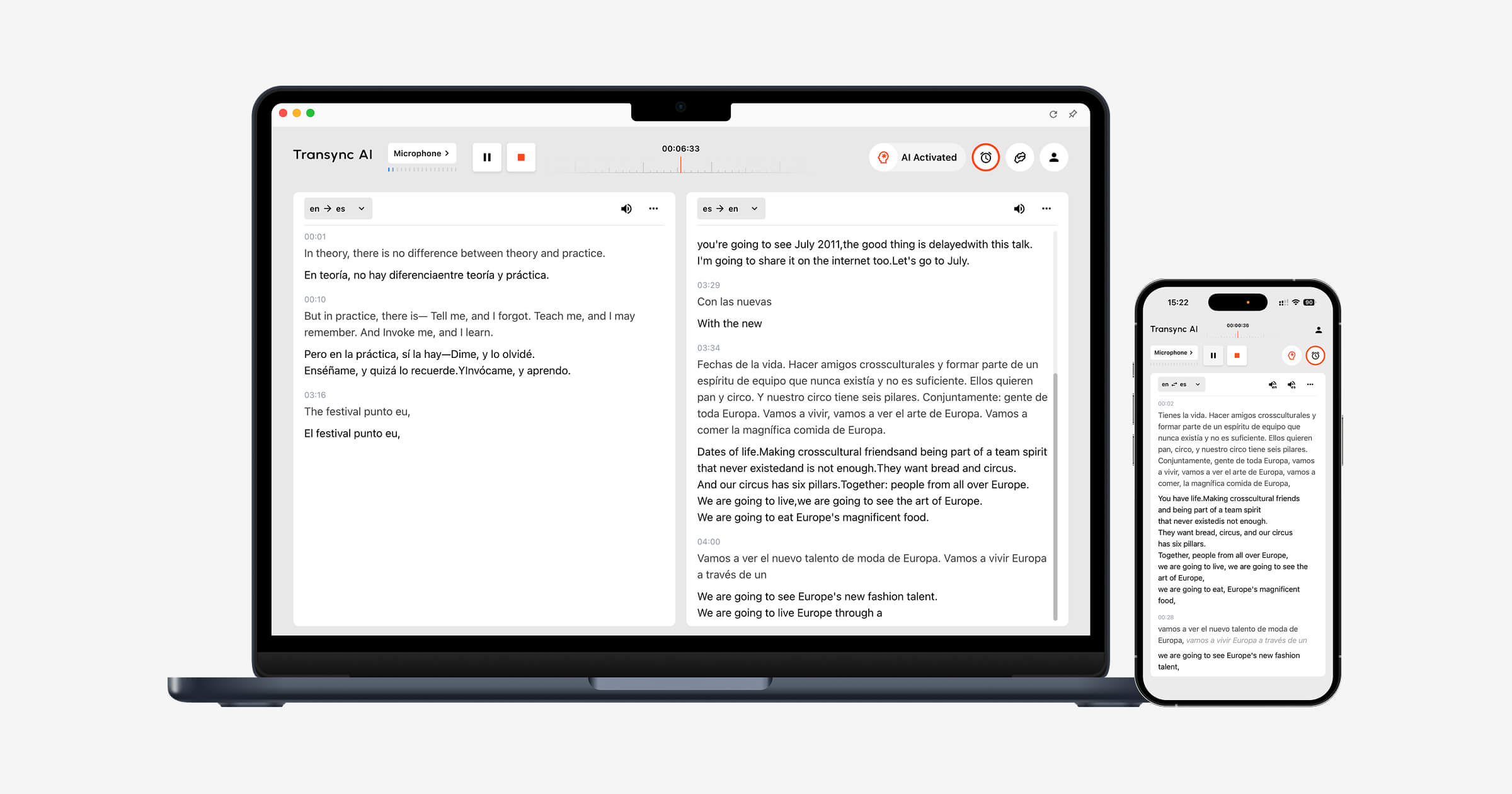
Transync AI est conçu autour de ce flux de travail. outil de traduction en temps réel affiche le discours original et la traduction avec une faible latence, tandis que Traducteur vocal IA énonce à voix haute le contenu traduit.
Le Fonctionnalité de prise de notes de réunion par IA crée une transcription et des notes structurées permettant aux utilisateurs de consulter la conversation et d'y donner suite ultérieurement.
 Pour les voyages et les conversations informelles
 Pour les voyages et les conversations informelles
Les voyageurs peuvent avoir besoin d'aide pour s'orienter, trouver un hôtel, un restaurant ou faire des achats. La traduction par caméra, la traduction de texte, l'accès mobile et la relecture de phrases simples peuvent s'avérer plus utiles que les comptes rendus de réunion.
Talkao Elle s'articule autour de la traduction mobile, des fonctionnalités de voyage, des outils de caméra et de réalité augmentée, et de l'apprentissage des langues. Google Traduction est une option gratuite et bien connue pour la traduction quotidienne de textes, d'images, de sites web et de messages vocaux.
 Transync AI Il peut prendre en charge des conversations orales en face à face plus longues, mais il ne propose pas de mode hors ligne, de reconnaissance d'images ni de traduction de documents textuels uniquement.
Pour les conférences et les grands événements
L'organisateur d'un événement doit assurer la traduction pour de nombreux participants sans créer de configuration complexe pour chacun. L'accès via un lien ou un code QR peut s'avérer plus important que les commandes individuelles de la réunion.
Mondial Ce système est conçu pour les réunions, les conférences, les webinaires et les événements hybrides, avec sous-titrage et traduction audio pour les participants. Il est parfaitement adapté aux interventions devant un large public.
 Choisir Transync AI lorsque des personnes ou des équipes ont besoin d'un interprète personnel pour des appels réguliers. Choisissez Mondial lorsque la distribution à un large public lors d'un événement constitue le principal défi.
Pour la localisation vidéo, audio et multimédia
La traduction multimédia nécessite le montage des sous-titres, l'enregistrement des voix off, le doublage, le minutage, la transcription et l'exportation. Ces tâches de production diffèrent du simple suivi d'une conversation en direct.
Maestra Il prend en charge la traduction multimédia, le sous-titrage, le doublage, les webinaires et le contenu en direct. Son flux de production plus complet pourrait constituer un choix plus judicieux pour les éditeurs et les équipes de contenu.
 Pour un appel commercial international ou une réunion interne, Transync AI offre une expérience plus ciblée, articulée autour du sous-titrage en direct, de la traduction vocale, du contexte et des comptes rendus de réunion.
Pour les applications personnalisées et les produits vocaux
Les développeurs ont généralement besoin d'API, de contrôles de latence, d'une infrastructure basée sur l'utilisation et d'une flexibilité d'intégration plutôt que d'une interface finie.
Soniox offre des fonctionnalités de conversion de la parole en texte, de traduction et de synthèse vocale pour les équipes techniques qui développent des produits personnalisés.
 DeepL Fournit des API et des outils linguistiques d'entreprise pour le texte, les documents, l'écriture et certains flux de travail vocaux.
 Choisir Transync AI Lorsque les utilisateurs souhaitent commencer la traduction des réunions immédiatement, choisissez une plateforme de développement si l'entreprise prévoit de concevoir, d'intégrer et de maintenir sa propre solution vocale.
Pourquoi ? Transync AI Conçu pour les réunions en direct ?
Transync AI Il combine les étapes de la communication lors d'une réunion multilingue : écouter, lire, répondre et faire le point sur ce qui s'est passé.
Traduction bilingue en temps réel
Le outil de traduction en temps réel Il affiche le discours source et sa traduction côte à côte. Au sein de la paire de langues prise en charge sélectionnée, il peut identifier automatiquement la langue de l'interlocuteur, réduisant ainsi les changements manuels lors des conversations bidirectionnelles.
 Lecture vocale traduite
 Lecture vocale traduite
Le Traducteur vocal IA Convertit le texte traduit en parole audible. Les utilisateurs peuvent choisir différents styles de voix et vitesses selon la situation.
Le fonction de clonage vocal peut produire une lecture traduite avec une voix calquée sur celle de l'utilisateur, permettant ainsi aux présentations, démonstrations, cours et conversations personnelles de sonner plus cohérents avec l'orateur original.
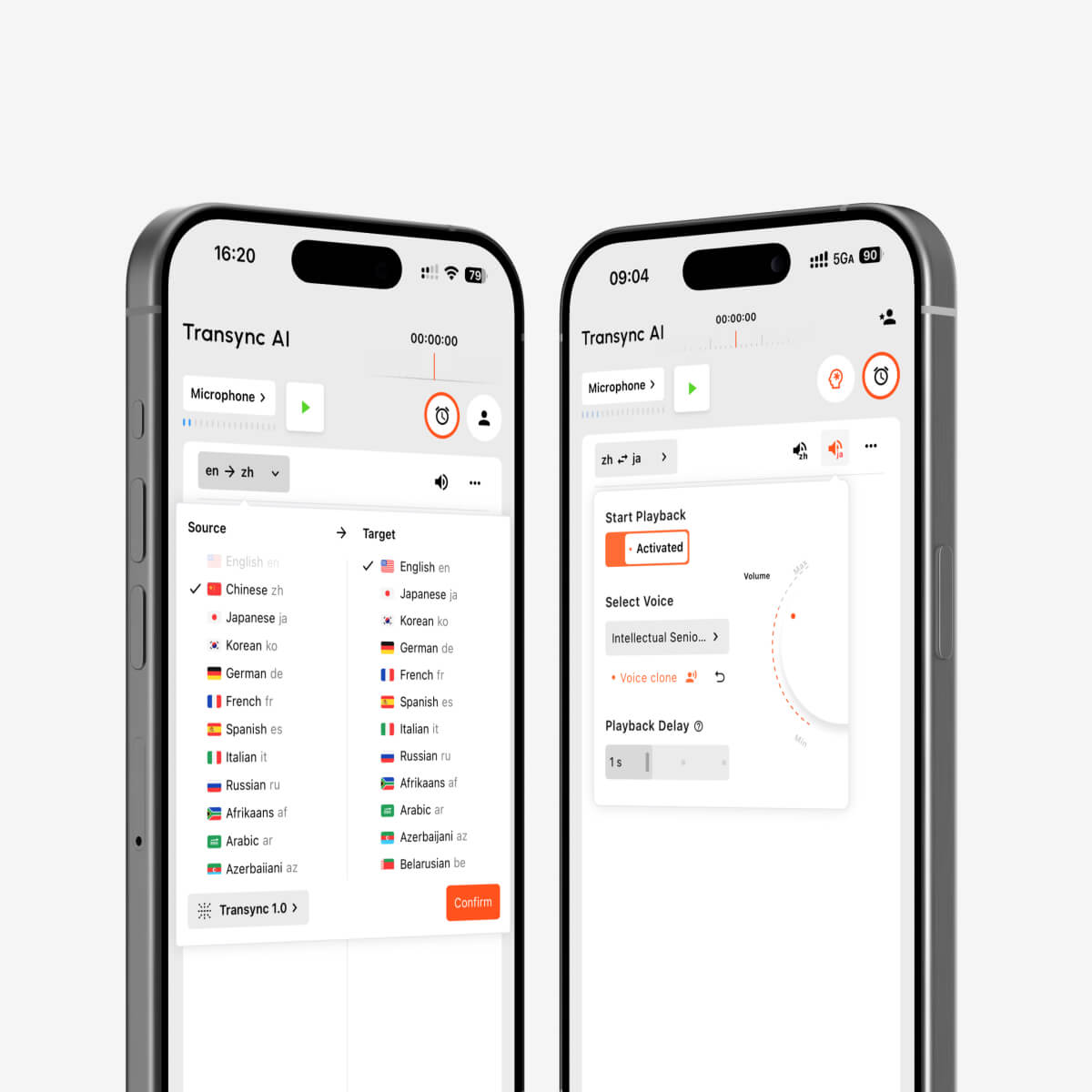
Lecture vocale par IA et clonage vocal pour l'interprétation multilingue en temps réel
Compatibilité des plateformes de réunion
Le fonctionnalité de traduction en direct pour les réunions travaille à côté Zoom, Microsoft Teams, et Google Meet. Transync AI Il s'agit d'un logiciel autonome et non d'un plugin spécifique à une plateforme, compatible avec les flux de travail Web, Windows, macOS, iOS et Android.
Le fonction de partage audio de l'ordinateur capte les voix des participants aux réunions à distance. fonctionnalité de microphone virtuel permet de transmettre la parole traduite lors de l'appel en ligne.
Des sous-titres s'affichent pendant que les utilisateurs travaillent.
Le Fonction de sous-titres bilingues en mode image dans l'image Sur les plateformes compatibles, les sous-titres restent visibles par-dessus les autres applications. L'utilisateur peut ainsi suivre la traduction tout en visionnant une présentation, en faisant la démonstration d'un logiciel ou en prenant des notes.

Sous-titres flottants en temps réel sur les appareils de bureau et mobiles
Mots-clés et contexte
Le Fonctionnalité Mots clés et contexte de l'assistant IA permet aux utilisateurs de saisir des noms, des marques, des acronymes, de la terminologie professionnelle et des informations générales avant une conversation.
Par exemple, une équipe de spécialistes des technologies de la santé pourrait fournir les noms des produits et une description du sujet de la réunion. Un professeur d'université pourrait ajouter le vocabulaire du cours. Ce contexte aide le système à interpréter un discours qui pourrait autrement être ambigu.
 Transcriptions et notes après l'appel
 Transcriptions et notes après l'appel
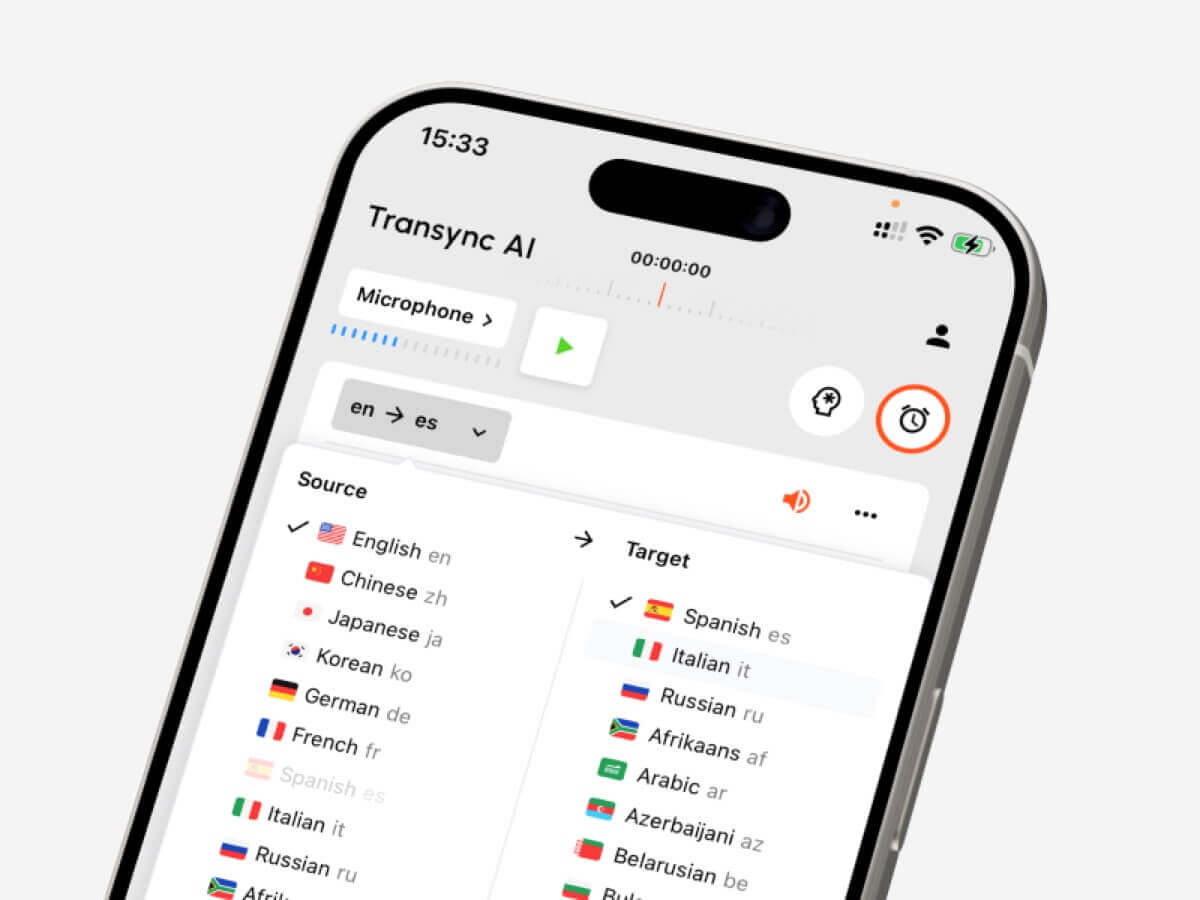
Le Fonctionnalité de prise de notes de réunion par IA transforme la conversation en un enregistrement que les utilisateurs peuvent consulter. guide de gestion des dossiers de traduction explique comment trouver et organiser les sessions précédentes.
 Couverture linguistique étendue
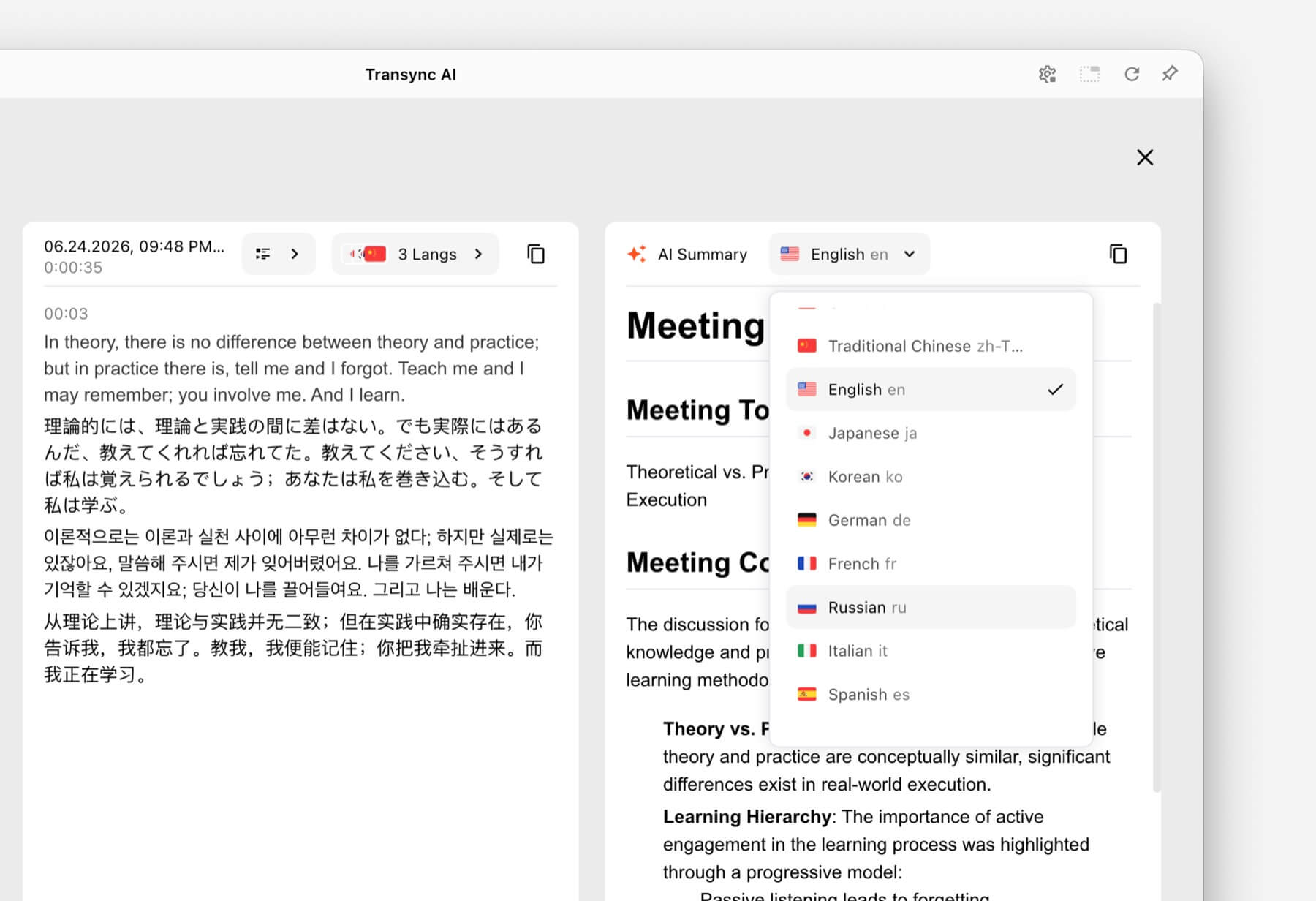 Couverture linguistique étendue
La plateforme prend en charge plus de 60 langues et plus de 1 000 paires de langues. Les utilisateurs doivent confirmer leurs langues source et cible exactes sur la plateforme. page des langues prises en charge avant une réunion importante.
Un test de traducteur vocal en 6 parties
Ne vous fiez pas uniquement à une démonstration du produit. Effectuez un court test basé sur votre cas d'utilisation réel.
Test 1 : Reconnaissance dans un environnement audio réaliste
Utilisez le microphone, la pièce, l'appareil et le réseau prévus pour la conversation. Commencez par une pièce calme, puis ajoutez un bruit de fond normal. Vérifiez si l'outil reconnaît correctement les phrases complètes et les différents locuteurs.
Test 2 : Votre paire de langues exacte
Le nombre total de langues indiquées peut être trompeur. Testez les deux sens de traduction en utilisant les langues et accents régionaux exacts requis.
Test 3 : Noms et vocabulaire spécialisé
Dressez une courte liste de noms de produits, de personnes, d'abréviations et de termes techniques. Comparez le résultat avant et après avoir ajouté du contexte. Cela permettra de déterminer si les règles de terminologie ont un impact concret.
Test 4 : Délai de traduction
Faites dialoguer deux personnes de manière naturelle. Observez si le délai provoque des interruptions ou de la confusion. Un léger délai peut être acceptable lors d'une conférence, mais s'avérer frustrant lors d'une négociation.
Test 5 : Ergonomie des sous-titres et de la voix
Demandez aux participants de suivre la conversation à l'aide des sous-titres, de l'audio et des deux simultanément. Vérifiez la lisibilité, la clarté de la voix, le rythme et la facilité de vérification des détails importants.
Test 6 : Résultats post-conversation
Examinez la transcription et le résumé. Repérez les décisions omises, les noms incorrects et les actions imprécises. Une expérience en direct peut sembler fluide tout en donnant lieu à un compte rendu inexact.
Quels sont les facteurs qui peuvent réduire la précision de la traduction vocale ?
Même un traducteur vocal compétent peut rencontrer des difficultés avec :
- Plusieurs personnes parlent simultanément.
- Un microphone positionné trop loin du haut-parleur.
- Musique forte, écho ou conversations en arrière-plan.
- Une connexion internet instable.
- Abréviations inexpliquées et noms inhabituels.
- Phrases incomplètes ou très ambiguës.
- Alternance rapide de codes entre des langues extérieures à la paire sélectionnée.
Utilisez un microphone de bonne qualité, demandez aux intervenants de prendre la parole à tour de rôle, fournissez le contexte nécessaire et vérifiez les dates, les prix, les quantités et les clauses contractuelles. Pour les discussions d'ordre médical, juridique, critique pour la sécurité ou ayant un caractère contraignant, faites appel à un interprète qualifié ou à un professionnel pour une relecture attentive, le cas échéant.
Comment démarrer une session de traduction vocale
- Ouvrir Transync AI sur un appareil compatible.
- Sélectionnez les deux langues utilisées dans la conversation.
- Choisissez le microphone ou la source audio système appropriée.
- Saisissez la terminologie importante via le Fonctionnalité Mots clés et contexte de l'assistant IA.
- Commencez le outil de traduction en temps réel.
- Vérifiez que les deux panneaux de sous-titres se mettent à jour correctement.
- Activer Traducteur vocal IA lorsque les auditeurs ont besoin d'un discours traduit.
- Utilisez le Fonction de sous-titres bilingues en mode image dans l'image si la traduction doit rester visible au-dessus d'une autre application.
- Pour un appel vidéo, configurez le fonction de partage audio de l'ordinateur et fonctionnalité de microphone virtuel.
- Examinez la transcription via le Fonctionnalité de prise de notes de réunion par IA après la séance.
Effectuez une courte répétition avant un appel important. Les erreurs de routage audio sont plus faciles à corriger avant l'arrivée des autres participants.
FAQ sur le traducteur vocal
Qu'est-ce qu'un traducteur vocal ?
Un traducteur vocal reconnaît la langue parlée et la convertit dans une autre langue. Le résultat peut s'afficher sous forme de sous-titres, de voix traduite, ou les deux. Certains logiciels génèrent également des transcriptions et des résumés.
Quel est le meilleur traducteur vocal pour les réunions en ligne ?
Transync AI est un excellent choix pour une première réunion car il combine traduction bilingue en temps réel, Lecture vocale traduite, sous-titres flottants, le contexte terminologique et Notes de réunion IA.
Le meilleur produit dépend toujours de la paire de langues requise, de l'appareil, de la plateforme de réunion, de la politique de confidentialité et de la durée prévue de la session.
Un traducteur vocal peut-il fonctionner lors d'appels vidéo ?
Oui. Fonctionnalité de traduction en direct pour les réunions Transync AI travaille à côté Zoom, Microsoft Teams, et Google Meet. Il peut fournir des sous-titres en direct et une traduction vocale lors d'appels multilingues.
Peut-il reconnaître automatiquement les deux langues ?
Le Outil de traduction en temps réel de Transync AI peut distinguer la langue du locuteur au sein de la paire de langues prises en charge sélectionnée, réduisant ainsi la nécessité de changer de langue manuellement.
La traduction vocale fonctionne-t-elle hors ligne ?
L'assistance hors ligne varie selon le fournisseur. Transync AI Nécessite une connexion internet et ne propose pas de mode hors ligne. Les voyageurs sont invités à vérifier la disponibilité hors ligne des langues souhaitées directement auprès d'un fournisseur de traduction.
Un discours traduit peut-il sonner comme l'orateur original ?
Le Fonctionnalité de clonage vocal de Transync AI Il est possible de générer une lecture traduite avec une voix calquée sur celle de l'utilisateur. Testez la voix avant de l'utiliser lors d'une présentation importante ou d'un appel client.
Un interprète vocal est-il sûr pour les réunions confidentielles ?
Veuillez consulter les conditions actuelles de chaque fournisseur en matière de confidentialité, de conservation des données et de sécurité. Transync AI Il est indiqué que les données client ne sont pas utilisées par défaut pour l'entraînement de l'IA et que les fichiers audio sont supprimés après traitement. Les organisations peuvent consulter les Centre de confiance pour plus d'informations.
L'IA peut-elle remplacer un interprète humain ?
La traduction automatique est utile dans de nombreuses conversations quotidiennes, éducatives et professionnelles, mais elle ne peut garantir une précision parfaite ni une restitution optimale des nuances culturelles. Les discussions importantes dans les domaines médical, juridique, de la sécurité et contractuel peuvent nécessiter le recours à un interprète qualifié.
Verdict final : Quel traducteur vocal choisir ?
Adapter le produit à la tâche :
- Choisir Talkao ou Google Traduction Pour les voyages rapides et les traductions quotidiennes.
- Choisir Mondial pour les conférences et les événements destinés aux participants.
- Choisir Soniox pour les API de développement et les produits vocaux personnalisés.
- Choisir Maestra pour la localisation des médias, les sous-titres et le doublage.
- Choisir DeepL pour les textes, les documents, les travaux linguistiques d'entreprise et certains flux de travail vocaux.
- Choisir Transync AI pour les réunions multilingues nécessitant des sous-titres bilingues, une traduction vocale, un contexte terminologique et des notes post-appel dans un seul flux de travail.
Un utile traducteur vocal Il ne devrait pas se contenter de générer une phrase traduite. Il devrait s'adapter au contexte, favoriser une prise de parole naturelle, permettre de vérifier facilement les détails importants et préserver les informations dont les participants auront besoin après la conversation.
Si vous voulez une expérience de nouvelle génération, Transync AI ouvre la voie avec une traduction en temps réel, optimisée par l'IA, qui assure un flux naturel des conversations. Vous pouvez essayez-le gratuitement maintenant.
 🤖
🤖