Traductor en tiempo real: 8 formas comprobadas de comunicarse

real-time voice translation, AI meeting translator, live speech translator, bilingual subtitles, instant voice translation

A real time translator helps people understand one another while they are still speaking. Instead of copying text into a translation box and waiting, users can follow a conversation through live subtitles, translated audio, or both.

That difference is important. In a multilingual meeting, even a short delay can interrupt the flow. In a classroom, missing one explanation can make the next topic harder to understand. During travel, a quick spoken response may matter more than a perfectly formatted document.

This problem-solution guide explores eight situations in which real-time translation can help. It also compares seven different tools so you can match the technology to the conversation rather than choosing by language count alone.

What Problem Does a Real Time Translator Solve?

Traditional translation is usually asynchronous: someone writes or records content, sends it for translation, and reads the result later. Real-time translation attempts to complete the process during the live exchange.

The core sequence is:

Hear speech → recognize words → understand context → translate meaning → show or speak the result

A capable system can reduce three common communication problems:

  • Waiting: Participants do not need to pause after every sentence for manual translation.
  • Uncertainty: Bilingual subtitles let users compare the original speech and translation.
  • Lost information: Transcripts and notes can preserve the conversation for later review.

However, products are designed for different jobs. Some focus on travel, some on large events, some on media production, and others on meetings or developer APIs.

8 Situations Where a Real Time Translator Can Help

1. A sales call with an international customer

The problem is not only language. Sales conversations include product names, numbers, objections, and subtle questions. If a key term is translated incorrectly, both sides may leave with different expectations.

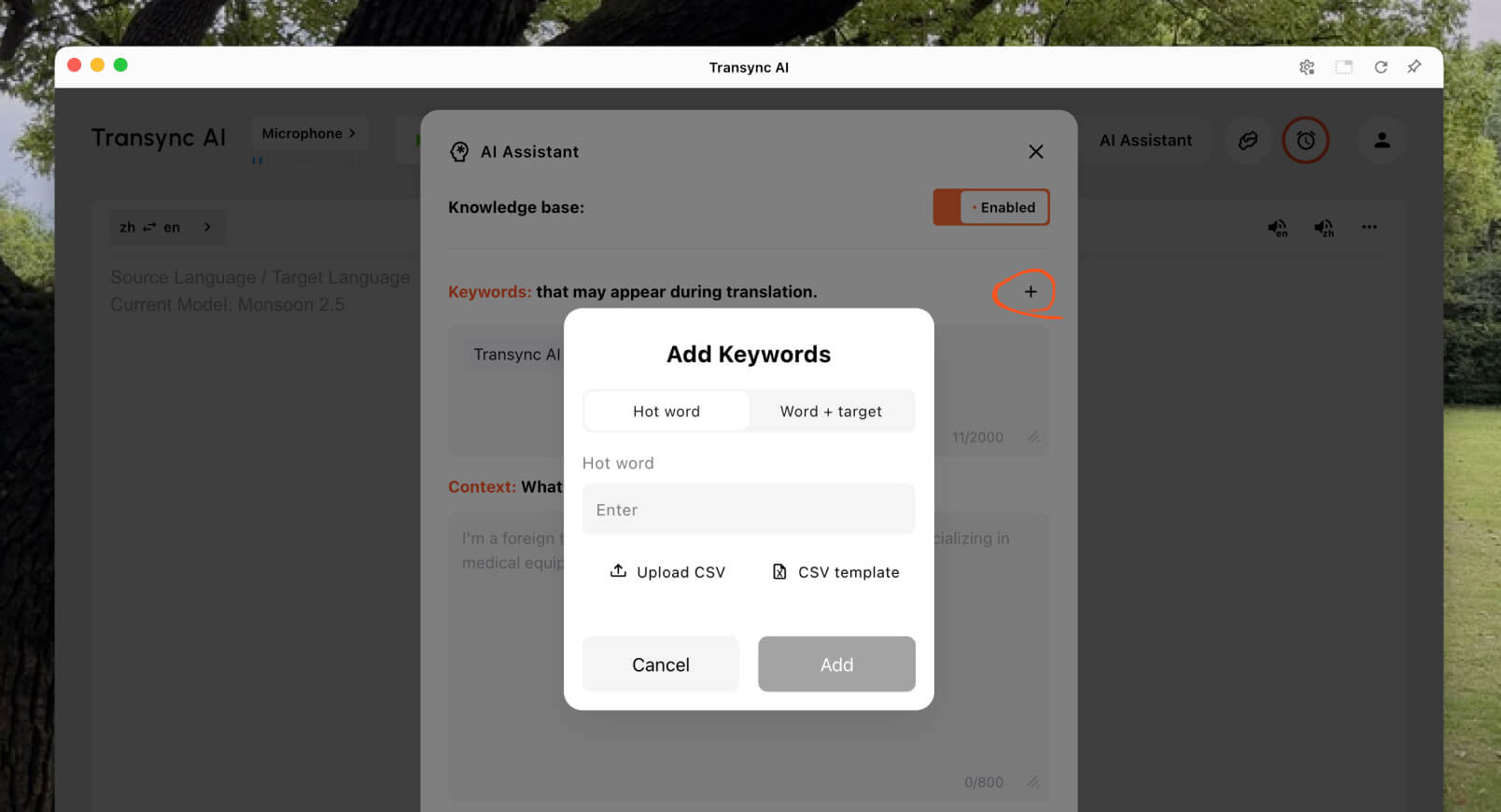
Transync AI addresses this scenario with its herramienta de traducción en tiempo real, which displays original and translated speech with low latency. Before the call, the salesperson can enter product terminology and background information through the AI Assistant Keywords and Context feature.

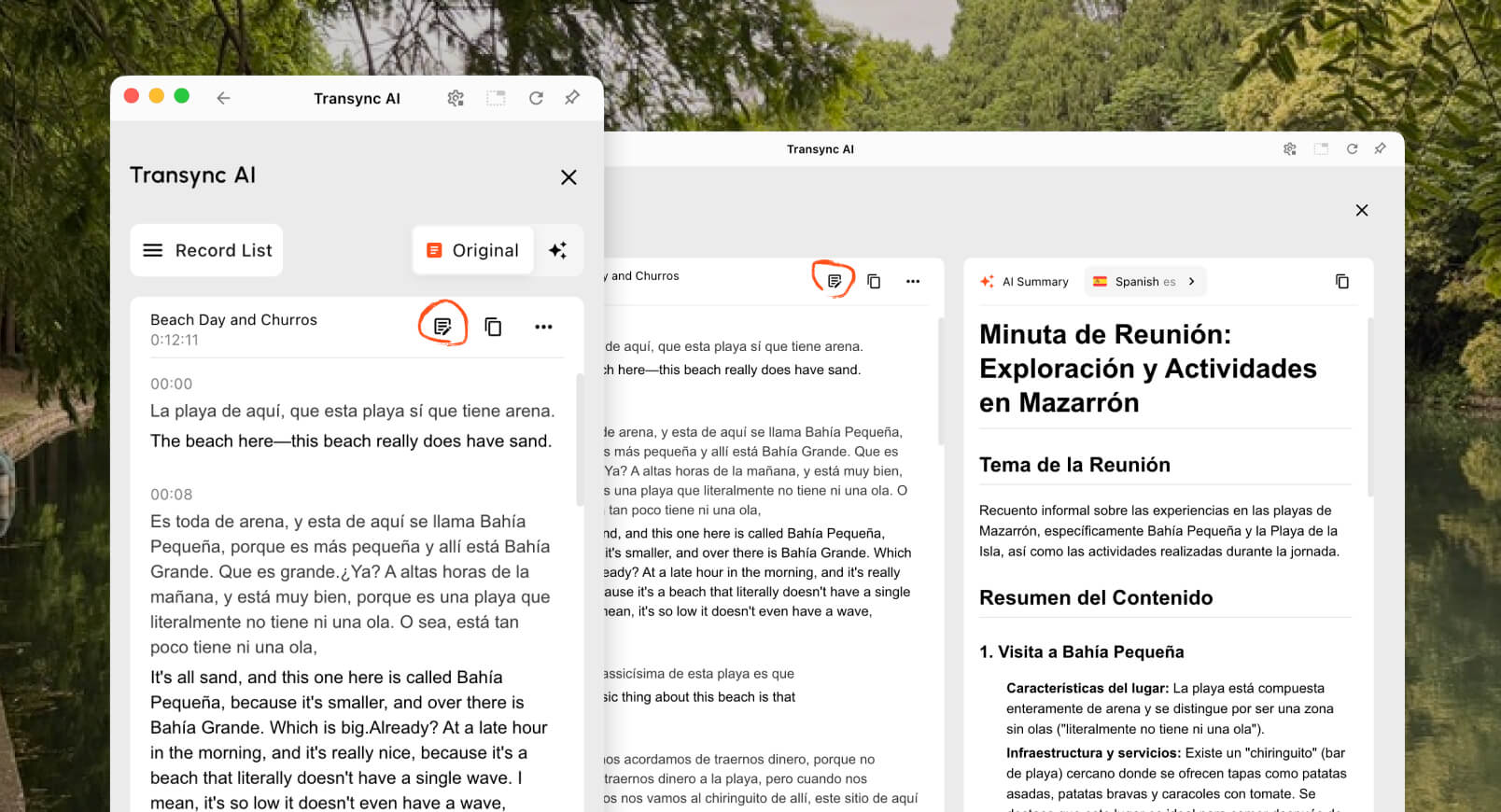
After the discussion, the AI meeting notes feature can provide a transcript and structured record for follow-up.

Modelos de Transync AI v2.0 para traducción en tiempo real2. A multilingual team meeting

Team members need to understand ideas and respond without constantly asking others to repeat themselves. Reading captions alone may be tiring, but voice-only translation can make names and technical terms difficult to verify.

The solution is to combine text and audio. Transync AI provides bilingual subtitles alongside its Traductor de voz con IA. Participants can listen to translated speech while checking the text when precision matters.

For calls on Zoom, Microsoft Teams, o Google Meet, el live meeting translation feature supports a meeting-oriented workflow without being a platform-specific plugin.

Transync AI se integra con Zoom, Google Meet, Microsoft Teams, Slack y Lark para la traducción de reuniones multilingües en tiempo real.

Compatible con las principales plataformas de reuniones en línea para una traducción en tiempo real sin interrupciones.

3. A presentation with slides on screen

Switching between slides and a translation window forces the audience to choose which information to follow. The translation is less useful if it hides behind the presentation.

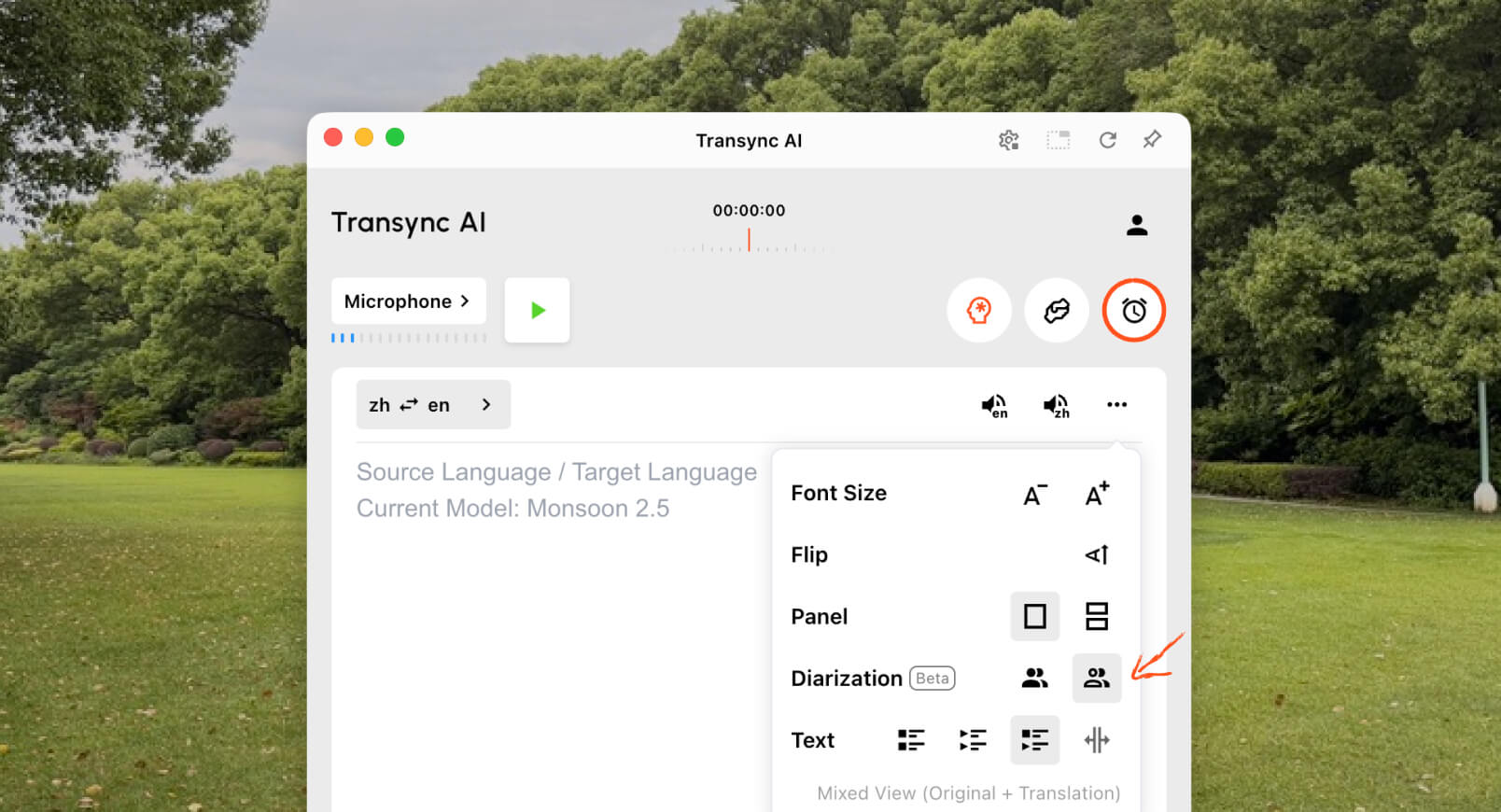
El Picture-in-Picture bilingual subtitles feature keeps original and translated captions visible above other apps on supported platforms. This gives presenters and participants a compact translation view while they continue working with slides, documents, or software demonstrations.

Subtítulos flotantes de Transync AI en ordenadores de escritorio y dispositivos móviles que muestran superposiciones de traducción multilingüe en tiempo real.

Subtítulos flotantes en tiempo real en dispositivos de escritorio y móviles.

4. A lecture in another language

A lecture contains connected ideas, specialist vocabulary, and long explanations. A phrase translator may handle individual sentences but provide no useful record after the class.

Students can use Transync AI to follow bilingual subtitles during the session, add course terms with the AI Assistant Keywords and Context feature, and review the results through the AI meeting notes feature.

Translation should still be checked against course materials, especially when definitions, formulas, or assessment instructions are involved.

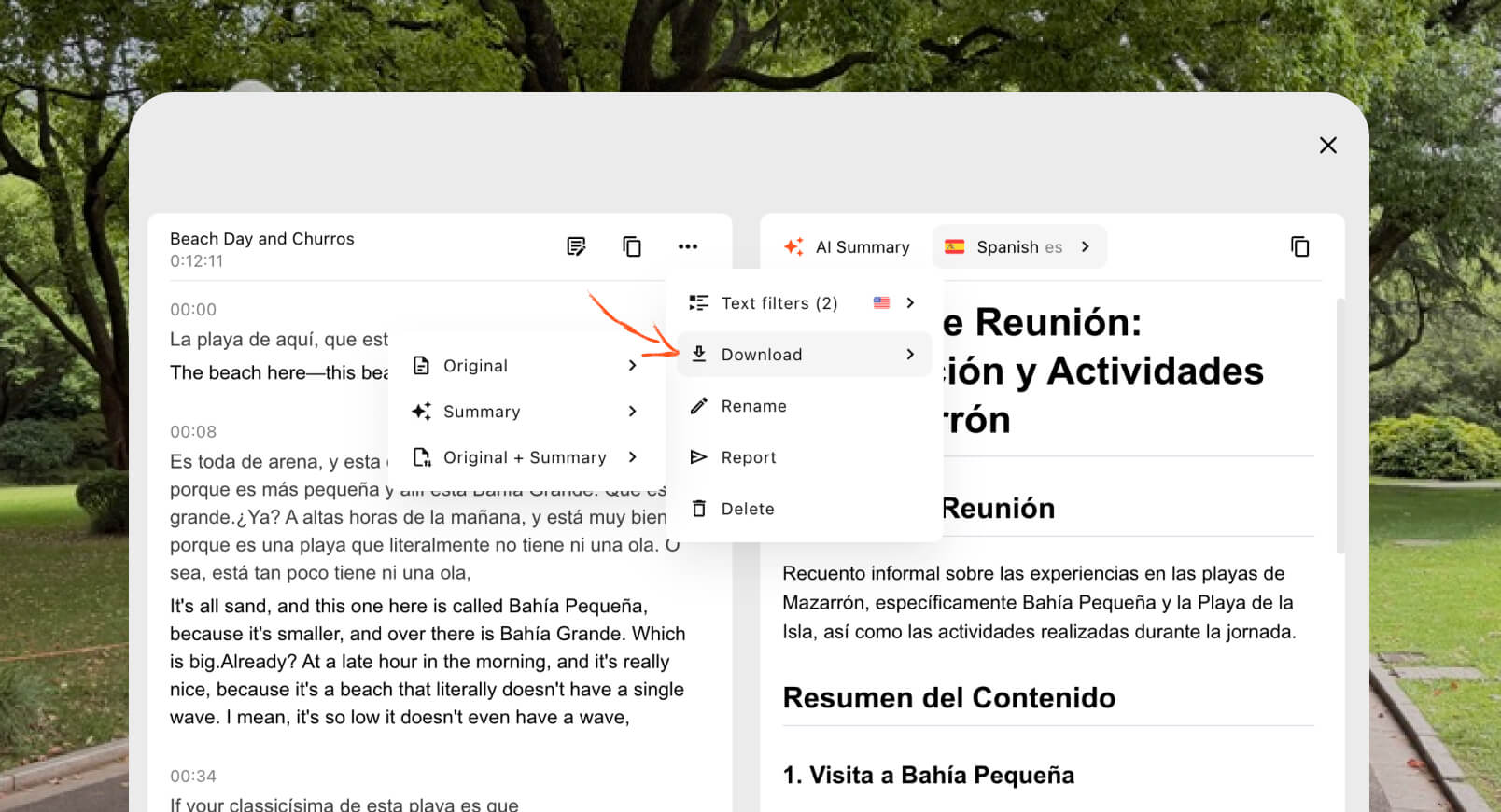
Selección de idioma de las notas de reuniones de IA que muestra compatibilidad con 55 idiomas de resumen en Transync AI.5. A face-to-face conversation while traveling

Travel conversations are usually shorter and more practical. Users may need to ask for directions, explain a dietary restriction, or confirm a booking.

Talkao y Google Translate are positioned for consumer and everyday translation, including mobile tasks beyond live business communication. They may be more suitable when camera translation, quick text translation, or casual travel use is the priority.

Transync AI is useful for longer in-person spoken conversations, but it does not offer offline mode, image recognition, or text-only document translation.

6. A conference with hundreds of attendees

A personal translator and an event translation platform solve different distribution problems. At a large conference, many attendees may need captions or translated audio on their own devices without joining a private team account.

Mundo is designed for meetings and events with attendee access through links or QR codes. For conferences, webinars, and hybrid events, this audience-scale workflow may be more appropriate.

For recurring internal calls or smaller meetings where each participant needs subtitles, voice playback, and notes, Transync AI provides a more personal meeting-first experience.

7. A video or webinar localization project

Media teams often need more than live understanding. They may need editable subtitles, dubbing, transcription, localization, and reusable content after a broadcast.

Maestra is positioned across media translation, subtitles, dubbing, webinars, and live events. That broader production workflow can be a better match for content teams.

When the main need is a two-way business conversation rather than media production, Transync AI offers a narrower combination of live captions, translated speech, context, and post-meeting notes.

8. A company building its own speech product

An end-user app is not the right answer when developers need to embed translation inside a voice agent, customer-support platform, or custom application.

Soniox offers speech-to-text, text-to-speech, and translation capabilities for developer and enterprise use cases.

DeepL also provides APIs and broader text, document, writing, and enterprise language workflows alongside selected voice products.

Elegir Transync AI when the goal is to use a finished real time translator for meetings. Choose an API platform when the goal is to build and maintain a custom translation experience.

Real Time Translator Comparison Table

This comparison focuses on product positioning and typical workflows. Verify current capabilities, language coverage, and purchasing options on each official website.

Herramienta Caso de uso principal Live translated text Voz traducida Post-conversation output Mejor ajuste
Transync AI Reuniones, llamadas y conversaciones en persona. Subtítulos bilingües Yes, with voice options Transcripciones y notas de la reunión de IA Teams and individuals wanting a ready-to-use meeting translator
Talkao Travel, mobile translation, and learning Depende de la aplicación No es un enfoque principal Consumers needing broad mobile translation features
Mundo Conferences, webinars, and events Transcripciones y resúmenes Organizers delivering translation to many attendees
Soniox Speech APIs and custom products Capacidad de API/aplicación Capacidad TTS/API Implementation-dependent Developers building their own voice experience
Maestra Media localization and live content Live voice and dubbing Transcripts and content workflows Media teams working with subtitles, dubbing, or webinars
DeepL Text, documents, enterprise language workflows, and selected voice uses Depende del producto Depende del producto de voz Not a core meeting-notes workflow Organizations with substantial written translation needs
Google Translate Free everyday translation No reunirse primero Reproducción de audio de la traducción No Quick, casual translation of common content

How Does Transync AI Handle Real-Time Translation?

Transync AI is a standalone translation product for web, Windows, macOS, iOS, and Android workflows. It is designed to help users listen, read, respond, and keep a record during multilingual communication.

Selección de modo de traducción unidireccional, bidireccional y multilingüe de Transync AI v2.1Automatic two-way language recognition

Within a selected language pair, the herramienta de traducción en tiempo real can distinguish which language is being spoken. This reduces manual language switching during back-and-forth conversation.

More than 60 supported languages

The platform supports more than 60 languages and over 1,000 language pairs. Always verify the required pair on the supported languages page before an important meeting.

Voice playback and voice cloning

El Traductor de voz con IA speaks translated content aloud using natural voice options. The voice cloning feature can generate translated playback in a voice modeled on the user, helping the output feel more personal in classes, demonstrations, and calls.

Online-meeting audio routing

El computer-audio sharing feature captures voices from other participants during an online meeting. The virtual microphone feature helps send translated speech into the call so others can hear it.

Conversation records and summaries

El AI meeting notes feature creates post-conversation output, while the translation record management guide explains how to access and manage saved records.

What Makes Real-Time Translation More Accurate?

No tool performs identically in every environment. These practices can improve the result:

  1. Use a clear microphone. Position it close enough to capture speech without excessive room noise.
  2. Ask people to take turns. Overlapping speech is harder to recognize and translate.
  3. Use stable internet. Cloud-based speech translation depends on a reliable connection.
  4. Provide context. Add names, brands, acronyms, and technical terms before the session.
  5. Speak in complete thoughts. Extremely fragmented or ambiguous speech can reduce translation quality.
  6. Test the actual language pair. Performance can vary across languages, accents, and topics.
  7. Check critical details. Confirm numbers, dates, legal language, and technical specifications.

For medical, legal, safety-critical, or contractually binding communication, consider a qualified human interpreter or professional review. AI translation can assist communication, but it cannot guarantee that every nuance will be preserved.

How to Choose the Right Real Time Translator

Use a simple three-part test.

Step 1: Define the conversation

Decide whether the main task is travel, a private call, a team meeting, a large event, media production, document work, or product development.

Step 2: Define the required output

Ask whether users need:

  • Translated audio.
  • Bilingual captions.
  • A participant access link.
  • A transcript or summary.
  • Document or image translation.
  • An API for a custom application.

Step 3: Test in real conditions

Run the tool with the actual device, language pair, platform, network, accents, and vocabulary. A short trial in a realistic environment reveals more than a general feature list.

How to Start a Session with Transync AI

  1. Abierto Transync AI on a supported device.
  2. Selecciona los dos idiomas utilizados en la conversación.
  3. Seleccione el micrófono o la fuente de audio del sistema correctos.
  4. Add terminology with the AI Assistant Keywords and Context feature.
  5. Start the herramienta de traducción en tiempo real.
  6. Check the original and translated subtitles.
  7. Enable the Traductor de voz con IA when participants need spoken output.
  8. Utilice el Picture-in-Picture bilingual subtitles feature when working in another app.
  9. Revisar el Notas de la reunión de IA after the session.

For a video call, review the Guía de traducción para reuniones en directo and test audio routing before other participants join.

Real Time Translator FAQ

What is the best real time translator for meetings?

Transync AI is a strong meeting-first option because it combines traducción bilingüe en tiempo real, translated voice playback, subtítulos flotantes, terminology context, and Notas de la reunión de IA. The best option still depends on language pair, meeting platform, privacy rules, and session length.

Can a real time translator work in a video meeting?

Yes. The live meeting translation feature from Transync AI trabaja junto a Zoom, Microsoft Teams, y Google Meet. It can provide live captions and translated voice during multilingual calls.

Can it translate both sides automatically?

El real-time translation tool from Transync AI can distinguish the speaker’s language within the selected supported pair, reducing the need for button switching.

Does real-time translation work offline?

Offline availability depends on the product. Transync AI requires an internet connection and does not offer offline mode. Confirm offline-language availability directly with any consumer app before relying on it during travel.

Is a real time translator free?

Google Translate is a widely accessible free option for casual translation. Transync AI provides a free starting allowance after registration so users can test meeting-oriented capabilities before choosing a paid plan.

Is conversation data private?

Privacy policies vary. Transync AI states that customer data is not used for AI training by default and that audio is deleted after processing. Organizations should review the Centro de confianza and current terms against their security and compliance requirements.

Final Answer: Which Real Time Translator Should You Pick?

Choose by workflow:

  • Talkao o Google Translate for casual travel and everyday tasks.
  • Mundo for multilingual events with many attendees.
  • Soniox for developer APIs and custom speech products.
  • Maestra for media translation, subtitles, and dubbing.
  • DeepL for text, documents, and enterprise language workflows.
  • Transync AI for live meetings that require bilingual subtitles, translated speech, terminology context, and useful notes afterward.

For recurring international meetings, a real time translator should do more than convert words. It should help participants follow the conversation, respond naturally, verify important details, and retain the information they need after the call.


Si quieres una experiencia de próxima generación, Transync AI lidera el camino con la traducción en tiempo real impulsada por IA que permite que las conversaciones fluyan con naturalidad. Puedes Pruébalo gratis ahora.

Transync AI Mac App Store: 3 maneras fáciles de empezar

Transync AI ya está disponible en la Mac App Store. Descárgala fácilmente, recibe actualizaciones automáticas y comienza a traducir en tiempo real en tu Mac.

🤖Descargar

🍎Descargar