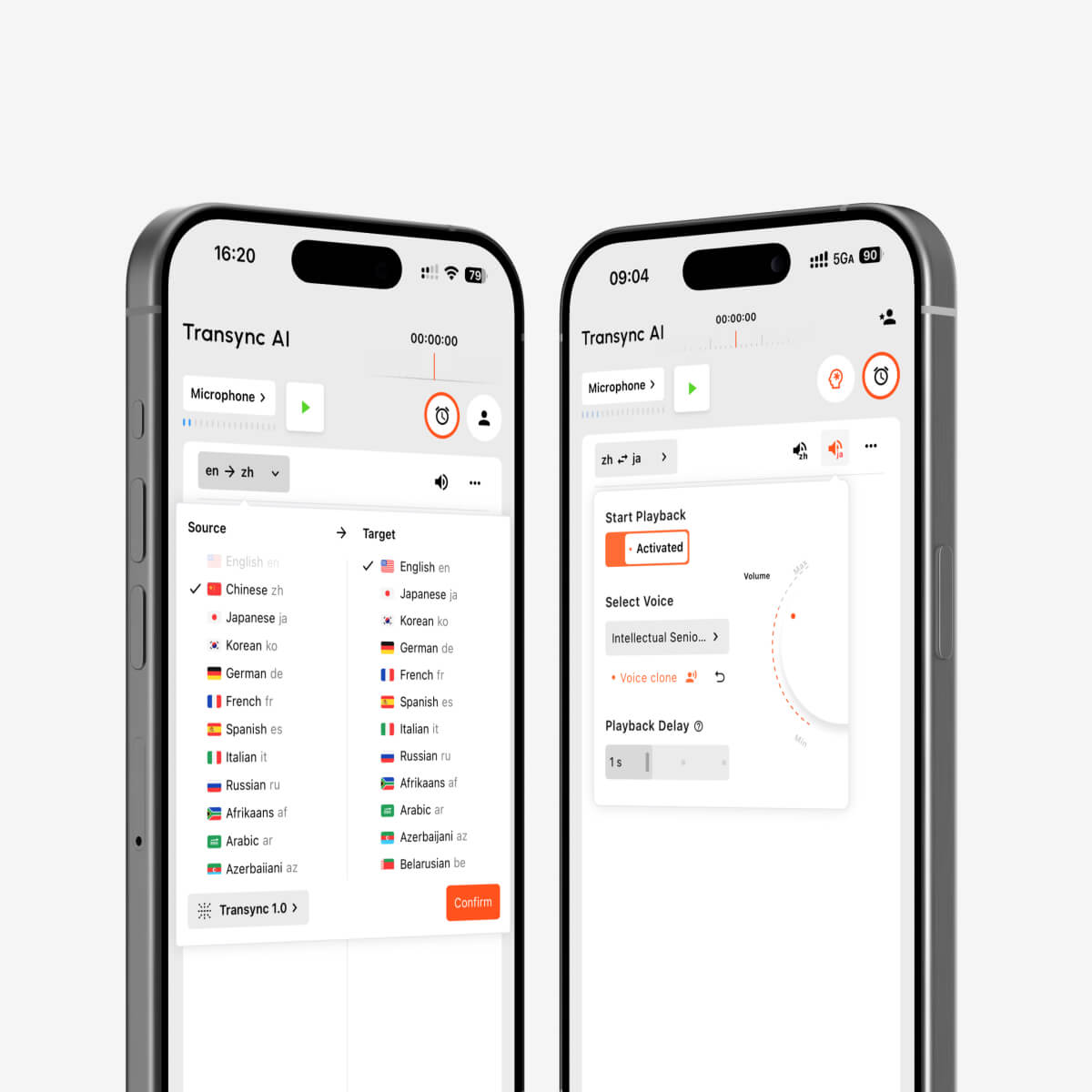
Audio language translator guide for 2026: learn how live speech translation, bilingual captions, AI voice output, and meeting notes work.
A Japanese supplier begins explaining a production delay. You understand a few words, but the technical details disappear before you can type them into a translation tool. By the time you receive a translated sentence, the speaker has already moved on to the next problem.
This is the moment when an audio language translator becomes more useful than a traditional text translator.
Instead of waiting for someone to type, copy, paste, and translate every sentence, an audio language translator listens to spoken language, converts it into text, translates the meaning, and displays or speaks the result while the conversation is still happening.
The goal is not simply to translate words. The goal is to help people stay inside the conversation.
Quick Answer: What Is an Audio Language Translator?
An audio language translator is a tool that translates spoken language into another language. Depending on the product, it may provide:
- Real-time bilingual subtitles
- Translated voice playback
- Automatic language detection
- Two-way conversation translation
- Meeting transcripts
- AI-generated meeting notes
- Keyword and terminology support
- Translation for Zoom, Microsoft Teams, or Google Meet
Some audio translation tools are designed for short travel conversations. Others are built for professional meetings, classes, presentations, interviews, and international collaboration.
Transync AI belongs to the second category. It focuses on live speech translation, bilingual captions, AI voice output, meeting notes, contextual terminology, and cross-device meeting workflows.
How Does an Audio Language Translator Work?
Most real-time audio translation systems follow four main stages.
| Stage | What happens |
|---|---|
| Speech recognition | The tool listens to the speaker and converts audio into text |
| Language detection | The system identifies the language being spoken |
| Machine translation | The recognized text is translated into the target language |
| Output | The translation appears as subtitles or plays as synthesized speech |
The entire process must happen quickly. A tool may produce an accurate translation, but if the result arrives too late, it is difficult to use in a live conversation.
That is why an effective audio language translator must balance three things:
- Translation accuracy
- Processing speed
- Natural delivery
In professional communication, all three matter.
The Moment a Text Translator Stops Being Enough
Text translators remain useful for emails, documents, short phrases, and webpages. They are less practical when language is moving continuously.
Imagine an online product demonstration.
The presenter explains a feature, changes screens, answers a question, and introduces a new technical term within 30 seconds. A participant using a text translator would need to pause the speaker, type each sentence, wait for the result, and then return to the presentation.
A live audio translator changes that workflow.
The participant can listen while translated subtitles appear. If voice output is enabled, the translated content can also be played aloud. The conversation continues without requiring constant copying and pasting.
This makes real-time audio translation especially useful when:
- The speaker cannot pause after every sentence
- Several people are participating
- The conversation includes technical information
- Users need to respond immediately
- The meeting lasts longer than a few minutes
- Participants prefer listening rather than reading
Where Is an Audio Language Translator Most Useful?
An audio translator can support several types of multilingual communication.
International Business Meetings
Business conversations often include product names, deadlines, prices, departments, and industry-specific vocabulary.
A real-time audio language translator allows participants to follow the discussion through bilingual subtitles or translated voice output. Keyword and context settings can also help the system recognize company names and technical terminology.
Online Classes and Lectures
Students may understand the general subject but struggle with fast explanations, accents, or specialist vocabulary.
Live translated subtitles reduce the pressure to understand every sentence immediately. AI meeting notes can also help students review key ideas after the class.
Interviews
During an interview, delays can make both people uncomfortable. The interviewer may simplify questions too much, while the interviewee may give shorter answers than intended.
Low-latency speech translation can help both sides communicate more naturally.
Customer and Supplier Calls
International customer support and supplier communication often involve precise details such as order numbers, delivery dates, component names, and account information.
A live translator can make these calls easier to follow, although important numbers and commitments should still be confirmed in writing.
Presentations and Webinars
Translated subtitles help international audiences follow a presentation without interrupting the speaker.
Picture-in-Picture subtitles are particularly useful because they can remain visible above slides, browser windows, or demonstration software.
Face-to-Face Conversations
An audio translator can also help during exhibitions, office visits, campus meetings, travel, and other in-person situations.
However, a tool designed mainly for meetings may offer a different experience from a lightweight travel translator. The best choice depends on whether you need short phrases or continuous professional conversation.
How Transync AI Handles Live Audio Translation
Transync AI is designed around real-time multilingual speech rather than static text translation.
Bidirectional Translation in 60 Languages
Transync AI supports two-way translation in 60 languages and more than 1,000 language pairs.
Commonly used languages include:
- English
- Chinese
- Japanese
- Korean
- Cantonese
- Spanish
- French
- German
- Italian
- Russian
Two-way translation means both people can speak their preferred language. The system can distinguish between the selected languages and translate the conversation without requiring users to press a language-switch button after every turn.
You can review the current language options on the Transync AI supported languages page.
 Bilingual Side-by-Side Subtitles
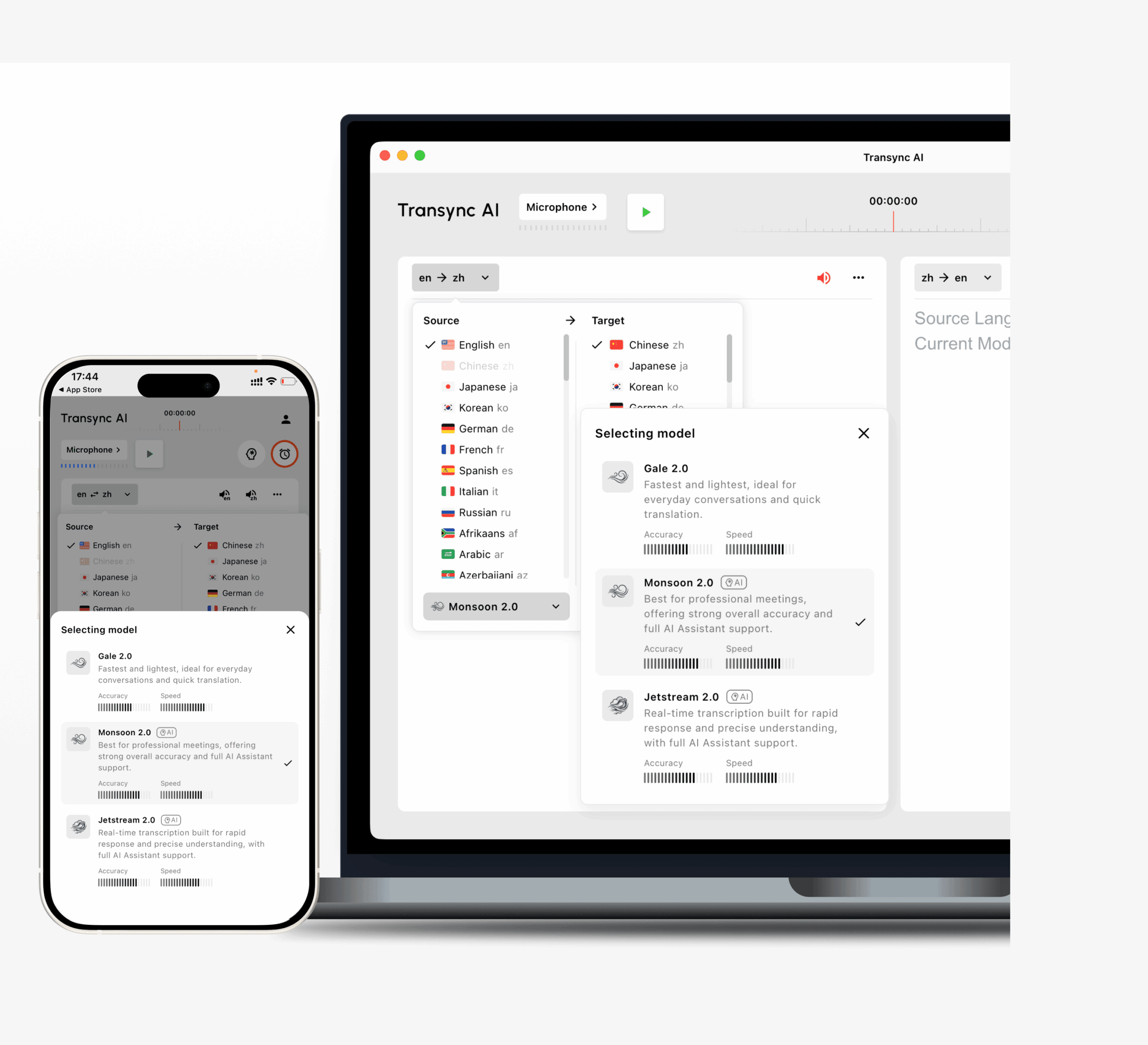 Bilingual Side-by-Side Subtitles
Transync AI displays the original speech and translated content together.
This layout is useful because users can:
- Compare the original and translated meaning
- Check names, numbers, and technical terms
- Follow the speaker without losing context
- Identify possible recognition errors
- Read the translation at their own pace
For business meetings and lectures, bilingual display can be more useful than showing only the translated sentence.
AI Voice Output
An audio language translator should not always require users to read the screen.
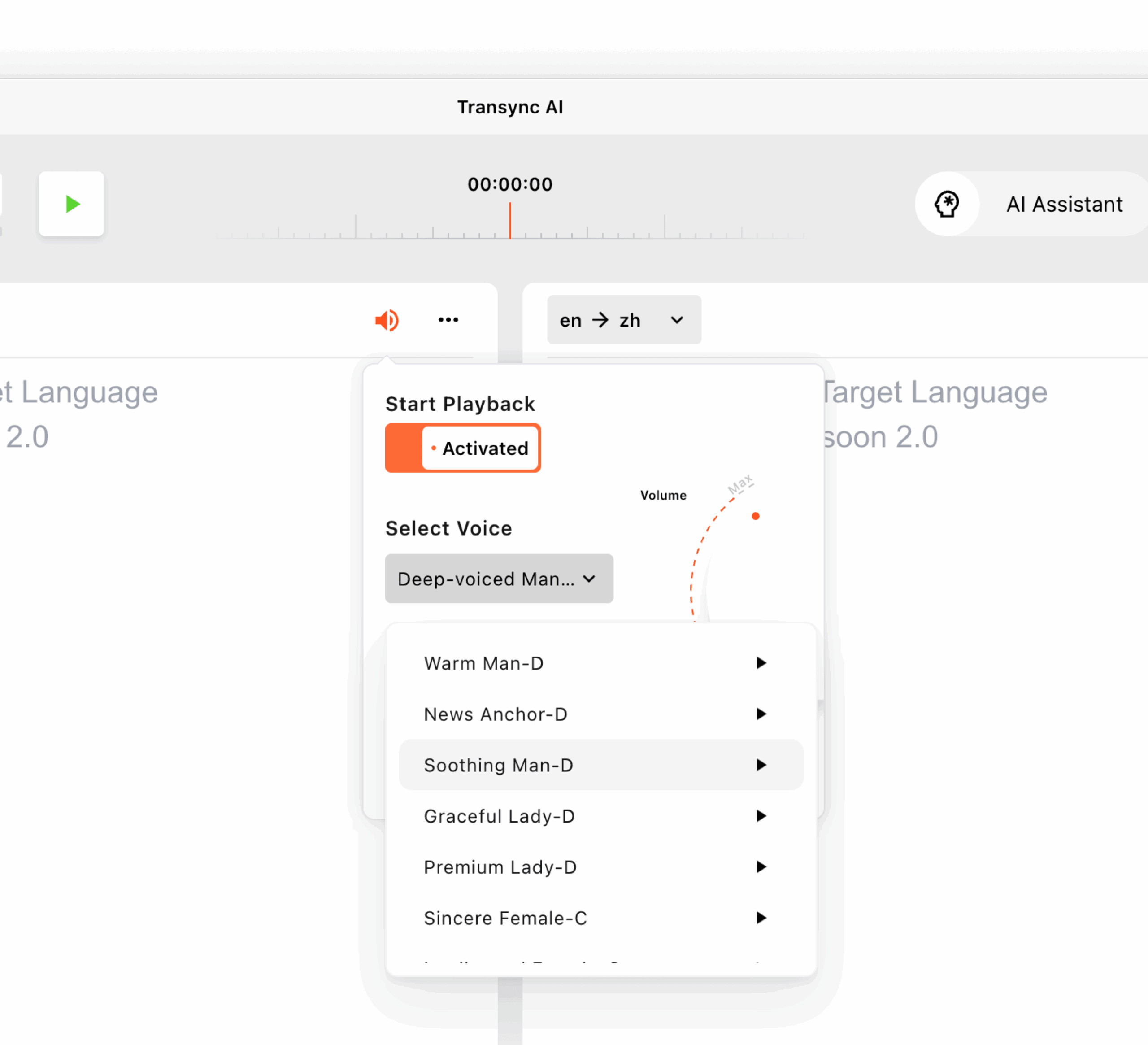
Transync AI can play translated speech aloud using AI voices. Users can preview available voices before the session and choose a voice that fits the meeting, class, presentation, or conversation.
The voice translation workflow is useful when:
- Participants need hands-free translation
- A user cannot constantly watch subtitles
- Translated speech must be shared during a meeting
- A presenter wants an audible translated version
- The listener reads slowly in the target language
Learn more on the AI Voice Translator & Speech Output page.
Voice Cloning
 Voice Cloning
Transync AI also supports voice cloning. Translated speech can be played in a voice that resembles the user’s own voice.
This can make international presentations, demonstrations, and conversations feel more personal than generic synthesized speech.
Voice data is securely stored and is not used for AI training.
Keywords and Context
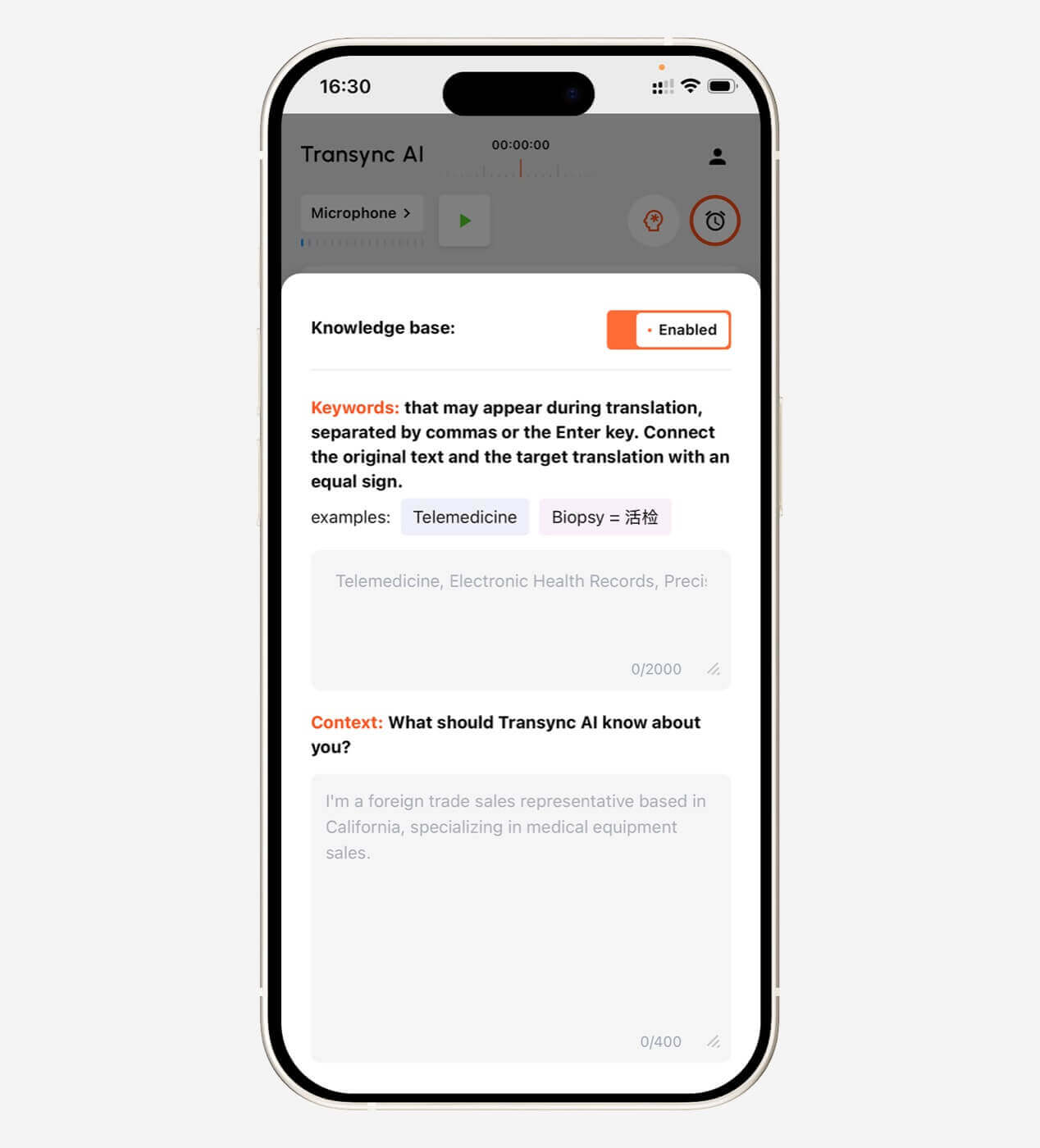
Audio translation becomes more difficult when conversations include company names, personal names, abbreviations, or specialist vocabulary.
For example:
The APAC engineering team will review the photovoltaic inverter specifications with John Smith.
A general translation tool may misunderstand “APAC,” “photovoltaic inverter,” or “John Smith.”
Transync AI allows users to add keywords such as:
- Transync AI = 同言翻译
- photovoltaic inverter
- semiconductor
- APAC
- John Smith
- neural network
- supply chain management
Users can also describe the meeting context:
This is a technical meeting about renewable energy equipment, regional compliance, installation schedules, and inverter specifications.
This information helps the AI interpret terms more consistently.
Explore the AI Assistant Keywords Context feature.
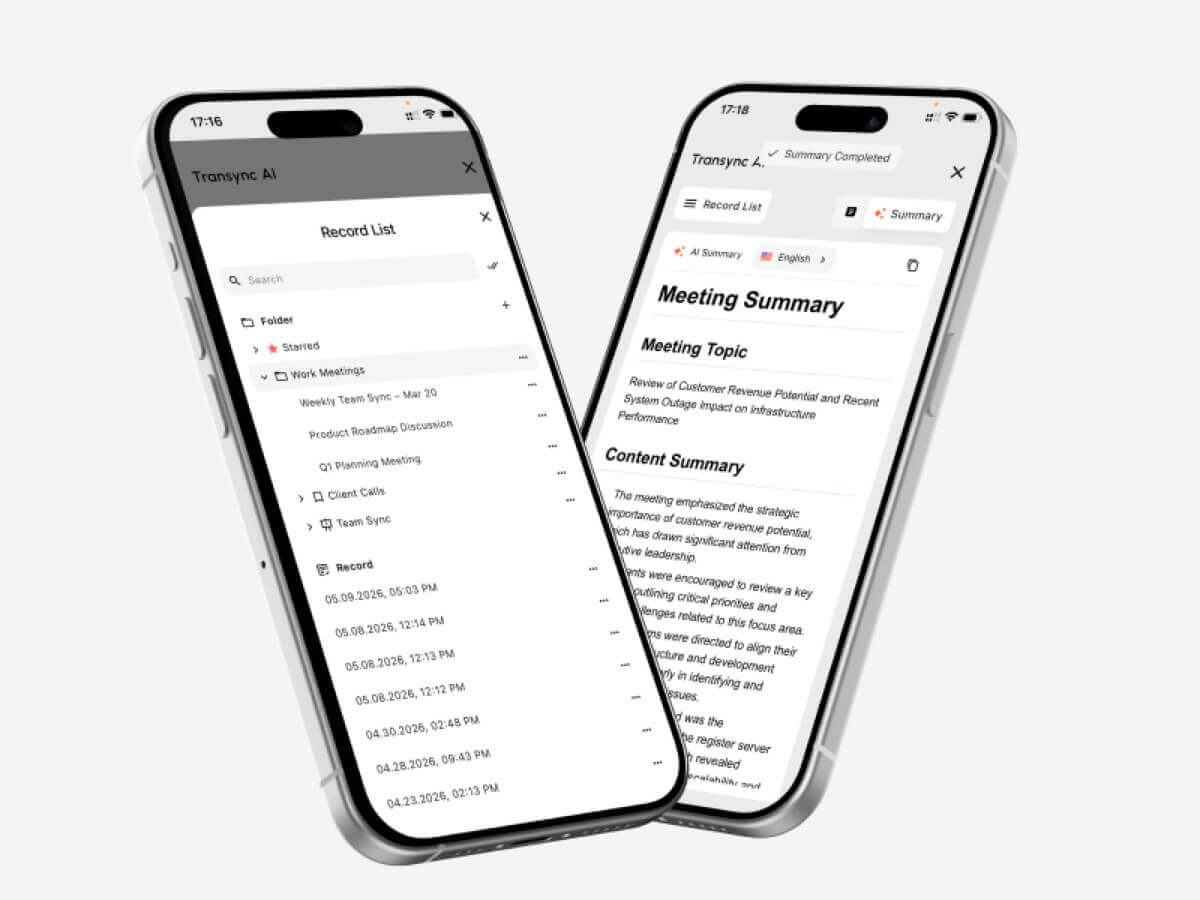
AI Meeting Notes
Understanding the meeting is only one part of the job. After the conversation, participants may still need to remember:
- What was decided
- Which tasks were assigned
- What deadlines were mentioned
- Which questions remain unresolved
- What should happen next
Transync AI can generate AI meeting notes from a multilingual conversation, helping users review key points without manually writing everything while listening to translated speech.
Visit AI Meeting Notes with Real-Time Translation for more information.
 Audio Language Translator vs. Other Translation Tools
 Audio Language Translator vs. Other Translation Tools
Different translation tools solve different problems.
| Tool type | Input | Output | Best for |
| Text translator | Typed or pasted text | Translated text | Messages and short paragraphs |
| Website translator | Webpage content | Translated webpage | Reading foreign websites |
| Image translator | Signs or screenshots | Translated visual text | Travel and printed materials |
| Audio language translator | Live speech | Captions or translated voice | Conversations, classes, and meetings |
| Transcription tool | Recorded or live audio | Same-language text | Notes and searchable records |
| Human interpreter | Live speech and context | Human interpretation | Legal, medical, diplomatic, and sensitive communication |
Some tools combine several categories. For example, Google Translate can handle text, speech, images, and short conversations. A professional live meeting translator, however, may provide a more complete workflow for continuous conversations, meeting platforms, voice output, and post-meeting notes.
What Should You Look for in an Audio Language Translator?
A long language list does not automatically make a tool suitable for real conversations.
Low Latency
Translation must arrive quickly enough for people to respond naturally.
Voice output normally takes slightly longer than subtitles because the system must also generate audio.
Two-Way Translation
For conversations, both participants should be able to speak their preferred language.
Clear Bilingual Captions
The subtitle layout should be readable without covering important meeting content.
Natural Voice Output
Check pronunciation, pacing, tone, and whether the voice sounds appropriate for professional use.
Terminology Control
Keywords, glossaries, or contextual prompts are important for technical and industry-specific conversations.
Meeting Compatibility
Confirm whether the tool works with Zoom, Microsoft Teams, Google Meet, or the meeting software used by your organization.
Transync AI supports live meeting workflows for these major platforms. See the live meeting translation guide.
Long-Session Stability
A short demonstration does not show how the tool performs during a 45-minute lecture or a two-hour workshop.
Test the tool with the length of sessions you actually attend.
Privacy
Check how voice data, transcripts, and recordings are handled. Avoid entering highly sensitive information into a tool unless its data policy meets your organization’s requirements.
A Practical Audio Translation Workflow
The following workflow can be used for an international online meeting.
Before the Meeting
- Select the source and target languages.
- Add company names, product terms, and speaker names.
- Describe the meeting topic and industry.
- Preview the AI voice if voice output will be used.
- Test the microphone and system audio.
- Confirm that the internet connection is stable.
During the Meeting
- Start real-time translation.
- Keep the bilingual subtitles visible.
- Use Picture-in-Picture mode when viewing slides or documents.
- Avoid having multiple people speak at exactly the same time.
- Confirm important numbers, dates, and commitments.
- Pause briefly after long or highly technical sentences.
After the Meeting
- Review the AI meeting notes.
- Check names, numbers, and technical terminology.
- Confirm important decisions in writing.
- Share the summary with participants.
- Add new terminology to the keyword list for future meetings.
Audio Translation for Zoom, Teams, and Google Meet
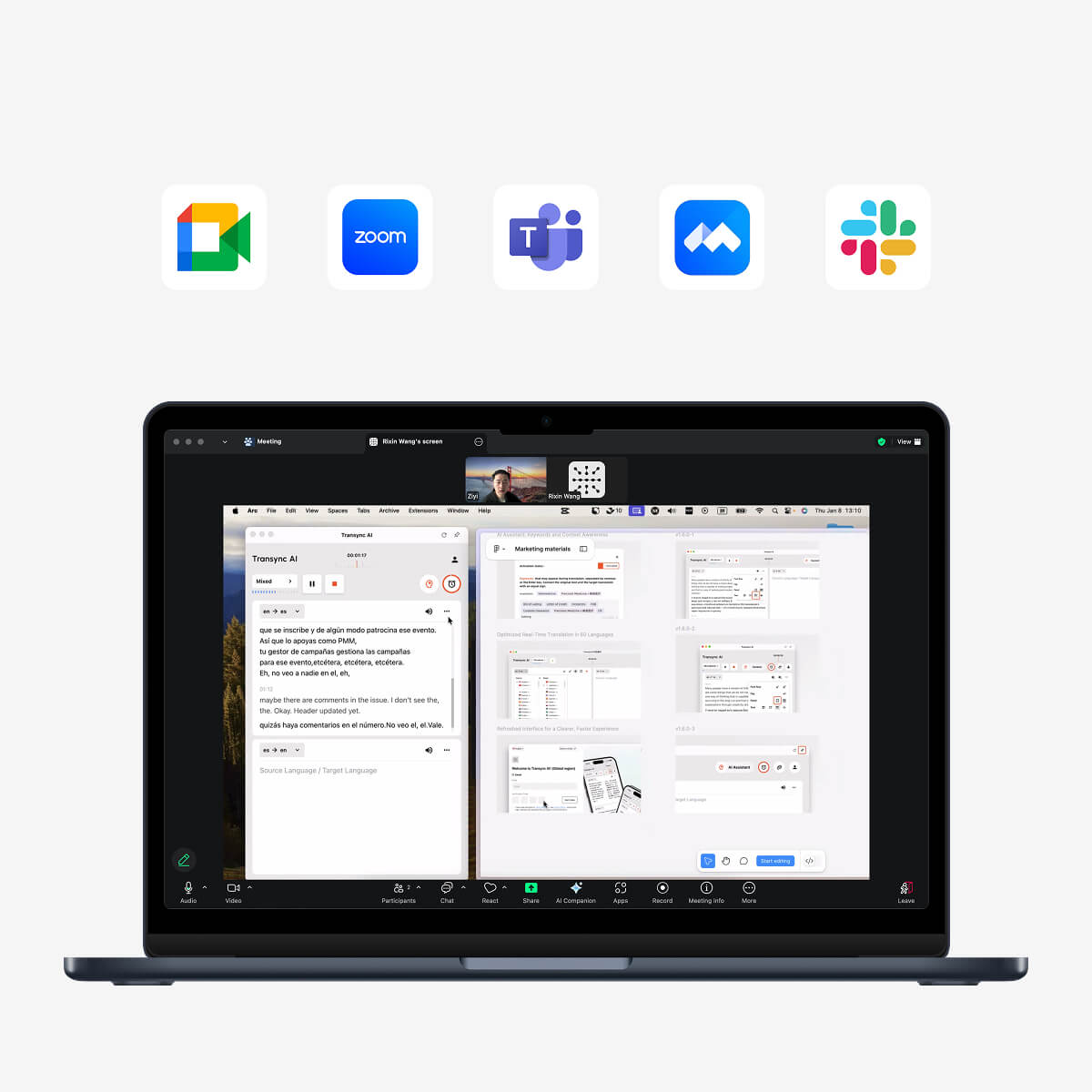
Transync AI runs as standalone software rather than a meeting plugin.
This means users can run it alongside:
- Zoom
- Microsoft Teams
- Google Meet
For subtitle translation, Transync AI can capture meeting audio and display translated content in its own interface or floating subtitle window.
For translated voice output, users may need to configure system audio or a virtual microphone so the meeting participants can hear the generated translation.
This workflow is useful for organizations that use several meeting platforms rather than relying on one platform-specific translation feature.
Floating Subtitles for Multitasking
During an online meeting, participants may need to read slides, edit a document, browse a product page, or demonstrate software.
If translation is only visible inside the main translator window, users must constantly switch between applications.
Transync AI’s Picture-in-Picture subtitles can remain above other apps on Mac, Windows, and supported iOS workflows.
This allows users to:
- View a presentation and translation together
- Take notes without hiding the subtitles
- Demonstrate software while reading translated speech
- Follow a webinar while browsing supporting materials
- Switch between apps without losing the current translation
Learn more about Picture-in-Picture Floating Subtitles.
 What Are the Limitations of an Audio Language Translator?
 What Are the Limitations of an Audio Language Translator?
AI audio translation can reduce language barriers, but it is not perfect.
Performance may be affected by:
- Background noise
- Room echo
- Weak microphones
- Unstable internet
- Multiple speakers talking simultaneously
- Very fast speech
- Strong regional accents
- Incomplete sentences
- Mixed-language speech
- Technical terminology
- Ambiguous expressions
Important Transync AI limitations include:
- Offline mode is not available
- Image recognition is not supported
- Static text translation is not its primary purpose
- It is standalone software rather than a meeting plugin
- Usage is counted cumulatively across devices on the same account
- Translation quality still depends on audio and network conditions
An audio language translator should also not be treated as a guaranteed replacement for a qualified interpreter in legal, medical, diplomatic, financial, or other high-stakes situations.
When Should You Use a Human Interpreter Instead?
Use a professional interpreter when an error could significantly affect someone’s rights, health, finances, safety, or legal position.
Examples include:
- Medical diagnosis
- Legal testimony
- Contract negotiations
- Immigration interviews
- Government proceedings
- Crisis communication
- Sensitive employee disputes
- High-value financial decisions
AI translation is often more practical for routine meetings, classes, internal discussions, product demonstrations, and everyday communication.
The best multilingual strategy may use both: AI translation for frequent communication and human interpretation for selected high-risk situations.
FAQ: Audio Language Translator
What is an audio language translator?
An audio language translator listens to spoken language and converts it into translated text or voice output. It can be used for conversations, classes, presentations, interviews, and online meetings.
Can an audio language translator work in real time?
Yes. Real-time tools process speech while the speaker is talking and display bilingual subtitles or generate translated voice output with a short delay.
What is the best audio language translator for meetings?
A good meeting translator should provide low-latency translation, two-way language support, readable subtitles, voice output, terminology controls, meeting compatibility, and post-meeting notes. Transync AI is designed around these live communication needs.
Can Transync AI translate Zoom audio?
Transync AI can be used alongside Zoom, Microsoft Teams, and Google Meet to translate live meeting audio and display bilingual subtitles. Translated voice can also be connected through supported audio-routing workflows.
Does Transync AI support voice translation?
Yes. Transync AI supports AI voice broadcast, multiple voice choices, voice preview, and voice cloning.
How many languages does Transync AI support?
Transync AI supports bidirectional translation in 60 languages and more than 1,000 language pairs.
Can an audio translator understand technical terms?
General-purpose tools may struggle with specialist terminology. Transync AI allows users to add keywords and contextual information to improve the handling of names, brands, abbreviations, and industry terms.
Does Transync AI work offline?
No. Transync AI currently requires an internet connection and does not support offline translation.
Can audio translation replace a human interpreter?
It can support many routine meetings and conversations, but a qualified interpreter is still recommended for legal, medical, diplomatic, financial, or other high-stakes communication.
Final Thoughts: Audio Translation Should Keep the Conversation Moving
An audio language translator is most valuable when it becomes part of the conversation rather than an extra task.
For short phrases, a basic translation app may be enough. For meetings, lectures, interviews, webinars, presentations, and international teamwork, users need a tool that can listen, translate, display subtitles, generate voice output, understand terminology, and preserve useful information after the session.
Transync AI combines bidirectional translation in 60 languages with bilingual subtitles, AI voice broadcast, voice cloning, keywords and context, AI meeting notes, and floating captions.
The result is not simply translated audio. It is a more complete multilingual communication workflow designed to help people listen, respond, and collaborate without leaving the conversation.
To get started, visit Transync AI, explore the real-time translation tool, or download Transync AI for your preferred device.