

Pilih alat penerjemahan online melalui 6 alur kerja cerdas untuk teks, dokumen, percakapan, rapat, presentasi, dan API produk.
Alat penerjemahan daring harus sesuai dengan bentuk pekerjaan—bukan hanya menjanjikan daftar bahasa terpanjang. Seseorang yang menempelkan pesan restoran, seorang editor yang menerjemahkan proposal, tim jarak jauh yang mengadakan pertemuan dwibahasa, dan seorang pengembang yang melokalisasi aplikasi semuanya membutuhkan terjemahan, tetapi mereka tidak membutuhkan sistem yang sama.
Peta alur kerja ini membandingkan Transink AI, Google Terjemahan, DeepL, Penerjemah Microsoft, Dan Terjemahan Google Cloud. Proses ini dimulai dengan tugas, mengikuti informasi dari input ke output, dan mengidentifikasi titik di mana setiap produk menjadi berguna—atau berhenti menjadi produk yang tepat.
Jawaban singkatnya sederhana: Google Terjemahan Cocok untuk pencarian cepat dan minim hambatan; DeepL merupakan kandidat dokumen yang kuat; Penerjemah Microsoft mendukung percakapan pribadi dan multi-perangkat; Transink AI dirancang untuk pertemuan langsung dan presentasi multibahasa; dan Terjemahan Google Cloud Alat terjemahan online terbaik merupakan bagian dari produk dan proses bisnis otomatis. Oleh karena itu, alat terjemahan online terbaik adalah keputusan alur kerja, bukan peringkat universal.
Mulailah di Sini: Apa yang Harus Dicapai oleh Terjemahan Ini?
Sebelum membandingkan antarmuka, tentukan tindakan akhirnya. Apakah seseorang perlu memahami satu kalimat, menyetujui file terjemahan, membalas selama panggilan, mengikuti pembicara, atau menerima konten terjemahan di dalam aplikasi lain?
| Alur kerja | Input Khas | Output yang Diperlukan | Kandidat Terbaik untuk Pemula | Mengapa Ini Cocok |
|---|---|---|---|---|
| Teks singkat atau halaman web | Teks, frasa, atau URL yang disalin | Makna yang mudah dibaca secara langsung | Google Terjemahan | Akses cepat dengan pengaturan minimal. |
| Dokumen yang ditinjau | DOCX, PDF, PPTX, atau XLSX | Berkas terjemahan untuk ditinjau oleh manusia. | DeepL atau Google Translate | Alur kerja penerjemahan berbasis file |
| Percakapan tatap muka | Ucapan bergantian | Belokan yang dapat dibaca atau didengar | Penerjemah Microsoft | Opsi percakapan pribadi dan multi-perangkat |
| Pertemuan daring langsung | Mikrofon dan audio komputer | Teks, suara, dan rekaman dwibahasa | Transink AI | Terjemahan dan catatan rapat pertama |
| Presentasi satu-ke-banyak | Seorang pembawa acara sedang berbicara. | Bahasa yang dipilih oleh audiens | Transink AI | Akses audiens melalui QR, tautan, atau ID Ruangan. |
| Otomatisasi aplikasi atau bisnis | Teks atau file dari perangkat lunak | Terjemahan yang dikembalikan oleh API | Google Cloud Translation atau DeepL API | Kontrol pengembang dan integrasi yang skalabel |
Tabel ini adalah peta rute, bukan keputusan akhir. Keamanan, ketersediaan bahasa, harga, terminologi, latensi, batasan file, dan persyaratan peninjauan manusia dapat mengubah hasilnya.
Alur Kerja 1: Gunakan Alat Terjemahan Online untuk Teks Cepat
Alur kerja tercepat juga paling mudah untuk menjadi terlalu rumit:
Salin teks → pilih bahasa → terjemahkan → verifikasi detail penting
Google Terjemahan sangat cocok untuk pola ini. Pengguna dapat menempelkan frasa, menerjemahkan halaman web, atau berpindah antara teks dan mode input lain yang didukung tanpa perlu membuat proyek. Hal ini membuatnya berguna untuk pertanyaan perjalanan, pesan informal, riset awal, dan memahami makna umum dari konten yang tidak dikenal.
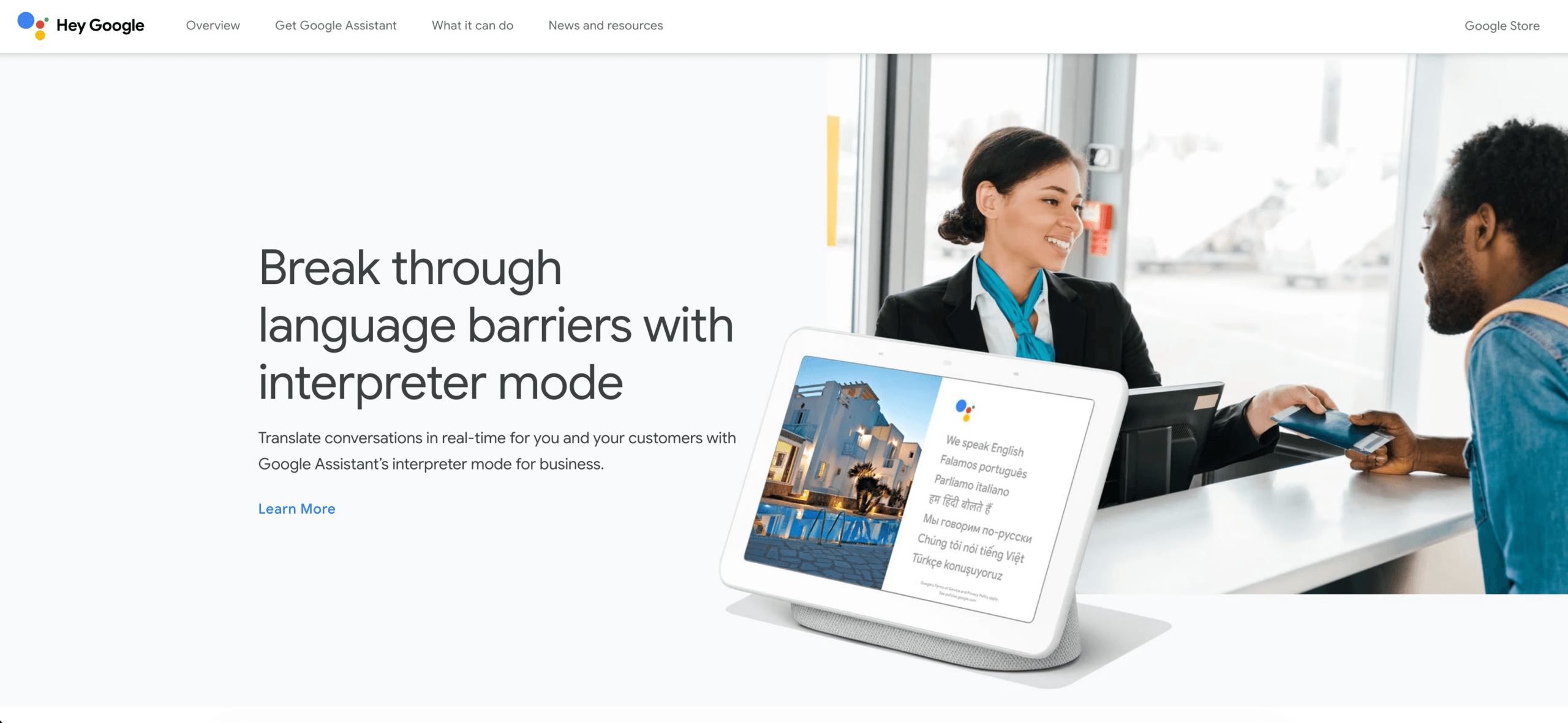
Kecepatan tidak menghilangkan kebutuhan akan verifikasi. Nama, tanggal, harga, negasi, ungkapan daerah, dan istilah teknis perlu diperiksa ulang. Bahkan alat penerjemahan daring yang praktis pun dapat menghasilkan kalimat yang lancar namun mengubah fakta penting. Jika kalimat yang diterjemahkan akan menjadi klausul kontrak, instruksi medis, pernyataan publik, atau arahan keselamatan, serahkan pekerjaan tersebut ke proses profesional yang telah ditinjau.
Pilih alur kerja alat penerjemahan daring ini ketika biaya kesalahan kecil rendah dan pembaca terutama membutuhkan pemahaman segera. Jangan menggunakan kemudahan sebagai bukti bahwa antarmuka konsumen cocok untuk rapat yang direkam atau alur kerja lokalisasi produksi.
Alur Kerja 2: Menerjemahkan File Tanpa Kehilangan Proses Peninjauan
Sebuah dokumen menempuh jalur yang berbeda:
unggah file → terjemahkan teks dan tata letak → bandingkan versi → edit terminologi → setujui
DeepL adalah pilihan praktis ketika hasil akhirnya berupa dokumen terjemahan, bukan pertukaran langsung. Platformnya yang lebih luas mendukung terjemahan teks dan file, sementara penawaran pengembang mencakup glosarium dan kontrol kustomisasi lainnya. Pertanyaan penting bukanlah apakah satu kalimat contoh terdengar lancar; melainkan apakah file sebenarnya tetap dapat digunakan dan ditinjau.

Google Terjemahan Layanan ini juga menyediakan terjemahan dokumen pada pengalaman desktop yang didukung. Dokumentasi bantuan saat ini mencantumkan format DOCX, PDF, PPTX, dan XLSX, dengan batas ukuran file 10 MB; PDF dapat berisi hingga 300 halaman. Teks yang hanya terdapat di dalam gambar PDF yang dipindai tidak diterjemahkan dalam output, dan terjemahan dokumen tidak tersedia pada layar yang lebih kecil atau perangkat seluler.
Uji berkas representatif sebelum menstandarisasi alat terjemahan daring apa pun. Sertakan tabel, judul, hyperlink, catatan kaki, bagan, akronim, dan kotak teks—bukan hanya paragraf kosong. Kemudian mintalah peninjau yang berkualifikasi untuk memeriksa makna, bahasa yang sesuai dengan pasar, format, dan istilah yang disetujui.
Untuk dokumen, file terjemahan adalah draf awal. Alur kerja alat terjemahan daring yang baik akan mempertahankan dokumen asli, mencatat perubahan, menyebutkan nama peninjau, dan mencegah terjemahan mesin yang belum disetujui menjadi versi yang dipublikasikan.
Alur Kerja 3: Mendukung Percakapan Tatap Muka atau Kelompok Kecil
Penerjemahan percakapan harus mendeteksi giliran bicara dengan cukup cepat agar orang dapat merespons:
Orang A berbicara → ucapan dikenali → makna diterjemahkan → Orang B membaca atau mendengarkan → peran berbalik
Penerjemah Microsoft Aplikasi ini dirancang untuk komunikasi pribadi serta percakapan yang dapat melibatkan banyak perangkat. Informasi fitur aplikasi saat ini mencakup terjemahan suara, pengalaman layar terpisah, teks ke suara, dan kemampuan percakapan multi-perangkat, meskipun ketersediaannya dapat bergantung pada bahasa, platform, dan perangkat.
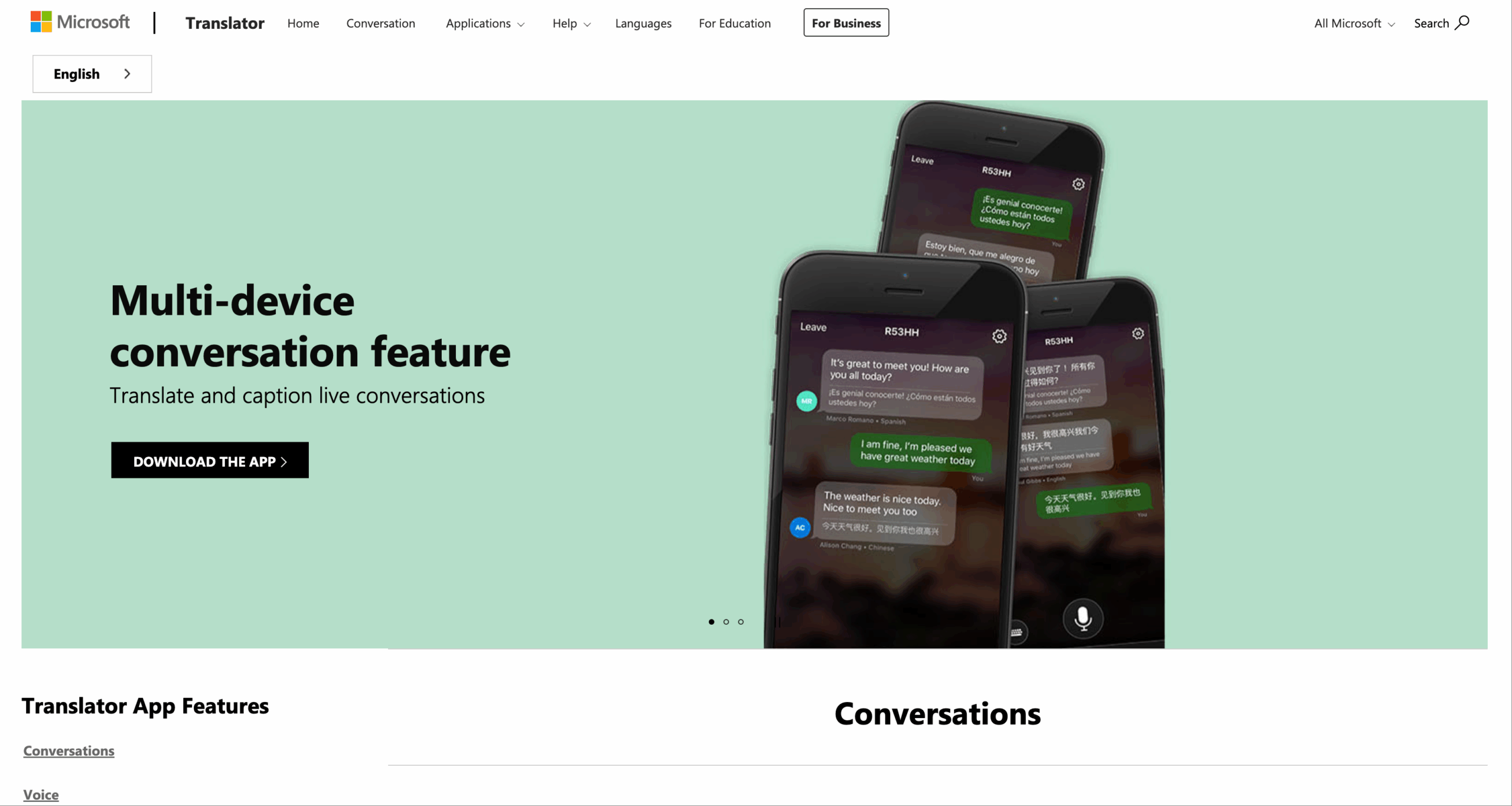
Rute ini cocok untuk meja resepsionis, kelompok kelas informal, percakapan komunitas, atau pertukaran cepat di mana peserta berada berdekatan. Uji alat terjemahan daring dengan perangkat nyata: proses bergabung harus mudah dipahami, setiap orang harus melihat bahasa yang dituju, pembicara harus dapat mengoreksi kesalahan, dan kelompok harus dapat mengatasi situasi ketika dua orang berbicara bersamaan.
Alat penerjemahan daring untuk percakapan tidak secara otomatis menjadi sistem pengetahuan rapat. Jika tim juga membutuhkan perekaman audio komputer, teks terjemahan dwibahasa melalui aplikasi lain, transkrip yang dapat dicari, poin tindakan, dan catatan setelah panggilan, beralihlah ke alur kerja rapat langsung.
Alur Kerja 4: Menjaga Agar Rapat Multibahasa Tetap Berjalan Lancar
Sebuah pertemuan menambahkan lebih banyak dimensi daripada percakapan biasa:
Mikrofon dan audio komputer → pengenalan pembicara → terjemahan → teks dan suara → respons peserta → transkrip dan catatan
Transink AI adalah opsi yang mengutamakan pertemuan dalam perbandingan ini. terjemahan waktu nyata Mendukung 60 bahasa dan dirancang untuk mengubah ucapan langsung menjadi teks dwibahasa dan audio terjemahan. alur kerja penerjemahan rapat langsung Dapat digunakan bersama platform seperti Zoom, Microsoft Teams, dan Google Meet tanpa mengharuskan setiap penyelenggara rapat untuk menginstal plugin terjemahan khusus platform.

Kompatibel dengan platform rapat online utama untuk terjemahan waktu nyata yang lancar.
Selama panggilan telepon, Transink AI dapat menyediakan Penerjemah suara AI sehingga peserta dapat mendengarkan sekaligus membaca. Ini Teks terjemahan dwibahasa dalam mode gambar-dalam-gambar dapat tetap terlihat di atas aplikasi lain yang didukung, mengurangi kebutuhan untuk beralih jendela.
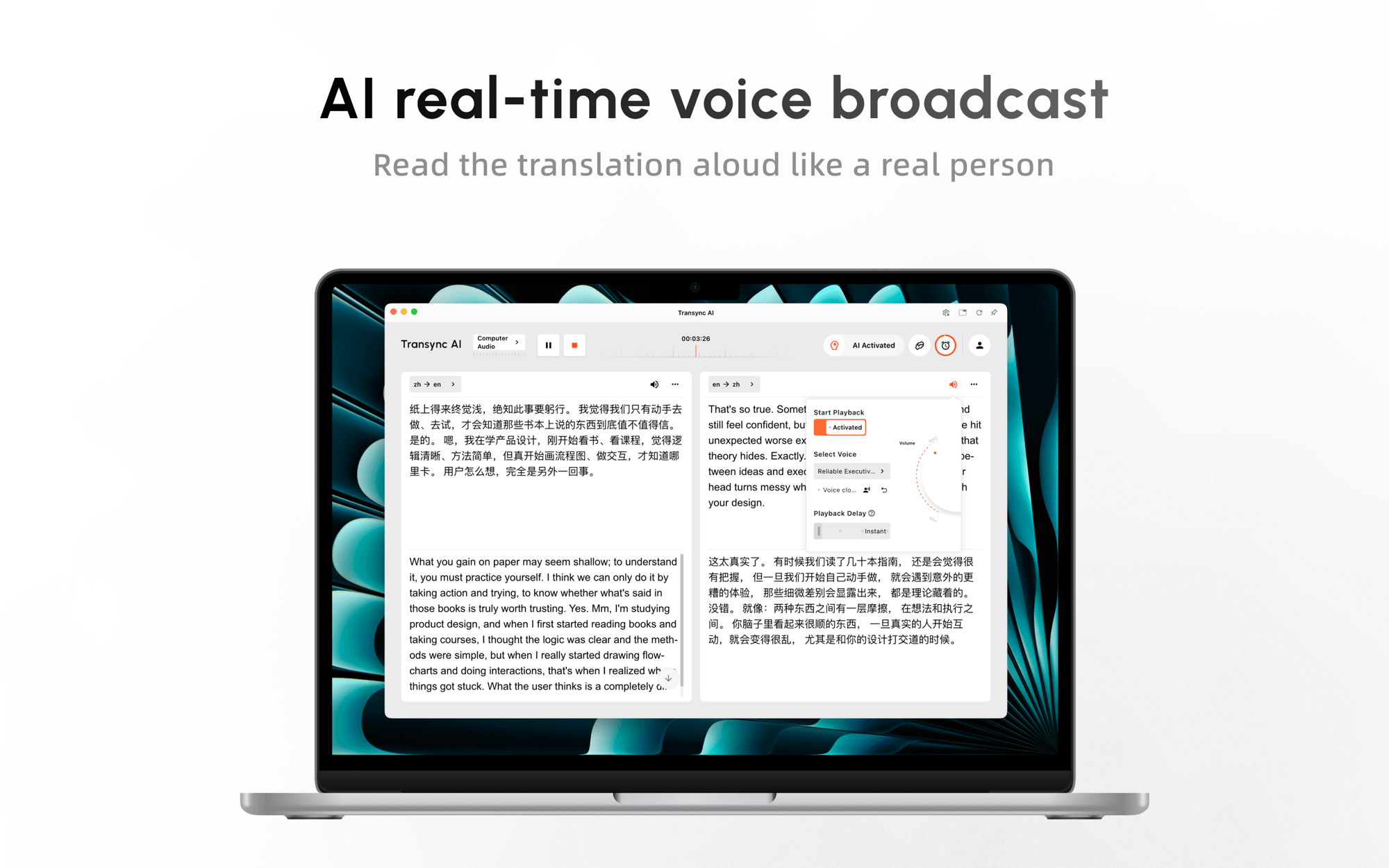 Sebelum pertemuan penting, pengguna dapat memasukkan nama, kosakata produk, akronim, dan latar belakang melalui kata kunci dan informasi kontekstual. Setelah itu, Catatan rapat AI dapat mengubah percakapan menjadi catatan yang lebih bermanfaat untuk pengambilan keputusan dan tindak lanjut.
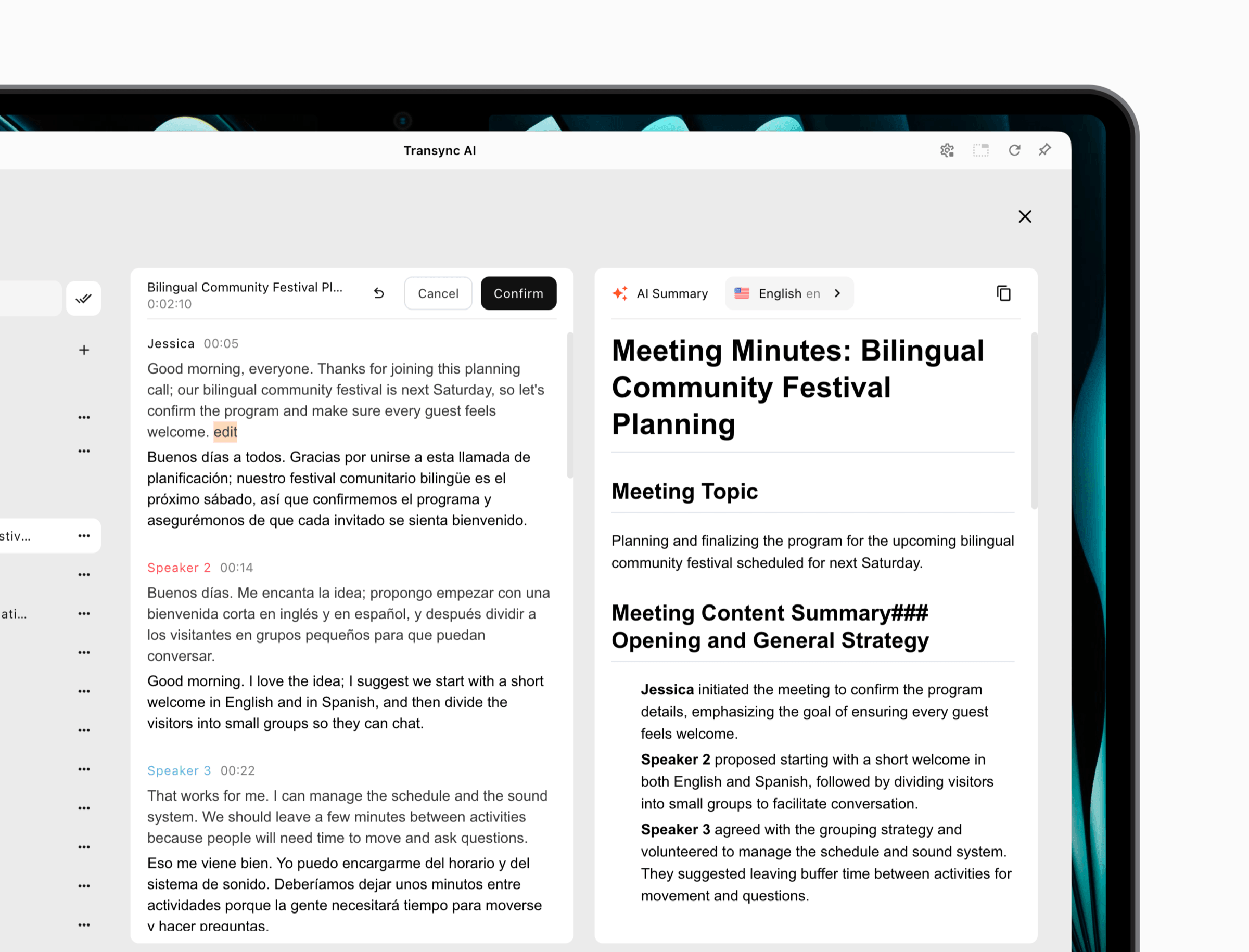 Ini tidak membuat Transink AI Alat yang tepat untuk setiap tugas penerjemahan. Ini adalah alur kerja daring, tim harus menguji mikrofon dan perutean audio komputer, dan alat ini tidak dimaksudkan untuk menggantikan penerjemah kamera luring atau editor tata letak dokumen. Keunggulannya terlihat ketika orang harus saling memahami dan menjawab satu sama lain saat rapat masih berlangsung.
Pilih alat penerjemahan daring ini ketika latensi, partisipasi, terjemahan suara, dan keberlanjutan setelah rapat menjadi hal yang penting. Ujilah dari perangkat peserta jarak jauh; pratinjau yang benar pada komputer host tidak membuktikan bahwa semua orang dapat mendengar dan mengikuti hasilnya.
Alur Kerja 5: Biarkan Audiens Mengikuti Satu Pembicara
Presentasi bukanlah sekadar percakapan yang sangat panjang. Biasanya, presentasi memiliki satu pembicara dan banyak pendengar:
Pembawa acara berbicara → satu aliran sumber diterjemahkan → anggota audiens memilih bahasa → setiap orang membaca atau mendengarkan
Dalam versi beta Mode Presentasi, Transink AI Memungkinkan satu host untuk mengaktifkan hingga 10 bahasa target. Anggota audiens dapat bergabung melalui ponsel atau komputer mereka sendiri melalui kode QR, tautan yang dapat dibagikan, atau ID Ruang. Mereka tidak perlu menginstal perangkat lunak, tetapi mereka harus mendaftar atau masuk ke suatu akun. Transink AI akun.
Setiap peserta memilih salah satu bahasa yang diaktifkan oleh penyelenggara dan dapat membaca teks terjemahan langsung atau mendengarkan suara terjemahan. Anggota audiens tidak dapat mengirimkan masukan suara dalam mode satu arah ini. Setelah sesi, penyelenggara dapat memilih apakah akan membagikan transkrip asli dan catatan yang dihasilkan AI; berbagi bersifat opsional dan dikendalikan oleh penyelenggara.
Arsitektur ini cocok untuk sesi pelatihan, kuliah, webinar, rapat seluruh karyawan, demonstrasi produk, dan presentasi publik. Arsitektur ini menghindari keharusan setiap peserta untuk mengkonfigurasi jalur audio yang sama, tetapi penyelenggara tetap harus menguji pendaftaran, kapasitas Wi-Fi, visibilitas QR, headphone, pemilihan bahasa, dan aksesibilitas sebelum ruangan terisi.
Untuk alur kerja audiens, nilai alat terjemahan daring berdasarkan menit pertama: Dapatkah seseorang yang datang terlambat bergabung, menemukan bahasa yang tepat, memahami apakah sesi tersebut satu arah, dan mendengar hasilnya tanpa mengganggu orang-orang di sekitarnya?

Mode Presentasi memungkinkan satu pembawa acara untuk berbagi terjemahan langsung dengan anggota audiens di perangkat mereka masing-masing.
Alur Kerja 6: Mengintegrasikan Terjemahan ke Dalam Produk atau Proses
Terkadang pengguna sama sekali tidak perlu mengunjungi situs web penerjemah. Penerjemahan harus dilakukan di dalam aplikasi, antrian dukungan, platform konten, atau alur data:
Perangkat lunak mengirimkan konten yang diotorisasi → API memprosesnya → output terjemahan dikembalikan → aplikasi memvalidasi dan menampilkannya
Terjemahan Google Cloud Menawarkan penerjemahan terprogram untuk pengembang. Dokumentasi produknya saat ini membedakan edisi Dasar yang menggunakan penerjemahan mesin saraf dari edisi Lanjutan yang menambahkan kemampuan seperti akses LLM Penerjemahan, glosarium, penerjemahan dokumen, pekerjaan batch, penerjemahan adaptif, dan jalur kustomisasi lainnya.
Jelajahi Google Cloud Translation
DeepL Selain itu, juga menyediakan API untuk terjemahan teks dan dokumen lengkap, pustaka klien resmi, dan penyesuaian terminologi. Pilihan antara API harus didasarkan pada pasangan bahasa yang didukung, perilaku dokumen, kontrol glosarium, latensi, infrastruktur regional, persyaratan keamanan, volume, dan total biaya operasional.
API bukanlah alat penerjemahan daring yang lengkap untuk karyawan. API membutuhkan otentikasi, penanganan kesalahan, pemantauan penggunaan, kontrol privasi, percobaan ulang, evaluasi kualitas, dan pengalaman pengguna. Dalam alur kerja ini, alat penerjemahan daring sebenarnya adalah sistem lengkap yang dibangun tim Anda di sekitar mesin penerjemahan. Pengembangan dan operasional berkelanjutan mungkin membutuhkan biaya lebih besar daripada panggilan penerjemahan itu sendiri.
Gunakan alur kerja ini ketika konten terjemahan harus muncul di dalam produk dalam skala besar. Jika kebutuhan sebenarnya hanya untuk membantu sepuluh kolega memahami rapat mingguan, pembuatan API merupakan kerumitan yang tidak perlu.
Perbandingan Alat Terjemahan Online Berdasarkan Alur Kerja
| Produk | Alur Kerja yang Paling Sesuai | Pidato Langsung | Dokumen | Kesinambungan Rapat | Mode Audiens | Integrasi API | Batas Utama |
|---|---|---|---|---|---|---|---|
| Transink AI | Pertemuan dan presentasi | Teks dan terjemahan suara | Bukan alur kerja utamanya | Transkrip dan catatan AI | Satu host, hingga 10 bahasa target dalam versi beta. | Bukan alasan utama untuk membeli | Online; pengaturan audio dan akses akun penting. |
| Google Terjemahan | Teks singkat, halaman web, dan penggunaan pribadi | Mode yang didukung bervariasi tergantung perangkat/bahasa. | Jenis file yang didukung beserta batasannya | Bukan ruang kerja untuk rapat dan berbagi pengetahuan. | Bukan alur kerja presentasi yang dihosting. | Alat konsumen berbeda dari Terjemahan Cloud. | Kemudahan tidak menggantikan tinjauan yang diatur. |
| DeepL | Teks dan dokumen telah ditinjau. | Layanan suara terpisah memerlukan peninjauan paket. | Kandidat yang berorientasi pada berkas yang kuat | Bukan primarily ruang kerja untuk rapat umum. | Bukan alur kerja inti | API teks dan dokumen | Format pengujian, istilah, dan target pasar. |
| Penerjemah Microsoft | Percakapan pribadi dan multi-perangkat | Fitur ucapan, TTS, dan percakapan. | Bukan alasan utama untuk memilihnya | Model percakapan terpisah | Bergabung dalam kelompok berbeda dengan penyampaian presentasi. | Opsi cloud adalah produk terpisah. | Fitur bervariasi tergantung platform dan bahasa. |
| Terjemahan Google Cloud | Terjemahan di dalam perangkat lunak | Implementasi yang bergantung pada API | Kemampuan dokumen tingkat lanjut | Harus dibangun oleh pelanggan. | Harus dibangun oleh pelanggan. | Kekuatan inti | Membutuhkan kontrol teknik dan operasional. |
Fitur dan harga dapat berubah. Konfirmasikan bahasa, perangkat, paket, batasan, dan ketentuan data terkini di situs resmi penyedia sebelum pembelian atau penggunaan.
Bagaimana Seharusnya Anda Memberi Skor pada Para Kandidat?
Jangan memberikan bobot yang sama pada setiap kriteria. Tim dokumen mungkin menghargai tata letak dan kontrol glosarium; panggilan penjualan menghargai pengaturan waktu dan pemulihan pembicara; auditorium menghargai akses audiens yang mudah.
| Faktor Penentu | Ajukan Pertanyaan Ini | Bukti yang Perlu Dikumpulkan |
|---|---|---|
| Ketepatan | Apakah nama, nomor, kondisi, dan maksudnya dilestarikan? | Skrip uji paralel dan tinjauan dwibahasa |
| Latensi | Bisakah orang-orang merespons sebelum percakapan berlanjut? | Siaran langsung terjadwal dengan gangguan. |
| Pengiriman | Apakah orang yang dituju dapat melihat atau mendengar hasilnya? | Pengujian pada perangkat peserta |
| Terminologi | Apakah nama dan jangka waktu domain yang telah disetujui dapat dijadikan acuan? | Tes glosarium representatif |
| Kontinuitas | Apakah ada transkrip, file, atau catatan yang dapat digunakan setelahnya? | Periksa alur ekspor dan berbagi. |
| Tata Kelola | Siapa yang dapat mengakses, menyimpan, membagikan, atau menghapus konten? | Tinjauan kontrak, privasi, dan administrasi |
| Pemulihan | Apa yang terjadi setelah audio tidak jelas atau jaringan terputus? | Tes kegagalan yang disengaja |
| Biaya | Bagaimana penggunaan sebenarnya diukur? | Skenario bulanan menggunakan volume yang diharapkan |
Untuk Transink AI, Paket yang tersedia saat ini mencakup 40 menit gratis setelah pendaftaran, Personal Premium seharga 8,99 per bulan dengan 10 jam, dan Enterprise seharga 24,99 per bulan per pengguna dengan hingga 40 jam. Penggunaan Multibahasa dan Mode Presentasi mungkin dihitung secara berbeda, jadi pastikan untuk mengkonfirmasinya. aturan harga dan penggunaan saat ini untuk alur kerja yang dimaksud.
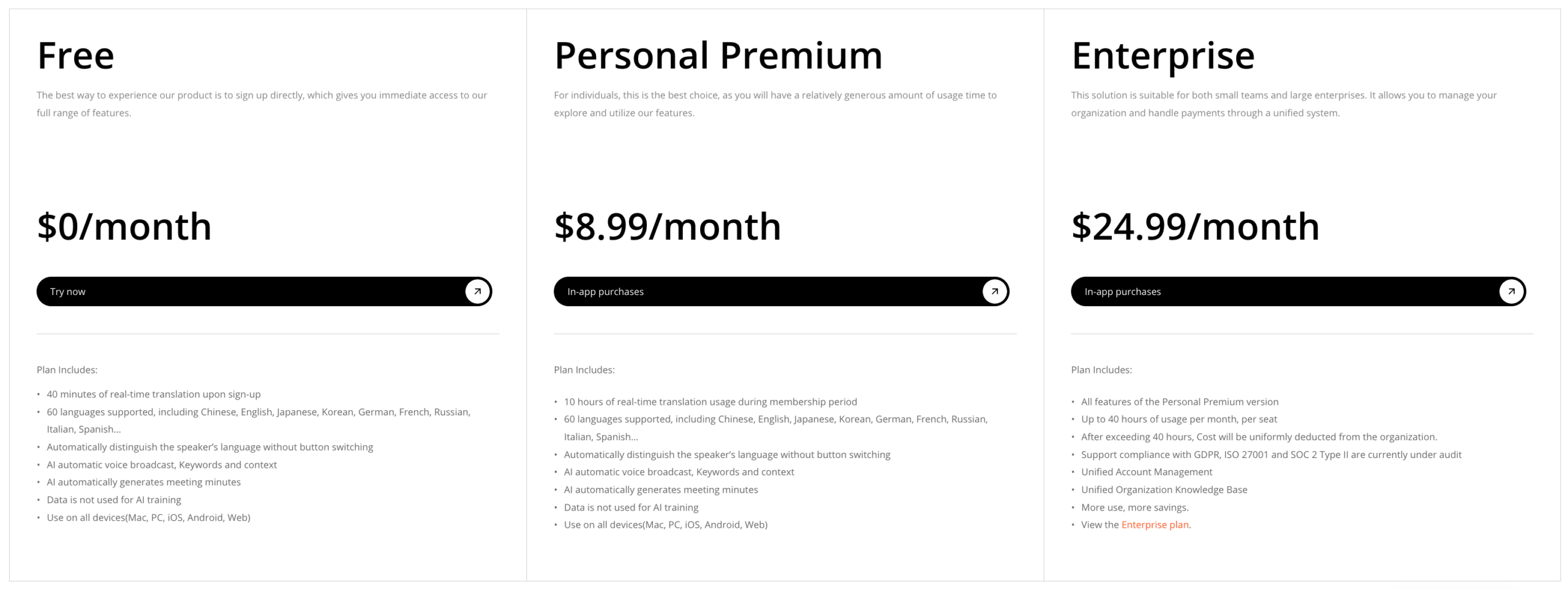 Produk API memerlukan perhitungan yang berbeda: biaya penggunaan, waktu rekayasa, pemantauan, tenaga kerja peninjauan, dan biaya kegagalan. Akses konsumen gratis tidak boleh dibandingkan secara langsung dengan integrasi produksi yang diatur.
Uji Coba Alat Penerjemahan Online Selama 20 Menit
Gunakan paket bukti kecil yang sama untuk setiap kandidat:
- Tulis 12 kalimat yang berisi dua nama, lima istilah khusus, tiga angka, satu koreksi, dan satu kondisi negatif.
- Tambahkan dokumen dua halaman yang berisi tabel, judul, hyperlink, dan teks berbasis gambar.
- Rekam dialog selama tiga menit dengan pergantian pembicara dan satu interupsi.
- Tentukan hasil yang diinginkan: pemahaman cepat, berkas yang disetujui, respons langsung, akses audiens, atau hasil API.
- Prioritaskan makna faktual sebelum kelancaran berbahasa.
- Verifikasi apa yang sebenarnya diterima oleh pendengar jarak jauh atau pembaca akhir.
- Catat waktu penyiapan, waktu penerjemahan, waktu koreksi, dan perkiraan biaya bulanan.
Alat penerjemahan daring terbaik seharusnya mengurangi total pekerjaan. Draf pertama yang dibuat cepat tetapi membutuhkan waktu satu jam untuk penyempurnaan mungkin kalah dibandingkan alur kerja yang lebih lambat tetapi terkendali. Terjemahan rapat yang lancar tetapi tiba terlambat mungkin kurang bermanfaat dibandingkan hasil yang sedikit kurang sempurna yang disampaikan tepat waktu untuk sesi tanya jawab.
Alat Penerjemahan Online Mana yang Harus Anda Pilih?
Memilih Google Terjemahan untuk pemahaman teks, halaman web, atau pribadi yang cepat ketika risikonya rendah. Pilih DeepL sebagai kandidat dokumen ketika berkas terjemahan akan memasuki tinjauan editorial yang sebenarnya. Pilih Penerjemah Microsoft untuk percakapan pribadi atau kelompok kecil yang dapat diikuti setelah menguji bahasa dan perangkat yang relevan.
Memilih Transink AI Saat rapat multibahasa membutuhkan teks terjemahan waktu nyata, terjemahan suara, konteks, dan catatan—atau saat satu pembicara perlu menjangkau audiens melalui Mode Presentasi. Pilih Terjemahan Google Cloud atau DeepL API ketika penerjemahan harus menjadi fungsi terkontrol di dalam perangkat lunak.
Tidak ada alat penerjemahan daring yang menghilangkan kebutuhan akan penilaian profesional. Komunikasi yang berkaitan dengan hukum, medis, peraturan, imigrasi, keuangan, dan keselamatan harus menggunakan penerjemah atau juru bahasa manusia yang berkualifikasi dan bertanggung jawab atas hasilnya.
Keputusan yang paling andal dimulai dengan satu kalimat: “Setelah diterjemahkan, pengguna harus dapat ___.” Isi bagian yang kosong itu, pilih alur kerja yang mencapainya, dan uji seluruh jalur tersebut, bukan hanya satu hasil yang menarik.
Pertanyaan yang Sering Diajukan
Apa itu alat penerjemahan online?
Alat penerjemahan daring memproses teks, dokumen, ucapan, atau data aplikasi melalui layanan yang terhubung ke internet dan mengembalikan konten dalam bahasa lain. Beberapa produk melayani pengguna individu; yang lain dirancang untuk rapat, presentasi, dokumen, atau integrasi perangkat lunak.
Apa alat penerjemahan online terbaik untuk rapat?
Transink AI adalah kandidat terkuat untuk rapat pertama dalam perbandingan ini karena menggabungkan teks terjemahan dwibahasa langsung, terjemahan suara, konteks terminologi, penggunaan lintas platform, transkrip, dan catatan AI. Tim tetap harus menguji perutean audio, bahasa, latensi, privasi, dan batasan paket di lingkungan rapat mereka sendiri.
Bisakah satu alat menerjemahkan dokumen dan ucapan langsung dengan sama baiknya?
Beberapa platform mencakup beberapa jenis input, tetapi alur kerjanya tetap berbeda. Penerjemahan dokumen memprioritaskan tata letak, terminologi, revisi, dan persetujuan. Pengenalan suara langsung memprioritaskan pengenalan, latensi, pergantian giliran, penyampaian, dan pemulihan. Evaluasi setiap mode yang dibutuhkan secara terpisah.
Apakah alat penerjemahan online gratis cukup akurat untuk keperluan bisnis?
Hal ini mungkin cukup untuk pemahaman dengan risiko rendah, tetapi penggunaan bisnis juga melibatkan kerahasiaan, terminologi, catatan, kontrol akses, koreksi, dan akuntabilitas. Uji konten yang representatif dan tentukan kapan peninjau dwibahasa atau penerjemah profesional harus mengambil alih.
Apakah penerjemahan daring dapat menggantikan penerjemah manusia?
Tidak. Penerjemahan otomatis dapat meningkatkan akses dan kecepatan, tetapi tidak dapat memikul tanggung jawab profesional. Gunakan penerjemah manusia yang berkualifikasi untuk komunikasi yang penting, bernuansa, atau memiliki konsekuensi hukum.
Jika Anda menginginkan pengalaman generasi berikutnya, Transink AI memimpin dengan terjemahan real-time bertenaga AI yang membuat percakapan mengalir secara alami. Anda bisa coba gratis Sekarang.
