

मीटिंग, यात्रा, इवेंट, मीडिया और API के लिए 7 AI भाषा अनुवादक टूल की तुलना करें। सही कार्यप्रणाली चुनने के लिए इस गाइड का उपयोग करें।.
एक एआई भाषा अनुवादक यह कृत्रिम बुद्धिमत्ता का उपयोग करके एक भाषा में मौजूद सामग्री का अनुवाद करता है और दूसरी भाषा में उसका समानार्थक अर्थ निकालता है। उत्पाद के प्रकार के आधार पर, यह पाठ, दस्तावेज़, चित्र, लाइव भाषण, रिकॉर्ड किए गए मीडिया या पूरी बहुभाषी बैठकों का अनुवाद कर सकता है।.
इस विविधता के कारण किसी टूल का चुनाव करना जितना आसान लगता है, उससे कहीं अधिक कठिन हो जाता है। एक निःशुल्क यात्रा अनुवादक, एक मीटिंग सहायक, एक इवेंट कैप्शनिंग प्लेटफ़ॉर्म, एक मीडिया लोकलाइज़ेशन सूट और एक डेवलपर एपीआई, ये सभी अलग-अलग समस्याओं का समाधान करते हैं—भले ही इनमें से प्रत्येक को एआई अनुवाद के रूप में वर्णित किया गया हो।.
यह गाइड फ़ीचर लिस्ट के बजाय उपयोगकर्ता पर केंद्रित है। निर्णय प्रक्रिया का अनुसरण करें, सात प्रमुख विकल्पों की तुलना करें और उस वर्कफ़्लो का परीक्षण करें जो आपकी वास्तविक संचार आवश्यकताओं के लिए सबसे उपयुक्त हो।.
संक्षिप्त उत्तर: आपको किस एआई भाषा अनुवादक की आवश्यकता है?
परिणाम से शुरू करें:
- क्या आपको यात्रा से संबंधित त्वरित वाक्यांश, चित्र या अनौपचारिक पाठ की आवश्यकता है? विचार करना टालकाओ या गूगल अनुवाद.
- क्या आपको द्विभाषी उपशीर्षक, अनुवादित भाषण और मीटिंग नोट्स की आवश्यकता है? विचार करना Transync AI.
- क्या आपको कार्यक्रम में शामिल होने वाले कई लोगों के लिए कैप्शन और ऑडियो की आवश्यकता है? विचार करना संसार में.
- क्या आपको अपने उत्पाद में अनुवाद की सुविधा शामिल करने की आवश्यकता है? विचार करना सोनियॉक्स.
- क्या आपको सबटाइटल, डबिंग और मीडिया लोकलाइज़ेशन की आवश्यकता है? विचार करना मेस्त्रा.
- क्या आपको टेक्स्ट, दस्तावेज़, लेखन उपकरण या एंटरप्राइज़ भाषा वर्कफ़्लो की आवश्यकता है? विचार करना डीपएल.
कोई भी एक एआई भाषा अनुवादक सभी छह कार्यों के लिए सर्वश्रेष्ठ नहीं है। उपयोग के आधार पर चयन करने से गलत कार्यप्रवाह के लिए भुगतान करने से बचा जा सकता है।.
एआई भाषा अनुवादक कैसे काम करता है?
यह प्रक्रिया इनपुट पर निर्भर करती है।.
लिखित सामग्री के लिए, सिस्टम अनुवादित पाठ उत्पन्न करने से पहले भाषा के पैटर्न, संदर्भ और अर्थ की पहचान करता है। मौखिक संचार के लिए, इसे अतिरिक्त चरणों को पूरा करना होगा:
ऑडियो रिकॉर्ड करें → भाषण पहचानें → संदर्भ की व्याख्या करें → अर्थ का अनुवाद करें → कैप्शन प्रदर्शित करें या आवाज़ उत्पन्न करें
लाइव स्पीच विशेष रूप से चुनौतीपूर्ण होती है क्योंकि टूल को उच्चारण, विराम, अधूरे वाक्य, पृष्ठभूमि शोर और कई वक्ताओं को बिना किसी व्यवधानकारी विलंब के संभालना होता है।.
आधुनिक उत्पादों में शब्दावली नियंत्रण, ध्वनि संश्लेषण, ध्वनि क्लोनिंग, मीटिंग-प्लेटफ़ॉर्म ऑडियो रूटिंग, ट्रांसक्रिप्ट, सारांश और एपीआई जैसी सुविधाएं शामिल हो सकती हैं। ये सुविधाएं निर्धारित करती हैं कि उपकरण किसी अनौपचारिक वाक्यांश या संपूर्ण व्यावसायिक कार्यप्रवाह के लिए उपयुक्त है या नहीं।.
एआई भाषा अनुवादकों की तुलना: 7 विकल्प
यह तालिका विशिष्ट उत्पाद पोजीशनिंग की तुलना करती है। विशेषताएं, समर्थित भाषाएं और प्लान बदल सकते हैं, इसलिए आधिकारिक उत्पाद वेबसाइटों पर महत्वपूर्ण आवश्यकताओं की पुष्टि करें।.
| औजार | इसके लिए सर्वश्रेष्ठ | मुख्य इनपुट | लाइव वॉयस आउटपुट | मीटिंग वर्कफ़्लो | सत्र के बाद का मूल्य |
|---|---|---|---|---|---|
| Transync AI | बहुभाषी बैठकें, कॉल और आमने-सामने की बातचीत | लाइव भाषण और मीटिंग का ऑडियो | हाँ | द्विभाषी उपशीर्षक, ऑडियो रूटिंग और संदर्भ उपकरण | एआई मीटिंग के प्रतिलेख और नोट्स |
| टालकाओ | यात्रा, मोबाइल अनुवाद और भाषा सीखना | भाषण, पाठ, कैमरा और मोबाइल इनपुट | हाँ | यह इसका प्राथमिक फोकस नहीं है | उपभोक्ता अनुवाद उपकरण |
| संसार में | सम्मेलन, वेबिनार और बड़ी बैठकें | लाइव कार्यक्रम भाषण | हाँ | कार्यक्रम और उपस्थित लोगों पर केंद्रित | प्रतिलेख और सारांश |
| सोनियॉक्स | डेवलपर भाषण उत्पाद | एपीआई और ऐप ऑडियो | टीटीएस/एपीआई क्षमता | कार्यान्वयन-निर्भर | कस्टम उत्पाद आउटपुट |
| मेस्त्रा | वीडियो, ऑडियो, उपशीर्षक, डबिंग और लाइव सामग्री | मीडिया फ़ाइलें और लाइव भाषण | हाँ | लाइव कंटेंट के लिए उपलब्ध है | स्थानीयकरण और मीडिया का पुनः उपयोग |
| डीपएल | टेक्स्ट, दस्तावेज़, एंटरप्राइज़ भाषा कार्य और चयनित वॉइस उपयोग के मामले | टेक्स्ट, दस्तावेज़, एपीआई और वॉइस उत्पाद | उत्पाद-निर्भर | वॉइस-प्रोडक्ट पर निर्भर | लिखित और उद्यम वर्कफ़्लो |
| गूगल अनुवाद | निःशुल्क दैनिक अनुवाद | पाठ, चित्र, वेबसाइटें, दस्तावेज़ और भाषण | अनुवाद प्लेबैक | पहली मुलाकात नहीं | त्वरित व्यक्तिगत अनुवाद |
निर्णय पथ 1: क्या आप लाइव मीटिंग का अनुवाद कर रहे हैं?
यदि उत्तर हां है, तो केवल टेक्स्ट की गुणवत्ता के बजाय बातचीत के प्रवाह पर ध्यान केंद्रित करें। सबसे उपयोगी विशेषताएं हैं कम विलंबता, दो-तरफ़ा भाषा पहचान, द्विभाषी कैप्शन, अनुवादित आवाज, मीटिंग ऑडियो रूटिंग, शब्दावली समर्थन और कॉल के बाद के रिकॉर्ड।.
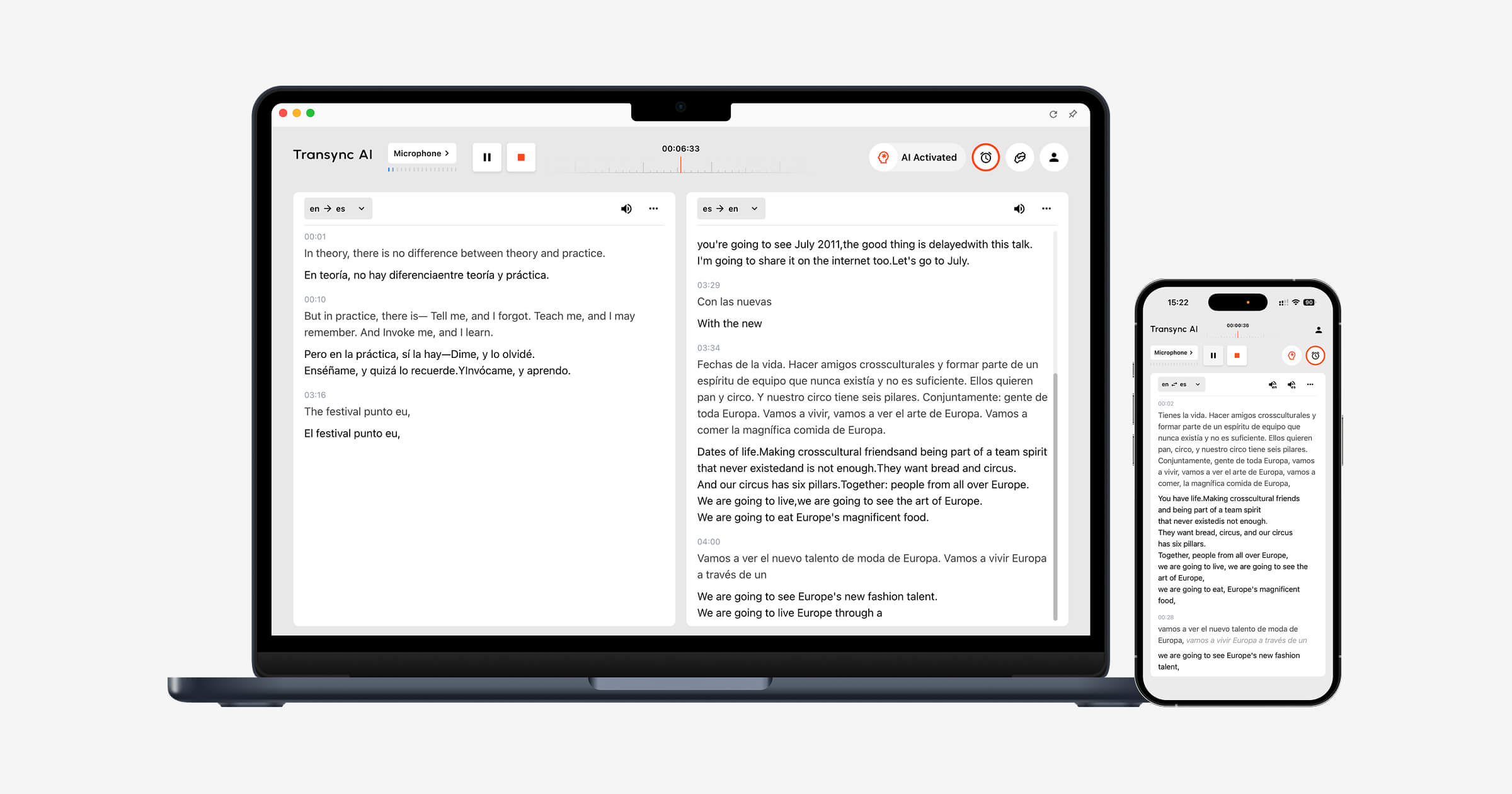
Transync AI इसे इन्हीं आवश्यकताओं को ध्यान में रखकर डिजाइन किया गया है। वास्तविक समय अनुवाद उपकरण यह संवाद के दौरान मूल भाषण और अनुवाद को साथ-साथ प्रदर्शित करता है।.
The AI वॉयस ट्रांसलेटर अनुवादित परिणाम को जोर से पढ़ा जाता है, जिससे प्रतिभागियों को पढ़ने के साथ-साथ सुनने की भी सुविधा मिलती है। एआई मीटिंग नोट्स सुविधा फिर कॉल के बाद एक ट्रांसक्रिप्ट और संरचित नोट्स तैयार करता है।.
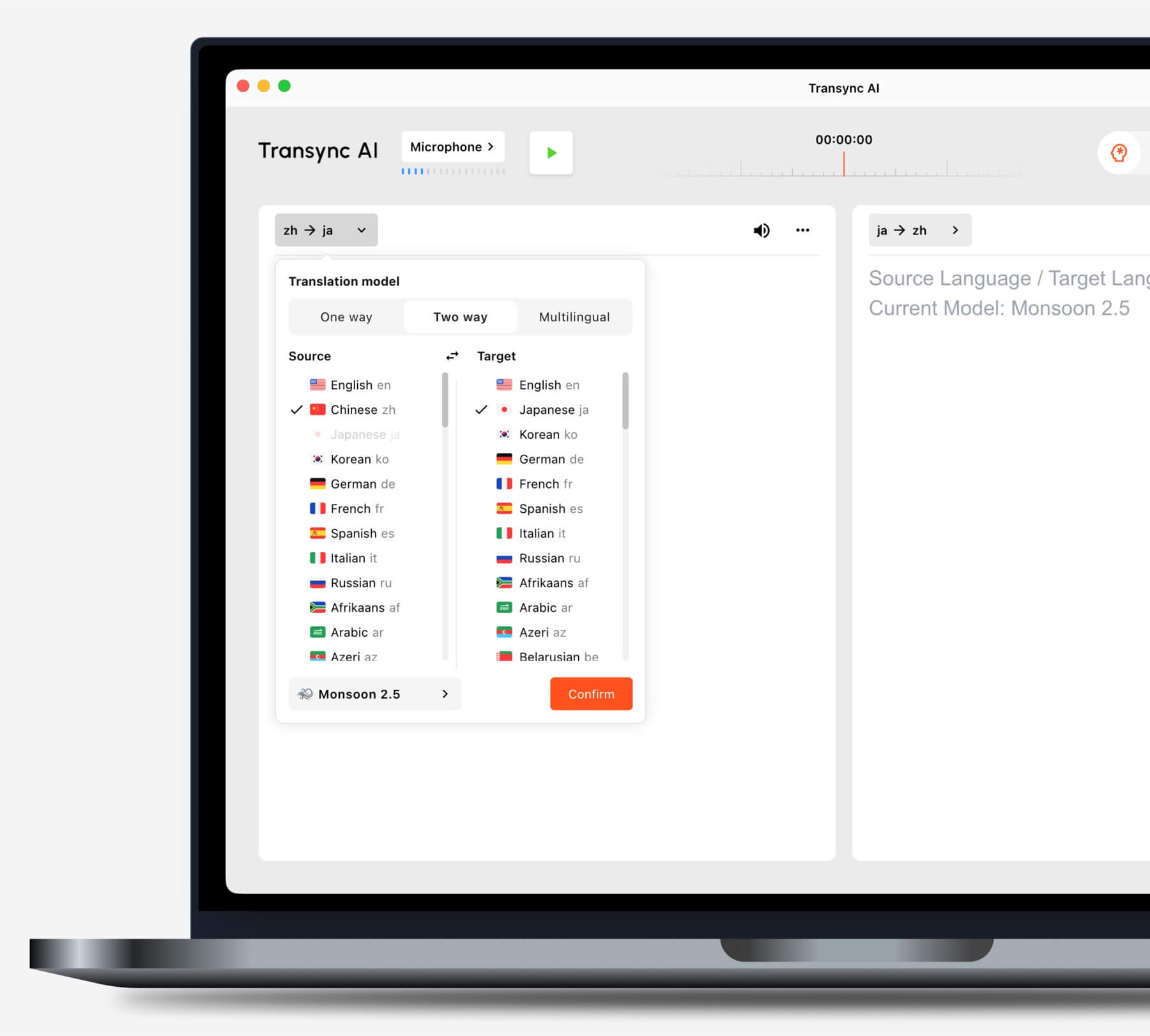
किसी कार्य को शुरू करने से पहले, अपनी स्थिति के अनुसार अनुवाद मोड चुनें।.
क्या आप आम वीडियो मीटिंग प्लेटफॉर्म का उपयोग करते हैं?
The लाइव मीटिंग अनुवाद सुविधा साथ काम करता है Zoom, Microsoft Teams, और Google Meet. Transync AI यह एक प्लेटफॉर्म-विशिष्ट प्लगइन के बजाय एक स्टैंडअलोन सॉफ्टवेयर है।.
The कंप्यूटर-ऑडियो साझाकरण सुविधा यह दूरस्थ प्रतिभागियों से भाषण रिकॉर्ड करता है। वर्चुअल माइक्रोफोन सुविधा यह मीटिंग में अनुवादित आवाज भेजने में मदद करता है।.

निर्बाध रीयल-टाइम अनुवाद के लिए प्रमुख ऑनलाइन मीटिंग प्लेटफॉर्म के साथ संगत।
क्या आप स्लाइड प्रेजेंटेशन देते हैं या किसी अन्य ऐप में काम करते हैं?
The पिक्चर-इन-पिक्चर द्विभाषी उपशीर्षक सुविधा यह समर्थित उपकरणों पर अन्य एप्लिकेशन के ऊपर मूल और अनुवादित कैप्शन को प्रदर्शित रखता है। इससे उपयोगकर्ताओं को प्रस्तुति देते समय, सॉफ़्टवेयर का प्रदर्शन करते समय या नोट्स लेते समय अनुवाद को समझने में मदद मिलती है।.
निर्णय पथ 2: क्या आप किसी बड़े आयोजन का अनुवाद कर रहे हैं?
जब सैकड़ों प्रतिभागियों को भाषा संबंधी सहायता की आवश्यकता होती है, तो वितरण मुख्य चुनौती बन जाता है। प्रतिभागियों को व्यक्तिगत खाते बनाने या मीटिंग टूल स्थापित करने के बजाय अपने उपकरणों पर कैप्शन या अनुवादित ऑडियो खोलने की आवश्यकता हो सकती है।.
संसार में यह कॉन्फ्रेंस, वेबिनार, हाइब्रिड इवेंट और बड़ी बैठकों के लिए उपयुक्त है। प्रतिभागी लिंक या क्यूआर कोड के माध्यम से अनुवाद का उपयोग कर सकते हैं, जिससे यह बड़े पैमाने पर दर्शकों के लिए अधिक उपयुक्त हो जाता है।.
 चुनना Transync AI व्यक्तिगत और टीम आधारित बैठकों के अनुवाद के लिए। चुनें संसार में जब किसी आयोजक को किसी बड़े समूह को अनुवाद उपलब्ध कराना हो।.
निर्णय पथ 3: क्या आप यात्रा संबंधी सामग्री का अनुवाद कर रहे हैं या रोजमर्रा की सामग्री का?
यात्रा के लिए, सबसे महत्वपूर्ण विशेषताएं मोबाइल की सुविधा, कैमरा अनुवाद, टेक्स्ट इनपुट और त्वरित वॉयस प्लेबैक हो सकती हैं। मीटिंग नोट्स और वर्चुअल माइक्रोफोन आमतौर पर अनावश्यक होते हैं।.
टालकाओ यह उपभोक्ता-उन्मुख अनुवाद और भाषा सीखने के उपकरण प्रदान करता है, जिसमें आवाज, कैमरा और मोबाइल सुविधाएं शामिल हैं।. गूगल अनुवाद यह टेक्स्ट, इमेज, वेबसाइट, दस्तावेज़ और अनौपचारिक बोलचाल के अनुवाद के लिए व्यापक रूप से उपलब्ध है।.
 Transync AI यह आमने-सामने की लंबी मौखिक बातचीत में मदद कर सकता है, लेकिन यह ऑफलाइन मोड, छवि पहचान या केवल पाठ वाले दस्तावेज़ों के अनुवाद का समर्थन नहीं करता है।.
निर्णय पथ 4: क्या आप मीडिया का स्थानीयकरण कर रहे हैं?
वीडियो और ऑडियो प्रोडक्शन के लिए सिर्फ उस समय की बातचीत को समझना ही काफी नहीं है। टीमों को एडिटेबल सबटाइटल्स, डबिंग, टाइमिंग, ट्रांसक्रिप्शन, ट्रांसलेशन और एक्सपोर्ट विकल्पों की आवश्यकता हो सकती है।.
मेस्त्रा इसका उपयोग मीडिया अनुवाद, प्रतिलेखन, उपशीर्षक, डबिंग, वेबिनार और लाइव सामग्री में किया जाता है। यह तब और भी बेहतर होता है जब अनुवाद उत्पादन और प्रकाशन कार्यप्रवाह का हिस्सा बन जाता है।.
 चुनना Transync AI जब मुख्य लक्ष्य प्रत्यक्ष दो-तरफ़ा बातचीत हो। चुनें मेस्त्रा जब अनुवादित सामग्री को संपादित करके मीडिया के रूप में पुनः उपयोग किया जाना आवश्यक हो।.
निर्णय पथ 5: क्या आप अनुवाद उत्पाद बना रहे हैं?
एक प्रोडक्ट टीम को प्रोग्रामेबल इंफ्रास्ट्रक्चर, डॉक्यूमेंटेशन, लेटेंसी कंट्रोल और इंटीग्रेशन फ्लेक्सिबिलिटी की आवश्यकता होती है। आमतौर पर उसे एंड-यूज़र मीटिंग इंटरफेस की आवश्यकता नहीं होती है।.
सोनियॉक्स यह वॉइस प्रोडक्ट बनाने वाले डेवलपर्स के लिए स्पीच-टू-टेक्स्ट, ट्रांसलेशन और टेक्स्ट-टू-स्पीच की क्षमताएं प्रदान करता है।.
 डीपएल यह टेक्स्ट, दस्तावेज़, लेखन और चयनित ध्वनि वर्कफ़्लो में एपीआई और एंटरप्राइज़ भाषा सेवाएं प्रदान करता है।.
 चुनना Transync AI जब कर्मचारियों या ग्राहकों को मीटिंग के लिए पूरी तरह से तैयार अनुवादक की आवश्यकता हो। API प्लेटफॉर्म तब चुनें जब इंजीनियर संपूर्ण अनुभव को डिजाइन और रखरखाव करेंगे।.
निर्णय पथ 6: क्या पाठ और दस्तावेज़ प्राथमिकता हैं?
लिखित अनुवाद में प्रारूप संरक्षण, शब्दावली की एकरूपता, संपादन, दस्तावेज़ समर्थन और मौजूदा कार्य उपकरणों के साथ एकीकरण को प्राथमिकता दी जाती है। लाइव उपशीर्षक और ध्वनि सुविधाएँ गौण हो सकती हैं।.
डीपएल इसे व्यापक रूप से पाठ और दस्तावेज़ अनुवाद, लेखन सहायता, एपीआई और उद्यम भाषा वर्कफ़्लो के लिए तैयार किया गया है।. गूगल अनुवाद यह त्वरित उपभोक्ता पाठ, वेबसाइट, छवि और दस्तावेज़ संबंधी कार्यों के लिए उपयोगी है।.
Transync AI यह केवल टेक्स्ट-आधारित दस्तावेज़ अनुवादक नहीं है। इसका सबसे मजबूत उपयोग बहुभाषी लाइव संचार में है।.
क्यों Transync AI बहुभाषी वार्तालापों के लिए उपयुक्त
Transync AI यह एक लाइव बातचीत के चरणों को जोड़ता है: दूसरे व्यक्ति को सुनना, अनुवाद पढ़ना, जवाब देना और रिकॉर्ड रखना।.
स्वचालित दो-तरफ़ा पहचान
चयनित समर्थित भाषा युग्म के भीतर, वास्तविक समय अनुवाद उपकरण बोली जा रही भाषा को पहचाना जा सकता है। उपयोगकर्ताओं को हर बार भाषा बदलने वाले बटन को दबाने की आवश्यकता नहीं है।.
 प्राकृतिक आवाज प्लेबैक और आवाज क्लोनिंग
 प्राकृतिक आवाज प्लेबैक और आवाज क्लोनिंग
The AI वॉयस ट्रांसलेटर यह विभिन्न आवाज शैलियों और प्लेबैक गति की सुविधा प्रदान करता है। वॉइस क्लोनिंग फ़ीचर यह उपयोगकर्ता की आवाज के अनुरूप अनुवादित भाषण उत्पन्न कर सकता है, जिससे पाठ, प्रस्तुतियों और ग्राहक कॉलों को अधिक व्यक्तिगत रूप देने में मदद मिलती है।.
 मुख्य शब्द और पृष्ठभूमि संदर्भ
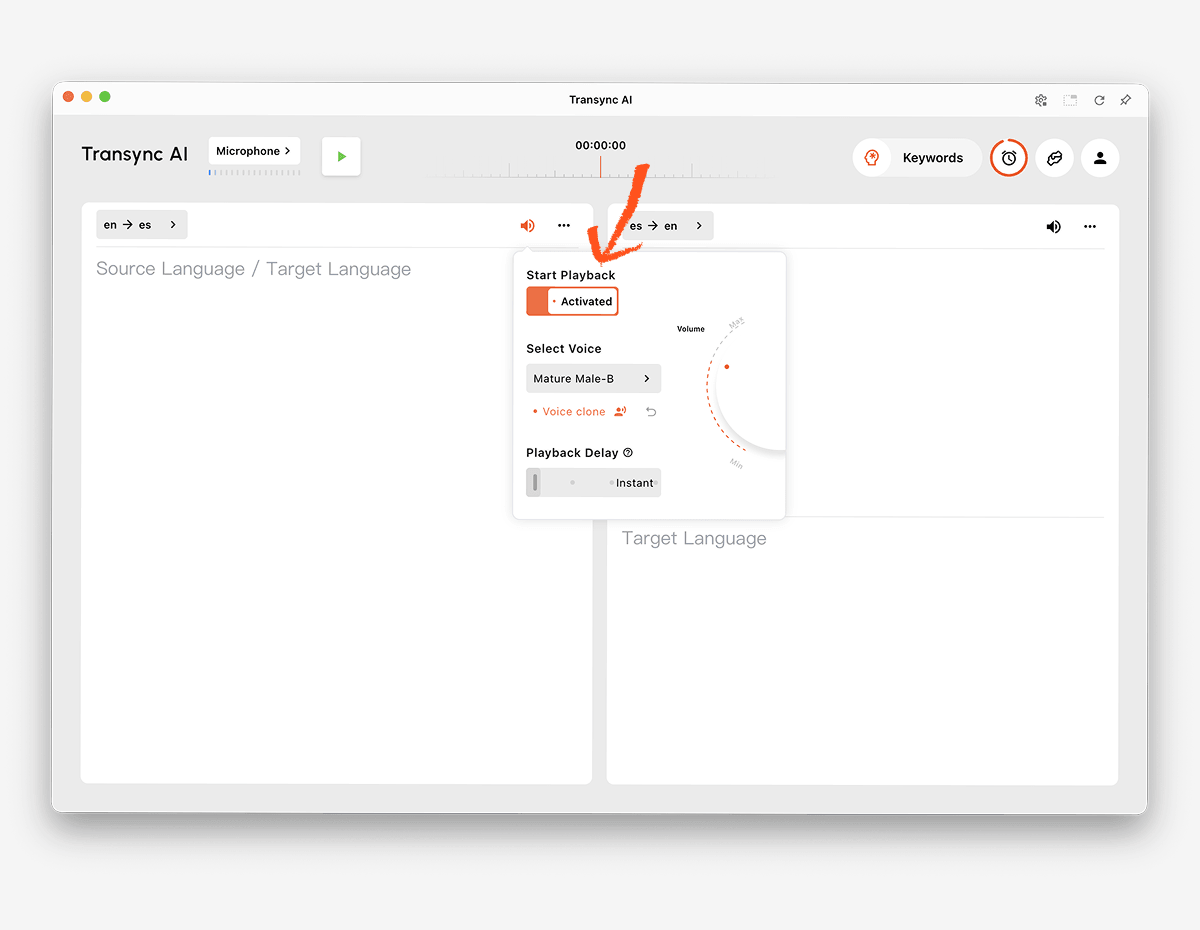 मुख्य शब्द और पृष्ठभूमि संदर्भ
नाम, ब्रांड, संक्षिप्त रूप और विशिष्ट शब्द अनुवाद त्रुटियों के सामान्य स्रोत हैं। एआई असिस्टेंट कीवर्ड और संदर्भ सुविधा यह उपयोगकर्ताओं को महत्वपूर्ण शब्दावली को परिभाषित करने और सत्र से पहले विषय को समझाने की सुविधा देता है।.
 क्रॉस-डिवाइस एक्सेस
 क्रॉस-डिवाइस एक्सेस
Transync AI यह वेब, विंडोज, macOS, iOS और Android वर्कफ़्लो को सपोर्ट करता है। इससे उपयोगकर्ता ऑनलाइन या आमने-सामने की बातचीत के लिए सबसे उपयुक्त डिवाइस का चयन कर सकते हैं।.
60 से अधिक भाषाएँ
यह प्लेटफॉर्म 60 से अधिक भाषाओं और 1,000 से अधिक भाषा युग्मों का समर्थन करता है। भाषा की उपलब्धता समय-समय पर बदल सकती है, इसलिए जाँच करते रहें। समर्थित भाषाओं का पृष्ठ ठीक उसी जोड़ी के लिए जिसकी आवश्यकता है।.
बातचीत के बाद के रिकॉर्ड
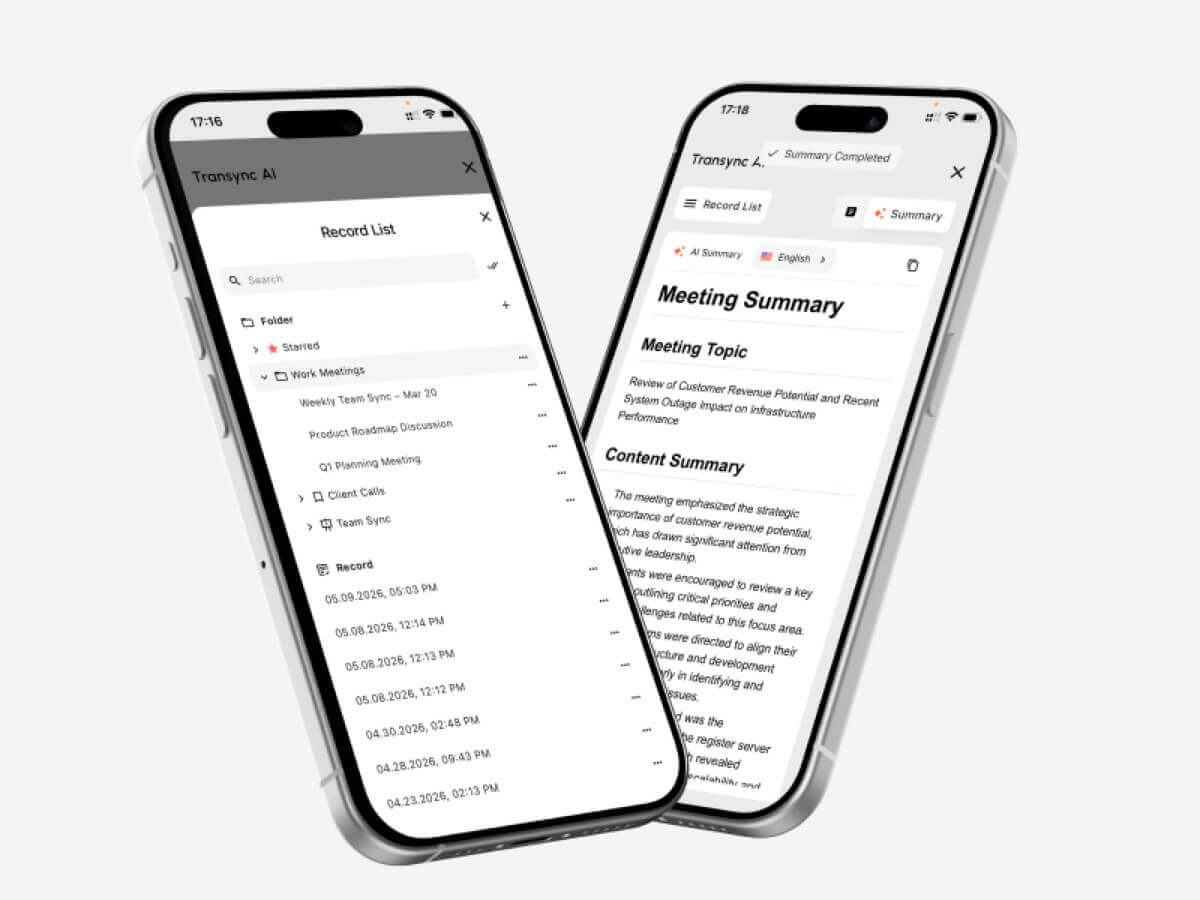
The एआई मीटिंग नोट्स सुविधा यह प्रतिलेख और संरचित नोट्स तैयार करता है। अनुवाद रिकॉर्ड प्रबंधन मार्गदर्शिका यह बताता है कि उपयोगकर्ता पिछली सत्रों तक कैसे पहुंच सकते हैं और उन्हें व्यवस्थित कर सकते हैं।.
 एआई भाषा अनुवादक का परीक्षण कैसे करें
 एआई भाषा अनुवादक का परीक्षण कैसे करें
उत्पाद का उपयोग जिस वातावरण में किया जाएगा, उसी वातावरण में परीक्षण करें।.
वास्तविक भाषा जोड़ी का परीक्षण करें
केवल कुल भाषा गणना पर ही निर्भर न रहें। आवश्यक जोड़ी की दोनों दिशाओं का क्षेत्रीय लहजे और वास्तविक बोलने की गति के साथ परीक्षण करें।.
महत्वपूर्ण शब्दावली का परीक्षण करें
नामों, उत्पादों, संक्षिप्त शब्दों और विशिष्ट शब्दावली की एक सूची बनाएं। संदर्भ जोड़ने से पहले और बाद के परिणामों की तुलना करें। जांचें कि अनुवाद शब्दों को पहचानने के बजाय उनके अर्थ को बरकरार रखता है या नहीं।.
बातचीत में होने वाली देरी का परीक्षण करें
दो लोगों को स्वाभाविक बातचीत करने के लिए कहें। ध्यान दें कि क्या अनुवाद में देरी के कारण बातचीत में रुकावट, भ्रम या अस्वाभाविक विराम उत्पन्न होते हैं।.
सबटाइटल और वॉइस का एक साथ परीक्षण करें
कुछ प्रतिभागी ऑडियो पसंद करते हैं, जबकि अन्य टेक्स्ट पर निर्भर रहते हैं। सबटाइटल की पठनीयता, आवाज की स्पष्टता, बोलने की गति और नामों और संख्याओं की आसानी से पुष्टि करने की क्षमता की जाँच करें।.
मीटिंग सेटअप का परीक्षण करें
वास्तविक मीटिंग प्लेटफॉर्म, माइक्रोफ़ोन, स्पीकर, ऑपरेटिंग सिस्टम और नेटवर्क का उपयोग करें। सुनिश्चित करें कि रिमोट ऑडियो अनुवादक तक पहुँचता है और अनुवादित भाषण इच्छित श्रोताओं तक पहुँचता है।.
कॉल के बाद आउटपुट की जांच करें
कार्यवाही विवरण और नोट्स की समीक्षा करते समय यह सुनिश्चित करें कि कोई निर्णय छूटा हुआ न हो, नाम गलत हों और कार्यसूची अस्पष्ट हो। सुचारू लाइव अनुभव से यह गारंटी नहीं मिलती कि रिकॉर्ड सटीक होगा।.
गोपनीयता और डेटा प्रबंधन की समीक्षा करें
जांचें कि ऑडियो, ट्रांसक्रिप्ट, वॉइस मॉडल और खाता डेटा को कैसे संसाधित किया जाता है।. Transync AI इसमें कहा गया है कि ग्राहक डेटा का उपयोग डिफ़ॉल्ट रूप से एआई प्रशिक्षण के लिए नहीं किया जाता है और प्रोसेसिंग के बाद ऑडियो को हटा दिया जाता है। संगठनों को इसकी समीक्षा करनी चाहिए। ट्रस्ट केंद्र और उनकी आवश्यकताओं के अनुसार वर्तमान शर्तें।.
लाइव अनुवाद सत्र कैसे शुरू करें
- खुला Transync AI समर्थित डिवाइस पर।.
- वार्तालाप में प्रयुक्त दो भाषाओं का चयन करें।.
- सही माइक्रोफोन या कंप्यूटर-ऑडियो स्रोत का चयन करें।.
- शब्दावली को इसके माध्यम से जोड़ें एआई असिस्टेंट कीवर्ड और संदर्भ सुविधा.
- शुरू करें वास्तविक समय अनुवाद उपकरण.
- सुनिश्चित करें कि द्विभाषी उपशीर्षक सही ढंग से अपडेट हो रहे हैं।.
- सक्षम करें AI वॉयस ट्रांसलेटर जब प्रतिभागियों को श्रव्य अनुवाद की आवश्यकता हो।.
- उपयोग पिक्चर-इन-पिक्चर द्विभाषी उपशीर्षक सुविधा किसी अन्य ऐप में काम करते समय।.
- ऑनलाइन कॉल के लिए, कॉन्फ़िगर करें कंप्यूटर-ऑडियो साझाकरण सुविधा और वर्चुअल माइक्रोफोन सुविधा.
- परिणाम की समीक्षा करें एआई मीटिंग नोट्स सुविधा.
किसी महत्वपूर्ण बैठक से पहले भाषा निर्देशन, ऑडियो रूटिंग, नेटवर्क गुणवत्ता और शब्दावली की पुष्टि करने के लिए एक छोटा पूर्वाभ्यास करें।.
एआई भाषा अनुवादक संबंधी अक्सर पूछे जाने वाले प्रश्न
एआई भाषा अनुवादक क्या है?
एक कृत्रिम बुद्धिमत्ता (एआई) भाषा अनुवादक मशीन लर्निंग मॉडल का उपयोग करके एक भाषा में लिखे पाठ, भाषण, चित्र, दस्तावेज़ या मीडिया की व्याख्या करता है और दूसरी भाषा में उसका समतुल्य अर्थ उत्पन्न करता है। उत्पाद की क्षमताएं इनपुट और उपयोग के प्रकार के आधार पर भिन्न होती हैं।.
बैठकों के लिए सबसे अच्छा एआई भाषा अनुवादक कौन सा है?
Transync AI यह एक मजबूत विकल्प है जो पहले बैठक करने के लिए उपयुक्त है क्योंकि यह संयोजन करता है वास्तविक समय द्विभाषी अनुवाद, अनुवादित ध्वनि प्लेबैक, फ्लोटिंग सबटाइटल, शब्दावली संदर्भ, और एआई मीटिंग नोट्स.
सबसे अच्छा विकल्प अभी भी आवश्यक भाषाओं, प्लेटफॉर्म, गोपनीयता नियमों और अपेक्षित सत्र अवधि पर निर्भर करता है।.
क्या वीडियो मीटिंग के दौरान एआई भाषण का अनुवाद कर सकता है?
हां ट्रांसिनक एआई से लाइव मीटिंग अनुवाद सुविधा साथ काम करता है Zoom, Microsoft Teams, और Google Meet. यह लाइव कॉल के दौरान द्विभाषी उपशीर्षक और अनुवादित आवाज प्रदान कर सकता है।.
क्या यह दोनों भाषाओं को स्वचालित रूप से पहचान सकता है?
The ट्रांसिनक एआई का रीयल-टाइम अनुवाद उपकरण यह चयनित समर्थित जोड़ी के भीतर वक्ता की भाषा को अलग-अलग पहचान सकता है, जिससे दो-तरफ़ा बातचीत में मैन्युअल रूप से भाषा बदलने की आवश्यकता कम हो जाती है।.
क्या एआई अनुवाद ऑफ़लाइन काम करता है?
ऑफलाइन सहायता प्रदाता और भाषा पर निर्भर करती है।. Transync AI इसके लिए इंटरनेट कनेक्शन की आवश्यकता होती है और वर्तमान में इसमें ऑफलाइन मोड उपलब्ध नहीं है।.
क्या एआई छवियों और दस्तावेजों का अनुवाद कर सकता है?
कुछ उत्पाद ऐसा कर सकते हैं।. गूगल अनुवाद यह छवियों और दस्तावेजों सहित व्यापक उपभोक्ता इनपुट का समर्थन करता है, जबकि डीपएल यह टेक्स्ट और डॉक्यूमेंट वर्कफ़्लो के लिए मज़बूती से तैयार है।. Transync AI यह लाइव स्पीच पर केंद्रित है और इसमें इमेज रिकग्निशन या टेक्स्ट-ओनली डॉक्यूमेंट ट्रांसलेशन की सुविधा नहीं है।.
क्या एआई अनुवादक मानव दुभाषिए का स्थान ले सकता है?
कृत्रिम बुद्धिमत्ता कई नियमित, शैक्षिक, यात्रा और व्यावसायिक बातचीत में सहायक हो सकती है, लेकिन यह पूर्ण सटीकता, निर्णय या सांस्कृतिक बारीकियों की गारंटी नहीं दे सकती। चिकित्सा, कानूनी, सुरक्षा संबंधी और संविदात्मक रूप से बाध्यकारी चर्चाओं के लिए एक योग्य मानव दुभाषिया की आवश्यकता हो सकती है।.
अंतिम निर्णय
मुख्य कार्यप्रवाह के अनुसार चयन करें:
- चुनना टालकाओ या गूगल अनुवाद सामान्य यात्रा और रोजमर्रा के अनुवाद के लिए।.
- चुनना संसार में बहुभाषी सम्मेलनों और प्रतिभागियों के लिए आयोजित कार्यक्रमों के लिए।.
- चुनना सोनियॉक्स एपीआई और कस्टम स्पीच उत्पादों के लिए।.
- चुनना मेस्त्रा उपशीर्षक, डबिंग और मीडिया स्थानीयकरण के लिए।.
- चुनना डीपएल टेक्स्ट, दस्तावेज़, एंटरप्राइज़ भाषा के काम और चयनित वॉइस वर्कफ़्लो के लिए।.
- चुनना Transync AI लाइव मीटिंग्स के लिए जिनमें द्विभाषी उपशीर्षक, प्राकृतिक आवाज अनुवाद, शब्दावली संदर्भ, ऑडियो रूटिंग और बाद में उपयोगी नोट्स की आवश्यकता होती है।.
दायाँ एआई भाषा अनुवादक जरूरी नहीं कि उत्पाद में सबसे अधिक इनपुट हों या सुविधाओं की सबसे लंबी सूची हो। बल्कि यह वह उत्पाद है जो वास्तविक संचार कार्य में शामिल लोगों, सामग्री, उपकरणों और अनुवर्ती कार्रवाई के लिए उपयुक्त हो।.
यदि आप अगली पीढ़ी का अनुभव चाहते हैं, Transync AI वास्तविक समय, AI-संचालित अनुवाद के साथ अग्रणी है जो बातचीत को स्वाभाविक रूप से प्रवाहित रखता है। आप मुफ्त में आजमाएं अब।
 🤖
🤖