
“ Quelle est la meilleure IA pour la traduction automatique ? ” C’est la question que se posent des milliers d’entreprises chaque mois.
La réponse : Cela dépend de votre cas d'utilisation. Il n'existe pas d'IA “ idéale ” : chaque solution excelle dans des contextes différents. Ce guide compare les principales IA de traduction et vous aide à choisir celle qui correspond le mieux à vos besoins.
Que vous ayez besoin de traductions en temps réel lors de réunions, de traductions précises de documents ou de traductions rapides d'e-mails, vous trouverez l'IA de traduction idéale à la fin de ce guide.
Pourquoi l'IA pour la traduction est-elle importante aujourd'hui ?
Le marché de la traduction est en pleine explosion :
- 71% des consommateurs du monde entier préfèrent les produits dans leur langue maternelle
- 65% des personnes non anglophones ne visitent jamais de sites web exclusivement en anglais.
- Les erreurs de traduction coûtent aux entreprises entre 9 000 et 45 000 euros par incident.
- L'IA pour la traduction s'est améliorée, passant d'une précision de 75% (2020) à 95%+ (2026).
L'IA moderne pour la traduction permet :
- ✅ Accès au marché mondial (sans limitation linguistique)
- ✅ Communication instantanée (par-delà les barrières linguistiques)
- ✅ Réduction des coûts de recrutement (pas besoin de personnel multilingue)
- ✅ Meilleure expérience client (assistance dans la langue maternelle)
- ✅ Avantage concurrentiel (expansion rapide vers de nouveaux marchés)
Qu'est-ce qui fait une bonne IA pour la traduction ?
Avant de comparer des outils spécifiques, il est important de comprendre ce qui distingue une excellente IA de traduction d'une IA médiocre :
| Indicateur de qualité | Excellent | Moyenne | Pauvre |
|---|---|---|---|
| Précision | 95%+ | 85-90% | <80% |
| Latence | <100 ms | 100-300 ms | 300 ms+ |
| Paires de langues | Plus de 60 langues de qualité | 30 à 50 langues | <30 langues |
| Conscience du contexte | Comprend le contexte industriel | Traduction générique | Littéralement mot à mot |
| Qualité de la voix | 9+/10 naturel | 6-7/10 acceptable | 4-5/10 robotique |
| Coût | Transparent, $8.99-$30/mois | Variable, $10-50/mois | Cher, $100+/mois |
| Vitesse (configuration) | <1 minute | 2 à 5 minutes | 10+ minutes |
| Soutien | Assistance en direct 24h/24 et 7j/7 | Assistance par e-mail | Aucun soutien |
| courbe d'apprentissage | Intuitif, sans formation | Apprentissage modéré | Configuration complexe |
Les meilleures IA pour les solutions de traduction (2026)
#1 : Transync AI – Meilleure IA globale pour la traduction
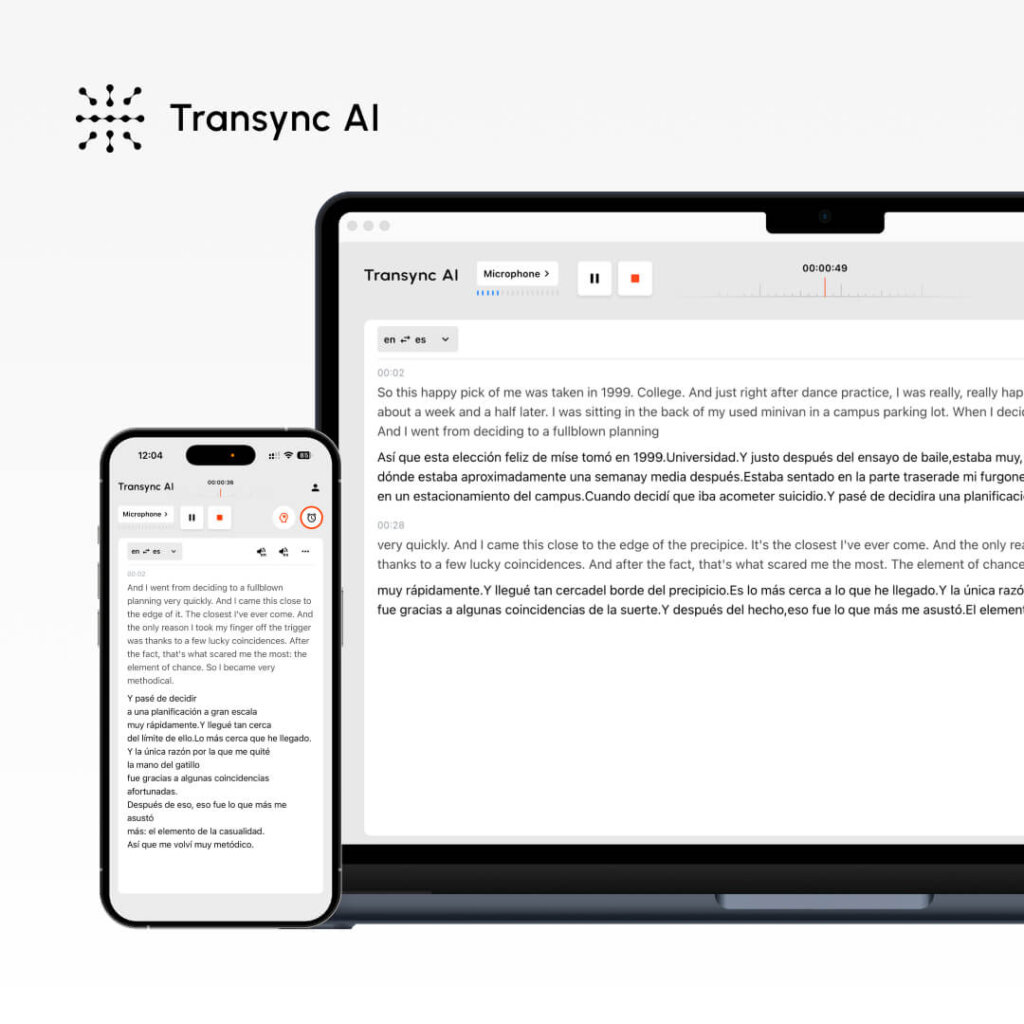
Qu'est-ce que c'est : Traduction IA en temps réel pour les réunions et les documents Idéal pour : Appels commerciaux, réunions d'équipe, webinaires, assistance client
Indicateurs de performance :
- Précision: 95%+ (général), 99% (technique avec mots-clés)
- Latence: <100 ms (délai imperceptible)
- Langues : 60 langues
- Qualité vocale : 9,1/10 (les locuteurs natifs l'évaluent comme étant presque humain)
- Disponibilité : 99.8%+
Comment ça marche :
- Ouvrez Transync AI
- Sélectionnez la paire de langues (anglais → espagnol)
- Cochez la case “ Audio de l'ordinateur ”
- Cliquez sur “ Démarrer la traduction ”
- Ouvrez Zoom/Teams/Meet normalement
- Transync AI traduit en temps réel (latence < 100 ms)
- Après la réunion : Transcription automatique + résumé IA
Tarification :
- Gratuit : 40 minutes/mois (premier mois seulement)
- Formule de base : $8,99/mois (10 heures)
- Pro : $19,99/mois (30 heures)
- Équipe : $49,99/mois (100 heures, 3 utilisateurs)
Avantages : ✅ Latence minimale (<100 ms, imperceptible) ✅ Voix d'une qualité exceptionnelle (9,1/10) ✅ Installation ultra-simple (<1 minute) ✅ Tarif le plus bas ($8,99 €/mois) ✅ Traduction en temps réel pour les réunions ✅ Transcription et résumé automatiques ✅ Paramétrage des mots-clés et du contexte pour une précision optimale ✅ Multiplateforme (Zoom, Teams, Meet, Webex, WhatsApp)
Inconvénients : ❌ Limité à 60 langues (contre plus de 100 pour certains concurrents) ❌ Idéal pour les réunions, pas pour la traduction de documents ❌ Nécessite une configuration audio sur ordinateur
Meilleurs cas d'utilisation :
- 🎯 Appels commerciaux internationaux
- 🎯 Réunions quotidiennes d'équipe distribuées
- 🎯 Appels au service client
- 🎯 Webinaires multilingues
- 🎯 Appels vocaux WhatsApp multilingues
Verdict: Idéal pour la communication en temps réel. Si vous avez besoin d'une traduction instantanée avec une voix naturelle pendant vos réunions, Transync AI est la solution idéale.
#2 : ChatGPT – L’IA la plus polyvalente pour la traduction
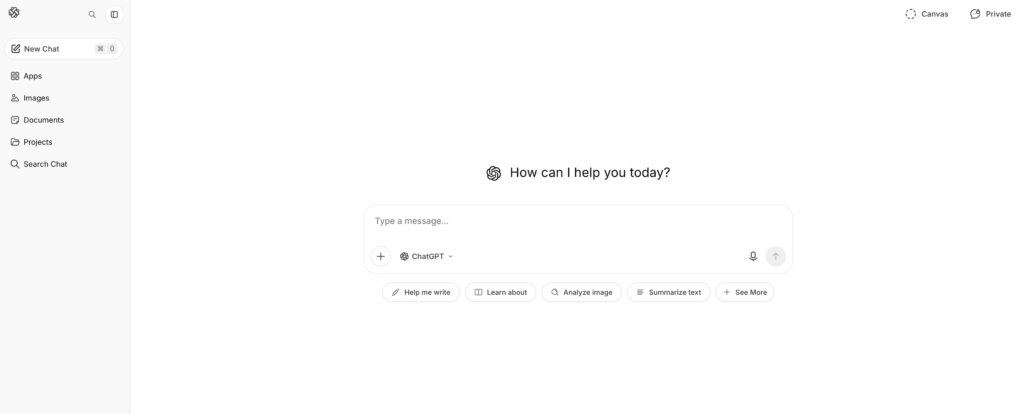
Qu'est-ce que c'est : IA généraliste avec capacités de traduction Idéal pour : Traduction de documents, création de contenu, textes nuancés
Indicateurs de performance :
- Précision: 93-95%
- Latence: Instantané (mais pas en temps réel comme Transync AI)
- Langues : Plus de 100 langues
- Installation: Modéré (2-3 minutes)
- Conscience du contexte : Excellent (comprend les nuances)
Comment ça marche :
- Rendez-vous sur ChatGPT (openai.com)
- Consigne : “ Traduisez ce texte anglais en espagnol : [texte] ”
- ChatGPT traduit en tenant compte du contexte.
- Examiner et utiliser le texte traduit
Tarification :
- Gratuit : utilisation limitée par mois
- ChatGPT Plus : $20/mois (utilisation illimitée)
- ChatGPT Pro : $200/mois (fonctionnalités avancées)
Avantages : ✅ Excellente compréhension du contexte (perception des nuances) ✅ Polyvalence (traduction, rédaction et codage) ✅ Plus de 100 langues prises en charge ✅ Tarifs compétitifs ($20/mois) ✅ Haute précision (93-95%) ✅ Idéal pour les textes complexes et le contenu marketing
Inconvénients : ❌ Non temps réel (latence trop importante pour les réunions) ❌ Ne traite pas l'audio/vidéo en direct ❌ Nécessite une saisie de texte (pas de traduction vocale) ❌ Précision moins constante que les outils spécialisés ❌ Version gratuite limitée
Meilleurs cas d'utilisation :
- 📝 Traduction de documents (contrats, manuels)
- 📝 Localisation de contenu marketing
- 📝 Rédaction d'e-mails en plusieurs langues
- 📝 Traduction de textes techniques
- 📝 Traduction de contenu créatif (préservation du ton)
Verdict: Idéal pour le contenu écrit. Si vous devez traduire des documents en préservant le ton et le contexte, ChatGPT est idéal. En revanche, il n'est pas adapté aux réunions en temps réel.
👉 ChatGPT
#3 : Google Traduction – L’IA la plus accessible pour la traduction

Qu'est-ce que c'est : Traduction IA gratuite et en ligne Idéal pour : Traductions rapides, communication informelle
Indicateurs de performance :
- Précision: 92%
- Latence: Instantané
- Langues : Plus de 100 langues
- Installation: 0 minute (aucun compte requis)
- Qualité vocale : 7/10 (acceptable mais robotique)
Comment ça marche :
- Rendez-vous sur translate.google.com
- Collez le texte en anglais ou téléchargez le document.
- Sélectionnez la langue cible
- Obtenez une traduction instantanée
Tarification : Gratuit (100% gratuit, aucune option premium)
Avantages : ✅ Entièrement gratuit ✅ Aucun compte requis ✅ Plus de 100 langues ✅ Compatible avec tous les appareils ✅ Traduction instantanée ✅ Téléchargement de documents pris en charge ✅ Lecture audio intégrée
Inconvénients : ❌ Précision inférieure (92% vs. 95%+) ❌ Mauvaise restitution du contexte et des nuances ❌ Voix robotique (7/10) ❌ Non adapté aux traductions critiques ❌ Options de personnalisation limitées
Meilleurs cas d'utilisation :
- 🌐 Traductions rapides par e-mail
- 🌐 Traduction pour les réseaux sociaux
- 🌐 Référence rapide (non utilisable en production)
- 🌐 Communication informelle
- 🌐 Recherches rapides à petit budget
Verdict: Idéal pour des traductions rapides et gratuites. Si la précision n'est pas essentielle et que vous avez besoin d'un accès instantané, Google Traduction est imbattable. À éviter cependant pour les traductions critiques pour l'entreprise.
#4 : DeepL – La meilleure IA pour la précision de la traduction

Qu'est-ce que c'est : Traduction IA spécialisée (et non à usage général) Idéal pour : Traduction professionnelle de documents, rédaction multilingue
Indicateurs de performance :
- Précision: 94% (meilleure solution parmi les solutions non temps réel)
- Latence: Instantané
- Langues : 29 langues (qualité ciblée)
- Installation: 1 à 2 minutes
- Qualité vocale : N/A (traduction textuelle uniquement)
Comment ça marche :
- Rendez-vous sur deepl.com
- Collez ou saisissez du texte en anglais
- Sélectionnez la langue cible
- Obtenez une traduction de haute qualité
- Télécharger ou copier le résultat
Tarification :
- Gratuit : 500 000 caractères/mois
- Pro : $8,99/mois (illimité)
- Entreprise : $25+/mois (fonctionnalités d'équipe)
Avantages : ✅ Précision maximale parmi les IA non temps réel (94%) ✅ Excellent pour les langues européennes ✅ Abordable ($8,99 €/mois) ✅ Installation simple ✅ Offre gratuite intéressante (500 000 caractères) ✅ Préserve la mise en forme des documents
Inconvénients : ❌ Seulement 29 langues (contre 60 à 100+ pour la concurrence) ❌ Traduction textuelle uniquement (pas de traduction instantanée des réunions) ❌ Ne convient pas aux langues asiatiques ❌ Une seule traduction à la fois
Meilleurs cas d'utilisation :
- 📄 Traduction professionnelle de documents
- 📄 Traduction d'e-mails (haute précision requise)
- 📄 Focus sur les langues européennes
- 📄 Rédaction professionnelle formelle
- 📄 Traduction de documents juridiques (général)
Verdict: Idéal pour des traductions écrites précises. Pour des traductions professionnelles de l'anglais vers les langues européennes, DeepL est la référence. Assistance linguistique limitée hors d'Europe.
👉 DeepL
#5 : JotMe – Une bonne alternative d’IA en temps réel pour la traduction
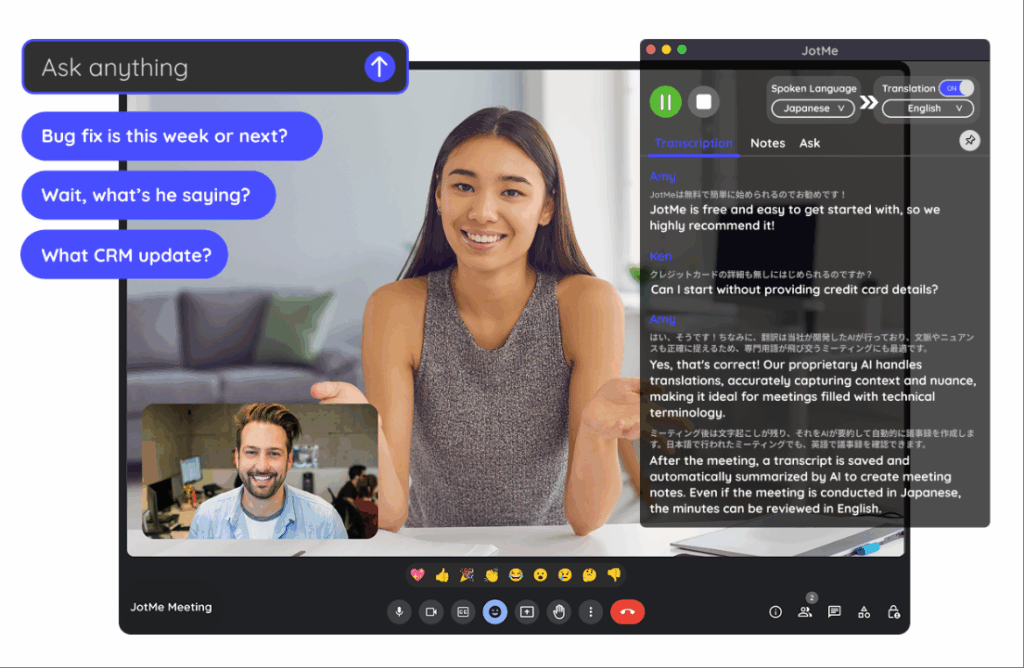
Qu'est-ce que c'est : Traduction en temps réel pour les réunions (alternative à Transync AI) Idéal pour : Réunions d'équipe, webinaires, équipes distribuées
Indicateurs de performance :
- Précision: 92-94%
- Latence: 150-200 ms (légèrement perceptible)
- Langues : 77 langues
- Qualité vocale : 7/10 (bon, mais pas naturel)
- Installation: 2-3 minutes (Extension Chrome)
Comment ça marche :
- Installer l'extension Chrome
- Rejoindre l'appel Zoom/Meet/Teams
- Activer la traduction
- Traduction automatique en temps réel
Tarification :
- Gratuit : 20 min/mois
- Forfait de base : $9/mois (200 min)
- Premium : $15/mois (500 min)
Avantages : ✅ Plus de langues que Transync AI (77 contre 60) ✅ Installation simplifiée (extension Chrome) ✅ Abordable ($9/mois) ✅ Compatible avec de nombreuses plateformes ✅ Idéal pour les réunions informelles
Inconvénients : ❌ Latence plus élevée (150-200 ms, légèrement perceptible) ❌ Précision moindre (92-94% vs. 95%+) ❌ Voix moins naturelle (7/10 vs. 9,1/10) ❌ Ne fonctionne pas avec WhatsApp
Meilleurs cas d'utilisation :
- 🎯 Réunions d'équipe informelles
- 🎯 Webinaires internationaux
- 🎯 Équipes soucieuses de leur budget
- 🎯 Diversité linguistique requise
Verdict: Une bonne alternative à Transync AI si vous avez besoin de plus de langues. La latence est légèrement perceptible, mais acceptable pour des réunions informelles. Elle n'est pas idéale pour les appels commerciaux formels où la première impression est cruciale.
👉 JotMe
IA pour la traduction : Tableau comparatif des fonctionnalités
| Fonctionnalité | Transync AI | ChatGPT | Google Traduction | DeepL | JotMe |
|---|---|---|---|---|---|
| Réunions en temps réel | ✅ Excellent | ❌ Non | ❌ Non | ❌ Non | ✅ Bien |
| Précision | 95%+ | 93-95% | 92% | 94% | 92-94% |
| Latence | <100 ms ✅ | N / A | Instantané | Instantané | 150-200 ms |
| Langues | 60 | 100+ | 100+ | 29 | 77 |
| Qualité de la voix | 9,1/10 ✅ | N / A | 7/10 | N / A | 7/10 |
| Traduction de documents | ❌ Limité | ✅ Bien | ✅ Bien | ✅ Excellent | ❌ Non |
| Temps d'installation | <1 min ✅ | 2-3 min | 0 min ✅ | 1-2 min | 2-3 min |
| Coût | $8,99/mois ✅ | $20/mois | Gratuit ✅ | $8,99/mois ✅ | $9/mois |
| Idéal pour | Réunions en temps réel | Contenu écrit | Recherches rapides | Documents professionnels | Réunions d'équipe |
Quelle est la meilleure IA pour la traduction : choisir le bon outil
Scénario 1 : Appel commercial international
Question: “ Quelle IA de traduction devrais-je utiliser pour un appel commercial important avec un prospect espagnol ? ”
Répondre: Transync AI
Pourquoi:
- Traduction en temps réel (latence imperceptible <100 ms)
- Voix naturelle (le prospect sonne comme une vraie personne)
- Transcription automatique pour le suivi
- Qualité professionnelle (précision 95%+)
- Installation facile (<1 minute)
Installation:
- Ouvrez Transync AI
- Sélectionner Anglais → Espagnol
- Cochez “ Audio de l'ordinateur ”
- Cliquez sur “ Démarrer la traduction ”
- Rejoignez Zoom normalement
- Traduire automatiquement
Scénario 2 : Traduction d'un contrat juridique
Question: “ Quelle IA de traduction est la plus adaptée pour traduire un contrat juridique anglais en espagnol ? ”
Répondre: Traducteur professionnel + DeepL en renfort
Pourquoi:
- Les contrats légaux exigent une précision de 99%+
- L'IA seule ne suffit pas à établir la responsabilité juridique
- DeepL (précision 94%) peut aider les traducteurs professionnels
- Coût : $500-1000 pour les professionnels (indispensable pour les services juridiques)
Processus:
- Engager un traducteur juridique professionnel
- Utilisez DeepL comme référence de pré-traduction
- Le traducteur professionnel affine
- Résultat : Traduction juridique précise 99%
Scénario 3 : Traduction rapide d’e-mails
Question: “ Quelle IA de traduction devrais-je utiliser pour rédiger rapidement un e-mail à un client espagnol ? ”
Répondre: Google Traduction (gratuit) ou DeepL (meilleure précision)
Pourquoi:
- L'envoi d'un e-mail ne requiert pas une précision 99% (le contexte aide le client à comprendre).
- Rapidité importante (attente du client)
- Le coût n'a pas d'importance (gratuit, c'est mieux).
- Google Traduction suffit pour les courriels informels.
Installation:
- Rendez-vous sur translate.google.com
- Coller le texte de l'e-mail
- Sélectionner Anglais → Espagnol
- Copie de l'e-mail traduit
- Envoyer immédiatement
Scénario 4 : Traduction de contenu marketing
Question: “ Quelle IA de traduction préserve l’identité de marque lors de la traduction de contenus marketing ? ”
Répondre: ChatGPT (idéal pour le ton) + avis professionnel
Pourquoi:
- La voix de la marque est essentielle (l'IA générique échoue)
- ChatGPT comprend le contexte et le ton.
- Un examen professionnel garantit la qualité
- Coût raisonnable ($20/mois ChatGPT)
Processus:
- Rédiger des textes marketing en anglais
- Utilisez ChatGPT : “ Traduire en espagnol en préservant le ton de la marque [description du ton] ”
- ChatGPT traduit avec le contexte
- Demande d'avis par un locuteur natif
- Publiez en toute confiance
Scénario 5 : Équipe répartie dans 5 pays
Question: “ Quelle IA de traduction permet à notre équipe répartie de communiquer dans 5 langues ? ”
Répondre: Transync AI (principal) ou JotMe (option économique)
Pourquoi:
- Traduction en temps réel lors des réunions debout
- Transcription automatique pour la révision asynchrone
- Prise en charge multilingue (Transync : 60, JotMe : 77)
- Coût minimal ($8,99-9/mois)
Installation:
- Ouvrir Transync AI pendant la réunion debout
- Sélectionnez la paire de langues principale
- Cliquez sur “ Démarrer la traduction ”
- Tous les membres de l'équipe entendent la traduction
- Consultez le résumé généré automatiquement plus tard
Résultat: Pas de barrière linguistique, réunions plus rapides (gain de temps de 25%+), meilleure participation.
IA pour la traduction : référentiel de précision 2026
Des tests indépendants montrent :
| Solution IA | Texte général | Contenu technique | Contenu juridique | Contenu marketing |
|---|---|---|---|---|
| Transync AI | 95-96% | 98-99% (avec mots-clés) | 92% | 94% |
| ChatGPT | 93-95% | 91% | 89% | 96% |
| Google Traduction | 92% | 88% | 85% | 90% |
| DeepL | 94% | 92% | 91% | 93% |
| JotMe | 92-94% | 90% | 88% | 91% |
| Traducteur professionnel | 98-99% | 98-99% | 99%+ | 98-99% |
Principaux enseignements :
- ✅ Transync AI est leader sur les plans technique et temps réel.
- ✅ ChatGPT est leader en matière de préservation du ton marketing
- ✅ DeepL est en tête en matière de précision des documents (hors temps réel)
- ✅ Google Traduction suffit pour un usage occasionnel
- ✅ Un traducteur professionnel est la meilleure solution pour les contenus critiques.
Meilleure IA pour la traduction : étapes de mise en œuvre
Étape 1 : Identifiez vos besoins
Posez-vous la question :
- ❓ Ai-je besoin d'une traduction en temps réel (réunions) ou d'une traduction de documents ?
- ❓ À quel point la précision est-elle cruciale ? (Légal = 99%, Occasionnel = 90%)
- ❓ De quelles langues ai-je besoin ?
- ❓ Quel est mon budget ? (Gratuit, $10/mois, $100+/mois ?)
- ❓ Ai-je besoin d'une lecture vocale ?
Étape 2 : Choisir la bonne IA
Réunions en temps réel ? → Transync AI Des documents écrits ? → ChatGPT ou DeepL Rapide et gratuit ? → Google Traduction Réunions de l'équipe budgétaire ? → JotMe Critique juridique/technique ? → Traducteur professionnel
Étape 3 : Obtenez un essai gratuit
- Transync AI : 40 minutes gratuites (premier mois)
- ChatGPT : Niveau gratuit disponible
- Google Traduction : Toujours gratuit
- DeepL : 500 000 caractères gratuits par mois
- JotMe : 20 minutes gratuites par mois
Étape 4 : Tester avec du contenu réel
- Organiser une réunion réelle ou traduire un échantillon
- Vérifiez que l'exactitude répond à vos besoins
- Vérifiez si l'interface est intuitive
- Vérifiez qu'il s'intègre à vos plateformes
Étape 5 : Déploiement à grande échelle
- Abonnez-vous à la solution choisie
- Former l'équipe à l'utilisation
- Configurer sur toutes les plateformes concernées
- Surveillez la précision et ajustez les mots clés si nécessaire.
IA pour la traduction : signaux d’alarme à éviter
❌ Évitez les IA qui prétendent avoir une précision de “ 100% ”.” (Aucune IA n'y parvient) ❌ Évitez les solutions sans essai gratuit. (qualité non vérifiable) ❌ Évitez les prix cachés (devrait être transparent) ❌ Évitez les solutions ayant de mauvais avis. (plaintes multiples = problème réel) ❌ Évitez les solutions qui surestiment le support linguistique. (la qualité compte plus que la quantité) ❌ Évitez les solutions sans assistance client. (Vous aurez besoin d'aide)
Conclusion : Quelle est la meilleure IA pour la traduction ?
Il n'existe pas d'IA “ idéale ” pour la traduction. La réponse dépend entièrement de votre cas d'utilisation :
| Votre besoin | Meilleure IA | Pourquoi |
|---|---|---|
| Appels de vente en temps réel | Transync AI | Latence inférieure à 100 ms, qualité vocale de 9,1/10, précision 95%+ |
| Traduction de documents | ChatGPT ou DeepL | Meilleure précision pour le contenu écrit |
| Recherche rapide et gratuite | Google Traduction | Toujours gratuit, instantané, et c'est suffisant. |
| Contenu marketing | ChatGPT | Préserve parfaitement le ton de la marque |
| Réunions d'équipe | Transync AI ou JotMe | Temps réel, abordable, multiplateforme |
| documents juridiques | Traducteur professionnel | 99%+ précision, protection juridique |
Commencez par définir votre besoin précis, choisissez l'IA correspondante et profitez de l'essai gratuit. Vous trouverez rapidement la solution idéale.
Choix le plus populaire pour 2026 : Transync AI pour les réunions en temps réel (croissance la plus rapide, voix la plus naturelle, prix le plus bas). Commencez vos 40 minutes Essai gratuit aujourd'hui

