

Language translation to English guide for text, live meetings, recorded audio, voice conversations, subtitles, and AI meeting notes.
Language translation to English can mean translating a document, following a live meeting, converting recorded audio, or speaking with someone face to face.
Although every task ends with English output, the technology behind each workflow is different. A document translator can wait until an entire paragraph is available. A live meeting translator must produce English subtitles before the conversation moves on. A recorded-audio platform needs speaker labels, timestamps, and editing tools.
This guide divides language translation to English into four practical paths and compares tools for each situation.
Quick Answer: Which Translation Path Do You Need?
| What you need to translate | Best tool category | Example tools |
|---|---|---|
| Text and documents | Written translation platform | DeepL |
| Live online meetings | Real-time meeting translator | Transync AI, JotMe, Talo |
| Recorded audio and video | Transcription and media platform | Sonix, Maestra |
| Face-to-face speech | Mobile conversation translator | Transync AI, DeepL Voice, Talkao |
The best tool depends on when the English translation is needed, how accurate it must be, and what users need to do with the result afterward.
Why Language Translation to English Is Not One Workflow
English is widely used in international business, education, research, customer support, travel, and online content. However, translating into English involves more than replacing foreign words.
The system may need to interpret:
- Regional accents
- Incomplete sentences
- Formal and informal tone
- Industry terminology
- Product and company names
- Mixed-language speech
- Dates, prices, and quantities
- Cultural expressions
A suitable language translation to English tool should match the type of content rather than simply support the source language.
Path 1: Translate Text and Documents into English
Written translation is the most controlled workflow.
Users may need to translate:
- Emails
- Reports
- Presentations
- Product manuals
- Website content
- Research papers
- Internal policies
DeepL is a strong option for professional text and document translation. Its workflow is designed around written language, document processing, editing, and enterprise language use.
A text-focused platform is usually better than a live meeting tool when formatting, sentence quality, and revision matter more than immediate output.
What to evaluate
| Requirement | Why it matters |
|---|---|
| Document formatting | Tables, headings, and layouts should remain usable |
| Terminology consistency | Repeated technical terms should use the same English wording |
| Tone | The English should suit business, academic, or casual communication |
| Editing | Users should be able to revise the translation |
| Data handling | Confidential documents require suitable privacy controls |
For publication, legal agreements, medical documents, or high-risk materials, human review remains important.
Path 2: Translate Live Meetings into English
Live meetings create a different challenge. Participants need to understand the English translation while people are still speaking.
A meeting translator must handle:
- Continuous audio
- Two-way conversations
- Speaker changes
- Short sentences
- Interruptions
- Background noise
- Low-latency subtitles
- Translated voice output
Transync AI is designed specifically for live multilingual communication. It can run alongside Zoom, Microsoft Teams, and Google Meet and supports bilingual subtitles, translated voice playback, keywords, context, floating captions, and AI meeting notes.
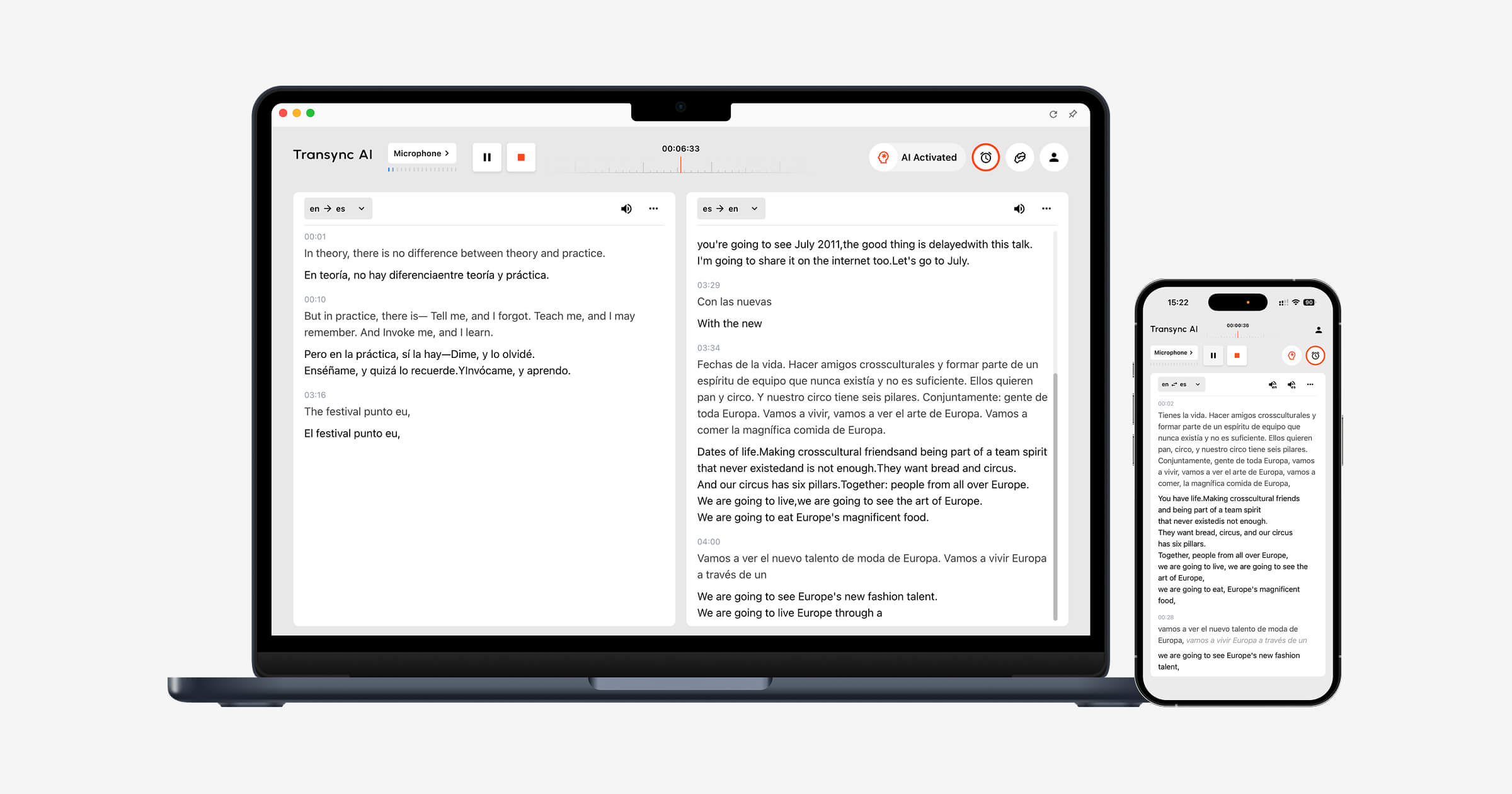 It is a practical language translation to English option for:
- International client meetings
- Supplier discussions
- Online classes
- Interviews
- Product demonstrations
- Global team calls
Meeting-focused tools compared
| Tool | Main workflow | Best for | Main trade-off |
|---|---|---|---|
| Transync AI | Standalone real-time translation | Subtitles, voice playback, context, and notes | Not designed for document or image translation |
| JotMe | Translation and meeting productivity | Live captions, transcripts, and action items | Primarily meeting-focused |
| Talo | Translation bot inside calls | Teams that prefer bot-managed interpretation | Bot appears as a meeting participant |
| DeepL Voice | Business voice translation | Selected conversation and meeting workflows | Availability depends on product and plan |
Why context matters
A meeting may include words such as “model,” “account,” “pipeline,” or “deployment.” Each word can have several meanings.
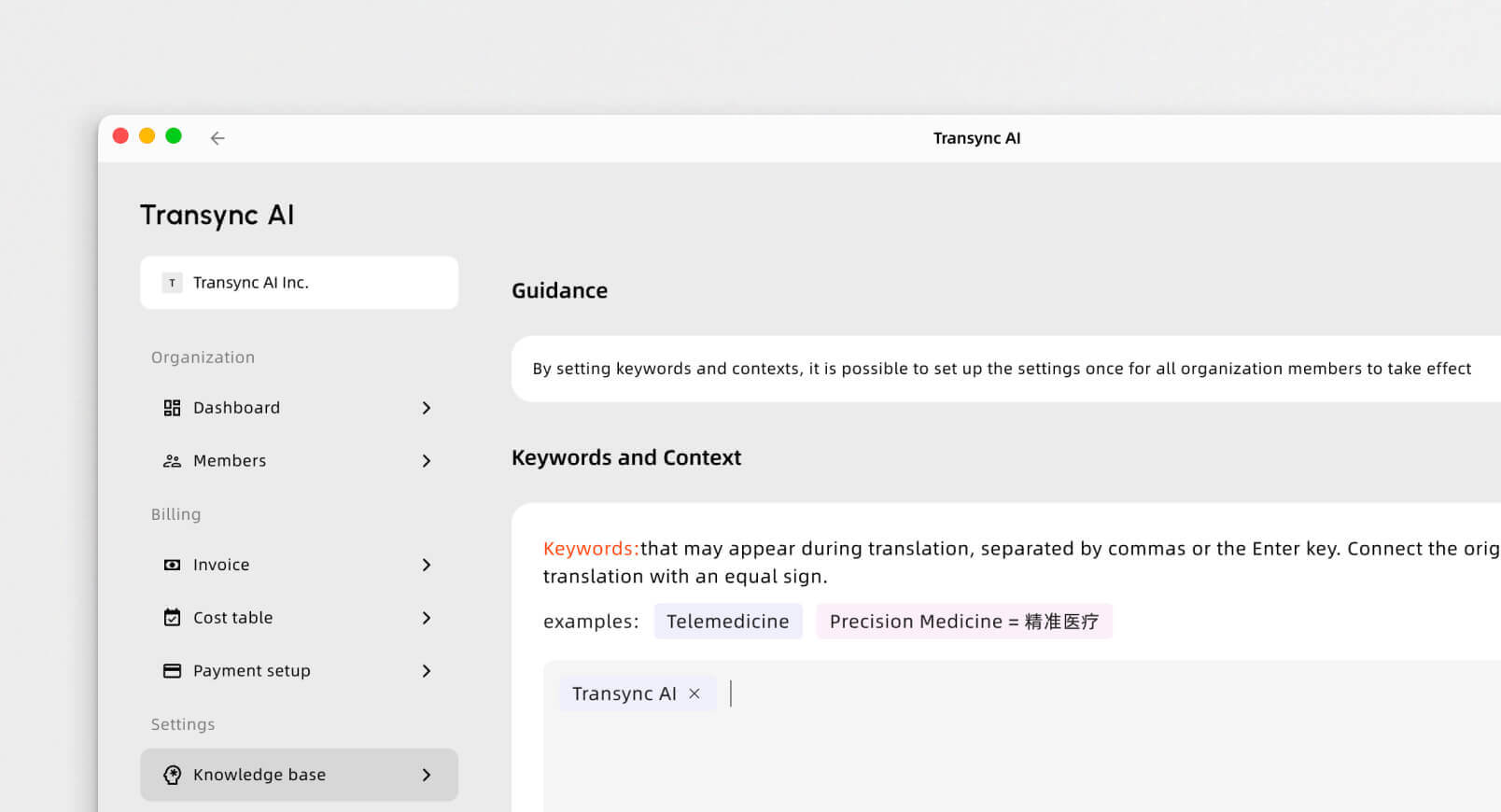
Transync AI allows users to prepare names, product models, abbreviations, and industry terms before the meeting. Users can also describe the topic so the system has more information when selecting the English meaning.
This makes language translation to English more useful in technical, academic, and business conversations.
 Path 3: Translate Recorded Audio and Video into English
 Path 3: Translate Recorded Audio and Video into English
Recorded content does not require immediate translation, so the priorities change.
Users may need:
- Accurate transcripts
- Speaker identification
- Timestamps
- Translation editing
- Subtitle synchronization
- Search
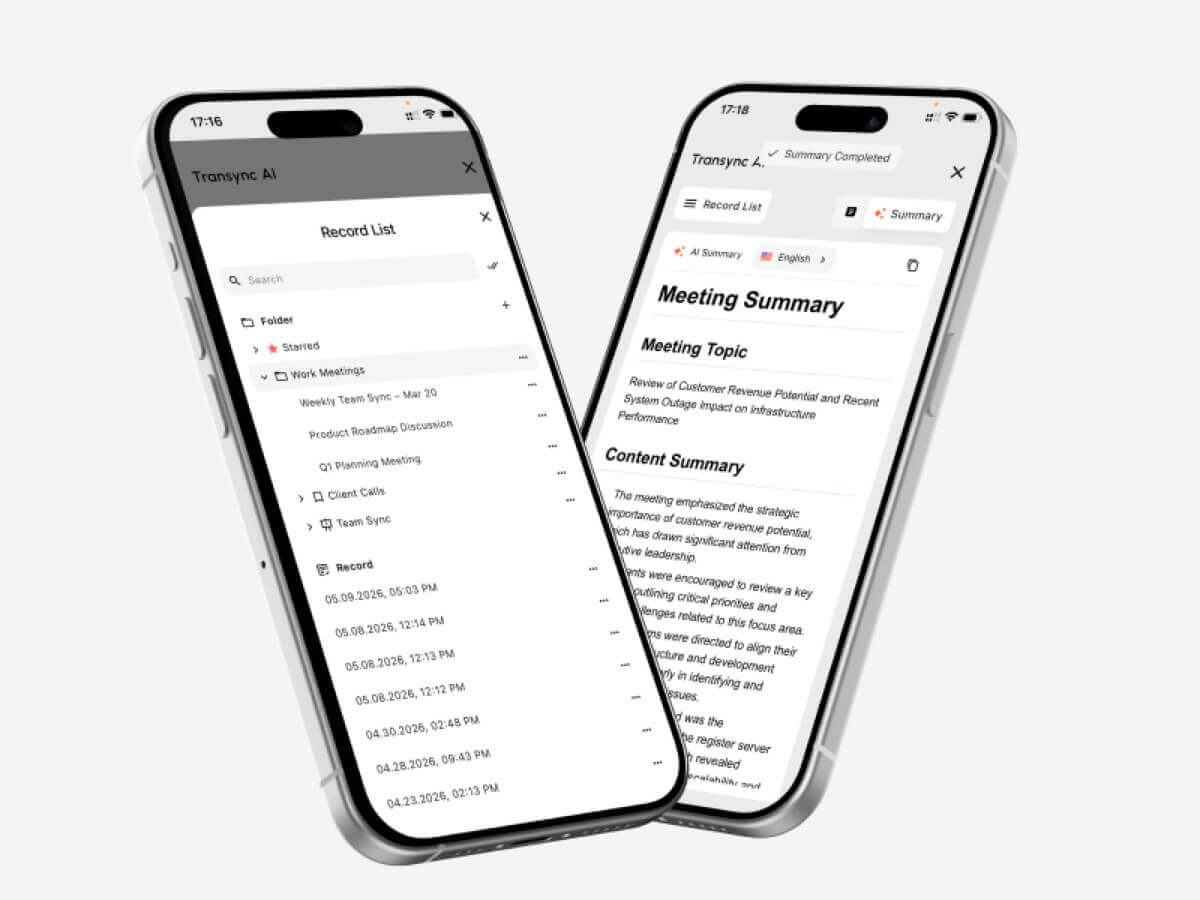
- Summaries
- Export formats
Sonix is a transcription-first platform suited to uploaded interviews, podcasts, lectures, videos, and meeting recordings. Users can convert speech into editable text, translate the transcript into English, and create subtitles.
Maestra offers a broader media workflow that includes transcription, subtitle translation, dubbing, voice cloning, and live or recorded content localization.
Recorded-media tools compared
| Tool | Best for | Strongest capabilities |
|---|---|---|
| Sonix | Interviews, podcasts, lectures, and archives | Transcription, speaker labels, timestamps, translation, and subtitles |
| Maestra | Video, courses, webinars, and localization | Translation, subtitles, dubbing, voice cloning, and media editing |
| Transync AI | Live meetings rather than uploaded files | Immediate translation, voice playback, and notes |
Sonix may be the better choice when the audio has already been recorded. Transync AI is more appropriate when people need English during the conversation.
This distinction is central to choosing a language translation to English workflow.
Path 4: Translate Face-to-Face Speech into English
Face-to-face translation usually happens on a mobile device or laptop.
Typical situations include:
- Travel
- Exhibitions
- Office visits
- Campus meetings
- Customer service
- Informal interviews
- In-person business discussions
The tool should be easy to start, recognize both languages, and provide readable or audible English output.
Face-to-face tools compared
| Tool | Best for | Main consideration |
|---|---|---|
| Transync AI | Longer professional conversations | Strong meeting features but requires internet |
| DeepL Voice | Business-oriented conversations | Product and language availability may vary |
| Talkao | Travel and casual mobile use | Less focused on professional notes and terminology |
For a short travel question, a consumer app may be enough. For a longer business discussion, bilingual subtitles, terminology controls, and meeting notes become more valuable.
Language Translation to English: Feature Comparison
| Feature | Transync AI | DeepL | JotMe | Talo | Sonix | Maestra | Talkao |
|---|---|---|---|---|---|---|---|
| Text translation | Limited | Yes | Transcript-based | Limited | Transcript-based | Yes | Yes |
| Document translation | No | Yes | Limited | No | Recorded workflow | Yes | Available |
| Live speech to English | Yes | Voice products | Yes | Yes | Not primary | Yes | Yes |
| Two-way meetings | Yes | Product-dependent | Yes | Yes | No | Available | Casual use |
| Bilingual subtitles | Yes | Voice-dependent | Yes | Available | Subtitle workflow | Yes | App-dependent |
| English voice playback | Yes | Available | Product-dependent | Yes | Not primary | Yes | Yes |
| Keywords or glossary | Keywords and context | Glossary-dependent | Custom vocabulary | Product-dependent | Editing workflow | Custom dictionary | Limited |
| Meeting notes | Yes | Not core | Yes | Product-dependent | AI analysis | Summaries | No |
| Uploaded audio | Not primary | Limited | Limited | No | Yes | Yes | Limited |
| Best fit | Live meetings | Documents | Meetings and notes | Bot-based calls | Recorded media | Media localization | Travel |
How to Choose the Right Tool
Before selecting a platform for language translation to English, answer these questions:
- Is the source text, live speech, or recorded audio?
- Is the English needed immediately?
- Do both sides need to speak?
- Do users need English subtitles, voice output, or both?
- Are technical terms or personal names involved?
- Is a transcript or summary needed afterward?
- Would an error create legal, medical, financial, or safety risks?
These questions usually reveal the correct product category more clearly than a general feature list.
How to Test Translation Quality
Test the tool using realistic content.
For live speech, include:
- Two speakers
- An accent
- A technical term
- A company name
- A product model
- A date
- A price
- A correction
- Mixed-language speech
For recorded content, evaluate:
- Transcript accuracy
- Speaker separation
- Timestamps
- Translation quality
- Subtitle timing
- Editing
- Export options
| Test area | What to check |
|---|---|
| Recognition | Did the system capture the original content correctly? |
| Meaning | Did the English preserve the intended message? |
| Terminology | Were names and specialist terms consistent? |
| Tone | Did the English fit the audience? |
| Latency | Was live output fast enough? |
| Readability | Were subtitles or transcripts easy to follow? |
| Voice | Was English playback natural and clear? |
| Follow-up | Were notes, summaries, or exports useful? |
Common Translation Problems
Language translation to English may become less accurate when the source contains:
- Several speakers at once
- Loud background noise
- Weak microphones
- Strong regional accents
- Slang
- Incomplete sentences
- Ambiguous terminology
- Rapid language switching
- Names that resemble ordinary words
Important dates, prices, quantities, and commitments should always be reviewed.
FAQ
What is the best tool for language translation to English?
The best tool depends on the content. DeepL fits written documents, Transync AI fits live meetings, Sonix fits recorded audio, Maestra fits media, and Talkao fits travel.
Which tool translates live meetings into English?
Meeting-focused tools such as Transync AI, JotMe, Talo, and selected DeepL Voice products can provide live English translation.
Which tool is best for translating recorded audio into English?
Sonix is well suited to recorded audio because it provides transcription, speaker labels, translation, editing, timestamps, and subtitle export.
Can AI translate technical speech into English?
Yes, but performance improves when the tool supports keywords, glossaries, custom vocabulary, or contextual information.
Can AI replace a human translator?
AI can support routine meetings, documents, travel, and recorded media. Human professionals remain safer for legal, medical, regulatory, and other high-stakes communication.
Final Thoughts
The best approach to language translation to English depends on the source and the timing.
Use a text-focused platform for documents, a meeting-first translator for live conversations, a transcription platform for recordings, and a mobile conversation tool for travel.
Transync AI is strongest when English is needed during a live meeting. DeepL is better suited to polished written content, JotMe to meetings with notes, Talo to bot-based calls, Sonix to recorded audio, Maestra to media localization, and Talkao to travel.
The right tool is not the one that translates the most formats. It is the one that delivers useful English in the workflow where it is needed.
If you want a next-generation experience, Transync AI leads the way with real-time, AI-powered translation that keeps conversations flowing naturally. You can try it free now.
 🤖
🤖