

Active translation app guide: read 7 critical status lights for listening, language direction, voice output, sharing, saving, privacy, and control.
An active translation app should do more than wait for a sentence to be pasted into a box. During an intentional session, it may listen to a microphone or computer audio, recognize speech, translate it, display bilingual captions, play a target-language voice, and preserve a record for later review.
The word active also creates responsibility. Users need to know when listening begins, which language direction is running, who can hear or read the output, whether an audience has joined, what is saved, and how to stop everything. An app that feels effortless should not make its state invisible.
This guide uses seven status lights to evaluate live translation without reducing quality to one latency number. It compares hands-free face-to-face conversation, translated phone calls, cross-platform meetings, and one-to-many presentations. The best choice is the one whose active state remains understandable to the speaker, listener, organizer, and reviewer.
What Does “Active” Mean in an Active Translation App?
“Active” can describe three different behaviors:
- Session-active: The user explicitly starts translation, and it continues until paused or stopped.
- Hands-free active: The user does not hold a button for every turn; the app listens during the open session.
- Workflow-active: Translation stays connected to a meeting, phone call, class, or presentation instead of handling isolated phrases.
None of these should mean secretly listening all day. A responsible active translation app needs a visible boundary between not listening, ready, actively processing, paused, Ve ended. Background behavior, microphone permissions, saved records, and notification indicators can differ by platform, so users should verify the exact device and app version.
The seven lights below form a practical dashboard.
| Status Light | Green State | Amber State | Red State |
|---|---|---|---|
| 1. Input | Correct microphone or computer audio is selected | Signal is weak or mixed | Wrong source or no permission |
| 2. Consent | Everyone knows translation is active | Notice is unclear | A person is processed or recorded without required notice |
| 3. Direction | Source and target are visible and correct | Automatic detection is uncertain | Languages are reversed or unsupported |
| 4. Live result | Source and translation remain inspectable | Text is unstable or delayed | Fluent output contains a material error |
| 5. Delivery | The intended person can read or hear it | Volume, routing, or access is inconsistent | Output reaches the wrong channel or nobody |
| 6. Context | Names, terms, and session purpose are prepared | Generic context only | A protected name, number, or condition is repeatedly wrong |
| 7. Record | Retention, sharing, and deletion are understood | Ownership is unclear | Sensitive records persist or spread unexpectedly |
Status Light 1: Which Audio Source Is Actually Active?
The microphone and the meeting audio are not the same input. In a face-to-face exchange, the phone microphone may need to hear both people. In an online meeting, the app may need microphone audio for the local speaker and computer audio for remote participants. In a translated phone call, the service may route both sides through its own call infrastructure.
Before starting an active translation app, name the source:
- built-in microphone;
- external USB or headset microphone;
- computer or system audio;
- a browser tab;
- a supported meeting feed;
- a phone-call audio route;
- a room microphone for a presenter.
Then speak one source sentence and watch the original-language transcript. If the text does not appear, translation has not failed yet—the app may simply be listening to the wrong place. If a remote speaker appears but the local speaker does not, the two sides probably use different routes.
The input light should also reveal duraklama. Pausing should stop active processing without forcing the user to rebuild the entire session. Stopping should close the translation task and move the user into whatever record or summary workflow follows. A button labeled “inactive” is useful only if users understand whether the microphone permission, audio stream, and recording state have also ended.
A reliable active translation app makes the current source visible instead of asking users to infer it from silence.
Status Light 2: Does Everyone Know Translation Is Running?
Live translation can process another person’s voice even when no traditional audio recording is saved. Captions, transcripts, phone numbers, speaker labels, summaries, and usage logs may still contain personal or confidential information.
Use a plain-language announcement before the session:
Live translation is active. Speech will be processed to create translated captions and voice. A transcript will / will not be saved, and it will be available to [named people] until [time or deletion rule].
Change the statement to match the real product and policy. Do not promise that nothing is stored merely because raw audio is not retained. Do not treat an automated call greeting as proof that every local consent requirement has been met.
The operator of an active translation app should be able to answer:
- Who started the session?
- Who is being heard?
- Who can see the source and translation?
- Is synthetic voice clearly distinguishable from a real person?
- Is the session recorded, transcribed, summarized, or only streamed?
- Can a participant decline or leave?
- Who is responsible for stopping and deleting the record?
Consent rules differ by jurisdiction, organization, and communication channel. Phone calls, healthcare conversations, employee meetings, classrooms, and public events can carry different obligations. For consequential use, obtain the required legal or organizational guidance rather than relying on a generic app setting.
A responsible active translation app supports an informed session; it does not make participant notice the operator’s hidden assumption.
Status Light 3: Which Language Direction Is Active?
One-way and two-way translation solve different problems. A traveler listening to a tour may need one-way translation. Two colleagues negotiating a delivery date need both people to speak and receive a result. A multilingual presentation may have one source language and several audience languages.
| Mode | Active Language Pattern | En İyi Kullanım | Common Failure |
|---|---|---|---|
| Tek Yön | A → B | Lecture, video, tour, or listening support | Listener expects to answer through the same session |
| İki yönlü | A ⇄ B | Face-to-face or remote conversation | Speakers overlap or output feeds back into the microphone |
| Çok dilli | A → B, C, D | Meeting or broadcast with several target outputs | Usage and display become harder to manage |
| Audience-selected | Host A → each attendee’s chosen language | Conference, training, webinar, town hall | Join instructions or available languages are unclear |
Automatic language detection can reduce manual switching, but the selected language set still matters. If English and Spanish are configured, a proper name or short foreign phrase may not justify changing the whole direction. If the wrong source language is selected, recognition errors can look like translation errors.
Ask both participants to say one complete sentence before the real discussion. Confirm that each sentence appears on the correct side and produces the expected target. For an audience, verify every enabled language on a second device rather than assuming the host preview represents all recipients.
An active translation app should show direction as a current state, not bury it inside initial setup.
Status Light 4: Is the Live Result Stable Enough to Use?
Live text can change while a speaker is still talking. The first words may be provisional; punctuation, names, negatives, and sentence boundaries may settle later. A translation voice may wait for a pause so it can play a more complete thought.
That behavior creates a choice between speed and completeness. Instant output feels responsive but may fragment a sentence. A longer delay can improve phrasing but makes turn-taking slower. The right balance depends on whether participants are chatting casually, discussing technical details, following a class, or making commitments.
Use a visible correction habit. If the source transcript shows “fifty” instead of “fifteen,” restate the complete fact:
Correction: the quantity is fifteen units, one-five, not fifty.
Do the same for dates, prices, percentages, account numbers, medication names, model codes, and negations. Do not continue speaking as if a wrong live result will repair itself in the final notes.
The active translation app should let users inspect both the recognized source and the translation whenever possible. A natural target-language voice is not evidence that the source was heard correctly. The important result is the one the listener acts on, not the prettiest provisional sentence.
For high-stakes legal, medical, safety, financial, immigration, or employment decisions, live AI output should not be the sole authority. Use a qualified interpreter or reviewer whose responsibility matches the consequence.
In everyday use, an active translation app still needs a clear correction path before a provisional error becomes someone’s decision.
Status Light 5: Where Is the Translation Being Delivered?
A correct translation is useless if it stays on the operator’s screen while the intended recipient hears nothing. Delivery can involve captions, device speakers, shared computer audio, a virtual microphone, headphones, a browser room, a normal phone call, or an attendee’s personal device.
Map the route before starting:
| Alıcı | Delivery Route | Confirmation Question |
|---|---|---|
| Person beside you | Split-screen text or device speaker | Can they read or hear without holding your device awkwardly? |
| Remote meeting participant | Shared audio, virtual microphone, or their own caption view | Does the meeting receive the translation rather than replay it into your microphone? |
| Phone recipient | Service-routed translated call | Do they hear an announcement and a distinct translated voice? |
| Classroom learner | Projected captions or personal device | Can they follow without blocking the teaching content? |
| Event attendee | Link, QR code, room code, or provided receiver | Can they join and choose an available language? |
Echo is a delivery failure, not a language failure. If translated voice returns through the microphone, the active translation app may hear its own output and translate it again. Headphones, one-sided voice playback, deliberate audio sharing, or a virtual microphone can separate the paths.
Delivery also controls privacy. A loudspeaker may expose a confidential message to the room. A shared link may reach people beyond the expected audience. A translated phone call may show a service-provided caller ID instead of the user’s personal number. Test the recipient experience, not only the operator’s screen.
Status Light 6: Is the Right Context Active?
Live translation must decide quickly whether an unfamiliar sound is a person, product, acronym, place, or ordinary word. A recurring error can survive every turn if the session begins without terminology.
Prepare a compact context card:
- meeting purpose;
- speaker roles;
- personal and company names;
- product names and model numbers;
- field-specific terms;
- approved translations;
- words that must remain untranslated;
- prohibited or easily confused alternatives.
Context memory and prepared terminology are different. Conversation memory helps resolve references such as “it,” “that version,” or “the earlier offer” within a session. A prepared glossary tells the active translation app that a specific spelling or translation matters before the term is spoken.
Do not assume an “industry mode” replaces expert review. A legal, medical, technical, or financial profile may improve vocabulary while still missing organization-specific meanings and obligations. Check current product documentation to learn what the mode actually changes and whether the supplied context is stored.
At the end of a business conversation, restate decisions with an owner, action, object, deadline, and condition. That clean source helps the live listener and the later record. The context light is green only when the people using the result agree on what the important terms mean.
This makes the active translation app part of a controlled communication process instead of an unexplained voice in the room.
Status Light 7: What Remains Active After You Stop?
Pressing Durmak may end microphone processing without deleting the transcript. A record may remain on the device, in an account, in an organizer’s history, in an attendee’s shared area, or in a generated meeting memo.
Separate five data states:
- Transient audio: processed during the session and not intentionally retained as a recording.
- Raw recording: an audio or video file saved for replay.
- Transcript: recognized source speech stored as text.
- Çeviri: target-language text linked to the source.
- Summary or notes: an AI-generated interpretation of decisions, actions, and themes.
These states have different accuracy and privacy implications. Deleting a recording may not delete a transcript. A summary may omit a correction that is visible in the full record. Sharing notes may give a person access to more than the single action item they need.
Before selecting an active translation app, review its current privacy policy, retention behavior, deletion controls, subprocessors, account access, export options, and training policy. Then set an operational rule: who reviews the record, who receives it, how long it remains, and who deletes it.
The session is not operationally finished until the record state is known.
Active Translation App Comparison
| Ürün veya Rota | Active Interaction Model | En Uygun Senaryo | Delivery Strength | State to Verify |
|---|---|---|---|---|
| Voqa | Hands-free ambient bidirectional voice session | Face-to-face mobile or web conversations | Live transcription and natural voice output | Session limits, language coverage, context memory, and data policy |
| LiveLingo | Live web/mobile translation plus translated outbound phone calls on eligible plans | In-person exchange, browser use, or calling someone who does not install the app | Captions, synthesized voice, phone-call routing, session records | Call consent, transcript storage, caller ID, provider processing, and emergency restrictions |
| Transync AI | User-started real-time translation across web, desktop, and mobile | Meetings, classes, calls, in-person conversation, and presentations | Bilingual captions, translated voice, meeting notes, and audience delivery | Audio source, playback route, records, audience sharing, and network access |
| Qualified interpreter | Human-managed consecutive or simultaneous interpreting | High-stakes, nuanced, regulated, or formal communication | Clarification, cultural judgment, and accountable interaction | Specialization, confidentiality, working conditions, and scheduling |
The table does not name one universal winner. A hands-free phone conversation, an outbound translated call, a recurring online meeting, and a multilingual conference have different active states. Shortlist products by delivery model before comparing language count or demo speed.
Voqa for Hands-Free Face-to-Face Translation
Voqa positions itself as a real-time bidirectional voice translator for web, iOS, and Android. Its ambient voice mode is designed to keep a conversation moving without requiring a button press for every sentence, and the current official site lists live transcription, conversation memory, and natural voice output.
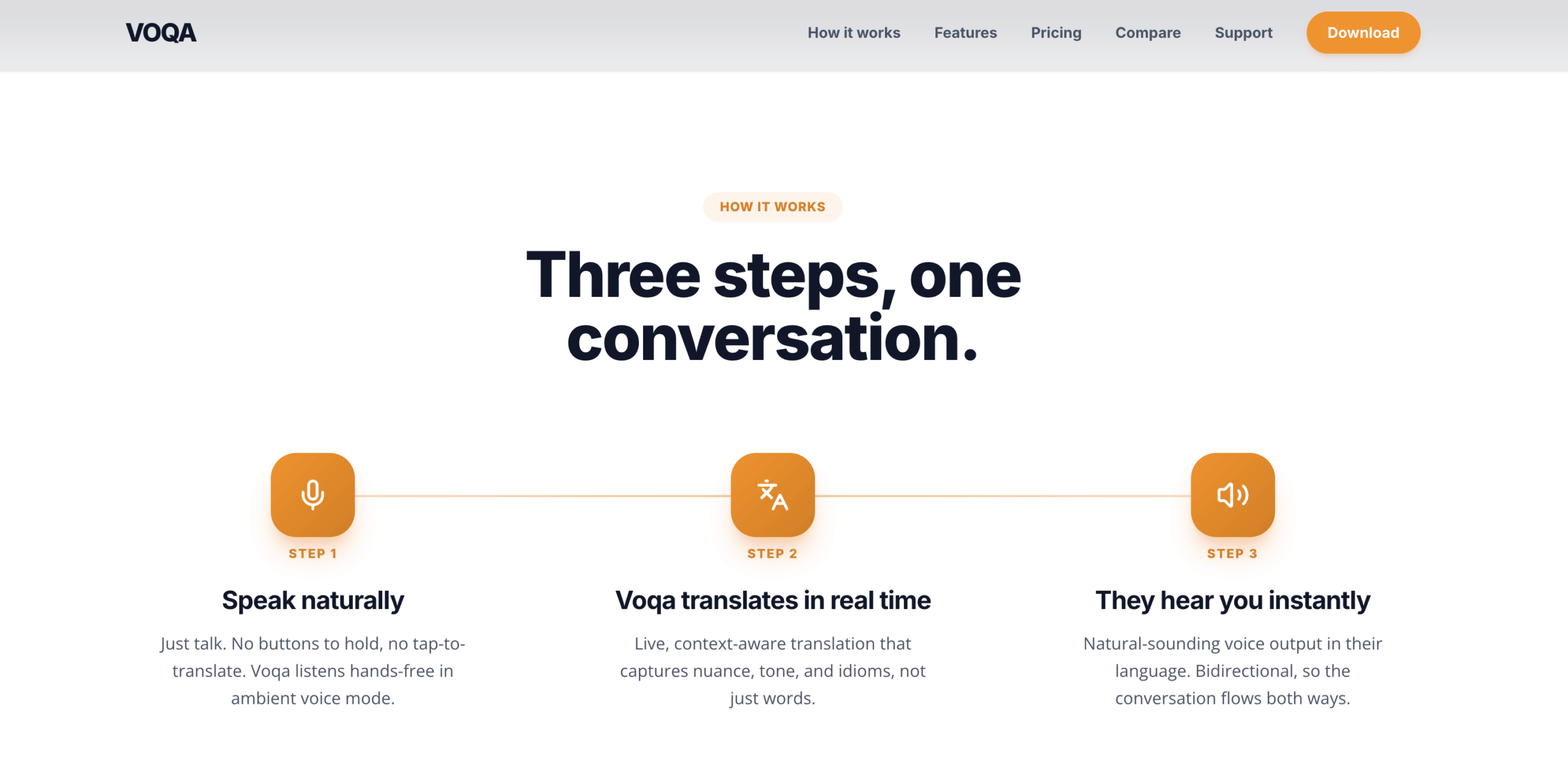
Dikkate almak Voqa when active translation app means a hands-free exchange between people who can share or position a phone, tablet, or browser. Its current plans have different session timeouts, memory limits, export options, voices, and professional modes, so confirm the plan and language pair rather than generalizing from the demo.
The active-state questions remain important: what does the microphone indicator show, when does the session end, what history can be copied or exported, and which policy governs sensitive content? Test normal pauses, interruptions, names, and the physical placement of the device.
LiveLingo for Translated Phone Calls
LiveLingo offers live translation through web and mobile experiences and currently describes translated outbound phone calls on its Pro workflow. The recipient answers a normal call without installing the app and hears a separate synthesized translation voice. Its terms state that the call begins with an automated translation notice and follows a turn-by-turn pattern.
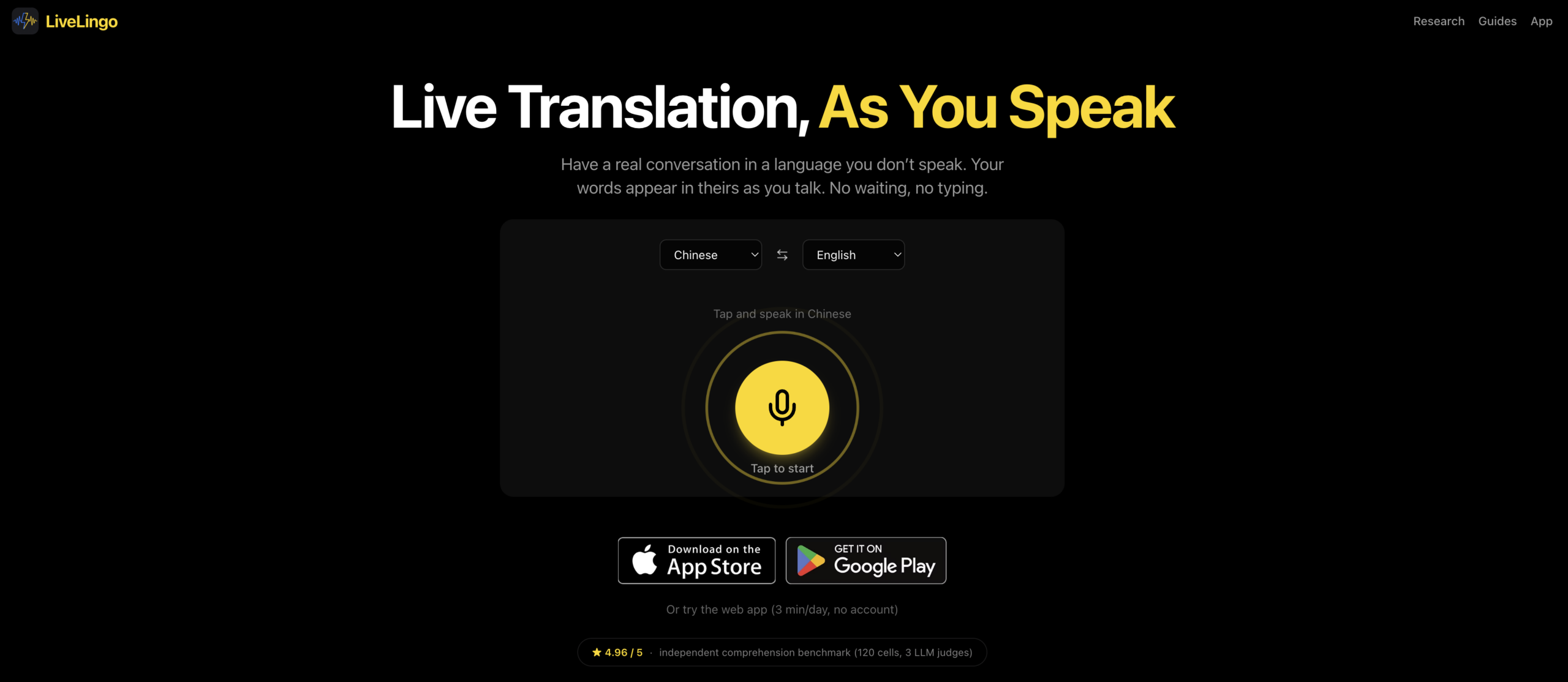
Seçmek LiveLingo when the defining problem is reaching a phone recipient who should not install another application. This active translation app route changes the consent and data checklist: the user must verify calling eligibility, obtain required consent, understand the service-provided caller identity, and avoid emergency or prohibited calls.
The current privacy policy says microphone audio is processed transiently and raw audio is not retained, while session transcripts, translations, phone participant data, and generated memos can be stored in the account. Review the current policy and deletion controls directly because “no raw recording” does not mean “no record.”
Transync AI Toplantılar ve Sunumlar için
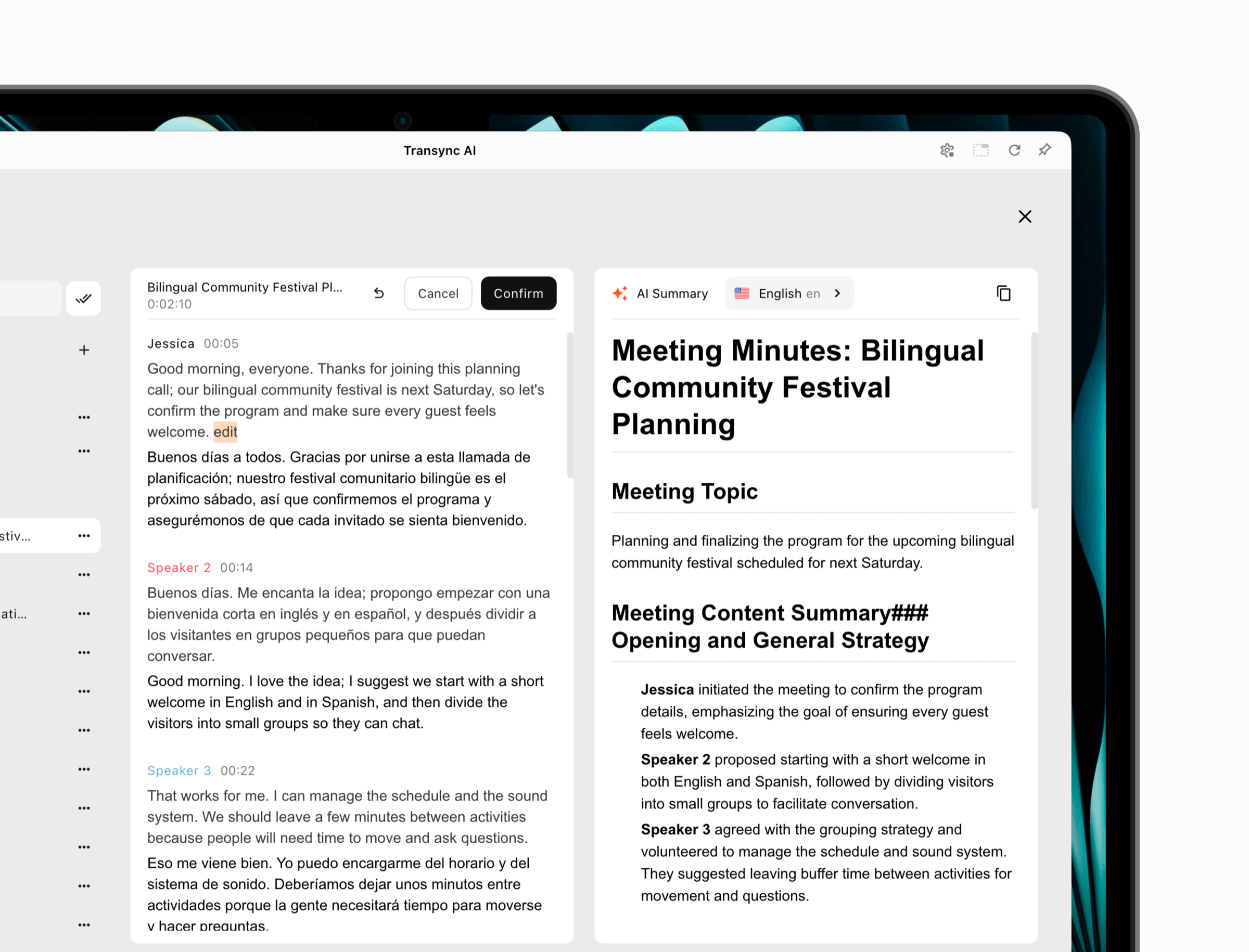
Transync AI is a meeting-oriented gerçek zamanlı çeviri product available across web, desktop, and mobile. It can display bilingual subtitles and provide Yapay zeka ses çevirisi during an explicitly started session.
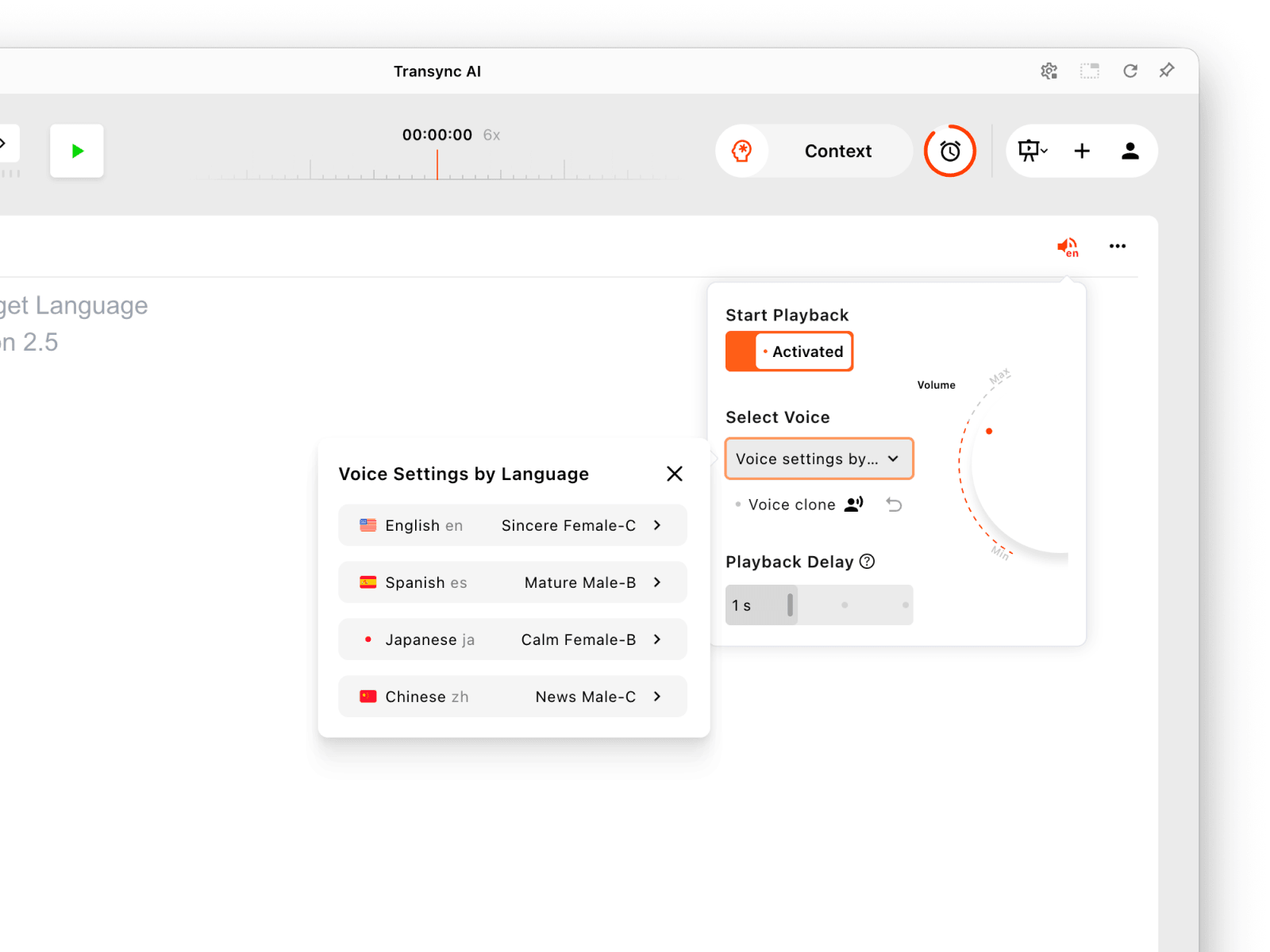
Sunum dillerinin her biri için ses oynatma ayarlarını ayrı ayrı yapılandırın.
For an online meeting, the desktop workflow is generally the stronger route because it can capture computer audio and provides more reliable playback routing and Virtual Microphone options. Users can prepare names and domain terms through Anahtar Kelimeler ve Bağlam and create Yapay zeka toplantı notları Konuşmanın ardından.
Transync AI'yı Ücretsiz Deneyin
For one speaker and many listeners, Sunum Modu gives the active translation app a different delivery state. Audience members join from their own devices through a link, QR code, or Room ID, then choose from languages enabled by the host. They can read and, when available, listen; they do not send voice into the host’s task.
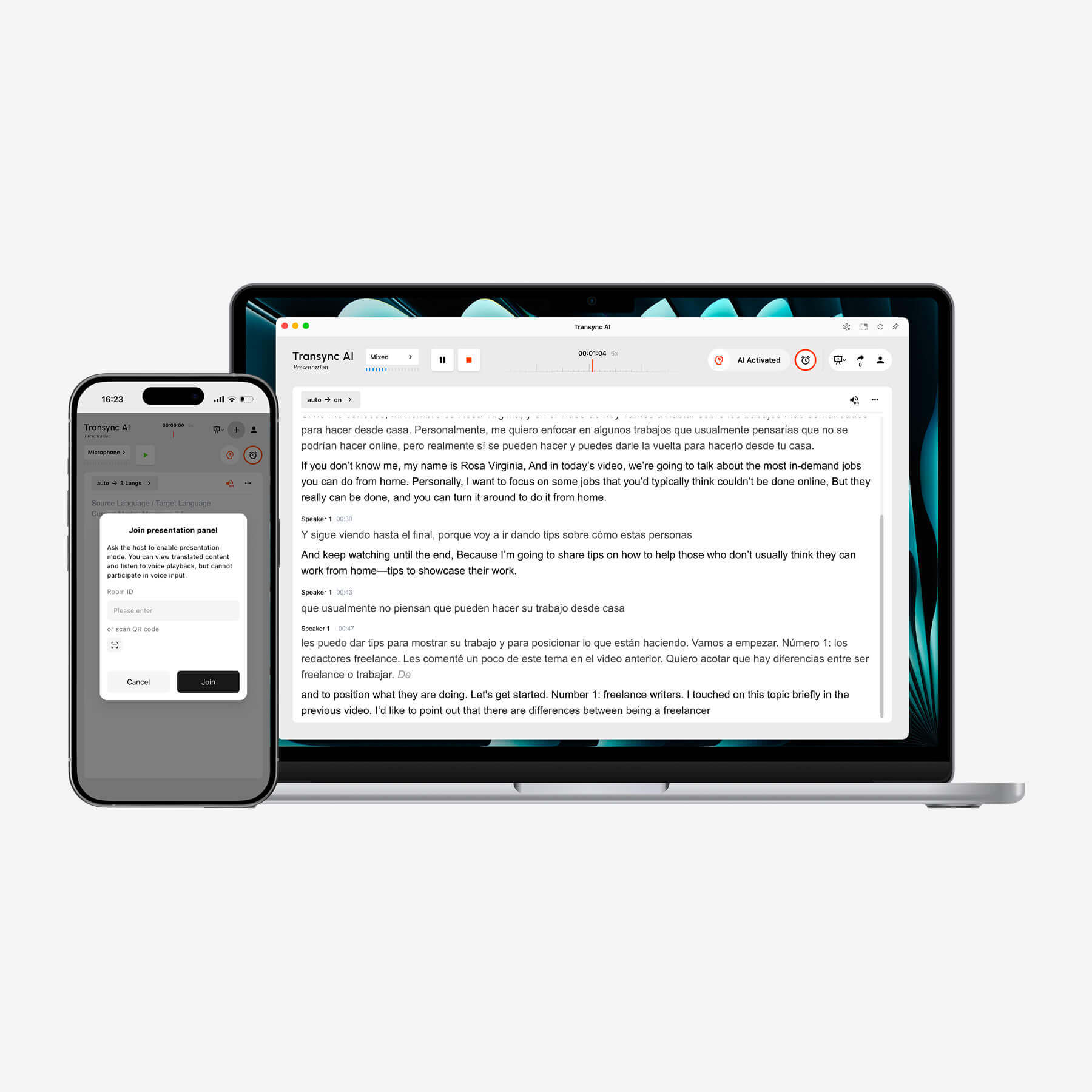
Transync AI, dizüstü bilgisayarda gerçek zamanlı çift dilli transkripsiyonu görüntülerken, mobil cihaz sunum kontrollerini sağlar.
Seçmek Transync AI when the operator needs visible source and target panels, controllable voice playback, meeting context, a reviewable record, or audience access. Confirm the microphone or computer-audio source, playback delay, speaker route, network, language pair, participant permissions, and transcript-sharing choice before the real session. Transync AI is not an offline translator or a managed human interpreting service.
When a Human Interpreter Should Be Active
A qualified human interpreter is preferable when the exchange establishes consent, rights, diagnosis, treatment, legal position, safety action, financial obligation, disciplinary outcome, or another consequential decision. Human interpretation can include clarification, cultural judgment, controlled turn-taking, and professional accountability that software alone does not supply.
Human service still requires setup. Confirm the language variety, direction, subject expertise, consecutive or simultaneous mode, confidentiality, audio access, preparation materials, breaks, and backup plan. For a large or lengthy simultaneous assignment, interpreters may work in teams.
An active translation app may support low-risk preparation, participant captions, or an internal record, but it should not be represented as a replacement for required professional interpreting. Match human involvement to consequence, not merely to meeting size.
Write an Active-State Declaration Before You Tap Start
The operator can prevent most workflow surprises with one visible declaration:
Giriş: computer audio + host microphone | Direction: English ⇄ Japanese | Çıktı: bilingual captions + Japanese voice | Recipients: six meeting participants | Stored: transcript and notes in the host account for 30 days | Shared: project lead only | Stop owner: Alex | Human fallback: bilingual account manager
Adapt every field to the real product and organizational policy. For a face-to-face conversation, the recipient may be one person beside the phone. For an outbound call, add the call notice, caller identity, and consent basis. For a presentation, add audience languages, join method, transcript-sharing decision, and maximum expected attendance.
The declaration does three jobs:
- gives participants a plain-language explanation;
- gives the operator a setup checklist;
- gives the reviewer a record of the intended state.
If the active translation app cannot support one declared field, change the workflow before the conversation begins. Do not discover during a confidential call that the recipient cannot hear the output or that the transcript is shared more widely than expected.
Keep the declaration beside the active translation app so a substitute host can reproduce the intended state without guessing.
Pause, Stop, and Recover
An active session needs a safe way to pause. Use pause when someone discusses unrelated confidential information, the audio route must be repaired, or a participant asks for clarification outside the translated channel. Confirm that paused time is visibly different from muted playback; the app may still process input even if no voice is being played.
Use stop when the intended session is over. Then check:
- the microphone or system-audio indicator is inactive;
- no translated voice remains queued;
- all participants know translation has ended;
- the transcript contains the final correction;
- the summary does not contradict the full record;
- sharing matches the declaration;
- deletion or retention is scheduled.
For recovery after an error, restate the complete fact, not just the wrong word. Ask the listener to confirm the corrected meaning. If the issue involves audio routing, pause translation before changing devices so fragments do not reach the recipient.
Pause and stop controls are part of translation quality. They keep the active translation app aligned with the human conversation rather than allowing the automation to dictate it.
Sıkça Sorulan Sorular
What is an active translation app?
It is an application that performs translation during an intentional live session instead of translating only isolated pasted text. Depending on the product, it may listen hands-free, show live bilingual captions, play translated speech, support two-way conversation, connect to meetings or phone calls, and save a transcript.
Does an active translation app listen all the time?
It should not be assumed to. Most products require microphone permission and an explicitly started session, but background behavior varies by operating system and app. Check the visible status, permissions, privacy policy, and what happens when the app is paused, minimized, or stopped.
Can an active translation app work during online meetings?
Yes, if it can capture the correct computer and microphone audio and deliver the result to participants. Some products run beside meeting software; others use browser, bot, caption, virtual-microphone, or shared-audio workflows. Test the real platform and devices before an important call.
Can the other person hear translated speech?
That depends on delivery. The app may use device speakers, shared computer sound, a virtual microphone, an attendee’s own device, or a service-routed phone call. Confirm from the recipient’s side. Seeing translated text on the operator screen does not prove that voice reached anyone else.
Is hands-free translation the same as automatic language detection?
No. Hands-free describes how the session continues without repeated button presses. Automatic language detection identifies which configured language is being spoken. A product may offer one without the other, and both still require a correctly selected language set.
Does stopping translation delete the transcript?
Not necessarily. Stopping can end live processing while leaving transcripts, translations, summaries, metadata, or shared records in an account. Review the current retention and deletion controls for the specific service and plan.
Is an active translation app safe for medical or legal use?
Do not rely on a general AI translation app as the sole authority for consequential medical, legal, safety, immigration, financial, or employment decisions. Use a qualified interpreter and the review process required by the relevant institution and jurisdiction.
Final Answer: Keep the Active State Visible
An active translation app is useful when it stays connected to a real conversation and keeps translation moving without a copy-and-paste loop. Its value depends on more than speed: the correct input must be active, participants must understand the session, the language direction must remain visible, the result must be inspectable, delivery must reach the right person, context must be prepared, and the record must be controlled.
Use the seven lights and write an active-state declaration before tapping Start. Then watch the recipient, not only the app. If that person cannot hear, read, answer, correct, or understand what will be saved, the workflow is not ready.
The best active translation app is not the one that hides the most work. It is the one that makes every important state easy to see, verify, pause, and end.