
Handleiding voor conversatievertalers: gebruik 5 praktische tests om snelheid, nauwkeurigheid, spraakweergave, context en ondersteuning tijdens vergaderingen te vergelijken voordat u een tool kiest.
A conversatievertaler Het kan indrukwekkend overkomen tijdens een productdemonstratie, maar toch ongemakkelijk aanvoelen in een echt gesprek.
Het verschil wordt meestal duidelijk wanneer mensen stoppen met het voorlezen van ingestudeerde zinnen en op een natuurlijke manier beginnen te communiceren. Ze onderbreken. Ze korten zinnen in. Ze veranderen van onderwerp halverwege een zin. Ze gebruiken productnamen, afkortingen, grappen en uitdrukkingen die alleen in de context betekenis hebben.
Daarom zou de keuze voor een vertaalbureau voor gesproken taal niet moeten beginnen met één vraag: "Hoeveel talen ondersteunt het?"“
Een betere vraag is:
Kan deze tool ervoor zorgen dat twee mensen met elkaar kunnen blijven praten zonder steeds te hoeven stoppen om de vertaling te controleren?
Deze handleiding gebruikt vijf praktische tests om de vaardigheden van een tolk te beoordelen voor vergaderingen, lessen, sollicitatiegesprekken, klantgesprekken, gesprekken met leveranciers en dagelijkse meertalige communicatie.
Kort antwoord: Wat is een conversatievertaler?
A conversatievertaler Luistert naar gesproken taal en vertaalt deze naar een andere taal terwijl er een gesprek plaatsvindt.
Afhankelijk van de software kan het het volgende bieden:
- Ondertitels worden in realtime vertaald.
- Tweewegs taaldetectie
- Vertaalde spraakweergave
- Automatische spraakherkenning
- Ondersteuning voor online vergaderingen
- Technische trefwoorden en contextuele aanwijzingen
- Transcripten en notulen van AI-vergaderingen
- Zwevende bijschriften boven andere toepassingen
Een eenvoudige reisvertaler is wellicht geschikt voor korte vragen zoals "Waar is het treinstation?". Een professionele gespreksvertaler moet langere, minder voorspelbare communicatie aankunnen.
Een zakelijke bijeenkomst kan bijvoorbeeld het volgende omvatten:
- Verschillende sprekers
- Product- en bedrijfsnamen
- Technische terminologie
- Cijfers en deadlines
- Chinees-Engels of Japans-Engels code-switching
- Vragen gesteld voordat het vorige antwoord compleet was
- Achtergrondgeluiden van een kantoor- of onlinegesprek
Het beste hulpmiddel is niet alleen het hulpmiddel dat een zin correct vertaalt. Het is het hulpmiddel dat het gesprek gaande houdt.
Waarom gewone vertaalprogramma's vaak moeite hebben met conversatie
Tekstvertaling is meestal gebaseerd op volledige invoer. De gebruiker voert een zin of alinea in en de tool vertaalt deze.
Het gesprek verloopt minder gestructureerd.
Een spreker kan zeggen:
“"Dus, wat betreft het nieuwe model – of eigenlijk, had de leverancier daarvoor al een leverdatum bevestigd?"”
De zin verandert halverwege van richting. Een tolk moet beslissen of hij/zij wacht op meer context of meteen begint met vertalen.
Als er te lang gewacht wordt, ervaart de luisteraar vertraging. Als er te vroeg vertaald wordt, moet de betekenis mogelijk worden herzien.
Dit zorgt voor een lastig evenwicht tussen:
| Vereiste | Waarom het belangrijk is |
|---|---|
| Snelheid | De vertaling moet binnen zijn voordat de discussie verdergaat. |
| Nauwkeurigheid | De output moet de door de spreker bedoelde betekenis behouden. |
| Continuïteit | Het systeem moet onvolledige en veranderende zinnen kunnen verwerken. |
| Context | Namen, bedrijfstakken en eerdere uitspraken beïnvloeden de betekenis. |
| Natuurlijke output | De vertaalde stem mag de volgende spreker niet onderbreken. |
Een goede tolk voor gesproken woord moet alle vijf beheersen.
Test 1: Behoudt de gespreksvertaler het ritme?
De eerste test is niet de nauwkeurigheid, maar het ritme.
Zelfs een correcte vertaling is lastig te gebruiken als deze pas binnenkomt nadat het gesprek al verder is gevorderd.
Hoe voer je de ritmetest uit?
Gebruik een kort gesprek tussen twee personen in plaats van een voorbereide monoloog.
Erbij betrekken:
- Een groet
- Een vervolgvraag
- Een korte onderbreking
- Een zin die van richting verandert
- Een getal of datum
- Een verzoek om verduidelijking
Bijvoorbeeld:
“"We kunnen 300 exemplaren leveren vóór 12 september – sorry, ik bedoel 21 september – als de definitieve specificaties deze week worden goedgekeurd."”
Observeer of het gereedschap:
- Wacht op de correctie
- Behoudt de einddatum
- Produceert snel ondertitels
- Voorkomt dat de oude spraakuitvoer over de volgende zin wordt afgespeeld.
- Geeft de tweede persoon de mogelijkheid om natuurlijk te reageren.
Wat wordt beschouwd als bruikbare latentie?
De ideale vertraging hangt af van de situatie.
| Vertalingvertraging | Praktische ervaring |
| Minder dan 2 seconden | Uitstekend geschikt voor actieve, heen-en-weer gesprekken. |
| 2–4 seconden | Meestal bruikbaar voor vergaderingen en lessen. |
| 4–6 seconden | Meer geschikt voor presentaties dan voor snelle discussies. |
| Meer dan 6 seconden | Verstoort waarschijnlijk het gespreksritme. |
Het afspelen van gesproken tekst duurt normaal gesproken langer dan het afspelen van ondertitels, omdat de software ook audio moet genereren.
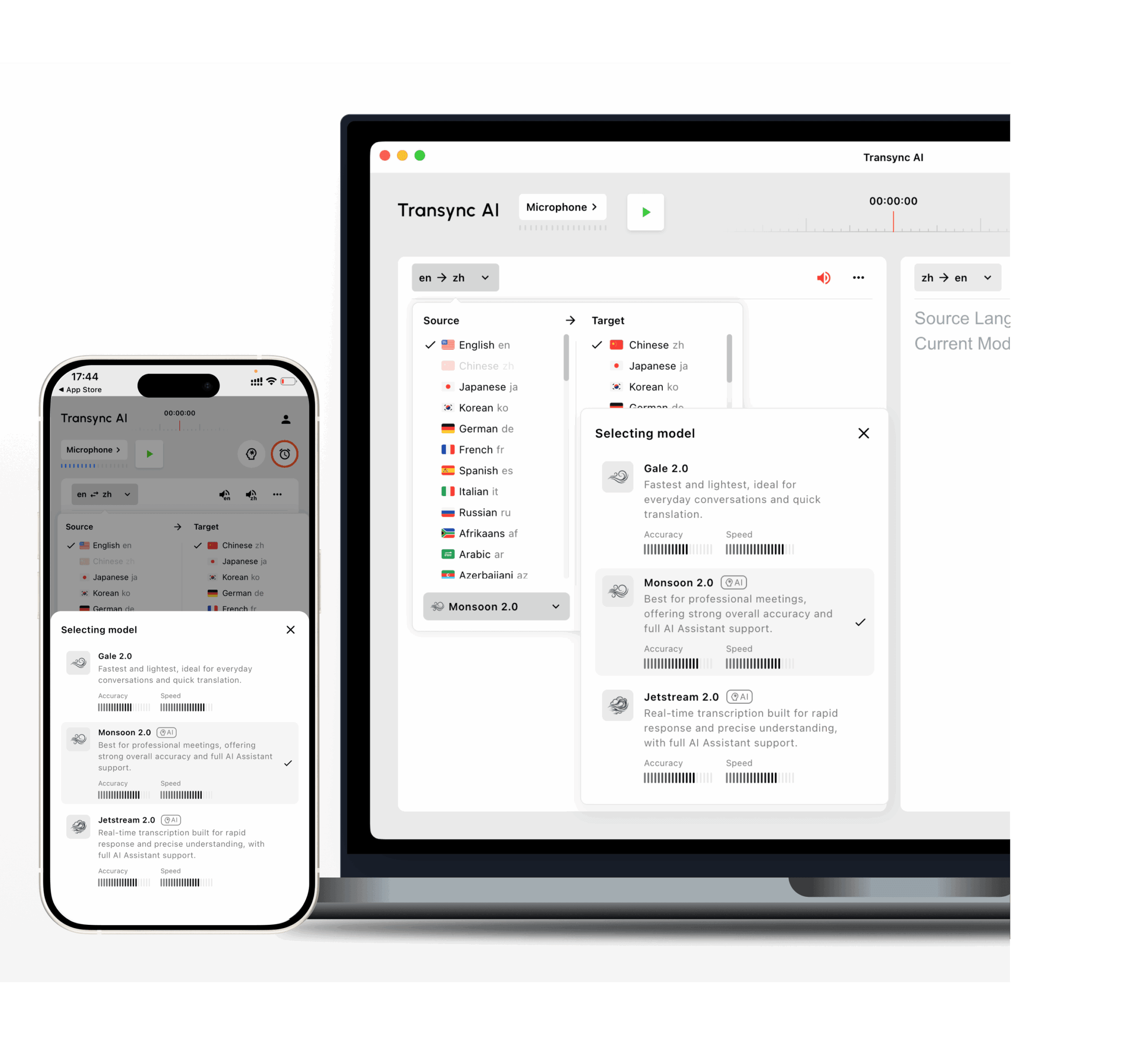
Transync AI is ontworpen voor tweetalige vertalingen met lage latentie. De modellen Gale 2.0, Monsoon 2.0 en Jetstream 2.0 zijn geoptimaliseerd voor gespreksomstandigheden zoals korte zinnen, spraak in meerdere talen, achtergrondgeluid en onregelmatige pauzes.
 Test 2: Kan het op natuurlijke wijze in beide richtingen vertaald worden?
 Test 2: Kan het op natuurlijke wijze in beide richtingen vertaald worden?
Veel vertaalprogramma's werken goed wanneer één persoon spreekt en de ander alleen luistert.
Een gesprek is anders. Beide partijen moeten eraan deelnemen.
Een nuttige realtime gespreksvertaler Het systeem moet tweewegvertaling ondersteunen zonder dat gebruikers na elke spreker op een knop voor taalwisseling hoeven te drukken.
Bijvoorbeeld:
- Spreker A gebruikt Engels.
- Spreker B spreekt Japans.
- Spreker A stelt een vervolgvraag in het Engels.
- Spreker B antwoordt in het Japans.
- Beide processen gaan door zonder dat de invoerinstelling handmatig hoeft te worden gewijzigd.
Vragen om te stellen
- Kan de tool onderscheid maken tussen de twee geselecteerde talen?
- Is het in beide richtingen te vertalen?
- Herkent het korte antwoorden zoals 'ja', 'nog niet' of 'volgende week'?
- Wat gebeurt er als een spreker een Engelse productnaam in een Chinese zin gebruikt?
- Gebruikt de vertaalde stem de juiste doeltaal?
- Kunnen beide deelnemers zowel de originele als de vertaalde inhoud zien?
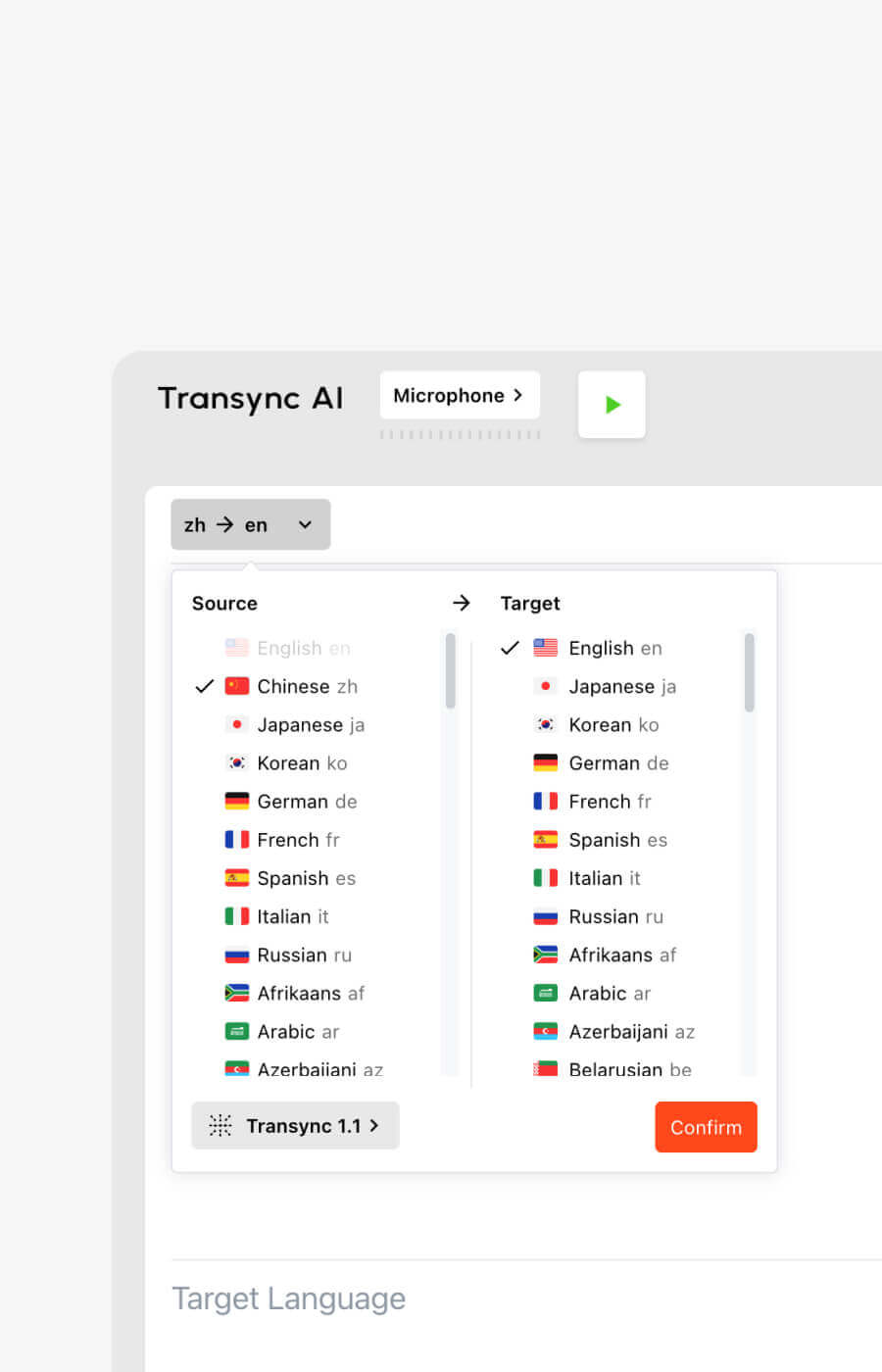
Transync AI ondersteunt bidirectionele realtime vertaling in 60 talen en meer dan 1000 taalparen.
Ondersteunde opties omvatten veelgebruikte talen zoals:
- Engels
- Chinese
- Japanse
- Koreaans
- Kantonees
- Spaans
- Frans
- Duits
- Italiaans
- Russisch
U kunt de huidige opties bekijken op de Transync AI ondersteunt de volgende talen: pagina.
Test 3: Begrijpt het het onderwerp, of alleen de woorden?
Een informeel gesprek is makkelijker dan een professioneel gesprek.
Neem bijvoorbeeld het woord 'model'. Het kan verwijzen naar:
- Een AI-model
- Een productmodel
- Een statistisch model
- Een bedrijfsmodel
- Een ontwerpprototype
- Een persoon die in de mode werkt
De juiste vertaling hangt af van het onderwerp.
Een zwakke vertaler verwerkt de zin geïsoleerd. Een contextbewuste vertaler gebruikt de omringende conversatie, trefwoorden en achtergrondinformatie.
Een praktische terminologietest
Bedenk tien termen uit je eigen werkproces.
Bijvoorbeeld:
- Transync AI = 同言翻译
- fotovoltaïsche omvormer
- halfgeleiderverpakking
- APAC
- Model X200
- neuraal netwerk
- optimalisatie van de toeleveringsketen
- John Smith
- bedrijfswerkruimte
- productlanceringscampagne
Gebruik de termen vervolgens in volledige zinnen.
Test niet alleen losse woorden. Een tolk voor een gesprek moet begrijpen hoe de term functioneert binnen een echt gesprek.
Waarom trefwoorden en context belangrijk zijn
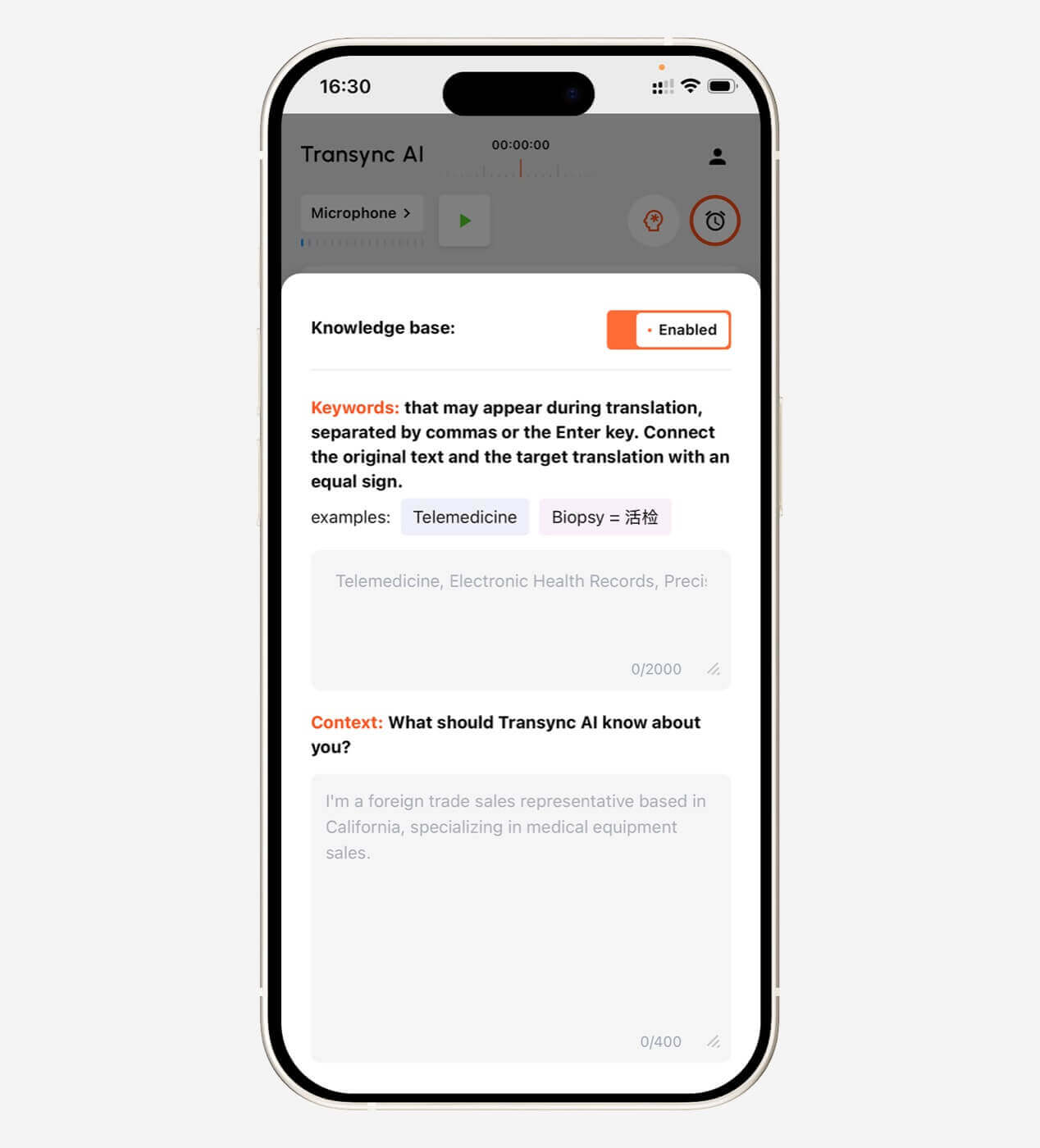
Transync AI stelt gebruikers in staat om voorafgaand aan een vergadering trefwoorden te definiëren en contextuele achtergrondinformatie te verstrekken.
Voorbeeldcontext:
Dit is een leveranciersbijeenkomst over de productie van halfgeleiders, kwaliteitscontrole, levertijden en productiecapaciteit.
Dit geeft de AI een betere kans om dubbelzinnige taal correct te interpreteren.
Trefwoord- en contextinstellingen zijn met name handig in:
- Productie
- Technologie
- Hernieuwbare energie
- Academisch onderzoek
- Gezondheidszorgadministratie
- Financiën
- Internationale verkoop
- Producttraining
- Softwaredemonstraties
Verken de Context van trefwoorden voor AI-assistenten functie.
 Test 4: Zijn de ondertitels en de gesproken tekst daadwerkelijk prettig in het gehoor?
 Test 4: Zijn de ondertitels en de gesproken tekst daadwerkelijk prettig in het gehoor?
De kwaliteit van de vertaling is slechts een deel van de ervaring. De manier waarop deze wordt gebracht, is minstens zo belangrijk.
Sommige gebruikers begrijpen dingen beter door te lezen. Anderen hebben een vertaalde audioversie nodig. Veel professionele gesprekken hebben baat bij beide.
Tweetalige ondertitels
Een gebruiksvriendelijke interface voor ondertiteling moet het gemakkelijk maken om de originele en vertaalde spraak met elkaar te vergelijken.
Dit helpt gebruikers:
- Controleer de namen en nummers.
- Identificeer mogelijke herkenningsfouten
- Volg de technische uitleg.
- Begrijp waar het ene idee eindigt en het andere begint.
- Lees de vertaling zonder de spreker te verliezen.
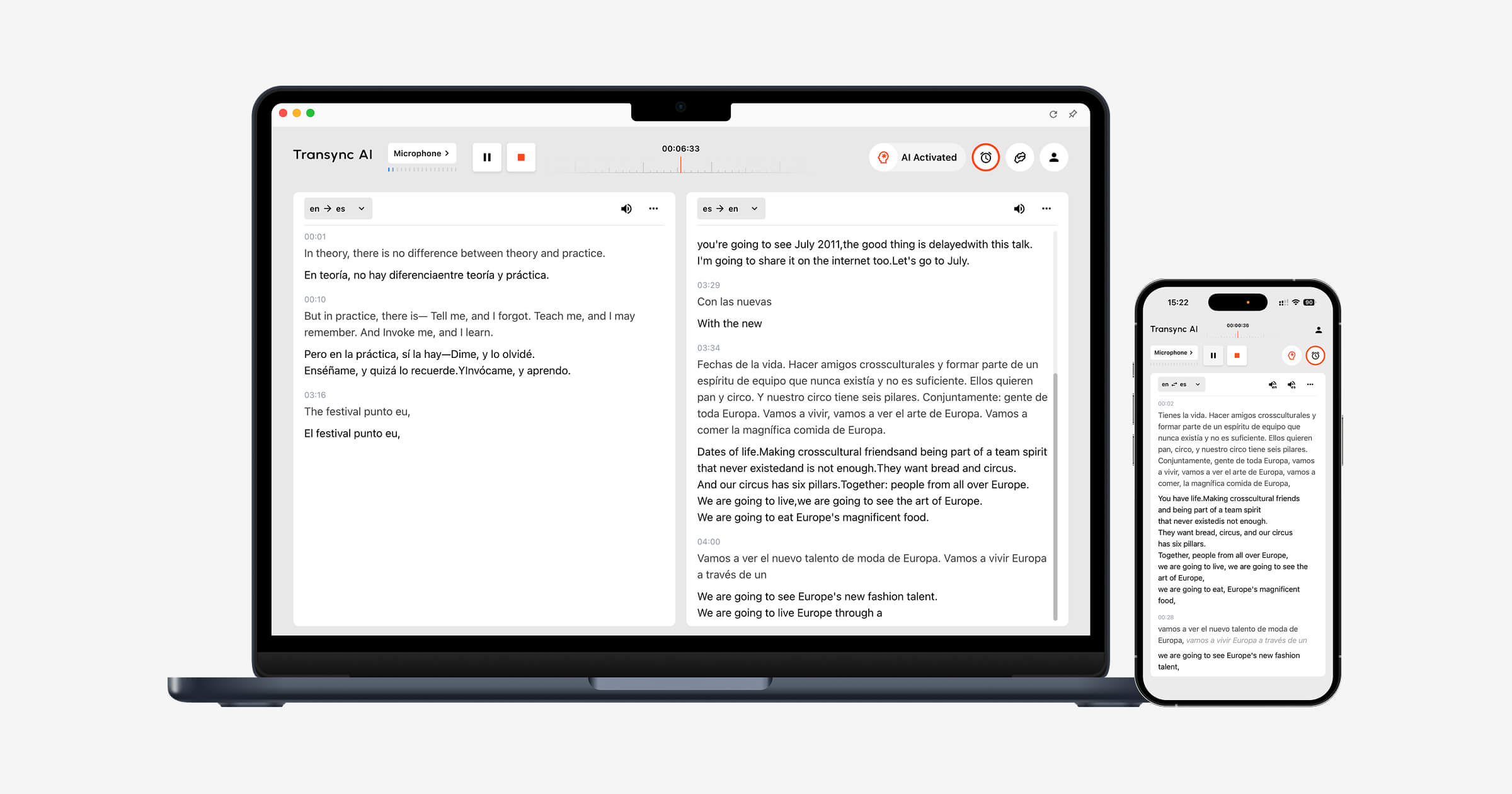
Transync AI maakt gebruik van een tweetalige lay-out waarbij de originele en vertaalde inhoud naast elkaar worden weergegeven.
Vragen voor het testen van ondertiteling
- Zijn de ondertitels groot genoeg om te lezen?
- Is de oorspronkelijke taal duidelijk gescheiden van de vertaling?
- Worden de ondertitels te vaak bijgewerkt?
- Omvat de tekst dia's of vergaderingsbedieningselementen?
- Blijven ondertitels zichtbaar bij het wisselen tussen applicaties?
- Kunnen gebruikers de vertaling eenvoudig pauzeren of hervatten?
Transync AI biedt ook Picture-in-Picture zwevende ondertitels aan op ondersteunde Mac-, Windows- en iOS-platforms. Het ondertitelvenster kan boven andere toepassingen blijven staan terwijl gebruikers presentaties, documenten of browserinhoud bekijken.
Zien Beeld-in-beeld zwevende ondertitels.
 Vertaalde spraakuitvoer
 Vertaalde spraakuitvoer
Spraakvertaling kan een gesprek directer laten aanvoelen, maar een slechte spraakweergave kan een nieuwe barrière vormen.
Evalueer:
- Uitspraak
- Spreeksnelheid
- Natuurlijke pauzes
- Toon
- Helderheid
- Vertraging vóór het afspelen
- Of de stem de volgende spreker onderbreekt.
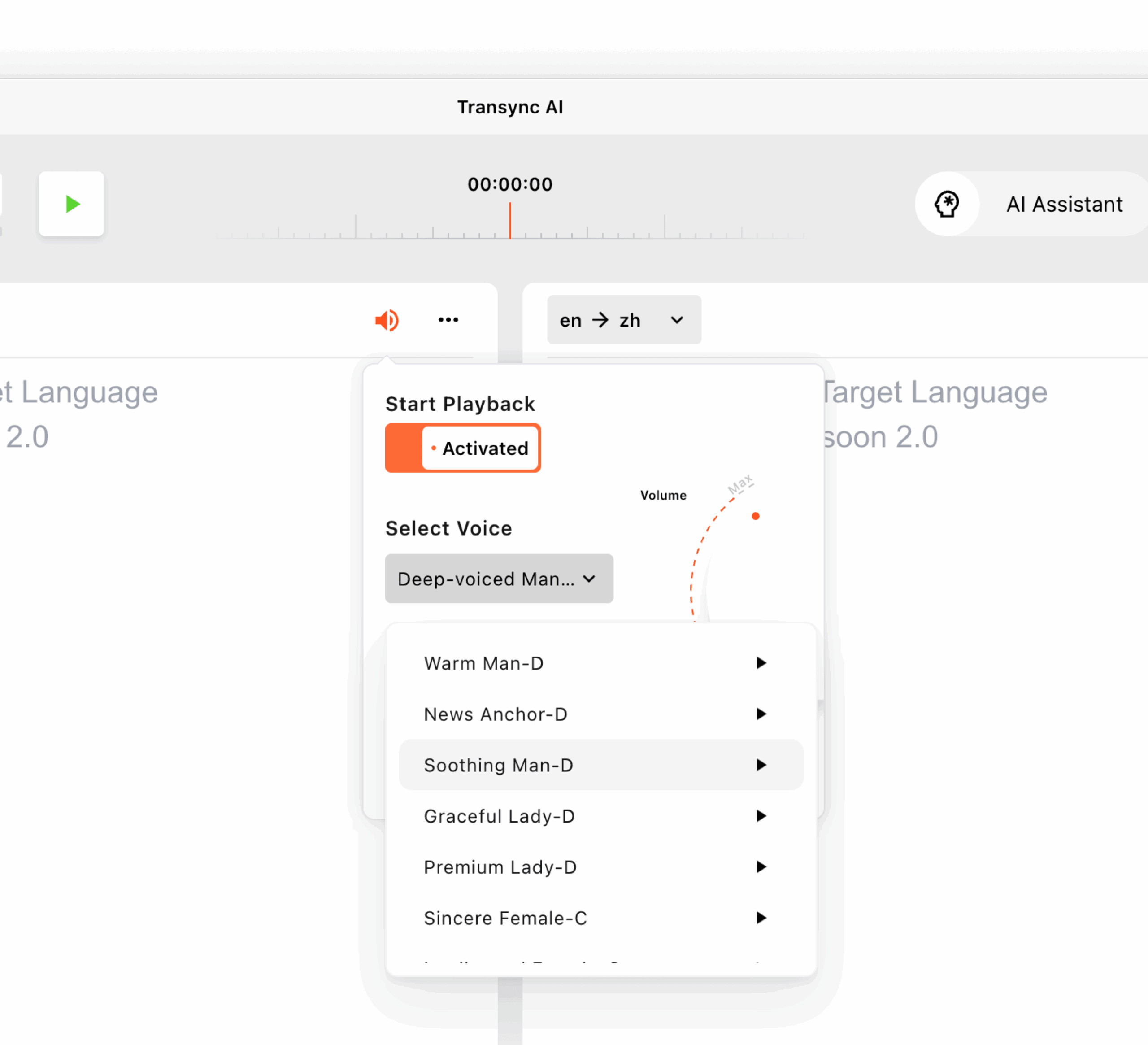
Transync AI biedt meerdere AI-stemmen en een previewfunctie. Gebruikers kunnen vóór een sessie naar de beschikbare stemmen luisteren en er een kiezen die het beste past bij een vergadering, les, demonstratie of informeel gesprek.
Het ondersteunt ook stemklonen, waardoor vertaalde uitvoer een stem kan gebruiken die lijkt op de eigen stem van de gebruiker. Stemgegevens worden veilig opgeslagen en niet gebruikt voor AI-training.
Leer meer van AI-spraakvertaler en spraakuitvoer.
Test 5: Past het bij het gesprek ervoor, tijdens en erna?
 Test 5: Past het bij het gesprek ervoor, tijdens en erna?
Een tolk voor gesproken conversatie mag niet alleen beoordeeld worden op basis van wat er gezegd wordt.
Het volledige werkproces bestaat uit drie fasen.
Voorafgaand aan het gesprek
Gebruikers moeten mogelijk het volgende doen:
- Selecteer het taalpaar
- Voeg namen en technische termen toe.
- Beschrijf het onderwerp van de vergadering.
- Kies een vertaalde stem
- Test de microfoon
- Controleer de systeemaudio-instellingen.
Tijdens het gesprek
Gebruikers moeten:
- Lees de ondertitels
- Luister naar de spraakuitvoer
- Schakel tussen dia's en documenten.
- Reageer zonder lange pauzes.
- Corrigeer belangrijke cijfers
- Vermijd het beheren van ingewikkelde bedieningselementen.
Na het gesprek
Gebruikers moeten mogelijk het volgende doen:
- Bekijk het transcript
- Bevestig beslissingen
- Identificeer actiepunten
- Deel een samenvatting
- Controleer de namen en datums
- Bereid je voor op de volgende vergadering.
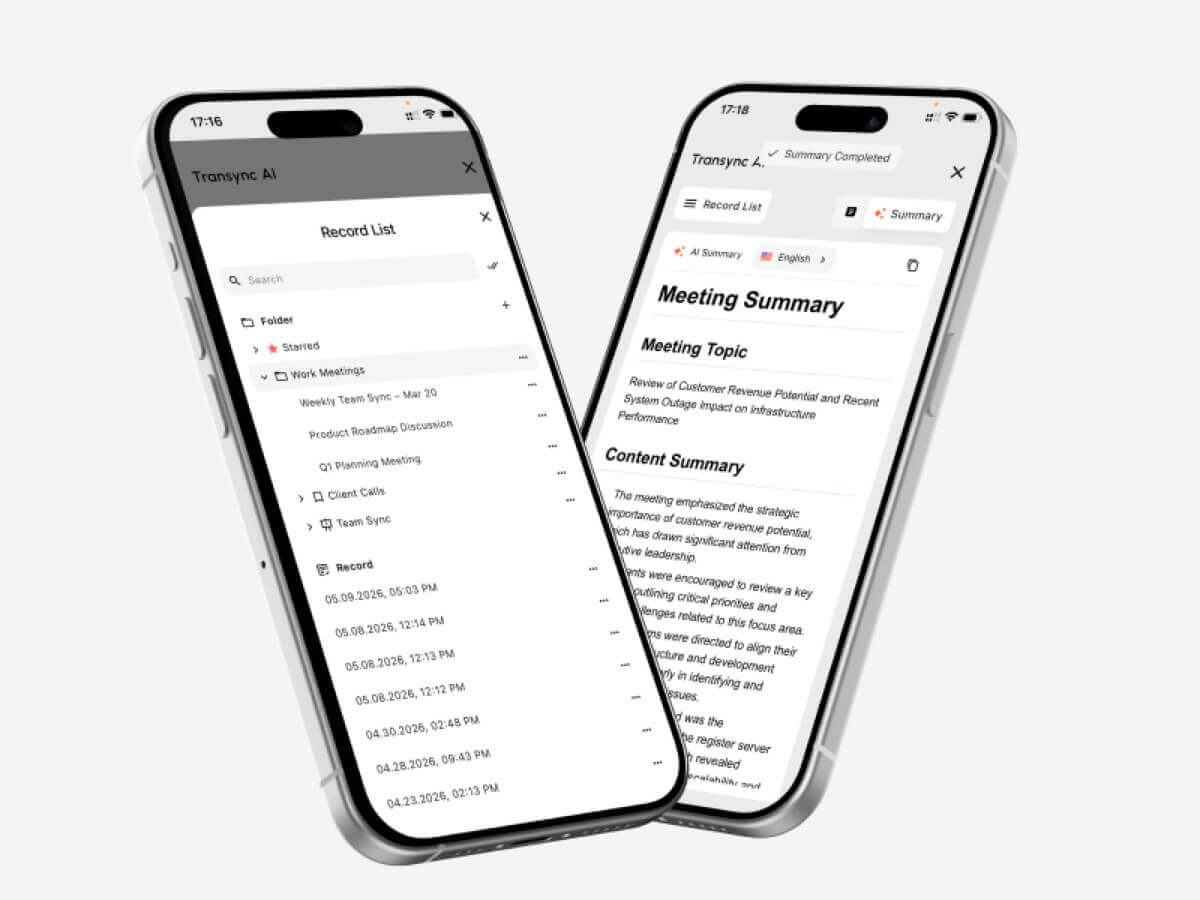
Transync AI combineert live vertaling met AI-gestuurde vergaderingsnotities. Na een meertalig gesprek kunnen gebruikers de belangrijkste informatie nog eens bekijken, in plaats van alleen op hun geheugen of handgeschreven notities te vertrouwen.
Bezoek AI-vergadernotities met realtime vertaling.
 Gespreksvertaler versus tekstvertaler
 Gespreksvertaler versus tekstvertaler
Deze hulpmiddelen lossen verschillende problemen op.
| Functie | Tekstvertaler | Gespreksvertaler |
| Hoofdinvoer | Getypte of geplakte tekst | Live toespraak |
| Interactie | Meestal één zin tegelijk. | Continue tweezijdige discussie |
| Snelheidsvereiste | Gematigd | Zeer hoog |
| Audioherkenning | Meestal optioneel | Essentieel |
| Sprekerwisselingen | Niet relevant | Moet soepel verlopen |
| Spraakuitvoer | Soms beschikbaar | Belangrijk voor gesproken communicatie |
| Vergaderingsondersteuning | Meestal beperkt | Vaak een belangrijk gebruiksscenario |
| Contextinstellingen | Variabel | Belangrijk voor professioneel gebruik |
| Notulen van de vergadering | Zeldzaam | Beschikbaar in geavanceerde tools |
| Het beste voor | Berichten, webpagina's, korte teksten | Telefoongesprekken, lessen, vergaderingen en sollicitatiegesprekken |
Een algemene tekstvertaler zoals Google Vertalen Geschikt voor korte zinnen, berichten en snelle reisvragen.
Een professionele tolk voor vergadergesprekken is vooral handig wanneer er continu gesproken wordt en beide deelnemers moeten reageren.
Gespreksvertaler versus menselijke tolk
Kunstmatige intelligentie en menselijke interpretatie zijn niet uitwisselbaar.
| Factor | AI-gespreksvertaler | Menselijke tolk |
| Beschikbaarheid | Kan doorgaans direct worden gestart. | Vereist vaak een afspraak. |
| Kosten | Abonnement of gebruiksgebaseerd | Meestal worden de kosten per uur of per evenement berekend. |
| Regelmatige vergaderingen | Praktisch voor frequent gebruik | Kan duur zijn voor dagelijks gebruik. |
| Culturele nuance | Je kunt subtiele betekenissen missen | Beter in het lezen van intentie en context. |
| Technische terminologie | Kan verbeterd worden met trefwoorden | Afhankelijk van de specialisatie van de tolk. |
| Notulen van de vergadering | Kan automatisch gegenereerd worden | Meestal een aparte dienst. |
| Juridische verantwoordelijkheid | Beperkt | Professionele normen kunnen van toepassing zijn. |
| Optimaal gebruik | Regelmatige vergaderingen en gesprekken | Communicatie met hoge inzet en gevoelige informatie |
Schakel een gekwalificeerde menselijke tolk in wanneer een fout gevolgen kan hebben voor:
- Juridische rechten
- Medische behandeling
- Veiligheid
- Immigratiestatus
- Financiële beslissingen
- Contractvoorwaarden
- Overheidsprocedures
- Gevoelige arbeidsrechtelijke kwesties
AI-vertaling is over het algemeen meer geschikt voor routinematige zakelijke telefoongesprekken, interne vergaderingen, lessen, demonstraties en dagelijkse communicatie.
Waar is een conversatievertaler het meest nuttig?
Internationale zakelijke bijeenkomsten
Een tweetalige vertaler helpt deelnemers projecten, planningen, kosten en technische vereisten te bespreken in hun voorkeurstaal.
Trefwoorden en context kunnen de weergave van bedrijfsnamen, productnamen en vaktermen verbeteren.
Telefoontjes van leveranciers en klanten
Dankzij realtime ondertiteling is het eenvoudiger om nummers, leverdata, ordergegevens en modelcodes te controleren.
Belangrijke afspraken dienen na het telefoongesprek alsnog schriftelijk bevestigd te worden.
Online lessen en colleges
Leerlingen kunnen de vertaalde ondertitels volgen terwijl de docent doorspreekt. AI-aantekeningen bieden na afloop van de sessie een naslagwerk.
Interviews
Een vertaler met lage latentie kan lange pauzes verkorten en ervoor zorgen dat beide partijen natuurlijker vervolgvragen kunnen stellen.
Productdemonstraties
Zwevende ondertitels stellen deelnemers in staat om de software of presentatie te bekijken zonder dat de vertaling wordt verborgen.
Tentoonstellingen en persoonlijke ontmoetingen
Een tolk voor gespreksvoering kan snelle gesprekken ondersteunen tijdens evenementen, op kantoor, op de campus en tijdens zakelijke bezoeken.
Test de internetverbinding en de microfoon voordat je een belangrijk gesprek voert.
Transync AI gebruiken met Zoom, Teams en Google Meet
Transync AI functioneert als zelfstandige software en niet als een plug-in voor vergaderingen.
Het kan parallel lopen met:
- Zoom
- Microsoft Teams
- Google Meet
Voor ondertiteling kan de app audio van vergaderingen opnemen en een tweetalige vertaling weergeven in de interface of een zwevend ondertitelingsvenster.
Voor vertaalde spraakuitvoer moeten gebruikers mogelijk systeemgeluid of een virtuele microfoon configureren, zodat andere deelnemers aan de vergadering de gegenereerde vertaling kunnen horen.
Deze op zichzelf staande aanpak is handig voor gebruikers die met meerdere vergaderplatformen werken.
Zien AI Live Meeting-vertaling voor Zoom, Teams en Google Meet.
Een praktisch testscript voor een conversatievertaler
Gebruik de volgende scriptstructuur bij het vergelijken van tools.
Deel 1: Inleiding
Elke deelnemer stelt zijn of haar rol, bedrijf en doel van de bijeenkomst voor.
Deel 2: Getallen en datums
Erbij betrekken:
- Een prijs
- Een percentage
- Een modelnummer
- Een leverdatum
- Een hoeveelheid
Deel 3: Technische woordenschat
Gebruik vijf termen die in je eigen werk voorkomen.
Deel 4: Natuurlijke onderbreking
Laat een van de sprekers de voorgaande uitspraak verduidelijken of corrigeren.
Deel 5: Meertalige spraak
Voeg een productnaam, afdelingsnaam of afkorting in een andere taal toe.
Deel 6: Vervolgvragen
Stel vragen die voortvloeien uit het vorige antwoord.
Deel 7: Samenvatting
Vraag een van de deelnemers om de beslissing en de volgende stappen samen te vatten.
Evaluatieformulier voor conversatievertalers
| Metrisch | Wat te evalueren |
| Spraakherkenning | Heeft het de woorden van de spreker wel goed weergegeven? |
| Vertalingsnauwkeurigheid | Is de beoogde betekenis behouden gebleven? |
| Latentie | Is de uitslag snel genoeg binnengekomen? |
| Tweewegstroom | Zouden beide deelnemers op een natuurlijke manier kunnen reageren? |
| Terminologie | Waren de namen en technische termen consistent? |
| Ondertitelingervaring | Waren de ondertitels leesbaar en stabiel? |
| Spraakuitvoer | Was de vertaalde audio helder en natuurlijk? |
| Werkstroom bij de vergadering | Paste het gereedschap op het bestaande platform? |
| Stabiliteit gedurende lange sessies | Bleef de prestatie constant? |
| Waarde na de vergadering | Waren de notities of samenvattingen nuttig? |
Test de tool met uw eigen sprekers, apparaten, netwerk, talencombinaties en vergaderduur. Een korte demonstratie kan niet elke werkomgeving nabootsen.
Transync AI-prijzen voor conversatievertaling
| Plan | Prijs | Inbegrepen gebruik | Het beste voor |
| Vrij | $0 | 40 minuten voor nieuwe gebruikers | Eerste tests |
| Persoonlijke premie | $8.99/maand | 10 uur gedurende de actieve lidmaatschapsperiode | Individuele bijeenkomsten en regelmatige vergaderingen |
| Onderneming | $24,99/maand/stoel | Tot 40 uur per maand per werkplek | Teams en organisaties |
| Tijdkaart | Vanaf $0,70/uur | Extra vertaaltijd | Gebruikers met een wisselende maandelijkse vraag |
De uren op de tijdkaart verlopen niet, maar kunnen alleen worden gebruikt zolang het lidmaatschap actief is.
Bij het vergelijken van prijzen is het belangrijk om te schatten hoeveel tijd u daadwerkelijk maandelijks aan gesprekken zult besteden. Een laag maandelijks tarief kan een slechte prijs-kwaliteitverhouding bieden als de inbegrepen tijd te beperkt is voor uw vergaderingen.
Beperkingen van software voor het vertalen van conversaties
Geen enkele spreektaalvertaler werkt perfect in elke omgeving.
Veelvoorkomende beperkingen zijn onder andere:
- Meerdere sprekers die tegelijkertijd praten
- Luid achtergrondgeluid
- Kamerecho
- Zwakke microfoons
- Instabiel internet
- Zeer snel spreken
- Sterke regionale accenten
- Onvolledige zinnen
- Lokale slang
- Snel wisselen tussen talen
- Dubbelzinnige terminologie
- Spraakweergave overlapt de volgende spreker.
Transync AI kent ook een aantal productspecifieke beperkingen:
- De offline modus is niet beschikbaar.
- Beeldherkenning wordt niet ondersteund.
- Het vertalen van statische tekst is niet het primaire gebruiksdoel.
- Het is zelfstandige software en geen plug-in voor vergaderingen.
- Het accountgebruik wordt cumulatief geteld over alle apparaten.
- De kwaliteit van de vertaling hangt nog steeds af van de audio- en netwerkomstandigheden.
Deze beperkingen maken het beter geschikt voor live meertalige communicatie dan gescande afbeeldingen, volledige documentvertaling of website-lokalisatie.
Veelgestelde vragen: Gespreksvertaler
Wat is een conversatievertaler?
Een tolk luistert naar gesproken taal en produceert vertaalde ondertitels of gesproken tekst tijdens een live gesprek.
Wat is de beste vertaler voor conversaties?
De beste tool hangt af van de talen, het vergaderplatform, de audio-omgeving, de terminologie en de duur van de sessie. Voor professionele vergaderingen is het belangrijk om prioriteit te geven aan een lage latentie, tweewegvertaling, ondertiteling, spraakuitvoer, contextuele bedieningselementen en vergaderingsnotities.
Kan een vertaalprogramma voor conversaties beide talen automatisch herkennen?
Sommige tools kunnen tijdens een gesprek onderscheid maken tussen twee geselecteerde talen. Transync AI ondersteunt automatische taalonderscheiding binnen ondersteunde tweewegvertalingstaken.
Kan Transync AI Zoom-gesprekken vertalen?
Ja. Transync AI kan naast Zoom, Microsoft Teams en Google Meet worden gebruikt om realtime tweetalige ondertiteling en vertaalde spraakworkflows te bieden.
Biedt Transync AI ondersteuning voor spraakvertaling?
Ja. Het ondersteunt AI-spraakuitzending, meerdere stemopties, spraakvoorbeelden en stemklonen.
Kan een tolk technische termen begrijpen?
De prestaties zijn afhankelijk van de tool en de terminologie. Transync AI stelt gebruikers in staat om trefwoorden en contextuele achtergrondinformatie toe te voegen vóór een gesprek.
Werkt een vertaalprogramma voor gesprekken ook offline?
Sommige reisapps bieden beperkte offline taalpakketten aan. Transync AI vereist momenteel een internetverbinding en ondersteunt geen offline vertaling.
Kan AI een menselijke tolk vervangen?
AI kan ondersteuning bieden bij routinevergaderingen, lessen, telefoongesprekken en alledaagse conversaties. Een professionele tolk blijft echter aan te raden voor juridische, medische, diplomatieke, financiële en andere communicatie met een hoog risico.
Tot slot: test het gesprek, niet alleen de vertaling.
A conversatievertaler Een relatie moet worden beoordeeld op basis van wat er tussen mensen gebeurt, niet alleen op de kwaliteit van één vertaalde zin.
Kunnen beide deelnemers natuurlijk spreken? Komt de vertaling binnen voordat het onderwerp verandert? Worden technische termen begrepen? Kunnen gebruikers het resultaat gemakkelijk lezen of beluisteren? Blijft de tool bruikbaar vóór, tijdens en na de discussie?
Transync AI combineert bidirectionele vertaling in 60 talen met tweetalige ondertitels, AI-spraakuitzending, stemklonen, trefwoorden en context, AI-vergaderingsnotities en Picture-in-Picture-ondertiteling.
Dat maakt het vooral relevant wanneer vertaling moet plaatsvinden tijdens een live gesprek, terwijl mensen nog vragen stellen, ideeën uitwisselen en beslissingen nemen.
Om te beginnen, bezoek Transync AI, verken de realtime vertaaltool, Of download de applicatie voor het apparaat van uw voorkeur.
 🤖
🤖 