

Traducteur IA, outil de traduction en temps réel, application de traduction vocale, traducteur multilingue pour réunions, logiciel d'interprétation en direct
Les meilleurs traducteurs ne sont pas interchangeables. L'un excelle dans la lecture d'un menu, l'autre dans la relecture d'un contrat, et un autre encore dans la gestion efficace d'une réunion multilingue malgré des microphones de qualité médiocre. Un classement général unique masque ces différences.
Cette sélection éditoriale désigne six lauréats par profession : Transync AI, Google Traduction, Apple Translate, DeepL, Microsoft Translator, et Mondial. L’objectif n’est pas de désigner un champion universel, mais de montrer quel flux de travail est le plus susceptible d’être utile au moment crucial.
Les six gagnants en 30 secondes
- Idéal pour les réunions en direct : Transync AI
- Idéal pour les traductions rapides en voyage : Google Traduction
- Idéal pour les conversations sur appareils Apple : Apple Translate
- Idéal pour la traduction centrée sur le document : DeepL
- Idéal pour les conversations de groupe informelles auxquelles on peut se joindre : Microsoft Translator
- Idéal pour les grands événements organisés : Mondial
Si les réunions constituent votre principal cas d'utilisation, commencez par Transync AI. Elle combine des sous-titres bilingues en temps réel, la traduction vocale, le contexte terminologique, la compatibilité avec les plateformes de réunion, les notes et un mode de présentation de groupe. Si vous n'avez besoin que d'une phrase lors d'un déplacement, une application grand public plus légère sera généralement plus rapide à ouvrir et plus facile à utiliser.
Tableau comparatif des meilleurs traducteurs de langues
| Traducteur | Notre prix | Entrée principale | Sortie principale | Groupe ou réunion Fit | Potentiel hors ligne | Modèle d'achat |
|---|---|---|---|---|---|---|
| Transync AI | Idéal pour les réunions en direct | Discours en direct | Sous-titres bilingues, voix traduite, notes | Idéal pour les réunions et les présentations | Flux de travail en ligne | Formules gratuites, personnelles et professionnelles |
| Google Traduction | Idéal pour les traductions rapides en voyage | Texte, écriture manuscrite, photos et discours | Expériences textuelles et vocales assistées | Plus adapté à une utilisation spontanée qu'aux réunions planifiées | Langues téléchargées sélectionnées | Application grand public et outil Web |
| Apple Translate | Idéal pour les conversations sur appareils Apple | Texte et voix | Vues de conversation et sortie traduite | Conversation personnelle axée sur | Langues téléchargées et mode sur l'appareil | Inclus sur les appareils compatibles |
| DeepL | Idéal pour les documents | Texte et fichiers | Traduction écrite | Pas principalement un espace de réunion | dépendant du produit | Offres gratuites et payantes |
| Microsoft Translator | Idéal pour les groupes informels auxquels on peut adhérer. | Texte et parole | Conversation en écran partagé ou sur plusieurs appareils | Les participants peuvent se joindre à une conversation partagée | Les packs hors ligne se concentrent principalement sur le texte | Options pour les consommateurs et l'écosystème Microsoft |
| Mondial | Idéal pour les grands événements organisés. | Audio en direct lors d'un événement ou d'une réunion | Audio, sous-titres, transcriptions et résumés | Flux de travail fortement axé sur les événements | Flux de travail en ligne | Packs commerciaux et démos |
Les fonctionnalités, les langues prises en charge, les prix et les exigences matérielles peuvent varier. Veuillez vérifier la combinaison de langues et le forfait souhaités avant d'acheter un traducteur.
Comment nous avons choisi les meilleurs traducteurs
Cette sélection évalue le processus de communication dans son intégralité, et non une phrase mise en scène dans un contexte calme. Chaque catégorie pose une question différente :
- Signification: La traduction respecte-t-elle l'intention de l'orateur ?
- Timing: Le résultat arrive-t-il suffisamment tôt pour la tâche à accomplir ?
- Modalité: Les utilisateurs peuvent-ils lire, écouter, parler, télécharger ou photographier ce dont ils ont besoin ?
- Contexte: La terminologie, les noms ou les informations générales peuvent-ils orienter le résultat ?
- Participation: Une personne, deux personnes, une équipe ou un public peuvent-ils l'utiliser confortablement ?
- Continuité: Existe-t-il un document utile, une transcription ou un résumé par la suite ?
- Risque: Les contrôles de confidentialité et la vérification humaine sont-ils appropriés pour ce contenu ?
- Coût: Quel est le coût du flux de travail final, et pas seulement du prix de l'abonnement initial ?
Les meilleurs traducteurs méritent leur place dans cette catégorie en assurant une traduction fluide et efficace. Une application proposant des centaines de langues peut s'avérer inadaptée pour une réunion de conseil d'administration ; une plateforme événementielle d'entreprise est peut-être superflue pour commander un déjeuner.
Les meilleurs traducteurs pour vos réunions : Transync AI
Transync AI Il s'agit du point de départ idéal lorsque la traduction doit s'intégrer à une conversation en cours. Au lieu de traiter chaque phrase comme une requête distincte, cette méthode facilite la réunion, de l'écoute à la traduction, jusqu'à la relecture ultérieure.
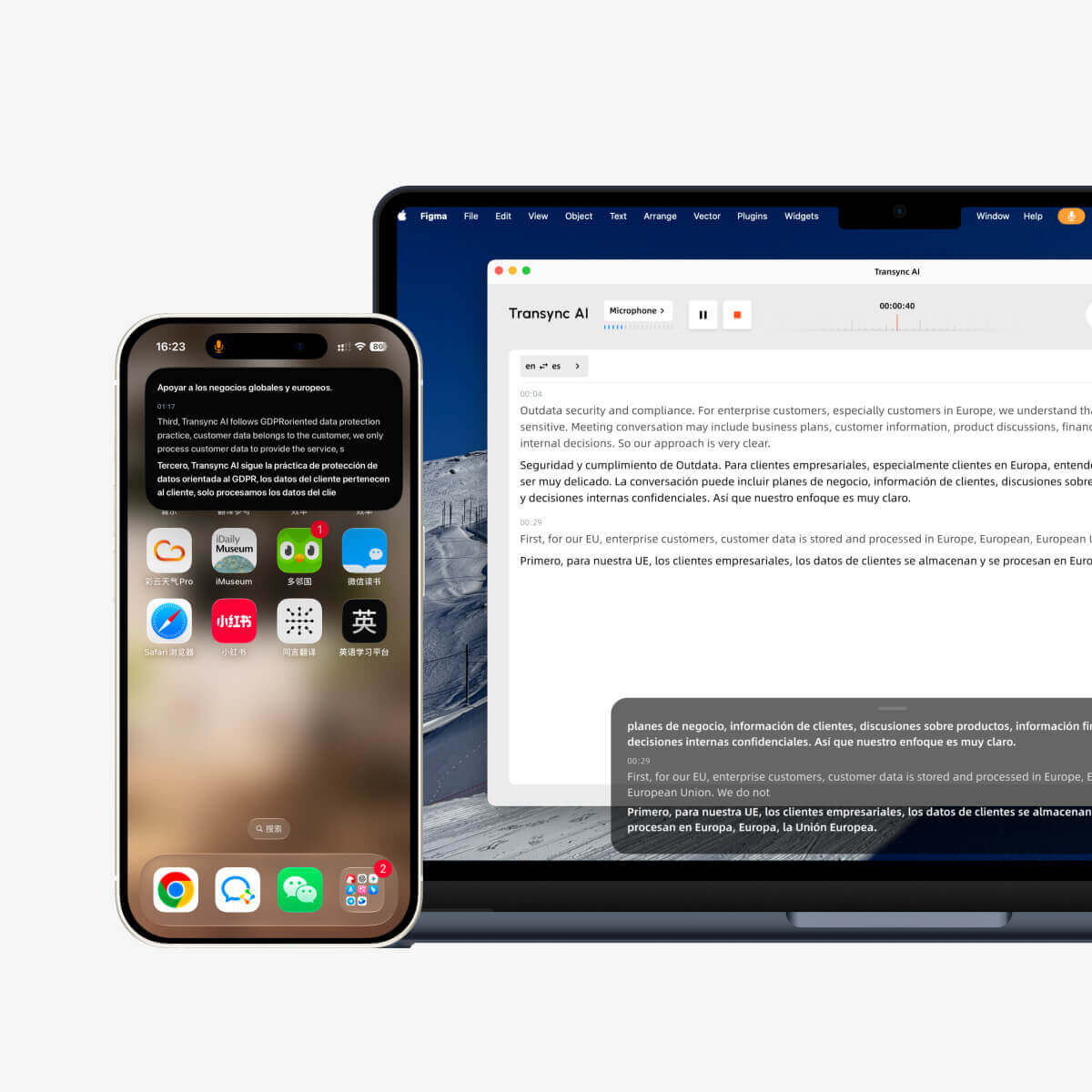
C'est traduction en temps réel Affiche les langues source et cible sous forme de sous-titres bilingues. La liste des langues actuellement disponible comprend 60 langues, permettant aux équipes de vérifier la disponibilité de la paire de langues souhaitée avant un appel.
Pour les participants qui préfèrent écouter, Transync AI comprend un Traducteur vocal IA. C'est Sous-titres bilingues en incrustation d'image peut rester visible par-dessus une autre application compatible, réduisant ainsi la nécessité de passer de la réunion à une fenêtre de traduction distincte.
Pourquoi elle remporte la catégorie réunion
- Traduction bidirectionnelle en temps réel pour des conversations soutenues.
- Sous-titres bilingues et traduction vocale.
- Distinction automatique entre les langues prises en charge sélectionnées.
- Disponibilité multiplateforme sur le web, les ordinateurs de bureau et les appareils mobiles.
- Préparation du contexte pour la terminologie spécialisée.
- Un document qui pourra servir de notes après la réunion.
Transync AI soutient un Flux de travail de traduction en direct pour les réunions pour Zoom, Microsoft Teams, et Google Meet. Cette approche multiplateforme aide les équipes qui ne souhaitent pas reconstruire la traduction chaque fois qu'un client envoie un lien provenant d'un fournisseur différent.
Avant un appel important, les utilisateurs peuvent donner le Mots clés et informations contextuelles de l'assistant IA. Les noms de produits, les acronymes, le vocabulaire du secteur et le contexte peuvent réduire les ambiguïtés évitables. Ensuite, Notes de réunion sur l'IA aider les participants à reprendre le fil de leurs décisions et à définir les prochaines étapes.
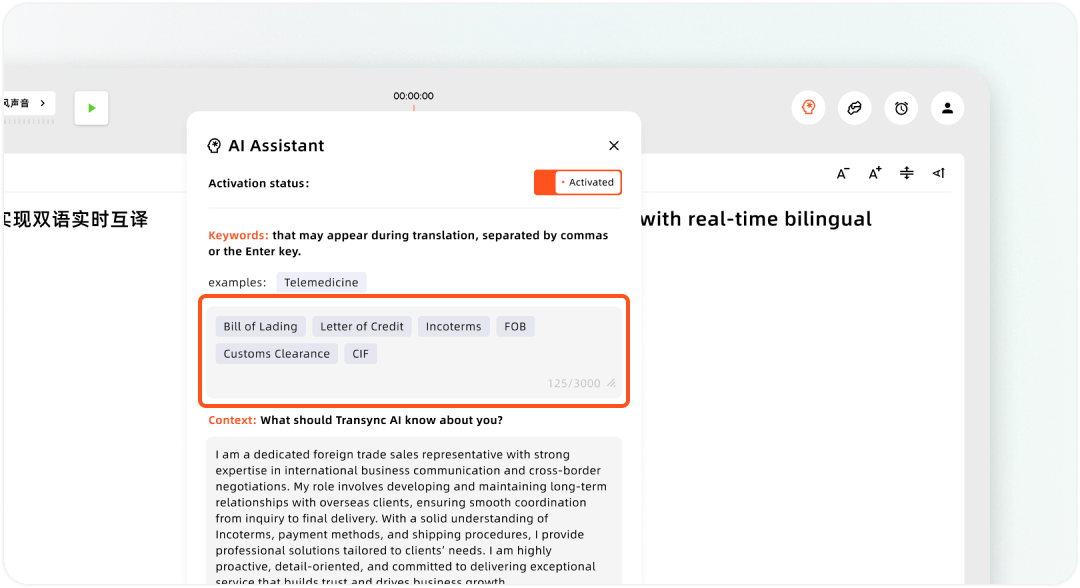
Configuration des mots clés personnalisés et du contexte utilisateur dans l'assistant IA Transync
Le mode Présentation modifie le flux de travail du public
En mode présentation bêta, un hôte peut configurer jusqu'à 10 langues cibles. Les participants se connectent depuis leur téléphone ou leur ordinateur à l'aide d'un code QR, d'un lien partageable ou d'un identifiant de salle. Ils n'ont pas besoin d'installer de logiciel, mais doivent s'inscrire ou se connecter à un compte. Transync AI compte.
Chaque participant choisit une des langues cibles proposées par l'organisateur et peut lire les sous-titres en direct ou écouter la traduction vocale. Les participants ne peuvent pas envoyer de commentaires vocaux dans ce mode. L'organisateur décide si la transcription originale et les notes générées par l'IA sont partagées après l'événement ; ce partage est optionnel et non automatique.
Ce Mode de présentation Il est pertinent pour les formations, les conférences, les réunions générales d'entreprise, les congrès, les visites guidées, les offices religieux et autres formats avec un seul orateur.
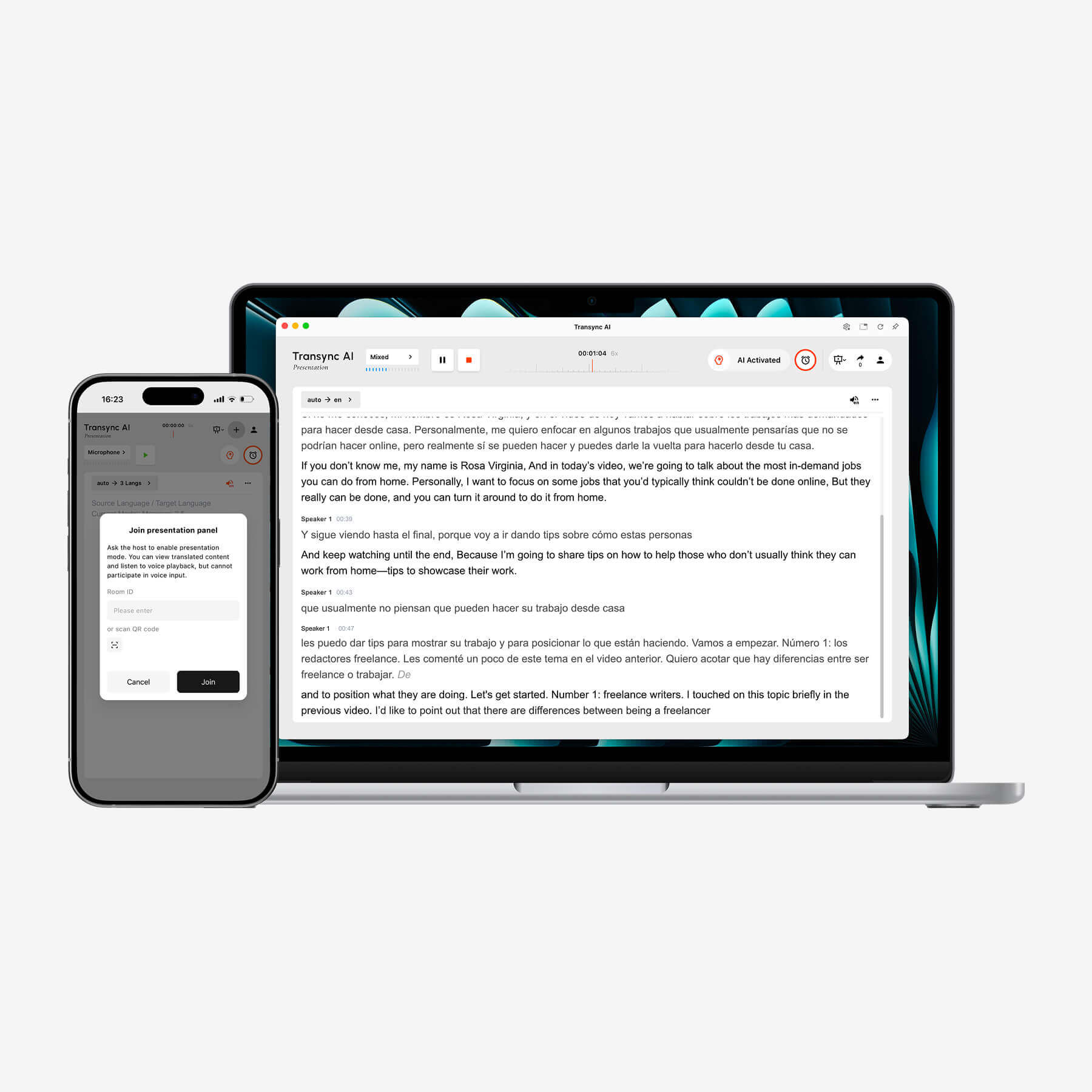
Transync AI affiche la transcription bilingue en temps réel sur un ordinateur portable tandis qu'un appareil mobile permet de contrôler la présentation.
Limites à prendre en compte
Transync AI Il s'agit d'un flux de travail de traduction en ligne, et non d'un guide de conversation hors ligne. Le mode Présentation est conçu pour la communication de groupe plutôt que pour une discussion ouverte avec un public. Les équipes doivent tester les microphones et le routage audio avant un appel important.
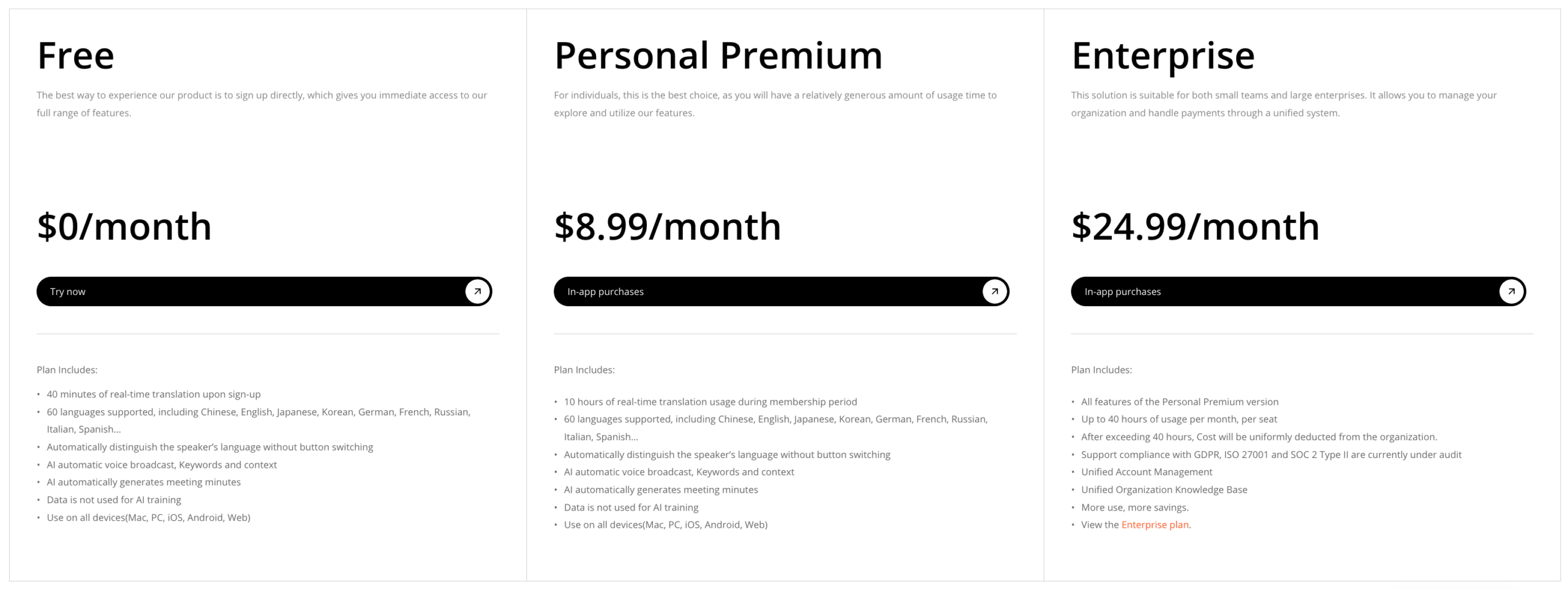
Les forfaits actuellement disponibles incluent 40 minutes gratuites à l'inscription, un forfait Premium Personnel à 8,99 € par mois avec 10 heures, et un forfait Entreprise à 24,99 € par mois et par utilisateur avec jusqu'à 40 heures par utilisateur. L'utilisation des modes multilingue et présentation est soumise à des règles de facturation distinctes ; veuillez consulter le calculateur de prix en vigueur avant d'estimer le coût d'un événement important.
Essayez Transync AI gratuitement
Les meilleurs traducteurs pour les voyages : Google Traduction
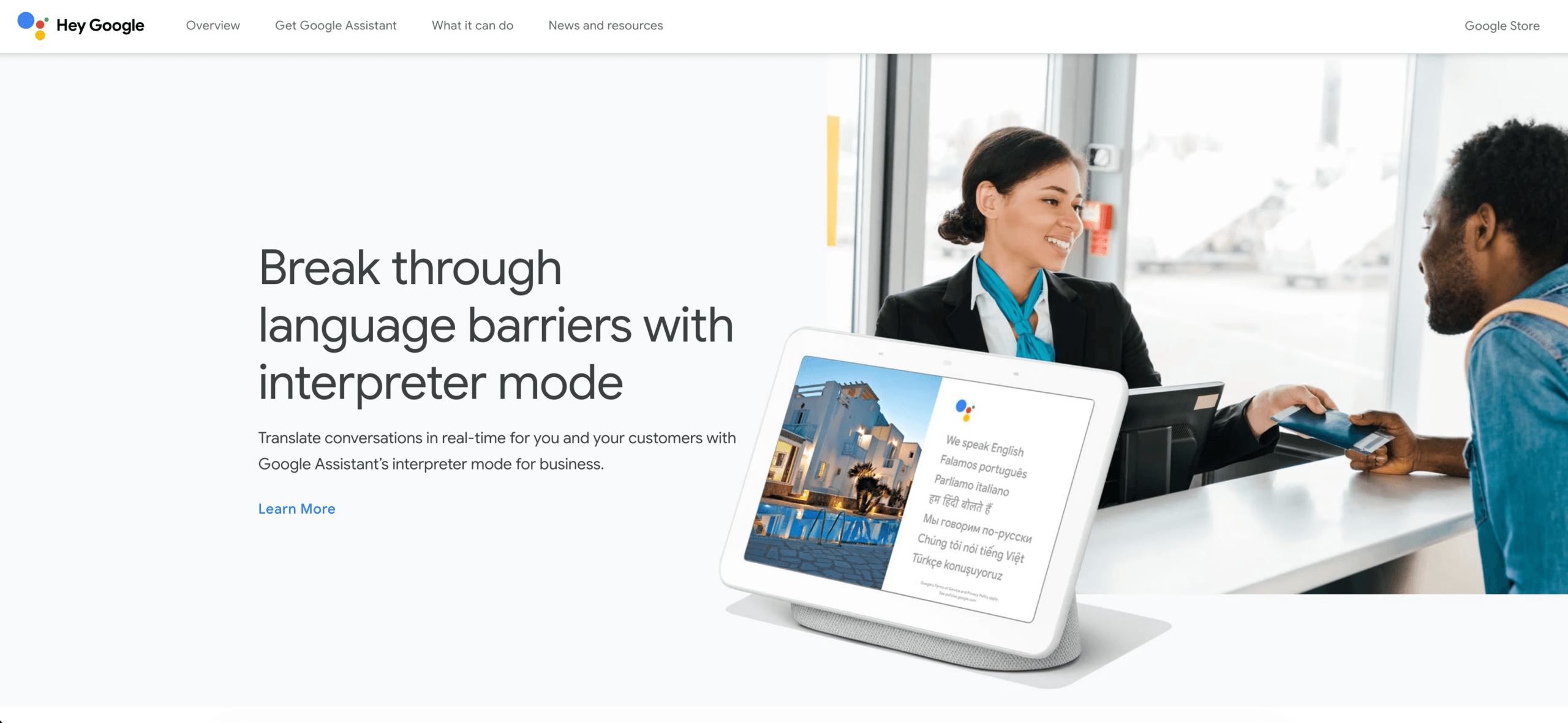
Google Traduction Il demeure l'un des meilleurs traducteurs pour les besoins spontanés et variés. Sa page d'aide officielle indique que l'application peut traduire du texte, de l'écriture manuscrite, des photos et la parole dans plus de 200 langues. Cette capacité est précieuse lorsqu'on passe de la lecture d'un panneau à la présentation d'une phrase tapée ou à une conversation avec une autre personne.
Pourquoi il remporte la catégorie voyage
- Accès rapide sur mobile et sur le web.
- Saisie par texte, caméra, écriture manuscrite et parole.
- Large couverture linguistique publiée.
- Certaines langues peuvent être téléchargées pour une utilisation hors ligne.
- Interface familière pour des échanges courts et pratiques.
L'utilisation hors ligne requiert une attention particulière. Le téléchargement d'une langue ne garantit pas le bon fonctionnement hors ligne de toutes les fonctionnalités vocales, de l'appareil photo ou de la conversation sur tous les appareils. Téléchargez les deux langues avant votre départ et testez le mode avion chez vous.
Limites à prendre en compte
Google Traduction C'est idéal pour une phrase, un signe, une photo ou un bref échange, mais ce n'est pas un espace de travail structuré comme pour une réunion permanente, avec préparation du contexte et prise de notes. Pour une négociation multilingue de 45 minutes, la simplicité d'utilisation ne suffit pas.
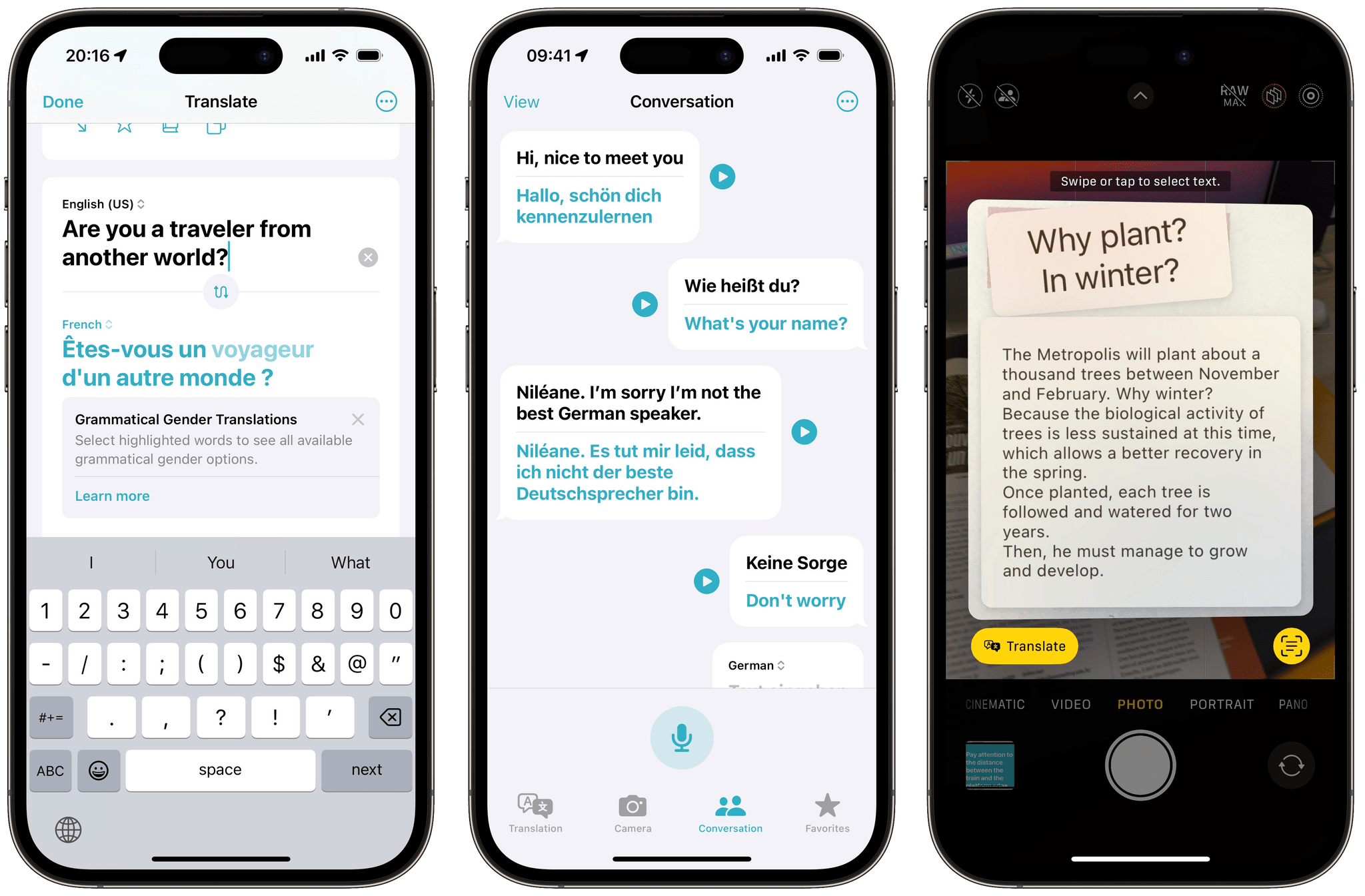
Meilleurs traducteurs de langues par écosystème d'appareils : Apple Translate
Apple Translate mérite sa catégorie en s'intégrant naturellement dans les environnements pris en charge Pomme Le guide actuel de l'iPhone décrit la traduction de texte et de voix, le mode conversation, la traduction automatique et le mode Face à face. Les langues téléchargées peuvent également être utilisées en mode intégré.
Pourquoi elle remporte la catégorie écosystème
- Flux de travail de conversation textuelle et vocale propre.
- La traduction automatique peut réduire les clics répétés.
- La fonction Face à Face permet à deux personnes de partager un seul appareil.
- Prise en charge des langues téléchargées pour une utilisation sur l'appareil.
- Pratique pour les personnes utilisant déjà du matériel compatible.
Limites à prendre en compte
La disponibilité dépend du matériel, de la version du système d'exploitation, de la langue et de la région. Ce service est axé sur les conversations personnelles plutôt que sur la gestion de réunions à l'échelle d'une organisation. Il est conseillé aux utilisateurs de vérifier la prise en charge linguistique et de tester l'appareil avant leur déplacement.
Meilleurs traducteurs de documents : DeepL
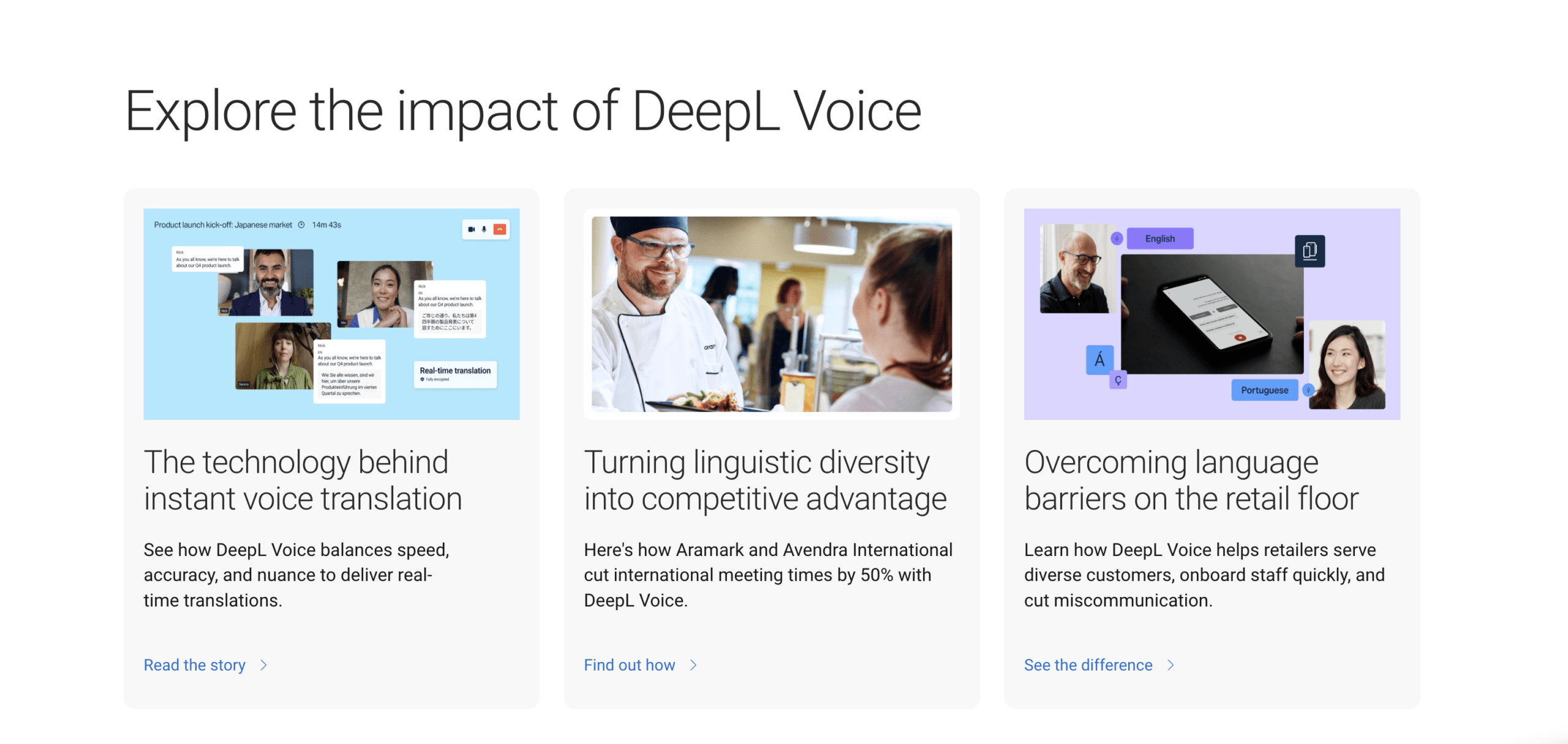
DeepL Ce service figure parmi les meilleurs traducteurs pour les contenus écrits. Il est particulièrement adapté aux courriels, rapports, présentations et documents dont la terminologie et le ton doivent être vérifiés avant publication.
Pourquoi il remporte la catégorie document
- Forte orientation vers la traduction de textes et de documents.
- Flux de travail terminologiques axés sur le glossaire.
- Utile pour comparer différentes formulations écrites.
- Produits de développement pour l'intégration de texte et de documents.
- Convient à un processus d'édition et de révision.
Le test approprié ne se limite pas à une seule phrase. Veuillez télécharger ou coller un document représentatif contenant des titres, des tableaux, des termes répétés, des chiffres et des noms de marques. Faites évaluer le sens, la terminologie, le ton, les omissions et la mise en forme par un relecteur bilingue.
Limites à prendre en compte
DeepL Ce logiciel ne remplace pas un outil conçu pour les réunions en présentiel, même si sa production écrite est fluide. Une conversation en direct exige également la reconnaissance vocale, la prise de parole à tour de rôle, la gestion de la latence, la lecture audio, la participation et le suivi des échanges. Les fonctionnalités du produit et du forfait doivent être vérifiées séparément.
Gagnant 5 : Microsoft Translator — Idéal pour les groupes informels auxquels on peut adhérer
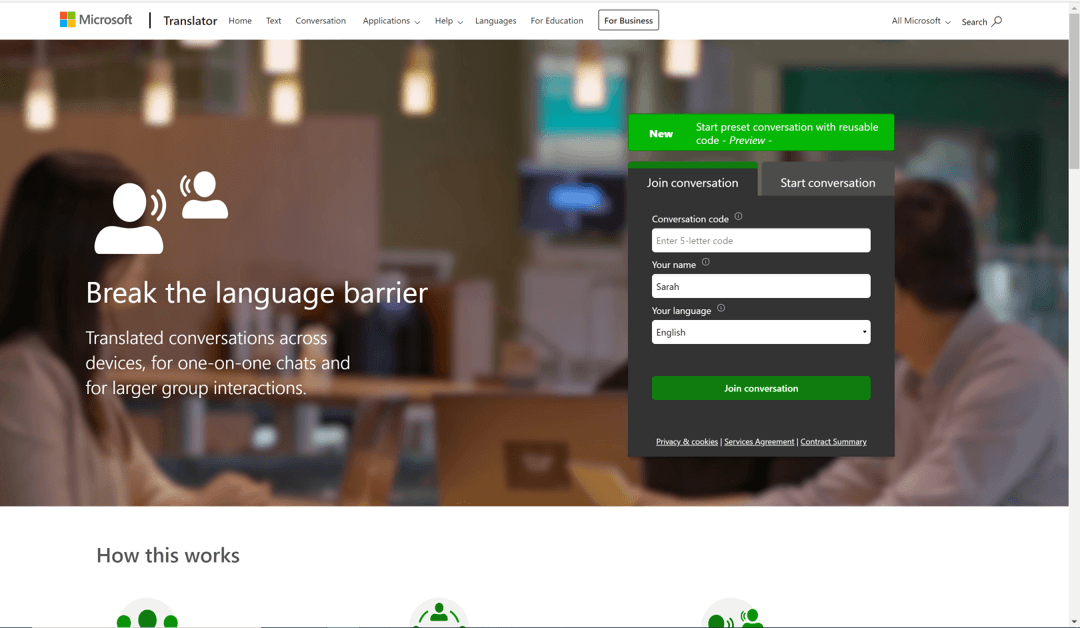
Microsoft Translator Cette application est utile lorsque plusieurs personnes souhaitent participer à une conversation multilingue sans avoir à se passer un seul appareil. Elle propose notamment la traduction en écran partagé pour deux personnes sur un même appareil et les conversations multi-appareils où les participants utilisent un code commun.
Pourquoi elle remporte la catégorie des groupes informels
- Conversation en écran partagé sur un seul appareil.
- Conversations multi-appareils via un code.
- Les participants peuvent s'exprimer ou écrire dans leur propre langue.
- Options de participation via application et navigateur.
- Utile pour les salles de classe, les groupes communautaires ou les rassemblements temporaires.
Limites à prendre en compte
La salle de conversation séparée peut ne pas convenir à tous les processus de réunion formels. Les packs de langue hors ligne prennent principalement en charge le texte et ne reproduisent pas l'intégralité de l'expérience d'une conversation en direct. Les organisations doivent distinguer le produit de conversation destiné aux consommateurs des services de traduction en nuage proposés ailleurs. Microsoft écosystème.
Découvrez Microsoft Translator
Gagnant 6 : Mondial — Idéal pour les grands événements organisés
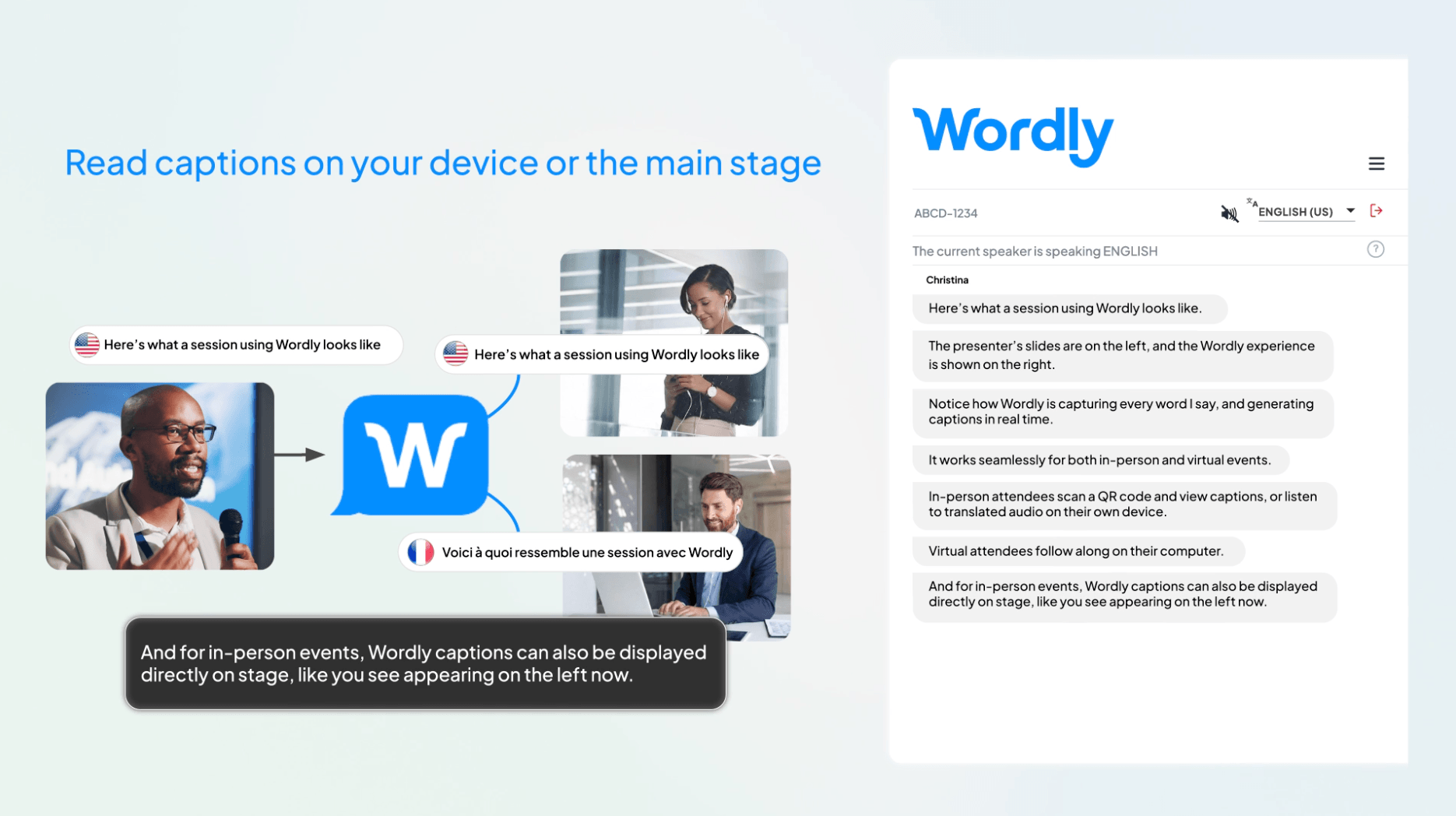
Mondial Ce service est conçu pour les conférences, les assemblées générales, les webinaires, les formations et autres événements où les organisateurs ont besoin d'un flux de travail de traduction et de sous-titrage géré. Sa documentation produit officielle décrit la diffusion audio et les sous-titres en direct, les transcriptions, les résumés, la personnalisation du glossaire et l'intégration avec les principales plateformes de réunions et d'événements.
Les participants peuvent se connecter via un code QR ou une URL sur leurs appareils personnels et choisir une langue pour l'audio ou les sous-titres. Selon Les membres de Worldly Sur la page actuelle du logiciel de traduction, les participants n'ont pas besoin de télécharger d'application, de créer un compte ni de fournir d'informations personnelles. Cela diffère de Transync AI Le mode Présentation nécessite l'inscription ou la connexion à un compte utilisateur, même s'il n'est pas nécessaire de télécharger un logiciel.
Pourquoi il remporte la catégorie des grands événements
- Planification de l'intégration et des flux de travail axée sur les événements.
- Accès par code QR et URL pour les participants.
- Sortie audio et sous-titres dans les langues sélectionnées par les participants.
- Glossaires personnalisés pour la terminologie spécifique à l'organisation.
- Transcriptions et résumés après les séances.
- Prise en charge des formats en présentiel, virtuels et hybrides.
Limites à prendre en compte
Mondial Il s'agit d'une plateforme événementielle commerciale et non d'une solution simple pour un voyageur individuel ou une conversation occasionnelle à deux. Les acheteurs potentiels doivent se renseigner sur les tarifs en vigueur, vérifier les services techniques requis et tester l'ensemble du système audio sur place.
Quel traducteur automatique correspond le mieux à vos besoins aujourd'hui ?
Vous rencontrez un client étranger
Choisir Transync AI Lorsque les deux parties doivent parler, consultez les sous-titres bilingues, écoutez la traduction et relisez la conversation ultérieurement. Préparez les noms des clients et les termes techniques avant l'appel.
Vous naviguez dans une ville sans données fiables
Commencez par Google Traduction ou Apple Translate. Téléchargez les langues nécessaires, sauvegardez les adresses importantes séparément et vérifiez les fonctions hors ligne avant de quitter le réseau Wi-Fi.
Vous traduisez un rapport en vue de sa publication.
Commencez par DeepL, Désignez ensuite un réviseur bilingue connaissant bien le marché cible. Conservez le document original et suivez les modifications importantes.
Une classe ou un groupe communautaire a besoin d'une conversation partagée
Essayer Microsoft Translator Les participants peuvent se connecter avec leurs propres appareils et un code de conversation. Prévoyez une brève présentation avant le début de la discussion.
Vous organisez une grande conférence multilingue
Comparer Mondial avec Transync AI Mode présentation. Mondial met l'accent sur la gestion et l'accès aux événements sans compte pour les participants ; Transync AI Il combine un prix d'entrée plus accessible avec des fonctionnalités axées sur les réunions et un mode de présentation dans lequel les participants connectés choisissent parmi un maximum de 10 langues cibles configurées.
Meilleurs traducteurs selon les critères de décision
| Facteur de décision | Questions à poser | Candidats solides |
|---|---|---|
| Communication bidirectionnelle en direct | Les deux personnes peuvent-elles répondre sans changement manuel de langue ? | Transync AI, Microsoft Translator |
| Sous-titres bilingues pour les réunions | Les sous-titres peuvent-ils rester visibles à côté de la réunion ? | Transync AI |
| Accès à un public de plusieurs personnes | Comment les participants s'inscrivent-ils et choisissent-ils une langue ? | Transync IA, Monde |
| polyvalence des voyages | Peut-il gérer la parole, les photos, l'écriture manuscrite et les textes hors ligne ? | Google Traduction |
| Expérience native de l'appareil | Est-ce compatible avec le matériel que les gens possèdent déjà ? | Apple Translate |
| Examen des documents | Peut-on affiner la terminologie et le ton écrit ? | DeepL |
| Continuité post-session | Des transcriptions, des résumés ou des notes sont-ils disponibles ? | Transync IA, Monde |
C’est pourquoi l’expression “ meilleurs traducteurs ” devrait toujours être suivie de “ pour quoi faire ? ” La réponse change lorsque l’utilisateur, les données d’entrée, l’environnement et le résultat attendu changent.
Un test de 15 minutes avant de vous engager
Ne choisissez pas les meilleurs traducteurs en vous basant uniquement sur des captures d'écran. Effectuez un test reproductible.
Minutes 1 à 3 : Entrée normale
Veuillez lire ou soumettre des documents réalistes contenant des noms, des dates, des prix et des phrases complètes. Pour les documents, veuillez inclure des titres et la terminologie récurrente.
Minutes 4 à 6 : Complexité naturelle
Ajoutez un accent, un bruit de fond modéré, une correction, une interruption ou une phrase longue. Pour un outil événementiel, connectez-vous depuis un deuxième appareil.
Minutes 7 à 9 : Expérience de production
Vérifiez la transcription source, le texte traduit, le minutage audio, la mise en page et la langue choisie. Demandez à une personne bilingue si le sens vous semble naturel.
Minutes 10 à 12 : Continuité du flux de travail
Trouvez la transcription, le résumé, les notes ou le fichier traduit. Testez le partage et la suppression. Notez toute intervention manuelle nécessaire.
Minutes 13 à 15 : Coût et risque
Estimez un mois normal en fonction du volume réel. Examinez les taux de fidélisation, les politiques de formation, les contrôles d'accès et la nécessité d'une vérification humaine par un professionnel.
Attribuez une note de 1 à 5 selon différents critères : rapidité, facilité d’utilisation, contexte, historique des modifications, confidentialité et coût total. La meilleure note obtenue dans votre scénario pondéré prime sur la liste des fonctionnalités la plus longue.
Tarification : Comparez le travail effectué
Les meilleurs traducteurs utilisent des modèles d'achat très différents, il est donc facile de mal interpréter les prix affichés.
Transync AI L'entreprise propose une offre d'essai gratuite ainsi que des abonnements mensuels pour particuliers et entreprises. La page actuelle indique 40 minutes d'utilisation après l'inscription gratuite, 10 heures pour l'abonnement Premium Personnel à 8,99 € par mois et jusqu'à 40 heures par poste Entreprise à 24,99 € par mois. La facturation peut varier selon le mode d'utilisation : conversation unidirectionnelle, bidirectionnelle, multilingue et présentations.
 Outils destinés aux consommateurs, tels que Google Traduction et Apple Translate sont facilement accessibles, mais elles ne fournissent pas automatiquement un flux de travail pour les réunions d'entreprise. DeepL propose différents produits et forfaits pour répondre à vos besoins en traduction. Mondial oriente les organisations vers des solutions commerciales ou une démonstration. Microsoft Translator englobant les expériences de conversation des consommateurs et plus largement Microsoft services.
Incluez la configuration, les appareils, le développement, l'assistance événementielle, les exigences des participants, le temps de relecture et le coût d'une erreur. Une application gratuite peut s'avérer coûteuse si les employés recopient manuellement chaque phrase pendant une réunion. Une plateforme d'entreprise peut être surdimensionnée si la tâche se résume à une seule phrase de voyage.
Sécurité, confidentialité et examen humain
Aucun classement des meilleurs traducteurs ne saurait laisser entendre que la maîtrise automatique d'une langue élimine tout risque. Les dates, les dosages, les négations, les clauses contractuelles, les avertissements de sécurité et le langage culturellement sensible exigent une attention particulière.
Pour les communications à haut risque dans les domaines médical, juridique, réglementaire, de l'immigration et de la sécurité, faites appel à un interprète ou un traducteur humain qualifié. Pour les communications à moindre risque, conservez le texte source, confirmez à voix haute les chiffres importants, identifiez les contenus générés automatiquement et prévoyez un moyen simple de corriger l'enregistrement.
Avant de choisir une plateforme, posez-vous les questions suivantes :
- Les données audio brutes sont-elles stockées, et pendant combien de temps ?
- Le texte traduit est-il conservé ?
- Les utilisateurs peuvent-ils supprimer des enregistrements ?
- Les données clients sont-elles utilisées par défaut pour entraîner les modèles ?
- Où le traitement est-il effectué ?
- Quels engagements en matière de sécurité ou de conformité s'appliquent au plan acheté ?
- Qui peut accéder aux transcriptions et aux résumés ?
Transync IA La page actuelle sur les tarifs et la sécurité indique que l'audio brut est supprimé après traitement, que le texte traité peut être supprimé par les utilisateurs et que les données client ne sont pas utilisées par défaut pour l'entraînement du modèle, sauf si l'utilisateur y consent explicitement. Les organisations devraient néanmoins consulter la page. Transync AI Centre de confiance et leurs propres exigences.
Foire aux questions
Quels sont les meilleurs traducteurs pour les réunions ?
Transync AI Cette solution est idéale pour organiser des réunions multilingues régulières, car elle combine traduction bidirectionnelle, sous-titres bilingues, voix traduite, contexte terminologique, compatibilité avec les plateformes de réunion et prise de notes. Testez la paire de langues et la configuration audio avant un appel important.
Quels sont les meilleurs traducteurs de langues pour les voyages ?
Google Traduction et Apple Translate sont des options pratiques pour des échanges personnels de courte durée. Google Traduction prend en charge plusieurs types d'entrée, tandis que Apple Translate compatible Pomme L'appareil propose des options de langue téléchargées. Testez le fonctionnement hors ligne avant le départ.
Quel traducteur de langues est le plus adapté aux documents ?
DeepL est un candidat idéal pour un travail axé sur les documents. Le choix final devrait reposer sur un fichier représentatif, des contrôles terminologiques, des résultats de mise en forme, des exigences de confidentialité et une relecture humaine bilingue.
Quel traducteur est le plus adapté à un public multilingue ?
Comparer Transync AI Mode de présentation et Mondial. Les deux peuvent fournir des sous-titres traduits ou de l'audio aux appareils des participants, mais leurs exigences d'accès, leurs flux de travail événementiels, leurs configurations linguistiques, leurs modèles de support et leurs tarifs diffèrent.
Les meilleurs traducteurs peuvent-ils remplacer les interprètes humains ?
Elles peuvent améliorer l'accès et réduire les frictions dans de nombreux scénarios quotidiens et professionnels, mais elles ne devraient pas être la seule autorité lorsqu'une erreur pourrait causer un préjudice médical, juridique, financier, réglementaire ou de sécurité.
Comment comparer la précision des traductions ?
Utilisez le même matériel réaliste pour chaque produit et demandez à des évaluateurs bilingues d'analyser le sens, les omissions, les noms, les nombres, la terminologie, le ton et le rythme. N'utilisez pas de démonstrations sans rapport avec le produit et ne vous basez pas uniquement sur la maîtrise de la grammaire.
Verdict final
Les meilleurs traducteurs décrochent des emplois différents. Google Traduction est un compagnon de voyage adaptable. Apple Translate est pratique au sein d'un écosystème d'appareils compatibles. DeepL est un candidat documentaire solide. Microsoft Translator rend les conversations informelles multi-appareils accessibles. Mondial elle est conçue autour de réunions et d'événements organisés.
Pour les équipes qui ont besoin de traductions dans le cadre de conversations récurrentes, Transync AI offre le flux de travail axé sur les réunions le plus équilibré de cette sélection : sous-titres bilingues, voix traduite, contexte terminologique, utilisation des réunions multiplateformes, notes IA et mode Présentation pour la communication de un à plusieurs.
Choisissez votre méthode de travail, puis testez-la avec de vrais locuteurs, des fichiers, une terminologie et des appareils, en tenant compte des risques. Les meilleurs traducteurs ne sont pas ceux qui font les plus grandes promesses. Ce sont ceux qui aident les destinataires à comprendre, à répondre et à agir avec le moins de difficultés possible.
Si vous voulez une expérience de nouvelle génération, Transync AI ouvre la voie avec une traduction en temps réel, optimisée par l'IA, qui assure un flux naturel des conversations. Vous pouvez essayez-le gratuitement maintenant.
