
Translator to any language guide: compare text, voice, and live meeting tools, and learn how to choose the right translator for every situation.
Typing translator to into a search bar is usually only the beginning of a translation request. Most people complete the phrase with a target language, such as “translator to English,” “translator to Spanish,” or “Japanese translator to English.”
But the target language is not the only decision that matters.
You may need to translate a paragraph, understand a foreign website, speak with someone face to face, follow an online lecture, or participate in a multilingual business meeting. Each situation requires a different type of translation tool.
A text translator may be enough for a short message. A live meeting, however, may require real-time bilingual subtitles, low-latency voice output, automatic language detection, and AI-generated meeting notes.
This guide explains how to choose the right translator to communicate across languages, what features matter in different scenarios, and when a real-time translation tool such as Transync AI may be more useful than a basic text translator.
What Does “Translator To” Mean?
The phrase translator to normally describes a tool that converts content into a selected target language.
Common searches include:
- Spanish translator to English
- Arabic translator to English
- English translator to Japanese
- French translator to English
- Voice translator to Spanish
- Speech translator to Chinese
- Audio translator to English
In each example, the word after “to” is the target language—the language the user wants to receive.
For example:
| Search query | Source language | Target language |
|---|---|---|
| Spanish translator to English | Spanish | English |
| English translator to Japanese | English | Japanese |
| Korean voice translator to English | Korean | English |
| German audio translator to French | German | French |
| Chinese speech translator to Spanish | Chinese | Spanish |
However, choosing the target language is only the first step. Users must also decide what type of content they want to translate and whether the translation needs to happen live.
What Type of Translator Do You Need?
Translation tools can be divided into several categories.
| Translator type | What it translates | Best for |
| Text translator | Words, sentences, and paragraphs | Messages, emails, and short documents |
| Website translator | Webpage text and menus | Reading foreign websites |
| Image translator | Signs, screenshots, and printed text | Travel and visual content |
| Document translator | PDF, Word, or presentation files | Reports and business documents |
| Voice translator | Spoken language | Face-to-face conversations |
| Live meeting translator | Online speech, subtitles, and voice | Zoom, Teams, and Google Meet |
| Human interpreter | Spoken meaning and cultural nuance | Legal, medical, and high-stakes communication |
A user searching for a “translator to English” may be looking for any one of these tools. That is why the best translator depends less on the language name and more on the communication scenario.
7 Powerful Ways to Choose a Translator To Any Language
Before selecting an AI translation tool, consider how, where, and why you will use it.
1. Identify What You Need to Translate
Start by identifying the content format.
Choose a text translator when you need to:
- Translate a short message
- Check the meaning of a phrase
- Write a simple email
- Understand a social media post
- Translate copied text
Tools such as Google Translate are convenient for short text, phrases, and webpages.
Choose a voice translator when you need to:
- Speak with someone face to face
- Translate speech without typing
- Hear the result spoken aloud
- Conduct a short two-way conversation
Choose a live meeting translator when you need to:
- Join an international online meeting
- Follow multilingual speakers in real time
- Read bilingual subtitles
- Play translated speech into a meeting
- Record key points after the call
Transync AI is primarily designed for real-time speech and meeting translation rather than static documents, images, or full website localization.
2. Confirm the Source and Target Languages
A translator needs to know both the source language and the target language.
The source language is what the speaker or writer uses. The target language is the language you want the content translated into.
For example:
- English → Spanish means translating English into Spanish.
- Japanese → English means translating Japanese into English.
- Korean ↔ Chinese means translating in both directions.
Two-way translation is particularly important during live conversations. It allows both participants to speak naturally instead of forcing one person to communicate in a second language.
Transync AI supports bidirectional real-time translation in 60 languages and more than 1,000 language pairs. Supported languages include English, Chinese, Japanese, Korean, Cantonese, German, French, Russian, Italian, and Spanish.
You can review the current list on the Transync AI supported languages page.
 3. Decide Whether Translation Must Be Real Time
 3. Decide Whether Translation Must Be Real Time
Not every translation needs to be instant.
If you are translating a paragraph, waiting several seconds is rarely a problem. In a live conversation, however, delay directly affects communication.
Imagine a business call where every translated sentence appears five or six seconds late. Participants may interrupt the translated voice, respond to an earlier point, or lose track of who is speaking.
For real-time use, evaluate:
- Subtitle latency
- Voice-output latency
- Speech-recognition speed
- Stability during longer sessions
- Performance with short or incomplete sentences
- Handling of natural pauses and interruptions
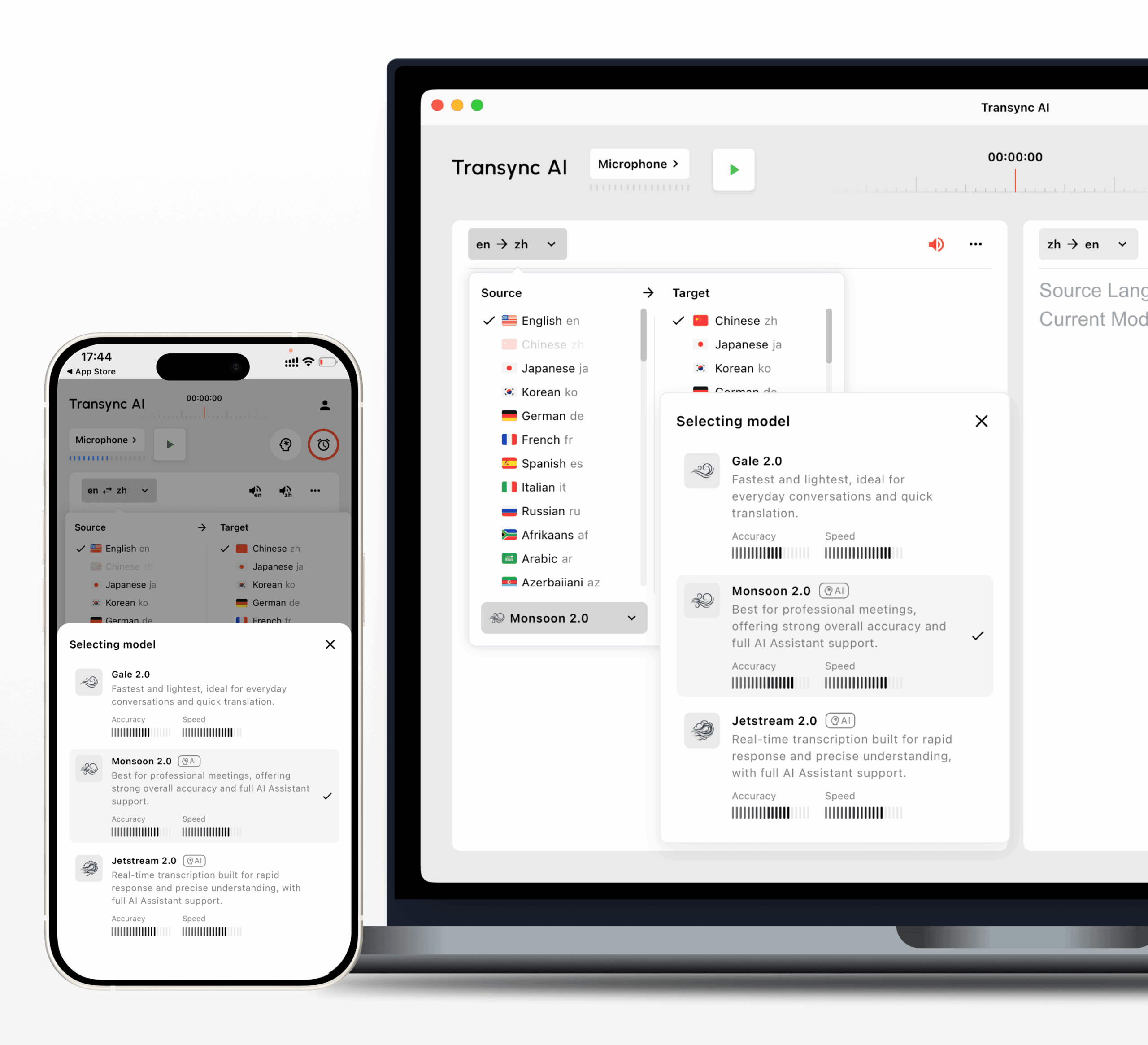
Transync AI uses end-to-end speech model technology to provide low-latency bilingual output. Its Gale 2.0, Monsoon 2.0, and Jetstream 2.0 models have been optimized for mixed-language speech, short sentences, noise, and irregular sentence breaks.
A good real-time translator should feel like part of the conversation rather than a separate translation step.
4. Check Whether the Translator Works with Your Meeting Platform
A general voice translator may work well for face-to-face conversations but poorly during online meetings.
For a multilingual meeting, the tool should fit into the platforms you already use.
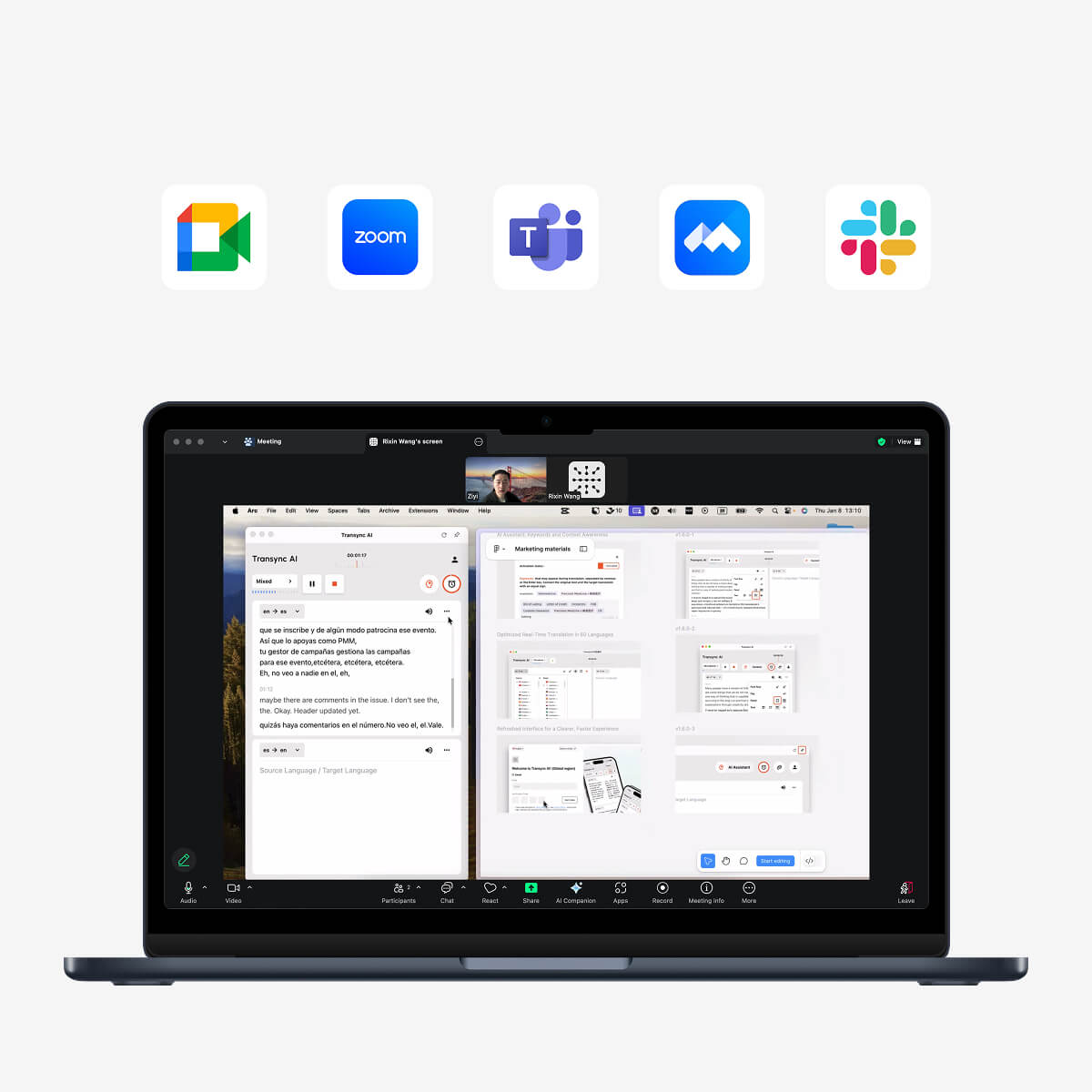
Transync AI supports live translation workflows for:
- Zoom
- Microsoft Teams
- Google Meet
It operates as standalone software rather than a meeting plugin. Users can run it alongside their meeting platform to receive bilingual subtitles and translated voice output.
This setup is useful for:
- International client meetings
- Remote team collaboration
- Online interviews
- Academic lectures
- Cross-border sales calls
- Product demonstrations
- Multilingual training sessions
For setup details, visit AI Live Meeting Translation for Zoom, Teams, and Google Meet.
Compatible with major online meeting platforms for seamless real-time translation
5. Evaluate Voice Output, Not Just Translation Text
A translator may produce understandable text but still deliver an uncomfortable voice experience.
When comparing a voice translator to another tool, evaluate:
- Pronunciation
- Speaking speed
- Natural pauses
- Voice tone
- Clarity
- Delay before playback
- Suitability for professional settings
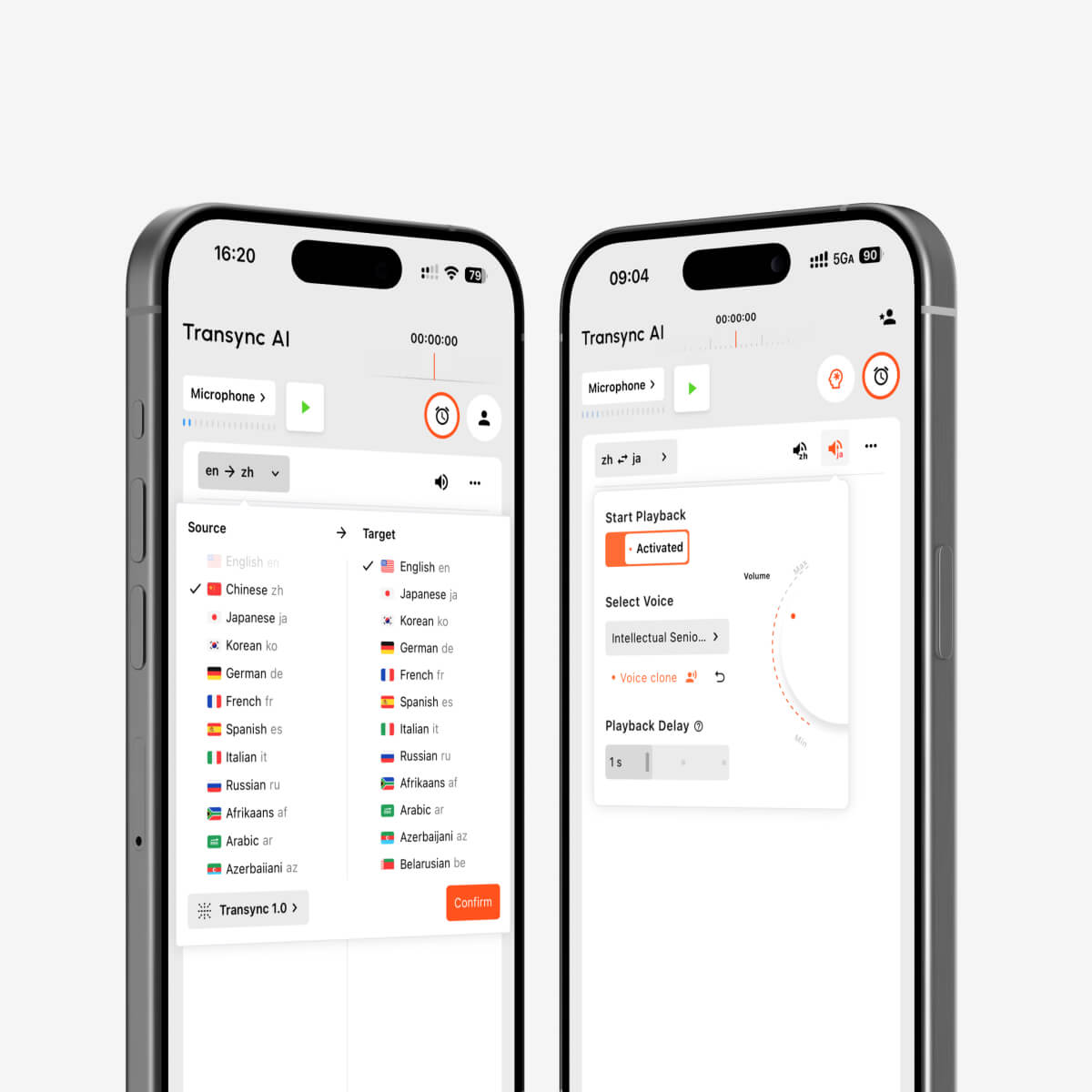
Transync AI provides multiple AI voice options for translated speech. Users can preview voices before starting a task and choose one that fits the meeting, presentation, class, or conversation.
Voice output is especially helpful when:
- Participants cannot constantly watch subtitles
- A translated presentation must be heard aloud
- One participant has difficulty reading quickly
- The meeting needs a more natural conversational flow
- Translated speech must be played into another application
Transync AI also supports voice cloning, allowing translated speech to play in a voice resembling the user’s own voice. Voice data is securely stored and is not used for AI training.
Learn more from AI Voice Translator & Speech Output.
AI voice playback and voice cloning for multilingual real-time interpretation
6. Test Technical Terms, Names, and Context
General-purpose translators often perform well with common sentences but struggle with:
- Company names
- Personal names
- Product names
- Abbreviations
- Industry terminology
- Academic language
- Mixed-language sentences
Consider the sentence:
“John will review the photovoltaic inverter specifications with the APAC engineering team.”
A translator may recognize the general sentence but mistranslate “photovoltaic inverter,” “APAC,” or a person’s name.
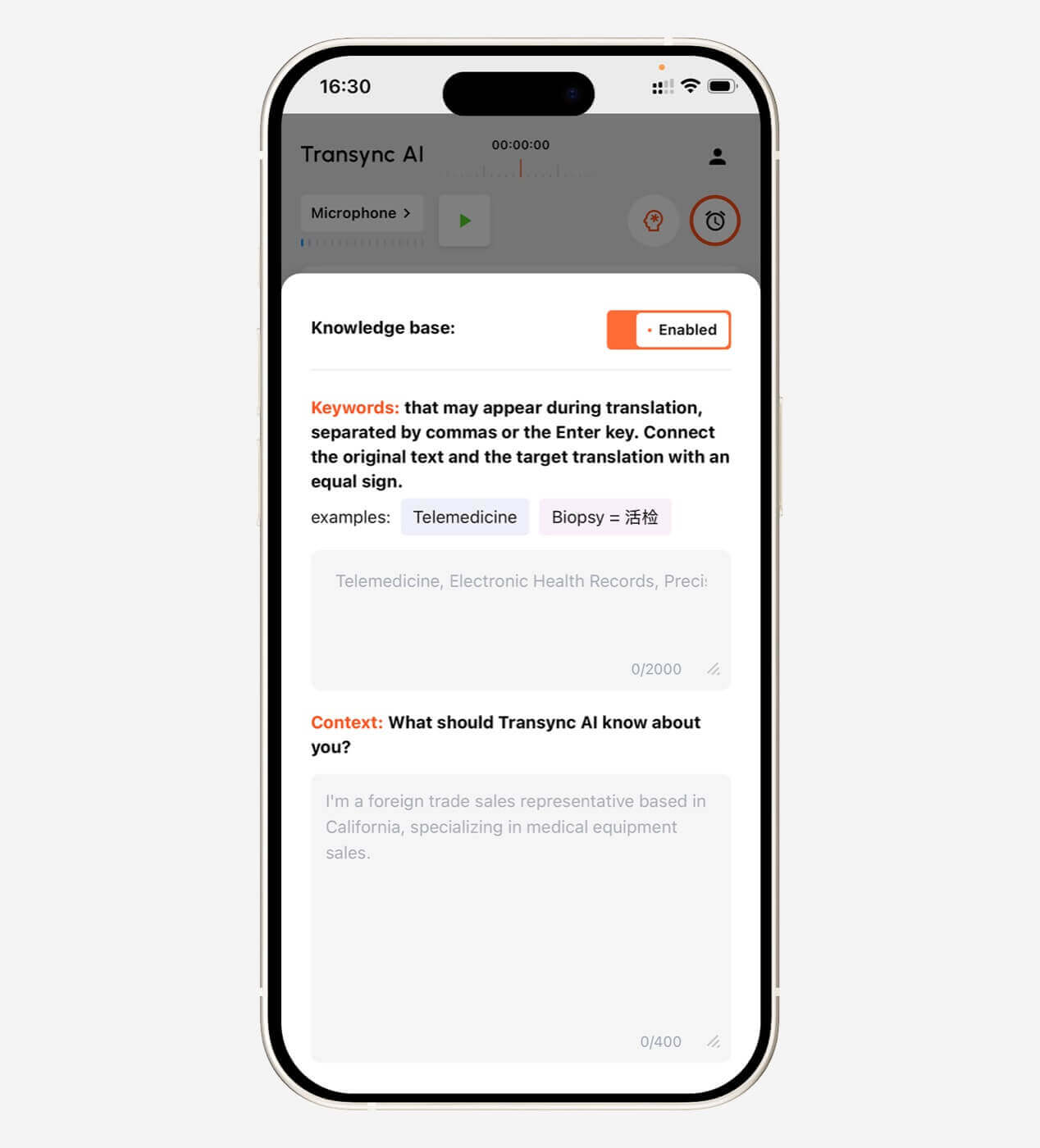
Transync AI allows users to enter keywords and contextual background before translation begins.
Example keywords:
- Transync AI = 同言翻译
- photovoltaic inverter
- semiconductor
- APAC
- John Smith
- supply chain optimization
Example context:
I work for a renewable energy company. This meeting covers photovoltaic system design, inverter specifications, installation timelines, and regional compliance requirements.
Providing this information helps the AI understand how words should be interpreted in that specific conversation.
For technical meetings, keyword and context support can be more valuable than a small difference in general translation speed.
Explore the feature on the AI Assistant Keywords Context page.
 7. Consider What Happens After the Translation
 7. Consider What Happens After the Translation
A live translator helps during the conversation, but useful information should not disappear when the meeting ends.
After an international meeting, users may need to:
- Review key decisions
- Check important details
- Create follow-up tasks
- Share a summary
- Revisit translated terminology
- Confirm what each participant agreed to
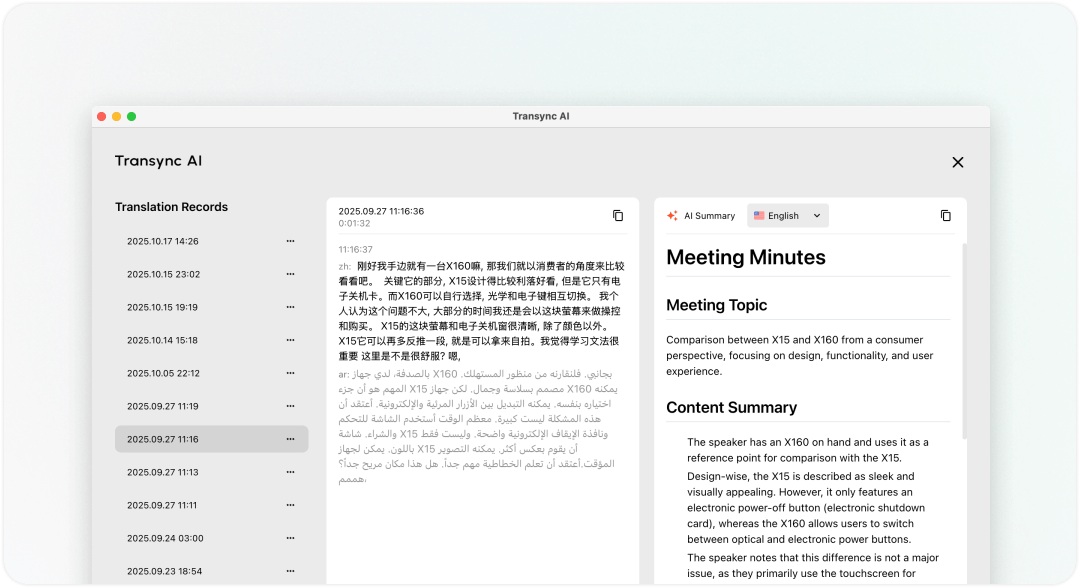
Transync AI combines real-time translation with AI meeting notes. The tool can extract key points from multilingual conversations and turn them into a more useful post-meeting record.
This is especially helpful for long calls where manually translating and taking notes at the same time would be difficult.
Learn more from AI Meeting Notes with Real-Time Translation.
Translator To English: Which Tool Should You Use?
“Translator to English” is one of the most common translation search patterns because English is widely used in international business, education, travel, and online content.
The right tool depends on the input format.
| You need to translate | Recommended tool type |
| A single word | Dictionary or text translator |
| A short paragraph | Online text translator |
| A foreign webpage | Browser translation |
| A street sign | Image translator |
| A recorded interview | Audio transcription and translation tool |
| A face-to-face conversation | Two-way voice translator |
| A Zoom or Teams call | Live meeting translator |
| A legal or medical conversation | Qualified human interpreter |
For example, a Spanish translator to English may only need text input for an email. A Japanese voice translator to English for a business call needs speech recognition, low latency, subtitles, and terminology support.
The phrase may be similar, but the required technology is very different.
Translator To vs. Human Interpreter: What Is the Difference?
AI translators and human interpreters solve overlapping but different problems.
| Factor | AI translation tool | Human interpreter |
| Availability | Usually available immediately | Must often be scheduled |
| Cost | Usually subscription- or usage-based | Usually billed by time or event |
| Speed | Near real-time automated output | Real-time human interpretation |
| Scale | Useful for frequent routine meetings | Better for selected high-stakes sessions |
| Cultural nuance | May miss subtle implications | Better at interpreting context and intent |
| Technical terms | Can improve with keywords and context | Depends on interpreter specialization |
| Meeting notes | May generate summaries automatically | Usually a separate service |
| Best use | Routine meetings, classes, and calls | Legal, medical, diplomatic, or sensitive discussions |
An AI translator is useful for everyday communication and frequent multilingual meetings. A qualified human interpreter remains the safer choice when errors could have legal, medical, financial, or personal consequences.
Useful Transync AI Features for Live Translation
Transync AI combines several functions that are often separated across multiple translation tools.
| Feature | How it helps |
| Bidirectional translation | Lets both participants speak in their preferred language |
| 60-language support | Covers common business, education, and travel language pairs |
| Bilingual subtitles | Displays original and translated content together |
| AI voice broadcast | Reads translated speech aloud |
| Voice preview | Lets users select a suitable voice before the session |
| Voice cloning | Plays translations in a voice resembling the user |
| Keywords and context | Improves handling of names and technical terms |
| AI meeting notes | Summarizes key information after the conversation |
| Floating subtitles | Keeps captions visible above other apps |
| Cross-device access | Works on Mac, Windows, iOS, Android, and web |
How to Use Transync AI as a Translator To Another Language
Step 1: Select the language pair
Choose the language being spoken and the language you want to receive.
For a two-way conversation, select both languages used by the participants.
Step 2: Add important keywords
Enter brand names, personal names, abbreviations, and technical terms that may appear in the discussion.
Step 3: Describe the context
Explain the topic, industry, and purpose of the meeting. This helps the AI interpret ambiguous words more accurately.
Step 4: Start real-time translation
Begin the task and speak normally. Transync AI displays the original speech and translated result side by side.
Step 5: Enable voice output when needed
Choose an AI voice and turn on translated speech playback if participants need to hear the translation aloud.
Step 6: Use floating subtitles
Activate Picture-in-Picture subtitles to keep translations visible while viewing slides, opening documents, or switching applications.
Step 7: Review the meeting notes
After the session, review the AI-generated summary and important points.
Limitations to Consider Before Choosing a Translator
No translator works perfectly in every situation.
Translation performance may be affected by:
- Loud background noise
- Room echo
- Low-quality microphones
- Unstable internet connections
- Multiple people speaking at once
- Very fast speech
- Strong regional accents
- Ambiguous sentences
- Specialized terminology
- Incomplete sentence fragments
Important Transync AI limitations include:
- Offline mode is not available
- Image recognition is not supported
- Static text translation is not its primary use case
- It is standalone software rather than a meeting plugin
- Usage is counted cumulatively across devices on the same account
- Translation quality still depends on audio and network conditions
These limitations make Transync AI better suited to live speech and meeting translation than scanned documents, signs, images, or complete website localization.
How Much Does a Live Translator Cost?
Translation tools use different pricing models.
| Transync AI plan | Price | Included usage | Best for |
| Free | $0 | 40 minutes for new users | Testing the service |
| Personal Premium | $8.99/month | 10 hours during the membership period | Individuals and regular meetings |
| Enterprise | $24.99/month/seat | Up to 40 hours per month per seat | Teams and organizations |
| Time Card | From $0.70/hour | Additional non-expiring translation time | Users with changing monthly usage |
Time Cards can be used to add translation hours when a membership is active. Unused Time Card hours do not expire, but they require an active membership to be used.
Before choosing a plan, estimate how many hours of multilingual meetings you attend each month. The cheapest monthly price is not always the best value if the included time is too limited for your workflow.
FAQ: Translator To
What does “translator to” mean?
“Translator to” usually introduces the target language of a translation request. Examples include “translator to English,” “translator to Spanish,” and “voice translator to Japanese.”
What is the best translator to English?
The best translator to English depends on what you need to translate. A text translator works for short written content, while a real-time voice or meeting translator is better for spoken conversations and online meetings.
Can I use a translator to translate live speech?
Yes. A real-time voice translator can listen to speech, translate it, display bilingual subtitles, and in some cases play translated audio aloud.
Can Transync AI translate Zoom meetings?
Yes. Transync AI can be used alongside Zoom, Microsoft Teams, and Google Meet for real-time subtitles and translated voice output.
Does Transync AI automatically detect the speaker’s language?
Transync AI can distinguish the speaker’s language during supported two-way translation tasks, reducing the need to switch languages manually during a conversation.
Can I translate speech into my own voice?
Transync AI supports voice cloning, allowing translated output to use a voice resembling your own. Voice data is securely stored and is not used for AI training.
Can a translator replace a professional interpreter?
AI translators are useful for routine meetings, classes, presentations, and everyday conversations. Professional human interpretation is still recommended for legal, medical, diplomatic, or other high-stakes communication.
Does Transync AI work offline?
No. Transync AI requires an internet connection and does not currently support offline translation.
Final Thoughts: Complete Your “Translator To” Search with the Right Tool
A search beginning with translator to may look simple, but choosing the right tool requires more than selecting a target language.
First decide whether you need to translate text, images, documents, recorded audio, face-to-face speech, or a live online meeting. Then compare language support, latency, voice quality, platform compatibility, terminology control, post-meeting notes, pricing, and limitations.
For short text or webpages, a general online translator may be enough. For live business meetings, classes, interviews, and international collaboration, a specialized real-time translation tool provides a more complete workflow.
Transync AI combines bidirectional translation in 60 languages with bilingual subtitles, AI voice broadcast, voice cloning, keywords and context, AI meeting notes, and floating captions.
To get started, visit Transync AI, explore the real-time translation tool, or download Transync AI for your preferred device.

