

Budget decisions hit hardest in small teams. Every tool subscription is scrutinized, every line item justified. So when multilingual communication becomes a real operational need — a growing client base in Japan, a new supplier in Germany, a partnership negotiation with a firm in Brazil — the question leadership asks is entirely reasonable:
Is premium real-time translation actually worth the cost for small teams?
This article answers that question directly — breaking down the real cost of translation gaps, evaluating what premium tools actually deliver for small teams, and showing exactly how Transync AI’s Enterprise plan is structured to make professional-grade real-time translation accessible, affordable, and self-serve for teams of any size.
The Hidden Cost of Not Having Real-Time Translation
Before evaluating the cost of a premium translation tool, small teams should honestly assess the cost of not having one. These costs are rarely tracked — but they accumulate quickly:
- Lost deals from miscommunication during multilingual sales calls
- Rework cycles triggered by mistranslated technical specifications with overseas suppliers
- Delayed decisions because multilingual meeting summaries are never produced accurately
- Freelance interpreter fees — professional interpreters typically charge $50–$150/hour for business interpretation, adding up fast across a month of international calls
- Productivity loss from meetings that drag on due to language friction and repeated clarifications
For a small team conducting even four multilingual meetings per month at two hours each, freelance interpretation alone can cost $400–$1,200/month — before factoring in the scheduling overhead and quality inconsistency that comes with ad-hoc interpreter sourcing.
Against this baseline, a premium AI real-time translation tool starts to look very different on the balance sheet.
What “Premium” Real-Time Translation Actually Delivers for Small Teams
Not all real-time translation tools are equal. The difference between a free consumer app and a premium professional platform — for small teams specifically — comes down to five factors:
1. Accuracy for Professional Terminology
Free tools translate by surface meaning. Premium tools with AI Keywords & Context calibration translate by professional intent — the difference between a correctly understood contract clause and an expensive misunderstanding.
2. Near-Zero Latency
Conversation flow in live business meetings depends on translation that keeps pace with speech. Premium tools using end-to-end AI architectures deliver near-zero latency — free tools with cascaded pipelines routinely introduce 3–6 second delays that fracture meeting rhythm.
3. Post-Meeting Documentation
For small teams without dedicated administrative support, automatically generated multilingual meeting notes are not a luxury — they are a productivity multiplier that replaces hours of manual transcription and follow-up email writing.
4. Data Privacy
Free tools monetize through data. For small teams handling client data, proprietary technical information, or confidential negotiations, this is a compliance and trust risk that premium tools with explicit privacy guarantees eliminate.
5. Centralized Team Management
A single team member managing their own subscription is one thing. A small team of four, six, or ten people each on individual plans creates billing fragmentation, inconsistent settings, and zero visibility into usage. Enterprise-tier plans with centralized management solve this directly.
Transync AI for Small Teams: Personal Plan vs. Enterprise Plan
Transync AI is uniquely structured to serve small teams at both the individual and organizational level — with a self-serve upgrade path that requires no sales process, no contracts, and no minimum commitment.
Starting with the Personal Plan
Transync AI’s approach to small teams is refreshingly transparent:
“We won’t proactively have sales reach out to you. You can start by using the personal plan self-serve, and if you’re happy with it, you can create an organization to top up and pay centrally for the teammates you invite.”
This means small teams can fully evaluate Transync AI’s capabilities — including all premium features — before committing to team-level billing. No sales calls. No enterprise procurement process. No minimum seat requirements.
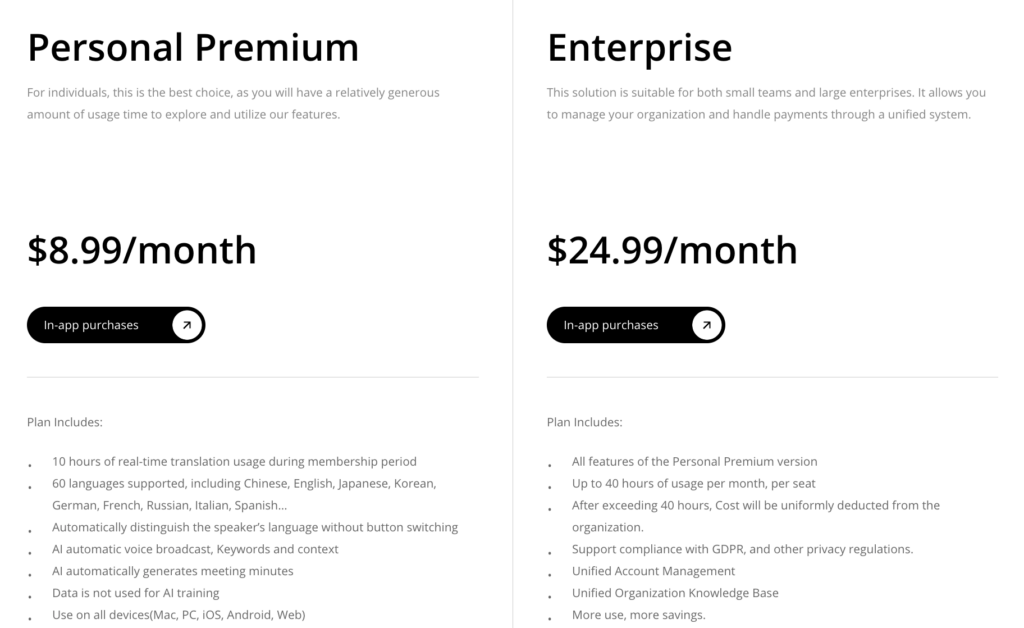
Personal Plan Options
| Plan | Price | Translation Time | Best For |
|---|---|---|---|
| Free | $0/month | 40 minutes | Testing all features, occasional use |
| Personal Premium | $8.99/month | 10 hours/month | Individual team members with regular multilingual calls |
Transync AI Enterprise: Built for Small Teams Who Need Centralized Control
When a small team is ready to formalize translation as a shared operational tool, Transync AI’s Enterprise plan delivers professional infrastructure without enterprise-level complexity.
Enterprise Plan Highlights
| Feature | Detail |
|---|---|
| Price per member | $24.99/month per seat |
| Translation time | 40 hours/month per member (resets monthly) |
| Extra usage | $0.70/hour charged from organization balance |
| Billing | Centralized — organization pays for all members |
| Discounts | Automatically applied when usage thresholds are met |
| Invoicing | Full invoice and cost table visibility for administrators |
| Team management | Self-serve — no sales process required |
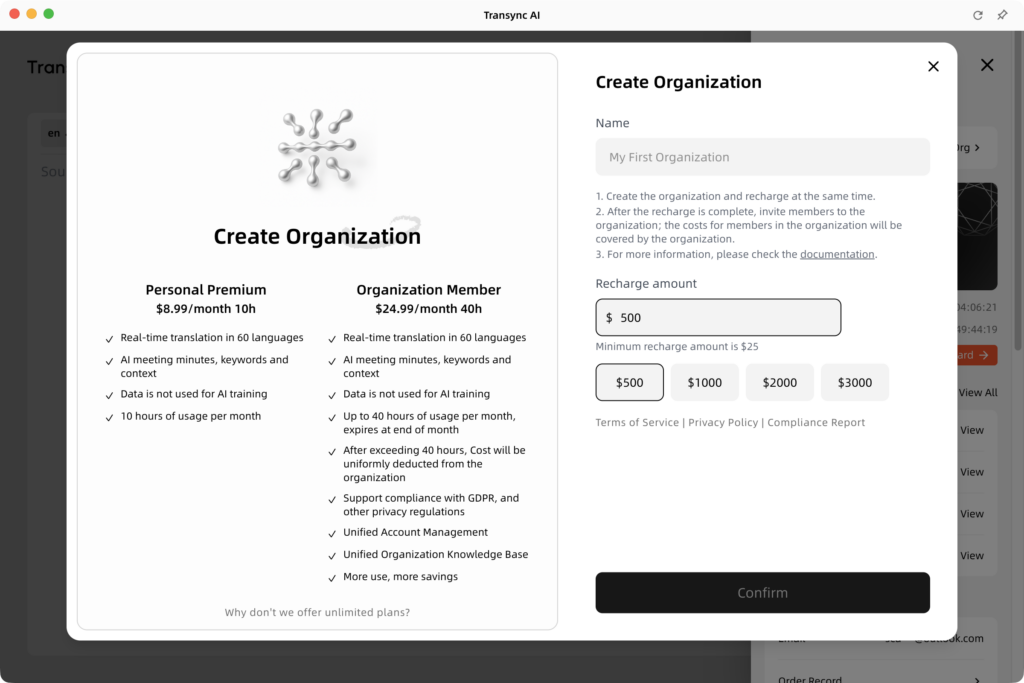
How Small Teams Create an Organization in Transync AI
Setting up a team account is entirely self-serve — no sales representative, no procurement form, no waiting period. Here is exactly how it works:
Step 1 — Open Organization Settings Open Transync AI, navigate to the personal center in the upper right corner, and select “Create Organization.”
Step 2 — Name the Organization and Add Balance Enter your organization name and choose a recharge amount. At this step, Transync AI displays a direct comparison between organizational membership value and individual membership pricing — so small teams can make an informed decision before committing.
Step 3 — Invite Team Members Enter each team member’s email address. Invitees receive an invitation email or can accept directly within the application. Once they join, their subscription is automatically billed to the organization balance.
Step 4 — Manage Billing and Usage Centrally Administrators have full visibility into billing, usage per member, invoices, and cost tables — all within the organization settings dashboard. Usage thresholds trigger automatic discounts. Extra usage beyond 40 hours per member is billed at $0.70/hour from the shared balance.
Real Cost Comparison: Is the Enterprise Plan Worth It for Small Teams?
Let’s model a realistic scenario for a small team of five people conducting regular multilingual online meetings:
Scenario: 5-Person Cross-Border Product Team
Five team members conduct multilingual meetings across English, Japanese, and Korean on Zoom — covering supplier reviews, client updates, and internal planning sessions. Average translation need: 15 hours/month per member.
| Option | Monthly Cost | Quality | Admin Overhead |
|---|---|---|---|
| Freelance interpreters ($80/hr × 15 hrs × 5 members) | $6,000/month | Variable (depends on interpreter) | High — scheduling, coordination, inconsistency |
| Free consumer apps | $0 | Low — no terminology control, data privacy risks | Medium — each member manages own tool |
| 5 × Transync AI Personal Premium | $44.95/month | High | Medium — fragmented billing, no shared settings |
| 5-member Transync AI Enterprise | $124.95/month | High + centralized terminology & notes | Low — unified billing, shared knowledge base, admin dashboard |
At $124.95/month for five members with 40 hours each, Transync AI Enterprise delivers:
- Professional-grade accuracy via shared AI Keywords & Context
- Full GDPR compliance and explicit data privacy guarantee
- 200 hours/month of translation across the team
- Centralized invoicing and usage reporting
- Automatic multilingual AI meeting notes for every session
Compared to $6,000/month in freelance interpretation — or the compounding cost of translation errors from free consumer tools — the ROI for a small team is unambiguous.
Key Features That Make Transync AI Worth the Investment for Small Teams
🔹 AI Keywords & Context — Shared Across the Whole Team
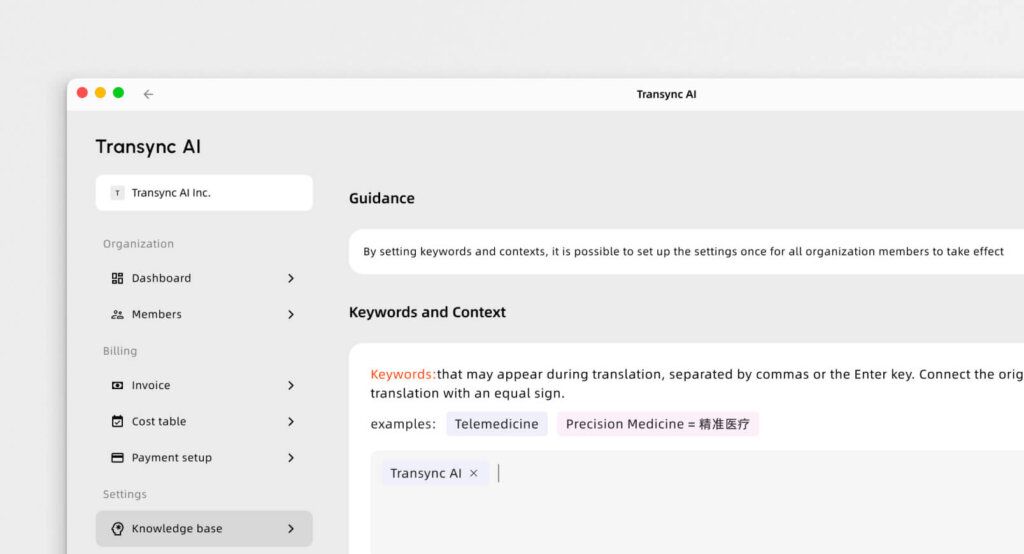
Enterprise teams maintain a shared Organization Knowledge Base — ensuring consistent terminology translation across every member’s meetings. When a technical term is mapped correctly, it is mapped correctly for everyone — not just the team member who configured their individual settings.
🔹 Near-Zero Latency via End-to-End Speech AI
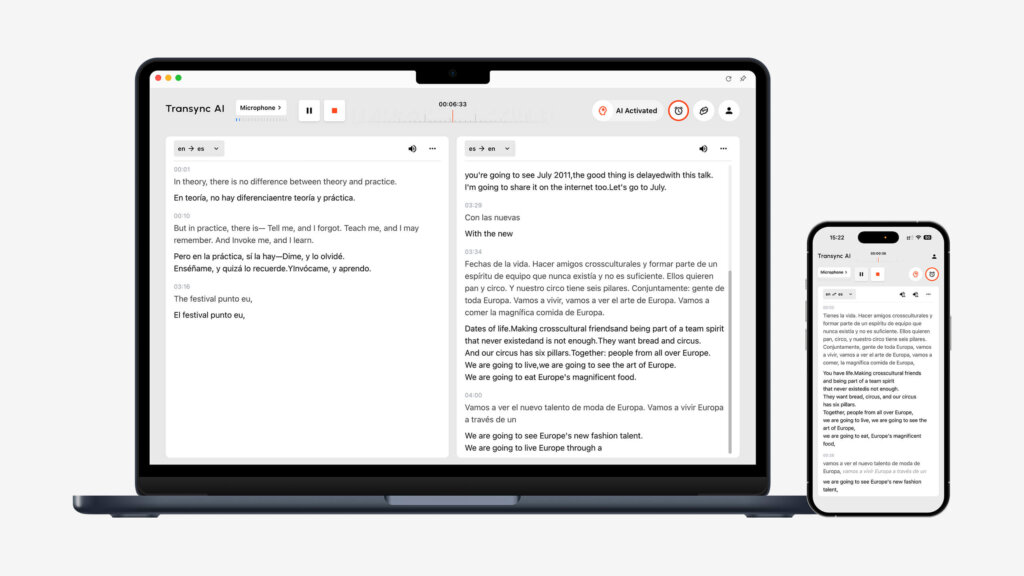
Built on an end-to-end speech large model — not a cascaded pipeline — Transync AI delivers near-zero-latency translation across 60 languages. For small teams where every meeting minute counts, this keeps conversations fluid and productive.
🔹 Automatic Multilingual AI Meeting Notes
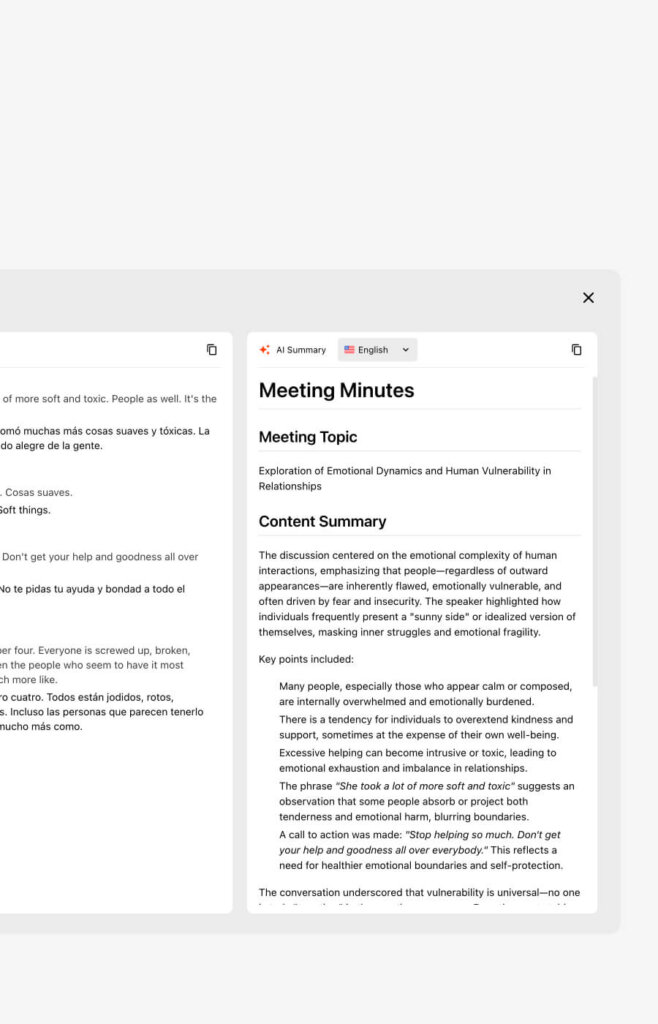
For small teams without dedicated administrative support, automatically generated bilingual meeting summaries eliminate the manual overhead of post-meeting documentation — capturing decisions, action items, and key terms in both source and target languages after every session.
🔹 AI Voice Broadcast
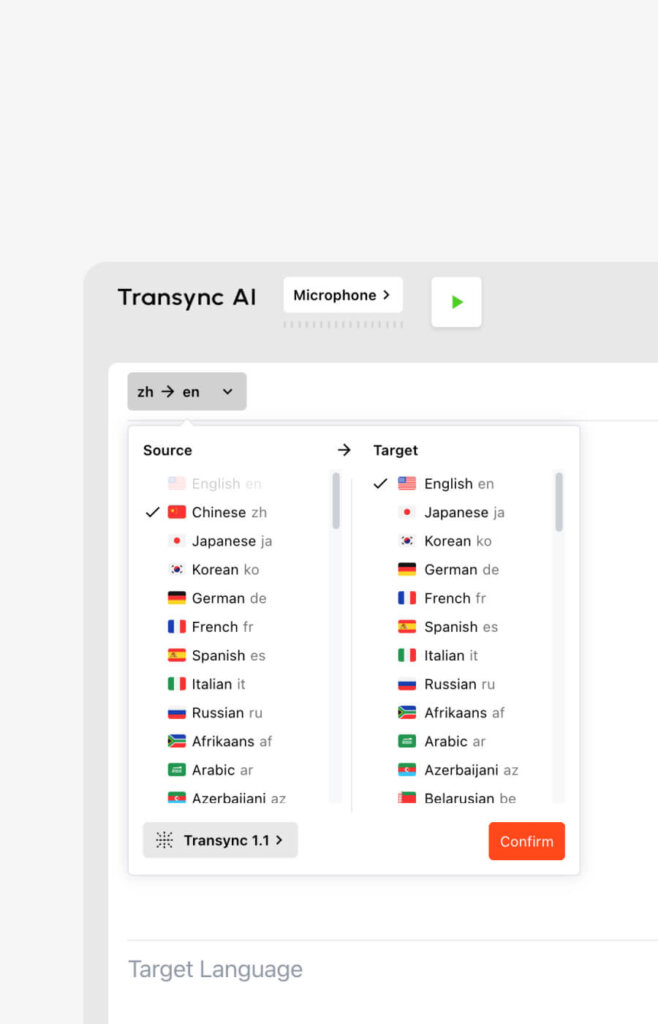
Translations are delivered in natural, human-like spoken voices — allowing team members to maintain eye contact and engagement during meetings rather than reading subtitles on a screen.
🔹 Works with Existing Meeting Platforms — Zero Friction

Transync AI integrates seamlessly alongside Zoom, Microsoft Teams, and Google Meet with no plug-ins required. Small teams do not need to change their existing meeting workflow — Transync AI runs alongside it on Mac, PC, iOS, Android, or Web.
🔹 Automatic Discounts for Growing Teams
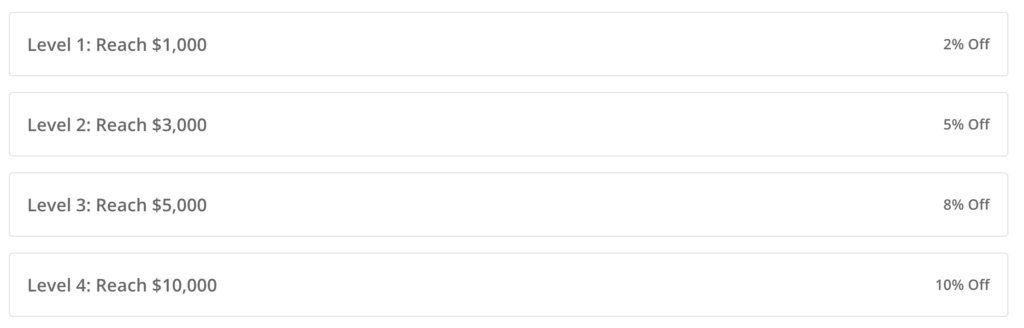
As team usage grows, discounts are applied automatically based on usage thresholds — meaning small teams pay less per hour as they use more, with no manual renegotiation required.
👉🏻 The ultimate AI real-time translation software for your enterprise
Who Benefits Most: The Right Small Teams for Transync AI Enterprise
Transync AI Enterprise is particularly well-suited for small teams in these situations:
- 🌏 Cross-border product or engineering teams collaborating across Asia, Europe, and North America
- 📈 Sales teams with multilingual client portfolios spanning multiple countries
- ⚖️ Legal or compliance teams conducting due diligence calls with international counterparts
- 🤝 Business development teams managing international partnerships and negotiations
- 🏭 Procurement teams running vendor qualification calls with overseas suppliers
- 💊 Clinical or regulatory teams coordinating multinational trial or compliance discussions
For all of these small teams, the cost of a single translation error — a misquoted specification, a misunderstood deadline, a miscommunicated compliance requirement — far exceeds the monthly Enterprise subscription cost.
Q&A: Is Premium Real-Time Translation Worth It for Small Teams?
Q1: Is premium real-time translation actually worth the cost for small teams?
A: For small teams conducting regular multilingual online business calls, the answer is yes — with clear evidence. The cost of professional-grade AI translation at the Enterprise level is a fraction of freelance interpreter fees, and the accuracy advantage over free consumer tools eliminates the compounding cost of translation errors. Transync AI’s Enterprise plan at $24.99/seat/month — with 40 hours included — delivers measurable ROI from the first month.
Q2: Can small teams start without committing to an enterprise plan immediately?
A: Absolutely. Transync AI is designed for exactly this journey. Small teams can begin with individual free or Personal Premium accounts ($8.99/month) to evaluate the tool in real working conditions — then self-serve create an organization when the team is ready to centralize billing and management. No sales process, no contract, no minimum commitment.
Q3: How does centralized billing benefit small teams specifically?
A: For small teams, fragmented individual subscriptions create administrative noise — separate invoices, inconsistent settings, no usage visibility. Transync AI’s Enterprise plan consolidates everything: one organization balance, one invoice, one admin dashboard showing usage per member. Administrators can view billing and cost tables at any time, and discounts are applied automatically as usage thresholds are met.
Q4: What happens if a team member uses more than 40 hours in a month?
A: Extra usage beyond the 40-hour monthly allowance per member is charged at $0.70/hour directly from the organization balance — with no action required from the administrator. Usage and balance are always visible in the organization settings dashboard, giving small teams full cost predictability and control.
Q5: How quickly can a small team get set up on Transync AI Enterprise?
A: The entire process is self-serve and takes under ten minutes. Open Transync AI, go to personal center, select “Create Organization,” enter your organization name and initial balance, then invite team members by email. Once an invitee accepts, their subscription is automatically billed to the organization — the team is operational immediately, with no IT support or onboarding call required.
Q6: Does Transync AI protect confidential data shared during team business calls?
A: Yes. Transync AI explicitly guarantees that user data is never used for AI training, and the Enterprise plan provides full GDPR compliance — making it appropriate for small teams handling confidential client information, proprietary technical content, or regulated business discussions. The Organization Knowledge Base keeps all approved terminology and context profiles private within the organization.
Q7: What is the minimum team size for Transync AI Enterprise?
A: There is no minimum. Transync AI’s self-serve organization model is designed to work for small teams of two members just as effectively as for larger organizations. Billing scales by seat — you pay only for the members you invite, with no lock-in to a minimum headcount.
Conclusion: For Small Teams, Premium Translation Pays for Itself
The question is not whether premium real-time translation is worth the cost for small teams — it is whether small teams can afford the alternative.
Freelance interpretation is expensive and logistically complex. Free consumer tools carry data privacy risks, accuracy limitations, and no post-meeting documentation. And the compounding cost of translation errors — in lost deals, rework cycles, and damaged relationships — is almost never tracked, but always felt.
Transync AI’s Enterprise plan is purpose-built to make professional-grade real-time translation accessible for small teams — with a self-serve setup process, transparent per-seat pricing at $24.99/month, automatic volume discounts, centralized billing and usage visibility, and the full feature set that makes Transync AI the most accurate and complete real-time translation platform available in 2026.
For small teams ready to start, the path is simple: try the personal plan free, validate it works for your context, then create your organization and invite your team — all without a single sales call.
If you want a next-generation experience, Transync AI leads the way with real-time, AI-powered translation that keeps conversations flowing naturally. You can try it free now.

