

Yapay zekâ destekli dil çevirmeni, gerçek zamanlı çeviri aracı, sesli çeviri uygulaması, çok dilli toplantı çevirmeni, canlı tercüme yazılımı
En iyi dil çevirmenleri birbirinin yerine geçemez. Biri menü okumakta, diğeri sözleşme düzenlemekte, bir diğeri ise insanların kusurlu mikrofonlarla konuştuğu çok dilli bir toplantıyı sorunsuz bir şekilde yürütmekte mükemmel olabilir. Tek bir genel sıralama bu farklılıkları gizler.
Bu editörlük seçkisinde mesleklerine göre altı kazanan belirlenmiştir: Transync AI, Google Çeviri, Apple Translate, DerinL, Microsoft Çevirmen, Ve Dünyevi. Amaç, evrensel bir şampiyon belirlemek değil. Amaç, en önemli anda hangi iş akışının en çok yardımcı olma olasılığının yüksek olduğunu göstermektir.
30 Saniyede Altı Kazanan
- Canlı toplantılar için en iyisi: Transync AI
- Hızlı seyahat çevirisi için en iyisi: Google Çeviri
- Apple cihazlarıyla ilgili konuşmalar için en iyisi: Apple Translate
- Belge merkezli çeviri için en iyisi: DerinL
- Katılıma açık, gayri resmi grup sohbetleri için en uygun platform: Microsoft Çevirmen
- Büyük çaplı etkinlikler için en uygunudur: Dünyevi
Eğer asıl kullanım amacınız toplantılar ise, şunlarla başlayın: Transync AI. Gerçek zamanlı çift dilli altyazıları, çevrilmiş sesi, terminoloji bağlamını, toplantı platformu uyumluluğunu, notları ve bire bir sunum modunu bir araya getiriyor. Seyahat ederken sadece bir cümleye ihtiyacınız varsa, daha hafif bir tüketici uygulaması genellikle daha hızlı açılır ve kullanımı daha kolay olur.
En İyi Dil Çevirmenleri Karşılaştırma Tablosu
| Çevirmen | Ödülümüz | Çekirdek Girişi | Ana Çıkış | Grup veya Toplantı Uygunluğu | Çevrimdışı Potansiyel | Satın Alma Modeli |
|---|---|---|---|---|---|---|
| Transync AI | Canlı toplantılar için en iyisi | Canlı konuşma | İki dilli altyazılar, seslendirme çevirisi, notlar | Toplantılar ve sunumlar için güçlü | Çevrimiçi iş akışı | Ücretsiz, kişisel ve kurumsal planlar |
| Google Çeviri | Hızlı seyahat çevirisi için en iyisi | Metin, el yazısı, fotoğraflar ve konuşma | Metin ve destekli konuşma deneyimleri | Planlı toplantılardan ziyade ani kullanımlar için daha uygundur. | Seçilen indirilen diller | Tüketici uygulaması ve web aracı |
| Apple Translate | Apple cihazlarıyla ilgili konuşmalar için en iyisi | Metin ve ses | Konuşma görüntüleri ve çevrilmiş çıktılar | Kişisel görüşmenin odak noktası | İndirilen diller ve Cihaz İçi Mod | Uyumlu cihazlarda bulunur. |
| DerinL | Belgeler için en iyisi | Metin ve dosyalar | Yazılı çeviri | Öncelikle bir toplantı çalışma alanı değil. | Ürüne bağlı | Ücretsiz ve ücretli teklifler |
| Microsoft Çevirmen | Resmi olmayan, kolayca katılabilecek gruplar için en uygunudur. | Metin ve konuşma | Bölünmüş ekran veya çoklu cihaz görüşmesi | Katılımcılar ortak bir sohbete katılabilirler. | Çevrimdışı paketler ağırlıklı olarak metne odaklanır. | Tüketici ve Microsoft ekosistemi seçenekleri |
| Dünyevi | Büyük çaplı etkinlikler için en uygunudur. | Canlı etkinlik veya toplantı ses kaydı | Ses kayıtları, altyazılar, metin dökümleri ve özetler | Güçlü olay odaklı iş akışı | Çevrimiçi iş akışı | Ticari paketler ve demolar |
Özellikler, desteklenen diller, fiyatlar ve cihaz gereksinimleri değişebilir. En iyi dil çeviricilerinden herhangi birini satın almadan önce, tam dil çiftini ve planı doğrulayın.
En İyi Dil Çevirmenlerini Nasıl Seçtik?
Bu bölüm, sessiz bir odada sahnelenmiş bir cümle yerine, tüm iletişim iş akışını değerlendirir. Her kategori farklı bir soru sorar:
- Anlam: Çeviri, konuşmacının niyetini koruyor mu?
- Zamanlama: Sonuç, görev için yeterince çabuk mu gelecek?
- Yöntem: Kullanıcılar ihtiyaç duydukları şeyleri okuyabilir, dinleyebilir, konuşabilir, yükleyebilir veya fotoğraflayabilir mi?
- Bağlam: Terminoloji, isimler veya arka plan bilgileri sonucu etkileyebilir mi?
- Katılım: Tek kişi, iki kişi, bir ekip veya bir izleyici kitlesi bunu rahatlıkla kullanabilir mi?
- Süreklilik: Sonrasında elde edilebilecek faydalı bir belge, tutanak veya özet var mı?
- Risk: İçerik için gizlilik kontrolleri ve insan incelemesi uygun mu?
- Maliyet: Tamamlanmış iş akışının maliyeti, sadece ana abonelik ücreti değil, tam olarak nedir?
En iyi dil çevirmenleri, tüm işi en az sürtünmeyle çözerek kendi kategorilerinde hak ettikleri yeri alırlar. Yüzlerce dili destekleyen bir uygulama, yönetim kurulu toplantısı için yine de kötü bir seçim olabilir; bir kurumsal etkinlik platformu, öğle yemeği siparişi için gereksiz olabilir.
Toplantılar için En İyi Dil Çevirmenleri: Transync AI
Transync AI Çevirinin devam eden bir konuşma içinde gerçekleşmesi gerektiğinde en güçlü başlangıç noktasıdır. Her ifadeyi ayrı bir istek olarak ele almak yerine, sözlü girdiden çevrilmiş çıktıya ve sonrasında yapılan incelemeye kadar toplantıyı destekler.
Onun gerçek zamanlı çeviri Kaynak ve hedef dilleri çift dilli altyazı olarak görüntüler. Şu anda yayınlanan dil listesi 60 dili kapsamakta olup, ekiplerin görüşmeden önce tam olarak istedikleri dil çiftinin mevcut olup olmadığını kontrol etmelerine olanak tanır.
Dinlemeyi tercih eden katılımcılar için, Transync AI içerir Yapay zeka ses çevirmeni. Onun Resim içinde resim çift dilli altyazılar Desteklenen diğer uygulamaların üzerinde de görünür kalabilir, böylece toplantı ile ayrı bir çeviri penceresi arasında geçiş yapma ihtiyacı azalır.
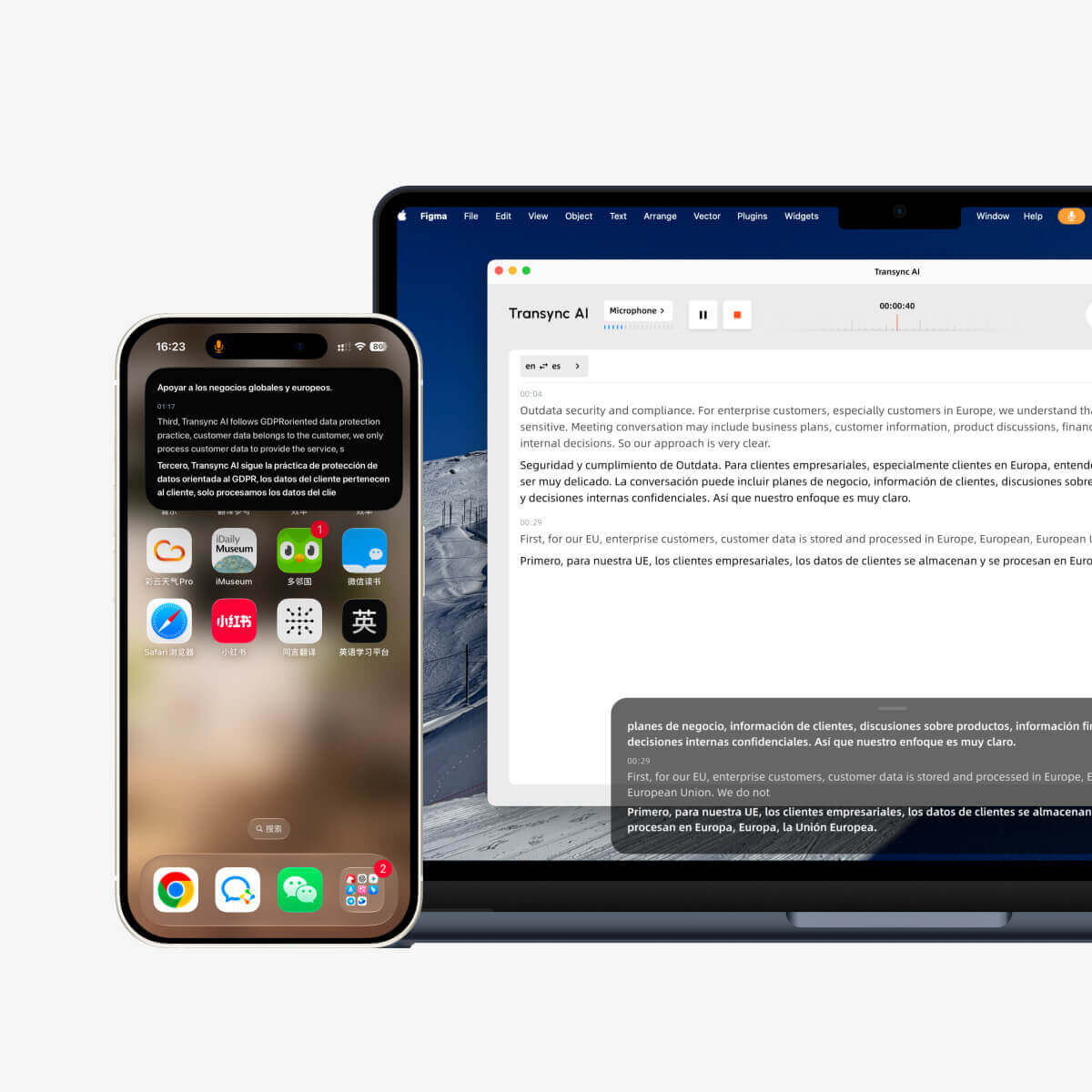
Toplantı kategorisinde neden birinci oldu?
- Kesintisiz konuşma için çift yönlü, gerçek zamanlı çeviri.
- İki dilli altyazı ve çevrilmiş seslendirme.
- Seçilen desteklenen diller arasında otomatik ayrım yapılması.
- Web, masaüstü ve mobil platformlarda kullanılabilirlik.
- Uzmanlık terminolojisi için bağlam hazırlığı.
- Toplantı sonrasında not haline getirilebilecek bir kayıt.
Transync AI destekler canlı toplantı çeviri iş akışı için Zoom, Microsoft Teams, Ve Google Meet. Bu platformlar arası yaklaşım, bir müşteri farklı bir sağlayıcıdan bağlantı gönderdiğinde çeviriyi yeniden oluşturmak istemeyen ekiplere yardımcı olur.
Önemli bir görüşme öncesinde kullanıcılar arama yapabilirler. Yapay Zeka Asistanı anahtar kelimeleri ve bağlamsal bilgiler. Ürün adları, kısaltmalar, sektör terminolojisi ve arka plan bilgileri, gereksiz belirsizlikleri azaltabilir. Sonrasında, Yapay zeka toplantı notları Katılımcıların kararlarını ve sonraki adımlarını hatırlamalarına yardımcı olmak.
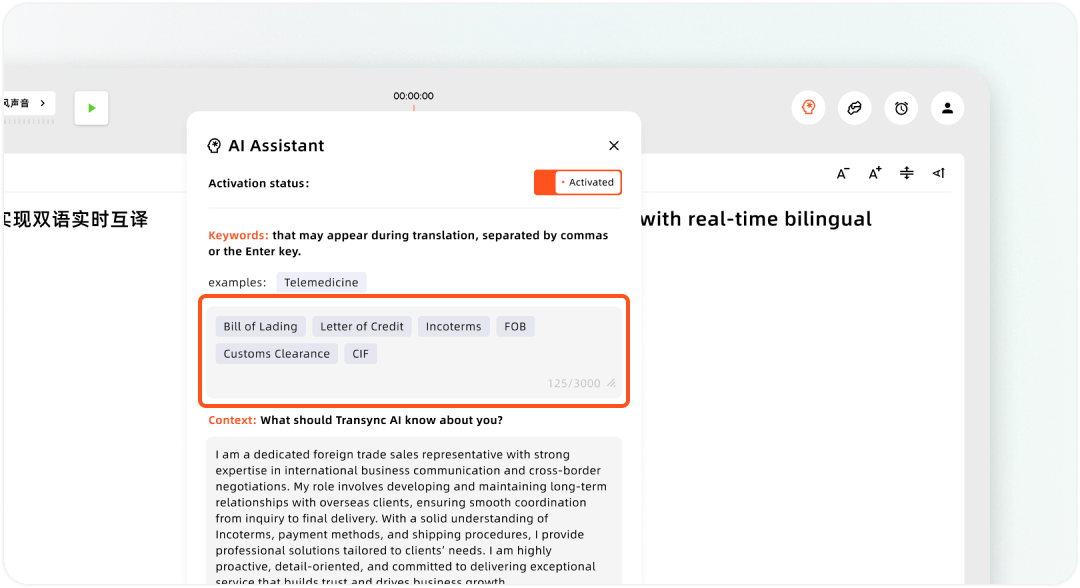
Transync Yapay Zeka Asistanında özel anahtar kelimeler ve kullanıcı bağlamı ayarlama
Sunum Modu, izleyici iş akışını değiştirir.
Beta sunum modunda, bir sunucu en fazla 10 hedef dil yapılandırabilir. İzleyiciler, QR kodu, paylaşılabilir bağlantı veya Oda Kimliği kullanarak kendi telefonlarından veya bilgisayarlarından katılırlar. Yazılım yüklemeleri gerekmez, ancak kayıt olmaları veya oturum açmaları gerekir. Transync AI hesap.
Her katılımcı, sunucu tarafından etkinleştirilen hedef dillerden birini seçer ve canlı altyazıları okuyabilir veya çevrilmiş sesi dinleyebilir. Bu modda izleyiciler sesli giriş gönderemez. Sunucu, etkinlikten sonra orijinal transkriptin ve yapay zeka tarafından oluşturulan notların paylaşılıp paylaşılmayacağını kontrol eder; paylaşım otomatik değil, isteğe bağlıdır.
Bu Sunum Modu Bu, eğitimler, dersler, şirket genel toplantıları, konferanslar, geziler, ibadet hizmetleri ve diğer tek konuşmacılı formatlar için uygundur.
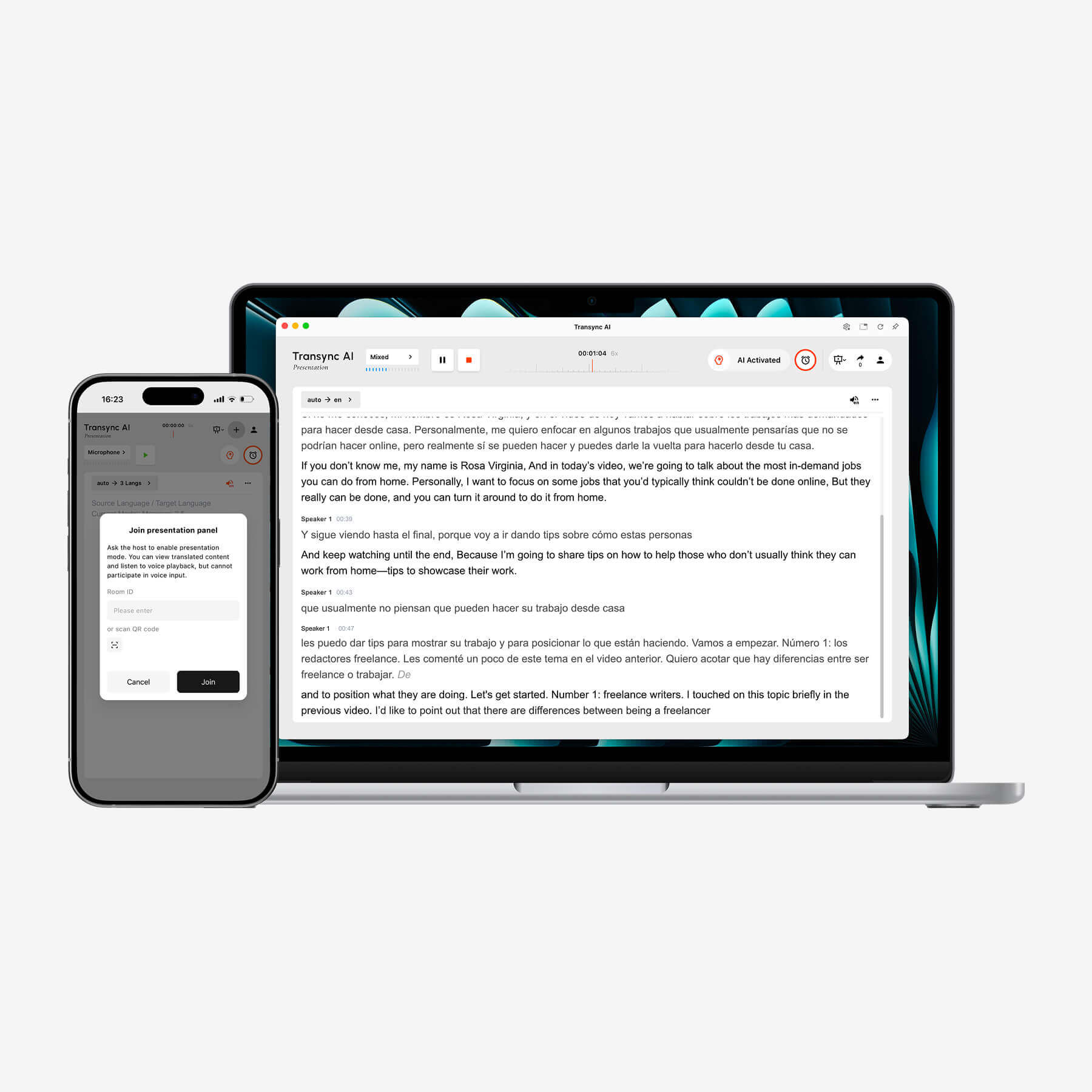
Transync AI, dizüstü bilgisayarda gerçek zamanlı çift dilli transkripsiyonu görüntülerken, mobil cihaz sunum kontrollerini sağlar.
Dikkate alınması gereken sınırlamalar
Transync AI Bu, çevrimdışı bir sözlük değil, çevrimiçi bir çeviri iş akışıdır. Sunum Modu, açık bir izleyici tartışmasından ziyade, bire bir iletişim ve çoklu katılımcı odaklı olarak tasarlanmıştır. Ekipler, önemli bir görüşme öncesinde mikrofonları ve ses yönlendirmesini test etmelidir.
Mevcut yayınlanmış planlarda kayıt olduktan sonra 40 dakika ücretsiz, aylık 8,99 TL karşılığında 10 saate kadar kullanım hakkı sunan Kişisel Premium ve kişi başı aylık 24,99 TL karşılığında kişi başı 40 saate kadar kullanım hakkı sunan Kurumsal planlar bulunmaktadır. Çok dilli ve Sunum Modu kullanımı ayrı ücretlendirme kurallarına tabidir, bu nedenle büyük bir etkinlik için fiyat tahmini yapmadan önce güncel fiyat hesaplayıcısını kontrol edin.
Transync AI'yı Ücretsiz Deneyin
Seyahat İçin En İyi Dil Çevirmenleri: Google Çeviri
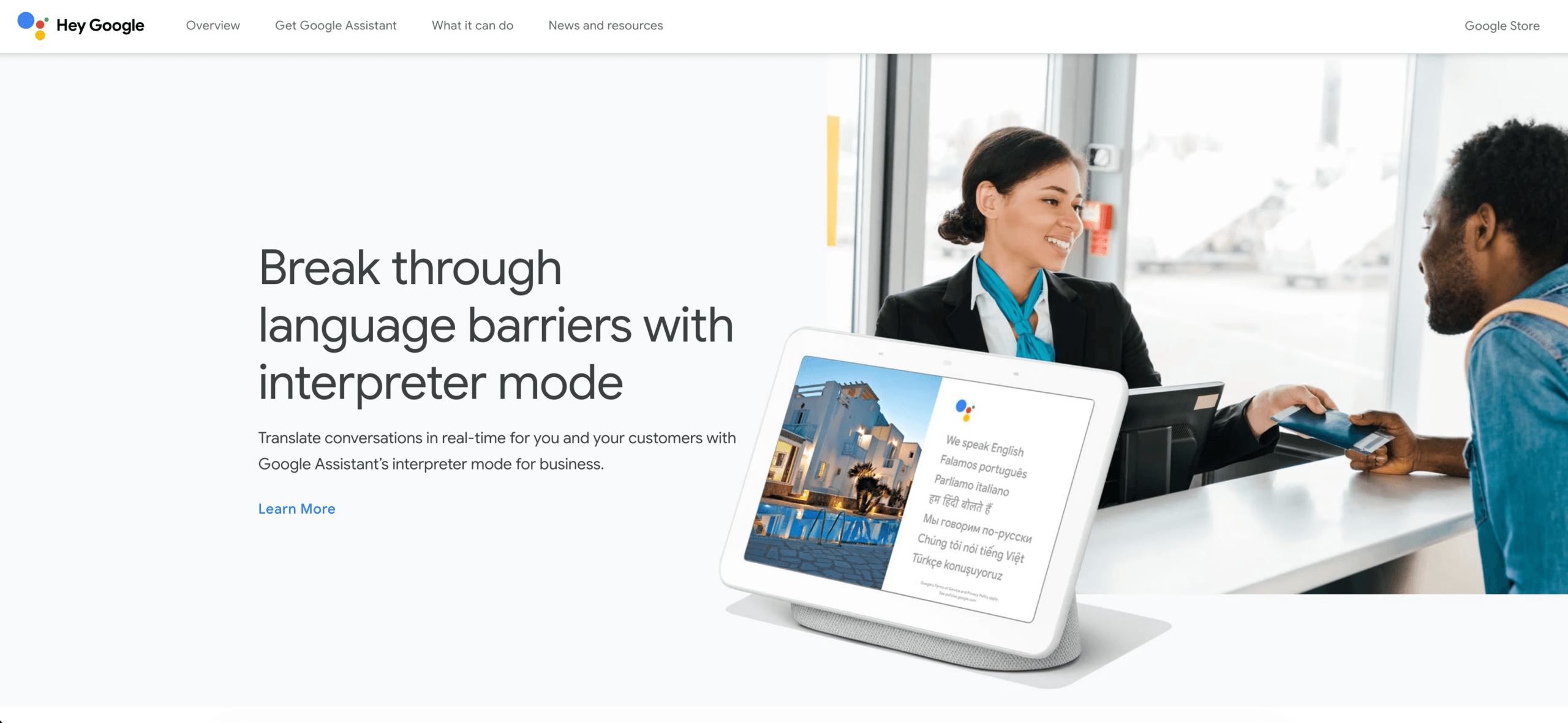
Google Çeviri Anlık ve karma formatlı ihtiyaçlar için en iyi dil çevirmenlerinden biri olmaya devam ediyor. Resmi yardım sayfasında, uygulamanın 200'den fazla dilde metin, el yazısı, fotoğraf ve konuşmayı çevirebildiği belirtiliyor. Bu geniş yelpaze, bir yolculukta tabela okumaktan yazılı bir cümle göstermeye veya başka bir kişiyle konuşmaya geçildiğinde oldukça kullanışlıdır.
Seyahat kategorisinde neden birinci oldu?
- Mobil ve web üzerinden hızlı erişim.
- Metin, kamera, el yazısı ve konuşma girdileri.
- Geniş yelpazede yayınlanmış dil seçenekleri.
- Seçilen diller çevrimdışı kullanım için indirilebilir.
- Kısa ve pratik iletişimler için tanıdık arayüz.
Çevrimdışı kullanım detayına dikkat etmek gerekiyor. İndirilen bir dil, her cihazda her konuşma, kamera veya sohbet özelliğinin çevrimdışı çalışacağını garanti etmez. Yola çıkmadan önce her iki dili de indirin ve uçak modunu evdeyken test edin.
Dikkate alınması gereken sınırlamalar
Google Çeviri Bir ifade, işaret, fotoğraf veya kısa bir bilgi alışverişi için mükemmeldir, ancak bağlamsal hazırlık ve toplantı notlarıyla sürekli bir toplantı çalışma alanı gibi organize edilmemiştir. 45 dakikalık çok dilli bir görüşme için, yalnızca kolaylık yeterli değildir.
Cihaz Ekosistemine Göre En İyi Dil Çevirmenleri: Apple Translate
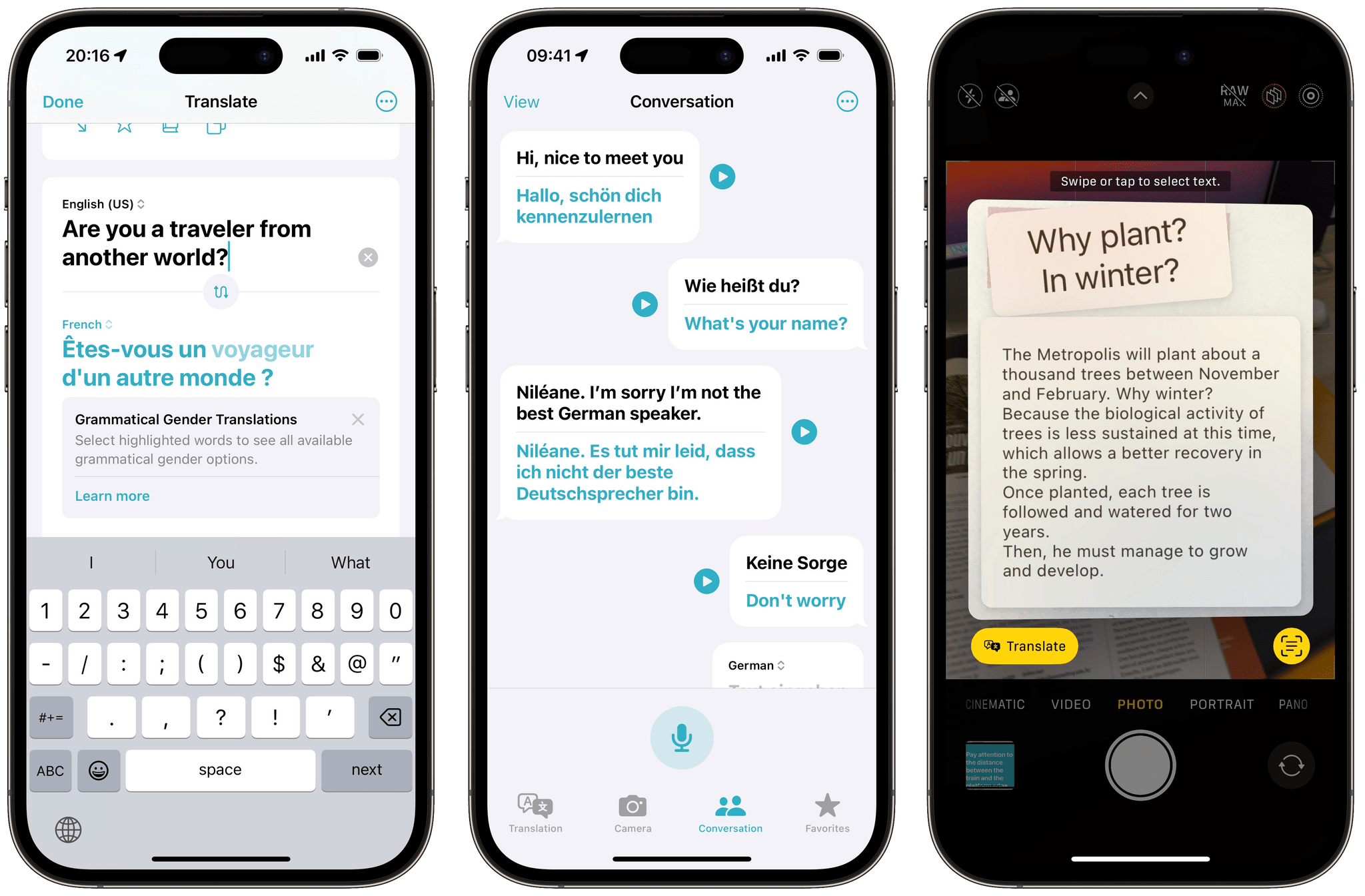
Apple Translate Desteklenen sistemlere doğal bir şekilde uyum sağlayarak kendi kategorisinde hak ettiği yeri kazanır. Elma Cihazlar. Mevcut iPhone kılavuzu, metin ve ses çevirisi, konuşma modu, Otomatik Çeviri ve Yüz Yüze görünüm özelliklerini açıklamaktadır. İndirilen diller, Cihaz İçi Modda da kullanılabilir.
Ekosistem kategorisinde neden birinci oldu?
- Temiz metin ve sesli görüşme iş akışı.
- Otomatik çeviri, tekrarlanan dokunmaları azaltabilir.
- Yüz yüze görünüm, iki kişinin tek bir cihazı paylaşmasına yardımcı olur.
- Cihazda kullanım için indirilen dil desteği.
- Uyumlu donanımı zaten kullanan kişiler için uygundur.
Dikkate alınması gereken sınırlamalar
Kullanılabilirlik donanıma, işletim sistemi sürümüne, dile ve bölgeye bağlıdır. Uygulama, kuruluş genelindeki toplantı yönetiminden ziyade kişisel görüşmelere odaklanmıştır. Kullanıcılar seyahat etmeden önce dil desteğini doğrulamalı ve cihazı test etmelidir.
Belgeler için En İyi Dil Çevirmenleri: DerinL
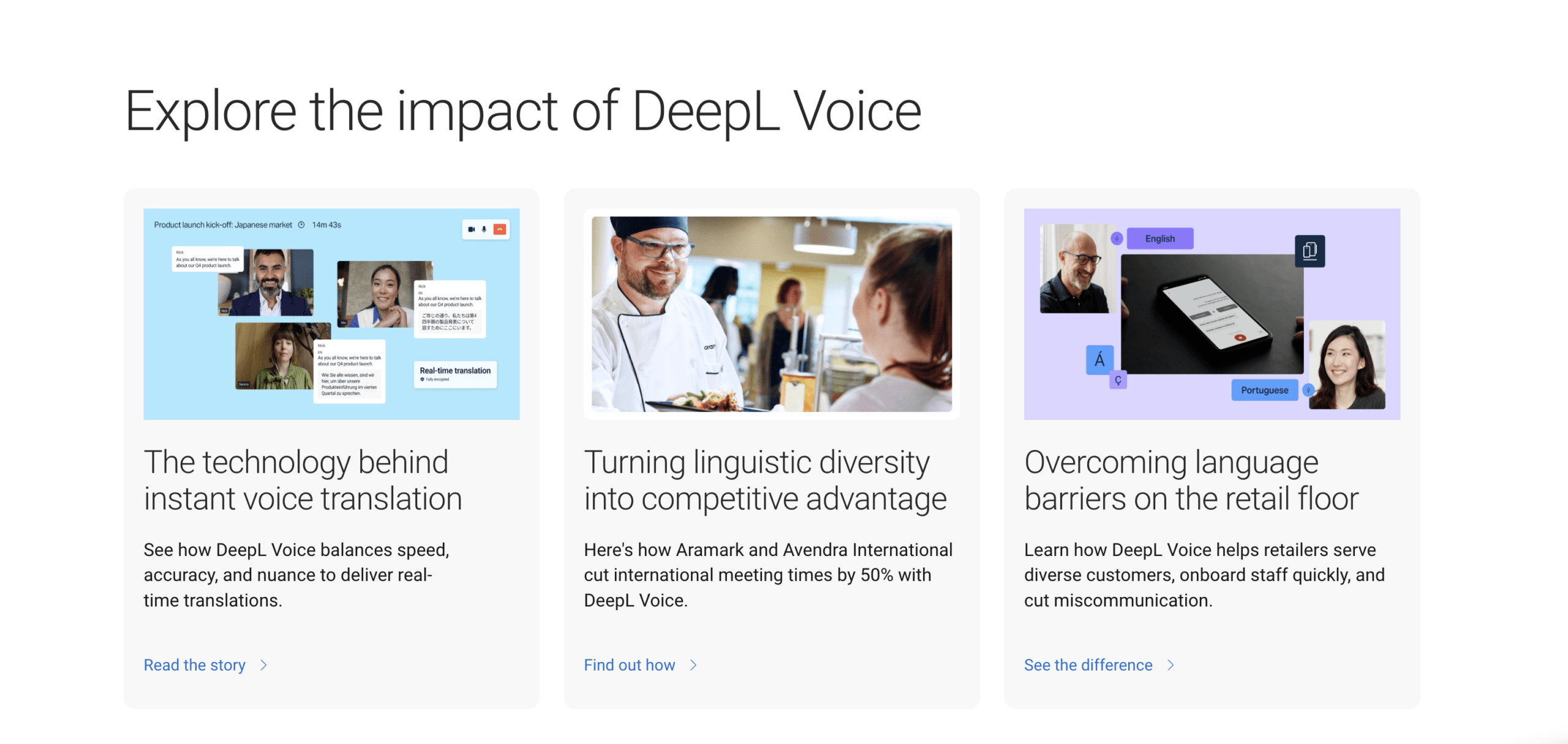
DerinL Yazılı içerik söz konusu olduğunda, en iyi dil çevirmenleri listesinde yer almayı hak eden bir üründür. Yayınlanmadan önce terminolojisi ve üslubu gözden geçirilmesi gereken e-postalar, raporlar, sunumlar ve belgeler için mantıklı bir adaydır.
Belge kategorisinde neden birinci oldu?
- Metin ve belge çevirisine güçlü bir şekilde odaklanılmıştır.
- Sözlük odaklı terminoloji iş akışları.
- Alternatif yazılı ifadeleri karşılaştırmak için kullanışlıdır.
- Metin ve belge entegrasyonu için geliştirici ürünleri.
- Editör ve hakemli bir süreç için uygundur.
Doğru test tek bir cümleden ibaret değildir. Başlıklar, tablolar, tekrarlanan terimler, sayılar ve marka adları içeren temsili bir belge yükleyin veya yapıştırın. İki dilli bir değerlendiriciye anlam, terminoloji, üslup, eksiklikler ve biçimlendirme açısından puan verin.
Dikkate alınması gereken sınırlamalar
DerinL Yazılı çıktısı akıcı olduğu için, bir toplantı odaklı ürünün doğrudan yerini tutamaz. Canlı konuşma ayrıca konuşma tanıma, sıra alma, gecikme yönetimi, ses oynatma, katılım ve takip kayıtları gerektirir. Ürün ve plan yetenekleri ayrı ayrı kontrol edilmelidir.
5. Kazanan: Microsoft Çevirmen — Gayriresmi Katılımlı Gruplar İçin En İyisi
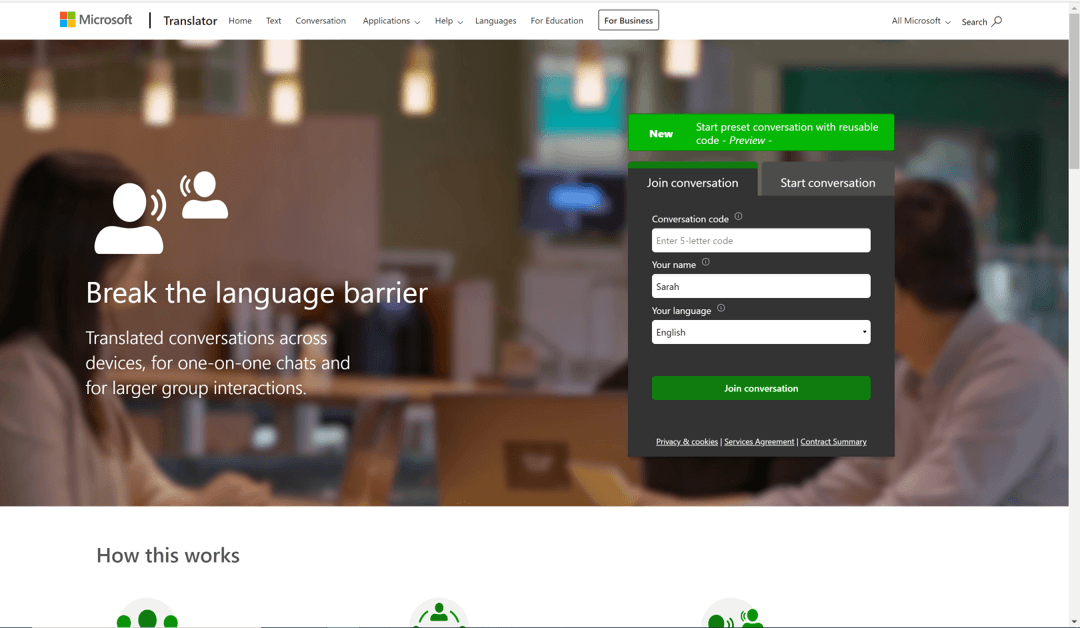
Microsoft Çevirmen Birden fazla kişinin tek bir cihazı elden ele dolaştırmadan çok dilli bir sohbete katılmak istediği durumlarda kullanışlıdır. Uygulamanın özellikleri arasında, tek bir cihazda iki kişi için bölünmüş ekran çevirisi ve katılımcıların ortak bir kod kullandığı çoklu cihaz sohbetleri yer almaktadır.
Neden gayri resmi grup kategorisinde birinci oldu?
- Tek bir cihazda bölünmüş ekranlı görüşme.
- Kod aracılığıyla birden fazla cihaz üzerinden iletişim.
- Katılımcılar kendi dillerinde konuşabilir veya yazabilirler.
- Uygulama ve tarayıcı üzerinden katılım seçenekleri.
- Sınıflar, topluluk grupları veya geçici toplantılar için kullanışlıdır.
Dikkate alınması gereken sınırlamalar
Ayrı bir görüşme odası her resmi toplantı sürecine uymayabilir. Çevrimdışı dil paketleri öncelikle metni destekler, canlı görüşme deneyiminin tamamını yeniden üretmez. Kuruluşlar, tüketiciye yönelik görüşme ürününü, başka yerlerde sunulan bulut çeviri hizmetlerinden ayırt etmelidir. Microsoft ekosistem.
Microsoft Translator'ı keşfedin
Kazanan 6: Dünyevi — Büyük Ölçekli Etkinlikler İçin En İyi Seçenek
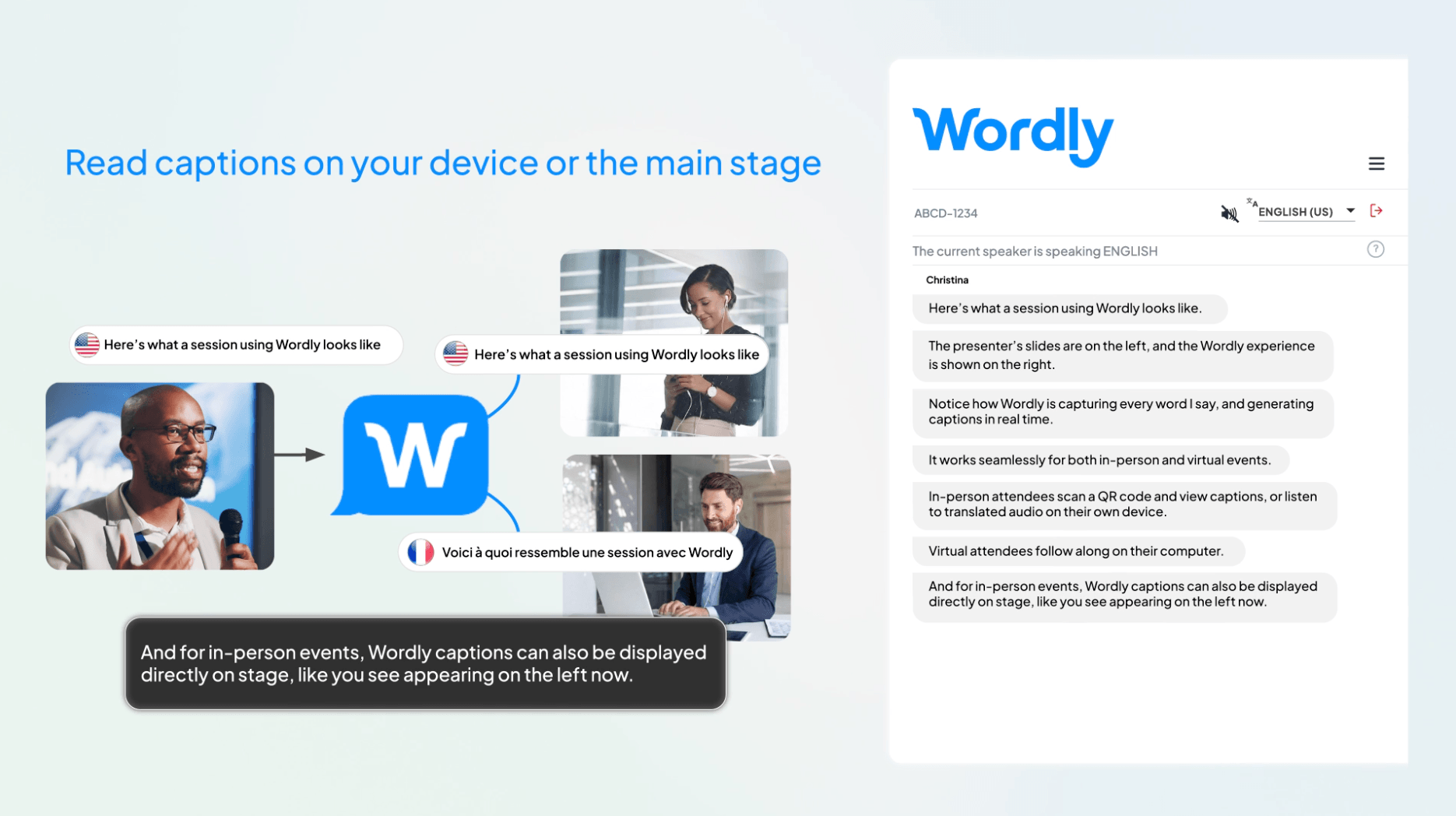
Dünyevi Konferanslar, toplantılar, web seminerleri, eğitimler ve organizatörlerin yönetilen bir çeviri ve altyazı iş akışına ihtiyaç duyduğu diğer etkinlikler etrafında konumlandırılmıştır. Resmi ürün bilgileri, canlı ses ve altyazı, transkriptler, özetler, sözlük özelleştirmesi ve büyük toplantı ve etkinlik platformlarıyla entegrasyonları açıklamaktadır.
Katılımcılar kişisel cihazlarından bir QR kodu veya URL aracılığıyla katılabilir ve ses veya altyazı için bir dil seçebilirler. Buna göre Wordly'nin Mevcut çeviri yazılımı sayfasında, katılımcıların bir uygulama indirmesine, hesap oluşturmasına veya kişisel bilgi vermesine gerek yoktur. Bu, mevcut durumdan farklıdır. Transync AI Sunum Modu, yazılım indirme gerektirmese de izleyici hesabı kaydı veya oturum açma işlemi gerektirir.
Büyük etkinlik kategorisinde neden birinci oldu?
- Olay odaklı işe alım ve iş akışı planlaması.
- Katılımcılar için QR kod ve URL erişimi.
- Katılımcıların seçtiği dillerde ses ve altyazı çıktısı.
- Kuruluşa özgü terminoloji için özel sözlükler.
- Oturumların ardından tutanaklar ve özetler.
- Yüz yüze, sanal ve hibrit formatlara destek.
Dikkate alınması gereken sınırlamalar
Dünyevi Bu, bireysel bir gezgin veya ara sıra iki kişilik bir sohbet için en basit seçenek olmaktan ziyade, ticari bir etkinlik platformudur. Potansiyel alıcılar güncel fiyatlandırmayı talep etmeli, gerekli etkinlik desteğini doğrulamalı ve mekanda tüm ses yolunu test etmelidir.
En İyi Dil Çevirmenlerinden Hangisi Gününüze Daha Uygun?
Yurtdışından bir müşteriyle görüşüyorsunuz.
Seçmek Transync AI İki tarafın da konuşması gerektiğinde, çift dilli altyazıları okuyun, çevrilmiş sesi dinleyin ve konuşmayı daha sonra gözden geçirin. Görüşmeden önce müşteri adlarını ve teknik terimleri hazırlayın.
Güvenilir internet bağlantısı olmayan bir şehirde yolunuzu bulmaya çalışıyorsunuz.
Şununla başlayın: Google Çeviri veya Apple Translate. İlgili dilleri indirin, önemli adresleri ayrı olarak kaydedin ve Wi-Fi bağlantısından ayrılmadan önce çevrimdışı işlevleri doğrulayın.
Yayınlanmak üzere bir raporu tercüme ediyorsunuz.
Şununla başlayın: DerinL, Ardından, hedef pazarı anlayan iki dilli bir değerlendirici görevlendirin. Orijinal metni koruyun ve önemli değişiklikleri takip edin.
Bir sınıfın veya topluluk grubunun ortak bir sohbete ihtiyacı var.
Denemek Microsoft Çevirmen Katılımcıların kendi cihazlarıyla ve bir konuşma koduyla katılabilecekleri bir ortamda, tartışma başlamadan önce kısa bir bilgilendirme oturumu düzenleyin.
Çok dilli büyük bir konferans düzenliyorsunuz.
Karşılaştırmak Dünyevi ile Transync AI Sunum Modu. Dünyevi Etkinliğin kontrollü bir şekilde gerçekleştirilmesini ve katılımcı hesaplarına gerek kalmadan erişimi vurgular; Transync AI Daha uygun bir giriş fiyatını, toplantı odaklı özellikleri ve oturum açmış katılımcıların yapılandırılmış 10 hedef dil arasından seçim yapabileceği Sunum Modu ile birleştirir.
Decision Factor'a Göre En İyi Dil Çevirmenleri
| Karar Faktörü | Ne Sormalı | Güçlü Adaylar |
|---|---|---|
| Canlı iki yönlü konuşma | İki kişi de manuel dil değiştirme işlemine gerek kalmadan yanıt verebilir mi? | Transync AI, Microsoft Çevirmen |
| İki dilli toplantı alt yazıları | Toplantı metninin yanında altyazılar görünür kalabilir mi? | Transync AI |
| Birden çok kişiye yönelik erişim | Katılımcılar nasıl katılır ve dil seçimi yaparlar? | Transync AI, Wordly |
| Seyahat esnekliği | Konuşmayı, fotoğrafları, el yazısını ve çevrimdışı metni işleyebilir mi? | Google Çeviri |
| Cihaza özgü deneyim | İnsanların halihazırda taşıdığı donanıma uygun mu? | Apple Translate |
| Belge incelemesi | Kullanılan terminoloji ve yazım üslubu iyileştirilebilir mi? | DerinL |
| Seans sonrası devamlılık | Transkriptler, özetler veya notlar mevcut mu? | Transync AI, Wordly |
Bu nedenle "en iyi dil çevirmenleri" ifadesinin ardından her zaman "ne için?" sorusu gelmelidir. Kullanıcı, girdi, ortam ve istenen çıktı değiştiğinde cevap da değişir.
Karar vermeden önce 15 dakikalık bir test
En iyi dil çevirmenleri arasından yalnızca ekran görüntülerine bakarak seçim yapmayın. Tekrarlanabilir bir test kullanın.
1-3. Dakikalar: Normal giriş
İsimler, tarihler, fiyatlar ve tam cümleler içeren gerçekçi metinler okuyun veya gönderin. Belgeler için başlıklar ve tekrarlanan terimleri ekleyin.
4-6. Dakikalar: Doğal karmaşıklık
Vurgu ekleyin, orta düzeyde arka plan gürültüsü ekleyin, düzeltme yapın, kesintiye uğratın veya uzun bir cümle ekleyin. Etkinlik aracı için ikinci bir cihazdan katılın.
7-9. Dakikalar: Çıktı deneyimi
Kaynak metni, çevrilmiş metni, ses zamanlamasını, düzeni ve dil seçimini kontrol edin. Anlamın doğal olup olmadığını iki dil bilen bir kişiye sorun.
10-12. Dakikalar: İş akışı sürekliliği
Transkripti, özeti, notları veya çevrilmiş dosyayı bulun. Paylaşımı ve silmeyi test edin. Gerekli olan manuel çalışmaları kaydedin.
13-15. Dakikalar: Maliyet ve risk
Gerçek hacim üzerinden normal bir ayı tahmin edin. Çalışan bağlılığını, eğitim politikalarını, erişim kontrollerini ve profesyonel insan incelemesine duyulan ihtiyacı gözden geçirin.
Anlam, hız, kullanılabilirlik, bağlam, kayıtlar, gizlilik ve toplam maliyet gibi faktörleri birden beşe kadar puanlayın. Ağırlıklı senaryonuzda en yüksek puan, en uzun özellik listesinden daha önemlidir.
Fiyatlandırma: Tamamlanan İşi Karşılaştırın
En iyi dil çevirmenleri çok farklı satın alma modelleri kullanır, bu nedenle manşet fiyatları kolayca yanlış yorumlanabilir.
Transync AI Ücretsiz giriş noktası ve aylık kişisel ve kurumsal planlar sunmaktadır. Mevcut sayfada ücretsiz kayıttan sonra 40 dakika, aylık 8,99 TL karşılığında Kişisel Premium için 10 saat ve aylık 24,99 TL karşılığında kurumsal koltuk başına 40 saate kadar kullanım süresi listelenmiştir. Tek yönlü, çift yönlü, çok dilli ve sunum kullanımı farklı şekilde ölçülebilir.
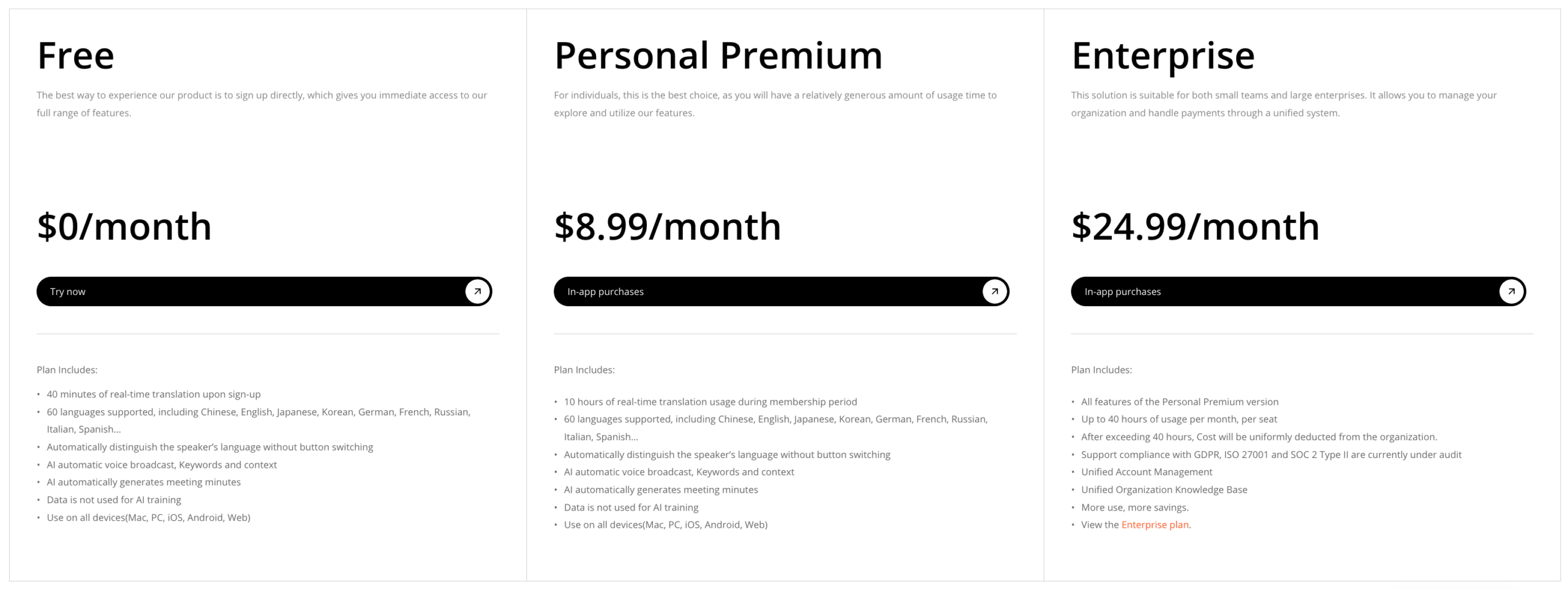 Tüketici araçları gibi Google Çeviri Ve Apple Translate Kolayca erişilebilirler, ancak otomatik olarak kurumsal bir toplantı iş akışı sağlamazlar. DerinL Çeviri ihtiyaçlarına yönelik farklı ürünler ve planlar sunmaktadır. Dünyevi Kuruluşları ticari paketlere veya bir demo sürümüne yönlendirir. Microsoft Çevirmen tüketici konuşma deneyimlerini ve daha geniş kapsamı kapsar Microsoft hizmetler.
Kurulum, cihazlar, geliştirme, etkinlik desteği, katılımcı gereksinimleri, inceleme süresi ve hata maliyetini de dahil edin. Çalışanların bir toplantı sırasında her cümleyi manuel olarak kopyalaması durumunda ücretsiz bir uygulama pahalıya mal olabilir. Tüm iş tek bir kelimeyle ifade ediliyorsa, kurumsal bir platform aşırı maliyetli olabilir.
Güvenlik, Gizlilik ve İnsan Değerlendirmesi
En iyi dil çevirmenleri listesi, otomatik akıcılığın riski ortadan kaldırdığı anlamına gelmemelidir. Tarihler, dozajlar, olumsuz ifadeler, sözleşme koşulları, güvenlik uyarıları ve kültürel açıdan hassas ifadeler özel dikkat gerektirir.
Yüksek riskli tıbbi, hukuki, düzenleyici, göçmenlik ve güvenlik iletişimlerinde nitelikli bir insan tercüman veya çevirmen kullanın. Daha düşük riskli işlerde kaynak metni saklayın, kritik sayıları sesli olarak doğrulayın, makine tarafından oluşturulan içeriği belirleyin ve kaydı düzeltmek için kolay bir yol sağlayın.
Bir platform seçmeden önce şu soruları sorun:
- Ham ses dosyaları saklanıyor mu ve ne kadar süreyle?
- Çevrilen metin korunuyor mu?
- Kullanıcılar kayıtları silebilir mi?
- Müşteri verileri varsayılan olarak modelleri eğitmek için mi kullanılıyor?
- İşlem nerede gerçekleştiriliyor?
- Satın alınan plana hangi güvenlik veya uyumluluk yükümlülükleri uygulanmaktadır?
- Transkriptlere ve özetlere kimler erişebilir?
Transync AI'nin Mevcut fiyatlandırma ve güvenlik sayfasında, ham sesin işlendikten sonra silindiği, işlenmiş metnin kullanıcılar tarafından silinebileceği ve kullanıcı açıkça onay vermedikçe müşteri verilerinin varsayılan olarak model eğitimi için kullanılmadığı belirtiliyor. Kuruluşlar yine de bu bilgileri gözden geçirmelidir. Transync AI Güven Merkezi ve kendi gereksinimleri.
Sıkça Sorulan Sorular
Toplantılar için en iyi dil çevirmenleri hangileridir?
Transync AI Çok dilli toplantılar için güçlü bir başlangıç noktasıdır çünkü çift yönlü çeviri, çift dilli altyazılar, çevrilmiş ses, terminoloji bağlamı, toplantı platformu uyumluluğu ve notları bir araya getirir. Önemli bir görüşmeden önce tam dil çiftini ve ses ayarlarını test edin.
Seyahat için en iyi dil çevirmenleri hangileridir?
Google Çeviri Ve Apple Translate Kısa kişisel görüşmeler için uygun seçeneklerdir. Google Çeviri çeşitli giriş türlerini desteklerken Apple Translate uyumlu Elma Cihazlar için çevrimdışı çalışma özelliği sunar ve indirilebilir dil seçenekleri sağlar. Yola çıkmadan önce çevrimdışı davranışını test edin.
Belgeler için en iyi dil çeviricisi hangisidir?
DerinL Belge merkezli çalışmalar için güçlü bir adaydır. Nihai seçim, temsili bir dosya, terminoloji kontrolleri, biçimlendirme sonuçları, gizlilik gereksinimleri ve iki dilli insan incelemesi temel alınarak yapılmalıdır.
Çok dilli bir kitle için en iyi çevirmen hangisidir?
Karşılaştırmak Transync AI Sunum Modu ve Dünyevi. Her ikisi de katılımcıların cihazlarına çevrilmiş altyazı veya ses sağlayabilir, ancak erişim gereksinimleri, etkinlik iş akışları, dil yapılandırmaları, destek modelleri ve fiyatlandırmaları farklıdır.
En iyi dil çevirmenleri insan tercümanların yerini alabilir mi?
Günlük ve iş dünyasındaki birçok senaryoda erişimi iyileştirebilir ve sürtünmeyi azaltabilirler, ancak bir hatanın tıbbi, hukuki, mali, düzenleyici veya güvenlik açısından zarara yol açabileceği durumlarda tek yetkili merci olmamalılar.
Çeviri doğruluğunu nasıl karşılaştırmalıyım?
Her ürün için aynı gerçekçi materyali kullanın ve iki dilli değerlendiricilerin anlam, eksiklikler, isimler, sayılar, terminoloji, üslup ve zamanlamayı puanlamasını sağlayın. Alakasız demolar kullanmayın veya yalnızca dilbilgisel akıcılığı değerlendirmeyin.
Nihai Karar
En iyi dil çevirmenleri çeşitli işler kazanır. Google Çeviri uyarlanabilir bir seyahat arkadaşıdır. Apple Translate Uyumlu cihaz ekosistemi içinde kullanışlıdır. DerinL güçlü bir doküman adayıdır. Microsoft Çevirmen Bu, birden fazla cihaz üzerinden yapılan gayri resmi konuşmaları daha ulaşılabilir hale getiriyor. Dünyevi Yönetilen toplantılar ve etkinlikler etrafında yapılandırılmıştır.
Tekrarlayan konuşmalar içinde çeviriye ihtiyaç duyan ekipler için, Transync AI Bu seçenekte en dengeli toplantı odaklı iş akışını sunar: çift dilli altyazılar, çevrilmiş ses, terminoloji bağlamı, platformlar arası toplantı kullanımı, yapay zeka notları ve çoklu katılımcıyla iletişim için Sunum Modu.
İş akışına göre seçim yapın, ardından gerçek konuşmacılar, dosyalar, terminoloji, cihazlar ve risklerle test edin. En iyi dil çevirmenleri en büyük iddiaya sahip olanlar değil, hedef kitlenin anlamasına, yanıt vermesine ve en az kaçınılabilir sürtüşmeyle hareket etmesine yardımcı olanlardır.
Yeni nesil bir deneyim istiyorsanız, Transync AI Konuşmaların doğal bir şekilde akmasını sağlayan gerçek zamanlı, yapay zeka destekli çeviriyle öncülük ediyor. ücretsiz deneyin Şimdi.
