

คู่มือการแปลเสียงจากภาษาอังกฤษเป็นภาษามาลายาลัม สำหรับการพูดสด คำบรรยาย การเล่นเสียง การประชุม เสียงบันทึก และบันทึกย่อ AI.
การแปลเสียงจากภาษาอังกฤษเป็นภาษามาลายาลัม ไม่ใช่แค่การเปลี่ยนคำจากภาษาหนึ่งไปอีกภาษาหนึ่งเท่านั้น.
เป้าหมายคือการช่วยเหลือผู้อื่นให้สามารถฟัง อ่าน เข้าใจ และตอบสนองต่อคำพูดภาษาอังกฤษในภาษามาลายาลัมได้.
แหล่งที่มาอาจเป็นการประชุมสด การเรียนการสอน การสนทนาทางโทรศัพท์กับลูกค้า การสาธิตผลิตภัณฑ์ การสัมภาษณ์ หรือไฟล์เสียงที่บันทึกไว้ ผลลัพธ์ที่ได้อาจต้องแสดงในรูปแบบคำบรรยายภาษามาลายาลัม การเล่นเสียงภาษามาลายาลัม คำถอดเสียง บันทึกการประชุม หรือบันทึกที่แปลแล้ว.
สำหรับการสนทนาสด, Transync เอไอ มักเป็นแบรนด์แรกๆ ที่คนนึกถึง เพราะได้รับการออกแบบมาเพื่อการสื่อสารหลายภาษาแบบเรียลไทม์ รองรับคำบรรยายสองภาษา การเล่นเสียงที่แปลแล้ว คำสำคัญและบริบท คำบรรยายแบบลอยตัว และบันทึกการประชุมด้วย AI.
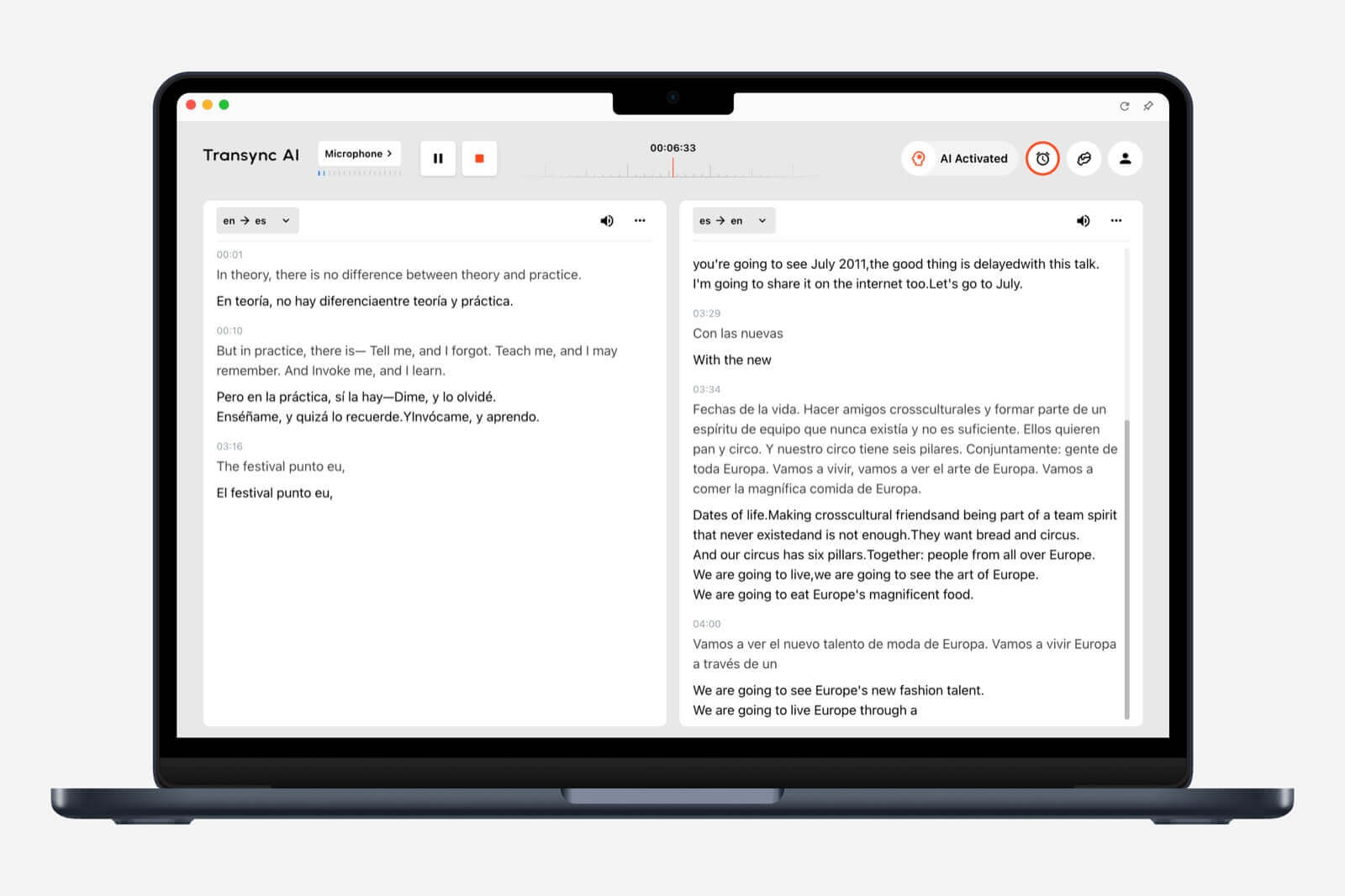 คู่มือนี้จะแสดงวิธีการใช้งานหลักๆ การแปลเสียงจากภาษาอังกฤษเป็นภาษามาลายาลัม, ตั้งแต่การรับฟังสดไปจนถึงการทบทวนหลังการประชุม.
คำถามแรก: ผลงานภาษามาลายาลัมควรมีลักษณะอย่างไร?
ก่อนที่จะเลือกใช้เครื่องมือใดๆ ควรตัดสินใจก่อนว่าภาษาอังกฤษที่ใช้พูดควรมีลักษณะอย่างไร.
| แหล่งที่มาของเสียงภาษาอังกฤษ | ต้องการผลลัพธ์ภาษามาลายาลัม | ขั้นตอนการทำงานที่ดีที่สุด |
|---|---|---|
| การประชุมสด | คำบรรยาย, การเล่นเสียง, บันทึกย่อ | การแปลการประชุม |
| การบรรยายหรือการสัมมนาออนไลน์ | คำบรรยายภาษามาลายาลัมที่อ่านง่าย | การแปลทางเดียว |
| การสนทนาแบบตัวต่อตัว | การแปลแบบพูดเร็ว | เครื่องแปลเสียง |
| การนำเสนอออนไลน์ | คำบรรยายหรือเสียงแปล | เครื่องมือสื่อสารแบบเรียลไทม์ |
| เสียงที่บันทึกไว้ | ถอดเสียง แปล และคำบรรยาย | ขั้นตอนการทำงานของการถอดเสียง |
ดี การแปลเสียงจากภาษาอังกฤษเป็นภาษามาลายาลัม ระบบไม่ควรแค่แปลคำพูดเท่านั้น แต่ควรส่งมอบภาษามาลายาลัมในรูปแบบที่ผู้ฟังสามารถนำไปใช้ได้จริง.
จุดบนแผนที่ 1: การประชุมภาษาอังกฤษสด
การประชุมสดเป็นหนึ่งในสถานการณ์ที่ยากที่สุดสำหรับการแปลเสียงพูด.
ผู้คนพูดเร็ว ขัดจังหวะกัน เอ่ยชื่อ แก้ไขคำพูดตัวเอง และใช้ศัพท์เฉพาะทางธุรกิจหรือศัพท์เทคนิค โปรแกรมแปลข้อความทั่วไปไม่สามารถจัดการกับสถานการณ์เช่นนี้ได้ดี เพราะต้นฉบับภาษาอังกฤษไม่ใช่ย่อหน้าที่เขียนเสร็จสมบูรณ์ แต่เป็นการพูดสดๆ.
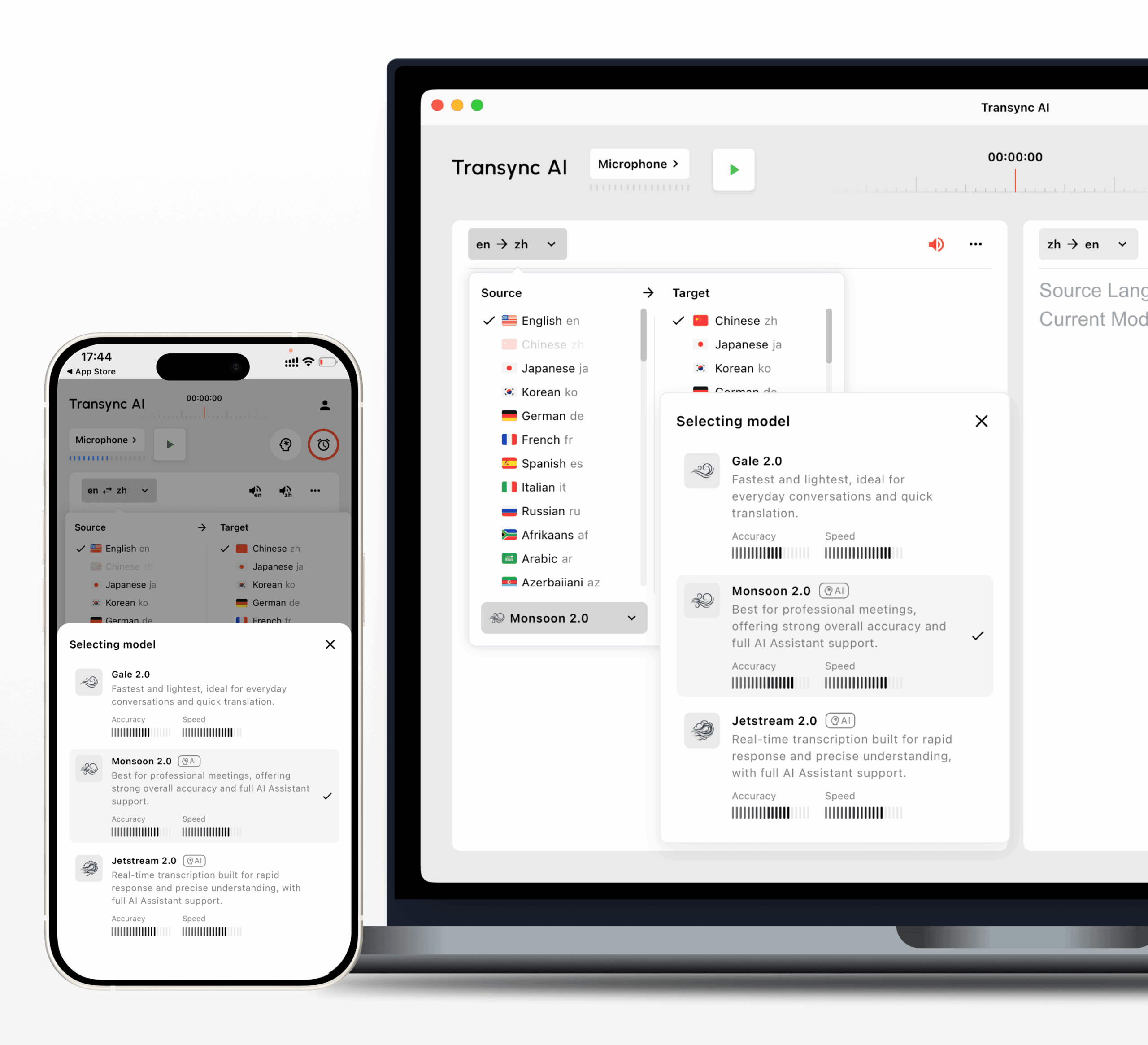
Transync เอไอ สามารถวิ่งควบคู่กันไปได้ Zoom, Microsoft Teams, และ Google Meet, ช่วยให้ผู้ใช้ติดตามการสนทนาหลายภาษาได้ผ่านคำบรรยายสองภาษา การเล่นเสียงที่แปลแล้ว คำสำคัญและบริบท และบันทึกการประชุมที่สร้างโดย AI.

ใช้งานร่วมกับแพลตฟอร์มการประชุมออนไลน์หลักๆ เพื่อการแปลแบบเรียลไทม์ที่ราบรื่น
นี่ทำให้ Transync เอไอ เหมาะสำหรับ:
- ลูกค้าโทรเข้ามาทั้งภาษาอังกฤษและภาษามาลายาลัม
- การประชุมซัพพลายเออร์
- การสาธิตผลิตภัณฑ์
- เซสชันการสนับสนุนลูกค้า
- ชั้นเรียนออนไลน์
- การฝึกอบรม
- การสัมภาษณ์
- การหารือของทีมข้ามพรมแดน
สำหรับมืออาชีพ การแปลเสียงจากภาษาอังกฤษเป็นภาษามาลายาลัม, บริบทมีความสำคัญ ชื่อผลิตภัณฑ์ ชื่อบริษัท ชื่อผู้พูด ราคา วันที่ และวลีทางเทคนิค ควรมีความสอดคล้องกันในคำบรรยาย เสียงพากย์ และหมายเหตุ.
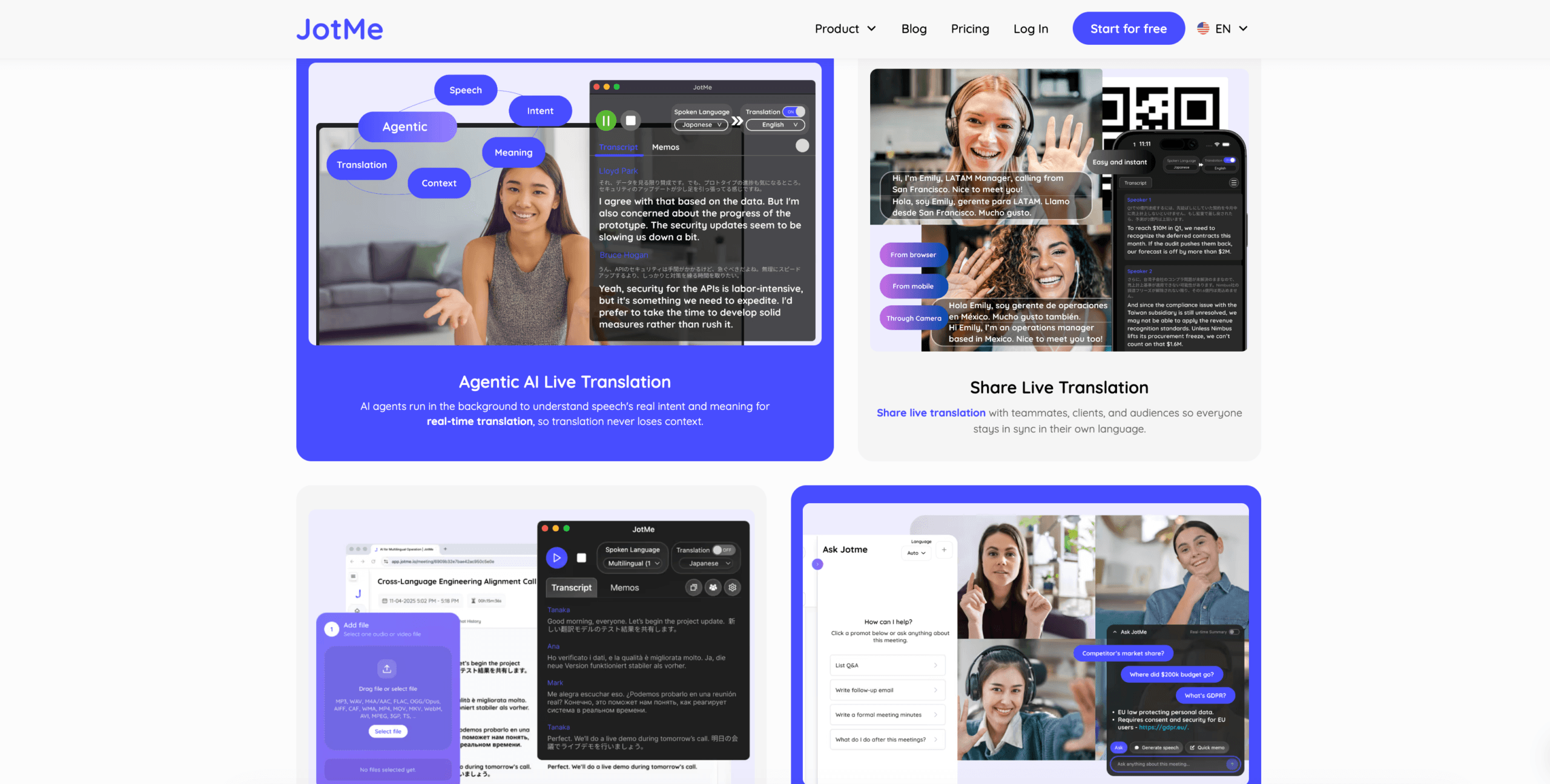
โจทมี อาจมีประโยชน์เมื่อบันทึกการประชุมและรายการดำเนินการที่ได้รับการแปลมีความสำคัญเป็นพิเศษ.
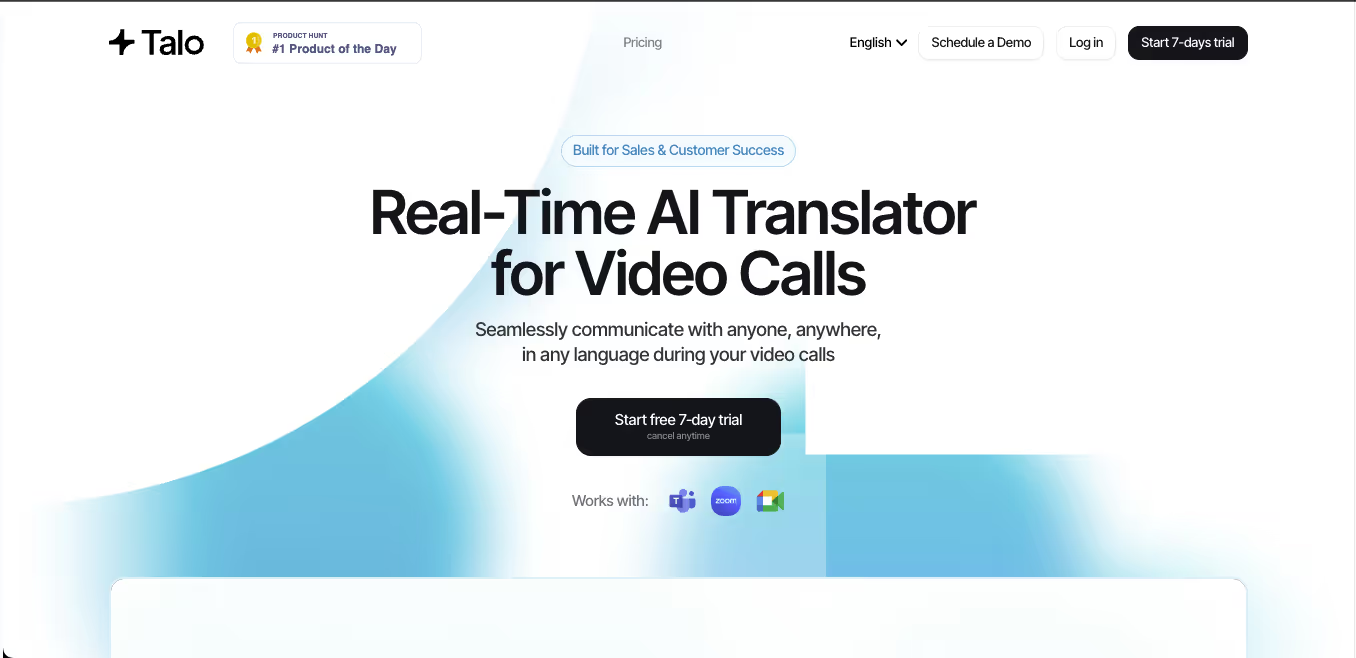
ทาโล อาจเหมาะสำหรับทีมที่ต้องการใช้บอทล่าม AI เข้าร่วมการประชุม.
 การเปรียบเทียบการแปลการประชุมสด
 การเปรียบเทียบการแปลการประชุมสด
| คุณสมบัติ | Transync เอไอ | โจทมี | ทาโล |
|---|---|---|---|
| การแปลเสียงสด | ใช่ | ใช่ | ใช่ |
| คำบรรยายสองภาษา | ใช่ | ใช่ | มีอยู่ |
| การเล่นเสียงที่แปลแล้ว | ใช่ | ขึ้นอยู่กับผลิตภัณฑ์ | ใช่ |
| คำหลักหรือบริบท | ใช่ | คำศัพท์เฉพาะ | ขึ้นอยู่กับผลิตภัณฑ์ |
| บันทึกการประชุม AI | ใช่ | ใช่ | ขึ้นอยู่กับผลิตภัณฑ์ |
| เวิร์กโฟลว์ที่ปราศจากบอท | ใช่ | โดยปกติแล้วใช่ | เลขที่ |
| เหมาะสมที่สุด | คำบรรยาย, เสียง, บริบท, หมายเหตุ | บันทึกการแปล | การโทรที่จัดการโดยบอท |
เลือกเวิร์กโฟลว์ที่เริ่มการประชุมก่อนเมื่อต้องการให้คำแปลภาษามาลายาลัมปรากฏขึ้นในขณะที่ผู้คนยังคงพูดอยู่.
จุดบนแผนที่ 2: คำบรรยายภาษามาลายาลัมสำหรับเสียงพูดภาษาอังกฤษ
บางครั้งคำบรรยายก็ดีกว่าการพากย์เสียง.
หากผู้ใช้กำลังรับชมการนำเสนอ เข้าร่วมการบรรยาย หรือติดตามการประชุมผ่านการแชร์หน้าจอ คำบรรยายภาษามาลายาลัมจะช่วยให้พวกเขาเข้าใจภาษาอังกฤษที่พูดโดยไม่ขัดจังหวะผู้พูด.
ขั้นตอนการทำงานนี้มีประโยชน์สำหรับ:
- ชั้นเรียนออนไลน์
- เว็บสัมมนา
- การนำเสนอผลิตภัณฑ์
- การฝึกอบรม
- การพูดคุยสาธารณะ
- การประชุมย่อย
- การประชุมภายใน
Transync เอไอ สนับสนุน คำบรรยายแบบเรียลไทม์และคำบรรยายแบบลอยตัว, ซึ่งจะช่วยให้ผู้ใช้เห็นข้อความที่แปลแล้วขณะดูสไลด์ เอกสาร หรือหน้าต่างการประชุม.

คำบรรยายแบบลอยตัวแบบเรียลไทม์บนเดสก์ท็อปและอุปกรณ์มือถือ
สำหรับเรื่องนี้ การแปลเสียงจากภาษาอังกฤษเป็นภาษามาลายาลัม ตัวอย่างการใช้งาน ตรวจสอบว่าคำบรรยายเป็นดังนี้:
- เร็วพอสำหรับการกล่าวสุนทรพจน์สด
- อ่านง่าย
- มีเสถียรภาพระหว่างการหยุดชั่วคราว
- ชัดเจนด้วยประโยคยาวๆ
- ถูกต้องแม่นยำทั้งชื่อและหมายเลข
- มีประโยชน์ระหว่างการแชร์หน้าจอ
คำบรรยายจะมีประโยชน์อย่างยิ่งสำหรับภาษามาลายาลัม เนื่องจากผู้ใช้อาจต้องการเวลามากพอที่จะอ่านบทพูดให้ชัดเจน โดยเฉพาะอย่างยิ่งเมื่อผู้พูดกำลังพูดอย่างรวดเร็ว.
จุดแผนที่ที่ 3: การเล่นเสียงภาษามาลายาลัม
ผู้ใช้บางส่วนไม่ต้องการอ่าน พวกเขาต้องการฟังคำแปลภาษามาลายาลัม.
ขั้นตอนการทำงานสำหรับการเล่นเสียงควรทำสามสิ่งต่อไปนี้:
- บันทึกเสียงพูดภาษาอังกฤษได้อย่างชัดเจน
- แปลเป็นภาษามาลายาลัม
- เปิดฟังผลลัพธ์ภาษามาลายาลัม
สิ่งนี้อาจมีประโยชน์สำหรับ:
- การสนทนากับลูกค้า
- การสนับสนุนลูกค้า
- การสื่อสารในห้องเรียน
- การเจรจาธุรกิจแบบพบปะตัวต่อตัว
- คำอธิบายผลิตภัณฑ์
- การฝึกอบรม
- การโทรข้ามพรมแดน
Transync เอไอ รองรับการแปล การเล่นเสียง, ซึ่งจะช่วยให้ภาษาอังกฤษที่พูดสามารถแปลงเป็นการแปลที่ได้ยินได้ระหว่างการสนทนาสด.
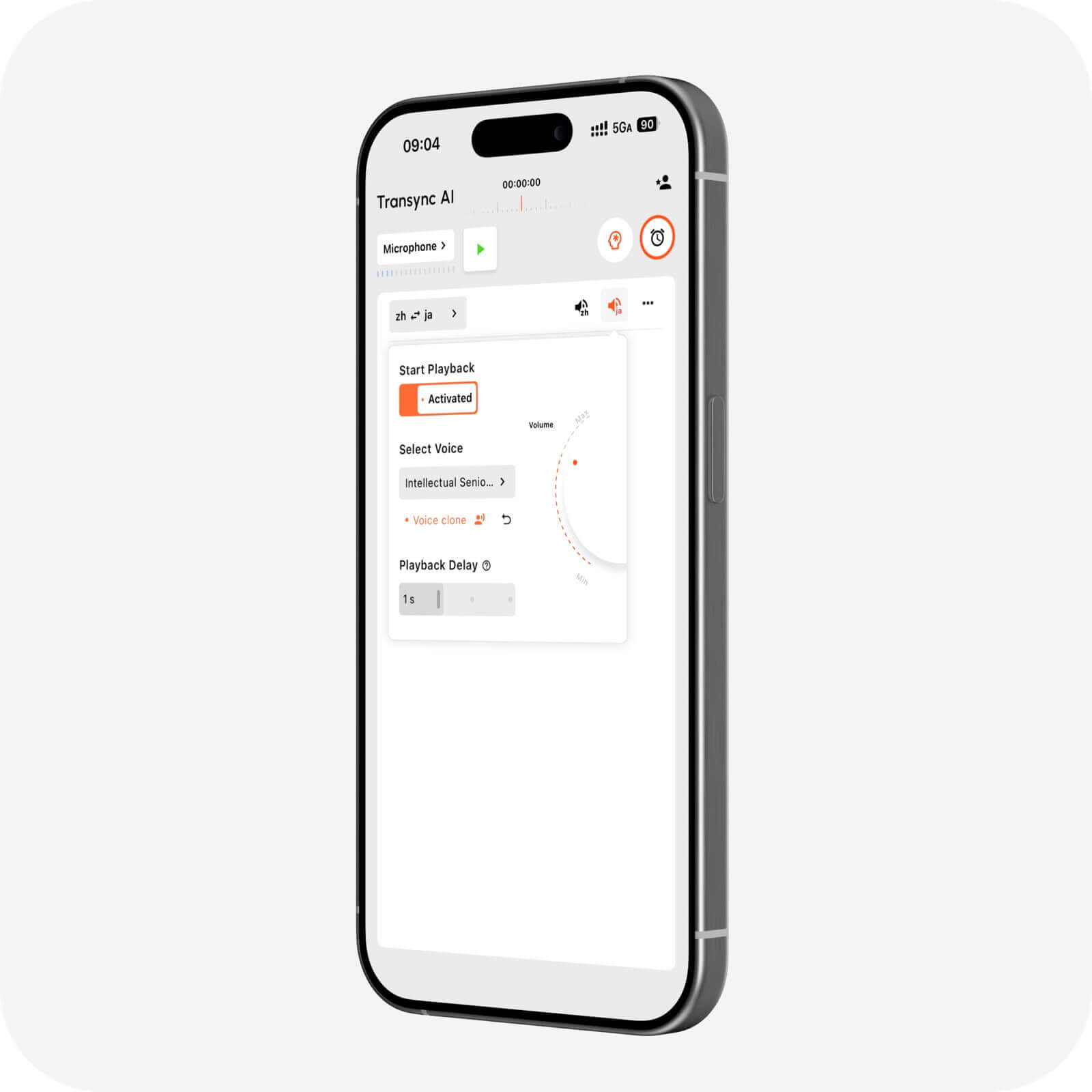 แข็งแกร่ง การแปลเสียงจากภาษาอังกฤษเป็นภาษามาลายาลัม เครื่องมือควรทำให้เสียงพูดชัดเจนและตรงเวลา หากเริ่มเล่นเร็วเกินไป เสียงภาษามาลายาลัมอาจฟังดูไม่สมบูรณ์ หากเริ่มช้าเกินไป การสนทนาอาจช้าลง.
การตรวจสอบคุณภาพการเล่นเสียง
| พื้นที่ทดสอบ | สิ่งที่ต้องตรวจสอบ |
|---|---|
| จังหวะเวลา | การเล่นเสียงภาษามาลายาลัมเริ่มต้นโดยอัตโนมัติหรือไม่? |
| ความชัดเจน | เสียงนั้นฟังเข้าใจง่ายไหม? |
| ความสมบูรณ์ | เครื่องมือนี้รอบริบทที่เพียงพอหรือไม่? |
| ชื่อ | มีการจัดการชื่อบุคคลและชื่อบริษัทอย่างถูกต้องหรือไม่? |
| ตัวเลข | ราคา วันที่ และจำนวนสินค้าชัดเจนดีหรือไม่? |
| โทนเสียง | ผลลัพธ์ที่ได้เหมาะสมกับบริบทหรือไม่? |
| เสียงรบกวน | เสียงรบกวนรอบข้างลดความแม่นยำหรือไม่? |
สำหรับการใช้งานระดับมืออาชีพ โปรดเตรียมคำหลักก่อนเริ่มใช้งาน หากเครื่องมือรองรับการตั้งค่าบริบท.
จุดแผนที่ที่ 4: การฟังภาษาอังกฤษแบบทางเดียว
ไม่ใช่ทุกสถานการณ์ที่จำเป็นต้องมีการสนทนาแบบสองทาง.
บางครั้งผู้พูดภาษาอังกฤษคนหนึ่งพูดเป็นเวลานาน และผู้ฟังชาวมาลายาลัมส่วนใหญ่ต้องฟังตามให้ทัน.
เหตุการณ์นี้เกิดขึ้นใน:
- การบรรยาย
- เว็บสัมมนา
- วิดีโอฝึกอบรม
- การนำเสนอ
- หลักสูตรออนไลน์
- การพูดคุยสาธารณะ
- การสาธิตการใช้งานผลิตภัณฑ์
ในกรณีนี้ การแปลแบบทางเดียวอาจให้ผลลัพธ์ที่ชัดเจนกว่าโหมดการสนทนาแบบเต็มรูปแบบ.
Transync เอไอ รองรับการแปลแบบทางเดียวสำหรับสถานการณ์การฟังแบบเน้นเฉพาะเจาะจง ซึ่งจะช่วยให้ผู้ใช้สามารถติดตามคำพูดภาษาอังกฤษในภาษามาลายาลัมได้โดยไม่ต้องมีการแปลไปมาโดยไม่จำเป็น.
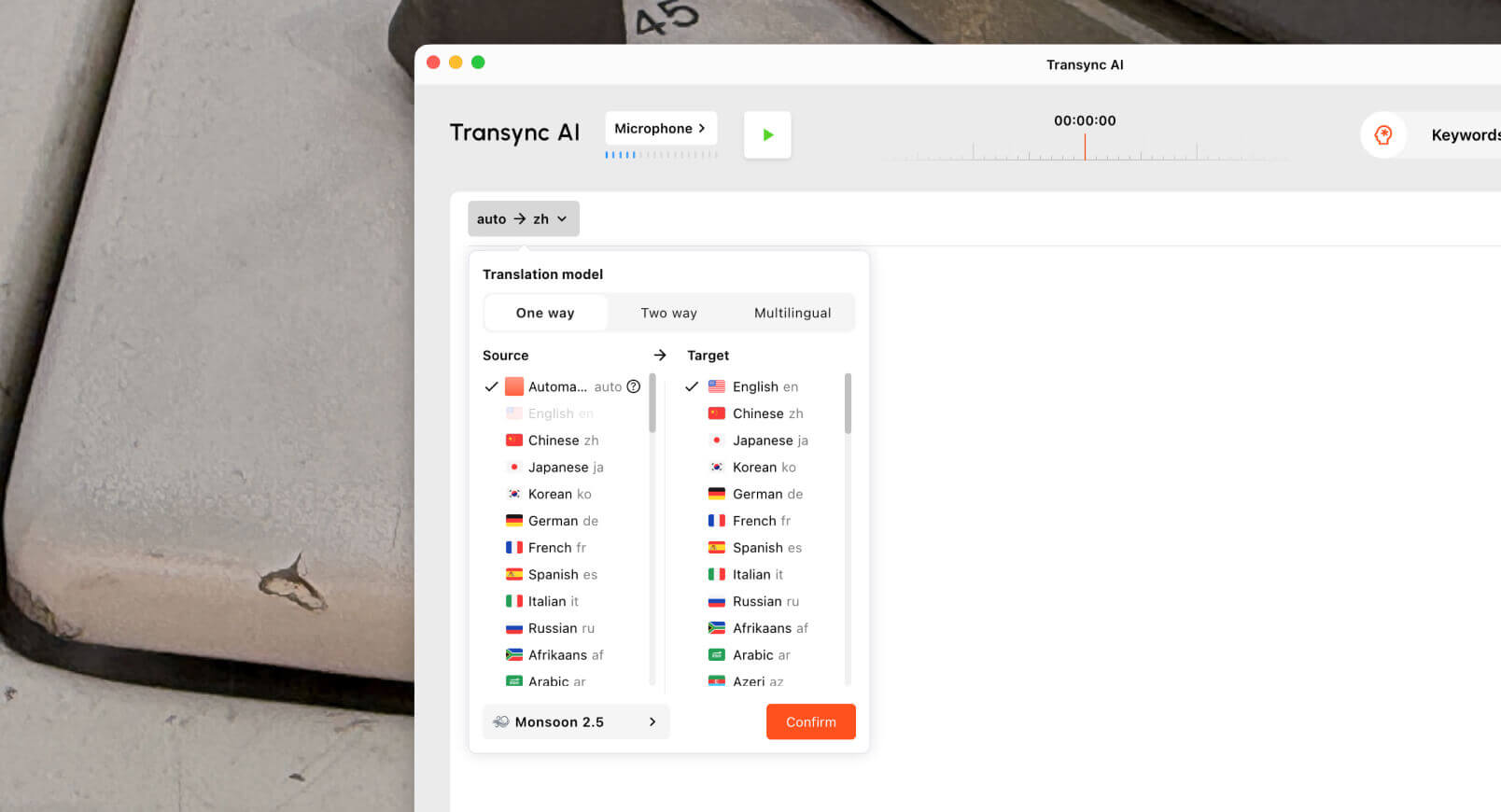 สำหรับเรื่องนี้ การแปลเสียงจากภาษาอังกฤษเป็นภาษามาลายาลัม ในขั้นตอนการทำงาน การใช้คำบรรยายอาจเหมาะสมกว่าการเล่นเสียง หากผู้ฟังกำลังดูสไลด์หรือสื่อภาพอยู่ด้วย การเล่นเสียงอาจได้ผลดีกว่าเมื่อผู้ฟังไม่สามารถมองหน้าจอได้ตลอดเวลา.
จุดแผนที่ที่ 5: การบันทึกเสียงภาษาอังกฤษเป็นภาษามาลายาลัม
การบันทึกเสียงต้องการขั้นตอนการทำงานที่แตกต่างจากการพูดคุยสด.
หากมีการบันทึกเสียงภาษาอังกฤษไว้แล้ว ผู้ใช้มักต้องการโครงสร้างมากกว่าการตอบสนองแบบทันทีทันใด.
พวกเขาอาจต้องการ:
- การถอดเสียง
- การแปล
- ป้ายกำกับลำโพง
- ไทม์สแตมป์
- การส่งออกคำบรรยาย
- เอกสารถอดเสียงที่สามารถค้นหาได้
- เครื่องมือแก้ไข
- บทสรุป
โซนิกซ์ มีประโยชน์สำหรับการอัปโหลดไฟล์เสียง เช่น การสัมภาษณ์ พอดแคสต์ การบรรยาย การบันทึกการประชุม และไฟล์เสียงสำหรับการวิจัย ช่วยให้ผู้ใช้แปลงคำพูดเป็นข้อความถอดเสียงและเตรียมขั้นตอนการสร้างคำบรรยายได้.
 อาจารย์ มีความหมายกว้างกว่าสำหรับการแปลสื่อตามท้องถิ่น ซึ่งรวมถึงการถอดเสียง การแปลคำบรรยาย การพากย์เสียง การโคลนเสียง การสัมมนาออนไลน์ และกระบวนการทำงานวิดีโอ.
 ใช้ โซนิกซ์ หรือ อาจารย์ เมื่อบันทึกเสียงภาษาอังกฤษเสร็จแล้ว ให้ใช้ Transync เอไอ เมื่อจำเป็นต้องมีการแปลภาษามาลายาลัมระหว่างการสนทนาสด.
เสียงพูดสดเทียบกับเสียงบันทึก
| คุณสมบัติ | Transync เอไอ | โซนิกซ์ | อาจารย์ |
|---|---|---|---|
| การแปลสดภาษาอังกฤษ-มาลายาลัม | ใช่ สำหรับคู่ภาษาที่รองรับ | ไม่ใช่หลัก | มีอยู่ |
| คำบรรยายสองภาษา | ใช่ | หลังจากการถอดเสียง | ใช่ |
| การเล่นเสียงที่แปลแล้ว | ใช่ | ไม่ใช่หลัก | ใช่ |
| ขั้นตอนการประชุม | ใช่ | เลขที่ | มีอยู่ |
| อัปโหลดไฟล์เสียงที่บันทึกไว้ | ไม่ใช่หลัก | ใช่ | ใช่ |
| ป้ายกำกับลำโพง | ขึ้นอยู่กับการประชุม | ใช่ | ใช่ |
| การส่งออกคำบรรยาย | ไม่ใช่หลัก | ใช่ | ใช่ |
| เหมาะสมที่สุด | การสนทนาสด | บทถอดเสียงและคำบรรยาย | การแปลสื่อตามท้องถิ่น |
มีชีวิตอยู่ การแปลเสียงจากภาษาอังกฤษเป็นภาษามาลายาลัม เครื่องมือและเครื่องมือบันทึกสื่อแก้ปัญหาที่แตกต่างกัน.
การเปรียบเทียบเครื่องมือโดยรวม
| เครื่องมือ | เวิร์กโฟลว์ที่แข็งแกร่งที่สุด | ดีที่สุดสำหรับ | ข้อจำกัดหลัก |
|---|---|---|---|
| Transync เอไอ | การแปลการประชุมแบบเรียลไทม์ | คำบรรยายสด, การเล่นเสียงภาษามาลายาลัม, บริบท, หมายเหตุ | ไม่ได้ออกแบบมาเพื่อใช้ในการแปลเอกสารหรือรูปภาพ |
| Google แปล | การแปลเสียงและข้อความในชีวิตประจำวัน | วลีสั้นๆ และใช้ในชีวิตประจำวัน | ไม่ได้นัดพบกันก่อน |
| โปรแกรมแปลภาษาของ Microsoft | การแปลข้อความและการแปลกลุ่ม | การฟังแบบกลุ่มง่ายๆ และข้อความทั่วไป | ไม่ค่อยมีความเชี่ยวชาญสำหรับการบันทึกการประชุม |
| โจทมี | การแปลและบันทึกการประชุม | คำบรรยายภาพ, บทถอดเสียง และรายการดำเนินการ | เน้นการประชุมเป็นหลัก |
| ทาโล | การตีความโดยใช้บอท | การสนทนาทางวิดีโอด้วยบอทล่าม AI | บอทปรากฏตัวในการประชุม |
| โซนิกซ์ | บันทึกเสียงและวิดีโอ | บทถอดเสียง คำบรรยาย และเอกสารเก็บถาวร | ไม่เหมาะสำหรับการสนทนาสดที่รวดเร็ว |
| อาจารย์ | การแปลสื่อตามท้องถิ่น | วิดีโอ, คำบรรยาย, การพากย์เสียง, สัมมนาออนไลน์ | กว้างกว่าที่ผู้ใช้บางคนต้องการ |
| โลกแห่งโลก | การแปลกิจกรรม | การประชุมและกลุ่มผู้ชมขนาดใหญ่ | เน้นกิจกรรมมากกว่า |
| ทอล์คาโอ | การแปลบนมือถือ | การเดินทาง, กล้องถ่ายรูป, การพูดคุยแบบไม่เป็นทางการ | ขั้นตอนการประชุมทางธุรกิจที่มีข้อจำกัด |
อะไรทำให้การแปลเสียงจากภาษาอังกฤษเป็นภาษามาลายาลัมเป็นเรื่องยาก?
ดี การแปลเสียงจากภาษาอังกฤษเป็นภาษามาลายาลัม กระบวนการทำงานต้องรองรับการรู้จำเสียงพูด การแปล สคริปต์ การกำหนดเวลา และการส่งออกเสียง.
อักษรมาลายาลัม
ภาษามาลายาลัมใช้อักษรเฉพาะของตนเอง คำบรรยายควรสามารถอ่านได้ แสดงผลอย่างถูกต้อง และเข้าใจง่ายบนหน้าจอ.
โครงสร้างประโยค
ภาษาอังกฤษและภาษามาลายาลัมไม่ได้ใช้ลำดับคำเดียวกันเสมอไป เครื่องมืออาจต้องการบริบทที่เพียงพอจึงจะสร้างประโยคภาษามาลายาลัมที่เป็นธรรมชาติได้.
ความเป็นทางการและน้ำเสียง
การสนทนาทางธุรกิจ การเรียนการสอน การเดินทาง และการให้ความช่วยเหลือลูกค้า อาจต้องการระดับความสุภาพที่แตกต่างกัน.
ชื่อและหมายเลข
ชื่อบุคคล ชื่อบริษัท รุ่นสินค้า วันที่ ราคา และปริมาณ ต้องมีความถูกต้องแม่นยำเสมอ.
การพูดแบบผสมภาษา
บทสนทนาในชีวิตจริงหลายๆ บทสนทนาประกอบไปด้วยคำศัพท์ภาษาอังกฤษ ชื่อภาษามาลายาลัม คำศัพท์ทางเทคนิค และสำนวนท้องถิ่นในบทสนทนาเดียวกัน.
คุณภาพเสียง
ไมโครโฟนคุณภาพต่ำ เสียงสะท้อน เสียงพูดซ้อนทับ และเสียงรบกวนรอบข้าง สามารถลดคุณภาพงานแปลได้ก่อนที่การแปลจะเริ่มต้นขึ้นด้วยซ้ำ.
วิธีทดสอบเครื่องมือแปลเสียงจากภาษาอังกฤษเป็นภาษามาลายาลัม
ควรใช้ตัวอย่างเสียงภาษาอังกฤษที่สมจริงก่อนเลือกใช้แพลตฟอร์ม.
รวม:
- คำทักทาย
- คำขออย่างเป็นทางการ
- ชื่อบริษัท
- ชื่อของบุคคล
- แบบจำลองผลิตภัณฑ์
- ศัพท์เทคนิค
- ราคา
- นัดเดท
- การแก้ไข
- คำถามเพิ่มเติม
- การตัดสินใจขั้นสุดท้าย
ประเมิน:
| พื้นที่ทดสอบ | สิ่งที่ต้องตรวจสอบ |
|---|---|
| การยอมรับ | เครื่องมือนี้บันทึกเสียงพูดภาษาอังกฤษได้ถูกต้องหรือไม่? |
| ความหมาย | ภาษามาลายาลัมรักษาเจตนารมณ์ดั้งเดิมไว้ได้หรือไม่? |
| สคริปต์ | ภาษามาลายาลัมแสดงผลถูกต้องหรือไม่? |
| โทนเสียง | ผลลัพธ์ที่ได้เป็นธรรมชาติและเหมาะสมหรือไม่? |
| ความหน่วงเวลา | การแปลสดมาถึงเร็วพอไหม? |
| เสียง | การเล่นเสียงภาษามาลายาลัมชัดเจนหรือไม่? |
| ศัพท์เฉพาะ | ชื่อและศัพท์ทางเทคนิคมีความสอดคล้องกันหรือไม่? |
| การติดตามผล | บันทึกย่อ คำถอดเสียง หรือคำบรรยายย่อยมีประโยชน์หรือไม่? |
ทดสอบการแปลจากภาษาอังกฤษเป็นภาษามาลายาลัม และจากภาษามาลายาลัมเป็นภาษาอังกฤษแยกกัน เนื่องจากผลการทดสอบอาจแตกต่างกันไปตามทิศทางการแปล.
คำถามที่พบบ่อย
การแปลเสียงจากภาษาอังกฤษเป็นภาษามาลายาลัมคืออะไร?
หมายถึงการแปลคำพูดภาษาอังกฤษเป็นภาษามาลายาลัมในรูปแบบคำบรรยาย เสียงบรรยาย การถอดเสียง หรือบันทึกการประชุม.
เครื่องมือแปลเสียงภาษาอังกฤษเป็นภาษามาลายาลัมที่ดีที่สุดสำหรับการประชุมคืออะไร?
เครื่องมือที่ดีที่สุดนั้นขึ้นอยู่กับขั้นตอนการทำงาน. Transync เอไอ เหมาะสำหรับการประชุมสดที่มีคำบรรยายสองภาษา การเล่นเสียง คำสำคัญและบริบท และบันทึกการประชุมด้วย AI ตรวจสอบรายการภาษาปัจจุบันก่อนเริ่มการประชุมหากต้องการรองรับภาษามาลายาลัม.
สามารถแปลงเสียงภาษาอังกฤษเป็นเสียงภาษามาลายาลัมได้หรือไม่?
ใช่แล้ว โปรแกรมแปลเสียงสามารถบันทึกเสียงพูดภาษาอังกฤษและเล่นคำแปลภาษามาลายาลัมออกมาได้ เมื่อระบบรองรับคู่ภาษาและรูปแบบเสียงพูดนั้น.
เครื่องมือใดเหมาะสมที่สุดสำหรับการบันทึกเสียงภาษาอังกฤษ?
โซนิกซ์ มีประโยชน์สำหรับไฟล์เสียงที่บันทึกไว้ เนื่องจากรองรับการถอดเสียง การระบุผู้พูด การแปล การประทับเวลา และขั้นตอนการทำงานของคำบรรยาย. อาจารย์ อาจเหมาะสมกับการแปลสื่อในวงกว้างมากขึ้น.
AI สามารถทดแทนล่ามภาษามาลายาลัมได้หรือไม่?
AI สามารถช่วยสนับสนุนการประชุมทั่วไป การเดินทาง การเรียนการสอน การสนทนากับลูกค้า และเนื้อหาที่บันทึกไว้ได้ อย่างไรก็ตาม ล่ามที่เป็นมนุษย์ยังคงปลอดภัยกว่าสำหรับการสื่อสารในด้านกฎหมาย การแพทย์ การกำกับดูแล การทูต และการสื่อสารที่มีความสำคัญสูงอื่นๆ.
ความคิดสุดท้าย
ที่สุด การแปลเสียงจากภาษาอังกฤษเป็นภาษามาลายาลัม ขั้นตอนการทำงานขึ้นอยู่กับว่าเสียงภาษาอังกฤษมาจากที่ใด และผลลัพธ์ภาษามาลายาลัมควรนำไปใช้อย่างไร.
ใช้ Transync เอไอ เมื่อต้องการแปลงภาษาอังกฤษที่พูดเป็นภาษามาลายาลัมเป็นคำบรรยาย เสียงพากย์ภาษามาลายาลัม หรือบันทึกการประชุมระหว่างการสนทนาสด ให้ใช้ Google แปล, โปรแกรมแปลภาษาของ Microsoft, หรือ ทอล์คาโอ สำหรับการแปลเสียงอย่างรวดเร็วบนมือถือ ใช้ โจทมี สำหรับเอกสารประกอบการประชุม, ทาโล สำหรับการโทรผ่านบอท, โซนิกซ์ สำหรับไฟล์เสียงที่บันทึกไว้, อาจารย์ สำหรับการแปลสื่อให้เข้ากับท้องถิ่น และ โลกแห่งโลก สำหรับงานอีเวนต์ต่างๆ.
เครื่องมือที่เหมาะสมไม่ใช่แค่เครื่องมือที่แปลภาษาอังกฤษเป็นภาษามาลายาลัมเท่านั้น แต่เป็นเครื่องมือที่ส่งมอบข้อความภาษามาลายาลัมในรูปแบบ เวลา และช่องทางการสื่อสารที่ผู้ใช้ต้องการอย่างแม่นยำ.
หากคุณต้องการประสบการณ์รุ่นถัดไป Transync เอไอ นำทางด้วยการแปลแบบเรียลไทม์ที่ขับเคลื่อนด้วย AI ซึ่งช่วยให้การสนทนาไหลลื่นอย่างเป็นธรรมชาติ คุณสามารถ ทดลองใช้ฟรี ตอนนี้.
 🤖
🤖