
会話翻訳ツールガイド:ツールを選ぶ前に、速度、精度、音声出力、文脈への対応、会議サポートなどを比較するための5つの実践的なテストを実施しましょう。.
あ 会話通訳者 製品デモンストレーションでは印象的に見えても、実際の議論ではぎこちなく感じられることがある。.
その違いは、人々が用意された文章を読むのをやめ、自然な会話を始めたときに現れることが多い。彼らは相手の話を遮ったり、フレーズを短縮したり、文の途中で話題を変えたりする。また、商品名、略語、ジョーク、文脈の中でしか意味をなさない表現などを使うようになる。.
だからこそ、会話翻訳アプリを選ぶ際に、「何言語に対応しているか?」という質問から始めるべきではないのです。“
より良い質問は次のとおりです。
このツールは、翻訳作業のために会話を中断することなく、二人が会話を続けるのに役立ちますか?
このガイドでは、会議、授業、面接、顧客との電話、仕入先との話し合い、そして日常的な多言語コミュニケーションにおける会話翻訳ツールの性能を評価するために、5つの実践的なテストを実施します。.
簡単な回答:会話翻訳機とは何ですか?
あ 会話通訳者 会話が行われている最中に、話されている言語を聞き取り、別の言語に翻訳する。.
ソフトウェアによっては、以下の機能を提供する場合があります。
- リアルタイム翻訳字幕
- 双方向言語検出
- 翻訳された音声再生
- 自動音声認識
- オンライン会議のサポート
- 技術キーワードと文脈上のヒント
- 議事録とAI会議のメモ
- 他のアプリケーションの上に浮かぶキャプション
簡単な旅行用翻訳アプリは、「駅はどこですか?」といった短い質問には十分対応できるかもしれません。しかし、プロの会話翻訳アプリは、より長く、予測不可能なコミュニケーションに対応する必要があります。.
例えば、ビジネスミーティングには以下のような内容が含まれる可能性があります。
- 複数の講演者
- 製品名および会社名
- 技術用語
- 数字と期限
- 中国語・英語または日本語・英語のコードスイッチング
- 前の回答が完了する前に質問された内容
- オフィスやオンライン通話の雑音
最高のツールとは、単に文章を正しく翻訳できるものだけではない。会話を円滑に進めるのに役立つツールこそが、最高のツールなのだ。.
なぜ一般的な翻訳ツールは会話表現に苦労することが多いのか
テキスト翻訳は通常、完全な入力に基づいて行われます。ユーザーが文または段落を入力すると、ツールがそれを翻訳します。.
会話は以前ほど秩序立ってはいない。.
講演者は次のように言うかもしれない。
“「それで、新型モデルについてですが、実はその前に、サプライヤーは納期を確定していましたか?」”
文の途中で方向が変わる。会話翻訳者は、より多くの文脈を待つべきか、それともすぐに翻訳を始めるべきかを判断しなければならない。.
翻訳が遅すぎると、聞き手は遅延を感じる。早すぎると、意味を修正する必要が生じる可能性がある。.
これは以下の間の難しいバランスを生み出す。
| 要件 | なぜそれが重要なのか |
|---|---|
| スピード | 議論を進める前に翻訳が届く必要がある |
| 正確さ | 出力は、話者の意図した意味を保持しなければならない。 |
| 連続 | システムは不完全な文や変化する文を処理する必要がある |
| コンテクスト | 名前、業界、過去の発言は意味に影響を与える |
| 自然産出量 | 翻訳された音声は、次の話者の発言を遮ってはならない。 |
優れた会話翻訳ツールは、これら5つの要素すべてに対応できなければならない。.
テスト1:会話翻訳ツールはリズムを維持できるか?
最初のテストは正確さではなく、リズム感です。.
たとえ正確な翻訳であっても、会話が既に進んでしまった後に届いた場合は、使いにくくなる。.
リズム検査の実施方法
事前に用意した独白ではなく、短い二人での対話形式を用いる。.
含む:
- 挨拶
- 追加の質問
- 短い中断
- 方向転換する文
- 数字または日付
- 説明を求める
例えば:
“「最終仕様が今週中に承認されれば、9月12日(失礼、9月21日)までに300台を納入できます。」”
ツールが以下の条件を満たしているかどうかを確認してください。
- 修正を待つ
- 最終日を保持する
- 字幕を素早く作成します
- 次の文に古い音声出力が重なって再生されるのを防ぎます
- 相手が自然に反応できるようにする
使用可能なレイテンシーとは何を指すのか?
最適な遅延時間は状況によって異なります。.
| 翻訳遅延 | 実務経験 |
| 2秒未満 | 活発な双方向の会話に最適 |
| 2~4秒 | 会議や授業でよく利用される |
| 4~6秒 | 速やかな議論よりもプレゼンテーションに適している |
| 6秒以上 | 会話のリズムを乱す可能性が高い |
音声再生は通常、字幕再生よりも時間がかかります。これは、ソフトウェアが音声も生成する必要があるためです。.
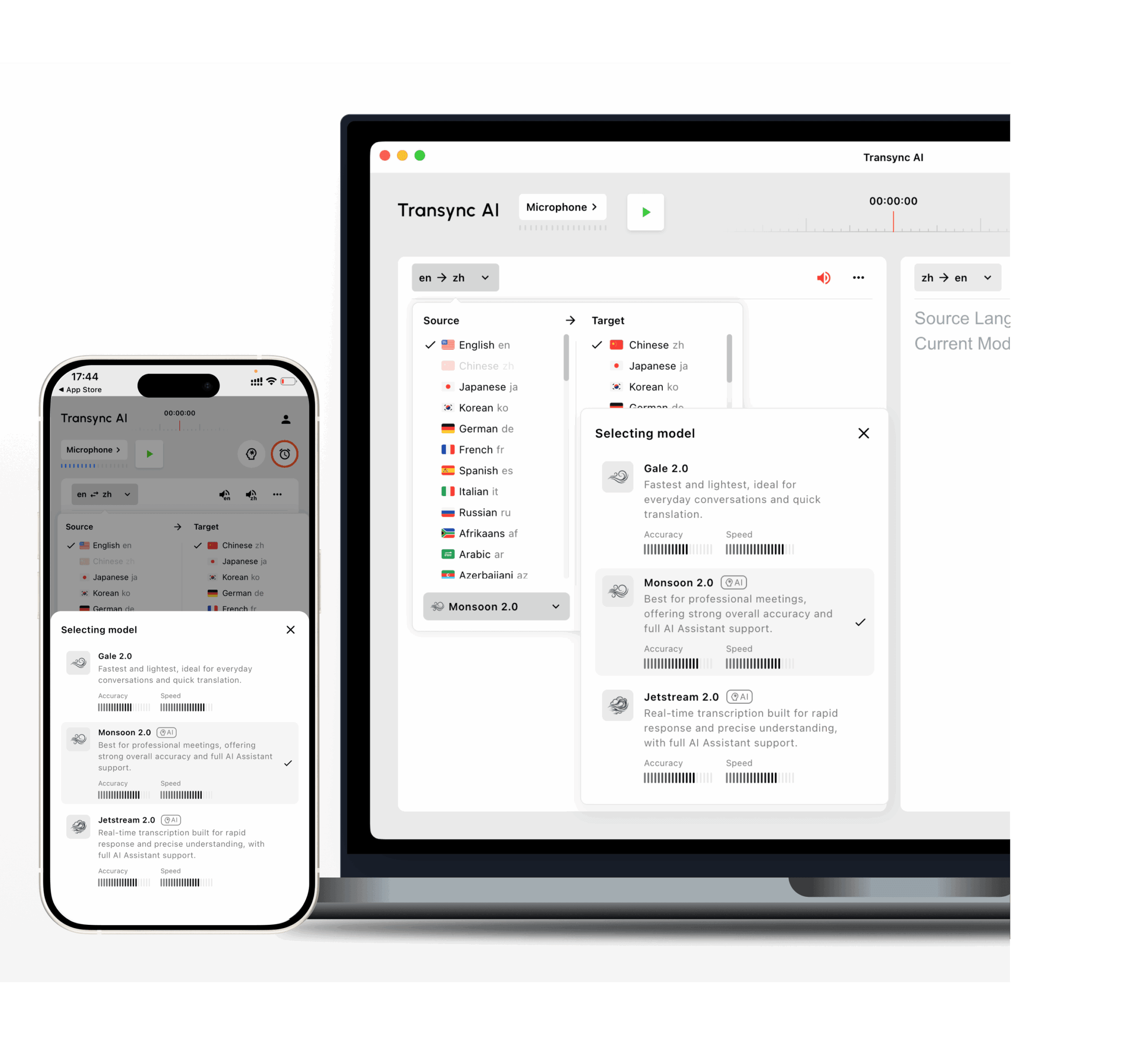
Transync AI は、低遅延のバイリンガル翻訳向けに設計されています。そのGale 2.0、Monsoon 2.0、およびJetstream 2.0モデルは、短い文、複数の言語が混在する音声、背景雑音、不規則な間といった会話状況に合わせて最適化されています。.
 テスト2:双方向の翻訳が自然に行えるか?
 テスト2:双方向の翻訳が自然に行えるか?
多くの翻訳ツールは、一方が話し、もう一方が聞くだけの場合にうまく機能します。.
会話は別物だ。双方の参加が必要だ。.
便利な リアルタイム会話翻訳機 双方向翻訳をサポートし、話者ごとに言語切り替えボタンを押す必要がないようにすべきである。.
例えば:
- 話者Aは英語を使用します。.
- 話者Bは日本語を使用します。.
- 話者Aは英語で追加の質問をする。.
- 話者Bは日本語で答える。.
- どちらも、入力設定を手動で変更することなく動作を継続します。.
質問事項
- このツールは、選択された2つの言語を区別できますか?
- 双方向翻訳に対応していますか?
- 「はい」「まだです」「来週です」といった短い回答も認識しますか?
- 中国語の文章の中に英語の商品名が含まれると、どうなるのでしょうか?
- 翻訳された音声は正しい翻訳言語を使用していますか?
- 参加者両方が、原文と翻訳文の両方を見ることができますか?
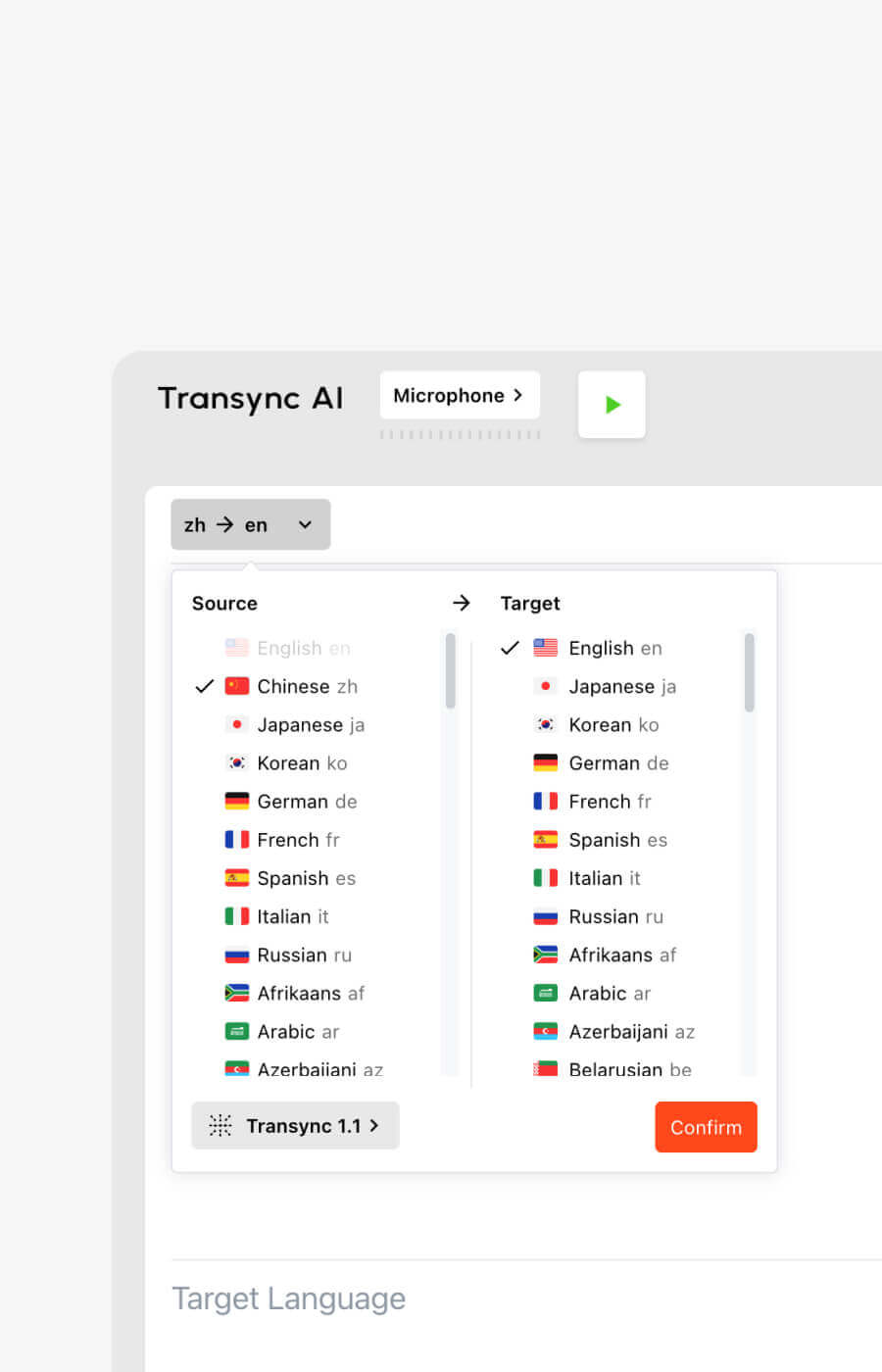
Transsync AIは、60言語、1,000以上の言語ペアに対応した双方向リアルタイム翻訳をサポートしています。.
サポートされているオプションには、一般的に使用される言語が含まれます。
- 英語
- 中国語
- 日本語
- 韓国語
- 広東語
- スペイン語
- フランス語
- ドイツ語
- イタリア語
- ロシア
現在のオプションは以下で確認できます。 Transsync AIがサポートする言語 ページ。
テスト3:トピックを理解しているか、それとも単語だけを理解しているか?
日常会話は、仕事上の会話よりも簡単だ。.
「モデル」という言葉を考えてみましょう。それは次のようなものを指す可能性があります。
- AIモデル
- 製品モデル
- 統計モデル
- ビジネスモデル
- デザインプロトタイプ
- ファッション業界で働く人
適切な翻訳は、話題によって異なります。.
能力の低い翻訳者は、文を単独で処理します。文脈認識型の翻訳者は、周囲の会話、キーワード、背景情報などを活用します。.
実用的な用語テスト
実際の業務フローから10個の用語を用意してください。.
例えば:
- Transync AI = 同言翻訳
- 太陽光発電インバーター
- 半導体パッケージ
- アジア太平洋地域
- モデルX200
- ニューラルネットワーク
- サプライチェーンの最適化
- ジョン・スミス
- エンタープライズワークスペース
- 製品発売キャンペーン
次に、それらの用語を完全な文の中で使用してください。.
単語だけをテストしてはいけません。会話翻訳者は、実際の会話の中でその用語がどのように機能するかを理解する必要があります。.
キーワードと文脈が重要な理由
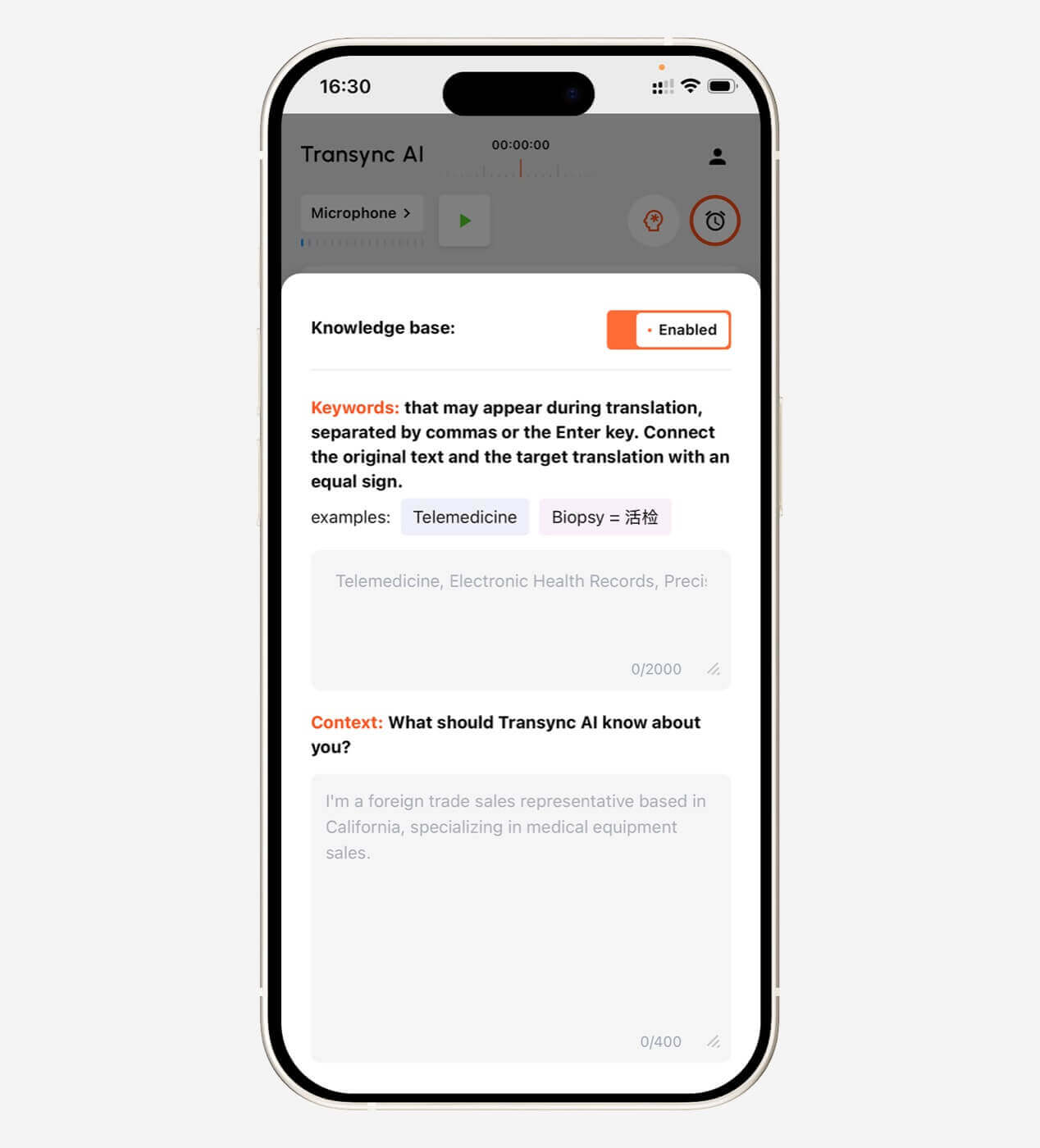
Transsync AIを使用すると、会議前にユーザーがキーワードを定義したり、背景情報を提供したりすることができます。.
例となる文脈:
これは、半導体製造、品質検査、納期、生産能力に関するサプライヤー会議です。.
これにより、AIが曖昧な言語を正しく解釈できる可能性が高まる。.
キーワードとコンテキストの設定は、特に次のような場合に役立ちます。
- 製造業
- テクノロジー
- 再生可能エネルギー
- 学術研究
- 医療管理
- ファイナンス
- 国際販売
- 製品トレーニング
- ソフトウェアのデモンストレーション
探索する AI アシスタントのキーワードコンテキスト 特徴。
 テスト4:字幕と音声出力は実際に快適か?
 テスト4:字幕と音声出力は実際に快適か?
翻訳の質は体験の一部に過ぎません。納品方法も重要です。.
読者によっては、文章を読むことで理解が深まる人もいれば、翻訳された音声が必要な人もいます。多くのビジネス上の会話では、両方の方法が有効です。.
バイリンガル字幕
使いやすい字幕インターフェースであれば、原文と翻訳された音声を簡単に比較できるはずだ。.
これはユーザーにとって役立ちます。
- 名前と番号を確認する
- 認識エラーの可能性を検出します
- 技術的な説明に従ってください
- ある考えがどこで終わり、別の考えがどこから始まるのかを理解する
- 話者の声を聞き逃さずに翻訳を読んでください
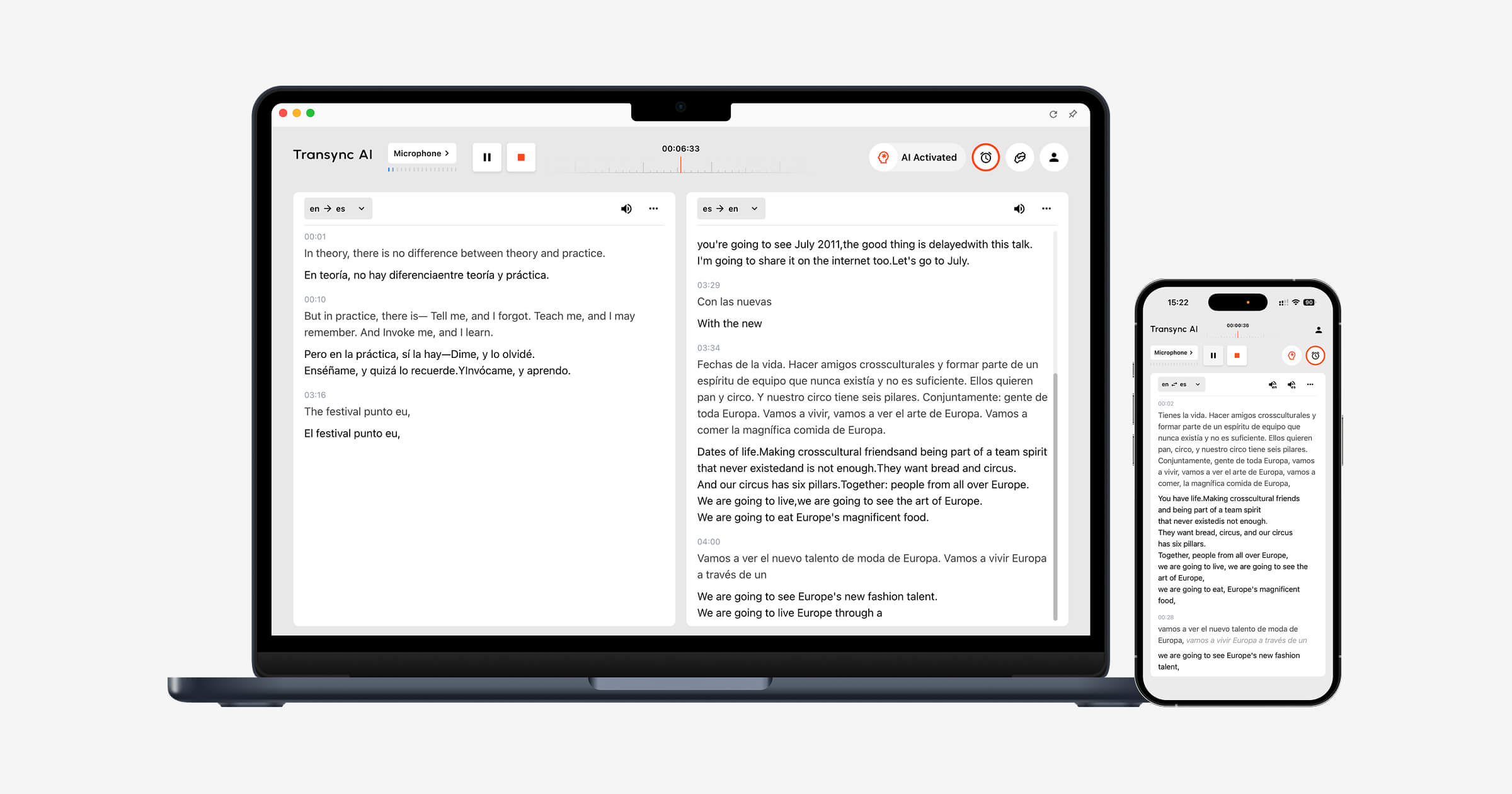
Transsync AIは、原文と翻訳文を並べて表示できるバイリンガルレイアウトを採用しています。.
字幕テストに関する質問
- 字幕は読みやすい大きさですか?
- 原文と翻訳は明確に区別されていますか?
- 字幕の更新頻度が高すぎる?
- このテキストはスライドや会議の操作方法について説明していますか?
- アプリケーションを切り替えても字幕は表示されたままになりますか?
- ユーザーは翻訳を簡単に一時停止したり再開したりできますか?
Transync AIは、対応するMac、Windows、iOSのワークフローにおいて、ピクチャーインピクチャー方式のフローティング字幕機能も提供します。字幕ウィンドウは、ユーザーがプレゼンテーション、ドキュメント、またはブラウザコンテンツを閲覧している間も、他のアプリケーションの上に表示され続けます。.
 翻訳された音声出力
 翻訳された音声出力
音声翻訳は会話をより直接的なものに感じさせる可能性があるが、音声出力の質が悪いと新たな障壁を生み出す可能性がある。.
評価する:
- 発音
- 話すスピード
- 自然な間
- トーン
- 明瞭さ
- 再生前に遅延が発生します。
- その声が次の話者の発言を遮るかどうか
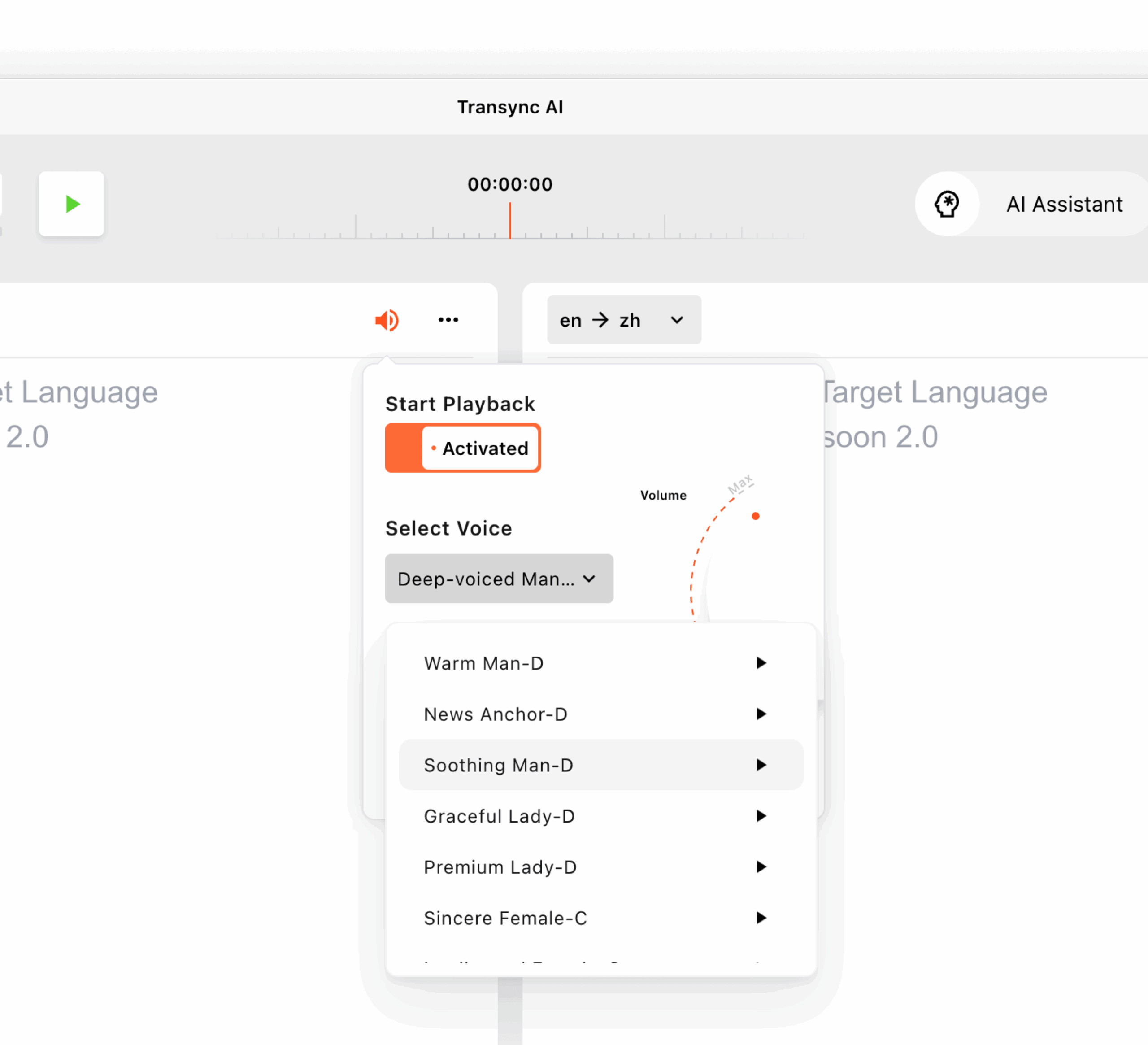
Transsync AIは、複数のAI音声オプションと音声プレビューに対応しています。ユーザーはセッション前に利用可能な音声を聞き、会議、授業、デモンストレーション、またはカジュアルな会話に適した音声を選択できます。.
また、音声クローン機能もサポートしており、翻訳出力にユーザー自身の声に似た音声を使用できます。音声データは安全に保管され、AIの学習には使用されません。.
詳細はこちらをご覧ください AI音声翻訳&音声出力.
テスト5:会話の前、最中、後のいずれにも合致しているか?
 テスト5:会話の前、最中、後のいずれにも合致しているか?
会話翻訳ツールは、誰かが話している間だけ評価されるべきではない。.
ワークフロー全体は3つの段階から構成されています。.
会話の前に
ユーザーは以下のことを行う必要があるかもしれません。
- 言語ペアを選択してください
- 名前と専門用語を追加する
- 会議の議題を説明してください
- 翻訳された音声を選択してください
- マイクをテストする
- システムオーディオ設定を確認する
会話中
ユーザーは以下のことを行う必要があります。
- 字幕を読む
- 音声出力を聞く
- スライドとドキュメントを切り替える
- 間を置かずに返答してください
- 重要な数字を正しく
- 複雑な制御の管理を避ける
会話の後
ユーザーは以下のことを行う必要があるかもしれません。
- 議事録を確認する
- 決定事項を確認する
- アクション項目を特定する
- 要約を共有する
- 名前と日付を確認してください
- 次の会議の準備をしましょう
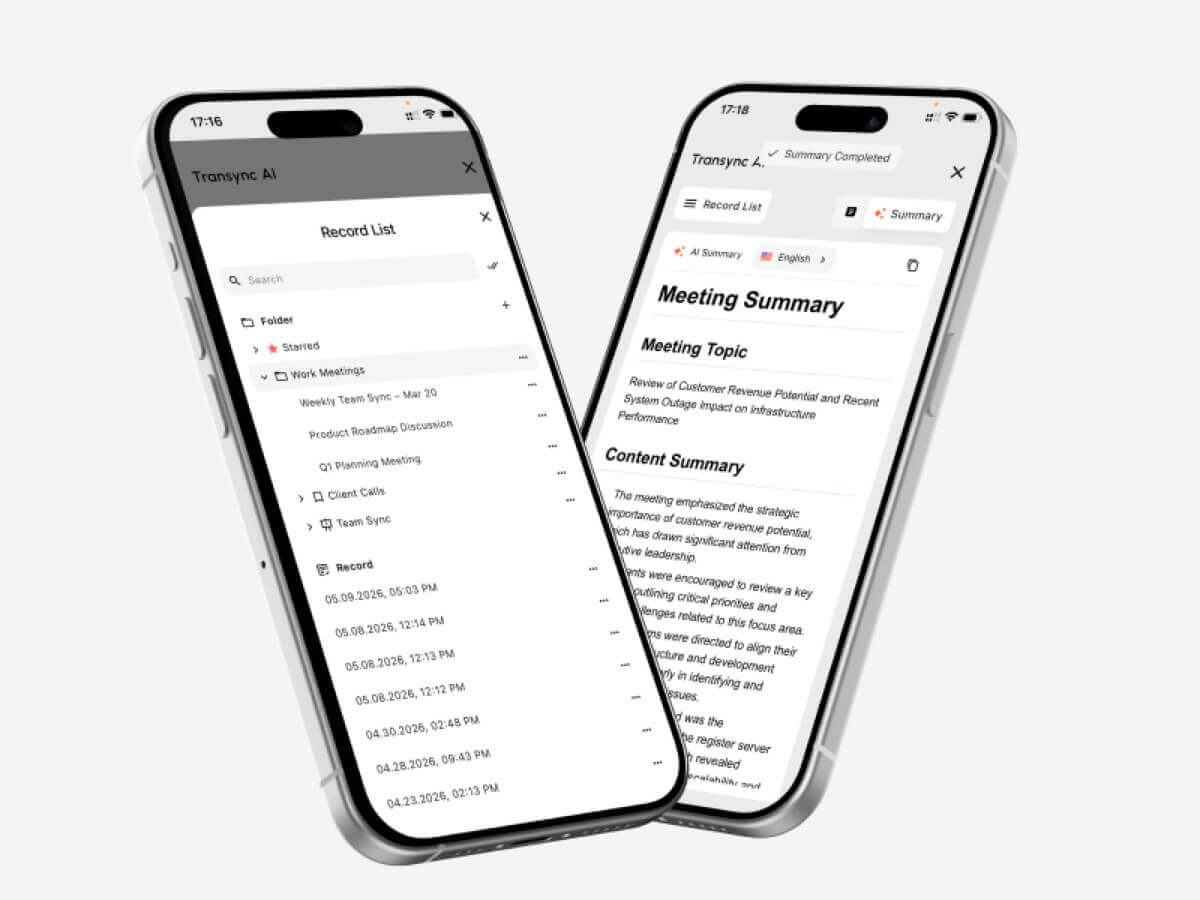
Transsync AIは、リアルタイム翻訳とAIによる会議議事録作成を組み合わせたサービスです。多言語での会話後、ユーザーは記憶や手書きのメモだけに頼るのではなく、重要な情報を確認できます。.
 会話翻訳ツール vs. テキスト翻訳ツール
 会話翻訳ツール vs. テキスト翻訳ツール
これらのツールはそれぞれ異なる問題を解決する。.
| 特徴 | テキスト翻訳 | 会話翻訳者 |
| メイン入力 | 入力または貼り付けたテキスト | 生のスピーチ |
| 交流 | 通常は一度に一文ずつ | 継続的な双方向の議論 |
| 速度要件 | 適度 | 非常に高い |
| 音声認識 | 通常はオプション | 不可欠 |
| スピーカー交代 | 関係ない | スムーズに処理する必要がある |
| 音声出力 | 時々入手可能 | 口頭でのコミュニケーションに重要 |
| 会議サポート | 通常は限定的 | 多くの場合、主要なユースケース |
| コンテキスト設定 | 様々 | プロフェッショナルな用途に重要 |
| 会議メモ | レア | 高度なツールで利用可能 |
| 最適な用途 | メッセージ、ウェブページ、短いテキスト | 電話、授業、会議、面接 |
一般的なテキスト翻訳ツール Google翻訳 フレーズ、メッセージ、簡単な旅行に関する質問などに適しているかもしれません。.
会議での会話を専門に翻訳するツールは、会話が途切れることなく続き、参加者双方が応答する必要がある場合に特に役立ちます。.
会話翻訳機 vs. 人間の通訳者
AIと人間の解釈は互換性がない。.
| 要素 | AI会話翻訳機 | 人間の通訳 |
| 可用性 | 通常はすぐに開始できます | 多くの場合、スケジュール調整が必要となる |
| 料金 | サブスクリプションまたは使用量ベース | 通常は時間単位またはイベント単位で料金が請求されます。 |
| 定例会議 | 頻繁に使用するのに適しています | 日常使いには高価かもしれない |
| 文化的なニュアンス | 微妙な意味を見逃してしまう可能性がある | 意図や文脈を読み取る能力が向上した |
| 技術用語 | キーワードで改善可能 | 通訳者の専門性によります |
| 会議メモ | 自動的に生成される場合があります | 通常は別のサービス |
| 法的責任 | 限定 | 専門的な基準が適用される場合があります。 |
| 最適な使用方法 | 定例会議や会話 | 重大なリスクを伴う、デリケートなコミュニケーション |
エラーが発生すると以下のような影響が出る可能性がある場合は、資格のある人間の通訳者を使用してください。
- 法的権利
- 医療
- 安全性
- 移民ステータス
- 財務上の決定
- 契約条件
- 政府の手続き
- デリケートな雇用問題
AI翻訳は一般的に、定型的なビジネス電話、社内会議、授業、デモンストレーション、日常的なコミュニケーションに適しています。.
会話翻訳ツールはどのような場面で最も役立ちますか?
国際ビジネス会議
双方向通訳ツールは、参加者がプロジェクト、スケジュール、費用、技術要件などを各自の希望する言語で話し合うのに役立ちます。.
キーワードと文脈を活用することで、企業名、製品名、専門用語の扱い方を改善できる。.
サプライヤーと顧客との電話
リアルタイム字幕により、番号、配送日、注文の詳細、モデルコードなどを簡単に確認できます。.
重要な約束事項については、電話会議後も書面で確認しておくべきです。.
オンライン授業と講義
生徒は教師が話し続ける間、翻訳された字幕を見ることができます。AIによるメモは、授業後に参照できる資料となります。.
インタビュー
低遅延の翻訳ツールを使えば、長い沈黙を減らし、双方がより自然な形で追加の質問をしやすくなる。.
製品デモンストレーション
フローティング字幕を使用すると、参加者は翻訳を隠すことなくソフトウェアやプレゼンテーションを視聴できます。.
展示会と対面でのミーティング
会話翻訳ツールは、イベント、オフィス、キャンパス、ビジネス訪問などにおける迅速な話し合いをサポートできます。.
重要な会話の前には、インターネット接続とマイクの環境をテストしておくべきです。.
Transsync AIをZoom、Teams、Google Meetで使用する
Transsync AIは、会議プラグインではなく、スタンドアロンソフトウェアとして動作します。.
以下のものと並行して実行できます。
- Zoom
- Microsoft Teams
- Google Meet
字幕に関しては、このアプリは会議の音声をキャプチャし、インターフェースまたはフローティング字幕ウィンドウに二言語翻訳を表示できます。.
翻訳された音声を出力する場合、他の会議参加者が生成された翻訳を聞くことができるように、システムオーディオまたは仮想マイクを設定する必要がある場合があります。.
このスタンドアロン方式は、複数の会議プラットフォームを併用するユーザーにとって便利です。.
見る Zoom、Teams、Google Meet 向け AI ライブ会議翻訳.
実践的な会話翻訳者テストスクリプト
ツールを比較する際は、以下のスクリプト構造を使用してください。.
パート1:はじめに
参加者それぞれが、自身の役割、所属企業、会議の目的を紹介します。.
パート2:数字と日付
含む:
- 価格
- パーセンテージ
- 型番
- 配達日
- 数量
パート3:専門用語
実際にあなたの仕事で使われている用語を5つ選びなさい。.
第4部:自然による中断
発言者のうち1名に、前の発言を明確化または訂正してもらいましょう。.
パート5:混合言語スピーチ
商品名、部署名、または略称を別の言語で記載してください。.
パート6:フォローアップ質問
前の回答に基づいて質問をしてください。.
第7部:要約
参加者のうち1人に、決定内容と今後の手順を要約して発表してもらいます。.
会話翻訳機の評価スコアカード
| メトリック | 評価対象 |
| 音声認識 | それは、話し手が実際に言ったことを正確に捉えていたか? |
| 翻訳の精度 | 意図した意味は保たれていたか? |
| レイテンシー | 結果は十分早く届きましたか? |
| 双方向の流れ | 両参加者は自然な反応を示すことができたでしょうか? |
| 用語 | 名称と専門用語は一貫していましたか? |
| 字幕体験 | 字幕は読みやすく、安定していましたか? |
| 音声出力 | 翻訳された音声は明瞭で自然でしたか? |
| 会議のワークフロー | そのツールは既存のプラットフォームに適合しましたか? |
| 長時間のセッションにおける安定性 | パフォーマンスは一貫していましたか? |
| 会議後の価値 | メモや要約は役に立ちましたか? |
実際のスピーカー、デバイス、ネットワーク環境、言語ペア、会議時間でツールをテストしてください。短いプロモーションデモでは、あらゆる作業環境を再現することはできません。.
Transsync AIの会話翻訳料金プラン
| プラン | 価格 | 含まれる使用方法 | 最適な用途 |
| 無料 | $0 | 新規ユーザーの場合40分 | 初期テスト |
| 個人プレミアム | $月額8.99 | 会員資格有効期間中の10時間 | 個人および定期的な会合 |
| 企業 | $24.99/月/座席 | 座席1席あたり月最大40時間 | チームと組織 |
| タイムカード | 時給$0.70から | 追加の翻訳時間 | 月間需要が変動するユーザー |
タイムカードの利用時間には有効期限はありませんが、会員資格が有効な期間のみ使用できます。.
料金を比較する際は、実際の月間通話時間を見積もってください。月額料金が安くても、含まれる時間が会議に必要な時間よりも少なければ、費用対効果が低い可能性があります。.
会話翻訳ソフトウェアの限界
会話翻訳ツールは、あらゆる環境で完璧に機能するわけではありません。.
一般的な制限事項は以下のとおりです。
- 複数のスピーカーが同時に話している
- 大きな背景ノイズ
- 部屋の反響音
- マイクの性能が低い
- インターネット接続が不安定です
- 非常に速い話し方
- 強い地域訛り
- 不完全な文
- 地元のスラング
- 迅速なコードスイッチング
- 曖昧な用語
- 次の話者の音声と重なる音声再生
Transsync AIには、製品固有の制限事項もいくつかあります。
- オフラインモードは利用できません
- 画像認識はサポートされていません
- 静的テキストの翻訳は、その主な用途ではありません。
- これは会議プラグインではなく、スタンドアロンソフトウェアです。
- アカウントの使用状況はデバイス全体で累積的にカウントされます
- 翻訳品質は依然として音声とネットワークの状態に依存します
これらの制約があるため、スキャン画像、文書全体の翻訳、ウェブサイトのローカライズよりも、リアルタイムの多言語コミュニケーションに適している。.
よくある質問:会話翻訳ツール
会話翻訳機とは何ですか?
会話翻訳機は、話し言葉を聞き取り、ライブでの議論中に翻訳された字幕や音声出力を生成します。.
最も優れた会話翻訳ツールは何ですか?
最適なツールは、使用言語、会議プラットフォーム、音声環境、専門用語、会議時間によって異なります。ビジネス会議の場合は、低遅延、双方向翻訳、字幕、音声出力、コンテキスト制御、会議メモ機能を優先的に考慮しましょう。.
会話翻訳ツールは、両方の言語を自動的に検出できますか?
一部のツールは、会話中に選択された2つの言語を区別できます。Transync AIは、対応する双方向翻訳タスクにおいて、言語の自動区別をサポートします。.
Transsync AIはZoomの会話を翻訳できますか?
はい。Transync AIは、Zoom、Microsoft Teams、Google Meetと連携して動作し、リアルタイムのバイリンガル字幕と翻訳音声ワークフローを提供できます。.
Transsync AIは音声翻訳に対応していますか?
はい。AI音声放送、複数の音声オプション、音声プレビュー、音声クローンに対応しています。.
会話翻訳機は専門用語を理解できますか?
パフォーマンスはツールと用語によって異なります。Transync AIでは、会話の前にキーワードや背景情報を追加できます。.
会話翻訳ツールはオフラインでも動作しますか?
旅行ツールの中には、オフラインで利用できる言語パックが限られているものもあります。Transync AIは現在インターネット接続が必要で、オフライン翻訳には対応していません。.
AIは人間の通訳に取って代わることができるのか?
AIは、定型的な会議、授業、電話、日常会話をサポートできます。ただし、法律、医療、外交、金融など、重要なコミュニケーションにおいては、プロの通訳者を利用することをお勧めします。.
最後に:翻訳だけでなく、会話そのものもテストしましょう
あ 会話通訳者 評価は、翻訳された一文の質だけでなく、人々の間で何が起こるかによっても行われるべきである。.
参加者双方とも自然な会話ができるか?話題が変わる前に翻訳結果が表示されるか?専門用語は理解できるか?ユーザーは翻訳結果を快適に読んだり聞いたりできるか?このツールは、議論の前、最中、後を通して役立つか?
Transync AIは、60言語の双方向翻訳と、バイリンガル字幕、AI音声放送、音声クローン、キーワードとコンテキスト、AI会議メモ、ピクチャーインピクチャー字幕を組み合わせたサービスです。.
そのため、翻訳が最も効果を発揮するのは、人々が質問をしたり、アイデアを共有したり、意思決定をしたりしている最中、つまり生の会話の中で翻訳を行う必要がある場合です。.
まず、次のサイトにアクセスしてください。 Transync AI, 探索する リアルタイム翻訳ツール, または、お好みのデバイス用のアプリケーションをダウンロードしてください。.
 🤖
🤖 