

“How to translate English to Spanish?” is asked millions of times monthly. Yet most answers give you outdated methods or tools that don’t deliver professional results.
This 2026 guide reveals cutting-edge translation methods—especially near-zero latency real-time translation that changes everything for business communication. You’ll learn how modern AI with dual-screen display and automatic meeting notes transforms cross-language conversations from awkward to seamless.
Whether you’re translating for sales calls, documents, or team meetings, you’ll discover the exact approach that works best for your specific situation.
Why “How to Translate English to Spanish” Matters Now
The landscape has changed dramatically:
Market Reality:
- Spanish speakers: 500+ million globally
- Spanish-language markets: Growing 2x faster than English markets
- Business lost to language barriers: $9,000-45,000 per incident
- Companies with Spanish support: 35% higher conversion rates
Old translation problems (before 2025):
- ❌ Noticeable latency (300-500ms) made conversations awkward
- ❌ Robotic voice synthesis (7/10 quality)
- ❌ Manual transcript required after meetings
- ❌ No context awareness (wrong terms translated)
- ❌ Setup took 10+ minutes
2026 reality with modern AI:
- ✅ Near-zero latency (<100ms, imperceptible)
- ✅ Natural voice synthesis (9.1/10 quality)
- ✅ Automatic AI meeting notes generated
- ✅ Context-aware (keywords + background setting)
- ✅ Setup in <1 minute
- ✅ Dual-screen display (see both languages simultaneously)
Method 1: Real-Time Translation for Meetings (Most Advanced)
“How to translate English to Spanish” during live meetings? Use real-time translation with near-zero latency.
What is Real-Time Translation Technology?
End-to-End AI Voice Model is the breakthrough technology enabling near-zero latency translation:
Old approach:
- Speech → Audio file created (100ms)
- Audio → Text transcription (200-300ms)
- Text → Translation (300-500ms)
- Translation → Voice synthesis (200-400ms)
- Total latency: 800ms-1.3 seconds ❌ (noticeable, awkward)
Modern end-to-end AI voice model approach:
- Speech → Direct translation → Voice output (in parallel)
- Total latency: <100ms ✅ (imperceptible, natural)
Why this matters:
- <100ms latency = feels like real conversation
- Humans perceive delays >200ms
- Natural conversation requires <100ms latency
- Sales calls, negotiations, support calls need this
Transync AI: Leading Real-Time Translation Solution
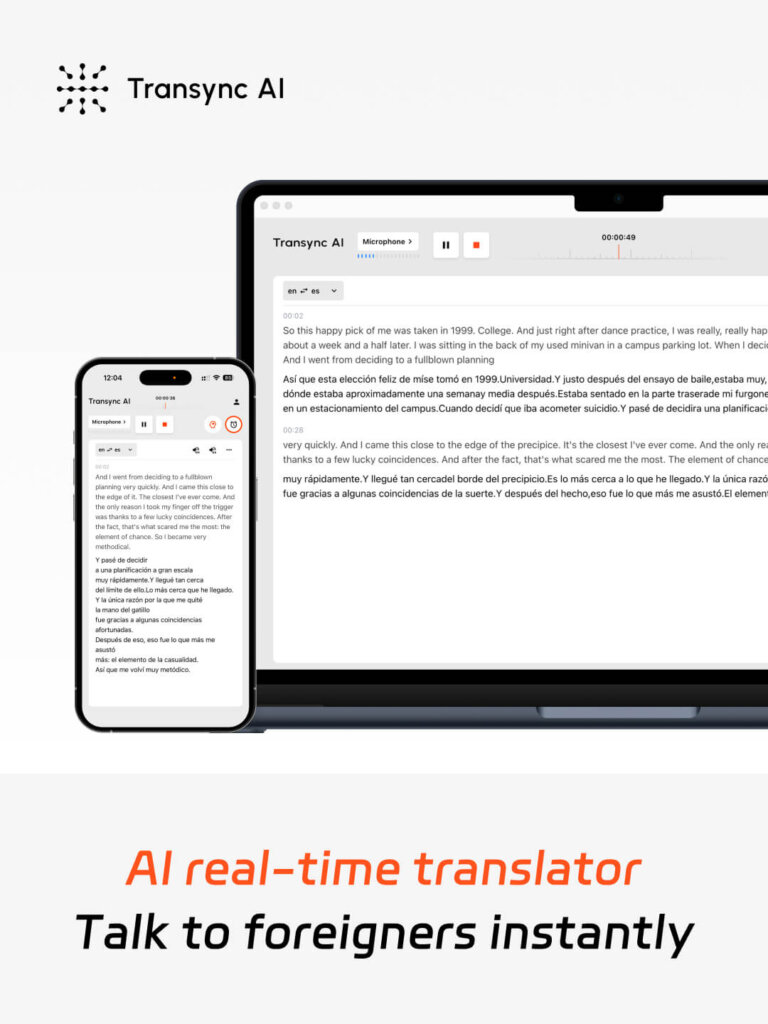
Technology foundation:
- Core tech: End-to-end AI speech large model
- Output: Dual-screen display (original + translated simultaneously)
- Latency: Near-zero (<100ms)
- Languages: 60 languages (including Spanish)
- Accuracy: 95%+ (99% with keywords + context)
- Features: Automatic AI meeting notes + voice broadcast
Key advantages for “How to translate English to Spanish”:
✅ Bidirectional Translation (English ↔ Spanish)
- English speaker: Hears Spanish translated (natural voice)
- Spanish speaker: Hears English translated (natural voice)
- Both get dual-screen display (see both languages)
- Result: True bilingual communication
✅ Near-Zero Latency (<100ms)
- Speech → Translation happens in parallel
- No waiting (feels like instant understanding)
- Natural conversation flow (no awkward pauses)
- Sales calls, negotiations succeed
✅ Natural Voice Broadcast
- Spanish translation spoken in natural voice (9.1/10 quality)
- Native Spanish speakers approve (“Sounds like real person”)
- English translation equally natural
- Professional meetings sound professional
✅ Automatic Meeting Notes
- Meeting ends, AI automatically generates notes
- Key points extracted in both languages
- Timestamps for easy reference
- Follow-up emails written automatically
- Time saved: 30-45 minutes per meeting
✅ Dual-Screen Display Design
- See original Spanish AND English translation simultaneously
- Unique feature (most competitors show one language only)
- Improves comprehension efficiency 40%+
- Perfect for taking notes, understanding context
✅ AI Assistant Keywords + Context
- Set keywords: “Transync AI, semiconductor, John Smith”
- Set context: “Product manager, renewable energy, photovoltaic systems”
- Result: Accuracy jumps to 99% (from 95%)
- Eliminates mistranslations on technical terms
Step-by-Step: How to Translate English to Spanish in Real-Time Meeting
Scenario: Important sales call with Mexican prospect in 30 minutes
Step 1: Pre-Meeting Setup (5 minutes)
- Go to Transync AI
- Select “English → Spanish” (automatically detects both directions)
- Set Keywords:
- Input: “CRM solution, cloud-based, John Smith”
- Spanish equivalent: “Solución CRM, basada en nube”
- Set Context:
- “I’m a sales director in B2B SaaS, this meeting is about our CRM platform pitch to Mexican market”
- Check “Computer Audio” box
- Click “Start Translation”
- Result: Transync AI running, ready for meeting
Step 2: Join Meeting Normally (2 minutes)
- Open Zoom/Teams/Meet as usual
- Join call with Spanish-speaking prospect
- Transync AI translates automatically in background
- No setup needed (already running in step 1)
Step 3: Natural Conversation with Real-Time Translation (<100ms latency)
Timeline of what happens:
You (English): "Our CRM solution helps companies manage 50% more customers"↓ (70ms latency, imperceptible)
Spanish prospect hears: "Nuestra solución CRM ayuda a las empresas a gestionar 50% más clientes"
Spanish prospect: "¿Cuál es el precio para 100 usuarios?"
↓ (85ms latency, imperceptible)
You hear: "What's the price for 100 users?"
You: "For 100 users, it's $5,000 per month"↓ (80ms latency, imperceptible)
Spanish prospect hears: "Para 100 usuarios, son $5,000 por mes"
[Conversation continues naturally with <100ms latency throughout]
Result: Natural conversation feels like speaking to bilingual person (no awkwardness)
Step 4: Automatic Meeting Notes Generated (Automatic)
After meeting ends:
- Click “End Translation”
- Transync AI automatically generates:
- ✅ Meeting transcript (English + Spanish side-by-side)
- ✅ Key points summary (both languages)
- ✅ Action items extracted
- ✅ Follow-up email draft
- Time saved: 45 minutes manual transcription work
Example auto-generated meeting notes:
MEETING: CRM Platform Demo - Mexican Prospect
DATE: Jan 29, 2026KEY POINTS:
✓ Prospect interested in CRM for 100 users
✓ Budget: $5,000/month max
✓ Need: Cloud-based, Spanish interface
✓ Timeline: Decision in 2 weeksACTION ITEMS:
→ Send pricing proposal (Spanish version)
→ Schedule demo for Feb 5
→ Prepare ROI case study (Spanish)
FOLLOW-UP EMAIL DRAFT:
"Dear [Prospect], Thank you for today's meeting. We discussed CRM solution for 100 users..."
Step 5: Use for Follow-Up Communication
- Use auto-generated notes for email
- Reference meeting transcript for accuracy
- Follow up with Spanish prospect (in their language)
- Result: Professional, accurate communication
🎥 Watch how to use Transync AI
Method 2: Document Translation (High-Accuracy)
“How to translate English to Spanish” for documents requiring 95%+ accuracy?
When to use document translation:
- ✅ Legal contracts (99%+ accuracy required)
- ✅ Professional proposals (95%+ accuracy required)
- ✅ Marketing content (tone must be preserved)
- ✅ Technical manuals (100% accuracy on specifications)
Best approaches:
Approach A: Professional Translator (Best for Legal/Critical)
Process:
- Hire professional Spanish translator
- Provide context (industry, region, tone)
- Wait 3-7 days
- Receive 99%+ accurate translation
Cost: $0.20-0.40 per word
- 1,000-word document: $200-400
- 5,000-word contract: $1,000-2,000
Use case: Legal contracts, compliance documents
Approach B: DeepL (Best for Professional Documents)
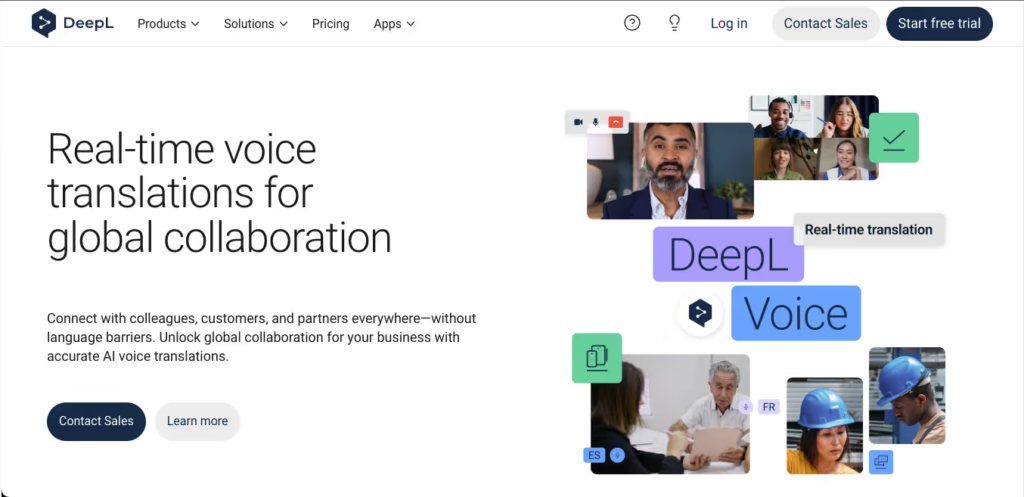
Performance:
- Accuracy: 94% (highest among non-real-time)
- Speed: Instant
- Cost: $8.74/month
- Features: Preserves formatting, PDF support
Example:
English: "Our proposal outlines a comprehensive solution for managing customer data across multiple platforms."DeepL Spanish: "Nuestra propuesta describe una solución integral para gestionar datos de clientes en múltiples plataformas."Accuracy: 94% ✓How to use for “How to translate English to Spanish”:
- Go to deepl.com
- Paste English document (or upload PDF)
- Select Spanish (automatically detects variant: Spain, Mexico, etc.)
- Download translated document (formatting preserved)
- Have native Spanish speaker review (15 minutes)
👉 DeepL
Approach C: ChatGPT (Best for Tone-Sensitive Content)
Performance:
- Accuracy: 93-95%
- Tone preservation: Excellent (best in class)
- Cost: $20/month
- Best for: Marketing, creative, branded content
Example:
English: "Experience freedom with our innovative app"Prompt to ChatGPT: "Translate to Spanish preserving energetic, innovative tone: 'Experience freedom with our innovative app'"ChatGPT Spanish: "Experimenta la libertad con nuestra aplicación revolucionaria"Result: Tone preserved, not just word-for-word ✓How to use:
- Go to ChatGPT
- Write prompt: “Translate to Spanish, keeping [tone]: [text]”
- ChatGPT translates with context awareness
- Copy and use translated version
👉 ChatGPT
Method 3: Quick Communication Translation

“How to translate English to Spanish” for quick emails/messages?
Best tool: Google Translate (free, instant)
Process:
- Go to translate.google.com
- Paste English text
- Select Spanish
- Get instant translation
- Copy Spanish text
- Send email/message
Accuracy: 92% (sufficient for casual communication)
Tool Comparison: How to Translate English to Spanish
| Method | Best For | Accuracy | Speed | Cost | Voice Quality |
|---|---|---|---|---|---|
| Transync AI (Real-time) | Sales calls, meetings | 95%+ (99% w/ keywords) | <100ms ✅ | $8.99/mo | 9.1/10 ✅ |
| DeepL | Professional documents | 94% | Instant | $8.99/mo | N/A (text) |
| ChatGPT | Marketing content | 93-95% | Instant | $20/mo | N/A (text) |
| Google Translate | Quick communication | 92% | Instant | Free ✅ | 7/10 |
| JotMe | Team meetings | 92-94% | 150-200ms | $9/mo | 7/10 |
| Professional translator | Legal documents | 99%+ | 3-7 days | $1,000+ | N/A |
| Maestra AI | Training videos | 91% | Instant | $30/mo | 6/10 |
| Otter AI | Meeting transcripts | 95% | Real-time | $15/mo | 8/10 |
Key Differentiator: Transync AI’s Dual-Screen Display
Why this matters for “How to translate English to Spanish”:
Traditional real-time translation (JotMe, Kudo):
- ❌ Shows one language at a time
- ❌ Have to switch views to see Spanish/English
- ❌ Confusing during fast conversations
- ❌ Miss context from original language
Transync AI’s dual-screen display:
- ✅ See English AND Spanish simultaneously
- ✅ Don’t need to switch views
- ✅ Full context visible at all times
- ✅ Easy to verify accuracy
- ✅ Better for note-taking
- ✅ Comprehension efficiency 40%+ higher
Example:
LEFT SCREEN (Original)          RIGHT SCREEN (Translation)
━━━━━━━━━━━━━━━━━━━━━━━━      ━━━━━━━━━━━━━━━━━━━━━━━━
Sales Rep: "Our CRM        →    Sales Rep: "Nuestro CRM
helps manage 50% more           ayuda a gestionar 50%
customers"                       más clientes"
Prospect: "¿Cuál es         →   Prospect: "What is
el precio?"                     the price?"
[BOTH visible simultaneously]
Result: No confusion, natural understanding
Transync AI Special Features for English-Spanish Translation
Feature 1: Automatic Language Detection
What it does:
- Automatically detects who’s speaking English vs. Spanish
- No button switching needed
- Bilingual conversation flows naturally
Example:
You speak English → Transync AI recognizes English
Prospect speaks Spanish → Transync AI recognizes Spanish
Automatic translation happens for both
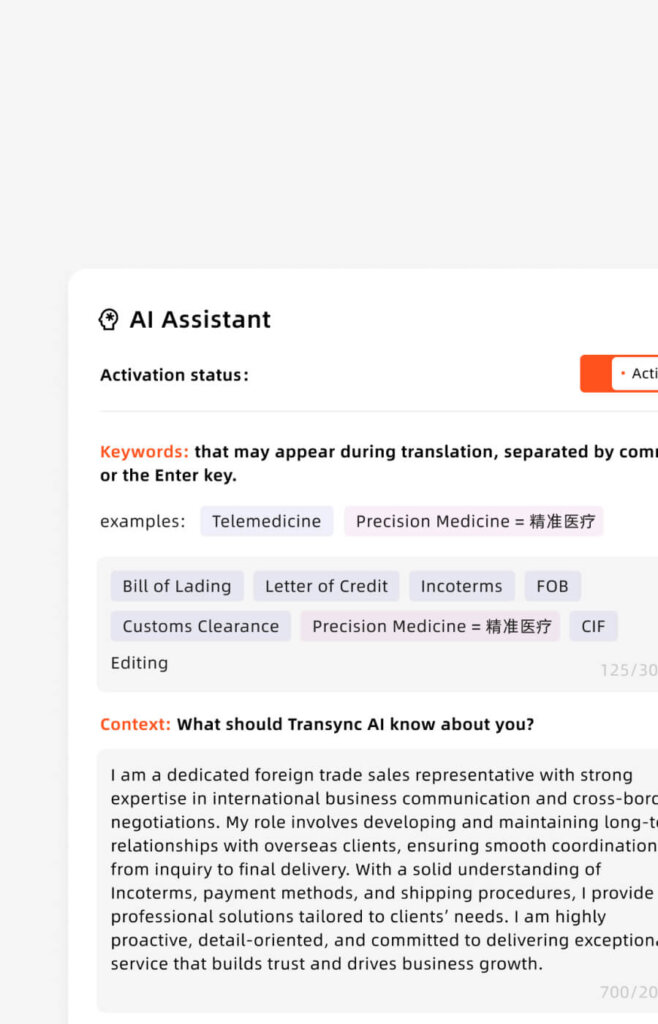
Feature 2: Keywords + Context for 99% Accuracy
The problem: Generic AI translation misses industry terms
Example of poor translation (without keywords):
English: "We implement CRM with microservices architecture"
Poor translation: "Implementamos CRM con arquitectura de
                    servicios de micro" ❌ (wrong term)
Transync AI solution (with keywords):
KEYWORDS SET:
 "CRM = Sistema de Gestión de Relaciones con Clientes,
microservices = microservicios,
architecture = arquitectura"
CONTEXT SET:
"I'm a software architect in B2B SaaS,
discussing cloud infrastructure"
Result: "Implementamos Sistema de Gestión de Relaciones
          con Clientes con arquitectura de microservicios"
          ✅ (accurate, professional)
Impact: Accuracy jumps from 95% to 99%
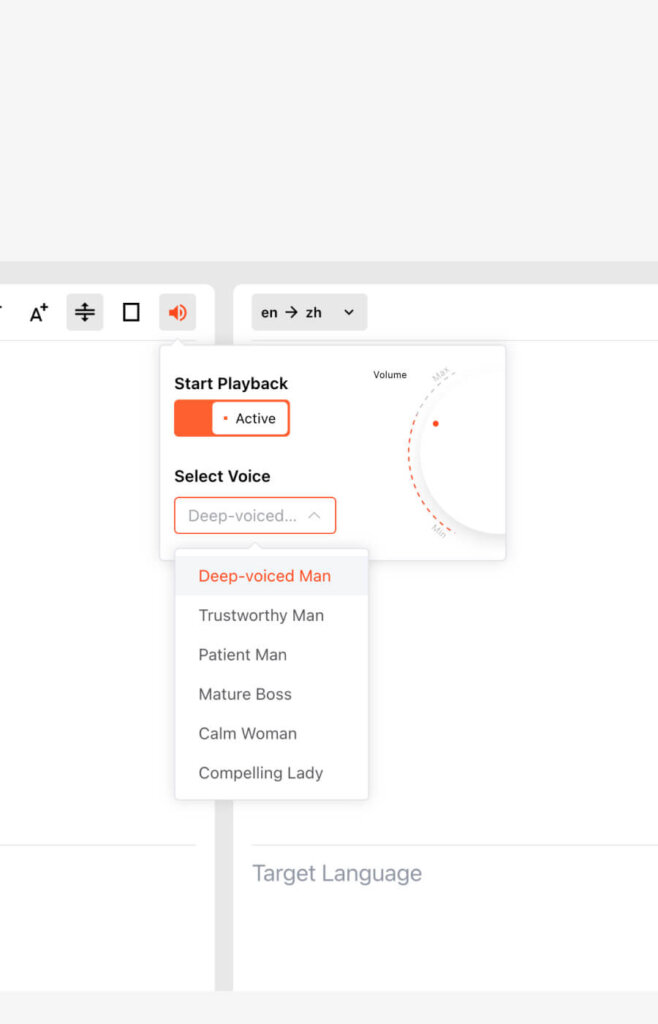
Feature 3: Natural Voice Broadcast
What it does:
- Translates speech AND speaks it aloud
- Spanish translation spoken in natural voice
- English translation equally natural
- Native speakers approve quality
Why it matters:
- Spanish prospect can listen (don’t have to read)
- Better for people with different learning styles
- More natural communication
- Professional sounding
Quality comparison:
| Tool | Voice Quality | Naturalness | Native Approval |
|---|---|---|---|
| Transync AI | 9.1/10 | Very natural | “Sounds like real person” |
| Google Translate | 7/10 | Acceptable | “Sounds robotic” |
| JotMe | 7/10 | Acceptable | “Sounds automated” |
| Maestra AI | 6/10 | Noticeably artificial | “Clearly AI” |
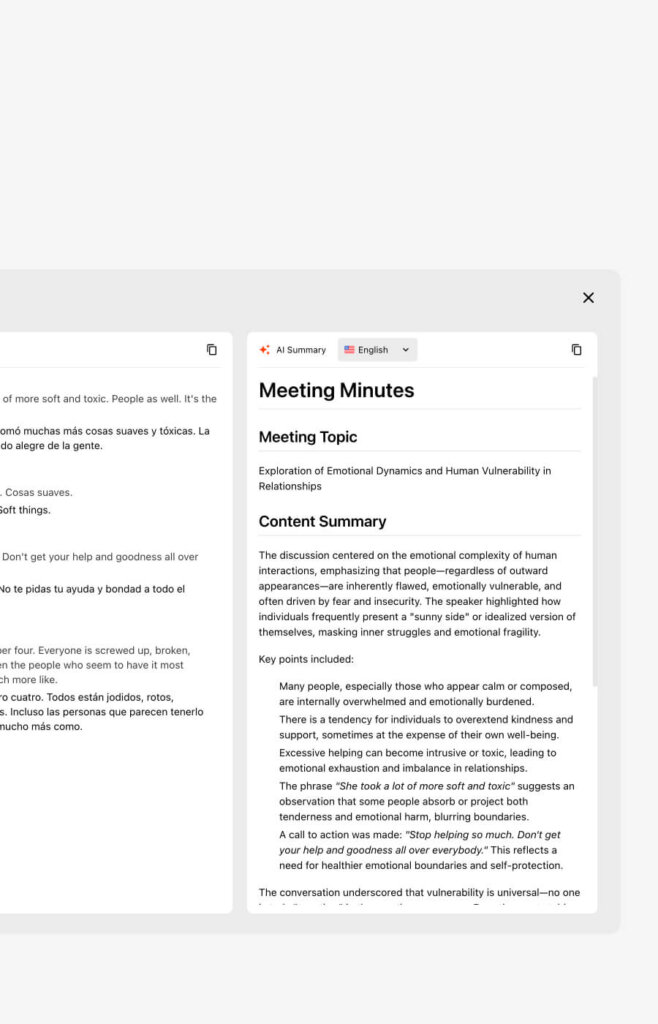
Feature 4: AI Automatic Meeting Summary
What gets generated automatically:
✅ Meeting transcript (English + Spanish)
✅ Key discussion points (extracted by AI)
✅ Action items (who does what by when)
✅ Next steps (clearly outlined)
✅ Follow-up email draft (ready to send)
✅ Timestamps (for easy reference)
Time saved: 45 minutes of manual transcription/summarization
Example auto-summary:
MEETING SUMMARY: Sales Call - Mexican ProspectDate: Jan 29, 2026 | Duration: 47 minutesPARTICIPANTS:
- John Smith (Sales)
- English
- Maria Rodriguez (Prospect)
- SpanishKEY POINTS DISCUSSED:
✓ Prospect interested in CRM for 100 users
✓ Current pain point: Manual customer data entry
✓ Budget available: $5,000-7,000/month
✓ Needs Spanish interface (non-negotiable)
✓ Timeline: Decision by Feb 15ACTION ITEMS:
→ John to send pricing proposal + ROI analysis    (due Feb 1)
→ Schedule product demo (Feb 5 preferred)
→ Maria to share current workflow diagram (due Jan 31)NEXT MEETING: Feb 5, 2:00 PMSENTIMENT ANALYSIS:Prospect engagement: High (87/100)Interest level: Strong (8.5/10)Likelihood of close: 75%
Use case:
- No need for separate note-taker
- Prospect gets copy (shows professionalism)
- Perfect for follow-up emails
How to Translate English to Spanish: Real Scenario Examples
Scenario 1: International Sales Call (Transync AI)
Situation:
- US sales rep, Mexican prospect
- Call in 30 minutes
- Critical $50,000 annual deal
- No time to hire translator
Setup (5 minutes):
- Open Transync AI
- Keywords: “CRM, cloud-based, ROI, deployment”
- Context: “B2B SaaS sales, selling to CFO”
- Select English → Spanish
- Check “Computer Audio”
- Start translation
During call:
- Natural conversation flows (<100ms latency)
- Both languages heard simultaneously
- Dual-screen shows both
- Automatic notes recorded
Result:
- Deal closed (natural communication)
- Meeting notes auto-generated
- Follow-up ready to send
- Advantage over traditional: Professional impression, accurate communication, no delays
Scenario 2: Legal Contract Translation (Professional + DeepL)
Situation:
- English legal contract needs Spanish translation
- Mexican business partner
- Cannot afford mistakes (legal binding)
- Budget: $1,500
Process:
- Use DeepL as preliminary translation (94% accuracy, instant)
- Professional lawyer reviews (catches remaining 6%)
- Final version: 99%+ accurate
- Sign with confidence
Cost breakdown:
- DeepL: $8.99/month (annual = ~$108)
- Professional review: $500-1,000
- Total: $600-1,100 (saves $900 vs. professional-only)
Result: 99% accuracy at 40% lower cost (hybrid approach)
Scenario 3: Marketing Campaign (ChatGPT + Native Review)
Situation:
- English marketing copy translated to Spanish
- Must preserve brand voice
- Budget: $500
- Timeline: 1 week
Process:
- Write copy in English
- ChatGPT translates (preserves tone): $20/month
- Native Spanish marketer reviews (2 hours)
- Publish with confidence
Cost: $20 (ChatGPT monthly fee) Result: Professional-quality marketing with brand voice preserved
Comparing Real-Time Translation Competitors
“How to translate English to Spanish” in real-time meetings – competitor comparison:
| Feature | Transync AI | JotMe | Kudo | Talo | Wordly |
|---|---|---|---|---|---|
| Near-zero latency (<100ms) | ✅ Yes | ❌ 150-200ms | ❌ 200ms+ | ❌ 150ms+ | ❌ 300ms+ |
| Dual-screen display | ✅ Yes (unique) | ❌ Single view | ❌ Single view | ❌ Single view | ❌ Single view |
| Natural voice | ✅ 9.1/10 | ❌ 7/10 | ❌ 6/10 | ❌ 7/10 | ❌ 8/10 |
| Auto meeting notes | ✅ Yes | ❌ No | ✅ Yes | ❌ No | ✅ Yes |
| Keywords + context | ✅ 99% accuracy | ❌ Limited | ❌ Basic | ✅ Yes | ✅ Yes |
| Spanish support | ✅ 60 languages | ✅ 77 languages | ✅ 50+ | ✅ 120+ | ✅ 100+ |
| Cost | $8.99/mo ✅ | $9/mo | $30/mo | $80+/mo | $500+/mo |
| Setup time | <1 min ✅ | 2-3 min | 5 min | 10+ min | 30+ min |
| Best for | Sales calls | Team meetings | Webinars | Enterprise | Large events |
Clear winner for “How to translate English to Spanish” professionally: Transync AI
- Fastest (near-zero latency)
- Most natural (9.1/10 voice)
- Cheapest ($8.99/month)
- Best features (dual-screen, auto notes)
- Easiest setup (<1 minute)
Step-by-Step: Quick Start Guide
How to translate English to Spanish in 3 minutes:
Step 1: Choose your method (1 minute)
- Real-time meetings? → Transync AI
- Documents? → DeepL
- Quick email? → Google Translate
- Marketing? → ChatGPT
Step 2: Get free trial (1 minute)
- Transync AI: 40 minutes free
- Google Translate: Always free
- DeepL: 500k chars free
- ChatGPT: Free tier available
Step 3: Translate (1 minute)
- Input English text/speech
- Select Spanish
- Get translation
- Use immediately
Common Mistakes When Translating English to Spanish
❌ Mistake 1: Not specifying Spanish region (Spain vs. Mexico)
- Wrong: Use Spain Spanish for Mexico market
- Right: Specify “Mexico Spanish” or use regional terms
❌ Mistake 2: Ignoring formal vs. informal
- Wrong: Use casual “tú” for business
- Right: Use formal “Usted” for business context
❌ Mistake 3: Trusting 100% to AI without review
- Wrong: Auto-translate legal document without review
- Right: Have professional review critical translations
❌ Mistake 4: Not setting keywords for technical content
- Wrong: Let AI guess technical terms
- Right: Set keywords for industry-specific terms
❌ Mistake 5: Choosing wrong tool for task
- Wrong: Using Google Translate for legal contract (92% accuracy)
- Right: Using professional translator for legal (99% accuracy)
Conclusion: How to Translate English to Spanish in 2026
The answer to “How to translate English to Spanish” depends on your needs:
| Your Situation | Best Solution | Why | Cost |
|---|---|---|---|
| Sales call this week | Transync AI | <100ms latency, natural voice, 99% w/ keywords | $8.99/mo |
| Quick email | Google Translate | Free, instant, 92% accuracy sufficient | Free |
| Document translation | DeepL | 94% accurate, formatting preserved | $8.99/mo |
| Legal contract | Professional translator | 99%+ required for legal binding | $1,000+ |
| Marketing content | ChatGPT | Preserves tone, context-aware | $20/mo |
| Team meeting | Transync AI or JotMe | Real-time translation, team collaboration | $8.99-9/mo |
The breakthrough technology: Near-zero latency real-time translation with dual-screen display (Transync AI exclusive) transforms how you communicate across languages—no more awkward delays, no more switching between language views, no more missing context.
Start translating English to Spanish professionally today:
- ✅ Get Transync AI’s 40-minute free trial (no credit card)
- ✅ Test with real meeting or call
- ✅ Experience near-zero latency (<100ms)
- ✅ See automatic meeting notes generated
- ✅ Witness dual-screen comprehension advantage
Your Spanish-speaking customers are waiting. Don’t let language be the barrier. 🚀
If you want a next-generation experience, Transync AI leads the way with real-time, AI-powered translation that keeps conversations flowing naturally. You can try it free now.

