

Real-time translation apps have transformed global communication — making multilingual meetings, cross-border negotiations, and international team calls more accessible than ever. But as adoption grows across industries, so does a clearer picture of where these tools routinely fall short.
The reality is that not all real-time translation apps are built equal. Many professionals invest in a translation solution only to encounter latency issues, terminology errors, privacy concerns, or integration failures that undermine the very communication they were meant to support. In high-stakes environments — business negotiations, clinical discussions, legal proceedings, technical reviews — these problems are not minor inconveniences. They are operational risks.
This article identifies the seven most common problems with real-time translation apps that professionals encounter in 2026, explains why each problem occurs, and shows how Transync AI is specifically engineered to solve them — making it the most reliable choice for anyone who depends on accurate, seamless real-time translation.
Why Real-Time Translation Apps Fail: The Core Challenge
Most real-time translation apps are designed for general consumer use — prioritizing accessibility and simplicity over the depth of accuracy that professional environments demand. When deployed in specialized or high-pressure contexts, this design philosophy creates predictable failure patterns.
Understanding these failure patterns is the first step to choosing the right tool — and avoiding the costly consequences of choosing the wrong one.
Problem #1: High Latency That Disrupts Natural Conversation Flow
What the Problem Looks Like
You’re mid-negotiation on a Zoom call. Your counterpart finishes speaking in Mandarin. Three seconds pass. Five seconds. The translation finally appears — but the conversation has already moved on. Your response is delayed, your counterpart is confused, and the rhythm of the discussion is broken.
This is the latency problem — and it is the single most frequently cited complaint about real-time translation apps in professional settings.
Why It Happens
Most translation tools use a cascaded pipeline architecture:
- Speech recognition converts audio to text
- A separate translation engine converts the text
- A text-to-speech engine vocalizes the result
Each stage introduces its own processing delay. Compounded across three steps, total latency often reaches 2–6 seconds — far beyond what feels natural in live conversation.
How Transync AI Solves It
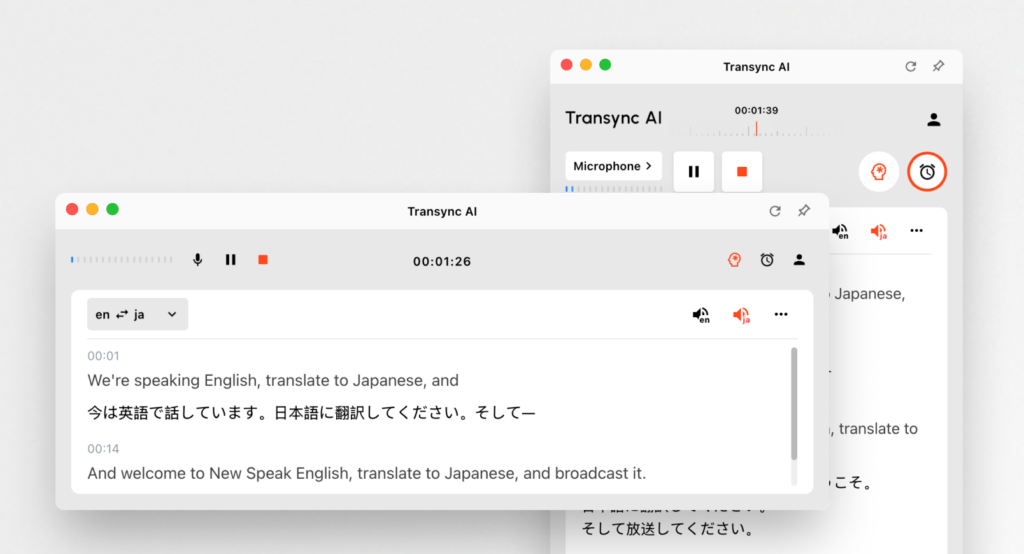
Transync AI is built on an end-to-end speech large model that processes audio holistically in a single unified pass — eliminating the compounding delays of cascaded architectures. The result is near-zero latency translation that feels instantaneous to participants, preserving the natural rhythm of live conversation even in fast-paced, high-stakes discussions.
“The translation keeps up with the speaker — I don’t feel like I’m waiting. It just flows.” — Senior Legal Counsel, Germany
Problem #2: Poor Accuracy for Technical or Industry-Specific Terminology
What the Problem Looks Like
An engineer on a supplier call asks about “GD&T compliance on the valve housing assembly.” The translation app renders it as something roughly equivalent to “geometric design and theory related to valve building.” The supplier team in Tokyo nods — they understood something completely different.
Downstream: rejected components, delayed shipment, and an expensive rework cycle that a precise translation would have prevented.
Why It Happens
Most real-time translation apps are trained on general-purpose text — web pages, subtitles, everyday speech. They have no mechanism for domain-specific calibration, meaning that specialized vocabulary in engineering, law, medicine, or finance is translated by surface meaning rather than professional intent. Technical acronyms are paraphrased. Compound legal terms are simplified. Proprietary product names are guessed at.
How Transync AI Solves It
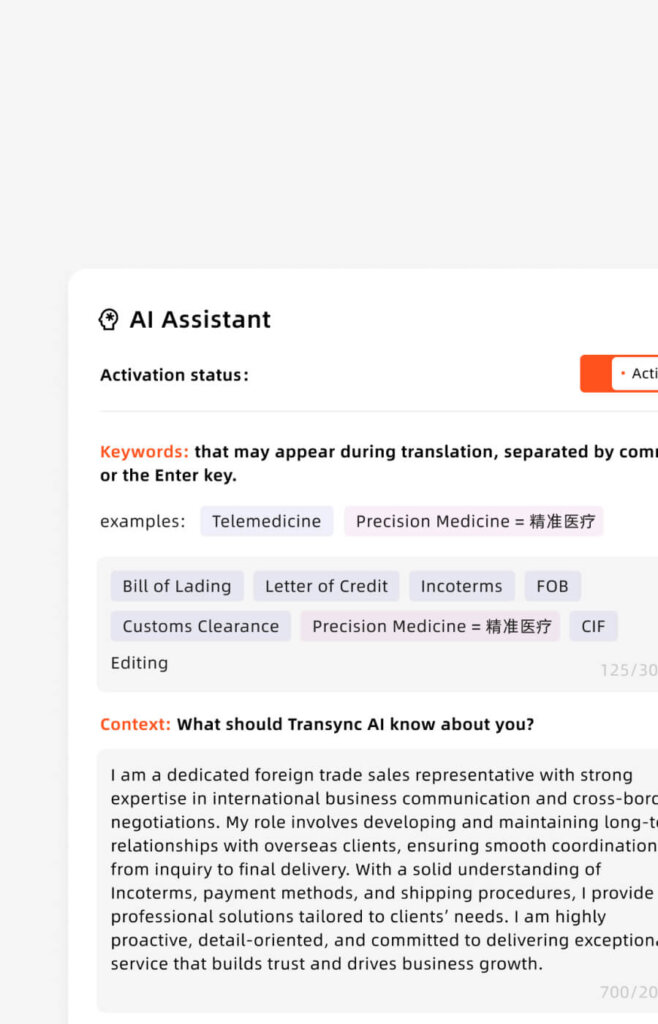
Transync AI’s AI Keywords & Context feature directly addresses this problem:
Setting Keywords — Users pre-map specific terminology before any meeting:
“GD&T, valve housing, ISO 9001, BOM, PCB, Transync AI = 同言翻译, force majeure, sublicensing rights, EBITDA”
Setting Context — Users describe their professional background:
“I am a procurement engineer in the automotive industry. This meeting covers supplier qualification for a new braking system component.”
With both inputs active, Transync AI calibrates its translation model to the correct domain — achieving accuracy above 95% for specialized terminology that generic real-time translation apps routinely mishandle.
Problem #3: No Support for Multi-Speaker or Bidirectional Conversations
What the Problem Looks Like
A three-way call between English, Japanese, and Korean speakers. The user activates their translation app — which is set to English → Japanese. A Korean speaker joins the discussion. The app either goes silent, produces garbled output, or requires manual language switching mid-sentence — breaking the meeting’s momentum entirely.
Why It Happens
Many real-time translation apps are designed for unidirectional translation — one source language to one target language, manually configured before the session. They lack automatic language detection, cannot handle speaker switching, and are architecturally incapable of managing the dynamic, multi-speaker reality of international professional meetings.
How Transync AI Solves It
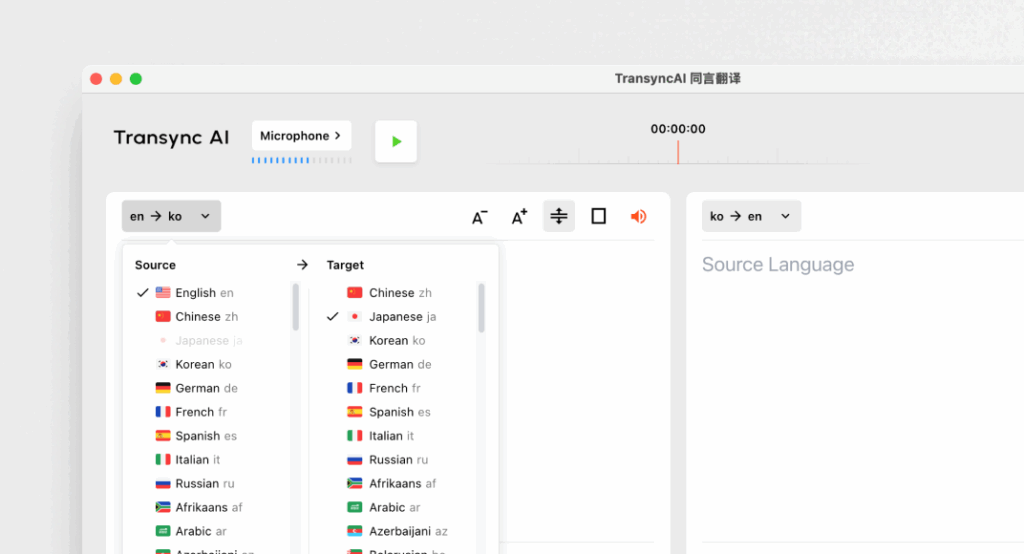
Transync AI features automatic bidirectional translation across 60 languages with built-in language detection that identifies each speaker’s language in real time — with no button switching or manual input required.
Supported languages include: 🇨🇳 Chinese · 🇬🇧 English · 🇯🇵 Japanese · 🇰🇷 Korean · 🇨🇳 Cantonese · 🇩🇪 German · 🇫🇷 French · 🇷🇺 Russian · 🇮🇹 Italian · 🇪🇸 Spanish — and 50 more
Problem #4: Plug-In Requirements That Create Setup Friction and Compatibility Failures
What the Problem Looks Like
Your client is about to join a critical meeting. You try to activate your translation tool — and realize it requires a browser extension that isn’t installed, an admin permission your corporate IT policy blocks, or a platform-specific plug-in that doesn’t support the version of Zoom your client is using.
The meeting starts. The translation tool doesn’t. You improvise — and the session suffers for it.
Why It Happens
Many real-time translation apps are built as extensions or plug-ins for specific platforms, rather than as standalone applications. This creates dependency on platform versions, operating system permissions, browser compatibility, and IT security policies — all of which can fail at the worst possible moment.

How Transync AI Solves It
Transync AI runs as a fully independent, standalone application — requiring no browser extensions, no platform plug-ins, and no IT department involvement. The setup process is three steps:
- Join your meeting on Zoom, Teams, or Google Meet as usual
- Open Transync AI on your device — Mac, PC, iOS, Android, or Web
- Share your system audio — translation begins instantly
No installation burden for other participants. No compatibility risks. No admin permissions required. It simply works — every time, on every device, with every supported meeting platform.
Problem #5: Inadequate Data Privacy and Security for Professional Use
What the Problem Looks Like
A law firm uses a consumer-grade real-time translation app during a confidential client consultation. Months later, they discover that the tool’s terms of service allowed audio data to be used for model training — meaning fragments of privileged attorney-client communication were processed by a third-party AI system.
In regulated industries — legal, medical, financial, pharmaceutical — this is not merely a policy violation. It is a potential breach of professional obligation, compliance regulations, and client trust.
Why It Happens
Consumer real-time translation apps are predominantly monetized through data — using transcribed audio and translation pairs to continuously improve their AI models. For individual users, this trade-off is often acceptable. For professionals handling confidential, proprietary, or regulated information, it is categorically unacceptable.
Many tools bury data usage policies in terms of service rather than making them explicit — leaving professional users exposed without realizing it.
How Transync AI Solves It
Transync AI takes an explicit, proactive stance on data privacy:
- ✅ User data is never used for AI training — stated as a core product commitment, not buried in terms of service
- ✅ GDPR-compliant on Enterprise plans — meeting the requirements of regulated industries across Europe and beyond
- ✅ Unified Organization Knowledge Base — enterprise teams maintain a private, internally controlled library of approved terminology, context profiles, and meeting records
- ✅ No data leakage to third-party training systems — proprietary technical terms, legal discussions, and financial negotiations stay private
For professionals in law, healthcare, finance, and technology, Transync AI’s privacy architecture is not a feature — it is a prerequisite.
Problem #6: No Post-Meeting Record of What Was Actually Communicated
What the Problem Looks Like
A two-hour multilingual product development meeting concludes. Both sides leave feeling the discussion was productive. Two days later, the engineering team in Seoul and the product team in Berlin realize they had entirely different understandings of the agreed specifications — because there is no shared, bilingual record of what was actually said and decided.
Without documentation, translation disputes become memory disputes — and memory disputes are rarely resolved quickly or inexpensively.
Why It Happens
The vast majority of real-time translation apps focus exclusively on the translation experience during the meeting and provide nothing after it ends. There is no transcript, no summary, and no bilingual record of decisions made or action items agreed. Post-meeting alignment depends entirely on participants’ individual notes — which are themselves filtered through imperfect real-time comprehension of a second language.
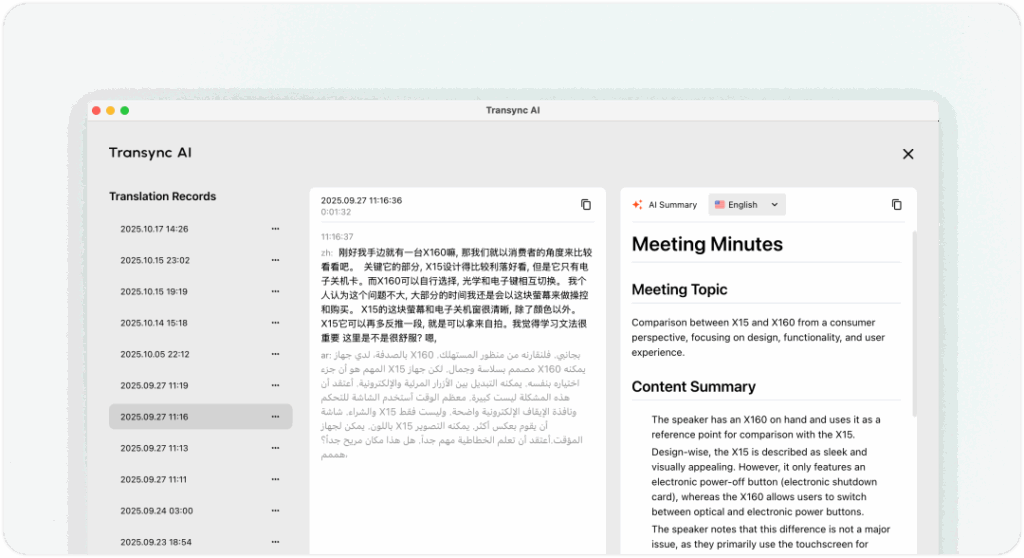
How Transync AI Solves It
Transync AI includes AI-Powered Automatic Meeting Notes — a feature that makes it categorically distinct from every competing real-time translation app in this comparison. After every session, Transync AI automatically generates a multilingual meeting summary that:
- Captures key decisions and agreed terms in both the source and target language
- Extracts action items and assigns them clearly
- Preserves important technical terms and specifications as they were communicated
- Creates a shareable, bilingual record that all participants can verify and align on
This transforms Transync AI from a translation tool into a complete multilingual meeting management solution — eliminating post-meeting miscommunication before it begins.
Problem #7: Translation Without Voice — Forcing Participants to Read Instead of Converse
What the Problem Looks Like
A sales director is on a video call with a potential partner in Tokyo. The translation app shows subtitles on screen — but to read them, the director must look down at their device, breaking eye contact, disrupting their presence, and making the interaction feel transactional rather than relational.
In relationship-driven professional contexts — sales, negotiations, client management — this visual disruption undermines the human connection that drives outcomes.
Why It Happens
Many real-time translation apps deliver translation exclusively as text — captions or subtitles displayed on screen. While this is better than nothing, it forces a fundamental change in participant behavior: from listening and engaging to reading and processing. In high-interpersonal-stakes meetings, this is a meaningful cost.
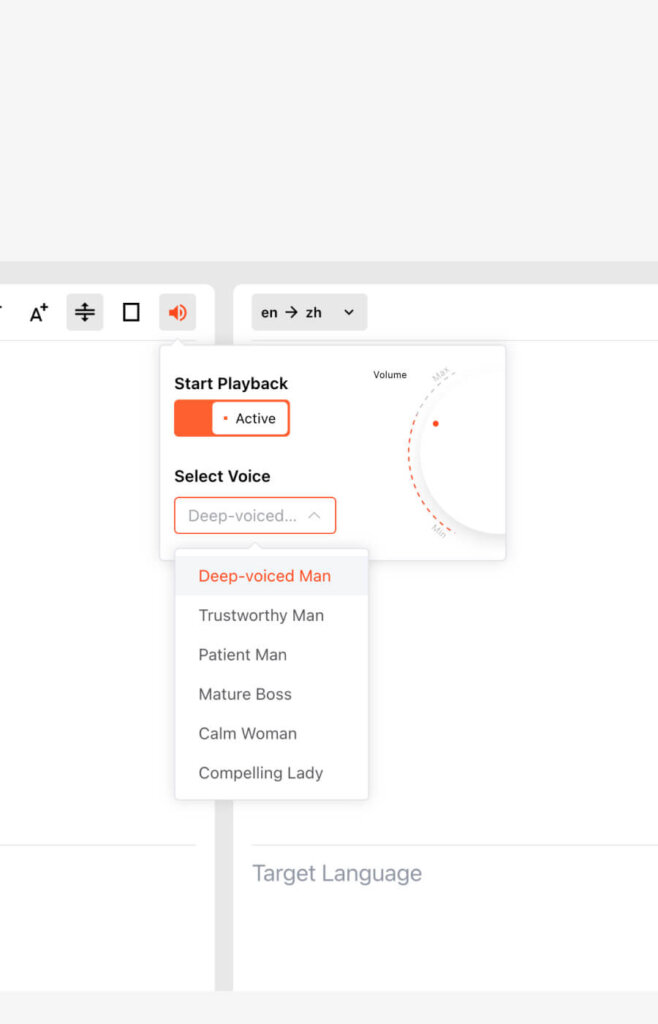
How Transync AI Solves It
Transync AI includes AI Voice Broadcast (Natural TTS) — spoken translation delivered in natural, human-like voices in the target language. Users can:
- Choose voice tone appropriate to the language and professional context
- Hear translations through earphones while maintaining full visual engagement with meeting participants
- Experience cross-language communication that feels like a natural conversation rather than a reading exercise
Supported voice output languages include English, Japanese, Korean, Spanish, French, German, and more — with tone options that preserve the professional register appropriate for each context.
The combination of dual-screen display (for verification) and voice broadcast (for natural engagement) gives Transync AI users the ability to choose the translation experience that best fits each meeting scenario.
Comparison Table: How Real-Time Translation Apps Handle Common Problems
| Problem | Transync AI | KUDO | Wordly | Talo AI | Jotme | Otter AI | iTranslate |
|---|---|---|---|---|---|---|---|
| High Latency | ✅ Near-zero (end-to-end AI) | ✅ Human (no lag) | ⚠️ 2–4 sec lag | ⚠️ 2–3 sec lag | ⚠️ Moderate lag | ⚠️ English only | ⚠️ Basic lag |
| Technical Terms Accuracy | ✅ 95%+ w/ context | ✅ Interpreter-dependent | ⚠️ 85–88% | ⚠️ 80–85% | ⚠️ 78–83% | ❌ English focus | ⚠️ 78–82% |
| Multi-Speaker / Bidirectional | ✅ Auto-detect, 60 languages | ✅ Manual setup | ❌ | ⚠️ Limited | ⚠️ Limited | ❌ | ⚠️ Manual |
| No Plug-In Required | ✅ Standalone app | ❌ Complex setup | ❌ Extension | ✅ Bot join | ⚠️ | ✅ | ✅ Mobile |
| Data Privacy / No Training Use | ✅ Explicit guarantee | ⚠️ | ⚠️ | ⚠️ | ❌ | ⚠️ | ❌ |
| AI Meeting Notes | ✅ Multilingual auto-summary | ❌ | ❌ | ❌ | ❌ | ✅ English only | ❌ |
| Voice Broadcast (TTS) | ✅ Natural multi-language | ✅ Human only | ❌ | ⚠️ Basic | ⚠️ Basic | ❌ | ✅ Basic |
| Starting Price | Free / $8.99/mo | Custom ($$$$) | Custom ($$$$) | Custom | Custom | Free / $16.99/mo | $4.99/mo |
| All Devices | ✅ Mac/PC/iOS/Android/Web | ⚠️ Web | ⚠️ Web | ⚠️ | ⚠️ | ✅ | ✅ Mobile |
| Zoom / Teams / Meet Integration | ✅ Seamless | ⚠️ Complex | ⚠️ Limited | ✅ Bot | ⚠️ | ✅ English | ❌ |
| GDPR Compliance | ✅ Enterprise | ✅ | ✅ | ⚠️ | ⚠️ | ✅ | ⚠️ |
| Overall Problem-Solving Score | ⭐⭐⭐⭐⭐ | ⭐⭐⭐⭐ | ⭐⭐⭐ | ⭐⭐ | ⭐⭐ | ⭐⭐ | ⭐⭐ |
Transync AI Pricing: Solving Every Problem at Every Scale
| Plan | Price | Translation Time | Key Problem-Solving Features |
|---|---|---|---|
| Free | $0/month | 40 minutes | All features, 60 languages, AI notes, keywords & context — full test of every capability |
| Personal Premium | $8.99/month | 10 hours/month | Voice broadcast, AI assistant, dual-screen display, all devices |
| Enterprise | $24.99/seat/month | 40 hrs/seat/month | GDPR compliance, org knowledge base, unified billing, $0.70/hr overage, centralized admin |
How to Avoid Every Common Problem: A Practical Checklist for Choosing Real-Time Translation Apps
Before committing to any real-time translation app for professional use, verify the following:
- ☑ Latency: Is translation near-instantaneous, or does it introduce a 2–5 second delay that breaks conversation flow?
- ☑ Technical Accuracy: Can you pre-define how specific terminology is handled — or does the tool translate by surface meaning?
- ☑ Multi-Speaker Support: Does it auto-detect language changes, or require manual switching?
- ☑ Setup Complexity: Does it require plug-ins, extensions, or platform-specific installations — or does it run as a standalone app?
- ☑ Data Privacy: Is there an explicit commitment that your audio is not used for AI training? Is GDPR compliance available?
- ☑ Post-Meeting Documentation: Does the tool generate a bilingual meeting record automatically?
- ☑ Voice Output: Does the tool speak translations aloud in natural voices — or only display text?
Transync AI satisfies every criterion on this checklist. No other real-time translation app in the current market does.
Q&A: Common Problems with Real-Time Translation Apps
Q1: What is the most common problem with real-time translation apps?
A: The most universally cited problem is high latency — translation delays of 2–6 seconds that disrupt natural conversation flow, particularly in dynamic back-and-forth discussions. Transync AI solves this through its end-to-end speech large model architecture, delivering near-zero-latency translation that keeps conversations fluid and natural.
Q2: Why do real-time translation apps struggle with technical terminology?
A: Most real-time translation apps are trained on general-purpose text and lack domain-specific calibration. Without the ability to pre-define how specialized vocabulary should be handled, they translate technical terms by surface meaning rather than professional intent. Transync AI’s AI Keywords & Context feature directly addresses this — allowing users to map terminology precisely before every session.
Q3: Are real-time translation apps safe to use for confidential business discussions?
A: Many consumer-grade real-time translation apps use audio data to train their AI models — a significant privacy risk for professional use. Transync AI explicitly guarantees that user data is never used for AI training, and its Enterprise plan provides full GDPR compliance — making it the appropriate choice for confidential legal, financial, medical, or technical discussions.
Q4: How do I avoid plug-in compatibility failures with real-time translation apps?
A: Choose a real-time translation app that operates as a standalone application rather than a platform-specific plug-in or browser extension. Transync AI runs independently on any device, captures system audio without platform-level integration, and requires no installation from other participants — eliminating compatibility failures entirely.
Q5: What should I look for in real-time translation apps for multi-speaker meetings?
A: Look for automatic language detection that identifies each speaker’s language without manual input, and bidirectional translation support across all languages present in the meeting. Transync AI automatically detects and translates across 60 languages simultaneously — handling multi-speaker, multilingual meetings without any manual configuration.
Q6: How do the best real-time translation apps handle post-meeting documentation?
A: Most real-time translation apps provide nothing after the meeting ends. Transync AI is the exception — automatically generating multilingual AI meeting notes that capture key decisions, action items, and agreed terms in both source and target languages. This eliminates the post-meeting miscommunication that frequently occurs when participants rely on individual notes filtered through imperfect real-time comprehension.
Q7: Is voice output important in real-time translation apps?
A: For professional meetings — particularly sales, client management, and negotiations — voice output is highly valuable. Reading subtitles requires visual attention that breaks eye contact and engagement. Transync AI’s AI Voice Broadcast delivers natural, spoken translations in the target language, allowing users to hear the translation through earphones while maintaining full visual presence in the meeting.
Q8: Which real-time translation app is best for small teams on a budget?
A: Transync AI’s free plan provides 40 minutes of full-feature real-time translation — including AI meeting notes, voice broadcast, 60-language bidirectional support, and keyword context. The Personal Premium plan at $8.99/month provides 10 hours — making Transync AI the most capable and most affordable option among professional real-time translation apps for individuals and small teams.
Q9: Can real-time translation apps replace human interpreters entirely?
A: For everyday professional use — team meetings, client calls, vendor discussions, cross-border negotiations — high-quality real-time translation apps like Transync AI provide accuracy and speed that makes human interpretation unnecessary and impractical. For ultra-formal settings — diplomatic proceedings, major conference simultaneous interpretation — human interpreters via platforms like KUDO remain the gold standard. The two approaches are complementary rather than mutually exclusive.
Q10: How quickly can I get started with a real-time translation app like Transync AI?
A: Transync AI is operational in under two minutes: sign up for a free account, open the app on any device, join your meeting as usual, and share your system audio. No plug-ins, no configuration, no IT support required. For maximum accuracy on specialized topics, spend an additional two minutes pre-loading keywords and context in the AI Assistant panel before the meeting begins.
Conclusion: Don’t Let Common Problems Undermine Your Real-Time Translation
The promise of real-time translation apps is transformative — instant, seamless communication across any language boundary, in any professional context. But that promise is only delivered by tools built to solve the real problems that generic translation software creates.
In 2026, the seven problems outlined in this article — high latency, poor technical accuracy, limited multi-speaker support, plug-in friction, data privacy risks, absent post-meeting documentation, and text-only output — are fully solvable. They are not inherent limitations of real-time translation technology. They are the consequences of choosing tools not designed for professional demands.
Transync AI was built specifically to solve every one of these problems:
- Near-zero latency via end-to-end speech AI
- 95%+ accuracy for technical terms via AI Keywords & Context
- Automatic bidirectional translation across 60 languages with language detection
- No plug-ins — standalone app on all devices
- Explicit data privacy guarantee — never used for AI training, GDPR enterprise compliance
- Automatic multilingual AI meeting notes — bilingual post-session records
- Natural AI voice broadcast — spoken translation in professional-grade voices
For professionals who depend on accurate, reliable, and friction-free multilingual communication, avoiding the common pitfalls of lesser real-time translation apps starts with choosing the one tool engineered to eliminate them.
If you want a next-generation experience, Transync AI leads the way with real-time, AI-powered translation that keeps conversations flowing naturally. You can try it free now.

