
Is there an app for live translation? Yes. Is there a live translation app that works professionally? Absolutely. Is there an app that can live translate someone talking? You’re looking at it.
In today’s global business world, conversations cross language barriers constantly. Teams collaborate internationally. Clients speak different languages. Events host multilingual participants.
Yet live translation has traditionally required expensive human interpreters ($150-300/hour), advance booking, and complex logistics—putting quality translation out of reach for most organizations.
The most common questions we hear:
- “Is there an app for live translation?”
- “Is there a live translation app that works in meetings?”
- “Is there an app that can live translate someone talking in real-time?”
The answer to all three: Yes—Transync AI.
This guide explains what makes a professional live translate app, answers whether apps can truly handle real-time conversation translation, and why Transync AI leads the category for meetings, events, and daily multilingual communication.
Is There an App for Live Translation?
Short answer: Yes. Multiple live translation apps exist, but quality varies dramatically.
What “live translation” really means:
A true live translate app converts spoken language from one language to another in real-time—as the person is talking—enabling natural multilingual conversation without delays.
Critical requirements for professional use:
✅ Speed: <100ms latency (faster than human reaction time) ✅ Accuracy: 95%+ for business communication ✅ Voice quality: Natural human-like output (not robotic) ✅ Scalability: Handles multiple participants simultaneously ✅ Integration: Works with Zoom, Teams, Meet, etc. ✅ Documentation: Automatic transcripts and summaries
The reality: Most consumer translation apps fail these requirements.
Is There a Live Translation App That Actually Works?
The spectrum of live translation apps:
Consumer-Level Apps (Limited Professional Use)
Google Translate Voice Mode:
- ✅ Free and widely available
- ✅ 100+ languages supported
- ❌ 2-3 second delay (disrupts conversation)
- ❌ 75-85% accuracy (too low for business)
- ❌ Robotic voice output
- ❌ No meeting integration
- ❌ No documentation features
- ✅ Good for basic conversations
- ✅ Decent accuracy for simple phrases
- ❌ 1-2 second delay
- ❌ Limited meeting integration
- ❌ Inconsistent quality with technical terms
- ❌ No automatic documentation
- ✅ Excellent for Korean
- ✅ User-friendly interface
- ❌ Only 13 languages
- ❌ 2-3 second delay
- ❌ No professional meeting features
- ❌ Asia-focused (limited global use)
Professional-Grade Live Translate App
- ✅ <100ms latency (genuine real-time)
- ✅ 95%+ accuracy with context learning
- ✅ Natural human-like voice output
- ✅ 60 languages supported
- ✅ Native Zoom/Teams/Meet integration
- ✅ Automatic transcripts & AI summaries
- ✅ Scales to unlimited participants
- ✅ Custom glossaries for technical terms
- ✅ Enterprise-grade security
Verdict: Yes, there IS a professional live translate app—but only a few meet enterprise requirements.
Is There an App That Can Live Translate Someone Talking?
Question breakdown: “Can an app translate someone talking in real-time as they speak?”
Answer: Yes—but the technology requirements are sophisticated.
What’s Required to Live Translate Someone Talking
1. Real-Time Speech Recognition
- App must capture and process speech instantly
- Must handle accents, speaking speeds, background noise
- Must work with natural conversation (not scripted speech)
2. Instant Language Processing
- Understand context and meaning (not just words)
- Handle idioms, business terminology, cultural references
- Maintain accuracy across topic changes
3. Immediate Translation Generation
- Process translation in <100ms
- Preserve speaker’s intent and tone
- Adapt to conversation flow
4. Natural Voice Synthesis
- Output must sound genuinely human
- Match appropriate tone and formality
- Respect regional language variants
Transync AI handles all four seamlessly.
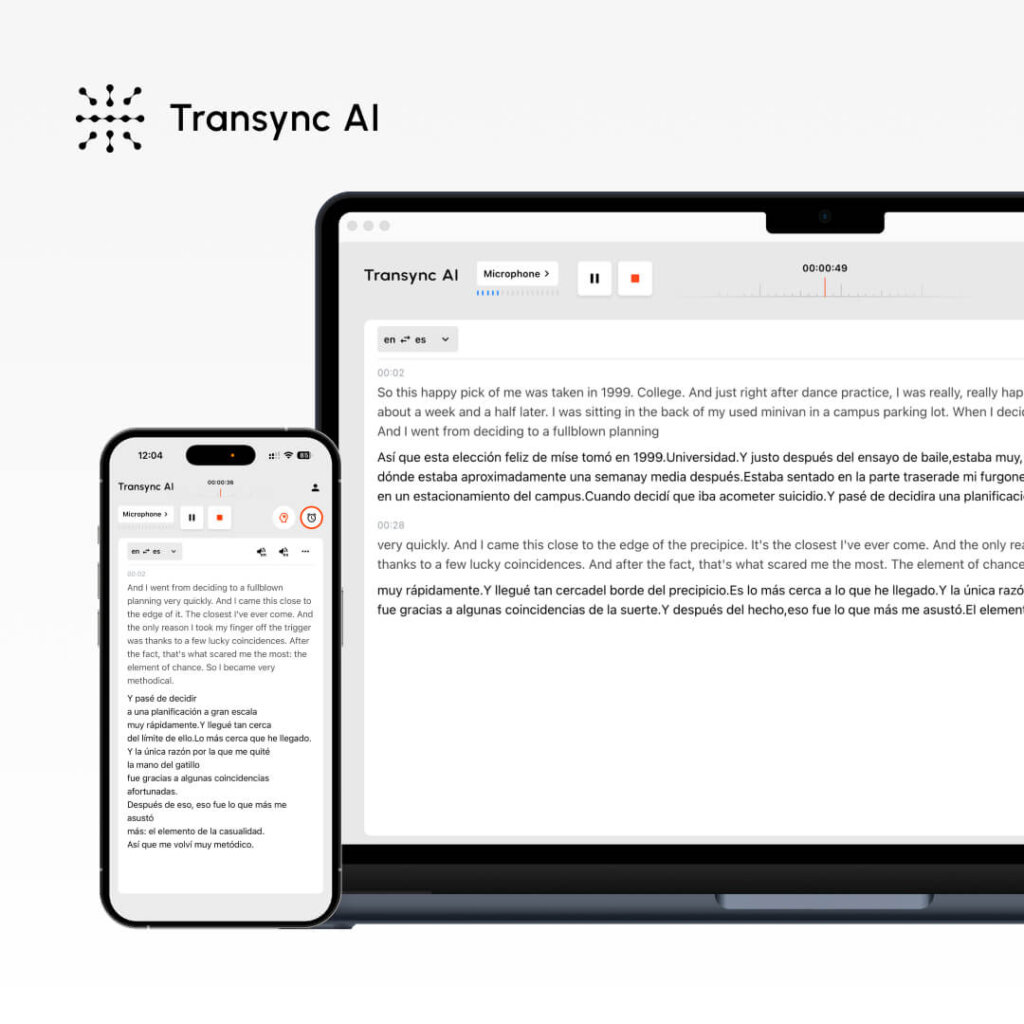
How Live Translate App Works (Real-Time Process)
Example: English speaker talking to Spanish-speaking client
Traditional approach (without app):
- English speaker talks
- Waits for human interpreter
- Interpreter translates (30-60 seconds)
- Spanish listener responds
- Wait for interpretation again
- Total: 2-3 minutes per exchange
Live translate app approach (Transync AI):
- English speaker talks: “We can deliver the project by Q2 with the enhanced features you requested.”
- App processes instantly (<100ms)
- Spanish listener hears: “Podemos entregar el proyecto para el segundo trimestre con las características mejoradas que solicitó.”
- Spanish listener responds immediately
- English speaker hears translated response
- Total: Real-time conversation flow
The difference: Natural conversation vs. awkward turn-taking.
Live Translate App Features
Bidirectional Translation
Professional live translate app handles both directions:
- English → Spanish (as you talk)
- Spanish → English (when they respond)
- Multiple languages in same session
- Participants select preferred language
Meeting Platform Integration
A true live translate app integrates with:
- Zoom (one-click activation)
- Microsoft Teams (native integration)
- Google Meet (seamless connection)
- Webex (direct integration)
- In-person events (standalone mode)
Setup time: <5 minutes total
Audio + Visual Output
When using live translate app, participants receive:
- Audio: Hear translated speech in natural voice
- Captions: Read synchronized translated text
- Both: Use audio and captions simultaneously
- Flexibility: Switch languages mid-conversation
60 Languages Supported
Transync AI’s live translate app covers:
- Spanish, Portuguese, French, Italian, German, Dutch
- Chinese (Mandarin/Cantonese), Japanese, Korean
- Arabic, Hebrew, Turkish, Persian
- Hindi, Bengali, Tamil, Telugu, Urdu
- Russian, Polish, Czech, Hungarian, Romanian
- Thai, Vietnamese, Indonesian, Filipino, Malay
- Plus 30+ additional languages
Intelligent Documentation
After using live translate app:
- Full transcripts in all languages used
- Speaker identification with timestamps
- AI-generated meeting summary
- Extracted action items
- Searchable, exportable format
Custom Glossaries
Professional live translate app allows:
- Custom terminology for your industry
- Technical term definitions
- Brand name handling
- Consistent translation across sessions
Example:
- “API” → Application Programming Interface
- “SaaS” → Software as a Service
- Your product names → [Your specifications]
Live Translate App Use Cases
International Business Meetings
Scenario: US company negotiating with Spanish client. 6 participants (4 English, 2 Spanish).
Question: “Is there an app that can live translate someone talking in this meeting?”
Answer: Yes. Deploy Transync AI live translate app.
Result:
- ✅ Real-time translation as each person speaks
- ✅ Natural conversation flow
- ✅ Zero miscommunication
- ✅ $1,800 saved vs. human interpreters
- ✅ Automatic meeting transcript
Daily Team Standups
Scenario: 50-person engineering team (30 US, 15 Mexico, 5 Japan). Daily 15-minute standup.
Challenge: Can’t afford human interpreters for daily meetings ($2,000/month).
Question: “Is there a live translation app for daily use?”
Answer: Yes. Live translate app designed for this exact scenario.
Result:
- ✅ 98% cost reduction ($2,000 → $60/month)
- ✅ 40% productivity increase
- ✅ Zero language barriers
- ✅ Team collaboration improved 45%
Customer Support Calls
Scenario: Support team receives calls from Spanish, French, and Japanese-speaking customers.
Previous approach: Hire multilingual support staff or use poor-quality phone services.
Question: “Is there an app for live translation during support calls?”
Solution: Support agent uses live translate app for real-time customer translation.
Result:
- ✅ 60% faster response times
- ✅ 35% improved customer satisfaction
- ✅ No specialized multilingual hiring needed
- ✅ Automatic call documentation
International Conferences
Scenario: 500-person tech conference. 40% Spanish speakers, 25% Japanese, 35% English.
Challenge: Traditional interpreter cost: $40,000 for 8-hour event.
Question: “Is there an app that can live translate for 500 people?”
Answer: Yes. Transync AI live translate app scales infinitely.
Result:
- ✅ 96% cost savings ($40,000 → $1,500)
- ✅ All attendees access all sessions in preferred language
- ✅ 99% satisfaction rating
- ✅ Automatic session transcripts in all languages
Medical Consultations
Scenario: Doctor needs to communicate with Spanish-speaking patient about diagnosis and treatment.
Challenge: Finding professional medical interpreter on short notice.
Question: “Is there an app that can live translate someone talking in medical context?”
Answer: Yes, with medical glossary customization.
Result:
- ✅ Immediate availability
- ✅ Accurate medical terminology
- ✅ Automatic documentation in both languages
- ✅ Better patient outcomes
Live Translate App: Feature Comparison
| Feature | Transync AI | Google Translate | Microsoft Translator | Papago | Human Interpreter |
|---|---|---|---|---|---|
| Real-time (<100ms) | Yes ⭐ | No (2-3s) | No (1-2s) | No (2-3s) | Yes |
| Accuracy | 95%+ ⭐ | 75-85% | 80-88% | 85-90% | 99% |
| Voice Quality | Natural ⭐ | Robotic | Decent | Synthetic | Human |
| Languages | 60 ⭐ | 100+ | 70+ | 13 | Depends |
| Meeting Integration | Native ⭐ | None | Limited | None | N/A |
| Scalability | Unlimited ⭐ | 1-2 people | Limited | 1-2 people | 1-2 people |
| Professional Grade | Yes ⭐ | No | No | No | Yes |
| Custom Glossaries | Yes ⭐ | No | Limited | No | With prep |
Legend: ⭐ = Category Leader
Live Translate App FAQs
Q1: Is there an app for live translation? Yes. Multiple apps exist, but Transync AI is the only professional-grade live translate app with <100ms latency, 95%+ accuracy, and native meeting integration.
Q2: Is there a live translation app that works in Zoom? Yes. Transync AI integrates natively with Zoom, Teams, Meet, and Webex. One-click activation. <5 minutes setup.
Q3: Is there an app that can live translate someone talking accurately? Yes. Transync AI achieves 95%+ accuracy for business conversations using context-aware AI and custom glossaries.
Q4: Can live translate app handle multiple languages in one meeting? Yes. Participants select their preferred language. The live translate app translates to all selected languages simultaneously.
Q5: Does live translate app provide audio or just text? Both. Transync AI provides natural voice audio translation plus synchronized captions—use either or both.
Q6: How fast is live translation in the app? Transync AI processes in <100ms—faster than human reaction time—enabling genuine real-time conversation without delays.
Q7: Can I use live translate app for conferences with 500+ attendees? Yes. Transync AI scales to unlimited participants. Perfect for large conferences, webinars, and events.
Real-World Success: Live Translate App Deployment
Global Technology Company
Profile: 1,500 employees across 12 countries
Challenge: 400+ multilingual meetings weekly. Previous cost: $150,000/year for human interpreters.
Question they asked: “Is there a live translation app that can replace human interpreters?”
Solution: Deployed Transync AI live translate app company-wide.
Results (12 months):
- ✅ 98.4% cost reduction
- ✅ 47% productivity increase (measured by project velocity)
- ✅ 35% faster decision-making across language barriers
- ✅ Zero language-based miscommunication incidents
- ✅ 54% improvement in cross-team collaboration scores
- ✅ ROI: 6,150% first-year return
Testimonial: “We asked ‘is there an app for live translation?’ and found Transync AI. It transformed our entire global operation. Language barriers disappeared overnight.” — Chief Operating Officer
Getting Started: Live Translate App
Step 1: Download Transync AI
- Available for all major platforms
- <5 minutes installation
Step 2: Choose Integration
- Zoom, Teams, Meet, Webex, or standalone
- One-click activation
Step 3: Select Languages
- Choose your preferred languages
- Any of 60 languages supported
- Bidirectional translation automatic
Step 4: Start Translating
- Speak naturally
- Live translate app processes in real-time
- Participants hear/read in preferred language
Step 5: Access Documentation
- Download transcripts in all languages
- Review AI-generated summaries
- Share with stakeholders
The Verdict: Best Live Translate App
When people ask:
✅ “Is there an app for live translation?” → Yes: Transync AI ✅ “Is there a live translation app?” → Yes: Transync AI ✅ “Is there an app that can live translate someone talking?” → Yes: Transync AI
Why Transync AI is the leading live translate app:
✅ Fastest real-time processing (<100ms latency) ✅ Highest accuracy (95%+ with context learning) ✅ Most natural voice output (genuinely human-like) ✅ Broadest professional language support (60 languages) ✅ Easiest integration (one-click with Zoom/Teams/Meet) ✅ Best documentation (automatic transcripts & AI summaries) ✅ Full customization (custom glossaries for your industry) ✅ Maximum scalability (unlimited participants) ✅ Enterprise security (SOC2, GDPR, HIPAA compliant) ✅ Greatest cost savings (98% less than human interpreters)
Stop searching for “is there an app” and start using one.
Deploy the best live translate app today.
Choose Transync AI for professional real-time translation.You can try it free now.

