

Every day, professionals struggle with language barriers. A client calls from Seoul. A team member emails from Madrid. A partner messages from São Paulo. Without a quality audio translation app, these interactions become frustrating, slow, and often unsuccessful.
An audio translation app changes everything. Instead of scheduling interpreters, waiting for translations, or missing critical information due to language barriers, you can communicate naturally and instantly in any language. The right audio translation app eliminates delays, maintains professionalism, and enables authentic conversations.
This comprehensive guide explores how an audio translation app works, what features matter most, and how to choose the perfect solution for your specific needs. Whether you’re conducting international business, managing global teams, or serving multilingual customers, this guide will help you master the power of modern audio translation app technology.
The Problem: Why You Need an Audio Translation App
The Cost of Language Barriers
Without an audio translation app, language barriers are expensive:
Lost Business Opportunities:
- Sales calls delayed waiting for translator availability
- International deals stalled by communication gaps
- New market entries postponed due to language concerns
- Revenue left on the table from non-English-speaking customers
Operational Inefficiencies:
- Team meetings require translation services ($100-300/hour)
- Customer support calls need bilingual staff (costly to maintain)
- Project delays due to miscommunication
- Documentation requires professional translation services
Relationship Damage:
- Miscommunications damage client relationships
- Delayed responses frustrate customers
- Language barriers create trust gaps
- Professional credibility suffers
McKinsey & Company research shows that companies without effective audio translation app solutions lose 25-35% of potential revenue in international markets.
The Limitations of Current Solutions
Professional Interpreters:
- ❌ Expensive ($100-300+ per hour)
- ❌ Scheduling delays
- ❌ Limited availability
- ❌ Not scalable for multiple conversations
- ❌ Requires advance booking
Basic Translation Apps:
- ❌ No audio translation app capability (text only)
- ❌ 2-3 second delays in voice translation
- ❌ Robotic voice output damages credibility
- ❌ 75-80% accuracy leads to misunderstandings
- ❌ No context awareness or learning
Manual Translation:
- ❌ Time-consuming and error-prone
- ❌ Destroys natural conversation flow
- ❌ Requires bilingual staff overhead
- ❌ Not scalable
- ❌ Expensive labor costs
The Solution: A Modern Audio Translation App
What if you had an audio translation app that worked like a real person—responding instantly, sounding natural, understanding context, and maintaining accuracy? This is what modern audio translation app technology makes possible.
What Is an Audio Translation App?
Defining an Audio Translation App
An audio translation app is a software application that converts spoken language from one language to another in real-time. Unlike text translation tools, an audio translation app specifically handles:
- Voice Input: Recording and processing spoken words
- Real-Time Processing: Instant translation without noticeable delays
- Voice Output: Natural-sounding audio in the target language
- Conversation Flow: Maintaining natural dialogue rhythm
How an Audio Translation App Works
When you use an audio translation app, several simultaneous processes occur:
- Audio Capture: Your audio translation app records your spoken words through the device microphone
- Language Detection: The audio translation app automatically identifies which language you’re speaking
- Speech Recognition: The audio translation app converts your audio into text
- Translation Engine: The audio translation app translates text to the target language
- Text-to-Speech: The audio translation app converts translated text to natural-sounding audio
- Audio Output: The audio translation app plays the translated speech instantly
All of this happens in under 100 milliseconds in a quality audio translation app.
Audio Translation App vs. Text Translation vs. Professional Interpreters
| Aspect | Audio Translation App | Text Translation | Professional Interpreter |
|---|---|---|---|
| Real-Time Capability | ✅ Yes | ❌ No | ✅ Yes |
| Voice Quality | Natural (premium) | N/A | Human (best) |
| Response Speed | <100ms (premium) | Instant | 3-5 seconds |
| Accuracy | 90-95% (with context) | 75-90% | 99%+ |
| Cost | Affordable subscription | Free-$50/month | $100-300+/hour |
| Scalability | Unlimited | Limited | Limited |
| Availability | Always available | Always available | Requires scheduling |
| Learning | Improves over time | Limited context | Human judgment |
Feature 1: Near-Zero Latency – Natural Conversation Flow
Why Latency Matters in an Audio Translation App
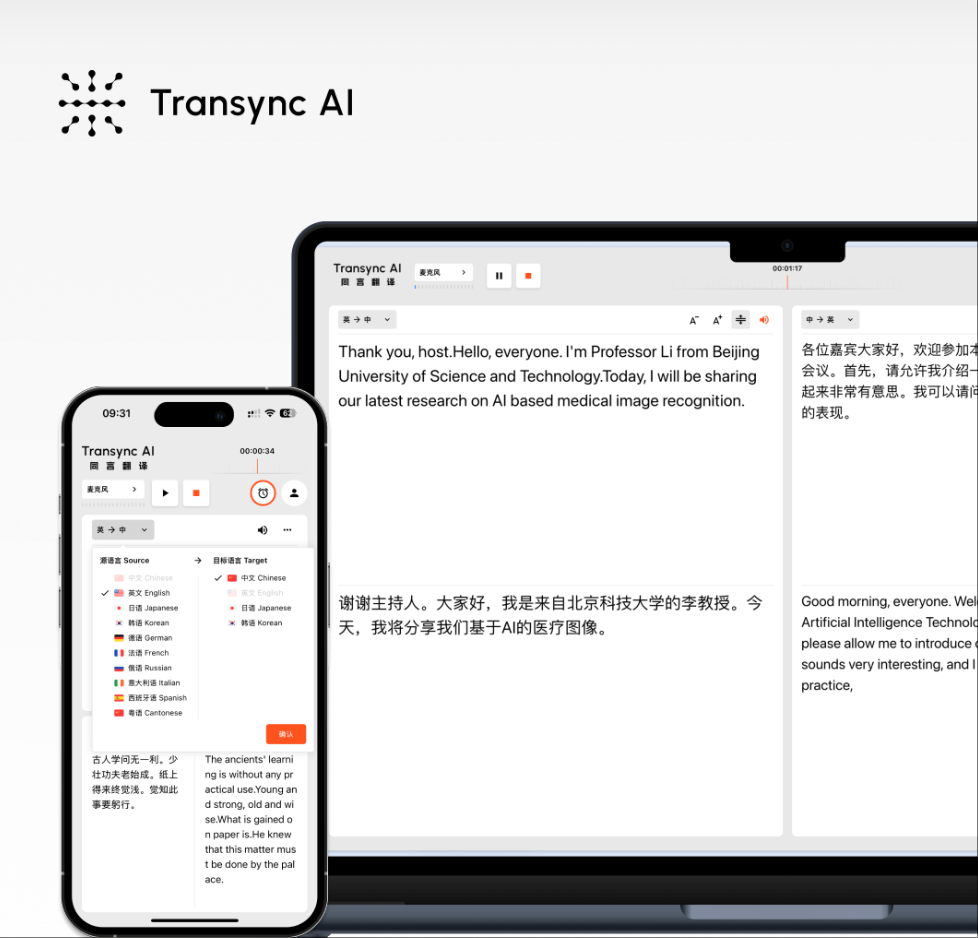
Latency is the delay between when you speak and when your listener hears the translation. For an audio translation app, latency is critical:
- 0-100ms: Feels instantaneous (natural conversation)
- 100-500ms: Noticeable but tolerable
- 500ms-2s: Awkward and unnatural
- 2s+: Conversation becomes impossible
The Impact of Low Latency
When your audio translation app delivers near-zero latency:
- ✅ Conversations feel natural and flowing
- ✅ Back-and-forth dialogue works smoothly
- ✅ Participants stay engaged and focused
- ✅ Emotional tone is preserved
- ✅ Professional credibility is maintained
- ✅ Interruptions and overlaps feel normal
When an audio translation app has high latency:
- ❌ Conversation feels robotic and awkward
- ❌ Dialogue becomes disjointed
- ❌ Participants get frustrated
- ❌ Nuance and emotion are lost
- ❌ Professional relationships suffer
- ❌ Communication effectiveness drops
How Transync AI’s Audio Translation App Achieves Near-Zero Latency
Transync AI’s audio translation app uses end-to-end speech models that process audio directly without multiple intermediate steps. This revolutionary approach to audio translation app architecture delivers latency under 100 milliseconds—essentially imperceptible to humans.
The result? When you use Transync AI’s audio translation app, it feels like talking to a real bilingual person, not a machine.
Feature 2: Natural Voice Output – Professional Credibility
The Voice Problem in Traditional Audio Translation Apps
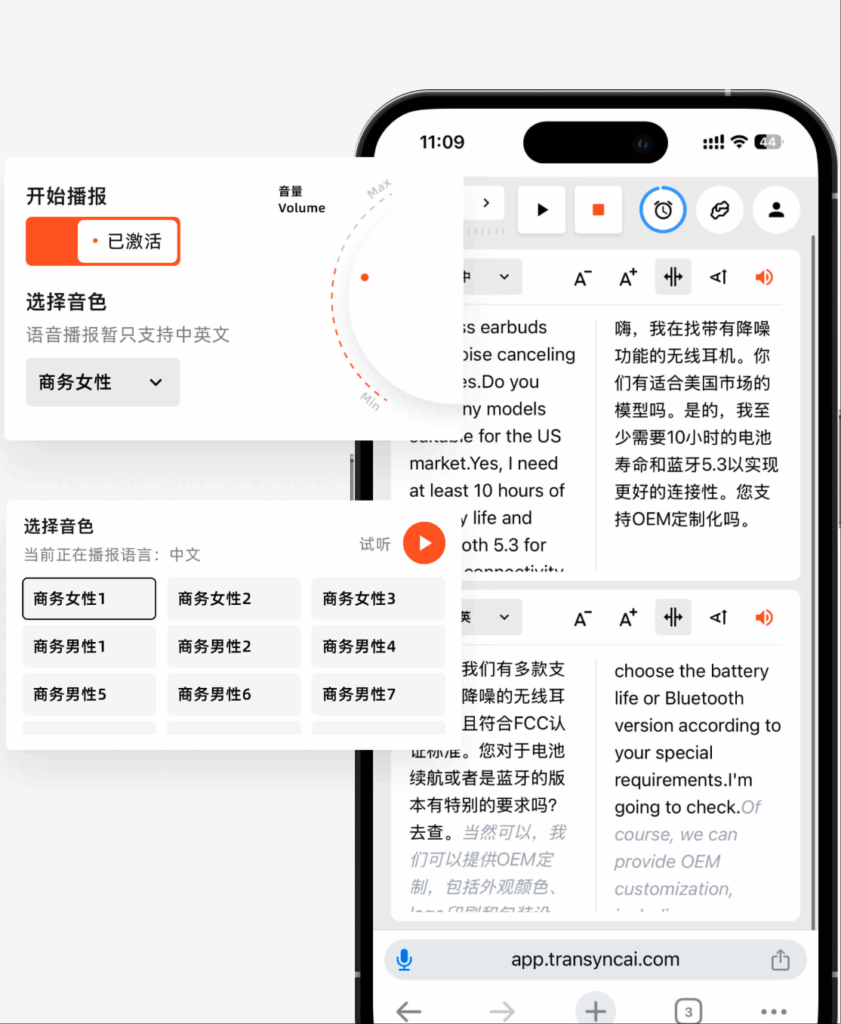
Most audio translation app solutions output translations in mechanical, emotionless, robotic voices. Hearing your important message delivered in a robotic voice:
- ❌ Damages your professional credibility
- ❌ Creates distrust with the listener
- ❌ Loses emotional nuance
- ❌ Sounds unprofessional and cheap
- ❌ Hurts customer relationships
What Natural Voices Mean for Your Audio Translation App
When your audio translation app uses natural, human-like voice output:
- ✅ Listeners perceive you as more credible
- ✅ Communication feels authentic and genuine
- ✅ Emotional tone and intent come through clearly
- ✅ Professional relationships strengthen
- ✅ Customer trust increases significantly
- ✅ Brands are perceived as premium
Voice Customization in Transync AI’s Audio Translation App
Transync AI’s audio translation app offers voice tone options matching your communication style:
Professional Tone:
- For business negotiations, executive communications, and formal meetings
- Authoritative but respectful
- Maintains professional distance when needed
Friendly Tone:
- For customer interactions, team communication, and casual meetings
- Approachable and warm
- Builds rapport and trust
Authoritative Tone:
- For presentations, announcements, and educational content
- Commands attention and respect
- Establishes expertise and credibility
Warm Tone:
- For healthcare, personal conversations, and sensitive discussions
- Empathetic and caring
- Creates emotional connection
The Measurable Impact
Research from MIT Media Lab shows that audio translation app users with natural voice output report 65% higher satisfaction compared to robotic voices, and listeners rate conversations as 70% more professional.
Feature 3: Automatic Language Detection – Zero Setup Friction
The Setup Problem in Traditional Audio Translation Apps
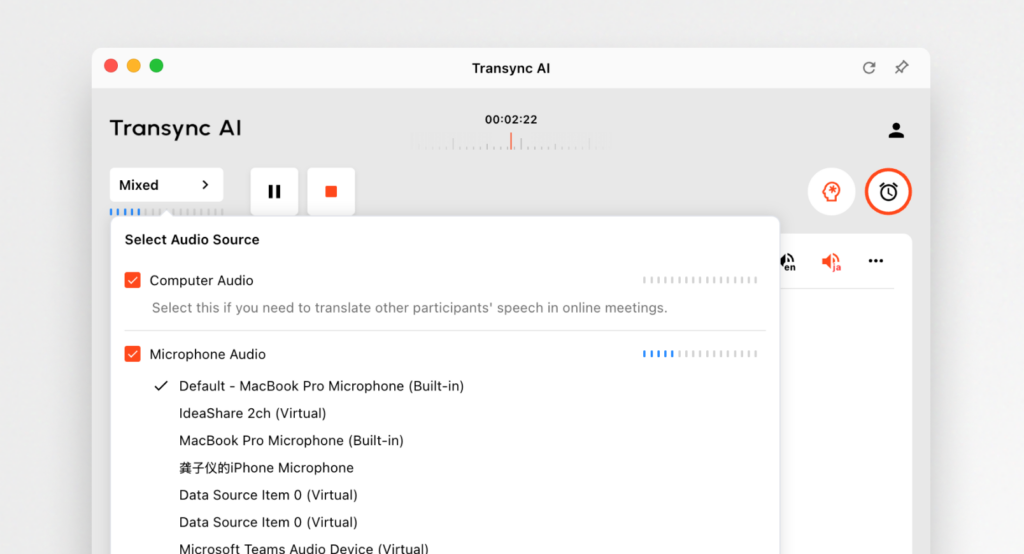
Most audio translation app solutions require manual language selection:
- Stop speaking mid-sentence
- Navigate menu to select language
- Confirm selection
- Resume conversation
This process breaks conversation flow and creates friction.
Intelligent Automatic Detection
When you use Transync AI’s audio translation app, it automatically detects:
- Which language you’re speaking (no manual selection)
- When you switch languages mid-conversation
- Regional dialect variations
- Mixed-language code-switching
- Accent variations
Why This Matters
When your audio translation app includes automatic language detection:
- ✅ No setup delays or interruptions
- ✅ Seamless multilingual conversations
- ✅ No manual selection errors
- ✅ Works in dynamic, spontaneous environments
- ✅ Supports natural language switching
- ✅ Eliminates user confusion
The difference is dramatic: Manual selection audio translation app processes take 5-10 seconds. Automatic detection audio translation app solutions are instantaneous.
Feature 4: Context-Aware Accuracy – 95%+ Precision
The Accuracy Challenge in Audio Translation Apps
Generic audio translation app solutions struggle with context-dependent words:
- “Bank” could mean financial institution or riverbank
- “Lead” could mean to guide or a metal
- “Present” could mean a gift or to introduce
- “Plant” could mean vegetation or manufacturing facility
Without understanding context, even sophisticated audio translation app technology produces poor translations.
How Context Learning Works
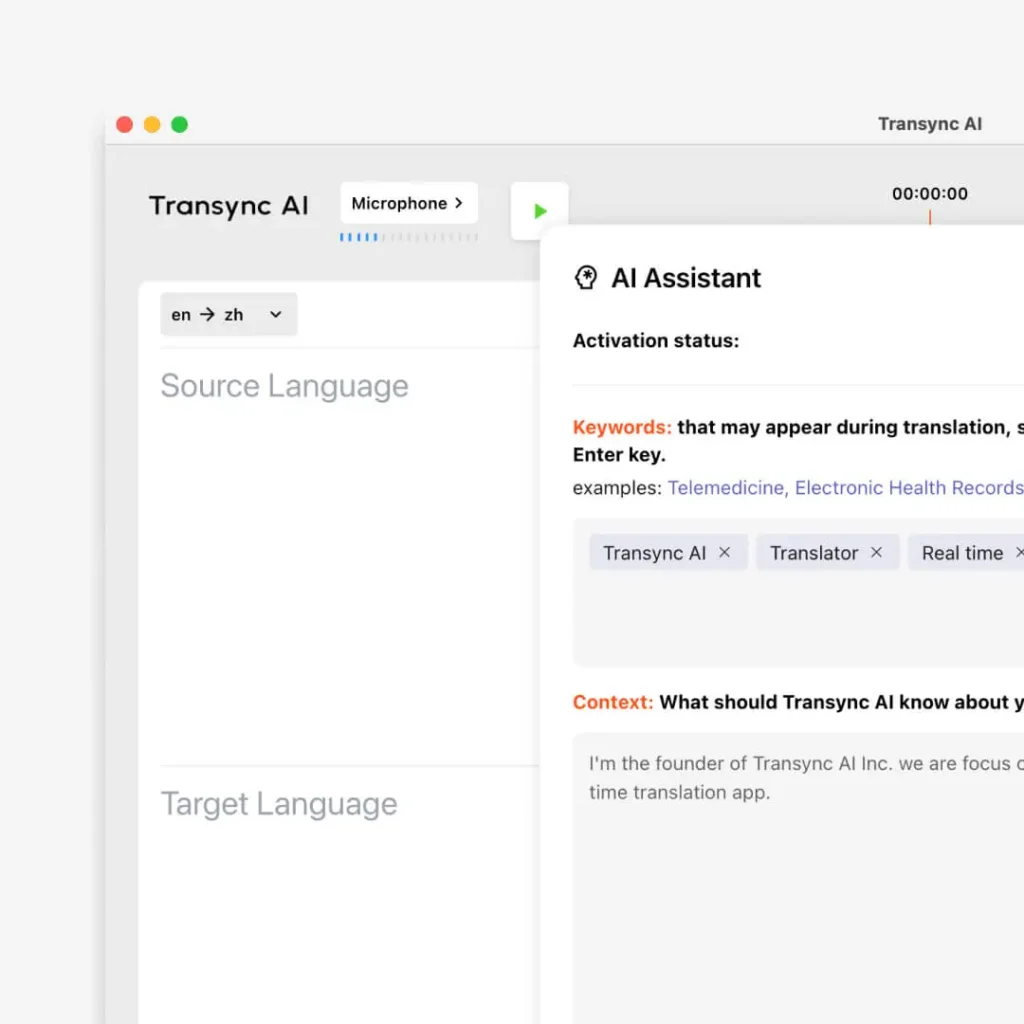
Transync AI’s audio translation app learns your context by:
Defining Keywords: You tell your audio translation app:
- Company names: “Sony, Microsoft, Tesla”
- Product names: “iPhone, PlayStation, Quantum Drive”
- Technical terminology: “API, machine learning, blockchain”
- Industry jargon: “quarterly earnings, market share, dividend”
Providing Context: You describe your situation:
- Your profession: “Product Manager in renewable energy”
- Your industry: “Automotive, Healthcare, Finance”
- Meeting topic: “Q4 strategy planning, clinical trial results”
- Your background: “10 years in this industry”
The Accuracy Results
When you configure your audio translation app with context:
- Without context: 75-80% accuracy (generic translation)
- With context configured: 95%+ accuracy (professional quality)
This 20% improvement is the difference between successful communication and costly misunderstandings.
Continuous Improvement
As you use your audio translation app, it learns:
- Which terminology you prefer
- How you typically communicate
- Industry-specific language nuances
- Your personal communication style
This means your audio translation app gets smarter and more accurate over time.
Feature 5: Seamless Platform Integration – Use Anywhere
The Integration Imperative
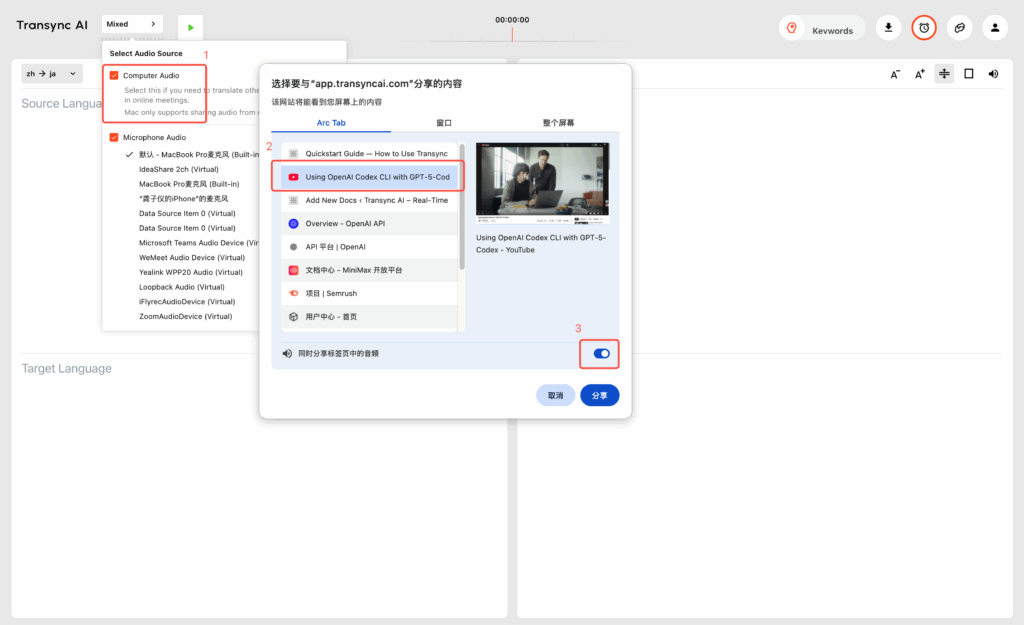
You use multiple platforms daily. Your audio translation app must integrate with:
- Video Conferencing: Zoom, Microsoft Teams, Google Meet
- Messaging: WhatsApp, Slack, Microsoft Teams
- Email: Gmail, Outlook
- Voice Calls: Direct phone calls, SIP protocols
- Social: Facebook, Instagram, LinkedIn
An audio translation app that doesn’t integrate with your workflow creates friction and reduces adoption.
Where Transync AI’s Audio Translation App Works
Transync AI’s audio translation app integrates with:
Video Meeting Platforms:
- ✅ Zoom meetings (real-time voice translation)
- ✅ Microsoft Teams calls (seamless integration)
- ✅ Google Meet (no plugin required)
- ✅ Custom video solutions (API available)
Communication Channels:
- ✅ Direct phone calls (peer-to-peer translation)
- ✅ Voice message translation
- ✅ Live chat translation
- ✅ Web browser access (no app download needed)
Platform Benefits: When your audio translation app integrates deeply:
- ✅ No learning curve (use familiar interfaces)
- ✅ No tool switching (translation built-in)
- ✅ Faster adoption (teams embrace it)
- ✅ Better compliance (standard tools only)
- ✅ Higher ROI (faster time to value)
Feature 6: AI Meeting Documentation – Automatic Records
The Documentation Challenge
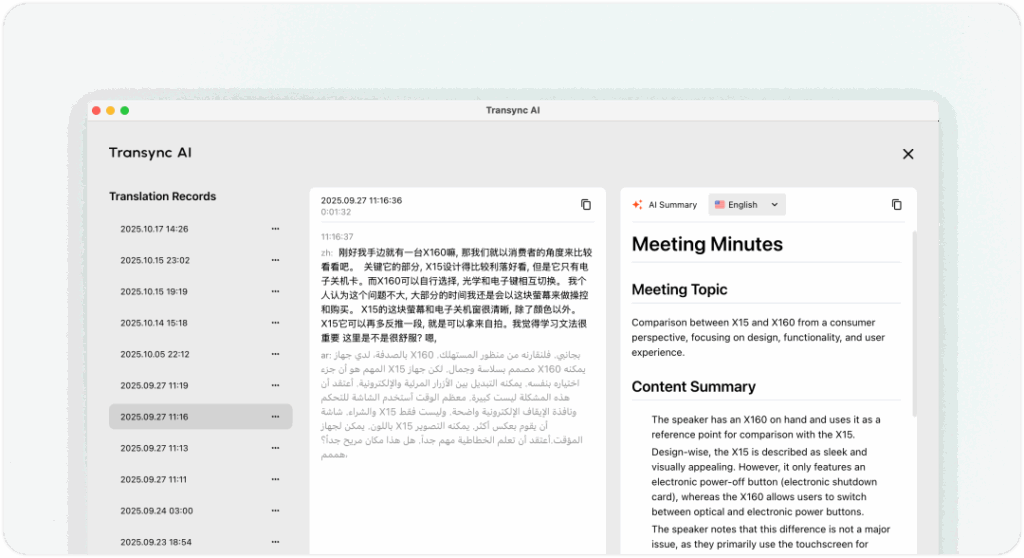
After using your audio translation app for an important multilingual meeting, you need:
- Complete transcript in both original and translated languages
- Summary of key points and decisions
- List of action items and responsible parties
- Documented decisions for compliance
- Follow-up task list for team members
Manually creating this documentation takes 2-3 hours and often misses important details.
How Transync AI’s Audio Translation App Automates Documentation
When you use Transync AI’s audio translation app for meetings, the platform automatically:
Transcription:
- Records the entire conversation
- Generates transcript in original language
- Generates transcript in translated language
- Makes transcripts searchable by keyword
Analysis:
- Extracts key decisions made
- Identifies action items with deadlines
- Highlights important discussion points
- Flags risks or concerns mentioned
Documentation:
- Creates meeting summary (executive overview)
- Compiles action item list with owners
- Generates decision log for compliance
- Produces task list for follow-up
Distribution:
- Shares automatically with attendees
- Sends to stakeholders for review
- Archives for future reference
- Enables asynchronous team catch-up
The Value of Automated Documentation
When your audio translation app includes AI documentation:
- ✅ Save 2-3 hours per multilingual meeting
- ✅ Capture 100% of important discussion points
- ✅ Create accountability through documented action items
- ✅ Enable team members to review at their own pace
- ✅ Provide searchable archive for future reference
- ✅ Ensure compliance documentation is complete
Real-World Applications: Audio Translation App Success Stories
International Sales Negotiation
The Scenario: A software company needs to negotiate a partnership with a Japanese firm. The CEO requires an audio translation app to conduct the negotiation in real-time.
How the Audio Translation App Helps:
- CEO speaks English naturally
- Japanese partners hear natural-sounding Japanese
- Partners respond in Japanese
- CEO hears English translation instantly
- Entire negotiation flows naturally without delays
- Meeting notes auto-generate in both languages
Result:
- Deal closes in one meeting instead of three
- Both sides feel heard and respected
- Terminology consistency prevents disputes
- Complete documentation for legal review
Global Team Standup Meeting
The Scenario: A tech company has distributed teams across 6 countries with different native languages. They need to conduct daily standups where everyone understands clearly.
How the Audio Translation App Helps:
- Each person speaks their native language
- Everyone hears the meeting in their preferred language
- Discussion flows naturally
- No interpreter needed
- Meeting runs in 20 minutes instead of 40
- Action items auto-documented
Result:
- Team cohesion improves
- Decision-making accelerates
- Language never becomes a barrier
- Daily meeting efficiency increases 100%
Customer Support Excellence
The Scenario: A customer service team handles inquiries from 20+ countries. Without an audio translation app, they can only serve English-speaking customers effectively.
How the Audio Translation App Helps:
- Support agent speaks English naturally
- Customer hears their native language translation
- Customer responds in their native language
- Agent hears English translation instantly
- Issue resolves faster with clear communication
- Support interaction auto-documented
Result:
- Customer satisfaction increases 40%
- Support costs decrease per interaction
- Team can serve global customer base
- No need to hire multilingual staff
Telemedicine Across Borders
The Scenario: A healthcare provider offers telemedicine to Spanish-speaking patients. They need to consult accurately while maintaining professional medical communication.
How the Audio Translation App Helps:
- Patient describes symptoms in Spanish
- Doctor hears English with medical terminology
- Doctor provides recommendations in English
- Patient hears natural Spanish explanation
- Medical terminology remains consistent
- Records auto-generate in both languages
Result:
- Patient outcomes improve through clear communication
- Medical accuracy maintained across languages
- Compliance documentation complete
- Liability risk reduces significantly
International Conference Speaking
The Scenario: A researcher presents findings at an international conference. The audience includes native speakers of 8 different languages. An audio translation app enables simultaneous interpretation.
How the Audio Translation App Helps:
- Researcher presents in English
- Audience members hear translation in their language
- Q&A flows naturally across languages
- No need for expensive interpretation services
- Presentation auto-transcribed in multiple languages
- Attendees receive multilingual recordings
Result:
- Audience engagement increases dramatically
- Researcher reaches global audience
- Knowledge transfer improves
- Event ROI increases significantly
Audio Translation App: Choosing the Right Solution
Key Features to Evaluate
When comparing audio translation app options, assess:
Real-Time Performance:
- Latency under 100ms? (Anything more feels awkward)
- Voice quality natural-sounding?
- Can it handle interruptions and overlaps?
- Does it maintain conversation flow?
Accuracy and Context:
- Does it learn your terminology?
- Can you define keywords and context?
- What’s accuracy without context? (Should be 75-80%+)
- What’s accuracy with context? (Should be 90-95%+)
Integration:
- Works with your meeting platforms?
- Integrates with communication channels you use?
- Easy to adopt without training?
- Accessible from any device?
Documentation:
- Auto-generates meeting transcripts?
- Extracts action items automatically?
- Captures key decisions?
- Provides searchable archive?
Languages:
- Covers all languages you need?
- Quality equal across languages?
- Supports regional dialects?
- Handles code-switching?
Audio Translation App Selection Process
Step 1: Define Your Primary Use
- Business meetings? → Transync AI
- Travel? → Google Translate
- Customer support? → Transync AI
- Document translation? → DeepL
- Casual conversation? → Free options
Step 2: Test With Real Scenarios
- Test with native speakers
- Verify accuracy in your domain
- Check integration with your platforms
- Assess voice quality
- Evaluate documentation features
Step 3: Consider Total Cost
- Subscription cost per month
- Time saved on documentation
- Productivity improvements
- Professional interpreter costs eliminated
- Accuracy improvements’ business impact
Step 4: Train Your Team
- Provide clear instructions
- Practice with low-stakes scenarios first
- Make it standard in procedures
- Collect feedback for optimization
Step 5: Monitor and Optimize
- Track translation accuracy
- Measure time savings
- Monitor user adoption
- Optimize terminology database
- Adjust settings based on feedback
Comparison: Audio Translation App Solutions
| Feature | Transync AI | Google Translate | Apple Translate | Microsoft Translator |
|---|---|---|---|---|
| Real-Time Latency | <100ms | 2-3 seconds | 2-3 seconds | 2-3 seconds |
| Voice Quality | Natural | Robotic | Robotic | Robotic |
| Text Accuracy | 95%+ | 75-80% | 75-80% | 80-85% |
| Voice Accuracy | 95%+ | 75-80% | 75-80% | 80-85% |
| Language Detection | Automatic | Manual | Manual | Manual |
| Context Learning | Yes | No | No | No |
| Platform Integration | Extensive | Limited | Limited | Good |
| AI Documentation | Yes | No | No | No |
| Cost | Affordable subscription | Free | Free | Free |
| Setup Time | 5 minutes | Instant | Instant | Instant |
| Best For | Professional use | General use | Apple users | Microsoft users |
FAQ: Audio Translation App Questions
Q: What’s the best audio translation app for business?
A: Transync AI offers the best combination of near-zero latency, natural voice output, 95%+ accuracy with context, platform integration, and AI documentation. It’s specifically designed for professional communication where quality and credibility matter.
Q: How fast does an audio translation app work?
A: Premium audio translation app solutions like Transync AI deliver <100ms latency. Traditional options like Google Translate have 2-3 second delays. For natural conversation, under 100ms is essential.
Q: Can I use an audio translation app for important business calls?
A: Yes, premium audio translation app solutions like Transync AI are specifically designed for business-critical communication with 95%+ accuracy when configured with context.
Q: Does an audio translation app require internet?
A: Most premium audio translation app solutions require internet for optimal real-time performance. Some offer limited offline capability after downloading language packs.
Q: How accurate is an audio translation app?
A: Transync AI achieves 95%+ accuracy with context configuration. Free audio translation app options deliver 75-80% accuracy. Professional human interpreters maintain 99%+ accuracy.
Q: Can an audio translation app replace a human interpreter?
A: For routine business communication, a premium audio translation app like Transync AI is excellent. For critical legal situations, medical emergencies, or high-stakes negotiations, professional interpreters remain superior.
Q: Does an audio translation app work for group meetings?
A: Yes, Transync AI’s audio translation app enables multiple participants to communicate in their preferred languages during group meetings. Each person can speak their native language while understanding others.
Q: How much does a quality audio translation app cost?
A: Quality audio translation app solutions typically offer affordable monthly subscriptions providing excellent value when compared to professional interpreter costs ($100-300/hour) and time saved on documentation.
Common Mistakes When Using an Audio Translation App
❌ Mistake 1: Choosing Based on Language Count Alone
Problem: An audio translation app with 100+ languages often has lower quality than one focused on fewer languages.
Solution: Prioritize quality over quantity. Choose an audio translation app with excellent accuracy in your specific languages.
❌ Mistake 2: Not Configuring Context and Keywords
Problem: Using an audio translation app without defined terminology results in 75-80% accuracy.
Solution: Invest 15-20 minutes defining keywords, terminology, and context. This boosts accuracy to 95%+.
❌ Mistake 3: Not Testing Before Critical Communication
Problem: Using an audio translation app for the first time during important business communication often fails.
Solution: Always test your audio translation app with native speakers before relying on it for critical situations.
❌ Mistake 4: Ignoring Voice Quality
Problem: A robotic-sounding audio translation app damages professional credibility.
Solution: Prioritize audio translation app solutions with natural voice output for professional communication.
❌ Mistake 5: Failing to Leverage Documentation
Problem: Not using an audio translation app’s documentation features means manual transcription and note-taking.
Solution: Configure your audio translation app to auto-generate meeting records and documentation.
Industry-Specific Audio Translation App Applications
Finance and Banking
Financial professionals use an audio translation app for:
- International client advisory calls
- Cross-border transaction discussions
- Global team communications
- Investor relations calls
- Compliance-documented conversations
Benefit: Faster deal closure, reduced compliance risk, expanded client base
Healthcare
Healthcare providers use an audio translation app for:
- Patient consultations in multiple languages
- Telemedicine appointments
- International specialist collaboration
- Medical training and education
- Emergency multilingual communication
Benefit: Better patient outcomes, improved compliance, expanded service reach
Technology and Engineering
Tech teams use an audio translation app for:
- International technical support
- Global project collaboration
- International conference participation
- Distributed team meetings
- Cross-border recruitment
Benefit: Faster problem resolution, better collaboration, access to global talent
Sales and Business Development
Sales teams use an audio translation app for:
- International sales calls
- Multilingual negotiation
- Global partnership building
- International market expansion
- Customer relationship management
Benefit: Faster deal closure, higher conversion rates, expanded market reach
Education and Research
Educational institutions use an audio translation app for:
- International student support
- Research collaboration across borders
- Academic conference participation
- Global knowledge sharing
- Multilingual educational content
Benefit: Enhanced global collaboration, expanded enrollment, increased research impact
The Future of Audio Translation App Technology
Gartner predicts that by 2026, 85% of international business communication will leverage audio translation app technology. Emerging trends include:
- Emotion Detection: Audio translation app that captures and conveys emotional tone
- Accent Adaptation: Technology that neutralizes or preserves accents based on preference
- Cultural Context: Audio translation app that adapts meaning for cultural appropriateness
- Predictive Translation: Systems that anticipate what you’ll say next
- Real-Time Transcription: Audio translation app that creates searchable records automatically
- Offline Capability: Advanced audio translation app that works without internet with AI quality
Transync AI continues advancing its audio translation app platform to lead these innovations.
Best Practices for Audio Translation App Success
✅ Choose near-zero latency – Anything over 100ms feels awkward in conversation
✅ Prioritize natural voice output – Maintains professional credibility
✅ Define terminology upfront – Improves accuracy from 80% to 95%+
✅ Leverage context learning – Allows your audio translation app to improve over time
✅ Integrate with existing platforms – Seamless workflow without friction
✅ Test before important use – Verify quality with native speakers
✅ Configure documentation – Automate meeting records and notes
✅ Train your team – Ensure proper adoption and usage
Conclusion: Transform Communication With an Audio Translation App
An audio translation app is no longer optional—it’s essential for any organization communicating across language barriers. Whether you’re conducting international business, managing global teams, or serving multilingual customers, the right audio translation app transforms communication from frustrating to seamless.
For professional communication, Transync AI represents the gold standard in audio translation app technology. With near-zero latency enabling natural conversation, natural voice output maintaining credibility, 95%+ accuracy through context learning, seamless platform integration, and AI meeting documentation, Transync AI’s audio translation app enables the kind of natural, professional multilingual communication that builds trust and drives results.
For organizations seeking competitive advantage, an audio translation app eliminates communication delays, accelerates decision-making, reduces costs, and expands global reach. Companies that leverage a quality audio translation app close deals faster, serve customers better, and collaborate more effectively.
The smart approach? Use Transync AI’s audio translation app for professional communication where quality matters. Reserve professional human interpreters only for the most sensitive or specialized situations requiring certification.
Ready to eliminate language barriers? Discover how Transync AI’s audio translation app can transform your organization’s multilingual communication and unlock global potential.
Break language barriers instantly. Choose Transync AI—the audio translation app that enables natural, accurate, and professional communication across all languages.You can try it free now.

