
“「言語翻訳に最適な AI は何ですか?」これは、毎月何千もの企業から寄せられる質問です。.
答え: 使用ケースによって異なります。. 「最高」のAIは一つではありません。それぞれのシナリオで優れたソリューションが異なります。このガイドでは、主要な翻訳AIソリューションを比較し、お客様のニーズに最適なソリューションを選択できるよう支援します。.
会議中のリアルタイム翻訳、正確な文書翻訳、または迅速なメール翻訳が必要な場合でも、このガイドを最後まで読めば、翻訳に最適な AI が見つかります。.
翻訳におけるAIの重要性
翻訳市場は爆発的に成長しています。
- 世界の消費者の71%は母国語で書かれた製品を好んでいる
- 英語を話さない人の65%は英語のみのウェブサイトを一度も訪問していない
- 翻訳エラーは企業に1件あたり9,000~45,000ドルのコストを負担させる
- 翻訳AIの精度は75%(2020年)から95%+(2026年)に向上しました。
翻訳用の最新の AI により、次のことが可能になります。
- ✅ グローバル市場へのアクセス(言語に制限はありません)
- ✅ 即時コミュニケーション(言語の壁を越えて)
- ✅ 採用コストの削減(多言語対応スタッフの必要がない)
- ✅ より良い顧客体験(母国語でのサポート)
- ✅ 競争優位性(新しい市場への迅速な拡大)
翻訳に優れた AI を導入するメリットとは?
特定のツールを比較する前に、翻訳に優れた AI と平凡な AI の違いを理解しましょう。
| 品質指標 | 素晴らしい | 平均 | 貧しい |
|---|---|---|---|
| 正確さ | 95%+ | 85-90% | <80% |
| レイテンシー | 100ミリ秒未満 | 100~300ミリ秒 | 300ミリ秒以上 |
| 言語ペア | 60以上の高品質言語 | 30~50の言語 | 30言語未満 |
| コンテキスト認識 | 業界の状況を理解する | 一般的な翻訳 | 逐語的に |
| 音声品質 | 9+/10 ナチュラル | 6~7/10 許容範囲 | 4-5/10 ロボット |
| 料金 | 透明、$8.99-$30/月 | 変動あり、$10-50/月 | 高額、$100+/月 |
| スピード(セットアップ) | 1分未満 | 2~5分 | 10分以上 |
| サポート | 24時間365日ライブサポート | メールサポート | サポートなし |
| 学習曲線 | 直感的でトレーニング不要 | 中程度の学習 | 複雑な設定 |
翻訳ソリューション向けトップAI(2026年)
#1: Transync AI – 翻訳における総合最優秀AI
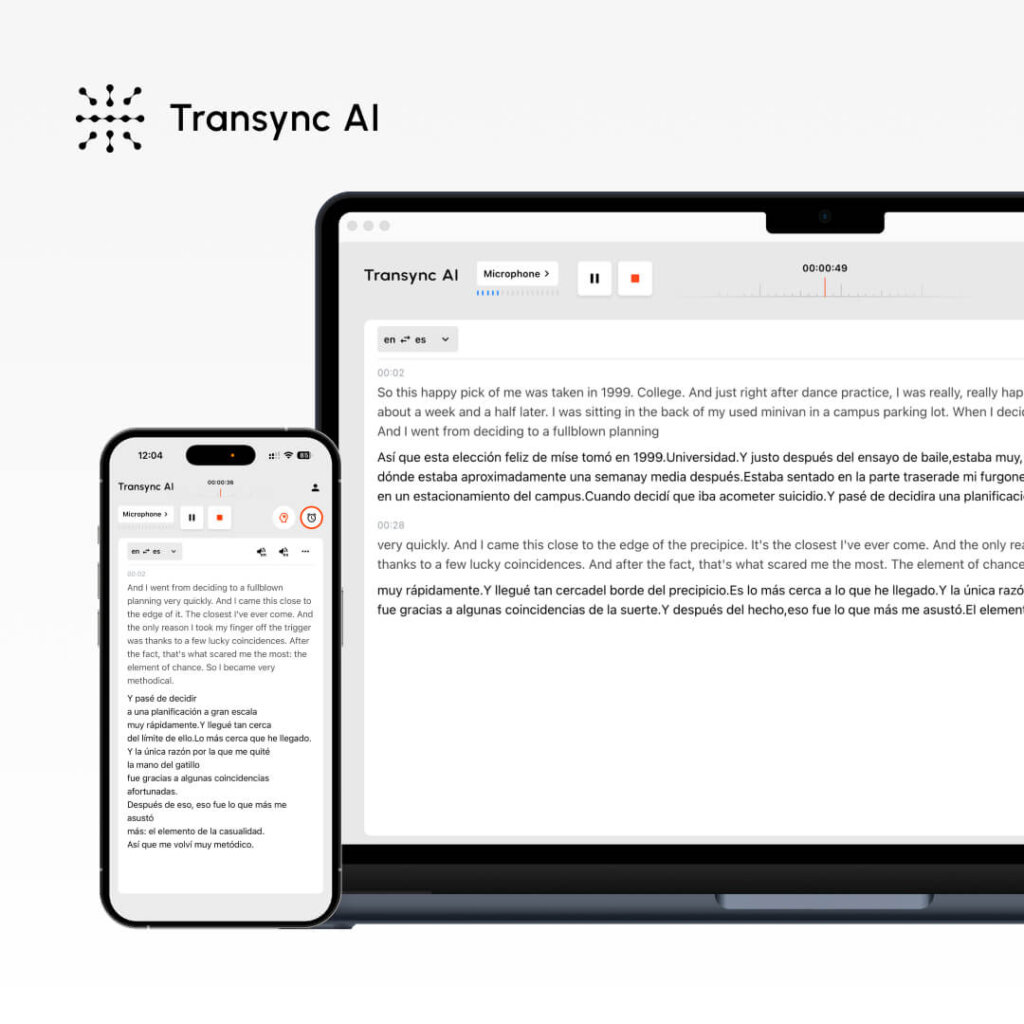
概要: 会議や文書のリアルタイム AI 翻訳 最適な用途: 営業電話、チームミーティング、ウェビナー、顧客サポート
パフォーマンスメトリック:
- 正確さ: 95%+(一般)、99%(キーワード付き技術)
- レイテンシー: <100ms(知覚できない遅延)
- 言語: 60言語
- 音声品質: 9.1/10(ネイティブスピーカーはほぼ人間と評価)
- 稼働時間: 99.8%+
仕組み:
- オープントランシンクAI
- 言語ペアを選択(英語→スペイン語)
- 「コンピューターオーディオ」ボックスにチェックを入れます
- 「翻訳を開始」をクリックします“
- Zoom/Teams/Meet を通常通り開きます
- Transync AIはリアルタイムで翻訳します(遅延<100ms)
- 会議後: 自動生成されたトランスクリプト + AI 要約
価格:
- 無料:月40分(初月のみ)
- スターター:$8.99/月(10時間)
- プロ: $19.99/月 (30時間)
- チーム: $49.99/月 (100 時間、3 ユーザー)
利点: ✅ 最速の遅延(100 ミリ秒未満、知覚できない)✅ 最も自然な音声(9.1/10)✅ 最も簡単なセットアップ(1 分未満)✅ 最低価格($8.99/月)✅ 会議のリアルタイム翻訳✅ 自動トランスクリプト + 要約✅ 正確性のためのキーワード/コンテキスト設定✅ マルチプラットフォーム(Zoom、Teams、Meet、Webex、WhatsApp)
デメリット: ❌ 60言語に限定(競合他社の一部では100言語以上)❌ 文書翻訳ではなく会議に最適❌ コンピューターのオーディオ設定が必要
最適な使用例:
- 🎯 海外営業電話
- 🎯 分散型チームのスタンドアップ
- 🎯 カスタマーサポートへの電話
- 🎯 多言語対応のウェビナー
- 🎯 WhatsApp 音声通話(多言語対応)
評決: リアルタイム通信に最適です。. 会議中に自然な音声で即座に翻訳する必要がある場合は、Transync AI が最適です。.
#2: ChatGPT – 最も汎用性の高い翻訳AI
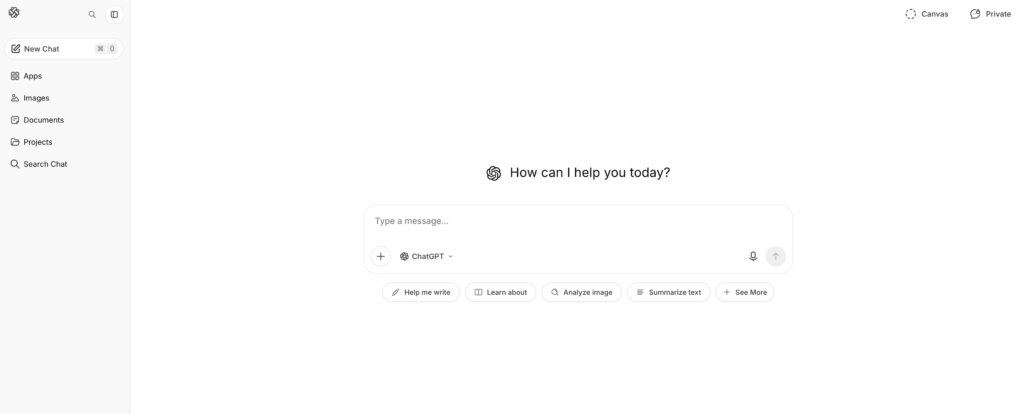
概要: 翻訳機能を備えた汎用AI 最適な用途: 文書翻訳、コンテンツ作成、ニュアンスのあるテキスト
パフォーマンスメトリック:
- 正確さ: 93-95%
- レイテンシー: 即時(ただし、Transync AI のようなリアルタイムではありません)
- 言語: 100以上の言語
- 設定: 中程度(2~3分)
- コンテキスト認識: 素晴らしい(ニュアンスを理解している)
仕組み:
- ChatGPT (openai.com) へアクセス
- 書き出しのヒント:「この英語のテキストをスペイン語に翻訳してください:[テキスト]」“
- ChatGPTはコンテキスト認識機能で翻訳します
- 翻訳されたテキストを確認して使用する
価格:
- 無料: 月ごとの使用量制限あり
- ChatGPT Plus: $20/月(無制限利用)
- ChatGPT Pro: $200/月 (高度な機能)
利点: ✅ 優れたコンテキスト認識(ニュアンスを理解)✅ 多用途(翻訳 + ライティング + コーディング)✅ 100以上の言語をサポート✅ リーズナブルな価格設定($20/月)✅ 高い精度(93-95%)✅ 複雑なテキスト、マーケティングコンテンツに最適
デメリット: ❌ リアルタイムではない(遅延が会議に適さない)❌ ライブオーディオ/ビデオを処理できない❌ テキスト入力が必要(音声翻訳なし)❌ 専用ツールよりも一貫性のない精度が低い❌ 無料枠が限られている
最適な使用例:
- 📝 文書翻訳(契約書、マニュアル)
- 📝 マーケティングコンテンツのローカライズ
- 📝 複数の言語でのメール作成
- 📝 技術文書翻訳
- 📝 クリエイティブコンテンツの翻訳(トーンの維持)
評決: 書かれたコンテンツに最適です。. 文章のトーンや文脈を保ちながら文書を翻訳する必要がある場合、ChatGPTが最適です。ただし、リアルタイムの会議には適していません。.
👉 チャットGPT
#3: Google翻訳 – 最もアクセスしやすい翻訳AI

概要: 無料のウェブベースのAI翻訳 最適な用途: 素早い翻訳、カジュアルなコミュニケーション
パフォーマンスメトリック:
- 正確さ: 92%
- レイテンシー: インスタント
- 言語: 100以上の言語
- 設定: 0分(アカウントは不要)
- 音声品質: 7/10(許容範囲内だがロボット的)
仕組み:
- translate.google.com へアクセス
- 英語のテキストを貼り付けるか、ドキュメントをアップロードしてください
- 対象言語を選択
- すぐに翻訳
価格: 無料(100%は無料、プレミアムオプションなし)
利点: ✅ 完全無料 ✅ アカウント不要 ✅ 100以上の言語に対応 ✅ どのデバイスでも利用可能 ✅ 即時翻訳 ✅ ドキュメントのアップロードに対応 ✅ 音声再生機能搭載
デメリット: ❌ 精度が低い(92% vs. 95%+)❌ 文脈やニュアンスが理解しにくい❌ ロボットのような音声(7/10)❌ 重要な翻訳には適していない❌ カスタマイズオプションが限られている
最適な使用例:
- 🌐 クイックメール翻訳
- 🌐 ソーシャルメディア翻訳
- 🌐 クイックリファレンス(本番環境では使用不可)
- 🌐 カジュアルなコミュニケーション
- 🌐 予算重視のクイック検索
評決: 迅速で無料の翻訳に最適です。. 正確さはそれほど重要ではなく、すぐにアクセスする必要がある場合、Google翻訳は無敵です。ただし、ビジネスクリティカルな翻訳には適していません。.
👉 Google翻訳
#4: DeepL – 翻訳精度に優れた最高のAI

概要: 特化型AI翻訳(汎用性はない) 最適な用途: プロフェッショナルな文書翻訳、多言語ライティング
パフォーマンスメトリック:
- 正確さ: 94%(非リアルタイムソリューションの中で最高)
- レイテンシー: インスタント
- 言語: 29言語(品質重視)
- 設定: 1~2分
- 音声品質: N/A(テキストのみの翻訳)
仕組み:
- deepl.com へアクセス
- 英語のテキストを貼り付けるか入力してください
- 対象言語を選択
- 高品質な翻訳を入手
- 結果をダウンロードまたはコピーする
価格:
- 無料: 500,000文字/月
- プロ: $8.99/月 (無制限)
- ビジネス: $25+/月 (チーム機能)
利点: ✅ 非リアルタイム AI の中で最高の精度 (94%) ✅ ヨーロッパ言語に最適 ✅ 手頃な価格 ($8.99/月) ✅ セットアップの複雑さなし ✅ 充実した無料枠 (50 万文字) ✅ ドキュメントの書式設定を保持
デメリット: ❌ 対応言語は29言語のみ(競合他社は60~100言語以上)❌ テキストのみ(リアルタイムの会議翻訳なし)❌ アジア言語には適していません❌ 一度に翻訳できるのは1言語のみです
最適な使用例:
- 📄 プロフェッショナルな文書翻訳
- 📄 メール翻訳(高精度が必要)
- 📄ヨーロッパ言語に重点を置く
- 📄 正式なビジネスライティング
- 📄 法律文書翻訳(一般)
評決: 正確な書面翻訳に最適です。. 英語からヨーロッパ言語へのプロ品質の翻訳なら、DeepLにお任せください。ヨーロッパ以外の言語への対応は限定的です。.
👉 ディープL
#5: JotMe – 翻訳に代わる優れたリアルタイムAI
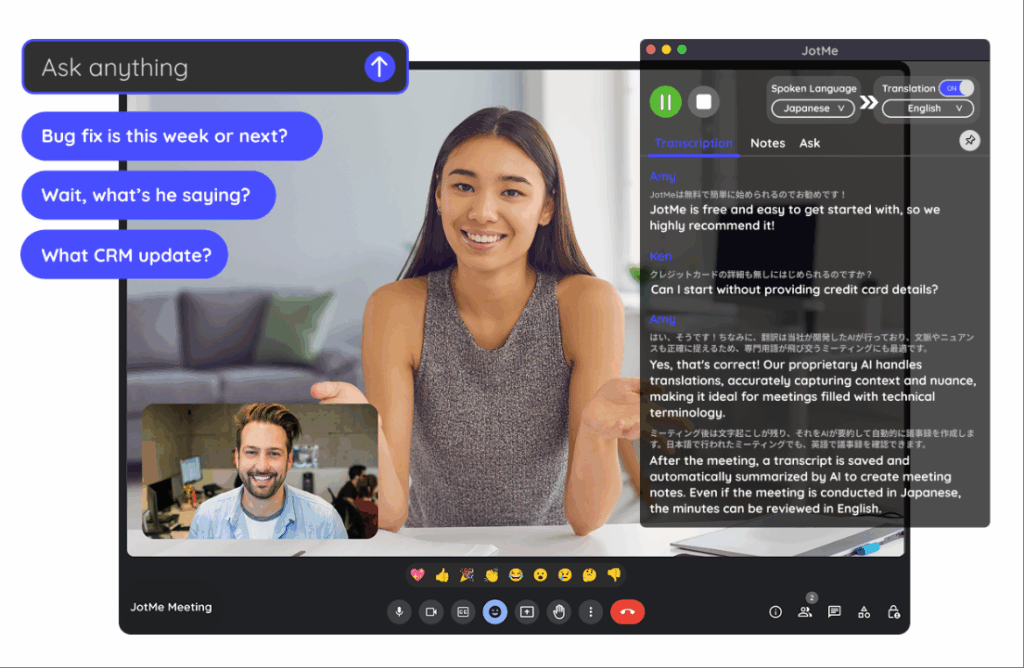
概要: 会議のためのリアルタイム翻訳(Transync AIの代替) 最適な用途: チームミーティング、ウェビナー、分散チーム
パフォーマンスメトリック:
- 正確さ: 92-94%
- レイテンシー: 150~200ms(わずかに目立つ)
- 言語: 77言語
- 音声品質: 7/10(良い、自然ではない)
- 設定: 2~3分(Chrome拡張機能)
仕組み:
- Chrome拡張機能をインストールする
- Zoom/Meet/Teams 通話に参加する
- 翻訳を有効にする
- 自動リアルタイム翻訳
価格:
- 無料: 月20分
- ベーシック:$9/月(200分)
- プレミアム:$15/月(500分)
利点: ✅ Transync AIよりも多くの言語に対応(77言語対60言語)✅ セットアップが簡単(Chrome拡張機能)✅ 手頃な価格($9/月)✅ 複数のプラットフォームで動作✅ カジュアルな会議に最適
デメリット: ❌ 遅延が遅い(150~200ms、わずかに感じる)❌ 精度が低い(92-94% vs. 95%+)❌ 音声の自然さが低い(7/10 vs. 9.1/10)❌ WhatsAppでは動作しない
最適な使用例:
- 🎯 カジュアルなチームミーティング
- 🎯 国際ウェビナー
- 🎯 予算重視のチーム
- 🎯 言語の多様性が必要
評決: より多くの言語が必要な場合、Transync AI の優れた代替品です。. 遅延は若干感じられますが、カジュアルな会議であれば許容範囲内です。ただし、第一印象が重要となる正式な営業電話には適していません。.
👉 ジョットミー
翻訳のためのAI:機能比較表
| 特徴 | トランシンクAI | チャットGPT | Google翻訳 | ディープL | ジョットミー |
|---|---|---|---|---|---|
| リアルタイム会議 | ✅ 素晴らしい | ❌ いいえ | ❌ いいえ | ❌ いいえ | ✅ 良い |
| 正確さ | 95%+ | 93-95% | 92% | 94% | 92-94% |
| レイテンシー | 100ミリ秒未満✅ | 該当なし | インスタント | インスタント | 150~200ミリ秒 |
| 言語 | 60 | 100+ | 100+ | 29 | 77 |
| 音声品質 | 9.1/10 ✅ | 該当なし | 7/10 | 該当なし | 7/10 |
| 文書翻訳 | ❌ 限定 | ✅ 良い | ✅ 良い | ✅ 素晴らしい | ❌ いいえ |
| セットアップ時間 | 1分未満✅ | 2~3分 | 0分 ✅ | 1~2分 | 2~3分 |
| 料金 | $8.99/月 ✅ | $20/月 | 無料✅ | $8.99/月 ✅ | $9/月 |
| 最適な用途 | リアルタイム会議 | 書かれたコンテンツ | クイック検索 | プロフェッショナルドキュメント | チームミーティング |
翻訳に最適なAIとは:適切なツールの選び方
シナリオ1: 国際営業コール
質問: “「スペインの見込み客との重要な営業電話には、どの翻訳 AI を使用すればよいでしょうか?」”
答え: トランシンクAI
なぜ:
- リアルタイム翻訳(100 ミリ秒未満の遅延は感知できない)
- 自然な声(見込み客が実際の人物のように聞こえる)
- フォローアップのための自動トランスクリプト
- プロフェッショナル品質(95%+の精度)
- 簡単なセットアップ(1分未満)
設定:
- オープントランシンクAI
- 英語→スペイン語を選択
- 「コンピューターオーディオ」をチェック“
- 「翻訳を開始」をクリックします“
- 通常通りZoomに参加する
- 自動翻訳
シナリオ2:法的契約書の翻訳
質問: “「英語の法的契約書をスペイン語に翻訳するのに最適な翻訳 AI は何ですか?」”
答え: プロの翻訳者 + DeepL によるバックアップ
なぜ:
- 法的契約には99%以上の精度が求められる
- AIだけでは法的責任を問うには不十分
- DeepL(94%の精度)はプロの翻訳者を支援できる
- 費用: 専門家向け $500-1000 (法務部門では必須)
プロセス:
- プロの法律翻訳者を雇う
- DeepLを翻訳前の参考資料として利用する
- プロの翻訳者が磨きをかける
- 結果: 99% 正確な法務翻訳
シナリオ3: クイックメール翻訳
質問: “「スペインの顧客に簡単なメールを送信するには、どの翻訳 AI を使用すればよいですか?」”
答え: Google翻訳(無料)またはDeepL(より正確)
なぜ:
- 電子メールでは 99% の正確さは求められません (コンテキストによって顧客が理解しやすくなります)
- スピードが重要(顧客待ち)
- コストは重要ではない(無料の方が良い)
- カジュアルなメールにはGoogle翻訳で十分
設定:
- translate.google.com へアクセス
- メールのテキストを貼り付ける
- 英語→スペイン語を選択
- 翻訳されたメールをコピー
- すぐに送信
シナリオ4: マーケティングコンテンツの翻訳
質問: “「マーケティングコンテンツを翻訳する際にブランドの声を維持する翻訳 AI は何ですか?」”
答え: ChatGPT(トーンに最適)+専門家のレビュー
なぜ:
- ブランドの声は重要(汎用AIは失敗)
- ChatGPTは文脈とトーンを理解する
- 専門家によるレビューで品質を保証
- リーズナブルな価格($20/月 ChatGPT)
プロセス:
- 英語でマーケティングコピーを書く
- ChatGPTを使用する:「ブランドの声を維持しながらスペイン語に翻訳する[トーンの説明]」“
- ChatGPTは文脈に合わせて翻訳します
- ネイティブスピーカーによるレビュー
- 自信を持って公開
シナリオ5: 5か国に分散したチーム
質問: “「分散したチームが 5 つの言語でコミュニケーションできるようにするには、どのような翻訳 AI が必要ですか?」”
答え: Transync AI(プライマリ)またはJotMe(予算オプション)
なぜ:
- スタンドアップ中のリアルタイム翻訳
- 非同期レビュー用の自動トランスクリプト
- 多言語サポート(Transync:60、JotMe:77)
- コストは最小限($8.99-9/月)
設定:
- スタンドアップ中にTransync AIを開く
- 主要言語ペアを選択
- 「翻訳を開始」をクリックします“
- チームメンバー全員が通訳を聞く
- 自動生成された要約を後で確認する
結果: 言語の壁がなく、会議が速くなり(25% 以上の時間が節約され)、参加率も向上しました。.
翻訳のためのAI:精度ベンチマーク2026
独立したテストの結果:
| AIソリューション | 一般テキスト | 技術コンテンツ | 法的コンテンツ | マーケティングコンテンツ |
|---|---|---|---|---|
| トランシンクAI | 95-96% | 98-99%(キーワード付き) | 92% | 94% |
| チャットGPT | 93-95% | 91% | 89% | 96% |
| Google翻訳 | 92% | 88% | 85% | 90% |
| ディープL | 94% | 92% | 91% | 93% |
| ジョットミー | 92-94% | 90% | 88% | 91% |
| プロの翻訳者 | 98-99% | 98-99% | 99%+ | 98-99% |
重要な洞察:
- ✅ Transync AIは技術とリアルタイムでリードしています
- ✅ ChatGPTはマーケティングトーンの維持をリードしています
- ✅ DeepLはドキュメントの正確性でリードしています(非リアルタイム)
- ✅ Google翻訳はカジュアルな用途には十分
- ✅ プロの翻訳者は重要なコンテンツに関しては誰よりも優れています
翻訳に最適なAI:導入手順
ステップ1:ニーズを特定する
自分自身に問いかけてみましょう:
- ❓ リアルタイム翻訳(会議)または文書翻訳が必要ですか?
- ❓ 正確さはどの程度重要ですか? (法務 = 99%、カジュアル = 90%)
- ❓ どの言語が必要ですか?
- ❓ 予算はいくらですか?(無料、$10/月、$100+/月?)
- ❓ 音声再生は必要ですか?
ステップ2: 適切なAIを選択する
リアルタイム会議ですか? → トランシンクAI 文書ですか? → ChatGPTまたはDeepL 速い + 無料? → Google翻訳 予算チームの会議ですか? → ジョットミー 法的/技術的に重要ですか? → プロの翻訳者
ステップ3:無料トライアルを受ける
- Transync AI: 40分無料(初月)
- ChatGPT: 無料プランあり
- Google翻訳:いつでも無料
- DeepL: 50万文字/月無料
- JotMe: 月20分無料
ステップ4:実際のコンテンツでテストする
- 実際の会議を実行するか、サンプルを翻訳する
- 精度がニーズを満たしていることを確認する
- インターフェースが直感的かどうかを確認する
- プラットフォームとの統合を確認する
ステップ5: 大規模に展開する
- 選択したソリューションを購読する
- チームに使用方法をトレーニングする
- 関連するすべてのプラットフォームで設定
- 精度を監視し、必要に応じてキーワードを調整する
翻訳のためのAI:避けるべき危険信号
❌ 「100%の精度」を主張するAIを避ける“ (AIではこれを実現できない)❌ 無料トライアルのないソリューションは避ける (品質を確認できません)❌ 隠れた価格設定を避ける (透明である必要があります)❌ レビューの悪いソリューションを避ける (複数の苦情 = 実際の問題)❌ 言語サポートを誇張したソリューションを避ける (量より質が大切)❌ 顧客サポートのないソリューションは避ける (助けが必要になります)
結論: 翻訳に最適な AI とは?
翻訳に「最適」な AI は存在しません。. 答えは、ユースケースによって完全に異なります。
| あなたのニーズ | 最高のAI | なぜ |
|---|---|---|
| リアルタイムのセールスコール | トランシンクAI | 遅延 <100ms、音声 9.1/10、精度 95%+ |
| 文書翻訳 | ChatGPTまたはDeepL | 書かれたコンテンツの精度向上 |
| 素早く無料の検索 | Google翻訳 | いつでも無料、即時、十分 |
| マーケティングコンテンツ | チャットGPT | ブランドの雰囲気を良好に保つ |
| チームミーティング | Transync AI または JotMe | リアルタイム、手頃な価格、マルチプラットフォーム |
| 法的文書 | プロの翻訳者 | 99%+の精度、法的保護 |
まずは具体的なニーズから始め、最適なAIをお選びいただき、無料トライアルをお試しください。きっと最適なソリューションがすぐに見つかります。.
2026年に最も人気のある選択肢: トランシンクAI リアルタイム会議向け(最も急速に成長、最も自然な音声、最低価格)。. 40分間の 今すぐ無料トライアル

