
“¿Cuál es la mejor IA para la traducción de idiomas?” es la pregunta que miles de empresas se hacen cada mes.
La respuesta: Depende de su caso de uso. No existe una única IA "mejor"; distintas soluciones destacan en distintos escenarios. Esta guía compara las principales soluciones de IA para traducción, ayudándote a elegir la más adecuada para tus necesidades específicas.
Ya sea que necesite traducción en tiempo real durante reuniones, traducción precisa de documentos o traducciones rápidas de correos electrónicos, encontrará la IA perfecta para la traducción al final de esta guía.
Por qué la IA para la traducción es importante ahora
El mercado de la traducción está en pleno auge:
- El 71% de los consumidores globales prefieren productos en su idioma nativo
- El 65% de quienes no hablan inglés nunca visitan sitios web exclusivos en inglés.
- Los errores de traducción cuestan a las empresas entre 9.000 y 45.000 TP por incidente.
- La IA para la traducción ha mejorado de una precisión de 75% (2020) a 95%+ (2026).
La inteligencia artificial moderna para la traducción permite:
- ✅ Acceso al mercado global (sin límite de idioma)
- ✅ Comunicación instantánea (a través de las barreras del idioma)
- ✅ Costes de contratación reducidos (no es necesario personal multilingüe)
- ✅ Mejor experiencia del cliente (soporte en idioma nativo)
- ✅ Ventaja competitiva (escalar a nuevos mercados rápidamente)
¿Qué hace que una IA sea excelente para la traducción?
Antes de comparar herramientas específicas, comprenda qué diferencia una IA excelente para la traducción de una mediocre:
| Métrica de calidad | Excelente | Promedio | Pobre |
|---|---|---|---|
| Exactitud | 95%+ | 85-90% | <80% |
| Estado latente | <100 ms | 100-300 ms | 300 ms+ |
| Pares de idiomas | Más de 60 idiomas de calidad | 30-50 idiomas | <30 idiomas |
| Conciencia del contexto | Comprende el contexto de la industria | Traducción genérica | Literalmente, palabra por palabra |
| Calidad de voz | 9+/10 naturales | 6-7/10 aceptable | 4-5/10 robótico |
| Costo | Transparente, $8.99-$30/mes | Varía, $10-50/mes | Caro, $100+/mes |
| Velocidad (configuración) | <1 minuto | 2-5 minutos | 10+ minutos |
| Apoyo | Soporte en vivo 24/7 | Soporte por correo electrónico | Sin soporte |
| Curva de aprendizaje | Intuitivo, sin entrenamiento | Aprendizaje moderado | Configuración compleja |
Las mejores soluciones de IA para traducción (2026)
#1: Transync AI: la mejor IA para traducción
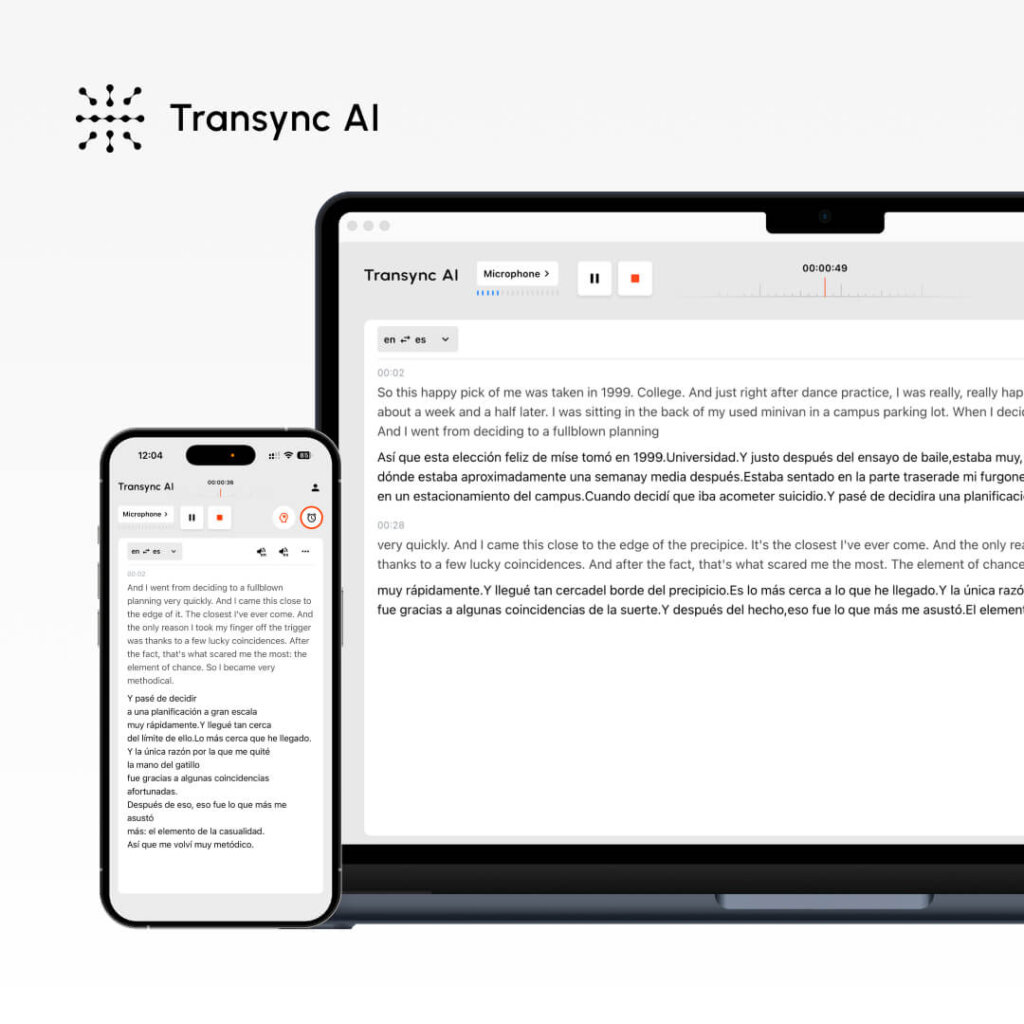
Qué es: Traducción de IA en tiempo real para reuniones y documentos Ideal para: Llamadas de ventas, reuniones de equipo, seminarios web, atención al cliente
Métricas de rendimiento:
- Exactitud: 95%+ (general), 99% (técnico con palabras clave)
- Estado latente: <100ms (retraso imperceptible)
- Idiomas: 60 idiomas
- Calidad de voz: 9,1/10 (los hablantes nativos lo califican como casi humano)
- Tiempo de actividad: 99.8%+
Cómo funciona:
- Abrir Transync AI
- Seleccione el par de idiomas (inglés → español)
- Marque la casilla “Audio de computadora”
- Haga clic en “Iniciar traducción”
- Abra Zoom/Teams/Meet normalmente
- Transyc AI traduce en tiempo real (latencia <100 ms)
- Después de la reunión: Transcripción generada automáticamente + Resumen de IA
Precios:
- Gratis: 40 minutos/mes (solo el primer mes)
- Principiante: $8,99/mes (10 horas)
- Pro: $19,99/mes (30 horas)
- Equipo: $49,99/mes (100 horas, 3 usuarios)
Ventajas: ✅ Latencia más rápida (<100 ms, imperceptible) ✅ Voz más natural (9.1/10) ✅ Configuración más sencilla (<1 minuto) ✅ Costo más bajo ($8.99/mes) ✅ Traducción en tiempo real para reuniones ✅ Transcripción + resumen automáticos ✅ Configuración de palabras clave/contexto para mayor precisión ✅ Multiplataforma (Zoom, Teams, Meet, Webex, WhatsApp)
Desventajas: ❌ Limitado a 60 idiomas (en comparación con los más de 100 de algunos competidores) ❌ Ideal para reuniones, no para traducción de documentos ❌ Requiere configuración de audio de computadora
Mejores casos de uso:
- 🎯 Llamadas de ventas internacionales
- 🎯 Reuniones de equipos distribuidos
- 🎯 Llamadas de atención al cliente
- 🎯 Webinars con múltiples idiomas
- 🎯 Llamadas de voz de WhatsApp en diferentes idiomas
Veredicto: Ideal para comunicación en tiempo real. Si necesita traducción instantánea durante reuniones con voz natural, Transync AI es la solución ideal.
#2: ChatGPT: la IA más versátil para la traducción
Qué es: IA de propósito general con capacidades de traducción Ideal para: Traducción de documentos, creación de contenidos, textos matizados
Métricas de rendimiento:
- Exactitud: 93-95%
- Estado latente: Instantáneo (pero no en tiempo real como Trasync AI)
- Idiomas: más de 100 idiomas
- Configuración: Moderado (2-3 minutos)
- Conciencia del contexto: Excelente (entiende los matices)
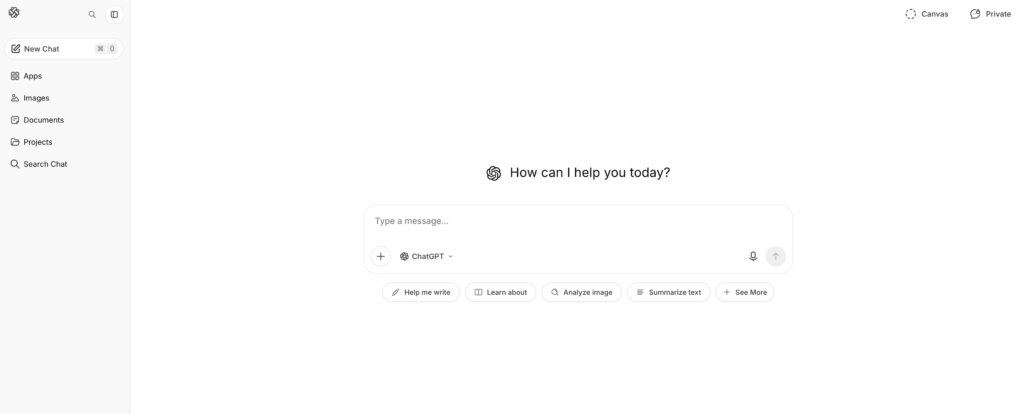
Cómo funciona:
- Vaya a ChatGPT (openai.com)
- Indicación de escritura: “Traduce este texto del inglés al español: [texto]”
- ChatGPT traduce con conocimiento del contexto
- Revisar y utilizar el texto traducido
Precios:
- Gratis: uso limitado por mes
- ChatGPT Plus: $20/mes (uso ilimitado)
- ChatGPT Pro: $200/mes (funciones avanzadas)
Ventajas: ✅ Excelente conocimiento del contexto (entiende los matices) ✅ Versátil (traducción + escritura + codificación) ✅ Más de 100 idiomas admitidos ✅ Precios razonables ($20/mes) ✅ Alta precisión (93-95%) ✅ Bueno para texto complejo, contenido de marketing
Desventajas: ❌ NO en tiempo real (latencia no adecuada para reuniones) ❌ No puede procesar audio/video en vivo ❌ Requiere entrada de texto (sin traducción de voz) ❌ Precisión menos consistente que las herramientas especializadas ❌ Nivel gratuito limitado
Mejores casos de uso:
- 📝 Traducción de documentos (contratos, manuales)
- 📝 Localización de contenidos de marketing
- Redacción de correos electrónicos en varios idiomas
- Traducción de textos técnicos
- 📝 Traducción de contenido creativo (conservación del tono)
Veredicto: Ideal para contenido escrito. Si necesita traducir documentos conservando el tono y el contexto, ChatGPT es la mejor opción. No es adecuado para reuniones en tiempo real.
👉 ChatGPT
#3: Google Translate: la IA más accesible para la traducción

Qué es: Traducción gratuita basada en IA y basada en la web Ideal para: Traducciones rápidas, comunicación informal.
Métricas de rendimiento:
- Exactitud: 92%
- Estado latente: Instante
- Idiomas: más de 100 idiomas
- Configuración: 0 minutos (no se necesita cuenta)
- Calidad de voz: 7/10 (aceptable pero robótico)
Cómo funciona:
- Vaya a translate.google.com
- Pegar texto en inglés o cargar documento
- Seleccionar el idioma de destino
- Obtenga traducción instantánea
Precios: Gratis (100% gratis, sin opción premium)
Ventajas: ✅ Completamente gratis ✅ No requiere cuenta ✅ Más de 100 idiomas ✅ Funciona en cualquier dispositivo ✅ Traducción instantánea ✅ Admite carga de documentos ✅ Reproducción de audio incorporada
Desventajas: ❌ Menor precisión (92% vs. 95%+) ❌ Deficiente en contexto/matices ❌ Voz robótica (7/10) ❌ No es ideal para traducciones críticas ❌ Opciones de personalización limitadas
Mejores casos de uso:
- 🌐 Traducciones rápidas de correo electrónico
- 🌐 Traducción de redes sociales
- 🌐 Referencia rápida (no para uso en producción)
- 🌐 Comunicación casual
- 🌐 Búsquedas rápidas que se ajustan al presupuesto
Veredicto: Ideal para traducciones rápidas y gratuitas. Si la precisión no es crucial y necesitas acceso instantáneo, Google Translate es insuperable. No es para traducciones esenciales para tu negocio.
#4: DeepL: la mejor IA para la precisión de la traducción

Qué es: Traducción de IA especializada (no de propósito general) Ideal para: Traducción profesional de documentos, redacción multilingüe
Métricas de rendimiento:
- Exactitud: 94% (la mejor entre las soluciones que no son en tiempo real)
- Estado latente: Instante
- Idiomas: 29 idiomas (calidad enfocada)
- Configuración: 1-2 minutos
- Calidad de voz: N/A (traducción de solo texto)
Cómo funciona:
- Visita deepl.com
- Pegar o escribir texto en inglés
- Seleccionar el idioma de destino
- Obtenga una traducción de alta calidad
- Descargar o copiar resultado
Precios:
- Gratis: 500.000 caracteres/mes
- Pro: $8.99/mes (ilimitado)
- Negocio: $25+/mes (funciones de equipo)
Ventajas: ✅ La mayor precisión entre las IA que no son en tiempo real (94%) ✅ Excelente para idiomas europeos ✅ Asequible ($8,99/mes) ✅ Sin complejidad de configuración ✅ Buen nivel gratuito (500 000 caracteres) ✅ Conserva el formato en los documentos
Desventajas: ❌ Solo 29 idiomas (en comparación con los 60-100+ de la competencia) ❌ Solo texto (sin traducción de reuniones en tiempo real) ❌ No apto para idiomas asiáticos ❌ Limitado a una traducción a la vez
Mejores casos de uso:
- 📄 Traducción profesional de documentos
- Traducción de correo electrónico (se requiere alta precisión)
- Enfoque en idiomas europeos
- Redacción comercial formal
- 📄 Traducción de documentos legales (general)
Veredicto: Ideal para traducciones escritas precisas. Si necesita traducciones profesionales del inglés a idiomas europeos, DeepL es la solución. Soporte limitado para idiomas fuera de Europa.
👉 DeepL
#5: JotMe: una buena alternativa a la IA en tiempo real para la traducción
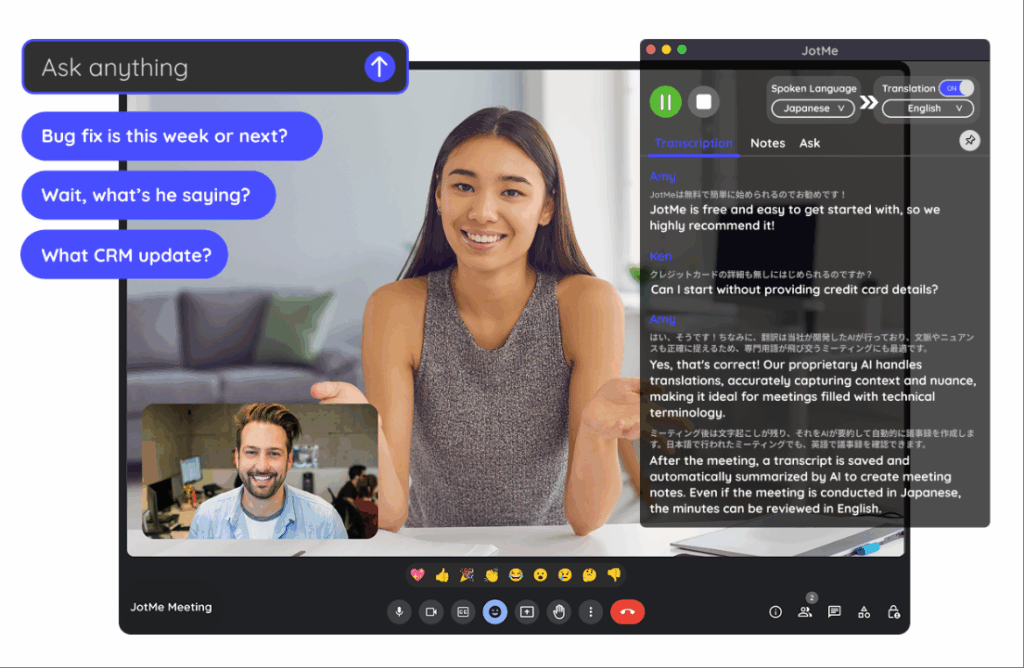
Qué es: Traducción en tiempo real para reuniones (alternativa a Transync AI) Ideal para: Reuniones de equipo, seminarios web, equipos distribuidos
Métricas de rendimiento:
- Exactitud: 92-94%
- Estado latente: 150-200ms (ligeramente perceptible)
- Idiomas: 77 idiomas
- Calidad de voz: 7/10 (bueno, no natural)
- Configuración: 2-3 minutos (extensión de Chrome)
Cómo funciona:
- Instalar la extensión de Chrome
- Unirse a la llamada de Zoom/Meet/Teams
- Habilitar traducción
- Traducción automática en tiempo real
Precios:
- Gratis: 20 min/mes
- Básico: $9/mes (200 min)
- Premium: $15/mes (500 min)
Ventajas: ✅ Más idiomas que Transync AI (77 frente a 60) ✅ Configuración más sencilla (extensión de Chrome) ✅ Asequible ($9/mes) ✅ Funciona en múltiples plataformas ✅ Bueno para reuniones informales
Desventajas: ❌ Latencia más lenta (150-200 ms, ligeramente perceptible) ❌ Menor precisión (92-94% frente a 95%+) ❌ Voz menos natural (7/10 frente a 9,1/10) ❌ No funciona con WhatsApp
Mejores casos de uso:
- 🎯 Reuniones informales de equipo
- 🎯 Seminarios web internacionales
- 🎯 Equipos conscientes del presupuesto
- 🎯 Se requiere diversidad lingüística
Veredicto: Buena alternativa a Transync AI si necesitas más idiomas. La latencia es ligeramente perceptible, pero aceptable para reuniones informales. No es ideal para llamadas de ventas formales, donde la primera impresión es fundamental.
👉 JotMe
IA para la traducción: Tabla comparativa de características
| Característica | Transinc IA | ChatGPT | Google Translate | DeepL | JotMe |
|---|---|---|---|---|---|
| Reuniones en tiempo real | ✅ Excelente | ❌ No | ❌ No | ❌ No | ✅ Bueno |
| Exactitud | 95%+ | 93-95% | 92% | 94% | 92-94% |
| Estado latente | <100 ms ✅ | N / A | Instante | Instante | 150-200 ms |
| Idiomas | 60 | 100+ | 100+ | 29 | 77 |
| Calidad de voz | 9.1/10 ✅ | N / A | 7/10 | N / A | 7/10 |
| Traducción de documentos | ❌ Limitado | ✅ Bueno | ✅ Bueno | ✅ Excelente | ❌ No |
| Tiempo de configuración | <1 minuto ✅ | 2-3 minutos | 0 minutos ✅ | 1-2 minutos | 2-3 minutos |
| Costo | $8.99/mes ✅ | $20/mes | Gratis ✅ | $8.99/mes ✅ | $9/mes |
| Mejor para | Reuniones en tiempo real | Contenido escrito | Búsquedas rápidas | Documentos profesionales | Reuniones de equipo |
¿Cuál es la mejor IA para la traducción? Cómo elegir la herramienta adecuada
Escenario 1: Llamada de ventas internacional
Pregunta: “¿Qué IA para traducción debería usar para una llamada de ventas importante con un cliente potencial español?”
Respuesta: Transinc IA
Por qué:
- Traducción en tiempo real (latencia imperceptible <100 ms)
- Voz natural (el prospecto suena como una persona real)
- Transcripción automática para seguimiento
- Calidad profesional (precisión 95%+)
- Fácil configuración (<1 minuto)
Configuración:
- Abrir Transync AI
- Seleccione Inglés → Español
- Marcar “Audio de computadora”
- Haga clic en “Iniciar traducción”
- Únase a Zoom normalmente
- Traducir automáticamente
Escenario 2: Traducción de un contrato legal
Pregunta: “¿Qué IA para traducción es mejor para traducir un contrato legal del inglés al español?”
Respuesta: Traductor profesional + DeepL como respaldo
Por qué:
- Los contratos legales requieren una precisión de 99%+
- La IA por sí sola no es suficiente para la responsabilidad legal
- DeepL (precisión 94%) puede ayudar a los traductores profesionales
- Costo: $500-1000 para profesionales (imprescindible para legales)
Proceso:
- Contratar traductor jurídico profesional
- Utilice DeepL como referencia previa a la traducción
- El traductor profesional perfecciona
- Resultado: 99% traducción legal precisa
Escenario 3: Traducción rápida de correo electrónico
Pregunta: “¿Qué IA de traducción debería usar para enviar correos electrónicos rápidos a un cliente español?”
Respuesta: Google Translate (gratis) o DeepL (mayor precisión)
Por qué:
- El correo electrónico no requiere precisión 99% (el contexto ayuda al cliente a comprender)
- La velocidad es importante (el cliente espera)
- El costo no es importante (es mejor que sea gratis)
- Google Translate es suficiente para correos electrónicos informales
Configuración:
- Vaya a translate.google.com
- Pegar el texto del correo electrónico
- Seleccione Inglés → Español
- Copiar el correo electrónico traducido
- Enviar inmediatamente
Escenario 4: Traducción de contenido de marketing
Pregunta: “¿Qué IA para la traducción preserva la voz de la marca al traducir contenido de marketing?”
Respuesta: ChatGPT (mejor para tono) + revisión profesional
Por qué:
- La voz de la marca es crítica (la IA genérica falla)
- ChatGPT entiende el contexto y el tono
- La revisión profesional garantiza la calidad
- Costo razonable ($20/mes ChatGPT)
Proceso:
- Redactar textos de marketing en inglés
- Usar ChatGPT: “Traducir al español, conservando la voz de la marca [descripción del tono]”
- ChatGPT traduce con contexto
- Haga que un hablante nativo revise
- Publica con confianza
Escenario 5: Equipo distribuido en 5 países
Pregunta: “¿Qué inteligencia artificial para la traducción permite que nuestro equipo distribuido se comunique en cinco idiomas?”
Respuesta: Transyc AI (principal) o JotMe (opción económica)
Por qué:
- Traducción en tiempo real durante las reuniones
- Transcripción automática para revisión asincrónica
- Soporte multilingüe (Transync: 60, JotMe: 77)
- Costo mínimo ($8,99-9/mes)
Configuración:
- Abra Transync AI durante la reunión
- Seleccione el par de idiomas principal
- Haga clic en “Iniciar traducción”
- Todos los miembros del equipo escuchan la traducción.
- Revisar el resumen generado automáticamente más tarde
Resultado: Sin barreras lingüísticas, reuniones más rápidas (25%+ tiempo ahorrado), mejor participación.
IA para la traducción: Indicador de precisión 2026
Pruebas independientes muestran:
| Solución de IA | Texto general | Contenido técnico | Contenido legal | Contenido de marketing |
|---|---|---|---|---|
| Transinc IA | 95-96% | 98-99% (con palabras clave) | 92% | 94% |
| ChatGPT | 93-95% | 91% | 89% | 96% |
| Google Translate | 92% | 88% | 85% | 90% |
| DeepL | 94% | 92% | 91% | 93% |
| JotMe | 92-94% | 90% | 88% | 91% |
| Traductor profesional | 98-99% | 98-99% | 99%+ | 98-99% |
Ideas clave:
- ✅ Transync AI lidera en lo técnico y en tiempo real
- ✅ ChatGPT lidera la preservación del tono de marketing
- ✅ DeepL es líder en precisión de documentos (no en tiempo real)
- ✅ Google Translate es suficiente para uso casual
- ✅ El traductor profesional supera a todos en contenido crítico
La mejor IA para la traducción: pasos de implementación
Paso 1: Identifique sus necesidades
Pregúntese:
- ❓ ¿Necesito traducción en tiempo real (reuniones) o traducción de documentos?
- ¿Qué tan importante es la precisión? (Legal = 99%, Casual = 90%)
- ❓¿Qué idiomas necesito?
- ❓ ¿Cuál es mi presupuesto? (Gratis, $10/mes, $100+/mes)
- ❓ ¿Necesito reproducción de voz?
Paso 2: Elige la IA adecuada
¿Reuniones en tiempo real? → Transinc IA ¿Documentos escritos? → ChatGPT o DeepL ¿Rápido y gratis? → Google Translate ¿Reuniones del equipo de presupuesto? → JotMe ¿Crítico legal/técnico? → traductor profesional
Paso 3: Obtenga una prueba gratuita
- Transync AI: 40 minutos gratis (primer mes)
- ChatGPT: Nivel gratuito disponible
- Google Translate: Siempre gratis
- DeepL: 500k caracteres gratis al mes
- JotMe: 20 minutos gratis al mes
Paso 4: Prueba con contenido real
- Realizar una reunión real o traducir una muestra
- Verifique que la precisión se ajuste a sus necesidades
- Compruebe si la interfaz es intuitiva
- Confirme que se integra con sus plataformas
Paso 5: Implementar a escala
- Suscríbete a la solución elegida
- Capacitar al equipo sobre el uso
- Configurar en todas las plataformas relevantes
- Supervise la precisión y ajuste las palabras clave si es necesario
IA para la traducción: señales de alerta que hay que evitar
❌ Evite que la IA afirme "precisión 100%"“ (ninguna IA logra esto) ❌ Evite soluciones sin prueba gratuita (no se puede verificar la calidad) ❌ Evite los precios ocultos (debería ser transparente) ❌ Evite soluciones con malas críticas (múltiples quejas = problema real) ❌ Evite soluciones que exageren el soporte lingüístico (la calidad importa más que la cantidad) ❌ Evite soluciones sin soporte al cliente (necesitarás ayuda)
Conclusión: ¿Cuál es la mejor IA para la traducción?
No existe una única “mejor” IA para la traducción. La respuesta depende completamente de su caso de uso:
| Tu necesidad | La mejor IA | Por qué |
|---|---|---|
| Llamadas de ventas en tiempo real | Transinc IA | <100 ms de latencia, voz 9.1/10, precisión 95%+ |
| Traducción de documentos | ChatGPT o DeepL | Mayor precisión para el contenido escrito |
| Búsqueda rápida y gratuita | Google Translate | Siempre gratis, instantáneo, suficientemente bueno. |
| Contenido de marketing | ChatGPT | Conserva el tono de la marca de forma excelente. |
| Reuniones de equipo | Transycn AI o JotMe | En tiempo real, asequible y multiplataforma |
| Documentos legales | traductor profesional | 99%+ precisión, protección legal |
Empieza con tus necesidades específicas, elige la IA que mejor se adapte a tus necesidades y prueba la versión gratuita. Encontrarás la solución perfecta rápidamente.
La opción más popular para 2026: Transinc IA para reuniones en tiempo real (de más rápido crecimiento, voz más natural, precio más bajo). Comienza tu sesión de 40 minutos prueba gratis hoy

