

هل تحتاج إلى إضافة ترجمة لمتصفحك أو اجتماعاتك؟ إضافة الترجمة المناسبة تُغير طريقة تواصلك بين اللغات.
“يشير مصطلح "امتداد المترجم" (أو "امتداد المترجم" باللغة الإنجليزية) إلى إضافات برمجية توفر إمكانيات الترجمة ضمن تطبيقاتك الحالية. سواء كنت بحاجة إلى متصفح امتداد المترجم لقراءة مواقع إلكترونية أجنبية أو لحضور اجتماع امتداد المترجم بالنسبة لترجمة المحادثات في الوقت الفعلي، يمكن للأداة المناسبة إزالة حواجز اللغة على الفور.
لكن الجودة تختلف اختلافاً كبيراً. بعضها ملحقات المترجم لا تقدم سوى ترجمة نصية أساسية بإخراج آلي. بينما توفر خدمات أخرى ترجمة صوتية احترافية فورية بصوت طبيعي وتوثيق تلقائي.
يشرح هذا الدليل ما هو امتداد المترجم يقارن هذا التقرير أفضل الخيارات لحالات الاستخدام المختلفة، ويوضح لماذا تتصدر Transync AI فئة الترجمة الاحترافية للاجتماعات والفعاليات.
ما هو امتداد المترجم؟
أنواع ملحقات المترجم الشائعة
1. إضافات المتصفح (كروم، فايرفوكس، سفاري)
- ترجمة صفحات الويب تلقائيًا
- ترجمة الكلمات عند تمرير المؤشر
- حدد النص وقم بترجمته
- أمثلة: إضافة ترجمة جوجل، إضافة DeepL
2. ملحقات منصات الاجتماعات (Zoom، Teams، Meet)
- ترجمة المحادثات في الوقت الفعلي
- ترجمة صوتية مع مخرج صوتي
- ترجمة تلقائية بلغات متعددة
- أمثلة: تقنية Transync AI، وامتدادات مترجم الاجتماعات
3. ملحقات البريد الإلكتروني (Gmail، Outlook)
- ترجمة رسائل البريد الإلكتروني الواردة
- كتابة رسائل البريد الإلكتروني بلغات أجنبية
- أمثلة: ترجمة جوجل لبريد جيميل
4. ملحقات المستندات (وورد، مستندات جوجل)
- ترجمة المستندات أثناء التحرير
- الحفاظ على التنسيق
- أمثلة: مترجم مايكروسوفت لبرنامج وورد
ملحق Traductor للمتصفح: المقارنة
إضافة ترجمة جوجل

ما يفعله:
- يترجم صفحات الويب بأكملها
- ترجمة الكلمات عند تمرير المؤشر
- ترجمة قائمة السياق بالنقر بزر الماوس الأيمن
- 133 لغة مدعومة
نقاط القوة:
- ✅ مجاني ومتاح على نطاق واسع
- ✅ يدعم العديد من اللغات
- ✅ سهل التركيب
- ✅ يعمل على معظم المواقع الإلكترونية
القيود:
- ❌ نص فقط (بدون ترجمة صوتية)
- ❌ ترجمة حرفية (تفقد السياق)
- ❌ لا يمكن ترجمة محتوى الصوت/الفيديو
- ❌ لا توجد إمكانية للمحادثة في الوقت الفعلي
- ❌ غالباً ما تكون الترجمات غير دقيقة أو ركيكة
الأفضل لـ: قراءة المواقع الإلكترونية الأجنبية، والبحث عن المفردات الأساسية
امتداد DeepL

ما يفعله:
- ترجمة نصوص عالية الجودة
- يعمل في متصفحات الويب
- الترجمة الواعية بالسياق
- يدعم 31 لغة
نقاط القوة:
- ✅ دقة أفضل من جوجل للغات الأوروبية
- ✅ ترجمات أكثر طبيعية
- ✅ مناسب للمحتوى المكتوب
- ✅ مستوى مجاني متاح
القيود:
- ❌ 31 لغة فقط (مقابل 133 لغة لدى جوجل)
- ❌ نص فقط (بدون ترجمة صوتية)
- ❌ لا توجد إمكانية للمحادثة في الوقت الفعلي
- ❌ التركيز الأساسي على اللغات الأوروبية
- ❌ لا يمكن ترجمة الاجتماعات المباشرة
الأفضل لـ: ترجمة الوثائق والمواقع الإلكترونية باللغات الأوروبية
إضافة مترجم مايكروسوفت
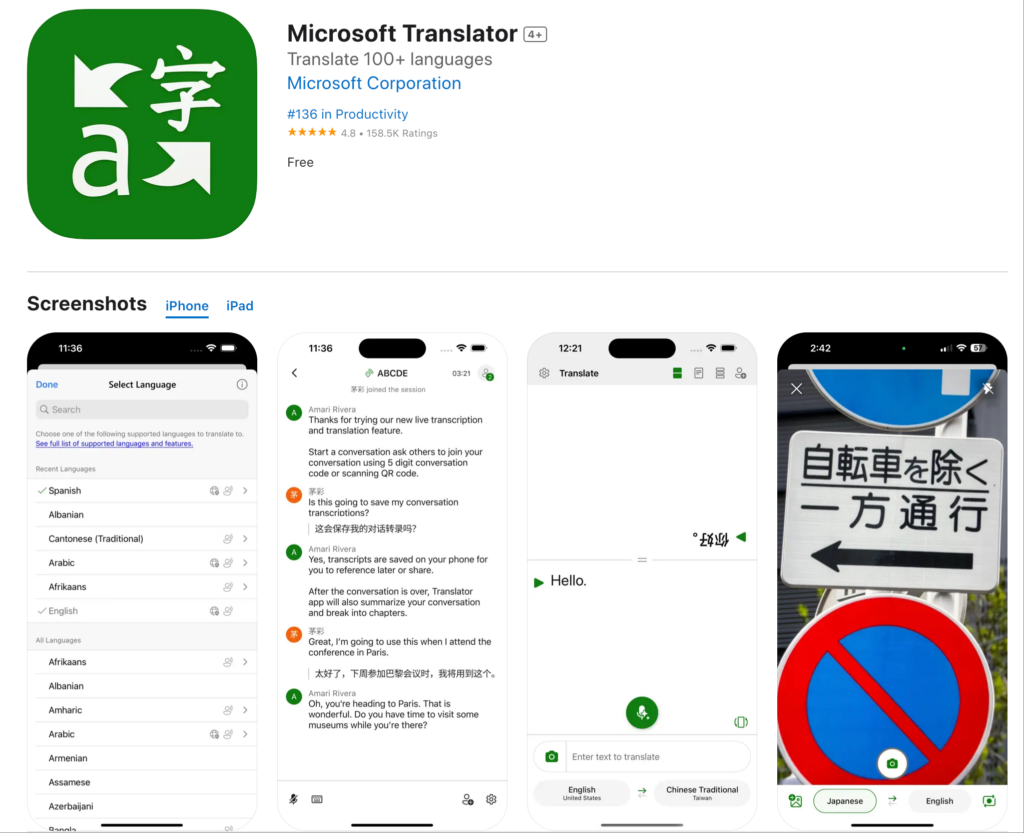
ما يفعله:
- يترجم صفحات الويب
- يتكامل مع متصفح مايكروسوفت إيدج
- وضع المحادثة الأساسي
- أكثر من 70 لغة مدعومة
نقاط القوة:
- ✅ تكامل جيد مع نظام مايكروسوفت البيئي
- ✅ دقة جيدة للغات الشائعة
- ✅ مجاني للاستخدام
- ✅ يعمل على معظم المواقع الإلكترونية
القيود:
- ❌ مصمم بشكل أساسي لمتصفح إيدج
- ❌ إمكانيات محدودة في الوقت الفعلي
- ❌ لا توجد ميزات اجتماعات احترافية
- ❌ جودة صوت أساسية
الأفضل لـ: مستخدمو مايكروسوفت إيدج الذين يحتاجون إلى ترجمة أساسية
ملحق مترجم الاجتماعات: حلول احترافية
الفجوة في إضافات المتصفح: لا يوجد أي منها يدعم الترجمة الفورية للاجتماعات.

Transync AI: إضافة مترجم اجتماعات احترافية
ما يفعله:
- الترجمة الصوتية الفورية في الاجتماعات
- مخرجات صوتية طبيعية بـ 60 لغة
- النسخ والملخصات التلقائية
- التكامل الأصلي مع Zoom وTeams وMeet
لماذا هو الأفضل؟
السرعة: أقل من 100 مللي ثانية، ترجمة فورية
- زمن استجابة غير محسوس
- انسيابية المحادثة الطبيعية
- لا توقفات محرجة
- أسرع من زمن رد الفعل البشري
الدقة: 95%+ مع خاصية التعلم السياقي
- يفهم المصطلحات التجارية
- يتولى المحادثات التقنية
- دعم المصطلحات المخصصة
- الوعي بالسياق الثقافي
جودة الصوت: توليف يشبه الصوت البشري
- النبرة والإيقاع الطبيعيان
- مطابقة النغمات المناسبة
- دعم اللهجة الإقليمية
- تم الحفاظ على الفروق الدقيقة العاطفية
اللغات: 60 لغة شاملة
- الإسبانية (بمختلف اللهجات المكسيكية والقشتالية والكولومبية)
- البرتغالية (البرازيلية، الأوروبية)
- الصينية (الماندرين، الكانتونية)
- اليابانية، الكورية، العربية، الهندية
- الفرنسية، الألمانية، الإيطالية، الروسية
- بالإضافة إلى أكثر من 45 لغة إضافية
التكامل: التفعيل بنقرة واحدة
- زووم: إضافة أصلية، إعداد في أقل من 5 دقائق
- مايكروسوفت تيمز: تكامل سلس
- جوجل ميت: اتصال مباشر
- ويبكس: دعم كامل
- فعاليات مستقلة: فعاليات حضورية
الوثائق: الذكاء الآلي
- النصوص الكاملة بجميع اللغات المستخدمة
- تحديد هوية المتحدث مع الطوابع الزمنية
- ملخصات الاجتماعات التي تم إنشاؤها بواسطة الذكاء الاصطناعي
- استخراج عناصر الإجراء
- تنسيق قابل للبحث والتصدير
قابلية التوسع: عدد غير محدود من المشاركين
- مناسب للمكالمات الثنائية
- تتسع المؤتمرات لتشمل 2000 شخص
- لغات متعددة في وقت واحد
- لا يوجد تدهور في الأداء
امتداد المترجم حسب حالة الاستخدام
قراءة المواقع الإلكترونية الأجنبية
سيناريو: فريق التسويق يبحث في مواقع المنافسين الإسبان
أفضل امتداد للمترجم: إضافة ترجمة جوجل
لماذا: ترجمة نصية فقط كافية للقراءة. سهلة الاستخدام. مجانية.
كيفية الاستخدام:
- قم بتثبيت إضافة ترجمة جوجل في متصفح كروم
- قم بزيارة الموقع الإسباني
- انقر على أيقونة الإضافة
- اختر "ترجمة هذه الصفحة"“
- اقرأ المحتوى المترجم
الحدود: قد تكون الترجمات غير سلسة. إنها جيدة لفهم المعنى العام، وليست مناسبة للكتابة الاحترافية.
اجتماعات الأعمال الدولية
سيناريو: مفاوضات الشراكة بين الولايات المتحدة واليابان. ٨ مشاركين. مطلوب ترجمة صوتية فورية.
أفضل امتداد للمترجم: ترانسينك الذكاء الاصطناعي
لماذا: الحل الوحيد الذي يوفر ترجمة صوتية فورية بجودة احترافية.
كيفية الاستخدام:
- قم بتثبيت إضافة Transync AI في Zoom
- بدء الاجتماع
- انقر على أيقونة Transync AI
- اختر اللغة (الإنجليزية + اليابانية)
- تحدث بشكل طبيعي - تتم الترجمة في الوقت الفعلي
نتيجة:
- انسيابية المحادثة الطبيعية
- دقة 95%+ للمصطلحات التجارية
- لا مجال لسوء الفهم
- نص الاجتماع التلقائي
لماذا تفشل إضافات المتصفح؟ لا يستطيع تطبيق ترجمة جوجل ترجمة الصوت في المحادثات المباشرة.
اجتماعات الفريق اليومية
سيناريو: فريق مكون من 50 شخصًا (من الولايات المتحدة والمكسيك). اجتماع يومي قصير لمدة 15 دقيقة عبر تطبيق زووم.
أفضل: ترانسينك الذكاء الاصطناعي
لماذا: مصمم للاجتماعات المتكررة. إعداد لمرة واحدة. أداء يومي موثوق.
كيفية الاستخدام:
- قم بالتثبيت
- قم بتعيين اللغات الافتراضية (الإنجليزية + الإسبانية)
- كل اجتماع وقوف يُترجم تلقائيًا
- يستمع أعضاء الفريق إلى لغتهم المفضلة
- يقوم الذكاء الاصطناعي بإنشاء ملخص يومي
نتيجة:
- زيادة إنتاجية 45%
- انعدام حواجز اللغة
- تحسن التعاون بين أعضاء الفريق
- لا يتطلب إعدادًا يوميًا
مكالمات دعم العملاء
سيناريو: يتولى فريق الدعم الرد على مكالمات العملاء باللغات الإسبانية والفرنسية واليابانية.
أفضل: تقنية Transync AI مع تكامل الهاتف
لماذا: الترجمة الصوتية الفورية ضرورية. تجربة العملاء بالغة الأهمية.
كيفية الاستخدام:
- دمج تقنية الذكاء الاصطناعي من Transync مع نظام الهاتف
- يتصل العميل باللغة الإسبانية
- يستمع الوكيل إلى الترجمة الإنجليزية
- يرد الموظف باللغة الإنجليزية
- يستمع العميل إلى الترجمة الإسبانية
نتيجة:
- أوقات استجابة أسرع 60%
- 38% تحسين الرضا
- لا يشترط إجادة لغتين عند التوظيف
- توثيق المكالمات التلقائي
المؤتمرات الدولية
سيناريو: مؤتمر يضم 500 شخص. لغات متعددة. مسارات متعددة.
أفضل: ترانسينك للذكاء الاصطناعي للأحداث
لماذا: قابلية توسع لا نهائية. جودة احترافية. دعم لغات متعددة في وقت واحد.
كيفية الاستخدام:
- قم بنشر تقنية Transync AI في جميع قاعات المؤتمرات
- يقوم الحضور بتنزيل التطبيق أو استخدام واجهة الويب
- اختر اللغة المفضلة
- تتم ترجمة جميع الجلسات تلقائيًا
- يمكنك الوصول إلى النصوص لاحقًا
نتيجة:
- جميع المحتويات متاحة لجميع الحضور
- جودة ترجمة احترافية
- توثيق الجلسة التلقائي
- رضا الحضور 99%+
ملحق Traductor: مقارنة الميزات
| ميزة | ترانسينك الذكاء الاصطناعي (الاجتماعات) | ترجمة جوجل امتداد | ديب إل امتداد | مترجم مايكروسوفت |
|---|---|---|---|---|
| صوت في الوقت الفعلي | نعم (أقل من 100 مللي ثانية) ⭐ | لا | لا | محدود |
| ترجمة النصوص | نعم ⭐ | نعم | نعم | نعم |
| دقة | 95%+ ⭐ | 75-85% | 90-94% | 80-88% |
| جودة الصوت | طبيعي ⭐ | غير متوفر | غير متوفر | روبوتي |
| اللغات | 60 ⭐ | 133 | 31 | 70+ |
| تكامل الاجتماعات | أصلي ⭐ | لا أحد | لا أحد | أساسي |
| الوثائق | ذكاء اصطناعي كامل ⭐ | لا أحد | لا أحد | أساسي |
| حالة الاستخدام | اجتماعات مهنية ⭐ | متصفح الويب | ترجمة المستندات | المهام الأساسية |
| التخصيص | قواميس مخصصة ⭐ | لا أحد | محدود | محدود |
| قابلية التوسع | غير محدود ⭐ | غير متوفر | غير متوفر | محدود |
مفتاح الرموز: ⭐ = قائد الفئة
خاتمة: المتصفح إضافة مترجم يُجيد ترجمة النصوص. وللحصول على ترجمة احترافية للاجتماعات، أنت بحاجة إلى حل متخصص مثل Transync AI.
ملحق المترجم: الأسئلة الشائعة
س1: ما هو امتداد المترجم؟ ملحق الترجمة هو برنامج إضافي يوفر إمكانيات الترجمة داخل التطبيقات الحالية مثل متصفحات الويب، أو Zoom، أو Teams، أو عملاء البريد الإلكتروني.
س2: ما هو أفضل إضافة ترجمة لمتصفح كروم؟ لقراءة المواقع الإلكترونية: إضافة ترجمة جوجل. للاجتماعات المهنية في زووم/تيمز: ترانسينك إيه آي. تتطلب حالات الاستخدام المختلفة حلولاً مختلفة.
س3: هل يمكن لملحق المترجم ترجمة الاجتماعات المباشرة؟ لا يمكن لملحقات المتصفح ذلك. أنت بحاجة إلى اجتماع مخصص. امتداد المترجم مثل تقنية Transync AI التي توفر ترجمة صوتية فورية مع مخرجات صوتية طبيعية.
س4: ما مدى دقة امتداد المترجم؟ إضافات المتصفح (ترجمة جوجل): 75-85%. DeepL: 90-94% للنصوص. إضافات الاجتماعات الاحترافية (Transync AI): 95%+ مع خاصية التعلم السياقي وقواميس مخصصة.
س5: هل تعمل ملحقات الترجمة دون اتصال بالإنترنت؟ معظمها يتطلب اتصالاً بالإنترنت. يتطلب برنامج Transync AI اتصالاً بالإنترنت للترجمة الفورية، ولكنه يستطيع إنشاء تقارير غير متصلة بالإنترنت من النصوص المحفوظة.
س6: هل يمكنني استخدام إضافة مترجم لاجتماعات زووم؟ لا تعمل إضافات المتصفح مع الصوت في Zoom. قم بتثبيت Transync AI كإضافة أصلية لـ Zoom. إضافة مترجم للترجمة الصوتية الفورية.
س7: ما الفرق بين ملحقات المترجم للمتصفح وملحقات مترجم الاجتماعات؟ تُترجم إضافات المتصفح النصوص على مواقع الويب. أما إضافات الاجتماعات فتُترجم المحادثات الصوتية المباشرة في الوقت الفعلي مع إخراج الصوت.
س8: هل يمكن لامتدادات المترجم التعامل مع المصطلحات التقنية؟ يواجه مترجم جوجل صعوبة في التعامل مع المصطلحات المتخصصة. يدعم برنامج Transync AI قواميس مخصصة حيث يمكنك تحديد ترجمات خاصة بكل قطاع.
نجاح في الواقع العملي: نشر امتداد المترجم
شركة استشارات عالمية
حساب تعريفي: 1200 مستشار في 15 دولة. أكثر من 400 اجتماع مع العملاء أسبوعياً بلغات متعددة.
تحدي: تؤدي الحواجز اللغوية إلى انخفاض جودة المشروع. يفضل العملاء التواصل بلغتهم الأم. تتسبب مشاكل الترجمة في تأخير المشروع.
المحاولات السابقة:
- ❌ متصفح ملحقات المترجم (ترجمة جوجل): لا يمكن ترجمة الصوت الخاص بالاجتماع
- ❌ المترجمون البشريون: غير مستدام لأكثر من 400 اجتماع أسبوعي
- ❌ التوظيف ثنائي اللغة فقط: مجموعة محدودة من المواهب، وتنوع أقل في الفريق
حل: اجتماع Transync AI المنشور امتداد المترجم
تطبيق:
- قمت بتثبيت إضافة Transync AI في Zoom و Teams
- أنشأتُ قواميس مصطلحات مخصصة للاستشارات
- تم تدريب جميع الاستشاريين (أقل من 30 دقيقة لكل شخص)
- قم بتحديد تفضيلات اللغة الإقليمية حسب المكتب
النتائج (12 شهرًا):
مقاييس التواصل:
- ✅ ١٠٠١ تيرابايت من اجتماعات العملاء متاحة باللغة التي يفضلها العميل
- ✅ لا تأخيرات في المشاريع بسبب اختلاف اللغات
- ✅ رضا المستشارين عن جودة الترجمة 99.3%
- ✅ رضا العملاء عن التواصل: 97.81%
الأثر على الأعمال:
- ✅ ارتفع معدل نجاح المشروع بمقدار 34%
- ✅ تحسن معدل الاحتفاظ بالعملاء 28%
- ✅ تم تحسين استخدام الاستشاريين (بدون قيود على مطابقة اللغة)
- ✅ تم تمكين التوسع في أسواق جديدة (دخول 8 دول جديدة)
مقاييس الإنتاجية:
- ✅ إنجاز المشاريع بشكل أسرع (42%)
- ✅ انخفاض في حوادث سوء الفهم 38%
- ✅ تحسين التعاون بين المكاتب 51%
شهادة: “"لقد جربنا جميع إضافات الترجمة المتاحة للمتصفحات، ولم تتمكن أي منها من ترجمة اجتماعاتنا مع العملاء. لقد أحدثت Transync AI نقلة نوعية في عملياتنا العالمية بأكملها. إنها ليست مجرد إضافة ترجمة، بل هي ميزتنا التنافسية." - الشريك الإداري، العمليات العالمية
البدء: إضافة مترجم
لتصفح الإنترنت (ترجمة النصوص)
الخطوة 1: قم بتثبيت إضافة ترجمة جوجل أو DeepL الخطوة 2: تصفح المواقع الإلكترونية الأجنبية بشكل طبيعي الخطوة 3: انقر على الإضافة لترجمة الصفحات الأفضل لـ: قراءة المحتوى، والبحث الأساسي

للاجتماعات المهنية (الترجمة الصوتية)
الخطوة 1: تثبيت برنامج Transync AI
- متوفر عبر Zoom وTeams وMeet وWebex
- تركيب في أقل من 5 دقائق
- تفعيل بنقرة واحدة
الخطوة الثانية: ضبط اللغات
- اختر لغات فريقك
- اختر الصيغ الإقليمية
- إنشاء قاموس مصطلحات مخصص (اختياري)
الخطوة الثالثة: بدء الاجتماع
- قم بتشغيل Zoom/Teams/Meet بشكل طبيعي
- انقر على أيقونة Transync AI
- تتم الترجمة تلقائياً
الخطوة الرابعة: الوصول إلى الوثائق
- قم بتنزيل النصوص بعد الاجتماع
- مراجعة الملخصات التي تم إنشاؤها بواسطة الذكاء الاصطناعي
- شارك مع أصحاب المصلحة
الخلاصة: أفضل ملحق للمترجم
يعتمد اختيار امتداد المترجم المناسب على حالة الاستخدام الخاصة بك:
لقراءة المواقع الإلكترونية:
- ✅ إضافة ترجمة جوجل (معظم اللغات)
- ✅ امتداد DeepL (أفضل جودة للغات الأوروبية)
للاجتماعات المهنية:
- ✅ تقنية Transync AI (الحل الوحيد الذي يوفر ترجمة صوتية فورية)
لماذا تتصدر Transync AI قائمة امتدادات مترجم الاجتماعات؟
✅ الأسرع: ترجمة فورية في أقل من 100 مللي ثانية (زمن استجابة غير محسوس) ✅ الأكثر دقة: 95%+ مع خاصية التعلم السياقي وقواميس مخصصة ✅ الأكثر طبيعية: توليف صوت يشبه الصوت البشري، وليس صوتًا آليًا ✅ أفضل تكامل: تفعيل Zoom/Teams/Meet بنقرة واحدة ✅ الأكثر ذكاءً: نسخ تلقائية، ملخصات، بنود عمل ✅ الأكثر شمولاً: 60 لغة مع دعم اللهجات الإقليمية ✅ الأكثر قابلية للتخصيص: قواميس مخصصة لمصطلحات الصناعة ✅ الأكثر قابلية للتوسع: من المكالمات الثنائية إلى المؤتمرات التي تضم 2000 شخص ✅ الأكثر احترافية: أمان وموثوقية على مستوى المؤسسات
تتفوق إضافات الترجمة في المتصفح في ترجمة النصوص. أما بالنسبة للترجمة الصوتية الاحترافية في الاجتماعات والفعاليات والمكالمات، فإن Transync AI هي الخيار الأمثل بلا منازع.
توقف عن البحث عن وصلة المترجم المثالية.
بالنسبة للمواقع الإلكترونية: استخدم ترجمة جوجل أو DeepL. للاجتماعات: استخدم تقنية Transync AI.
اختر الأداة المناسبة للمهمة المناسبة، وحوّل اتصالاتك العالمية اليوم.
إذا كنت تريد تجربة الجيل القادم، ترانسينك الذكاء الاصطناعي تقود الطريق مع الترجمة الفورية المدعومة بالذكاء الاصطناعي التي تحافظ على سير المحادثات بشكل طبيعي. يمكنك جربه مجانا الآن.

