

¿Necesitas una extensión de traducción para tu navegador o tus reuniones? La extensión de traducción adecuada transforma tu forma de comunicarte entre idiomas.
“La "extensión de traductor" (extensión de traductor en inglés) se refiere a los complementos de software que ofrecen funciones de traducción dentro de sus aplicaciones existentes. Ya sea que necesite un navegador extensión de traductor Para leer sitios web extranjeros o asistir a una reunión. extensión de traductor Para la traducción de conversaciones en tiempo real, la herramienta adecuada puede eliminar las barreras del idioma al instante.
Pero la calidad varía drásticamente. Algunos extensiones de traductor Algunos ofrecen únicamente traducción de texto básica con salida robótica. Otros ofrecen traducción de voz profesional en tiempo real con audio natural y documentación automática.
Esta guía explica qué es una extensión de traductor es decir, compara las mejores opciones para diferentes casos de uso y muestra por qué Transync AI lidera la categoría de traducción profesional de reuniones y eventos.
¿Qué es una extensión de Traductor?
Tipos comunes de extensiones de Traductor
1. Extensiones del navegador (Chrome, Firefox, Safari)
- Traducir páginas web automáticamente
- Traducción de palabras al pasar el cursor sobre ellas
- Seleccionar texto y traducir
- Ejemplos: extensión de Google Translate, extensión de DeepL
2. Extensiones de la plataforma de reuniones (Zoom, Teams, Meet)
- Traducción de conversaciones en tiempo real
- Traducción de voz con salida de audio
- Subtítulos automáticos en varios idiomas
- Ejemplos: Transync AI, extensiones de traductor de reuniones
3. Extensiones de correo electrónico (Gmail, Outlook)
- Traducir correos electrónicos entrantes
- Redactar correos electrónicos en idiomas extranjeros
- Ejemplos: Traductor de Google para Gmail
4. Extensiones de documentos (Word, Google Docs)
- Traducir documentos mientras se editan
- Conservar el formato
- Ejemplos: Microsoft Translator para Word
Extensión del traductor del navegador: comparación
Extensión del Traductor de Google

Qué hace:
- Traduce páginas web completas
- Traducción de palabras al pasar el cursor sobre ellas
- Traducción del menú contextual del botón derecho
- 133 idiomas compatibles
Puntos fuertes:
- ✅ Gratuito y ampliamente disponible
- ✅ Compatible con muchos idiomas
- ✅ Fácil de instalar
- ✅ Funciona en la mayoría de los sitios web
Limitaciones:
- ❌ Solo texto (sin traducción de voz)
- ❌ Traducción palabra por palabra (pierde contexto)
- ❌ No se puede traducir contenido de audio/video
- ❌ Sin capacidad de conversación en tiempo real
- ❌ Las traducciones a menudo son incómodas o inexactas
Ideal para: Lectura de sitios web extranjeros, búsqueda de vocabulario básico
Extensión DeepL

Qué hace:
- Traducción de textos de alta calidad
- Funciona en navegadores web
- Traducción sensible al contexto
- 31 idiomas compatibles
Puntos fuertes:
- ✅ Mayor precisión que Google para los idiomas europeos
- ✅ Traducciones con un sonido más natural
- ✅ Bueno para contenido escrito
- ✅ Nivel gratuito disponible
Limitaciones:
- ❌ Solo 31 idiomas (frente a los 133 de Google)
- ❌ Solo texto (sin traducción de audio)
- ❌ Sin capacidad de conversación en tiempo real
- ❌ Enfoque principalmente en idiomas europeos
- ❌ No se pueden traducir reuniones en vivo
Ideal para: Traducción de documentos y sitios web en idiomas europeos
Extensión de Microsoft Translator
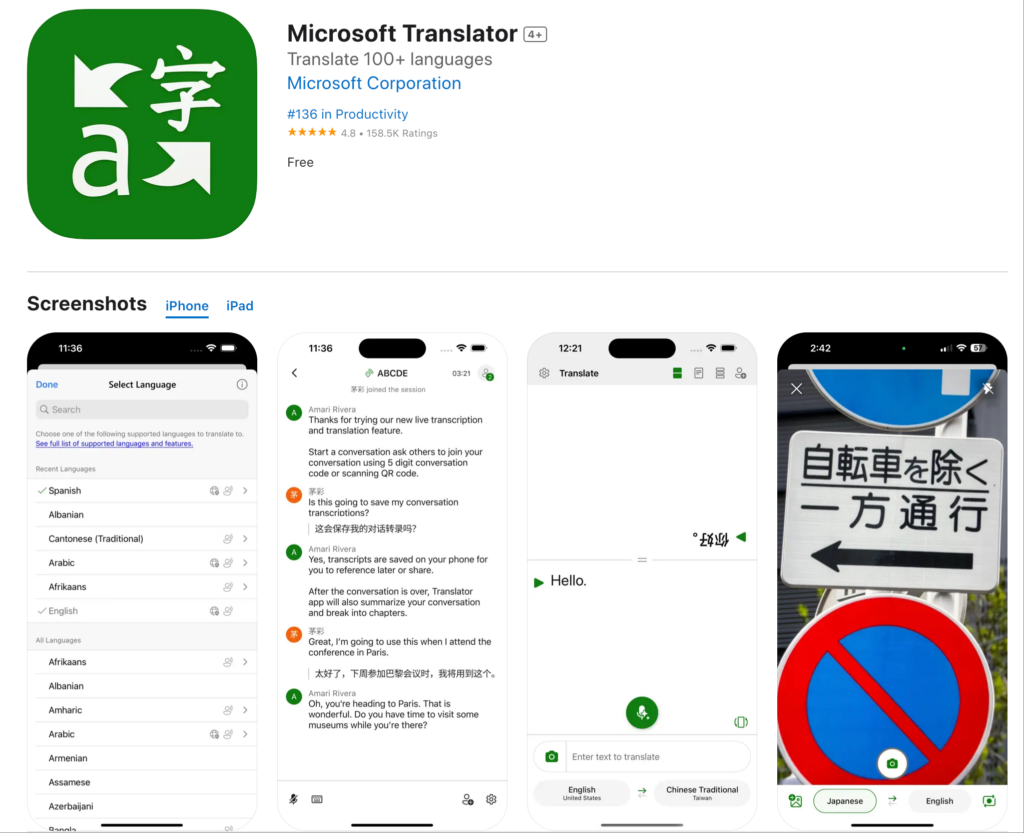
Qué hace:
- Traduce páginas web
- Se integra con Microsoft Edge
- Modo de conversación básico
- Más de 70 idiomas compatibles
Puntos fuertes:
- ✅ Buena integración con el ecosistema de Microsoft
- ✅ Precisión decente para idiomas comunes
- ✅ De uso gratuito
- ✅ Funciona en la mayoría de los sitios web
Limitaciones:
- ❌ Diseñado principalmente para el navegador Edge
- ❌ Capacidades limitadas en tiempo real
- ❌ Sin funciones de reunión profesionales
- ❌ Calidad de voz básica
Ideal para: Usuarios de Microsoft Edge que necesitan traducción básica
Extensión de Translator de Reuniones: Soluciones Profesionales
La brecha en las extensiones del navegador: Ninguno maneja traducción de reuniones en tiempo real.

Transyn AI: Extensión profesional para el traductor de reuniones
Qué hace:
- Traducción de voz en tiempo real en reuniones
- Salida de audio natural en 60 idiomas
- Transcripciones y resúmenes automáticos
- Integración nativa con Zoom, Teams y Meet
Por qué es el mejor:
Velocidad: <100 ms Traducción en tiempo real
- Latencia imperceptible
- Flujo de conversación natural
- Sin pausas incómodas
- Más rápido que el tiempo de reacción humano
Precisión: 95%+ con aprendizaje de contexto
- Comprende la terminología empresarial.
- Maneja conversaciones técnicas
- Soporte de glosario personalizado
- Conciencia del contexto cultural
Calidad de voz: síntesis similar a la humana
- Entonación y ritmo naturales
- Coincidencia de tonos adecuada
- Soporte para acento regional
- Matiz emocional preservado
Idiomas: 60 idiomas completos
- Español (variantes mexicana, castellana y colombiana)
- Portugués (brasileño, europeo)
- Chino (mandarín, cantonés)
- japonés, coreano, árabe, hindi
- francés, alemán, italiano, ruso
- Más de 45 idiomas adicionales
Integración: Activación con un solo clic
- Zoom: extensión nativa, configuración en menos de 5 minutos
- Microsoft Teams: Integración perfecta
- Google Meet: Conexión directa
- Webex: Soporte completo
- Independiente: eventos presenciales
Documentación: Inteligencia Automática
- Transcripciones completas en todos los idiomas utilizados
- Identificación del hablante con marcas de tiempo
- Resúmenes de reuniones generados por IA
- Extracción de elementos de acción
- Formato exportable y con posibilidad de búsqueda
Escalabilidad: Participantes ilimitados
- Funciona para llamadas de 2 personas
- Escalable para conferencias de 2.000 personas
- Varios idiomas simultáneamente
- Sin degradación del rendimiento
Extensión del Traductor por caso de uso
Lectura de sitios web extranjeros
Guión: Equipo de marketing investigando sitios web de competidores españoles
La mejor extensión de traductor: Extensión del Traductor de Google
Por qué: Traducción de texto, suficiente para leer. Fácil de usar. Gratis.
Cómo usar:
- Instalar la extensión Google Translate en Chrome
- Visita el sitio web en español
- Haga clic en el icono de extensión
- Seleccione “Traducir esta página”
- Leer contenido traducido
Limitación: Las traducciones pueden ser complicadas. Son útiles para comprender el significado general, no para la escritura profesional.
Reuniones de negocios internacionales
Guión: Negociación de asociación entre Estados Unidos y Japón. 8 participantes. Se requiere traducción de voz en tiempo real.
La mejor extensión de traductor: Transinc IA
Por qué: Única solución que ofrece traducción de voz en tiempo real con calidad profesional.
Cómo usar:
- Instalar la extensión Transync AI en Zoom
- Iniciar reunión
- Haga clic en el icono de Transync AI
- Seleccionar idiomas (inglés + japonés)
- Hable con naturalidad: la traducción se realiza en tiempo real
Resultado:
- Flujo de conversación natural
- 95%+ precisión para términos comerciales
- Cero falta de comunicación
- Transcripción automática de reuniones
¿Por qué fallan las extensiones del navegador? Google Translate no puede traducir el audio de una conversación en vivo.
Reuniones diarias del equipo
Guión: Equipo de 50 personas (EE. UU. y México). Reunión diaria de 15 minutos por Zoom.
Mejor: Transinc IA
Por qué: Diseñado para reuniones recurrentes. Configuración única. Rendimiento diario confiable.
Cómo usar:
- Instalar una vez
- Establecer idiomas predeterminados (inglés + español)
- Cada stand-up traducido automáticamente
- Los miembros del equipo escuchan su idioma preferido
- La IA genera un resumen diario
Resultado:
- Aumento de la productividad del 45%
- Cero barreras lingüísticas
- Colaboración en equipo mejorada
- No requiere configuración diaria
Llamadas de atención al cliente
Guión: El equipo de soporte atiende llamadas de clientes en español, francés y japonés.
Mejor: Transycn AI con integración de teléfono
Por qué: La traducción de voz en tiempo real es esencial. La experiencia del cliente es crucial.
Cómo usar:
- Integrar Transync AI con el sistema telefónico
- Llamadas de clientes en español
- El agente escucha la traducción al inglés
- El agente responde en inglés
- El cliente escucha la traducción al español
Resultado:
- 60% tiempos de respuesta más rápidos
- 38% mejoró la satisfacción
- No se requiere contratación bilingüe
- Documentación automática de llamadas
Conferencias internacionales
Guión: Conferencia para 500 personas. Varios idiomas. Múltiples temas.
Mejor: Transycn AI para eventos
Por qué: Escalabilidad infinita. Calidad profesional. Múltiples idiomas simultáneamente.
Cómo usar:
- Implemente Transync AI en todas las salas de conferencias
- Los asistentes descargan la aplicación o utilizan la interfaz web
- Seleccione el idioma preferido
- Todas las sesiones traducidas automáticamente
- Acceda a las transcripciones después
Resultado:
- Todo el contenido accesible para todos los asistentes.
- Calidad de traducción profesional
- Documentación automática de sesiones
- Satisfacción de los asistentes 99%+
Extensión del traductor: comparación de funciones
| Característica | Transinc IA (Reuniones) | Google Translate Extensión | DeepL Extensión | Traductor de Microsoft |
|---|---|---|---|---|
| Voz en tiempo real | Sí (<100ms) ⭐ | No | No | Limitado |
| Traducción de texto | Sí ⭐ | Sí | Sí | Sí |
| Exactitud | 95%+ ⭐ | 75-85% | 90-94% | 80-88% |
| Calidad de voz | Natural ⭐ | N / A | N / A | Robótica |
| Idiomas | 60 ⭐ | 133 | 31 | 70+ |
| Integración de reuniones | Nativo ⭐ | Ninguno | Ninguno | Básico |
| Documentación | IA completa ⭐ | Ninguno | Ninguno | Básico |
| Caso de uso | Reuniones profesionales ⭐ | Navegación web | Traducción de documentos | Tareas básicas |
| Personalización | Glosarios personalizados ⭐ | Ninguno | Limitado | Limitado |
| Escalabilidad | Ilimitado ⭐ | N / A | N / A | Limitado |
Leyenda: ⭐ = Líder de la categoría
Conclusión: Navegador extensión del traductor Sobresalga en la traducción de textos. Para una traducción profesional de reuniones, necesita una solución especializada como Trasync AI.
Extensión Traductor: Preguntas frecuentes
Q1: ¿Qué es una extensión traductor? Una extensión de traductor es un complemento de software que proporciona capacidades de traducción dentro de aplicaciones existentes como navegadores web, Zoom, Teams o clientes de correo electrónico.
P2: ¿Cuál es la mejor extensión de traductor para Chrome? Para leer sitios web: Extensión del Traductor de Google. Para reuniones profesionales en Zoom/Teams: Transync AI. Cada caso de uso requiere una solución diferente.
P3: ¿Puede una extensión de traductor traducir reuniones en vivo? Las extensiones del navegador no pueden. Necesita una reunión dedicada. extensión de traductor como Transync AI que proporciona traducción de voz en tiempo real con salida de audio natural.
Q4: ¿Qué tan precisas son las extensiones ttranslator? Extensiones de navegador (Google Translate): 75-85%. DeepL: 90-94% para texto. Extensiones profesionales para reuniones (Transync AI): 95%+ con aprendizaje contextual y glosarios personalizados.
Q5: ¿Las extensiones del traductor funcionan sin conexión? La mayoría requiere conexión a internet. Transync AI requiere internet para la traducción en tiempo real, pero puede generar informes sin conexión a partir de las transcripciones guardadas.
P6: ¿Puedo usar una extensión de traductor para las reuniones de Zoom? Las extensiones del navegador no funcionan con el audio de Zoom. Instala Transync AI como una extensión nativa de Zoom. extensión del traductor para traducción de voz en tiempo real.
P7: ¿Cuál es la diferencia entre las extensiones del navegador y del traductor de reuniones? Las extensiones de navegador traducen texto en sitios web. Las extensiones de reuniones traducen conversaciones de voz en tiempo real con salida de audio.
P8: ¿Pueden las extensiones de traductor manejar terminología técnica? El Traductor de Google tiene dificultades con los términos especializados. Transync AI admite glosarios personalizados donde puedes definir traducciones específicas para cada sector.
Éxito en el mundo real: Implementación de la extensión Traductor
Firma de consultoría global
Perfil: 1.200 consultores en 15 países. Más de 400 reuniones con clientes semanales en varios idiomas.
Desafío: Las barreras lingüísticas reducen la calidad del proyecto. Los clientes prefieren la comunicación en su lengua materna. Los problemas de traducción provocan retrasos en el proyecto.
Intentos anteriores:
- ❌ Navegador extensiones de traductor (Traductor de Google): No se puede traducir el audio de la reunión
- ❌ Intérpretes humanos: insostenibles para más de 400 reuniones semanales
- ❌ Personal exclusivamente bilingüe: grupo de talentos limitado, diversidad de equipo reducida
Solución: Se implementó la reunión de Transync AI extensión de traductor
Implementación:
- Se instaló la extensión Transync AI en Zoom y Teams
- Creación de glosarios personalizados para la terminología de consulta.
- Capacitó a todos los consultores (<30 minutos por persona)
- Establecer preferencias de idioma regionales por oficina
Resultados (12 meses):
Métricas de comunicación:
- ✅ 100% de reuniones con clientes accesibles en el idioma preferido del cliente
- ✅ Cero retrasos en proyectos relacionados con el idioma
- ✅ 99.3% satisfacción del consultor con la calidad de la traducción
- ✅ 97.8% satisfacción del cliente con la comunicación
Impacto en el negocio:
- ✅ La tasa de éxito del proyecto aumentó 34%
- ✅ Retención de clientes mejorada 28%
- ✅ Utilización de consultores optimizada (sin restricciones de coincidencia de idiomas)
- ✅ Se permitió la expansión de nuevos mercados (ingresó a 8 nuevos países)
Métricas de productividad:
- ✅ 42% finalización de proyectos más rápida
- ✅ Reducción del 38% en incidentes de falta de comunicación
- ✅ Mejora del 51% en la colaboración entre oficinas
Testimonial: “Probamos todas las extensiones de traducción disponibles para navegadores. Ninguna pudo traducir las reuniones con nuestros clientes. Transync AI transformó toda nuestra operación global. No es solo una extensión de traducción: es nuestra ventaja competitiva. — Socio Director, Operaciones Globales
Introducción: Extensión Traductor
Para navegación web (traducción de texto)
Paso 1: Instalar la extensión Google Translate o DeepL Paso 2: Navegar por sitios web extranjeros normalmente Paso 3: Haga clic en la extensión para traducir páginas Ideal para: Contenido de lectura, investigación básica

Para reuniones profesionales (traducción de voz)
Paso 1: Instalar Transync AI
- Disponible para Zoom, Teams, Meet, Webex
- <5 minutos de instalación
- Activación con un solo clic
Paso 2: Configurar idiomas
- Selecciona los idiomas de tu equipo
- Elija variantes regionales
- Crear un glosario personalizado (opcional)
Paso 3: Iniciar la reunión
- Inicie Zoom/Teams/Meet normalmente
- Haga clic en el icono de Transync AI
- La traducción se realiza automáticamente
Paso 4: Acceder a la documentación
- Descargar transcripciones después de la reunión
- Revisar resúmenes generados por IA
- Compartir con las partes interesadas
El veredicto: La mejor extensión de Traductor
La extensión de traductor adecuada depende de su caso de uso:
Para leer sitios web:
- ✅ Extensión del Traductor de Google (la mayoría de los idiomas)
- ✅ Extensión DeepL (la mejor calidad en idiomas europeos)
Para reuniones profesionales:
- ✅ Transycn AI (única solución con traducción de voz en tiempo real)
Por qué Trasync AI es líder como extensión de traducción para reuniones:
✅ Lo más rápido: Traducción en tiempo real <100 ms (latencia imperceptible) ✅ Lo más preciso: 95%+ con aprendizaje contextual y glosarios personalizados ✅ Lo más natural: Síntesis de voz similar a la humana, no robótica ✅ Mejor integración: Activación de Zoom/Teams/Meet con un solo clic ✅ El más inteligente: Transcripciones automáticas, resúmenes y elementos de acción ✅ Más completo: 60 idiomas con soporte para variantes regionales ✅ Más personalizable: Glosarios personalizados para terminología de la industria ✅ Más escalable: Desde llamadas de 2 personas hasta conferencias de 2000 personas ✅ Más profesional: Seguridad y confiabilidad de nivel empresarial
Las extensiones de traducción para navegadores son excelentes para la traducción de texto. Para la traducción de voz profesional en reuniones, eventos y llamadas, Transync AI es el líder indiscutible.
Deja de buscar la extensión de traductor perfecta.
Para sitios web: utilice Google Translate o DeepL. Para reuniones: Implemente Transync AI.
Elija la herramienta adecuada para el trabajo adecuado y transforme su comunicación global hoy mismo.
Si quieres una experiencia de próxima generación, Transinc IA lidera el camino con la traducción en tiempo real impulsada por IA que permite que las conversaciones fluyan con naturalidad. Puedes Pruébalo gratis ahora.

