

In 2025, breaking down language barriers has become essential for global success. If you’re searching for solutions to translate conversations on your iPhone, you’ve likely noticed dozens of options in the App Store. However, not all translation applications deliver the professional results that modern business demands.
Transync AI stands out as the leading choice for professionals, business travelers, and anyone requiring reliable multilingual communication. This comprehensive guide explores why this voice translator app iPhone leads the market and how it can transform your cross-language interactions.
What Makes an Exceptional Voice Translator App iPhone?
Before evaluating specific options, it’s important to understand what features define an outstanding translation application for iPhone users:
Real-Time Translation Without Delays
The best solutions must translate instantly without lag. In conversations, even a few seconds of delay can disrupt communication flow and create awkward pauses that undermine professionalism and trust.
Natural Sounding Voice Output
Quality applications don’t just display translations—they speak them naturally. Robotic or unnatural-sounding speech undermines communication effectiveness and makes interactions feel mechanical rather than genuine.
Extensive Language Support
An ideal voice translator app iPhone should support numerous languages, enabling global communication without limitations. Coverage of 50+ languages significantly expands your communication possibilities and opens new business opportunities.
Accuracy and Context Understanding
The most reliable applications understand context, idioms, and industry-specific terminology rather than providing literal translations that miss nuance and cultural meaning.
User-Friendly Interface
An intuitive design makes translation tools accessible and easy to use, even in stressful situations where you need quick solutions without extensive learning curves.
Introducing Transync AI: The Best Voice Translator App iPhone
Transync AI is revolutionizing how people communicate across languages on their iPhones. This platform combines cutting-edge AI technology with practical features designed for real-world use. Here’s why it’s considered exceptional by professionals worldwide:
1. Near-Zero Latency Translation Technology
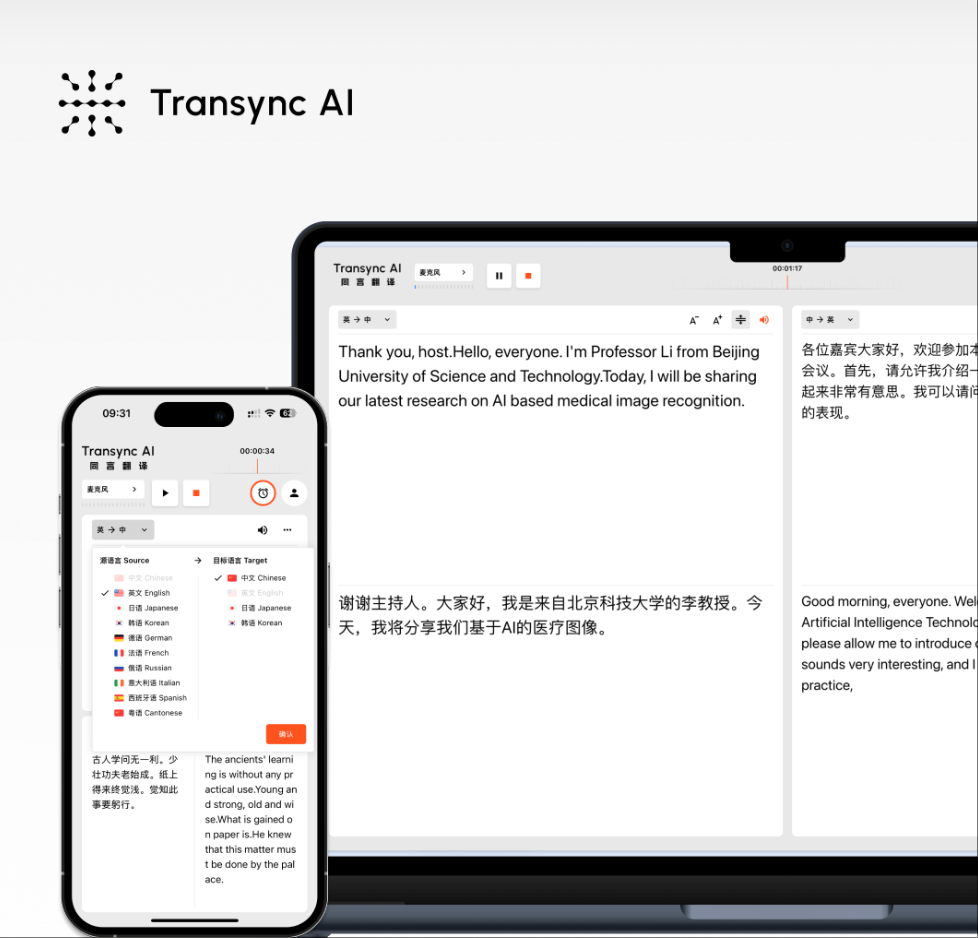
The most impressive feature is the near-zero latency translation capability. Using end-to-end speech AI models, this voice translator app iPhone delivers translations so quickly that conversations flow naturally without awkward pauses.
Why this matters: Traditional translation applications often lag 2-3 seconds behind speech. This technology eliminates that frustration, making real-time conversations feel genuinely natural and professional.
Real-world example: During a business call with a Japanese partner, you speak in English. Within milliseconds, your words appear translated in Japanese on your screen, and the Japanese response appears translated in English—all seamlessly. This experience is what sets this solution apart from competitors.
2. Support for 60 Languages with Natural Voice Output
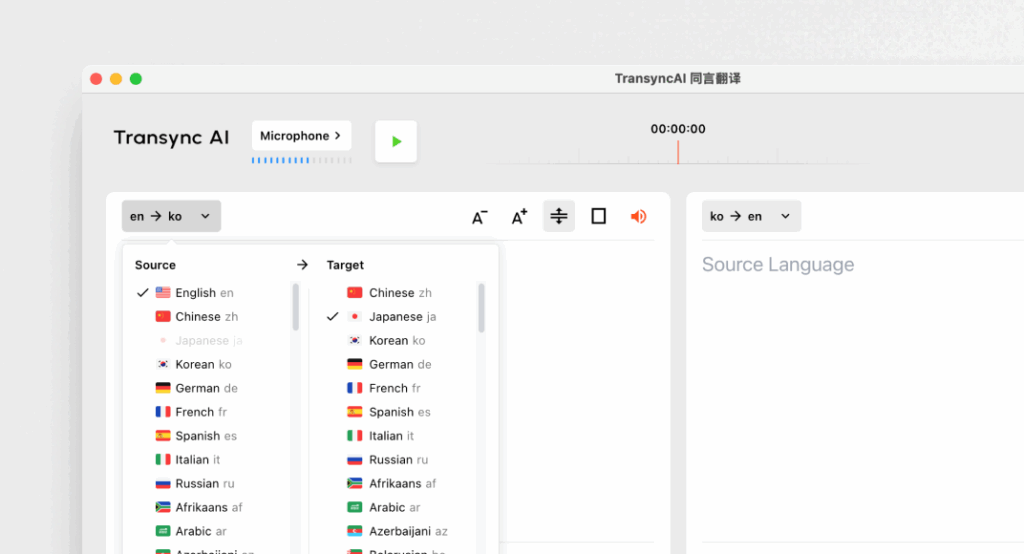
Transync AI supports 60 languages, making it one of the most comprehensive solutions available. This includes major languages like English, Mandarin Chinese, Japanese, Korean, German, French, Russian, Spanish, and many more.
This extensive coverage enables global communication. Whether you’re negotiating with international clients or connecting with friends worldwide, this voice translator app iPhone has you covered. Unlike robotic-sounding translations from other applications, this solution speaks translations with natural, human-like voices. You can select different voice tones to match your conversation style, making interactions sound genuinely conversational rather than automated.
3. Dual-Screen Display for Enhanced Understanding
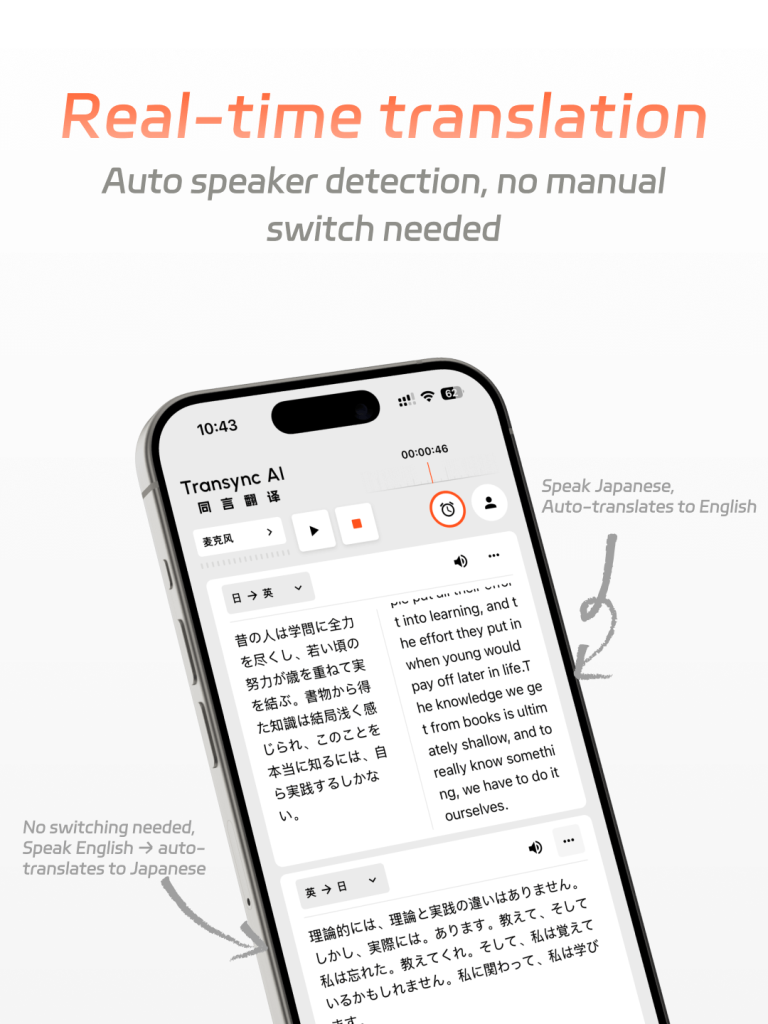
This platform features a unique dual-screen display design that simultaneously shows original and translated content side-by-side. This synchronized presentation significantly improves reading and comprehension efficiency. You can easily follow both languages without constantly switching focus, making complex conversations much easier to understand.
4. Professional Meeting Integration Features
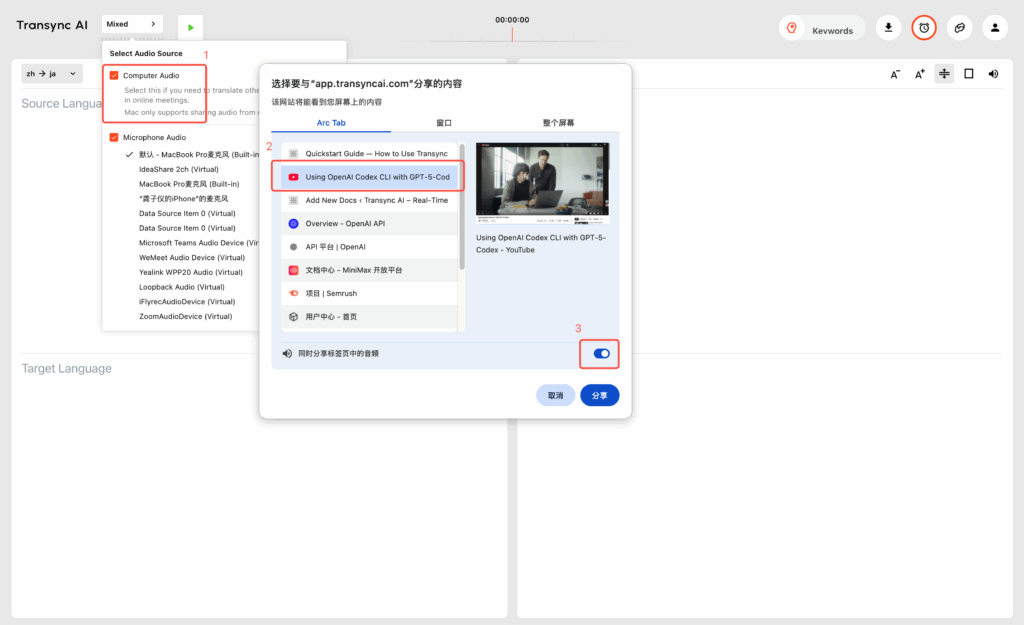
One standout feature is seamless integration with professional meeting platforms including Zoom, Microsoft Teams, and Google Meet. This voice translator app iPhone provides real-time subtitles and voice translation during video conferences, making it exceptional for business professionals. No plug-ins required—it works seamlessly with your existing meeting tools.
Professional advantage: Imagine leading an international team meeting where participants speak different languages. This platform automatically detects each speaker’s language and provides real-time translation to all participants. This capability transforms how distributed teams communicate and collaborate.
5. AI Meeting Notes and Automatic Summaries
Beyond translation, Transync AI includes intelligent meeting note features. It provides automatic meeting summaries that capture key points, real-time translation of meeting content, and searchable transcripts for future reference. This transforms the platform into more than just a translator—it’s a complete meeting intelligence solution that saves time and improves productivity.
Advanced Features of This Voice Translator App iPhone
AI Assistant Keywords and Context Setting
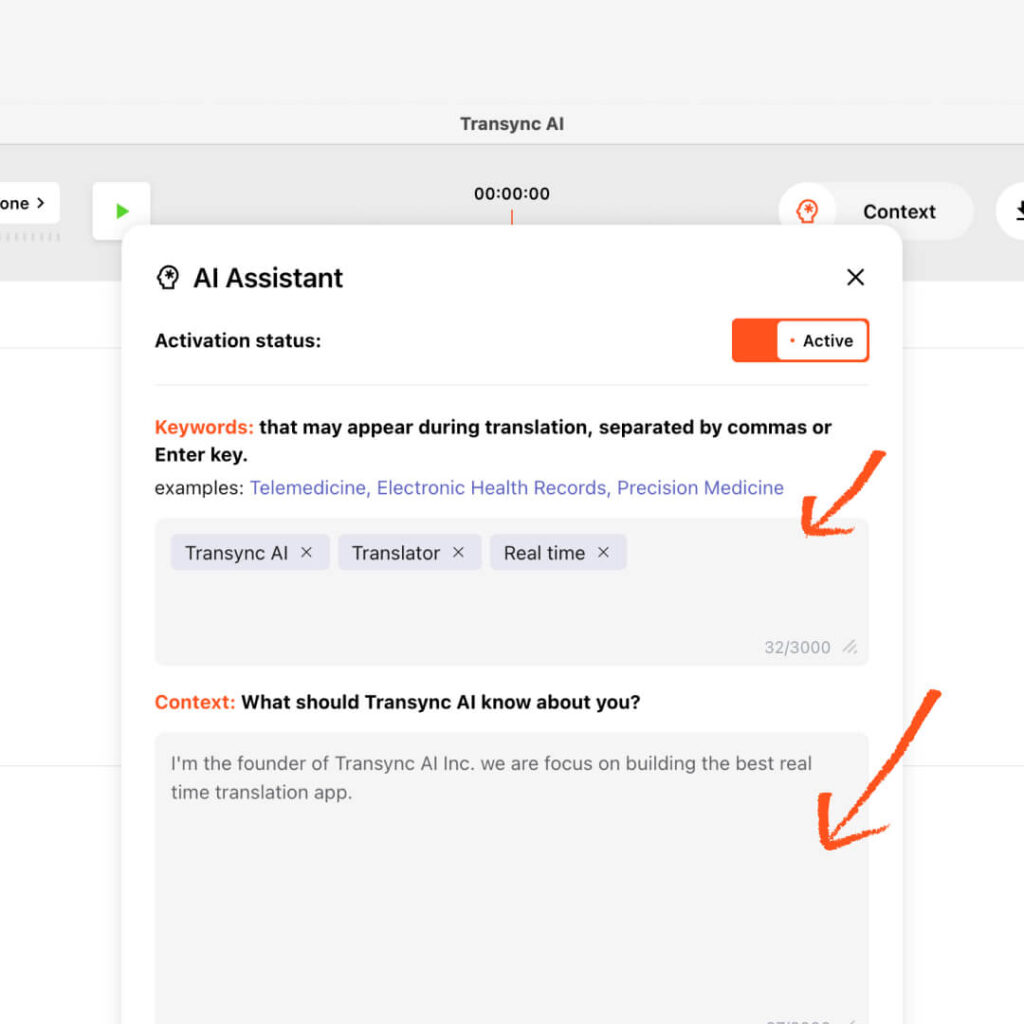
This platform includes an intelligent assistant feature that significantly improves translation accuracy. You can define important keywords such as industry terms, brand names, or personal names, and provide contextual background about your profession, industry, or meeting topic. This enables the system to understand your industry-specific terminology perfectly and achieve 95%+ translation accuracy.
Automatic Language Detection
The platform automatically detects which language a speaker is using, eliminating the need to manually select languages during conversations. This intelligent feature makes it ideal for multilingual environments where multiple languages are spoken simultaneously.
Bidirectional Communication
Transync AI functions as a true two-way translator. Both you and the other person can speak in your native languages, with the platform translating both directions simultaneously. This makes conversations feel natural and inclusive rather than one-sided.
Real-World Applications: How This Voice Translator App iPhone Works
International Business Negotiations
Scenario: Sarah, a marketing director, needs to negotiate a contract with a German supplier and a Japanese manufacturer simultaneously.
With Transync AI: ✅ She speaks English while hearing real-time German and Japanese translations
✅ Meeting notes are automatically summarized in all three languages
✅ She can set keywords for precise translation of contract terminology
✅ She has a complete record of the meeting with accurate translations
Result: Complex negotiations proceed smoothly without language barriers, saving time and reducing misunderstandings.
Academic Conferences
Scenario: Dr. Chen is presenting research findings at an international conference where attendees speak multiple languages.
With this solution: ✅ His presentation is translated in real time to multiple languages
✅ Audience members can follow his speech in their native language
✅ Q&A sessions flow smoothly with instant translation
✅ Conference organizers have complete meeting records with translations
Result: His research reaches a global audience without language limitations, maximizing impact.
Remote Team Communication
Scenario: Marcus manages a distributed team with members in India, Brazil, Germany, and Japan.
With this voice translator app iPhone: ✅ Team meetings happen in real time without translation delays
✅ All team members understand discussions in their native language
✅ Meeting summaries are automatically created with translations
✅ He can focus on team dynamics rather than translation logistics
Result: His team collaborates more effectively with stronger communication and fewer misunderstandings.
Comparing Solutions: What Makes This Platform Different
| Feature | Transync AI | Typical Competitors |
|---|---|---|
| Languages Supported | 60+ | 20-40 |
| Translation Latency | Near-zero | 2-3 seconds |
| Voice Quality | Natural, human-like | Often robotic |
| Meeting Integration | Zoom, Teams, Google Meet | Limited or none |
| AI Meeting Notes | ✅ Yes | ❌ No |
| Context Learning | ✅ Keywords + Context | ❌ Basic |
| Accuracy Rate | 95%+ with context | 70-80% |
| Dual-Screen Display | ✅ Yes | ❌ No |
This comparison clearly shows why this solution outperforms competitors across virtually every metric.
How to Get Started with Your Voice Translator App iPhone
Initial Setup:
Step 1: Download the application from the App Store
Step 2: Select your primary language and target language
Step 3: For meetings, choose your meeting platform (Zoom, Teams, or Google Meet)
Step 4: Start speaking—the system handles translation automatically
Step 5: Access AI meeting notes after the conversation
For Enhanced Accuracy:
Step 1: Set important keywords for your industry
Step 2: Provide context about your profession and meeting topic
Step 3: Enable context learning for ongoing accuracy improvement
Step 4: Use the dual-screen display to verify translations
This straightforward setup process means you can start translating conversations within minutes.
Why Business Professionals Choose This Solution
Reliability and Consistency
Built on end-to-end AI voice models, this platform delivers consistent, accurate translations you can depend on in critical business situations where miscommunication could have serious consequences.
Professional-Grade Features
Beyond basic translation, this solution includes meeting integration, automatic summaries, and context-aware translation—features essential for business professionals who need more than simple word translation.
Time Efficiency and Productivity
By eliminating translation delays and automating meeting notes, this platform saves hours of administrative work while improving communication quality. Your team can focus on strategy rather than logistics.
Global Reach and Opportunity
With support for 60 languages, this solution enables confident communication with anyone, anywhere in the world. This global capability opens doors to international opportunities and partnerships.
Competitive Advantage in Markets
Organizations using this voice translator app iPhone gain a competitive advantage in international markets by communicating more effectively and building stronger relationships with global partners.
Advanced Tips for Maximizing Translation Quality
Optimize Your Context Settings
The more specific context you provide, the better the translations become. Include your professional role and industry, common terminology in your field, names of products and companies you frequently discuss, and specific project details relevant to your meetings.
Use the Dual-Screen Display Effectively
Position your device so both you and conversation partners can see the dual-screen display. This transparency builds trust and ensures everyone understands translations accurately.
Enable Automatic Language Detection
For multilingual conversations, enable automatic language detection. The system intelligently recognizes which language each speaker uses without manual intervention.
Review Meeting Summaries
After important meetings, review the AI-generated summaries and searchable transcripts. This helps you capture action items and verify that all parties understood key points correctly.
Security and Privacy Considerations
Transync AI prioritizes user privacy and data security. All translations are processed securely, and your conversation data is protected with enterprise-grade encryption. This makes it suitable for confidential business discussions and sensitive negotiations where data protection is paramount.
The Bottom Line: Best Voice Translator App iPhone for 2025
In today’s interconnected world, effective cross-language communication is no longer a luxury—it’s a necessity. Whether you’re conducting international business, attending global conferences, or managing distributed teams, having the right translation solution makes all the difference.
Transync AI stands out because it combines near-zero latency for natural conversations, support for 60 languages for global communication, natural voice output that sounds genuinely human, iPhone optimization for seamless iOS integration, AI meeting features for professional productivity, and context learning for 95%+ accuracy.
Whether you’re a business professional, international traveler, conference organizer, or remote team manager, this voice translator app iPhone empowers you to communicate confidently across language barriers.
🎥 Watch how to use Transync AI
👉 Download Transync AI Today and experience why it’s the best voice translator app iPhone trusted by professionals worldwide for seamless multilingual communication.

Break down language barriers. Connect with the world. Choose Transync AI—the best voice translator app iPhone for your multilingual needs.
