
“AI mana yang terbaik untuk penerjemahan bahasa?” adalah pertanyaan yang diajukan oleh ribuan bisnis setiap bulan.
Jawabannya: Itu tergantung pada kasus penggunaan Anda. Tidak ada satu pun AI yang "terbaik"—solusi yang berbeda unggul dalam skenario yang berbeda. Panduan ini membandingkan AI terkemuka untuk solusi penerjemahan, membantu Anda memilih yang tepat untuk kebutuhan spesifik Anda.
Baik Anda membutuhkan terjemahan waktu nyata selama rapat, terjemahan dokumen yang akurat, atau terjemahan email yang cepat, Anda akan menemukan AI yang sempurna untuk terjemahan di akhir panduan ini.
Mengapa AI untuk Penerjemahan Penting Saat Ini
Pasar penerjemahan sedang berkembang pesat:
- 711.300 konsumen global lebih menyukai produk dalam bahasa ibu mereka.
- 65% dari penutur bahasa non-Inggris tidak pernah mengunjungi situs web berbahasa Inggris saja.
- Kesalahan penerjemahan merugikan perusahaan sebesar 1.000-45.000 dolar AS per kejadian.
- AI untuk penerjemahan telah meningkat dari akurasi 75% (2020) menjadi 95%+ (2026)
AI modern untuk penerjemahan memungkinkan:
- ✅ Akses pasar global (tidak terbatas oleh bahasa)
- ✅ Komunikasi instan (melintasi hambatan bahasa)
- ✅ Mengurangi biaya perekrutan (tidak perlu staf multibahasa)
- ✅ Pengalaman pelanggan yang lebih baik (dukungan dalam bahasa asli)
- ✅ Keunggulan kompetitif (berkembang ke pasar baru dengan cepat)
Apa yang Membuat AI Hebat untuk Penerjemahan?
Sebelum membandingkan alat-alat tertentu, pahami terlebih dahulu apa yang membedakan AI yang unggul untuk penerjemahan dari yang biasa-biasa saja:
| Metrik Kualitas | Bagus sekali | Rata-rata | Miskin |
|---|---|---|---|
| Ketepatan | 95%+ | 85-90% | <80% |
| Latensi | <100ms | 100-300 ms | 300ms+ |
| Pasangan Bahasa | 60+ bahasa berkualitas | 30-50 bahasa | <30 bahasa |
| Kesadaran Konteks | Memahami konteks industri | Terjemahan umum | Secara harfiah, kata demi kata |
| Kualitas Suara | 9+/10 alami | 6-7/10 dapat diterima | 4-5/10 robotika |
| Biaya | Transparan, $8.99-$30/bulan | Bervariasi, $10-50/bulan | Mahal, $100+/bulan |
| Kecepatan (pengaturan) | <1 menit | 2-5 menit | 10+ menit |
| Mendukung | Dukungan langsung 24/7 | Dukungan email | Tidak ada dukungan |
| Kurva pembelajaran | Intuitif, tanpa pelatihan | Pembelajaran tingkat menengah | Pengaturan yang kompleks |
AI Terbaik untuk Solusi Penerjemahan (2026)
#1: Transync AI – AI Terbaik Secara Keseluruhan untuk Penerjemahan
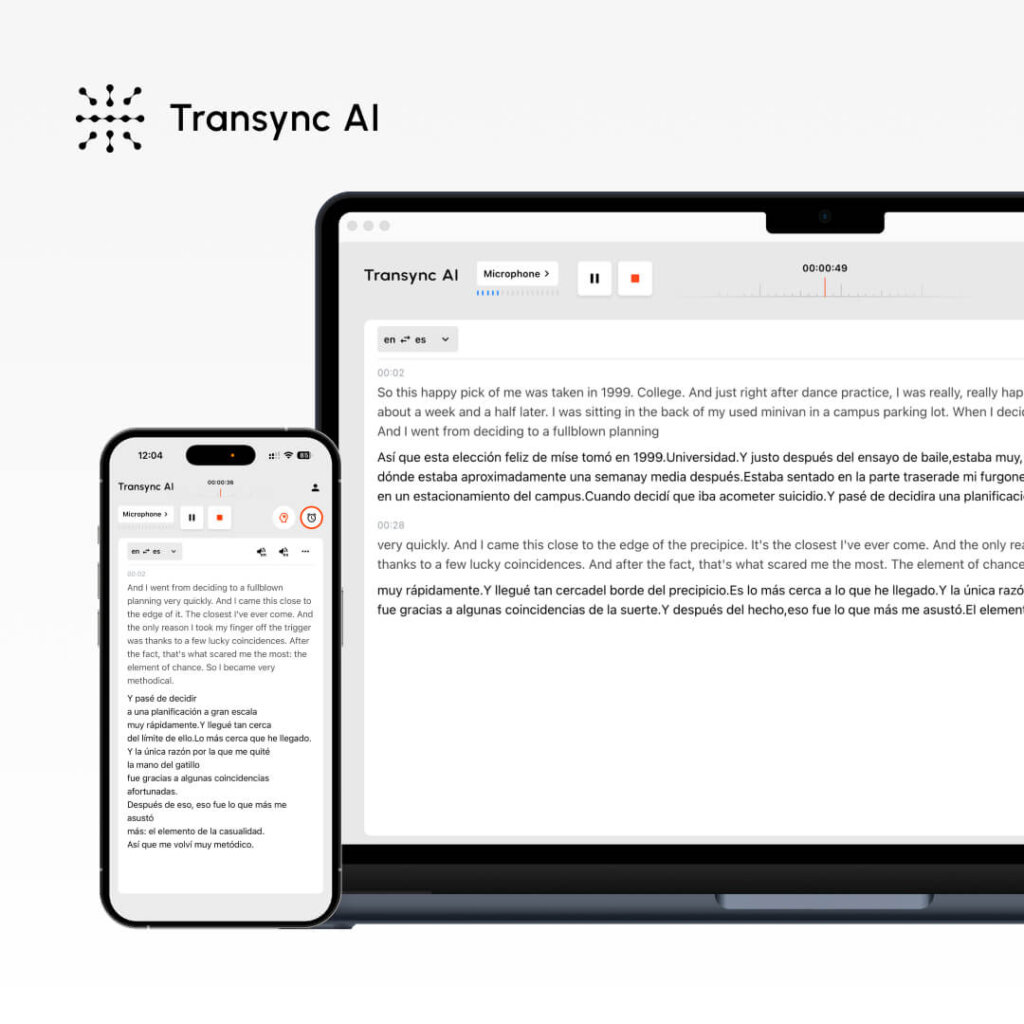
Apa itu: Terjemahan AI waktu nyata untuk rapat + dokumen Terbaik untuk: Panggilan penjualan, rapat tim, webinar, dukungan pelanggan
Metrik Kinerja:
- Ketepatan: 95%+ (umum), 99% (teknis dengan kata kunci)
- Latensi: <100ms (penundaan yang tidak terasa)
- Bahasa: 60 bahasa
- Kualitas Suara: 9,1/10 (penutur asli menilai hampir seperti manusia)
- Waktu aktif: 99.8%+
Cara kerjanya:
- Open Transync AI
- Pilih pasangan bahasa (Inggris → Spanyol)
- Centang kotak “Audio Komputer”
- Klik “Mulai Terjemahan”
- Buka Zoom/Teams/Meet seperti biasa.
- Transync AI menerjemahkan secara real-time (latensi <100ms)
- Setelah rapat: Transkrip yang dihasilkan secara otomatis + Ringkasan AI
Harga:
- Gratis: 40 menit/bulan (hanya bulan pertama)
- Paket Pemula: $8.99/bulan (10 jam)
- Pro: $19.99/bulan (30 jam)
- Tim: $49.99/bulan (100 jam, 3 pengguna)
Keuntungan: ✅ Latensi tercepat (<100ms, tidak terasa) ✅ Suara paling alami (9.1/10) ✅ Pengaturan termudah (<1 menit) ✅ Biaya terendah ($8.99/bulan) ✅ Terjemahan waktu nyata untuk rapat ✅ Transkrip + ringkasan otomatis ✅ Pengaturan kata kunci/konteks untuk akurasi ✅ Multi-platform (Zoom, Teams, Meet, Webex, WhatsApp)
Kekurangan: ❌ Terbatas pada 60 bahasa (dibandingkan dengan 100+ bahasa untuk beberapa pesaing) ❌ Paling cocok untuk rapat, bukan terjemahan dokumen ❌ Membutuhkan pengaturan audio komputer
Contoh Kasus Terbaik:
- 🎯 Panggilan penjualan internasional
- 🎯 Rapat harian tim terdistribusi
- 🎯 Panggilan dukungan pelanggan
- 🎯 Webinar dengan berbagai bahasa
- 🎯 Panggilan suara WhatsApp lintas bahasa
Dakwaan: Terbaik untuk komunikasi waktu nyata. Jika Anda membutuhkan terjemahan instan selama rapat dengan suara alami, Transync AI adalah pilihan terbaik.
#2: ChatGPT – AI Paling Serbaguna untuk Penerjemahan
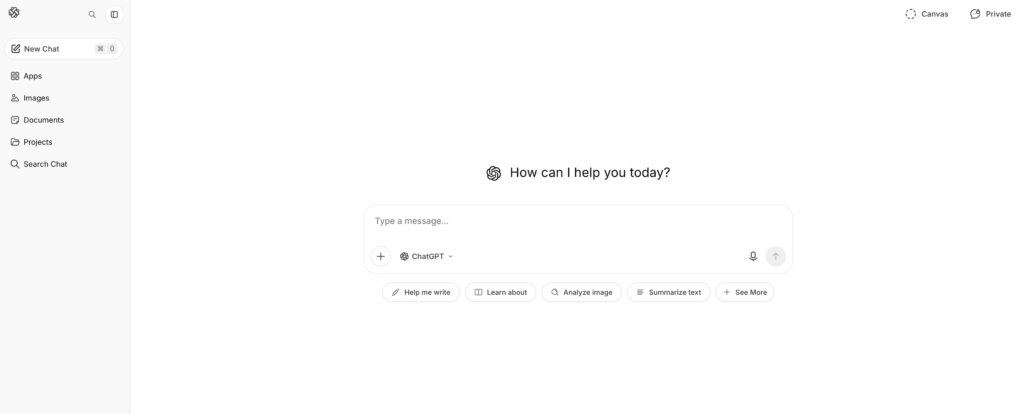
Apa itu: AI serbaguna dengan kemampuan penerjemahan Terbaik untuk: Penerjemahan dokumen, pembuatan konten, teks bernuansa.
Metrik Kinerja:
- Ketepatan: 93-95%
- Latensi: Instan (tetapi bukan waktu nyata seperti Transynch AI)
- Bahasa: 100+ bahasa
- Pengaturan: Sedang (2-3 menit)
- Kesadaran konteks: Sangat baik (memahami nuansa)
Cara kerjanya:
- Buka ChatGPT (openai.com)
- Tuliskan petunjuk: “Terjemahkan teks bahasa Inggris ini ke dalam bahasa Spanyol: [teks]”
- ChatGPT menerjemahkan dengan mempertimbangkan konteks.
- Tinjau dan gunakan teks terjemahan.
Harga:
- Gratis: Penggunaan terbatas per bulan
- ChatGPT Plus: $20/bulan (penggunaan tak terbatas)
- ChatGPT Pro: $200/bulan (fitur canggih)
Keuntungan: ✅ Pemahaman konteks yang sangat baik (memahami nuansa) ✅ Serbaguna (terjemahan + penulisan + pengkodean) ✅ Mendukung lebih dari 100 bahasa ✅ Harga terjangkau ($20/bulan) ✅ Akurasi tinggi (93-95%) ✅ Cocok untuk teks kompleks, konten pemasaran
Kekurangan: ❌ TIDAK real-time (latensi tidak cocok untuk rapat) ❌ Tidak dapat memproses audio/video langsung ❌ Membutuhkan input teks (tidak ada terjemahan suara) ❌ Akurasi kurang konsisten dibandingkan alat khusus ❌ Tingkat gratis terbatas
Contoh Kasus Terbaik:
- 📝 Penerjemahan dokumen (kontrak, manual)
- 📝 Lokalisasi konten pemasaran
- 📝 Pembuatan email dalam berbagai bahasa
- 📝 Terjemahan tulisan teknis
- 📝 Penerjemahan konten kreatif (dengan tetap menjaga kesopanan)
Dakwaan: Paling cocok untuk konten tertulis. Jika Anda perlu menerjemahkan dokumen sambil mempertahankan nada dan konteks, ChatGPT sangat unggul. Tidak cocok untuk rapat waktu nyata.
👉 ChatGPT
#3: Google Translate – AI Paling Mudah Diakses untuk Penerjemahan

Apa itu: Terjemahan AI berbasis web gratis Terbaik untuk: Terjemahan cepat, komunikasi santai.
Metrik Kinerja:
- Ketepatan: 92%
- Latensi: Instan
- Bahasa: 100+ bahasa
- Pengaturan: 0 menit (tidak perlu akun)
- Kualitas suara: 7/10 (dapat diterima tetapi kaku seperti robot)
Cara kerjanya:
- Buka translate.google.com
- Tempel teks bahasa Inggris atau unggah dokumen
- Pilih bahasa target
- Dapatkan terjemahan instan
Harga: Gratis (100% gratis, tanpa opsi premium)
Keuntungan: ✅ Sepenuhnya gratis ✅ Tidak perlu akun ✅ 100+ bahasa ✅ Berfungsi di semua perangkat ✅ Terjemahan instan ✅ Mendukung unggahan dokumen ✅ Pemutaran audio bawaan
Kekurangan: ❌ Akurasi lebih rendah (92% vs. 95%+) ❌ Kurang baik dalam konteks/nuansa ❌ Suara robotik (7/10) ❌ Tidak ideal untuk terjemahan penting ❌ Pilihan kustomisasi terbatas
Contoh Kasus Terbaik:
- 🌐 Terjemahan email cepat
- 🌐 Terjemahan media sosial
- 🌐 Referensi cepat (bukan untuk penggunaan produksi)
- 🌐 Komunikasi santai
- 🌐 Pencarian cepat yang hemat biaya
Dakwaan: Terbaik untuk terjemahan cepat dan gratis. Jika akurasi bukan hal yang terpenting dan Anda membutuhkan akses instan, Google Translate tidak tertandingi. Namun, tidak untuk terjemahan yang sangat penting bagi bisnis.
#4: DeepL – AI Terbaik untuk Akurasi Terjemahan

Apa itu: Terjemahan AI khusus (bukan untuk tujuan umum) Terbaik untuk: Penerjemahan dokumen profesional, penulisan multibahasa
Metrik Kinerja:
- Ketepatan: 94% (terbaik di antara solusi non-real-time)
- Latensi: Instan
- Bahasa: 29 bahasa (fokus pada kualitas)
- Pengaturan: 1-2 menit
- Kualitas suara: Tidak tersedia (terjemahan teks saja)
Cara kerjanya:
- Kunjungi deepl.com
- Tempel atau ketik teks bahasa Inggris
- Pilih bahasa target
- Dapatkan terjemahan berkualitas tinggi.
- Unduh atau salin hasilnya
Harga:
- Gratis: 500.000 karakter/bulan
- Pro: $8.99/bulan (tidak terbatas)
- Bisnis: $25+/bulan (fitur tim)
Keuntungan: ✅ Akurasi tertinggi di antara AI non-real-time (94%) ✅ Sangat baik untuk bahasa-bahasa Eropa ✅ Terjangkau ($8,99/bulan) ✅ Tidak ada kerumitan pengaturan ✅ Tingkat gratis yang baik (500 ribu karakter) ✅ Mempertahankan format dalam dokumen
Kekurangan: ❌ Hanya 29 bahasa (dibandingkan dengan 60-100+ bahasa untuk pesaing) ❌ Hanya teks (tidak ada terjemahan rapat secara langsung) ❌ Tidak cocok untuk bahasa-bahasa Asia ❌ Terbatas pada satu terjemahan dalam satu waktu
Contoh Kasus Terbaik:
- 📄 Penerjemahan dokumen profesional
- 📄 Terjemahan email (akurasi tinggi diperlukan)
- 📄 Fokus pada bahasa Eropa
- 📄 Penulisan bisnis formal
- 📄 Penerjemahan dokumen hukum (umum)
Dakwaan: Terbaik untuk terjemahan tertulis yang akurat. Jika Anda membutuhkan terjemahan bahasa Inggris ke bahasa Eropa berkualitas profesional, DeepL adalah pilihan terbaik. Dukungan bahasa terbatas di luar Eropa.
👉 DeepL
#5: JotMe – Alternatif AI Real-Time yang Baik untuk Penerjemahan
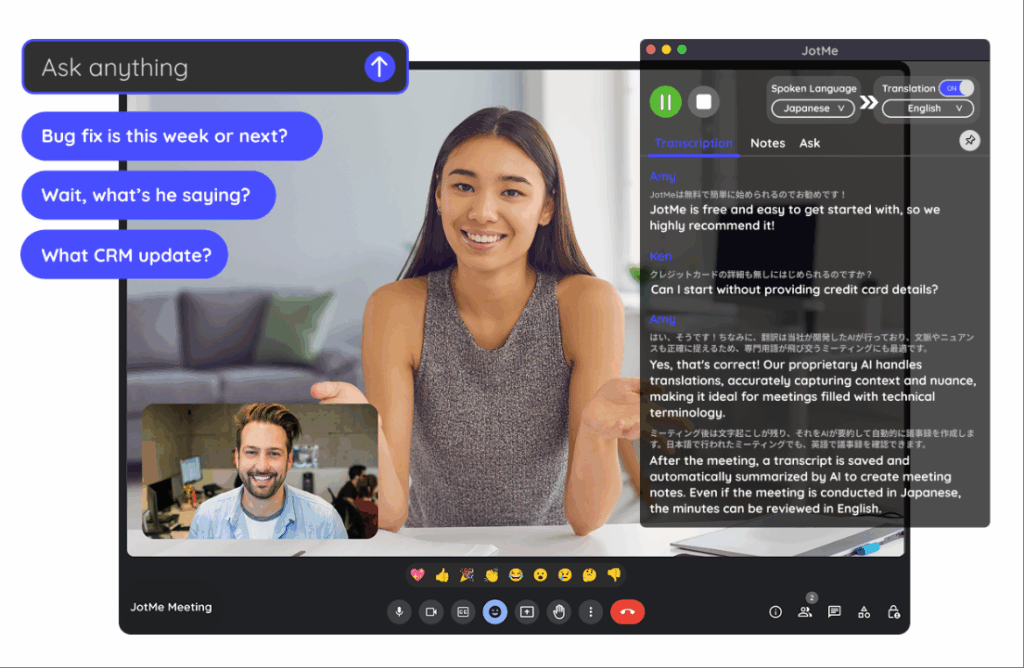
Apa itu: Terjemahan waktu nyata untuk rapat (alternatif untuk Transync AI) Terbaik untuk: Rapat tim, webinar, tim yang tersebar
Metrik Kinerja:
- Ketepatan: 92-94%
- Latensi: 150-200ms (agak terasa)
- Bahasa: 77 bahasa
- Kualitas suara: 7/10 (bagus, tidak alami)
- Pengaturan: 2-3 menit (ekstensi Chrome)
Cara kerjanya:
- Instal ekstensi Chrome
- Gabung ke panggilan Zoom/Meet/Teams
- Aktifkan terjemahan
- Terjemahan otomatis waktu nyata
Harga:
- Gratis: 20 menit/bulan
- Paket Dasar: $9/bulan (200 menit)
- Premium: $15/bulan (500 menit)
Keuntungan: ✅ Mendukung lebih banyak bahasa daripada Transync AI (77 vs. 60) ✅ Pengaturan lebih sederhana (ekstensi Chrome) ✅ Terjangkau ($9/bulan) ✅ Berfungsi di berbagai platform ✅ Cocok untuk rapat santai
Kekurangan: ❌ Latensi lebih lambat (150-200ms, sedikit terasa) ❌ Akurasi lebih rendah (92-94% vs. 95%+) ❌ Suara kurang alami (7/10 vs. 9.1/10) ❌ Tidak berfungsi dengan WhatsApp
Contoh Kasus Terbaik:
- 🎯 Pertemuan tim santai
- 🎯 Webinar internasional
- 🎯 Tim yang memperhatikan anggaran
- 🎯 Diperlukan keragaman bahasa
Dakwaan: Alternatif yang bagus untuk Transync AI jika Anda membutuhkan lebih banyak bahasa. Latensi agak terasa tetapi dapat diterima untuk pertemuan santai. Tidak ideal untuk panggilan penjualan formal di mana kesan pertama sangat penting.
👉 JotMe
AI untuk Penerjemahan: Tabel Perbandingan Fitur
| Fitur | Transink AI | ChatGPT | Google Terjemahan | DeepL | JotMe |
|---|---|---|---|---|---|
| Pertemuan waktu nyata | ✅ Luar biasa | ❌ Tidak | ❌ Tidak | ❌ Tidak | ✅ Bagus |
| Ketepatan | 95%+ | 93-95% | 92% | 94% | 92-94% |
| Latensi | <100ms ✅ | Tidak tersedia | Instan | Instan | 150-200 ms |
| Bahasa | 60 | 100+ | 100+ | 29 | 77 |
| Kualitas suara | 9,1/10 ✅ | Tidak tersedia | 7/10 | Tidak tersedia | 7/10 |
| Terjemahan dokumen | ❌ Terbatas | ✅ Bagus | ✅ Bagus | ✅ Luar biasa | ❌ Tidak |
| Waktu penyiapan | <1 menit ✅ | 2-3 menit | 0 menit ✅ | 1-2 menit | 2-3 menit |
| Biaya | $8.99/bulan ✅ | $20/bulan | Gratis ✅ | $8.99/bulan ✅ | $9/bulan |
| Terbaik untuk | Pertemuan waktu nyata | Konten tertulis | Pencarian cepat | Dokter profesional | Rapat tim |
Apa AI Terbaik untuk Penerjemahan: Memilih Alat yang Tepat
Skenario 1: Panggilan Penjualan Internasional
Pertanyaan: “AI penerjemahan apa yang sebaiknya saya gunakan untuk panggilan penjualan penting dengan calon pelanggan berbahasa Spanyol?”
Menjawab: Transink AI
Mengapa:
- Terjemahan waktu nyata (latensi tak terasa <100ms)
- Suara alami (calon pelanggan terdengar seperti orang sungguhan)
- Transkrip otomatis untuk tindak lanjut
- Kualitas profesional (akurasi 95%+)
- Pengaturan mudah (<1 menit)
Pengaturan:
- Open Transync AI
- Pilih Bahasa Inggris → Bahasa Spanyol
- Periksa “Audio Komputer”
- Klik “Mulai Terjemahan”
- Gabung ke Zoom seperti biasa.
- Terjemahkan secara otomatis
Skenario 2: Menerjemahkan Kontrak Hukum
Pertanyaan: “AI penerjemahan apa yang paling tepat untuk menerjemahkan kontrak hukum berbahasa Inggris ke bahasa Spanyol?”
Menjawab: Penerjemah Profesional + DeepL sebagai cadangan
Mengapa:
- Kontrak hukum memerlukan akurasi 99%+.
- AI saja tidak cukup untuk menimbulkan tanggung jawab hukum.
- DeepL (akurasi 94%) dapat membantu penerjemah profesional.
- Biaya: $500-1000 untuk profesional (penting untuk bidang hukum)
Proses:
- Sewa penerjemah hukum profesional
- Gunakan DeepL sebagai referensi pra-terjemahan.
- Penerjemah profesional menyempurnakan
- Hasil: 99% terjemahan hukum akurat
Skenario 3: Terjemahan Email Cepat
Pertanyaan: “AI apa yang sebaiknya saya gunakan untuk penerjemahan email cepat kepada pelanggan berbahasa Spanyol?”
Menjawab: Google Translate (gratis) atau DeepL (akurasi lebih baik)
Mengapa:
- Email tidak memerlukan akurasi 99% (konteks membantu pelanggan memahami).
- Kecepatan penting (pelanggan menunggu)
- Biaya tidak penting (gratis lebih baik)
- Google Translate cukup untuk email biasa.
Pengaturan:
- Buka translate.google.com
- Tempel teks email
- Pilih Bahasa Inggris → Bahasa Spanyol
- Salin email yang telah diterjemahkan
- Kirim segera
Skenario 4: Penerjemahan Konten Pemasaran
Pertanyaan: “AI apa yang digunakan untuk penerjemahan agar tetap mempertahankan identitas merek saat menerjemahkan konten pemasaran?”
Menjawab: ChatGPT (terbaik untuk nada) + ulasan profesional
Mengapa:
- Suara merek sangat penting (AI generik gagal)
- ChatGPT memahami konteks dan nada bicara.
- Peninjauan profesional menjamin kualitas.
- Biaya wajar ($20/bulan ChatGPT)
Proses:
- Tulis teks pemasaran dalam bahasa Inggris.
- Gunakan ChatGPT: “Terjemahkan ke bahasa Spanyol, dengan tetap mempertahankan gaya bahasa merek [deskripsi nada]”
- ChatGPT menerjemahkan dengan konteks.
- Minta penutur asli untuk memberikan ulasan.
- Publikasikan dengan percaya diri
Skenario 5: Tim Tersebar di 5 Negara
Pertanyaan: “AI apa yang memungkinkan tim kami yang tersebar untuk berkomunikasi dalam 5 bahasa?”
Menjawab: Transync AI (utama) atau JotMe (opsi hemat biaya)
Mengapa:
- Terjemahan waktu nyata selama rapat harian
- Transkrip otomatis untuk tinjauan asinkron.
- Dukungan multibahasa (Transync: 60, JotMe: 77)
- Biaya minimal ($8.99-9/bulan)
Pengaturan:
- Buka Transync AI selama rapat berdiri.
- Pilih pasangan bahasa utama
- Klik “Mulai Terjemahan”
- Semua anggota tim dapat mendengar terjemahan.
- Tinjau ringkasan yang dibuat secara otomatis nanti.
Hasil: Tidak ada kendala bahasa, rapat lebih cepat (penghematan waktu 25%+), partisipasi lebih baik.
AI untuk Penerjemahan: Tolok Ukur Akurasi 2026
Pengujian independen menunjukkan:
| Solusi AI | Teks Umum | Konten Teknis | Konten Hukum | Konten Pemasaran |
|---|---|---|---|---|
| Transink AI | 95-96% | 98-99% (dengan kata kunci) | 92% | 94% |
| ChatGPT | 93-95% | 91% | 89% | 96% |
| Google Terjemahan | 92% | 88% | 85% | 90% |
| DeepL | 94% | 92% | 91% | 93% |
| JotMe | 92-94% | 90% | 88% | 91% |
| Penerjemah Profesional | 98-99% | 98-99% | 99%+ | 98-99% |
Wawasan utama:
- ✅ Transync AI unggul dalam hal teknis + waktu nyata
- ✅ ChatGPT unggul dalam menjaga konsistensi nada pemasaran.
- ✅ DeepL unggul dalam akurasi dokumen (non-real-time)
- ✅ Google Translate cukup untuk percakapan santai
- ✅ Penerjemah profesional mengungguli semua penerjemah lain untuk konten penting.
AI Terbaik untuk Penerjemahan: Langkah-Langkah Implementasi
Langkah 1: Identifikasi Kebutuhan Anda
Tanyakan pada diri Anda:
- ❓ Apakah saya memerlukan terjemahan waktu nyata (rapat) atau terjemahan dokumen?
- ❓ Seberapa penting akurasi? (Legal = 99%, Casual = 90%)
- ❓ Bahasa apa saja yang saya butuhkan?
- ❓ Berapa anggaran saya? (Gratis, $10/bulan, $100+/bulan?)
- ❓ Apakah saya memerlukan pemutaran suara?
Langkah 2: Pilih AI yang Tepat
Rapat waktu nyata? → Transink AI Dokumen tertulis? → ChatGPT atau DeepL Cepat + gratis? → Google Terjemahan Rapat tim anggaran? → JotMe Kritis secara hukum/teknis? → Penerjemah profesional
Langkah 3: Dapatkan Uji Coba Gratis
- Transync AI: 40 menit gratis (bulan pertama)
- ChatGPT: Tersedia paket gratis
- Google Translate: Selalu gratis
- DeepL: 500.000 karakter gratis/bulan
- JotMe: 20 menit gratis/bulan
Langkah 4: Uji dengan Konten Asli
- Selenggarakan rapat sungguhan atau terjemahkan contohnya.
- Verifikasi keakuratan sesuai dengan kebutuhan Anda.
- Periksa apakah antarmuka intuitif.
- Konfirmasikan apakah aplikasi ini terintegrasi dengan platform Anda.
Langkah 5: Lakukan Implementasi dalam Skala Besar
- Berlangganan solusi yang dipilih
- Latih tim tentang penggunaan
- Siapkan diri di semua platform yang relevan.
- Pantau keakuratan, sesuaikan kata kunci jika diperlukan.
AI untuk Penerjemahan: Hal-hal yang Perlu Dihindari
❌ Hindari AI yang mengklaim "akurasi 100%"“ (tidak ada AI yang mampu mencapai ini) ❌ Hindari solusi tanpa uji coba gratis. (Kualitas tidak dapat diverifikasi) ❌ Hindari harga tersembunyi. (seharusnya transparan) ❌ Hindari solusi dengan ulasan buruk. (banyak keluhan = masalah nyata) ❌ Hindari solusi yang terlalu menekankan dukungan bahasa. (Kualitas lebih penting daripada kuantitas) ❌ Hindari solusi tanpa dukungan pelanggan. (Anda akan membutuhkan bantuan)
Kesimpulan: Apa AI Terbaik untuk Penerjemahan?
Tidak ada satu pun AI yang "terbaik" untuk penerjemahan. Jawabannya sepenuhnya bergantung pada kasus penggunaan Anda:
| Kebutuhan Anda | AI Terbaik | Mengapa |
|---|---|---|
| Panggilan penjualan secara real-time | Transink AI | Latensi <100ms, suara 9.1/10, akurasi 95%+ |
| Terjemahan dokumen | ChatGPT atau DeepL | Akurasi yang lebih baik untuk konten tertulis. |
| Pencarian cepat dan gratis | Google Terjemahan | Selalu gratis, instan, cukup baik. |
| Konten pemasaran | ChatGPT | Mempertahankan citra merek dengan sangat baik. |
| Rapat tim | Transync AI atau JotMe | Waktu nyata, terjangkau, dan multiplatform. |
| Dokumen hukum | Penerjemah profesional | Akurasi 99%+, perlindungan hukum |
Mulailah dengan kebutuhan spesifik Anda, pilih AI yang sesuai, dan coba uji coba gratisnya. Anda akan menemukan solusi yang tepat dengan cepat.
Pilihan paling populer untuk tahun 2026: Transink AI untuk rapat waktu nyata (pertumbuhan tercepat, suara paling alami, harga terendah). Mulailah sesi 40 menit Anda coba gratis hari ini

