

“Welche KI eignet sich am besten für die Sprachübersetzung?” – diese Frage stellen sich jeden Monat Tausende von Unternehmen.
Die Antwort: Das hängt von Ihrem Anwendungsfall ab. Es gibt keine “beste” KI – verschiedene Lösungen eignen sich für unterschiedliche Anwendungsfälle. Dieser Leitfaden vergleicht die führenden KI-Lösungen für Übersetzungen und hilft Ihnen, die richtige für Ihre spezifischen Bedürfnisse auszuwählen.
Egal ob Sie Echtzeitübersetzungen während Meetings, präzise Dokumentenübersetzungen oder schnelle E-Mail-Übersetzungen benötigen – am Ende dieses Leitfadens finden Sie die perfekte KI für Ihre Übersetzungsaufgaben.
Warum KI für Übersetzungen jetzt wichtig ist
Der Übersetzungsmarkt boomt:
- 711 TP3T der globalen Verbraucher bevorzugen Produkte in ihrer Muttersprache.
- 65% Nicht-Englischsprachige besuchen niemals rein englischsprachige Websites
- Übersetzungsfehler kosten Unternehmen $9.000-45.000 pro Vorfall
- Die Genauigkeit von KI für Übersetzungen hat sich von 75% (2020) auf 95%+ (2026) verbessert.
Moderne KI für Übersetzungen ermöglicht:
- ✅ Weltweiter Marktzugang (nicht sprachlich beschränkt)
- ✅ Sofortige Kommunikation (über Sprachbarrieren hinweg)
- ✅ Reduzierte Einstellungskosten (kein Bedarf an mehrsprachigem Personal)
- ✅ Besseres Kundenerlebnis (Support in der Muttersprache)
- ✅ Wettbewerbsvorteil (schnelle Expansion in neue Märkte)
Was zeichnet eine gute KI für Übersetzungen aus?
Bevor man einzelne Tools vergleicht, sollte man verstehen, was exzellente KI für Übersetzungen von mittelmäßiger unterscheidet:
| Qualitätskennzahl | Exzellent | Durchschnitt | Arm |
|---|---|---|---|
| Genauigkeit | 95%+ | 85-90% | <80% |
| Latenz | <100 ms | 100-300 ms | 300 ms+ |
| Sprachpaare | Mehr als 60 hochwertige Sprachen | 30-50 Sprachen | <30 Sprachen |
| Kontextbewusstsein | Versteht den Branchenkontext | Allgemeine Übersetzung | wörtlich, Wort für Wort |
| Sprachqualität | 9+/10 natürlich | 6-7/10 akzeptabel | 4-5/10 Roboter |
| Kosten | Transparent, $8.99-$30/Monat | Variiert, $10-50/Monat | Teuer, $100+/Monat |
| Geschwindigkeit (Einrichtung) | <1 Minute | 2-5 Minuten | 10+ Minuten |
| Unterstützung | Live-Support rund um die Uhr | E-Mail-Support | Keine Unterstützung |
| Lernkurve | Intuitiv, keine Schulung erforderlich | Mäßiges Lernen | Komplexe Einrichtung |
Führende KI für Übersetzungslösungen (2026)
#1: Transync AI – Die beste KI für Übersetzungen insgesamt
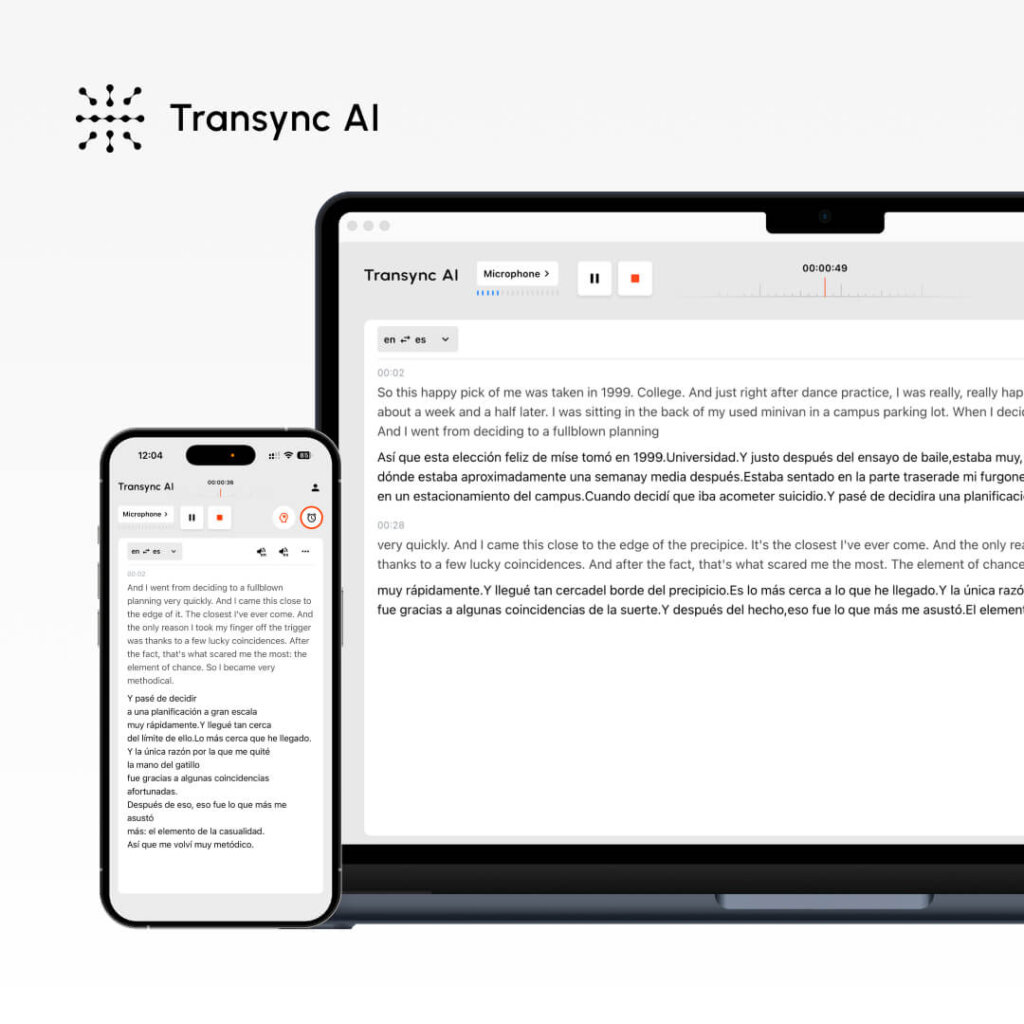
Was es ist: Echtzeit-KI-Übersetzung für Besprechungen und Dokumente Am besten geeignet für: Verkaufsgespräche, Teambesprechungen, Webinare, Kundensupport
Leistungskennzahlen:
- Genauigkeit: 95%+ (allgemein), 99% (technisch mit Stichwörtern)
- Latenz: <100 ms (nicht wahrnehmbare Verzögerung)
- Sprachen: 60 Sprachen
- Sprachqualität: 9,1/10 (Muttersprachler bewerten es als nahezu menschlich)
- Betriebszeit: 99.8%+
So funktioniert es:
- Öffnen Sie Transync AI
- Sprachpaar auswählen (Englisch → Spanisch)
- Aktivieren Sie das Kontrollkästchen “Computer-Audio”.
- Klicken Sie auf “Übersetzung starten”.”
- Zoom/Teams/Meet normal öffnen
- Transync AI übersetzt in Echtzeit (Latenz <100 ms)
- Nach dem Meeting: Automatisch generiertes Transkript + KI-Zusammenfassung
Preisgestaltung:
- Kostenlos: 40 Minuten/Monat (nur im ersten Monat)
- Starter: $8,99/Monat (10 Stunden)
- Pro: $19,99/Monat (30 Stunden)
- Team: $49,99/Monat (100 Stunden, 3 Benutzer)
Vorteile: ✅ Geringste Latenz (<100 ms, nicht wahrnehmbar) ✅ Natürlichste Sprachqualität (9,1/10) ✅ Einfachste Einrichtung (<1 Minute) ✅ Günstigste Preise (1 TP4T 8,99/Monat) ✅ Echtzeitübersetzung für Meetings ✅ Automatisches Transkript + Zusammenfassung ✅ Stichwort-/Kontexteinstellung für höchste Genauigkeit ✅ Multiplattform (Zoom, Teams, Meet, Webex, WhatsApp)
Nachteile: ❌ Beschränkt auf 60 Sprachen (gegenüber über 100 bei manchen Mitbewerbern) ❌ Am besten für Meetings geeignet, nicht für die Dokumentenübersetzung ❌ Erfordert eine Audio-Konfiguration am Computer.
Beste Anwendungsfälle:
- 🎯 Internationale Verkaufsgespräche
- 🎯 Verteilte Team-Standups
- 🎯 Kundensupport-Anrufe
- 🎯 Webinare mit mehreren Sprachen
- 🎯 WhatsApp-Sprachanrufe in verschiedenen Sprachen
Urteil: Am besten geeignet für Echtzeitkommunikation. Wenn Sie während Meetings eine sofortige Übersetzung mit natürlicher Sprachausgabe benötigen, ist Transync AI die beste Wahl.
#2: ChatGPT – Die vielseitigste KI für Übersetzungen
Was es ist: Universelle KI mit Übersetzungsfunktionen Am besten geeignet für: Dokumentenübersetzung, Inhaltserstellung, differenzierter Text
Leistungskennzahlen:
- Genauigkeit: 93-95%
- Latenz: Sofort (aber nicht in Echtzeit wie bei Transync AI)
- Sprachen: Über 100 Sprachen
- Aufstellen: Mittel (2-3 Minuten)
- Kontextbewusstsein: Ausgezeichnet (versteht Nuancen)
So funktioniert es:
- Gehen Sie zu ChatGPT (openai.com)
- Schreibe die Aufforderung: “Übersetze diesen englischen Text ins Spanische: [Text]”
- ChatGPT übersetzt kontextbezogen.
- Übersetzten Text prüfen und verwenden
Preisgestaltung:
- Kostenlos: Begrenzte Nutzung pro Monat
- ChatGPT Plus: $20/Monat (unbegrenzte Nutzung)
- ChatGPT Pro: $200/Monat (erweiterte Funktionen)
Vorteile: ✅ Ausgezeichnetes Kontextverständnis (erkennt Nuancen) ✅ Vielseitig (Übersetzung + Schreiben + Codierung) ✅ Unterstützung von über 100 Sprachen ✅ Günstiger Preis ($20/Monat) ✅ Hohe Genauigkeit (93–95%) ✅ Ideal für komplexe Texte und Marketinginhalte
Nachteile: ❌ Nicht in Echtzeit (Latenz ungeeignet für Meetings) ❌ Kann kein Live-Audio/Video verarbeiten ❌ Erfordert Texteingabe (keine Sprachübersetzung) ❌ Weniger konsistente Genauigkeit als spezialisierte Tools ❌ Eingeschränkter kostenloser Funktionsumfang
Beste Anwendungsfälle:
- 📝 Dokumentenübersetzung (Verträge, Handbücher)
- 📝 Lokalisierung von Marketinginhalten
- 📝 E-Mail-Erstellung in mehreren Sprachen
- 📝 Übersetzung technischer Texte
- 📝 Kreative Inhaltsübersetzung (Tonfallerhaltung)
Urteil: Am besten geeignet für schriftliche Inhalte. Wenn Sie Dokumente übersetzen müssen und dabei Tonfall und Kontext beibehalten möchten, ist ChatGPT hervorragend geeignet. Für Echtzeit-Meetings ist es jedoch nicht geeignet.
👉 ChatGPT
#3: Google Translate – Die zugänglichste KI für Übersetzungen

Was es ist: Kostenlose, webbasierte KI-Übersetzung Am besten geeignet für: Schnelle Übersetzungen, lockere Kommunikation
Leistungskennzahlen:
- Genauigkeit: 92%
- Latenz: Sofort
- Sprachen: Über 100 Sprachen
- Aufstellen: 0 Minuten (kein Konto erforderlich)
- Sprachqualität: 7/10 (akzeptabel, aber roboterhaft)
So funktioniert es:
- Gehen Sie zu translate.google.com
- Englischen Text einfügen oder Dokument hochladen
- Zielsprache auswählen
- Sofortübersetzung erhalten
Preisgestaltung: Kostenlos (100% kostenlos, keine Premium-Option)
Vorteile: ✅ Komplett kostenlos ✅ Keine Registrierung erforderlich ✅ Über 100 Sprachen ✅ Funktioniert auf allen Geräten ✅ Sofortübersetzung ✅ Dokumenten-Upload möglich ✅ Integrierte Audiowiedergabe
Nachteile: ❌ Geringere Genauigkeit (92% vs. 95%+) ❌ Schwache Kontext- und Nuancenwiedergabe ❌ Roboterhafte Stimme (7/10) ❌ Nicht ideal für kritische Übersetzungen ❌ Begrenzte Anpassungsmöglichkeiten
Beste Anwendungsfälle:
- 🌐 Schnelle E-Mail-Übersetzungen
- 🌐 Übersetzung in sozialen Medien
- 🌐 Kurzübersicht (nicht für den Produktiveinsatz)
- 🌐 Ungezwungene Kommunikation
- 🌐 Preisbewusste Schnellsuche
Urteil: Ideal für schnelle, kostenlose Übersetzungen. Wenn Genauigkeit nicht entscheidend ist und Sie sofortigen Zugriff benötigen, ist Google Translate unschlagbar. Nicht jedoch für geschäftskritische Übersetzungen.
#4: DeepL – Beste KI für Übersetzungsgenauigkeit

Was es ist: Spezialisierte KI-Übersetzung (nicht für allgemeine Zwecke) Am besten geeignet für: Professionelle Dokumentenübersetzung, mehrsprachiges Schreiben
Leistungskennzahlen:
- Genauigkeit: 94% (beste unter den Nicht-Echtzeit-Lösungen)
- Latenz: Sofort
- Sprachen: 29 Sprachen (fokussierte Qualität)
- Aufstellen: 1-2 Minuten
- Sprachqualität: Nicht verfügbar (nur Textübersetzung)
So funktioniert es:
- Gehen Sie zu deepl.com
- Englischen Text einfügen oder eingeben
- Zielsprache auswählen
- Hochwertige Übersetzung erhalten
- Ergebnis herunterladen oder kopieren
Preisgestaltung:
- Kostenlos: 500.000 Zeichen/Monat
- Pro: $8,99/Monat (unbegrenzt)
- Geschäftlich: $25+/Monat (Teamfunktionen)
Vorteile: ✅ Höchste Genauigkeit unter den nicht-Echtzeit-KI-Systemen (941 TP3T) ✅ Hervorragend für europäische Sprachen ✅ Erschwinglich (1 TP4T 8,99/Monat) ✅ Einfache Einrichtung ✅ Gutes kostenloses Kontingent (500.000 Zeichen) ✅ Formatierung in Dokumenten bleibt erhalten
Nachteile: ❌ Nur 29 Sprachen (gegenüber 60–100+ bei Mitbewerbern) ❌ Nur Text (keine Echtzeit-Übersetzung in Meetings) ❌ Nicht geeignet für asiatische Sprachen ❌ Nur eine Übersetzung gleichzeitig
Beste Anwendungsfälle:
- 📄 Professionelle Dokumentenübersetzung
- 📄 E-Mail-Übersetzung (hohe Genauigkeit erforderlich)
- 📄 Schwerpunkt europäische Sprachen
- 📄 Formelles Geschäftsschreiben
- 📄 Übersetzung von Rechtsdokumenten (allgemein)
Urteil: Am besten geeignet für präzise schriftliche Übersetzungen. Wenn Sie professionelle Übersetzungen vom Englischen in europäische Sprachen benötigen, ist DeepL führend. Sprachunterstützung außerhalb Europas ist eingeschränkt.
👉 DeepL
#5: JotMe – Gute Echtzeit-KI für Übersetzungsalternativen
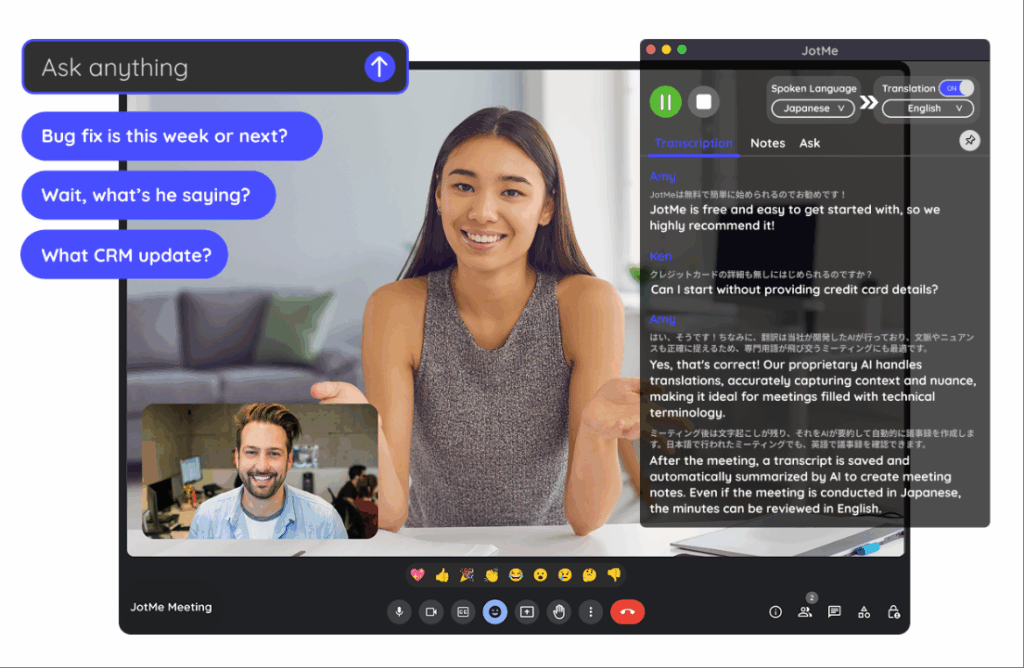
Was es ist: Echtzeitübersetzung für Meetings (Alternative zu Transync AI) Am besten geeignet für: Teammeetings, Webinare, verteilte Teams
Leistungskennzahlen:
- Genauigkeit: 92-94%
- Latenz: 150-200 ms (leicht wahrnehmbar)
- Sprachen: 77 Sprachen
- Sprachqualität: 7/10 (gut, nicht natürlich)
- Aufstellen: 2-3 Minuten (Chrome-Erweiterung)
So funktioniert es:
- Installieren Sie die Chrome-Erweiterung.
- Nehmen Sie am Zoom-/Meet-/Teams-Anruf teil
- Übersetzung aktivieren
- Automatische Echtzeitübersetzung
Preisgestaltung:
- Kostenlos: 20 Minuten/Monat
- Basis: $9/Monat (200 Min.)
- Premium: $15/Monat (500 Min.)
Vorteile: ✅ Mehr Sprachen als Transync AI (77 vs. 60) ✅ Einfachere Einrichtung (Chrome-Erweiterung) ✅ Günstig (14.000 ₹/Monat) ✅ Plattformübergreifend nutzbar ✅ Ideal für informelle Meetings
Nachteile: ❌ Längere Latenz (150–200 ms, leicht wahrnehmbar) ❌ Geringere Genauigkeit (92–94% vs. 95%+) ❌ Weniger natürliche Sprachqualität (7/10 vs. 9,1/10) ❌ Funktioniert nicht mit WhatsApp
Beste Anwendungsfälle:
- 🎯 Ungezwungene Teamtreffen
- 🎯 Internationale Webinare
- 🎯 Budgetbewusste Teams
- 🎯 Sprachliche Vielfalt erforderlich
Urteil: Eine gute Alternative zu Transync AI, wenn Sie mehr Sprachen benötigen. Die Latenz ist leicht spürbar, aber für informelle Besprechungen akzeptabel. Für formelle Verkaufsgespräche, bei denen der erste Eindruck zählt, ist sie nicht optimal.
👉 JotMe
KI für die Übersetzung: Vergleichstabelle der Merkmale
| Besonderheit | Transync AI | ChatGPT | Google Übersetzer | DeepL | JotMe |
|---|---|---|---|---|---|
| Echtzeit-Meetings | ✅ Ausgezeichnet | ❌ Nein | ❌ Nein | ❌ Nein | ✅ Gut |
| Genauigkeit | 95%+ | 93-95% | 92% | 94% | 92-94% |
| Latenz | <100 ms ✅ | N / A | Sofort | Sofort | 150-200 ms |
| Sprachen | 60 | 100+ | 100+ | 29 | 77 |
| Sprachqualität | 9,1/10 ✅ | N / A | 7/10 | N / A | 7/10 |
| Dokumentübersetzung | ❌ Begrenzt | ✅ Gut | ✅ Gut | ✅ Ausgezeichnet | ❌ Nein |
| Einrichtungszeit | <1 Min. ✅ | 2-3 Minuten | 0 Min. ✅ | 1-2 Minuten | 2-3 Minuten |
| Kosten | $8,99/Monat ✅ | $20/Monat | Kostenlos ✅ | $8,99/Monat ✅ | $9/Monat |
| Am besten geeignet für | Echtzeit-Meetings | Schriftlicher Inhalt | Schnelle Nachschlagevorgänge | Professionelle Ärzte | Teambesprechungen |
Welche KI eignet sich am besten für Übersetzungen? Das richtige Werkzeug auswählen
Szenario 1: Internationaler Verkaufsanruf
Frage: “Welche KI-Übersetzungsfunktion sollte ich für ein wichtiges Verkaufsgespräch mit einem spanischen Interessenten verwenden?”
Antwort: Transync AI
Warum:
- Echtzeitübersetzung (unmerkliche Latenz <100 ms)
- Natürliche Stimme (der potenzielle Kunde klingt wie eine echte Person)
- Automatisches Transkript für die Nachverfolgung
- Professionelle Qualität (95%+ Genauigkeit)
- Einfache Einrichtung (<1 Minute)
Aufstellen:
- Öffnen Sie Transync AI
- Englisch → Spanisch auswählen
- “Computer-Audio” prüfen”
- Klicken Sie auf “Übersetzung starten”.”
- Nehmen Sie normal an Zoom teil.
- Automatische Übersetzung
Szenario 2: Übersetzung eines Rechtsvertrags
Frage: “Welche KI eignet sich am besten für die Übersetzung eines englischen Rechtsvertrags ins Spanische?”
Antwort: Professioneller Übersetzer + DeepL als Backup
Warum:
- Rechtsverträge erfordern eine Genauigkeit von 99%+.
- KI allein reicht für eine rechtliche Haftung nicht aus.
- DeepL (94% Genauigkeit) kann professionelle Übersetzer unterstützen.
- Kosten: $500-1000 für Fachleute (unerlässlich für juristische Zwecke)
Verfahren:
- Engagieren Sie einen professionellen Rechtsübersetzer
- Verwenden Sie DeepL als Referenz vor der Übersetzung.
- Professioneller Übersetzer verfeinert
- Ergebnis: 99% korrekte juristische Übersetzung
Szenario 3: Schnelle E-Mail-Übersetzung
Frage: “Welche KI-Übersetzungsfunktion sollte ich für eine schnelle E-Mail an einen spanischen Kunden verwenden?”
Antwort: Google Translate (kostenlos) oder DeepL (bessere Genauigkeit)
Warum:
- E-Mails erfordern keine Genauigkeit nach 99% (der Kontext hilft dem Kunden, sie zu verstehen).
- Geschwindigkeit wichtig (Kunde wartet)
- Kosten unwichtig (kostenlos ist besser)
- Google Translate reicht für alltägliche E-Mails aus.
Aufstellen:
- Gehen Sie zu translate.google.com
- E-Mail-Text einfügen
- Englisch → Spanisch auswählen
- Kopie der übersetzten E-Mail
- Sofort senden
Szenario 4: Übersetzung von Marketinginhalten
Frage: “Welche KI für Übersetzungen bewahrt die Markenstimme bei der Übersetzung von Marketinginhalten?”
Antwort: ChatGPT (am besten für den Ton) + professionelle Bewertung
Warum:
- Markenstimme entscheidend (generische KI versagt)
- ChatGPT versteht Kontext und Tonfall
- Eine professionelle Überprüfung sichert die Qualität
- Kostengünstig ($20/Monat ChatGPT)
Verfahren:
- Verfassen Sie Marketingtexte auf Englisch
- ChatGPT verwenden: “Ins Spanische übersetzen, dabei den Markenstil beibehalten [Tonbeschreibung]”
- ChatGPT übersetzt mit Kontext
- Lassen Sie sich von einem Muttersprachler beraten.
- Veröffentlichen Sie mit Zuversicht
Szenario 5: Team verteilt auf 5 Länder
Frage: “Welche KI für die Übersetzung ermöglicht es unserem verteilten Team, in 5 Sprachen zu kommunizieren?”
Antwort: Transsync AI (primär) oder JotMe (Budgetoption)
Warum:
- Echtzeitübersetzung während Stand-up-Meetings
- Automatisches Transkript für die asynchrone Überprüfung
- Mehrsprachigkeit (Transsync: 60, JotMe: 77)
- Minimale Kosten ($8,99-9/Monat)
Aufstellen:
- Öffnen Sie Transync AI während des Standup-Meetings.
- Wählen Sie das primäre Sprachpaar aus
- Klicken Sie auf “Übersetzung starten”.”
- Alle Teammitglieder hören die Übersetzung
- Die automatisch generierte Zusammenfassung später einsehen
Ergebnis: Keine Sprachbarriere, schnellere Meetings (25%+ Zeitersparnis), bessere Beteiligung.
KI für Übersetzungen: Genauigkeitsvergleich 2026
Unabhängige Tests zeigen:
| KI-Lösung | Allgemeiner Text | Technischer Inhalt | Rechtliche Inhalte | Marketinginhalte |
|---|---|---|---|---|
| Transync AI | 95-96% | 98-99% (mit Schlüsselwörtern) | 92% | 94% |
| ChatGPT | 93-95% | 91% | 89% | 96% |
| Google Übersetzer | 92% | 88% | 85% | 90% |
| DeepL | 94% | 92% | 91% | 93% |
| JotMe | 92-94% | 90% | 88% | 91% |
| Professioneller Übersetzer | 98-99% | 98-99% | 99%+ | 98-99% |
Wichtigste Erkenntnisse:
- ✅ Transync AI ist führend in den Bereichen Technik und Echtzeit.
- ✅ ChatGPT ist führend in der Wahrung des Marketing-Tons.
- ✅ DeepL ist führend bei der Dokumentengenauigkeit (nicht in Echtzeit)
- ✅ Google Translate reicht für gelegentliche Zwecke aus
- ✅ Für kritische Inhalte ist ein professioneller Übersetzer unübertroffen.
Beste KI für Übersetzungen: Implementierungsschritte
Schritt 1: Ermitteln Sie Ihre Bedürfnisse
Frage dich selbst:
- ❓ Benötige ich Echtzeitübersetzung (für Besprechungen) oder Dokumentenübersetzung?
- ❓ Wie wichtig ist Genauigkeit? (Rechtlich = 99%, Gelegenheitsmäßig = 90%)
- ❓ Welche Sprachen benötige ich?
- ❓ Wie hoch ist mein Budget? (Kostenlos, $10/Monat, $100+/Monat?)
- ❓ Benötige ich Sprachwiedergabe?
Schritt 2: Die richtige KI auswählen
Echtzeit-Meetings? → Transync AI Schriftliche Dokumente? → ChatGPT oder DeepL Schnell und kostenlos? → Google Übersetzer Budgetteamsitzungen? → JotMe Kritische rechtliche/technische Frage? → Professioneller Übersetzer
Schritt 3: Kostenlose Testversion anfordern
- Transsync AI: 40 Minuten gratis (im ersten Monat)
- ChatGPT: Kostenlose Version verfügbar
- Google Translate: Immer kostenlos
- DeepL: 500.000 Zeichen kostenlos/Monat
- JotMe: 20 Minuten gratis/Monat
Schritt 4: Testen Sie mit echten Inhalten
- Führen Sie ein echtes Meeting durch oder übersetzen Sie ein Beispiel
- Prüfen Sie, ob die Genauigkeit Ihren Anforderungen entspricht.
- Prüfen Sie, ob die Benutzeroberfläche intuitiv ist.
- Prüfen Sie, ob die Integration mit Ihren Plattformen funktioniert.
Schritt 5: Skalierung der Bereitstellung
- Abonnieren Sie die gewählte Lösung
- Schulungsteam in der Nutzung
- Auf allen relevanten Plattformen eingerichtet
- Genauigkeit überwachen, Schlüsselwörter bei Bedarf anpassen
KI für Übersetzungen: Warnsignale, die es zu vermeiden gilt
❌ Vermeiden Sie KI-Behauptungen mit “100% Genauigkeit”.” (Keine KI schafft das) ❌ Vermeiden Sie Lösungen ohne kostenlose Testversion. (Qualität kann nicht überprüft werden) ❌ Vermeiden Sie versteckte Preisgestaltung (sollte transparent sein) ❌ Vermeiden Sie Lösungen mit schlechten Bewertungen. (Mehrere Beschwerden = tatsächliches Problem) ❌ Vermeiden Sie Lösungen, die die Sprachunterstützung überbewerten. (Qualität ist wichtiger als Quantität) ❌ Vermeiden Sie Lösungen ohne Kundensupport. (Du wirst Hilfe brauchen)
Fazit: Welche KI eignet sich am besten für Übersetzungen?
Es gibt keine “beste” KI für Übersetzungen. Die Antwort hängt ganz von Ihrem Anwendungsfall ab:
| Ihr Bedarf | Beste KI | Warum |
|---|---|---|
| Verkaufsanrufe in Echtzeit | Transync AI | Latenz <100 ms, Sprachqualität 9,1/10, Genauigkeit 95%+ |
| Dokumentübersetzung | ChatGPT oder DeepL | Höhere Genauigkeit bei schriftlichen Inhalten |
| Schnelle, kostenlose Suche | Google Übersetzer | Immer kostenlos, sofort, gut genug |
| Marketinginhalte | ChatGPT | Bewahrt den Markenauftritt hervorragend |
| Teambesprechungen | Transync AI oder JotMe | Echtzeitfähig, kostengünstig, plattformübergreifend |
| Rechtsdokumente | Professioneller Übersetzer | 99%+ Genauigkeit, Rechtsschutz |
Beginnen Sie mit Ihren konkreten Anforderungen, wählen Sie die passende KI und testen Sie die kostenlose Testversion. Sie werden schnell die perfekte Lösung finden.
Beliebteste Wahl für 2026: Transync AI für Echtzeit-Meetings (schnellstes Wachstum, natürlichste Stimme, niedrigster Preis). Beginnen Sie Ihre 40-minütige Heute kostenlos testen

