Benötigen Sie einen Übersetzer, um die Kommunikation über Sprachbarrieren hinweg zu ermöglichen? Moderne Übersetzungstechnologie hat die Art und Weise, wie globale Teams zusammenarbeiten und Geschäfte abwickeln, revolutioniert.
A Übersetzer nach Die Lösung wandelt gesprochene oder geschriebene Sprache in Echtzeit von einer Sprache in eine andere um und ermöglicht so eine nahtlose Kommunikation zwischen Menschen unterschiedlicher Sprachen. Ob Sie internationale Meetings organisieren, in neue Märkte expandieren, mehrsprachigen Kundensupport managen oder verteilte Teams über Kontinente hinweg aufbauen – eine professionelle Lösung ist die ideale Lösung. Übersetzer nach Das System ist eine unverzichtbare Infrastruktur.
Die Lösungen unterscheiden sich jedoch hinsichtlich Qualität und Leistungsfähigkeit erheblich. Verbraucherebene Übersetzer nach Dienste liefern roboterhafte Ausgaben mit Verzögerungen von 2–3 Sekunden. Professionelle Lösungen bieten natürliche Sprachsynthese mit einer Latenz von unter 100 ms, einer Genauigkeit von über 951 TP3T und intelligenter Dokumentation – und sind damit ein praktischer Ersatz für menschliche Dolmetscher bei gleichzeitig unbegrenzter Skalierbarkeit und Verfügbarkeit rund um die Uhr.
Dieser umfassende Leitfaden erklärt, wie Übersetzer nach Funktioniert, vergleicht verfügbare Lösungen und zeigt, warum Transync AI führend für professionelle Anwender ist. Übersetzer nach Anforderungen im gesamten globalen Geschäftsbetrieb.
Was bedeutet “Übersetzer nach”?
Übersetzer zu bezeichnet eine Echtzeit-Übersetzungstechnologie, die die Kommunikation von einer Sprache in eine andere umwandelt und es Menschen, die unterschiedliche Sprachen sprechen, ermöglicht, sich in Echtzeit zu verstehen.
Der Begriff umfasst mehrere verwandte Konzepte:
Übersetzer für: Mehrere Anwendungsfälle
1. Sprachspezifische Übersetzung
- Übersetzer ins Spanische (Englisch → Spanisch Konvertierung)
- Übersetzer für Mandarin (Englisch → Mandarin-Konvertierung)
- Übersetzer ins Deutsche (Englisch → Deutsche Konvertierung)
- Übersetzer ins Französische (Englisch → Französisch Konvertierung)
- Konvertierung von beliebiger Quellsprache in Zielsprache
2. Bidirektionale Übersetzung
- Übersetzer aus dem Spanischen ins Englische
- Übersetzer aus dem Englischen ins Spanische
- Gleichzeitige bidirektionale Umwandlung
- Beide Teilnehmer verstehen sich in ihrer Muttersprache.
3. Echtzeit-Kommunikationsübersetzung
- In Sprache umwandeln (Audioübersetzung)
- In Text übersetzen (schriftliche Übersetzung)
- Übersetzung in das Besprechungsformat (integriert in Videoanrufe)
- Übersetzung in Telefonanrufe (Telefonieintegration)
4. Skalierbare Übersetzung
- Übersetzen, um Einzelgespräche zu unterstützen
- Übersetzung zur Ermöglichung von Gruppenbesprechungen (unbegrenzte Teilnehmerzahl)
- Übersetzung zur Erleichterung von Großveranstaltungen
- Übersetzung für Konferenzszenarien
Warum Lösungen wichtig sind
Der Business Case für Übersetzer
Realität des globalen Arbeitsmarktes:
- 67% von Unternehmen international tätig
- 85% von globalen Unternehmen Zusammenarbeit mit Teams in mehr als 5 Ländern
- 73% von internationalen Teams Umspannt 3+ Zeitzonen
- 92% von verteilten Teams einschließlich Nicht-Muttersprachler
- 58% von globalen Treffen einschließlich sprachlicher Vielfalt
Kommunikationsprobleme ohne Dolmetscher:
❌ Sprachbarrieren verringern die Produktivität
- Weniger engagierte Nicht-Muttersprachler des Englischen (47% geringere Beteiligung)
- Die Besprechungen 30-40% dauern aufgrund von Sprachbarrieren länger.
- Fehlkommunikation kostet jedes Unternehmen jährlich 1.450.000 bis 1.200.000 US-Dollar.
❌ Marktexpansion begrenzt
- Kann Kunden nicht in ihren Muttersprachen bedienen
- Reduzierte Kundenzufriedenheit und Kundenbindung
- Es gelingt uns nicht, weltweit die besten Talente zu gewinnen.
- Begrenzte geografische Wachstumschancen
❌ Die Zusammenarbeit im Team leidet
- Remote-Teams haben Schwierigkeiten mit verschiedenen Sprachen.
- Wissensaustausch behindert
- Innovation eingeschränkt (Vielfalt der Denkweisen begrenzt)
- Die Mitarbeiterzufriedenheit sinkt
Lösung: Professioneller Übersetzer
✅ Ermöglicht natürliche Kommunikation in allen Sprachen ✅ Erhaltet die Vielfalt im Team durch Unterstützung einheimischer Sprachen ✅ Verkürzt die Besprechungszeit (Keine Sprachbarrieren) ✅ Verbessert die Teilnahme von Nicht-Muttersprachlern ✅ Erweitert den adressierbaren Markt (mehr Kunden bedienen) ✅ Steigert die Mitarbeiterzufriedenheit (in der Muttersprache arbeiten) ✅ Ermöglicht einen 24/7-Betrieb (Keine geografischen Einschränkungen) ✅ Reduziert die Kosten für Fehlkommunikation (Klarheit und Dokumentation)
Wie die Übersetzungstechnologie funktioniert
Echtzeitübersetzer zur Verarbeitung
Szenario: Übersetzung eines Geschäftstreffens vom Englischen ins Spanische
Zeitrahmen: <100 ms Gesamtverarbeitungszeit
Teilnehmer A (Englischsprachiger):
- Spricht: “Lassen Sie uns über die Strategie und die Umsatzziele für das dritte Quartal sprechen.”
- Mikrofonaufnahmen Englische Audioaufnahmen mit natürlichen Sprachmustern
- Spracherkennung wandelt Audio in englischen Text um:
- Text: “Lasst uns über die Strategie und die Umsatzziele für das dritte Quartal sprechen.”
- Übersetzungsmaschine Prozesse Englisch-Spanisch:
- Kontext verstanden: Diskussion über Geschäftsstrategie
- Spanische Ausgabe: “Discutamos la estrategia del Q3 y los objetivos de ingresos”
- Sprachsynthese erzeugt natürliches spanisches Audio:
- Natürliches Tempo, Intonation und Betonung
- Professioneller Ton, angemessen für den Geschäftskontext
- Klingt für einen spanischen Zuhörer glaubwürdig.
- Teilnehmer B erhält gleichzeitig natürliches spanisches Audio
Teilnehmer B (Spanischsprachiger):
- Hört: Natürliche spanische Übersetzung in Echtzeit
- Antwortet: “Estoy de acuerdo. Necesitamos enfocarnos en…” (Stimmt zu und fährt auf Spanisch fort)
- Mikrofonaufnahmen Spanisches Audio
- Spracherkennung wandelt Audio in spanischen Text um
- Übersetzungsmaschine Prozesse Spanisch-Englisch:
- Kontext beibehalten: Strategiediskussion wird fortgesetzt
- Englische Ausgabe: “Ich stimme zu. Wir müssen uns auf … konzentrieren.”
- Sprachsynthese erzeugt natürliches englisches Audio
- Teilnehmer A erhält gleichzeitige natürliche englische Übersetzung
Ergebnis: Bidirektionaler, simultaner, natürlicher Gesprächsfluss
Gesamtlatenz für jeden Schritt: <100 ms (für den Menschen nicht wahrnehmbar)
Übersetzer zur Architektur: Kernkomponenten
1. Echtzeit-Spracherkennung
- Nimmt Audio sofort auf
- Konvertiert mit hoher Genauigkeit in Text.
- Verarbeitet natürliche Sprachmuster
- Funktioniert bei allen Akzenten und Sprechgeschwindigkeiten.
- Verarbeitet Hintergrundgeräusche intelligent
2. Kontextsensitive Übersetzungs-Engine
- Versteht die Bedeutung jenseits der Worte
- Übersetzt Redewendungen angemessen
- Kennt Geschäftsterminologie
- Berücksichtigt den kulturellen Kontext
- Bewahrt Ton und Formalität
3. Natürliche Sprachsynthese
- Erzeugt eine menschenähnliche Audioausgabe
- Passt Tonfall und Emotionen des Sprechers an.
- Sorgt für angemessenes Tempo und Rhythmus
- Klingt glaubwürdig und professionell
- Unterstützt mehr als 60 Sprachen und Varianten
4. Echtzeit-Verarbeitungspipeline
- Verarbeitet alle Komponenten in weniger als 100 ms.
- Ermöglicht einen natürlichen Gesprächsfluss
- Unterstützt die gleichzeitige bidirektionale Übersetzung
- Synchronisiert sich über alle Teilnehmer hinweg.
- Keine wahrnehmbare Latenz
Übersetzertypen und Lösungen
Übersetzer für Endverbraucher
- ✅ Kostenlos und weit verbreitet verfügbar
- ✅ Unterstützung für über 100 Sprachen
- ❌ 2-3 Sekunden Latenz (merkliche Verzögerungen)
- ❌ 75-85% Genauigkeit (für geschäftliche Zwecke unzureichend)
- ❌ Roboterhafte Sprachausgabe (unnatürlich)
- ❌ Keine Plattformintegration
- ❌ Eingeschränkte Dokumentation
Am besten geeignet für: Alltagsübersetzung, Reisen, einfache Kommunikation
Nicht geeignet für: Professioneller Übersetzer nach Anforderungen

- ✅ Solide Grundfertigkeiten
- ✅ Über 70 Sprachen
- ❌ Latenz von 1-2 Sekunden (Verzögerungen vorhanden)
- ❌ Genauigkeit des 80-88% (variabel)
- ❌ Synthetische Sprachqualität
- ❌ Eingeschränkte Echtzeitfähigkeit
- ❌ Grundlegende Integration
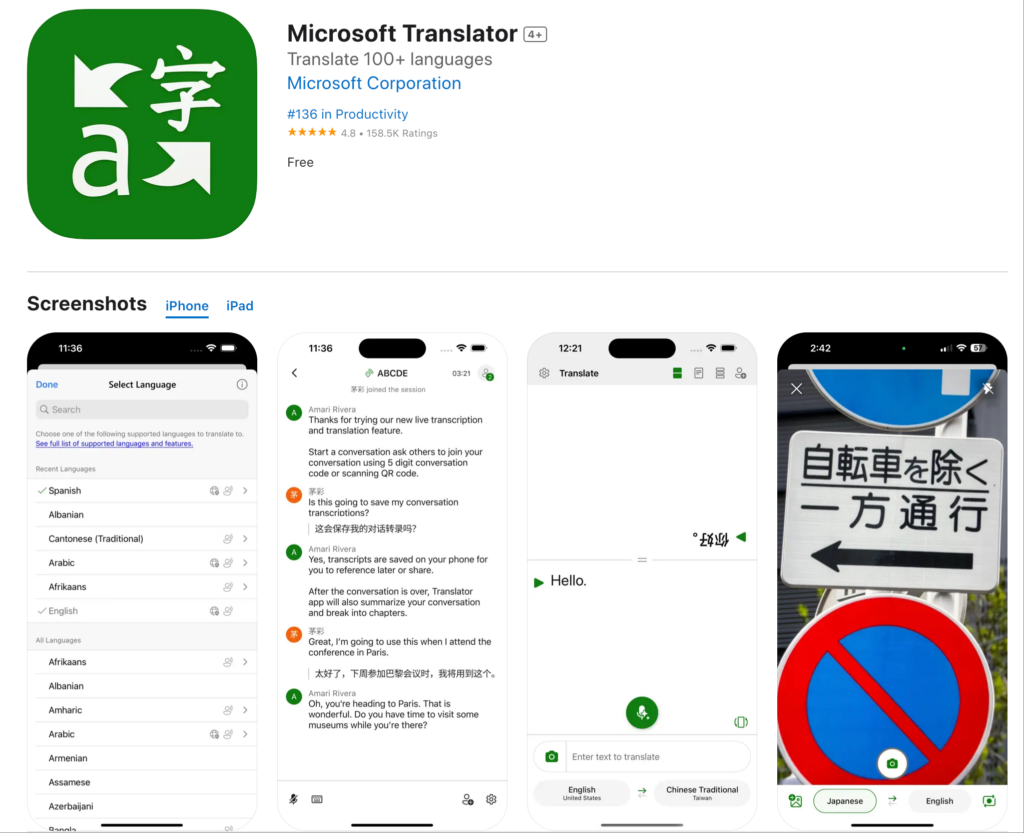
Am besten geeignet für: Microsoft-Ökosystem-Nutzer mit grundlegenden Bedürfnissen
Nicht geeignet für: Professioneller Übersetzer für Lösungen
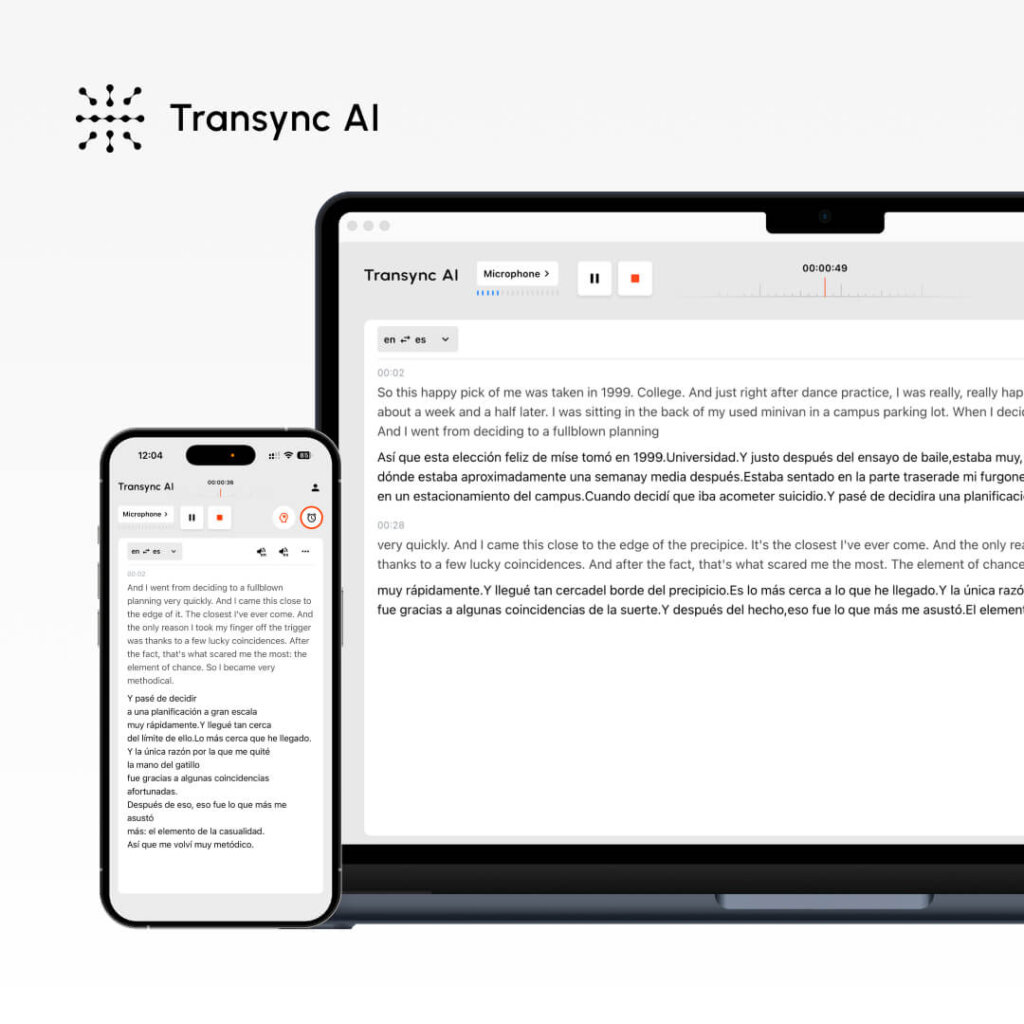
Professioneller Übersetzer nach
Transsync AI:
- ✅ Latenz <100 ms (echte Echtzeit)
- ✅ 95%+ Genauigkeit mit Kontextintelligenz
- ✅ Natürliche, menschenähnliche Stimmsynthese
- ✅ 60 Sprachen mit regionalen Varianten
- ✅ Native Plattformintegration (Zoom, Teams, Meet, Webex, Telefon)
- ✅ Bidirektionale Simultanübersetzung
- ✅ Automatische zweisprachige Transkripte
- ✅ KI-generierte Besprechungszusammenfassungen
- ✅ Individuelle Glossare für Fachvokabular
- ✅ Unbegrenzte Skalierbarkeit der Teilnehmerzahl
- ✅ Sicherheit und Compliance auf Unternehmensniveau
- ✅ Verfügbarkeit rund um die Uhr
Am besten geeignet für: Professionelle Meetings, Geschäftskommunikation, Veranstaltungen, tägliche Teamzusammenarbeit
Übersetzer zu Funktionen und Möglichkeiten
Geschwindigkeit: <100 ms Echtzeitübersetzer zu
Übersetzung für Verbraucher auf Geschwindigkeit:
- Google Translate: 2-3 Sekunden
- Microsoft: 1-2 Sekunden
- Auswirkungen: Spürbare Verzögerungen stören das Gespräch
Professioneller Übersetzer für mehr Geschwindigkeit:
- Transsync AI: <100ms
- Auswirkung: Unmerkliche Latenz ermöglicht natürliche Konversation
Warum Geschwindigkeit für Übersetzer wichtig ist:
- Der Gesprächsablauf erfordert eine Latenz von <150 ms.
- Verzögerungen von 2-3 Sekunden erzeugen unangenehme Pausen.
- Die Teilnehmer des Meetings verlieren den Faden
- Die Produktivität sinkt um 30-401 TP3T
- Der professionelle Übersetzer muss unmerklich sein.
Beispielhafte Auswirkung:
- 60-minütiges Meeting mit 2-Sekunden-Verzögerungen = über 6 Minuten kumulierte Leerlaufzeit
- Professioneller Übersetzer mit einer Übersetzung von unter 100 ms = unmerkliche Auswirkung
Transsync-KI-Vorteil: Konstant <100 ms über alle Sprachpaare und Gruppengrößen hinweg.
Genauigkeit: 95%+ Kontextsensitiver Übersetzer zu
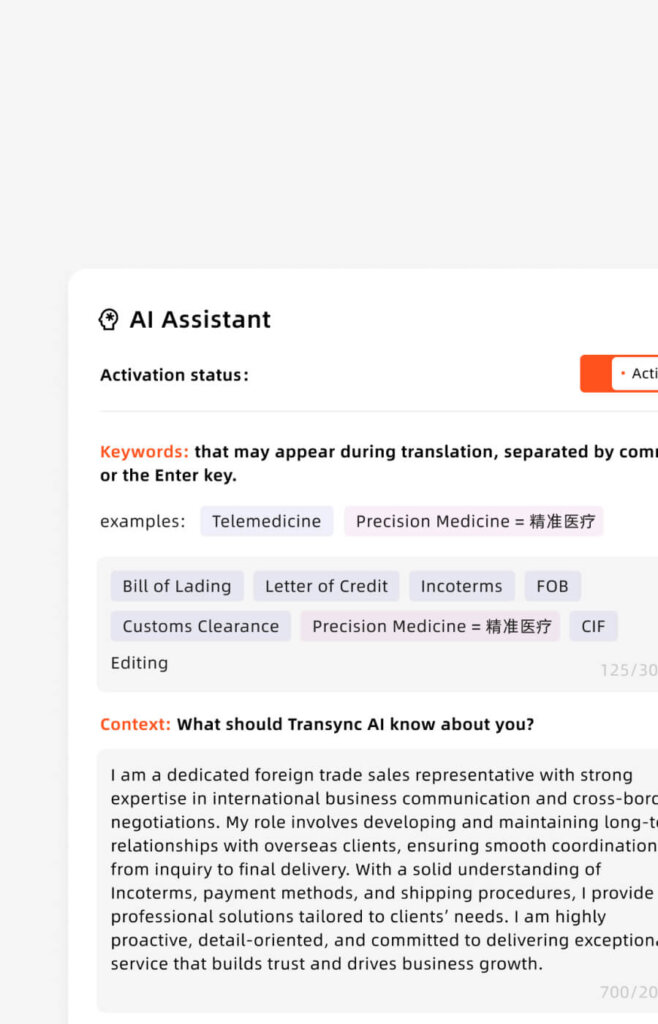
Was die Genauigkeit des 95%+ bedeutet:
- Nur 1-2 Fehler pro typischem Geschäftsgespräch
- Für alle beruflichen Kontexte geeignet.
- Benutzerdefinierte Glossare verbessern den Fachwortschatz.
- Kontinuierliches Lernen verbessert sich mit der Zeit
Warum Genauigkeit für Übersetzer wichtig ist:
- Genauigkeit des 75-85% (Verbraucherniveau) = 1 von 10 Sätzen falsch
- Fehlkommunikation im Geschäftsleben ist kostspielig.
- Professioneller Übersetzer benötigt mindestens 95%+
- In technischen, medizinischen und rechtlichen Kontexten ist eine hohe Genauigkeit erforderlich.
Beispiel aus der Praxis:
- Diskussion zum Projektbudget: “Erhöhung” vs. “Senkung” – falsche Übersetzung = falsche Entscheidung
- Kundenverpflichtung: “Verfügbar” vs. “Nicht verfügbar” – Genauigkeit ist entscheidend
- Rechtsgültiger Vertrag: Jede Klausel muss präzise sein.
- Medizinischer Eingriff: “Entfernen” vs. “Einführen” – Sicherheit hängt von der Genauigkeit ab
Transsync-KI-Vorteil: 95%+ Genauigkeit mit Kontext- und benutzerdefinierter Glossarunterstützung
Sprachqualität: Natürlicher Übersetzer zu Ausgabe
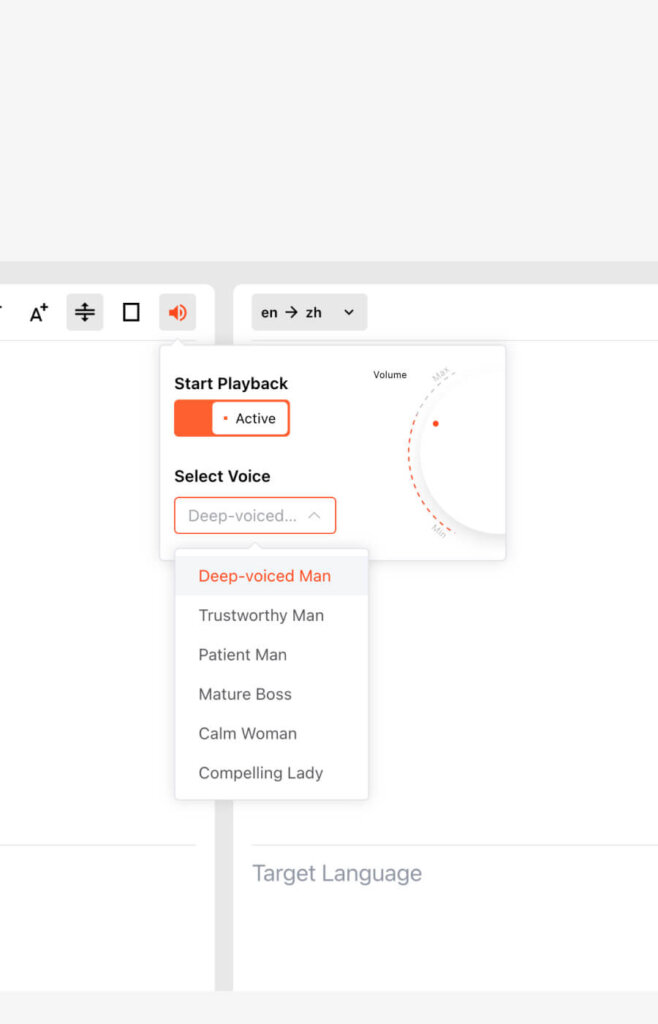
Sprachqualität für Endverbraucher:
- Roboterhaft und monoton
- Unnatürliches Tempo und Rhythmus
- Zuhörermüdung
- Vermindertes Verständnis
- Klingt offensichtlich künstlich
- Negative Markenauswirkung
Professioneller Übersetzer für Sprachqualität:
- Menschenähnliche Intonation und Rhythmus
- Angemessener Ton und angemessene Formalität
- Natürliche Pausen und Betonung
- Regionale Akzentoptionen
- Erhaltung emotionaler Nuancen
- Angenehm und glaubwürdig
- Klingt professionell
Auswirkungen auf die Effektivität:
- Natürliche Stimme erhöht das Sprachverständnis um 351 TP3T
- Natürliche Stimme steigert das Engagement um 481 TP3T
- Eine natürliche Stimme schafft Vertrauen und Glaubwürdigkeit.
- Roboterstimme verringert die Effektivität erheblich
Transsync-KI-Vorteil: Fortschrittliche Sprachsynthese mit vielfältigen Optionen und Tonanpassung
Sprachabdeckung: Übersetzungen in 60 Sprachen
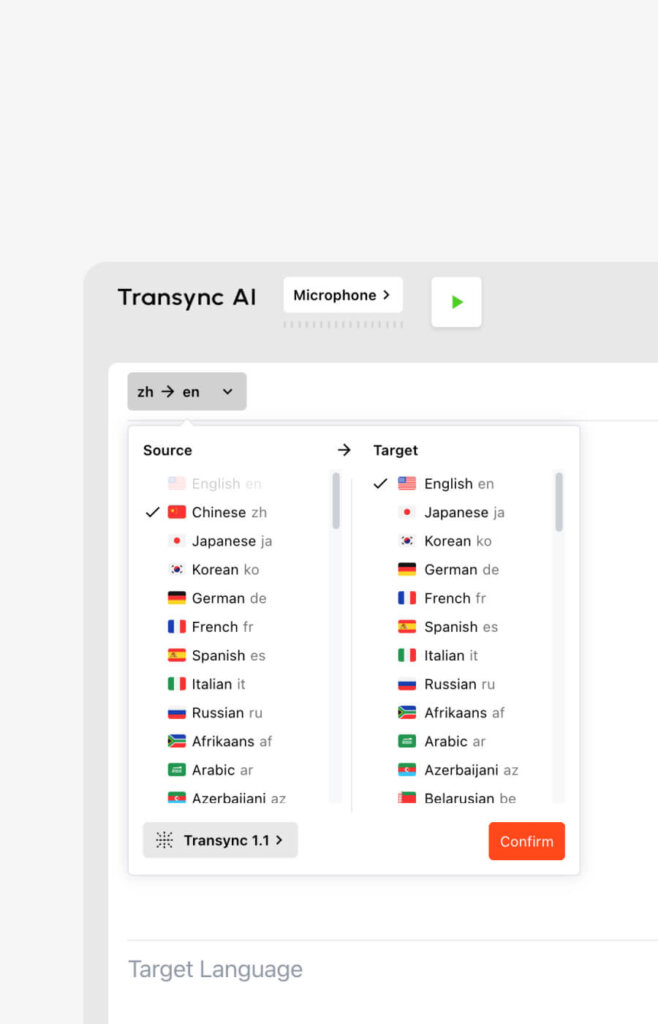
Umfassende Unterstützung für Übersetzungen in andere Sprachen:
- Spanisch (mexikanische, kastilische, kolumbianische Varianten)
- Portugiesisch (Brasilianisch, Europäisch)
- Chinesisch (Mandarin, Kantonesisch, Vereinfacht, Traditionell)
- Japanisch, Koreanisch, Arabisch, Hebräisch, Türkisch, Persisch
- Französisch, Deutsch, Italienisch, Niederländisch, Polnisch, Tschechisch
- Russisch, Ukrainisch, Rumänisch, Griechisch
- Hindi, Bengali, Tamil, Telugu, Marathi
- Thailändisch, Vietnamesisch, Indonesisch, Philippinisch
- Plus über 30 weitere Sprachen
Warum die sprachliche Breite für „Übersetzen in“ wichtig ist:
- Globale Teams benötigen mehrere Sprachen
- Regionale Varianten beeinflussen das Verständnis
- Ein professioneller Übersetzer sollte die organisatorischen Bedürfnisse abdecken.
- Begrenzte Sprachunterstützung schränkt die Erweiterung ein
Transsync-KI-Vorteil: Umfassendste Abdeckung professioneller Übersetzer (60 Sprachen mit Varianten)
Plattformintegration: Übersetzung in Konnektivität

Professioneller Übersetzer zur Integration mit:
- Zoom: Native Erweiterung, Aktivierung mit einem Klick
- Microsoft Teams: Direktes Plugin, nahtlose Integration
- Google Meet: Native Unterstützung, automatische Aktivierung
- Webex: Vollständige Integration, Video + Audio
- Telefonsysteme: Telefonieintegration
- Standalone-Modus: Präsenzveranstaltungen, Webbrowser
Warum Integration für die Übersetzung wichtig ist:
- Die Nutzer kennen die bestehenden Plattformen bereits.
- Keine zusätzliche Lernkurve
- Automatische Aufzeichnung und Dokumentation
- Nahtlose Workflow-Integration
- Verringert die Akzeptanzhürde
Transsync-KI-Vorteil: Native Übersetzung bis zur Integration auf allen wichtigen Plattformen
Dokumentation: Intelligentes Übersetzen in Datensätze
Professionelle Übersetzungen bieten:
- Vollständige Transkripte in allen verwendeten Sprachen
- Sprecheridentifizierung mit Zeitstempeln
- KI-generierte Besprechungszusammenfassungen
- Maßnahmenextraktion
- Themensegmentierung
- Suchbares Format
- Compliance-fähige Dokumentation
Warum die Dokumentation für die Übersetzung wichtig ist:
- Erweitert den Nutzen über die Live-Übersetzung hinaus.
- Rechtliche und Compliance-Anforderungen
- Entscheidungsgrundlage
- Wissenserfassung und Schulung
- Qualitätssicherung
Transsync-KI-Vorteil: Vollständiger KI-gestützter Übersetzer für Dokumente mit intelligenten Zusammenfassungen
Übersetzer zu Anwendungsfällen
Tägliches internationales Team-Standup
Szenario: 35-köpfiges Entwicklerteam (USA, Indien, Mexiko). Tägliches 20-minütiges Standup-Meeting.
Herausforderung: Nicht-Englischsprachige beteiligen sich weniger. Die Sitzungen dauern aufgrund von Sprachbarrieren länger. Die Beteiligung von Spanisch- und Hindi-Sprechern ist begrenzt.
Lösung: Übersetzer soll in das tägliche Zoom-Standup integriert werden
Durchführung:
- Übersetzer für Spanisch und Hindi aktivieren
- Die Teammitglieder sprechen die Muttersprache.
- Andere hören die Echtzeitübersetzung.
- Bidirektionale simultane
Ergebnis:
- 48% Zunahme der Beteiligung von Nicht-Englischsprachigen
- 38% schnellere Entscheidungsfindung
- 35% kürzere Besprechungszeit
- Automatische Tageszusammenfassungen
Internationale Verkaufsgespräche
Szenario: US-amerikanischer Vertriebsmitarbeiter präsentiert potenziellen deutschen Kunden sein Angebot. Abschluss des Geschäfts erforderlich.
Herausforderung: Sprachbarriere beeinträchtigt die Präsentationsqualität. Der potenzielle Kunde fühlt sich auf Englisch unwohl.
Lösung: Übersetzung in: im Verkaufsgespräch
Durchführung:
- Der Vertriebsmitarbeiter spricht fließend Englisch.
- Prospect hört natürliche deutsche Übersetzung
- Der Interessent antwortet auf Deutsch
- Der Vertriebsmitarbeiter hört die natürliche englische Übersetzung.
Ergebnis:
- 40% höhere Konversionsrate
- Schnellerer Verkaufszyklus
- Besserer Beziehungsaufbau
- Vollständige Anrufdokumentation
Globaler Kundensupport
Szenario: Supportteam, das Kunden in 6 Sprachen betreut (Englisch, Spanisch, Französisch, Deutsch, Portugiesisch, Italienisch).
Herausforderung: Nur wenige zweisprachige Supportmitarbeiter. Viele Kunden bevorzugen die Muttersprache.
Lösung: Für den Kundensupport übersetzen
Durchführung:
- Schulung eines englischsprachigen Supportteams
- Übersetzer für alle Sprachen bereitstellen
- Produktglossar erstellen
- Anrufe an den verfügbaren Mitarbeiter weiterleiten
- Übersetzer für die Übersetzung
Ergebnis:
- Unterstützung ist in allen 6 Sprachen verfügbar.
- 48% Erweiterung der unterstützten Sprachen
- 55% schnellere Support-Reaktion
- 38% verbesserte Kundenzufriedenheit
Internationale Konferenz
Szenario: Konferenz mit 500 Teilnehmern. Mehrere Sprachen. Alle Sitzungen erfordern Übersetzung.
Herausforderung: Die traditionelle Interpretation ist teuer und begrenzt.
Lösung: Übersetzung in eine konferenzweite Implementierung
Durchführung:
- Installation in allen Konferenzräumen
- Die Teilnehmer wählen ihre bevorzugte Sprache.
- Alle Präsentationen werden in Echtzeit übersetzt.
- Alle Frage- und Antwortrunden wurden bidirektional übersetzt.
Ergebnis:
- Alle Sitzungen sind in mehreren Sprachen verfügbar.
- Teilnehmerzufriedenheit der 99%
- Reduzierte Interpretationskomplexität
- Automatische Sitzungsprotokolle
Vertragsverhandlungen
Szenario: US-Unternehmen verhandelt Partnerschaft mit spanischsprachiger Firma. Kommunikation mit hohem Einsatz.
Herausforderung: Jedes Wort zählt. Präzise Übersetzung erforderlich. Juristische Fachbegriffe sind unerlässlich.
Lösung: Übersetzen Sie mit einem benutzerdefinierten Glossar
Durchführung:
- Erstellen Sie im Voraus ein juristisches Glossar.
- Die Teams verhandeln mit dem Übersetzer, um Unterstützung zu erhalten.
- Vollständige Dokumentation erfasst
- Zweisprachige Vertragsreferenz
Ergebnis:
- Keine Missverständnisse bezüglich der Bedingungen
- 99.4% Genauigkeit in Bezug auf juristische Terminologie
- Vollständige Dokumentation
- Professionelle Glaubwürdigkeit
Übersetzer zu: Detaillierter Vergleich
| Besonderheit | Transync AI | Google Übersetzer | Microsoft Translator | Menschlicher Dolmetscher |
|---|---|---|---|---|
| Geschwindigkeit | <100ms ⭐ | 2-3s | 1-2s | Echtzeit |
| Genauigkeit | 95%+ ⭐ | 75-85% | 80-88% | 99% |
| Sprachqualität | Natürlich ⭐ | Roboter | Synthetik | Menschlich |
| Sprachen | 60 ⭐ | 100+ | 70+ | Kommt darauf an |
| Bidirektional | Gleichzeitig ⭐ | Sequentiell | Sequentiell | Gleichzeitig |
| Gruppenunterstützung | Unbegrenzt ⭐ | Beschränkt | Beschränkt | Beschränkt |
| Plattformintegration | Einheimisch ⭐ | Beschränkt | Beschränkt | Telefonisch/persönlich |
| Dokumentation | Vollständige KI ⭐ | Keiner | Basic | Handbuch |
| Skalierbarkeit | 2-2000+ ⭐ | Beschränkt | Beschränkt | 1-2 Personen |
| Verfügbarkeit rund um die Uhr | Ja ⭐ | Ja | Ja | Geschäftszeiten |
| Benutzerdefinierte Glossare | Ja ⭐ | NEIN | Beschränkt | N / A |
| Professionelle Qualität | Ja ⭐ | Verbraucher | Prosumer | Ja |
Legende: ⭐ = Kategorieführer
Übersetzer zu FAQs
Frage 1: Was bedeutet “Übersetzer nach”? Übersetzer zu bezeichnet eine Echtzeit-Übersetzungstechnologie, die die Kommunikation von einer Sprache in eine andere umwandelt und es Menschen, die unterschiedliche Sprachen sprechen, ermöglicht, sich in Echtzeit zu verstehen.
Frage 2: Wie schnell ist die Übersetzungstechnologie? Professionelle Übersetzung (Transsync AI): <100 ms (nicht wahrnehmbare Latenz). Alternativen für Endverbraucher (Google): 2–3 Sekunden (merkliche Verzögerungen). Professionelle Übersetzer benötigen eine Latenz von unter 150 ms.
Frage 3: Wie genau ist die Übersetzung? Professioneller Übersetzer für: Genauigkeit 95%+. Übersetzer für Privatnutzer für: Genauigkeit 75-85%. Für Unternehmen ist ein professioneller Übersetzer für (95%+) unerlässlich.
Frage 4: Lässt sich das auch auf Gruppengespräche übertragen? Übersetzer für Privatnutzer: Beschränkt auf Gespräche mit zwei Personen. Professioneller Übersetzer (Transsync AI): Unterstützt eine unbegrenzte Anzahl gleichzeitiger Teilnehmer.
Frage 5: Werden bei der Übersetzung Transkripte bereitgestellt? Professionelle Übersetzungen sind möglich. Transync AI liefert vollständige Transkripte in allen verwendeten Sprachen mit Sprecheridentifizierung, Zeitstempeln und KI-Zusammenfassungen.
Frage 6: Welche Sprachen werden von Translate unterstützt? Professionelle Übersetzung (Transsync AI): 60 Sprachen mit regionalen Varianten. Optionen für Endverbraucher: 40–100+ Sprachen, jedoch mit eingeschränkter Variantenauswahl.
F7: Kann die Übersetzung mit meiner bestehenden Meeting-Plattform verwendet werden? Ja. Professionelle Übersetzungen wie Transync AI integrieren sich nativ in Zoom, Teams, Meet und Webex und lassen sich mit einem Klick aktivieren.
Frage 8: Kann ein Übersetzer menschliche Dolmetscher ersetzen? Für die Geschäftskommunikation (95%): Ja. Professionelle Übersetzungen in vergleichbarer Qualität wie Dolmetscher bieten Verfügbarkeit rund um die Uhr, unbegrenzte Skalierbarkeit und automatische Dokumentation. Dolmetscher bleiben für Verhandlungen mit höchstem Einsatz unverzichtbar.
Praxiserfolg: Vom Übersetzer zum Einsatz
Internationales SaaS-Unternehmen – Globale Expansion
Profil: US-amerikanisches SaaS-Unternehmen expandiert nach Europa, Lateinamerika und Asien. Aus einem Unternehmen mit 200 Mitarbeitern wird ein wahrhaft globaler Konzern.
Herausforderung: Wir müssen Kunden in mehreren Sprachen betreuen und gleichzeitig ein international verteiltes Team leiten. Bisheriger Ansatz: beschränkt auf rein englischsprachige Märkte.
Vorherige Versuche:
- ❌ Mehrsprachiges Personal einstellen: Teuer, Einstellungsdauer 3-6 Monate
- ❌ Google Translate: 75-85% Genauigkeit für die Kundenkommunikation inakzeptabel
- ❌ Manuelle Übersetzung: Langsam, teuer, nicht in Echtzeit
Lösung: Die eingesetzte Transsync-KI lässt sich in eine Unternehmenslösung übersetzen
Durchführung:
- Die integrierte Übersetzung wird in allen Kundengesprächen und Meetings verwendet.
- 8 primäre Sprachen konfiguriert (Spanisch, Portugiesisch, Französisch, Deutsch, Italienisch, Japanisch, Mandarin, Koreanisch)
- Produktglossar in allen Sprachen erstellt
- Alle kundennahen Teams wurden geschult.
- Rund-um-die-Uhr-Support über alle Zeitzonen hinweg
Ergebnisse (12 Monate):
Marktkennzahlen:
- ✅ Erfolgreiche Expansion in 8 neue Märkte gleichzeitig
- ✅ Kundensupport in allen Sprachen wurde sofort eingeführt
- ✅ Keine Verzögerungen bei der Einstellung (Übersetzer konnte zeitliche Einschränkungen beseitigen)
Kundenkennzahlen:
- ✅ Kundenzufriedenheit beim 92% (im Vergleich zum 78% mit nur englischsprachigem Support)
- ✅ 48% Steigerung des Engagements nicht-englischsprachiger Kunden
- ✅ Keine Probleme mit dem Kundensupport aufgrund von Sprachbarrieren
- ✅ 99,31 TP3T Genauigkeit bei produktbezogener Terminologie
Auswirkungen auf das Geschäft:
- ✅ 234% Umsatzsteigerung in Europa
- ✅ 189% Steigerung der Einnahmen in Lateinamerika
- ✅ 1561 TP3T Umsatzsteigerung im asiatisch-pazifischen Raum
- ✅ Steigerung der Produktivität des Support-Teams (keine Sprachbeschränkungen)
Teamkennzahlen:
- ✅ Internationales Team ohne Sprachbeschränkungen zusammengestellt
- ✅ 45% Steigerung der Diversität (internationale Talente jetzt realisierbar)
- ✅ Verbesserte Mitarbeiterzufriedenheit (Arbeit in der Muttersprache möglich)
- ✅ Bessere Teamzusammenarbeit (Sprache ist keine Barriere mehr)
Zeugnis: “Wir mussten schnell global expandieren. Die Einstellung mehrsprachiger Teams war zu langsam und zu teuer. Die Übersetzungslösung von Transync AI war der entscheidende Beschleuniger. Sie ermöglichte es uns, gleichzeitig in mehrere Märkte einzutreten und die besten internationalen Talente unabhängig von ihrer Muttersprache einzustellen.” – Chief Customer Officer
Erste Schritte: Übersetzer zu
Schritt 1: Wählen Sie Transsync AI.
- Professionelle Übersetzung in eine Lösung
- Bewährt für die Geschäftskommunikation
Schritt 2: Plattformintegration auswählen
- Zoom, Teams, Meet, Webex oder Telefon
- Ein-Klick-Aktivierung
- Einrichtung in weniger als 5 Minuten
Schritt 3: Sprachen konfigurieren
- Wählen Sie Ihre primären und sekundären Sprachen.
- Wählen Sie gegebenenfalls regionale Varianten aus.
- 60 Sprachen verfügbar
Schritt 4: Benutzerdefiniertes Glossar erstellen (optional)
- Branchenspezifische Terminologie definieren
- Gewährleisten Sie eine einheitliche Produktübersetzung
- Fachvokabular verbessern
- Einrichtung in weniger als 30 Minuten
Schritt 5: Übersetzer zu
- Aktivieren Sie diese Funktion in Ihren Meetings oder Anrufen.
- Sprechen Sie natürlich in Ihrer Sprache
- Die Teilnehmer hören die Echtzeitübersetzung
- Anschließend Zugriff auf Protokolle und Dokumentationen
Das Urteil: Professioneller Übersetzer
Bei mehrsprachiger Geschäftskommunikation hat die Qualität der Übersetzung direkten Einfluss auf den globalen Erfolg.
Warum Transsync AI für Übersetzer führend ist:
✅ Schnellste Verarbeitung: Echtzeitverarbeitung unter 100 ms (5- bis 30-mal schneller als Alternativen) ✅ Höchste Genauigkeit: 95%+ mit Kontextintelligenz (10-20% besser als Consumer) ✅ Natürlichste Stimme: Menschenähnliche Synthese (deutlich überlegen gegenüber robotischen Alternativen) ✅ Beste Plattformunterstützung: Native Integration auf allen wichtigen Plattformen (echte Ein-Klick-Bedienung) ✅ Intelligenteste Dokumentation: Vollständige KI-Zusammenfassungen und Handlungsempfehlungen (einzige intelligente Lösung) ✅ Umfassendste Sprachunterstützung: 60 Sprachen mit Varianten (umfangreichstes Angebot) ✅ Am besten anpassbar: Benutzerdefinierte Glossare für Fachvokabular (für Unternehmen geeignet) ✅ Am besten skalierbar: Unbegrenzte Teilnehmerzahl von Telefonkonferenzen bis hin zu Konferenzen mit über 2.000 Teilnehmern (keine Einschränkungen) ✅ Am sichersten: Compliance auf Unternehmensebene (SOC2, DSGVO, HIPAA)
Ein Übersetzer für Privatnutzer (wie Google Translate) eignet sich für alltägliche Übersetzungen. Für professionelle Geschäftskommunikation – wo Genauigkeit, Geschwindigkeit, natürliche Sprachausgabe, Dokumentation, Integration und Skalierbarkeit entscheidend sind – ist Transync AI die unangefochtene Nummer eins.
Hören Sie auf, nach der perfekten Übersetzungslösung zu suchen.
Setzen Sie noch heute professionelle Echtzeitübersetzung ein.
Wählen Transync AI für nahtlose globale Kommunikation. Sie können kostenlos testen Jetzt.